Category Archives: Antivirus Vendors

Antivirus Vendors

Android scam: Firms fined over $500,000 for malicious apps’ hidden subscriptions

Three UK firms have been fined over $500,000 for a scam that involved Android apps signing up to a subscription service, and suppressing notifications informing the victim they were being charged, according to The Guardian.

The post Android scam: Firms fined over $500,000 for malicious apps’ hidden subscriptions appeared first on We Live Security.

VMCloak – Create a Virtual Machine the Easy Way

… and – in this we were correct – they are. You can basically find virtual machines:

  • In companies running their internal servers as a VM for easier maintenance
  • On Thin Client, where the end-users have simple terminals instead of “real” systems (for reasons of easier maintenance again)
  • In clouds like the Amazon cloud where you can just “click your own system” within minutes
  • As virtual appliances, simple systems which only have one job (like a network proxy). Easy to install.

However, due to our assumption we decided not to bother with the virtual machine detection.

That’s where we went wrong.

Now, at the end of 2014, about 20% of the malware out there still detects VMs. Especially the complicated-and-interesting malware does. Back when we started, we estimated that not more than a one-figure number would be able to do it by now!

Symantec released an article which covers that topic. Furthermore our own numbers show similar results (ours are a bit biased though: For the iTES project we filter out all the “boring” malware before we send the remaining samples to Cuckoo).

Malware detects virtual machines just to annoy the antivirus vendors

One way to classify samples in a virus lab is to run the suspicious sample in a VM and monitor its behavior. If it does attack the system, it’s malware – and that’s why malware is detecting whether or not it is running in a virtual machine and changes its own behavior accordingly. In the Avira Virus Lab we do not rely on a single classification method but combine several ones. So this is not really an issue.

But for our research project I wanted to observe the malicious behavior of even the trickiest malware in a virtual machine … a problem that obviously needs to be solved.

VM Detection and a Paranoid Fish

There are many ways to detect if your program is running in a VM. The most common ones are:

  • Detect hardware configuration
  • Network MAC address
  • HD vendor Name
  • BIOS vendor
  • Video BIOS vendor
  • Detect installed guest additions
  • Detect specific registry keys
  • Some malware detects a specific machine ID (for example based on a fingerprint on the user ID and the hardware being used)

These tricks are surprisingly simple and yet seem to be very effective.

Instead of writing a documentation on how to detect a VM I decided to add the identified tricks to a cool Open Source project: The Paranoid Fish (PaFish. If you are interested you can find my changes in the dev-chaos branch). For me as a programmer writing code (especially as simple and structured as required for PaFish) is like writing a documentation that executes and helps in the next step:

VM Cloaking

This step starts with hardware configuration to create a cloaked VM. You will have to do this before being able to install any operation system. After the OS is installed there will be other buttons to press: Registry settings and basic program configuration. Back in the “good old days” we had whole manuals on how to do it and configured the virtual machines manually; a quite boring and error prone task. Instead of writing another how-to we (Jurriaan Bremer and I) decided to fix it once-and-forever: We created a tool called VMCloak that can mass-produce ready-to-use cloaked VMs.

Just add your requirements to a configuration file, start the script, wait 2 coffees and you will have a dozen VMs.

Please welcome VMCloak

VMCloak will:

  • Set up the virtual machine, including the appropriate hardware setup -like proper hardware ids, >50 GB of HD space (lesser is a sign for a VM), …
  • Install the OS
  • Set up networking
  • Install applications
  • Do some system config to cloak the machine
  • …and it can install everything required for Cuckoo Sandbox

To give you a small glimpse of the very useful features VMCloak offers I’ll go into more detail concerning its dependencies (aka “automatically install programs”). A complete documentation can be found here.

When analyzing the behavior of a malicious sample you normally want some programs installed which then will be attacked by the malware. That can include old browsers, PDF readers, Flash players, you name it. Also, when doing a manual analysis, you want you default tools to view the running processes, system changes, etc.

Dependencies are small configuration snippets that allow VMCloak to automatically install programs after the OS has been set up. They define the filename of the setup file, which buttons have to be clicked to get through the installation and some additional information like flags, description, and even dependencies.

Without any kind of automation one would waste minutes to hours in order to click the next button.

Test your skillz

PaFish and VMCloak are Open Source and available for everyone. Especially VMCloak is still very young and there are lots of opportunities to test it and show your superior skillz:

  • Add application packages (dependencies) for automatic program installation
  • Add more cloaking (add PaFish VM detection followed by VMCloak cloaking, chess against yourself)
  • Windows 7 installation or other – for programming admins
  • Create virtual machines using VMWare, KVM, …

The opportunities are endless, so just go ahead.

TL;DR:
No need to ever create a virtual machine for malware analysis again. Use VMCloak.

For Science !
Thorsten Sick

ites

Sponsored_by_Federal_Ministry_of_Education_and_Research

The post VMCloak – Create a Virtual Machine the Easy Way appeared first on Avira Blog.

When it comes to dangers on the internet, we are our own worst enemies

Today’s biggest threat to the normal consumer is the consumer themselves.

This bold statement was made by Avast CEO Vincent Steckler in an interview with German technology website Valuetech in Munich last week. That’s a daring position to take after this year’s revelations about NSA spying, the theft of tens of millions of customer passwords from major retailers like Target and Home Depot, the recent Sony Pictures hack, and the normal parade of Trojan horses, worms and viruses, but it’s one that Steckler stands behind.

Watch the interview here (04:00),

Mr. Steckler has good reason for his conclusion. Here’s a few of the main points he made during the interview.

Social engineering preys on human weakness

“A lot of attacks are still using social engineering techniques; phishing emails – ways of convincing the user to give up valuable information,” said Steckler.

An example of phishing emails just occurred after Black Friday, when cybercrooks sent millions of fake purchase confirmation emails to customers of major retailers. You can read about that, as well as what to do if you are a victim,  in our blog, Fake confirmation emails from Walmart, Home Depot, others in circulation.

The Mac misconception

Mac users are well-known for proudly touting that they don’t use antivirus protection because they never have a problem with viruses. But, it’s really a numbers game.

“There is no fundamental difference,” Steckler says of the security of PCs and Macs. “Mac is not inherently any safer, as a technology, than Windows is. What makes a difference there is what is more opportune for a bad guy to attack.”

He explains that malware written for Windows can attack up to 93% of the world’s PCs. Mac malware only reaches 7-8% of the world’s PCs. The safety then lies in the lower numbers of Mac devices rather than a technical safety advantage.

Households networks are as complicated as small business networks

With the interconnectivity of household devices from household computers, mobile phones, TVs and even refrigerators, Steckler compares the typical household network to that of a small business.

“The central weakness in this ‘Internet of Things’ will be that home router – the thing that connects everything together,” says Steckler, “and basically doesn’t have any security on it.”

Avast 2015 seeks to address this lack in security by including the new Home Network Security scanner.

Top Threats to Business Data in 2015

Around 1,000 delegates at the NexGen Cloud Conference in San Diego last week heard Tony Anscombe give some valuable insight into the partner opportunity for the Internet of Things.  The good news for our service provider partners is the opportunity is huge. Our recent Monetization of IoT study shows that around three fifths (62 percent) of small businesses has budget specifically assigned over the next 12 months for the development of IoT solutions.

On this evidence 2015 is shaping up to be an important year for IoT investment.  Engaging with IT providers on NextGen Cloud matters is just one component of what’s to come. The other part concerns the immediate future for their small business customers and the ever changing threat landscape.

With that in mind, here are my top threats to watch for in 2015:-

More ransomware

The latter part of 2013 was notable for a spate of ransomware attacks on small businesses. This has continued in 2014 and we are likely to see more instances in 2015. Ransomware, like the infamous CryptoLocker, encrypts or locks personal files on your machine and extorts a ransom to recover them.  To avoid falling victim, businesses should use reputable antivirus software, avoid risky downloads, educate staff and keep security software/operating systems regularly patched and updated.


Advanced Persistent Threats (APTs)

Cybercriminals are increasingly focusing their attacks on small businesses.  APTs are a relatively new class of malware developed by cybercriminals to steal passwords, logins and customer data.  They are purposely designed to gain a foothold in the business and remain there undetected for a prolonged period of time.  To counter this businesses require an equally sophisticated approach to defense that includes protection from risks in mobile communications and Cloud services as well as traditional networks.


Password-related breaches

As Cloud services and the Internet of Things become part of everyday business life password management is going to become a hot issue.  We saw a good example of this in the news last month where streaming images from thousands webcams and CCTVs around the world ended up on a Russian website simply because they had default passwords or no log-in codes at all.   Many of the images were taken from business CCTV equipment.  Until companies learn to manage their passwords efficiently we can expect to see a lot more of this kind of incidents.


Mobile threats

Not so long ago it was probably quite natural for your Apple®-loving colleagues to congratulate themselves for using the relatively threat-free Macintosh platform. But the tide is turning.  The prevalence of iPad® and iPhone® mobile devices in the office has turned the Apple operating system into a prime target. Last month we saw reports of a new combination of malware that infects Apple’s OS®X and iOS® mobile devices called the OSX/WireLurker Trojan.  Android™ too is subject to attack. You may have seen recent news reports about a new variant of Android malware called NotCompatible that uses spam email blasts and compromised websites to infiltrate secure company networks.


In summary, the outlook for business security threats is one of increasing diversity.  At the same time more IoT devices and Cloud services are coming on stream. Our study strongly indicates that small businesses are ready to spend on ways to simplify how things are kept up to date, secure and monitored in 2015.

iPhone®, iPad® and Apple® are trademarks of Apple Inc., registered in the United States and other countries.
Android™ is a trademark of Google Inc.

AVG Business strengthens team for big push in 2015

However, as always in business, you can never afford to rest on your laurels and we will continue to invest in and expand our bleeding-edge cloud security and managed services platforms.  To assist us with this task it gives me great pleasure to welcome on board Francois Daumard as our new vice-president of Global Channel Sales.

Most recently with the mobility management company FiberLink, Francois has a strong background in Channel Sales and has previously worked for such organizations as Apple and Microsoft.  Francois’ experience encompasses Global Sales & Marketing, Operations and establishing international strategic Channel Partner Programs.  He is well-recognized as an active participant in the Channel Community and currently sits on the Vendor Council of CompTIA.

Francois will be responsible for the channel sales teams across the globe.  He brings a tremendous amount of experience to the team and will be working closely with our VP of Marketing & Product Marketing Joanna Brace and her marketing team as we work to add a little sparkle to our channels in 2015.

As we pivot AVG business towards a cloud model, expansion of our global footprint has gathered pace. In 2014 Brazil, Australia, Germany and, following the recent acquisition of Norman Safeground, Scandinavia, DACH and Benelux have all come on stream.

Of course the size of the challenge ahead of us should not be underestimated.  We are not going to convince businesses overnight how radically we have changed as an organisation.  We must show them that today we are the online security company for devices, data and people with a modern consumer and business product portfolio to suit both markets.

Hopefully our continued roll out of market-leading cloud security and remote management solutions coupled with an unwavering commitment to helping our 10,000 global partners and their customers manage large numbers of business mobile devices will help to overturn some of those entrenched perceptions.

In summary, as we build up to the strategically important Mobile World Congress 2015 we can count on a solid framework, closely aligned to the ever changing needs of the Channel, that is capable of carrying us towards our next goal. That goal is to become the market leading applications vendor for streamlined delivery of cloud security and managed services to small and medium sized businesses.

Android Malware Steals Credit Card Information

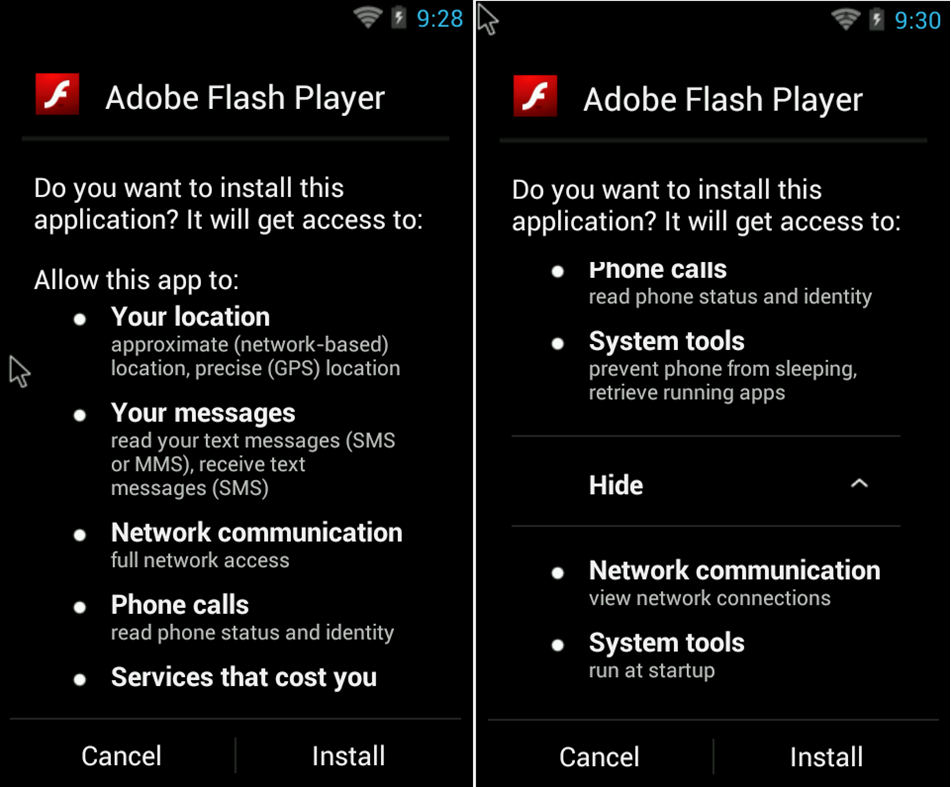
Given my daily work, I recently ran into some interesting Android malware that tries to steal credit card information from users. The malware is cloaked as Adobe Flash Player App: users who want to install the app on their devices end up downloading the malware from an untrusted source.The bad news is that victims might not even recognize it as malware since it looks like the real Flash Player.

Android malware

As you can see in the picture above, although it looks like Adobe Flash Player it actually requests a lot of permissions like access to location data, SMS, phone calls …

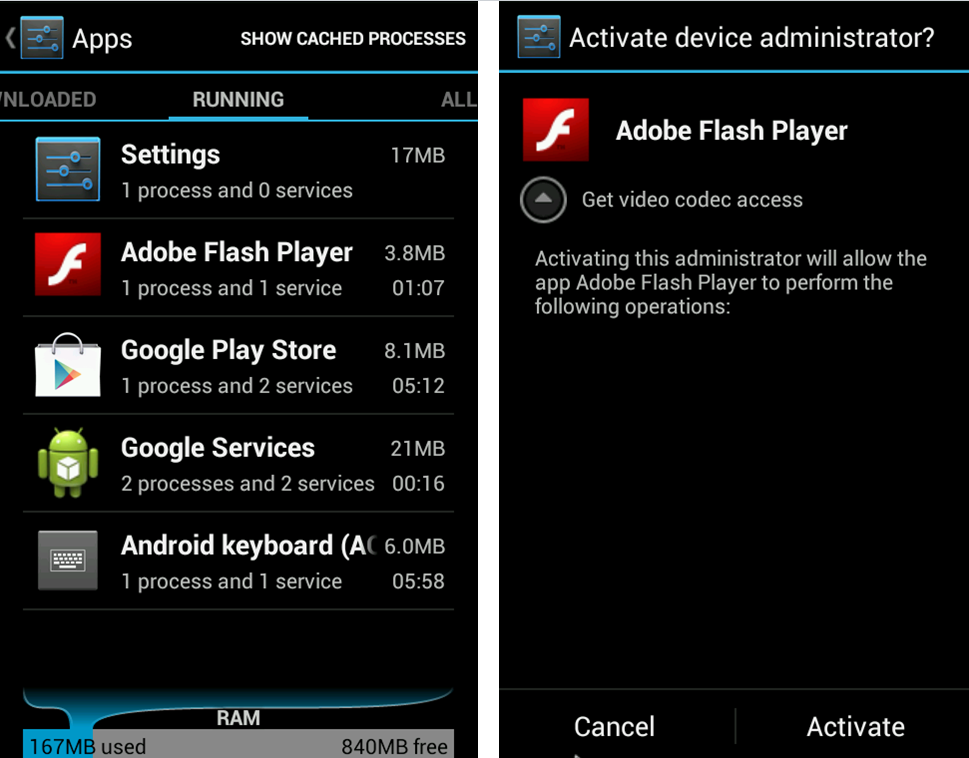
The malware installs itself as a service on the phone and it requests device administrator permissions from the user. It says that it needs the permission to get access to a video codec. Once the user agrees with this request, the app gains full access to everything on the phone.

Android malware

Now everything is set up and I will explain how it is stealing the information. Basically the malware is checking if some popular or often used apps like Google Play Store, Google Music, WhatsApp, Facebook, Twitter, Instagram … are launched on the device. If one of these Apps were started, the malware displays some screens to get the credit card information from the user. It looks like the launched app is requesting this credit card information for payment issues.
android11

As you can see in the screenshots above, all information needed to make a payment is demanded by the malware. It requests credit card number, expiration date,CVC number, the complete owner information with address and the only payment password for the credit card. The dialogue box also includes a checking system to ensure that no wrong numbers etc. are entered. Once all of this information is introduced, the data is sent to a server which collects the stolen credit card information. Authors of this Malware can use it now to make payment transactions with the stolen data.

To prevent you from being affected by such malware we recommend to install only apps from trusted sources like Google Play and always keep an eye on the permissions the app requests from you. Check if it makes sense that the app has this permission and if it is really needed.


The post Android Malware Steals Credit Card Information appeared first on Avira Blog.