
Category Archives: Antivirus Vendors

Antivirus Vendors

Christmas is coming… And cyber-criminals are on the prowl

Christmas-shopping

Christmas is coming, and what could be better this year than doing your Christmas shopping without having to leave home. All you need is a computer, an Internet connection and your credit card. Yet although this is one of the great benefits of the Web, it can also be the perfect trap: It gives certain types of criminals the chance to steal from a store’s customers without even going near the stop.

Stores’ Web pages receive their customers’ account details in order to complete the online transaction. If a cyber-criminal manages to access the store’s system, they would have access to this information and could exploit it to carry out their own transactions. To prevent this, you should make sure that the website interacts with the platform that your bank has set up in order to purchase online securely.

While such systems are at risk throughout the year, the Christmas period sees a lot more of this type of crime, given the amount of transactions that take place.

However, even if you go physically to the point-of-sale, there are still risks. In 2013, Target, the US retail chain, fell victim to an attack that leaked the credit card details of 40 million customers.

During the store’s Christmas campaign, cyber-criminals used a type of malware that targeted point-of-sale (POS) terminals, infecting the credit card payment systems. Since then, there have been many more such attacks, and the tools used are continually updated.

The strain of malware that hit Target was BlackPOS, a program that exploits a vulnerability to install on computers connected to POS terminals. It identifies the card reader process and steals information from the terminal memory with another malware: RAM Scraper.
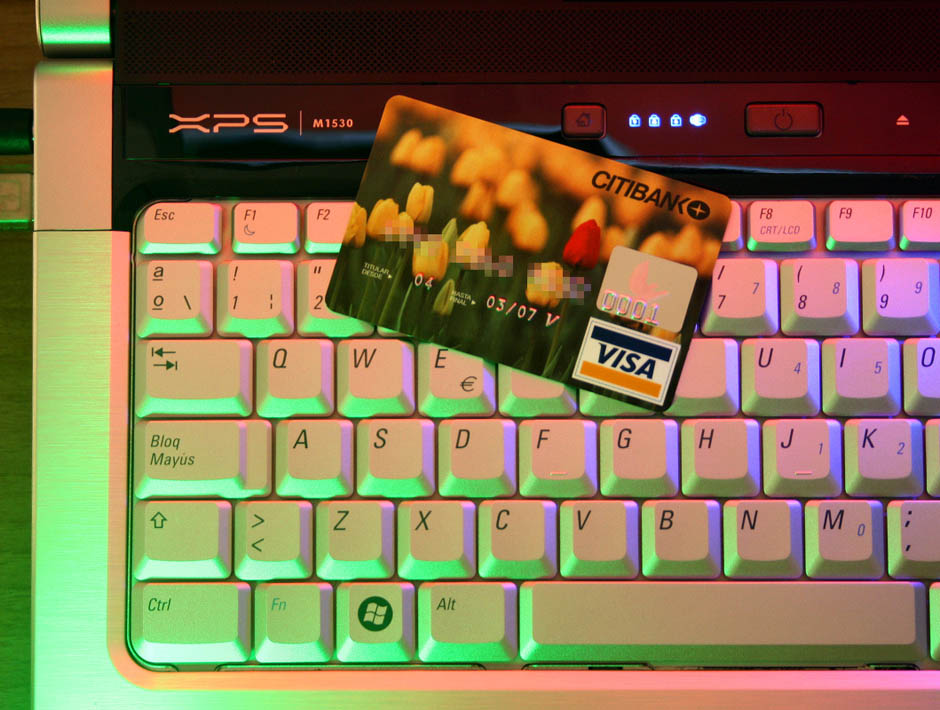
online-credit-card

This year another malicious code, FrameworkPOS, is doing the rounds. So far it has been used in attacks aimed at The Home Depot. With this system, cyber-criminals have managed to obtain the credit and debit card details of more than 50 million customers.

According to the Department of Homeland Security, as many as a thousand companies around the United States have been affected by another malicious code, dubbed Backoff, which targets POS terminals. Its effects are similar: It extracts data from the terminals’ memories to obtain card passwords. It infiltrates systems through the file ‘explorer.exe’.

Although there is little that customers can do about the malware that affects POS terminals, companies can take preventive measures. They should make sure that their antivirus solutions are up-to-date, use complex passwords on all devices, check their firewall and use encrypted data transfer systems.

The post Christmas is coming… And cyber-criminals are on the prowl appeared first on MediaCenter Panda Security.

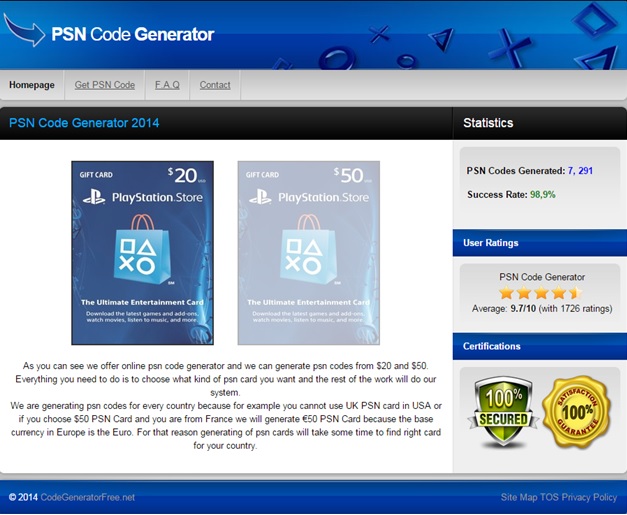
Fake free codes scam affects PSN and Steam users

Some webpages are giving away free codes for Playstation Network and Steam but, are they reliable?

At Avast we discovered a lot of webpages offering free codes, with a value from $20 to $50, for Playstation Network and Steam, two of the most important internet-based digital distribution platforms. Those webpages look very suspicious so we decided to analyze them.

We chose one of those webpages and followed all the steps required in order to get our “free code” for Playstation Network or Steam.

psnScam

After a first look at the main page, we found some suspicious items. To prove how trustworthy the transaction is, the webpage placed two security “certifications” in a visible location, but as we discovered, no security companies are associated with those certifications. They are completely fake!

Also, there’s a label with user ratings (4 ½ stars!), but we cannot rate the webpage; it’s just an image. Both fake images make the users think that they are in a safe and reliable website.

What happens when we click on a gift card? Are we going to receive the code?

The answer is no.

Let’s see what’s next:

PSNscam1

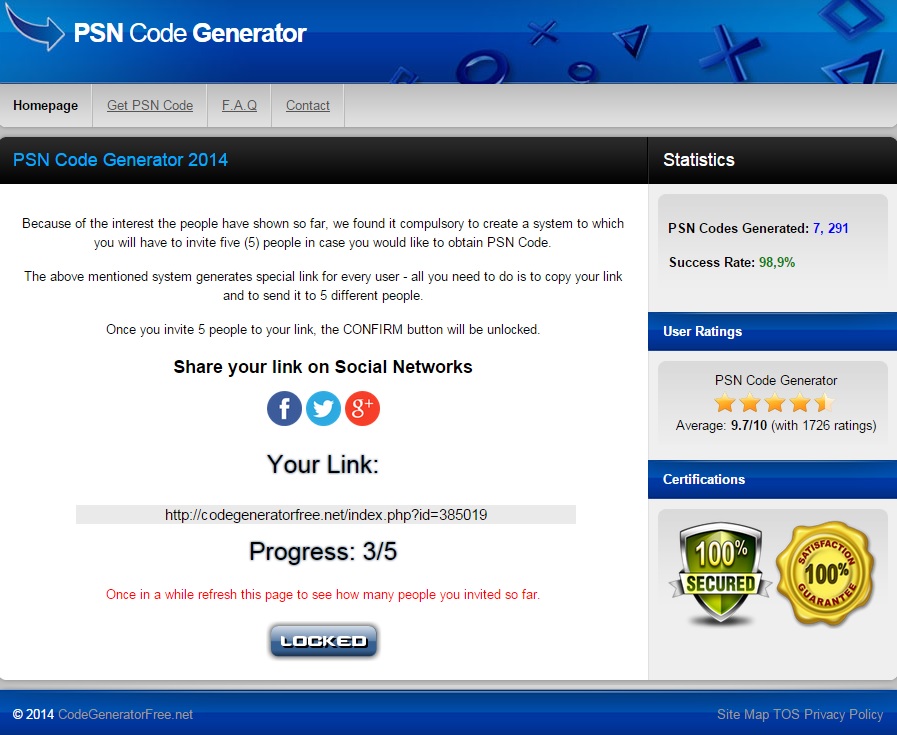
When we click on a gift card¸ instead of receiving the promised free code, we are asked to share a link with our friends in order to unlock the code.

Why do they do that?

When we share the link we are contributing to an increase in the number of visitors and, of course, the number of people that will try to redeem the “free code.” Keep this in mind, it will be important at the end of this post.

Ok, we already invited 5 of our friends and, in theory, we unlocked the code. Is this the last step? Are we going to receive the code now?

PSNscam3

Again, the answer is no.

Looks like they don’t want to give us the code. Suspicious, right? So, what do they want now?

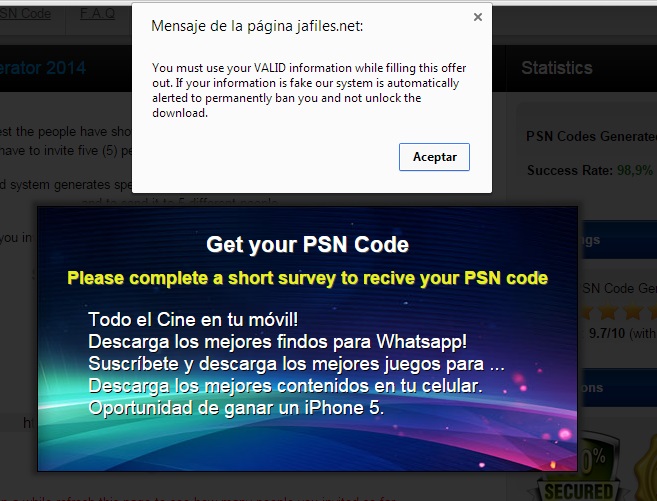
As we can see in the image, in order to receive our PSN code, we need to complete a short survey (like inviting 5 friends wasn’t already enough?!).

When we click on one of the surveys, a little pop-up with a message appears on the top of the screen. The message says: “You must use your VALID information while filling this offer out”.

Why do they need our VALID information?

Here’s the reason:

PSNscam4


In order to receive the code, we need to introduce our phone number – our VALID phone number. But wait, before doing that, let’s read the text at the bottom of the page.

PSNscam5

Surprise! It’s a premium SMS service with a total amount of 36,25€/month (>$40/month)! If we enter our phone number, we will be automatically subscribed to this premium service.

Remember the 5 friends you sent the link to? Well, now imagine how many people can fall into this scam just by sharing a link to 5 friends: 5+(5*5)+(5*5*5)+… creepy, right?

And of course, there’s no free code for your PSN or Steam accounts.

Unfortunately, there’s a lot of webpages using the same method to get user’s money. Also, there are other webpages offering software to generate codes. Cybercrooks create those
fake apps and get money from “download servers” because they bring
them users.

Tonda Hýža, from the AVAST Virus Lab, described those webpages as Adware due to the big amount of lies, advertisements and weird privacy policies.

Make sure you share this alert with your gamer friends J

Avast Software’s security applications for PC, Mac, and Android are trusted by more than 200-million people and businesses. Please follow us on FacebookTwitter and Google+.

The FBI’s most wanted cyber-criminal used his cat’s name as a password

Not for the first time here, we find ourselves talking about passwords. In January, the software company SplashData listed the most popular passwords of 2013, on the basis of millions of passwords found on the Internet. Among the most frequently used were simple combinations: ‘123456’ was in first place followed by ‘password’.

We’ll have to see what comes out in the next report, though we’ve already seen how even cyber-criminals can make such a simple mistake.

Jeremy Hammond was arrested in Chicago in 2012. In those days he was the most wanted cyber-criminal. He had managed to compromise the Web page of Stratfor, an intelligence and espionage firm whose customers include the U.S. Defense Dept.

The authorities managed to track him down with the help of Hector Xavier Monsegur, leader of the now defunct hacker group Lulz Security. This organization was the alleged perpetrator of the attack on the CIA’s website in 2011 and the theft of Sony Pictures user account details in the same year.

They finally caught him, though Hammond had time to shut down his Mac laptop before the police got into his house. To start it up again they needed his password.

saved-password

Hammond is now serving time in Manchester Federal Prison. While behind bars, he’s explained that hacking Stratfor’s Web page was not difficult. The main error, he claims, was that those responsible for the site had not encrypted their customers’ credit card details.

His own error, however, was quite different. Hammond has acknowledged that the weak point of the computer that he had used for a number of ‘jobs’, and which no doubt let police IT experts get into the machine, was its password. “Chewy123” is simply the name of his cat (plus the obvious sequence of numbers).

We have often spoken here of the techniques you can use to avoid making the same error as Hammond. Make sure your password is complex, and never use a sequence of numbers or letters.

There are also tools available to check the strength of your passwords, and you should change them regularly and use a password manager.

However much you think your data won’t be of interest to anyone, cyber-criminals can exploit information in many ways, not just for direct financial gain. And it’s not just large organizations that are targeted by hackers. IT security experts have recently warned of the leaking of passwords from platforms such as Gmail and Dropbox.

It’s difficult to stay ahead of cyber-criminals, but it’s not too hard to ensure that your passwords don’t figure in the ranking of the worst combinations. We all have to start somewhere.

The post The FBI’s most wanted cyber-criminal used his cat’s name as a password appeared first on MediaCenter Panda Security.
Is Government Malware unstoppable?

What is Regin?

According to Virus Bulletin, we are looking at a multi-staged threat (like Stuxnet) that uses a modular approach (like Flame), a combination that makes it one of the most advanced threats ever detected. Researches show that Regin has been used in espionage campaigns for the last 6 years. This sophisticated backdoor Trojan affects Microsoft Windows NT, 2000, XP, Vista, and 7 and it is able to take control of input devices, capture credentials, monitor network traffic, and gather information on processes and memory utilization.

Protection against government malware

In this context, we would like to remind our users that Avira is a founding member of IT Security made in Germany and we pride on providing our customers a guarantee of Quality and Reliability.

We thus committed ourselves, among other things, to:

  • Exclusively provide IT security solutions no other third party can access.
  • Offer products that do not cause the transmission of crypto keys, parts of keys or access recognition.
  • Eliminate vulnerabilities or avoidance methods for access control systems as fast as possible once detected.

Additionally, we would like to clarify our standpoint on malware developed by government. Whenever we discover a new piece of malware, we are adding detection for this for all of our customers, regardless of the source of the malware. It is the case for recently discovered Regin as well, since our Antivirus products already detect all known Reging samples.

We strongly believe that no malware is unstoppable, not even government malware. Users need to make sure that they are protecting all of their digital devices with the latest technology, keeping their operating system, 3rd party applications and of course their antivirus software up-to-date.


The post Is Government Malware unstoppable? appeared first on Avira Blog.

12 ways to boost your router’s security

hns2aWith the increasing number of network security breaches, we need to improve awareness regarding the security of your home network.

We simply need to follow some rules to control and prevent system penetration and also bandwidth theft (and losing money!). Safeguard your valuable information available through your home wireless connection and do not be easy target for hackers!

Here are 12 ways to boost your router’s security:

  1. 1. Install your router in a safe place where the wireless signal is available only inside your own house. Avoid placing it near to a window.
  2. 2. Turn off WPS, the automated network configuration method that makes your wireless password more vulnerable to hacker attacks.Turn on WPA2 encryption and, if you can, protect it with a strong password.
  3. 3. Change the default admin username and password to a strong password. Do not use default passwords because they’re generated from well-known algorithms that makes hacker attacks even easier. Do not use your name, date of birth, home address or any personal information as the password.
  4. 4. Upgrade your router firmware to fix known vulnerabilities of the router.
  5. 5. Don’t forget to log out after managing the router, avoiding abuse of the authenticated browser sessions.
  6. 6. Disable remote management of the router over the internet. In a business environment, if you need this management, it will be safer to use NAT rules allowing SSH or VPN access only.
  7. 7. To prevent CSRF attacks, don’t use the default IP ranges. Change the defaults 192.168.1.1 to something different like 10.8.9.7.
  8. 8. Prevent ROM-0 abuse (i.e., access to the secret data stored in your router: your ADSL login/password combination and WiFi password) of your router and forward port 80 on the router to and non-used IP address on your network. Check how-to here.
  9. 9. Set your router DNS servers to automatic mode (or DHCP) or for a static value that you manually set exactly according to your ISP.
  10. 10. Disable IPv6 on the router or, if you really need IPv6 services, replace the router with a IPv6 certified one.
  11. 11. You can save bandwidth and allow only specific computers or devices to access your WiFi even if they have the security key to enter. Find the computer MAC address (the “physical address” listed with the command line ipconfig/all at a cmd window). Into your router settings, you should look for the Mac filtering settings to add this identifier there.
  12. 12. Use a secure VPN in open/public WiFi hotspots. You can read more on how Avast SecureLine can protect PC, Mac and Android devices in these situations. If you cannot avoid using public WiFi, then try not to log in or enter your credentials (specially banking or credit card ones), but also your email and phone number. If you really need it, always prefer the secure protocol HTTPS (check the browser address bar).

Avast Software’s security applications for PC, Mac, and Android are trusted by more than 200-million people and businesses. Please follow us on FacebookTwitter and Google+.


Three essential tips for new Android devices

Unfortunately, with today’s smartphones (which have the capacity and the feature-set of a high-end PC from about 10 years ago) it’s no longer a matter of popping in the SIM and using it.

There are a million things to watch out for and set up. In this week’s blog, we’ve compiled the three most useful steps you need to take besides running through the initial setup and downloading your favorite apps.

Sign into your Google Account:

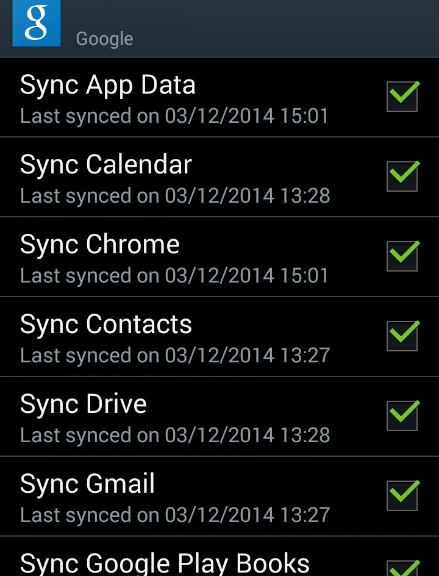
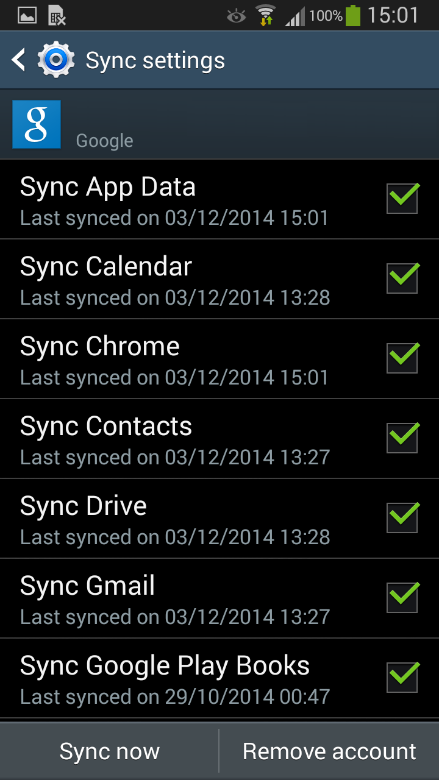
One of the first things your new Android will ask you to do is sign into your Google account. Now, you could technically go without a Google account, but the benefits outweigh a lot of the worries some users have: once you sign in, it will back-up your phone’s settings, installed apps, account data and more – plus it allows you to purchase apps on the Google Play Store.

If you’re worried about privacy, simply create a new account and leave out information you don’t want to be shared with Google.

Google Sync

Get the latest update:

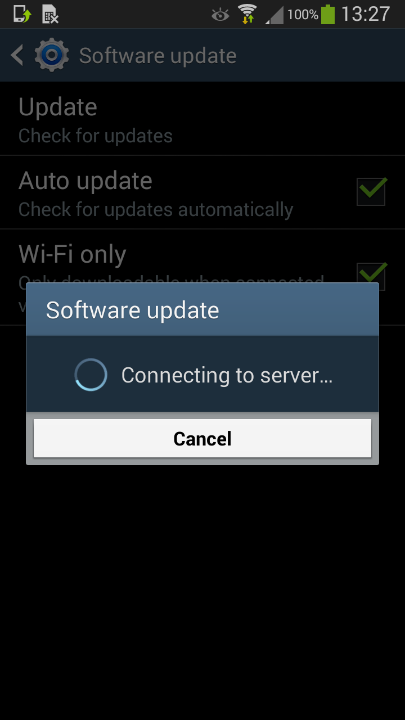
Most phones come with outdated software right out of the gate (as software continues to improve after devices come off the production line). We suggest checking for updates in your “Settings” app under “About device” (or similar).

Do the same for your apps so you don’t have to go into the Google Play store all the time. Go to Settings again and look for the “Auto-update apps” checkbox.

Software update

Get rid of preinstalled bloatware:

As we discovered last month in our AVG App Consumption report, one of the top reasons for battery drain, storage consumption and data traffic are the preinstalled apps on your phone.

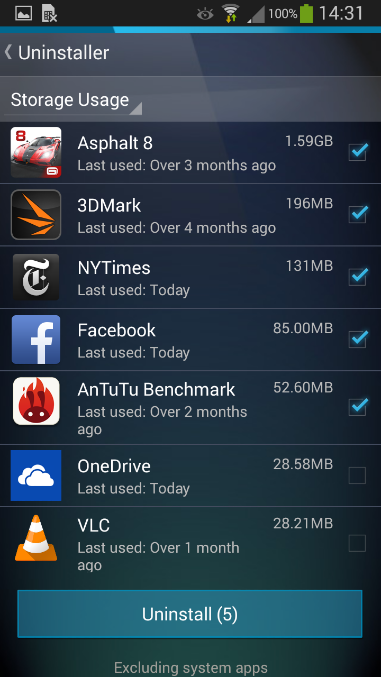
We’ve actually made a free app, AVG Cleaner for Android, which lets you view the most draining apps on your phone and helps you get rid of them: Open it up and go to the App Uninstaller.

This will list all your currently running apps. If you tap on the little blue arrow in the top right, you can then sort the list by:

  • App Usage – how often you use each of your apps
  • Storage Usage – how much space your apps use
  • Battery Usage – how demanding each app is on your battery
  • Data Usage – the apps that send and receive the most data (to help avoid hitting your data plan limit)

Uninstall Bloatware