Category Archives: Antivirus Vendors

Antivirus Vendors

Replace pre-installed antivirus on your Black Friday laptop

Black Friday laptop

Most people replace pre-installed antivirus programs with Avast Antivirus.

Black Friday and Cyber Monday abound with deals on laptops. When you purchase a new laptop one of the first things you should do is make sure that it is secure with your choice of antivirus protection.

You will probably find that antivirus is already pre-installed, for example, Windows Defender is built into devices that use Windows 8 and Windows 8.1. Among Windows 7 users, Microsoft Security Essentials is on most devices. When users change antivirus protection, the top product enabled is, you guessed it, Avast Free Antivirus.

You should replace Microsoft Security Essentials

Initial praise for the software (MSE) has turned to disappointment and it’s now clear that a third-party antivirus remains the best pick even for users who don’t want to pay,

wrote Matt Smith in a makeuseof.com article called Why You Should Replace Microsoft Security Essentials With A Proper Antivirus. Mr. Smith recommends Avast Free Antivirus.

Same goes for Windows Defender.

If you’re relying solely on Windows Defender for your antivirus protection, you’re anything but defended,

wrote Jill Scharr for Tom’s Guide.

Out with the old, in with the new

We strongly recommend to uninstall previously installed antivirus applications before installing Avast Antivirus on your computer. You can find a list of vendors, from A to Z, that provide a special removal tool to uninstall their antivirus software on our FAQ page. We recommend you follow their instructions before proceeding with the uninstallation.

Avast is most trusted worldwide

For the second year, Avast Free Antivirus has taken first place in the Worldwide Antivirus Product Market Share as measured by OPSWAT. With 220 million people, mobile devices, and computers protected by our security applications, Avast is the most trusted mobile and PC security in the world.

Avast Software’s security applications for PC, Mac, and Android are trusted by more than 200-million people and businesses. Please follow us on Facebook, Twitter and Google+.

Panda Security launches Panda Cloud Office Protection 7.1

Panda Security, The Cloud Security Company, announces the new features of version 7.1 of Panda Cloud Office Protection (PCOP), Panda Security’s cross-platform solution that offers the best cloud-based protection rapidly, easily and efficiently. In addition to the features included in the previous version, such as the ability for the user to act independently in the event of infections or problems detected, this version also includes improvements aimed at meeting the requirements of medium-sized and large customers who need greater control.

 Panda Cloud Office Protection 7.1 incorporates various technological and functional innovations compared to the previous version of the solution, with special emphasis on giving the user greater control and management. These new features include:

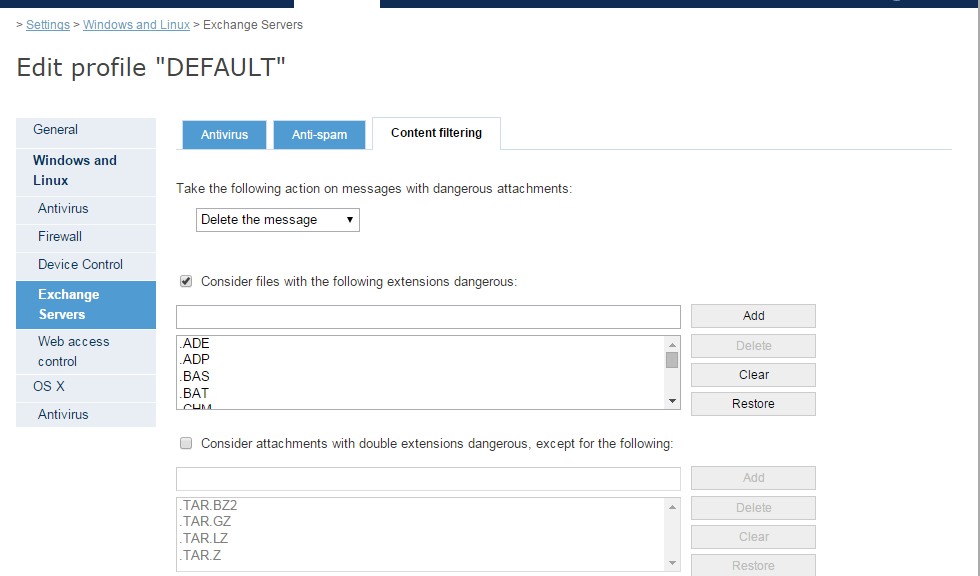
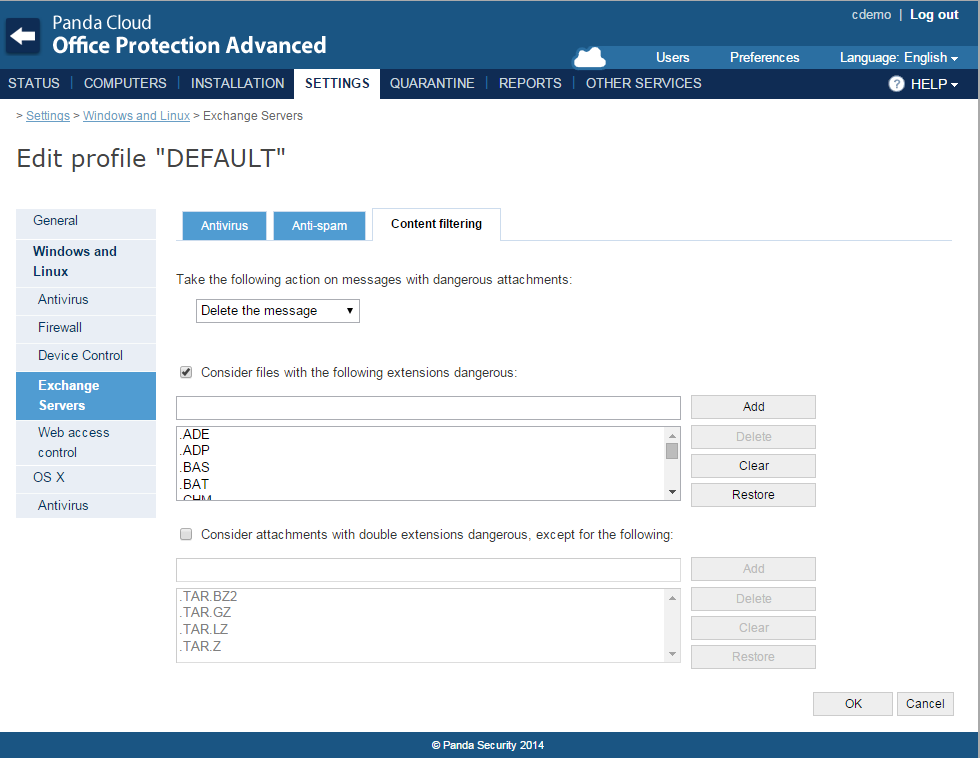
  • Content filtering for the Exchange protection, which allows emails to be filtered by the extension of the attachment, neutralizing dangerous attachments or attachments with a multiple file extension.
  • Whitelists included in device control. This feature allows different exclusions to be applied to different groups of computers selected by profile. In addition, whitelisted devices can be used without any restrictions, regardless of the settings.
  • Mobile device control. This option allows the user to block access to mobile devices.
  • New local console on the endpoint. This console provides PCOP administrators and partners with a tool to enable or disable the endpoint protection in a rapid and timely manner, without having to use the PCOP Web console.
  • Ability to upgrade to new versions from the PCOP Web console. Notifications will appear in the console to indicate that a new version is available.

PCOP 7.1_EN


“With Panda Cloud Office Protection 7.1 we want to foster independence of the network administrator, easing management of the solution, including whitelists and offering reports that help give the user greater control”, says Roberto Fernandez, Product Manager at Panda Security. “The goal of this new version is to offer PCOP administrators and our partners a tool that allows them to quickly secure their corporate environments,” he concludes.

The post Panda Security launches Panda Cloud Office Protection 7.1 appeared first on MediaCenter Panda Security.

Rootpipe, WireLurker and Masque Attack, the latest vulnerabilities on Apple devices

You have heard it more than once but it is a myth. It always has been. It does not matter how many times you have been told, Macs do have viruses. It is true that, until not too long ago, Apple computers were not a major target for cyber-crooks, but things are changing.

However, the fact that viruses do affect Macs is nothing new. Back in 1982 malware swarmed the old Apple II. That distant beginning of viruses on Apple machines was just an experiment but it already reflected the harsh reality. Gradually, at a much slower pace than PCs, Macs are also suffering the effects of some infection or other.

mac-viruses

The myth that there are no Mac viruses does have a basis, as malware has not roamed freely around Apple computers for various reasons. The main reason is that as Macs were not as widely-used, they were dismissed by cyber-crooks for developing malicious software targeting these machines.

However, the increasing presence of Macs on the market has changed this trend. They are popular and cyber-crooks do not want to miss the opportunity to spread their seeds of evil through these machines.

So, there are a few threats to bear in mind if you have a Mac and the dangers are increasing. In recent months quite a few vulnerabilities have been discovered that put the computers of the company managed by Tim Cook in the firing line.

Rootpipe and WireLurker, Mac vulnerabilities

One of them is Rootpipe. Discovered by a Swedish hacker just a few days ago, it is a critical security hole in OS X Yosemite, the latest version of Apple’s operating system. The flaw, for which a patch is not expected until the beginning of next year, allows cyber-crooks to act as the software administrator on third-party computers. In other words, get into your Mac without your consent.

The vulnerability and Apple’s delay in releasing a patch are very worrying but they are not the only security problem facing Mac users recently. A few days after Rootpipe was discovered, WireLurker came to light, a new malware family affecting Apple devices created in China and which has come to be considered the largest threat to them so far.

In this case, Mac users and the company can rest easier, as the Cupertino firm, which has identified 146 infected apps, has stopped the virus from spreading any further by blocking the apps responsible.

If you want to block Mac OS X malware as well as Windows malware, try the best antivirus for Mac.

padlock

Masque Attack, security flaw on iPads and iPhones

The cherry on this cake, which in just a few weeks brought the Apple device security myth crashing down, came with Masque Attack. A security hole in the majority of iPads and iPhones that makes them vulnerable to cyber-attacks.

Masque Attack allows cyber-crooks to access users’ personal data, even managing to get control of their devices. In this case, the Cupertino firm did react rapidly, but not fixing the threat but by releasing a statement down playing the importance of Masque Attack and insisting that iOS and OS X have various measures that warn users against installing potentially malicious software.

In any case, the best thing you can do to make sure that your iPad and iPhone are kept secure is to download apps from trusted sites only, such as the App Store, as the door cyber-crooks use to access your device is no other than making you download a malicious app. So remember, only download things from reliable sites and of course, forget about Apple not having any viruses.

The post Rootpipe, WireLurker and Masque Attack, the latest vulnerabilities on Apple devices appeared first on MediaCenter Panda Security.


Avira: Best Antivirus for Windows

AV-TEST certification earned with perfect score

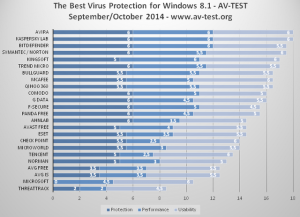
Avira earned a perfect 18/18 score, topping all three major categories of testing:

  • To evaluate the protection against malware infections (such as viruses, worms or Trojan horses), the testers took into consideration the protection against 0-day malware attacks, inclusive of web and e-mail threats (Real-World Testing) but also the detection of widespread and prevalent malware discovered in the last 4 weeks.
  • Performance was under the scope as well with the average impact of the security product on the speed of the computer in daily use cases: visiting websites, downloading software, installing and running programs or copying data.
  • Finally, the testers focused on the usability of the products by counting disruptions caused by false positives and false warning messages (false warnings or blockages when visiting websites, false detections of legitimate software as malware during a system scan and false warnings or blockages of certain actions carried out whilst installing and using legitimate software).

AV-TEST results

The results show an increase of 1.5 points compared to the last round of testing, evolution observed by Journalists as well. Avira becomes the best antivirus for Windows, offering users protection, performance and usability at the highest level.

Great level of Self-Protection

This time, AV-Test experts ran also a test to evaluate the self-protection of 32 security solutions for both consumers and businesses. The goal was to establish if these applications are adopting protection technologies like DEP (Data Execution Prevention) and ASLR (Address Space Layout Randomization) for their own use and how well they perform from this point of view. Avira occupied a top position in this area as well, with an average use of 99.7% in 32 and 64 bit versions.

To understand the importance of the self-protection factor in Antivirus Software, it’s useful to know that DEP uses CPU features to mark certain areas of the device’s memory as not executable while ASLR randomly locates executable code at load time. DEP and ASLR can thus protect against buffer overflow exploits and attempts to execute privileged code at known locations in memory.

AV-TEST self-protection results

We recommend Larry Seltzer’s analysis for a more in-depth understanding of the AV-TEST Self-Protection Results.

Your security: a long term commitment for our experts

Every successful test and earned certification shows how our antivirus is continuously evolving to face the digital challenges of today. It is a proof of strength and commitment of our teams towards millions of customers who trust us to secure their devices. Our experts will keep applying the best methods to discover, classify and detect new malicious applications until online safety becomes the natural state of things.

The post Avira: Best Antivirus for Windows appeared first on Avira Blog.

Ten Online Shopping Tips For Cyber Monday

Cyber Monday, the start of the digital holiday shopalooza, has occupied its role for nearly 10 years – starting in 2005. Though it still trails brick-and-mortar shopping on Black Friday in popularity, Cyber Monday shoppers spend more! According to an AOL study in 2013, Cyber Monday shoppers spent an average of $468 versus $309 spent on Black Friday.

Another data point of interest: Cyber Monday is an increasingly popular shopping experience for Boomers.  Nielsen research found the percent of customers aged 50-64 who visited online retail sites increased 20.5% and for age 65+ it was up 40% from 2011 to 2012.

In 2014 millions of consumers, and not just online shoppers, were affected by a series of major data breaches, along with malware, phishing, and identity theft. It’s enough to dampen the holiday shopping spirit. But there are ways to stay safe, shop online, and get the great deals offered on Cyber Monday.

Here are 10 tips to keep you safe when shopping online:

  • Be aware. There are unbelievable deals on Cyber Monday and the weeks before Christmas. But if it sounds too good to be true then it probably is. Beware of suspicious online ads and even emails or social media messages that seem to come from friends promising free products or unheard of discounts.
  • Be secure. Make sure you’re logged into a secure Wi-Fi.  Shopping online in a public place could compromise your financial accounts and personal privacy. Anyone can download software that picks your credit card numbers off the airwaves.  Wait until your home or on a secure network to do your shopping!
  • Look for the https:// – The “s” stands for secure. Also look for a lock or similar icon to indicate you are on a safe site.

  • Avoid malicious websites by shopping at well-known and trusted sites where you’ve shopped before. Keep in mind it’s possible for even legitimate sites to have been hijacked and to serve up malicious code to your computer. So make sure your online security software includes link-scanning technology. Such as our own AVG AntiVirus FREE
  • Do your research. If a site is unknown to you, check it out with the Better Business Bureau to see if it is accredited by the group. The National Retail Federation’s CyberMonday.com also has a list of legitimate retailers offering Cyber Monday discounts.
  • Always make sure that you have a unique username and password for each online account. And of course, make your password complicated! Use a mix of symbols and upper and lower case letters. Watch this video for more details:

Video

Never Use The Same Password Twice


  • Keep your software up to date! As with any guide to online security, make sure that you’re operating system, browser and antivirus software are up to date.
  • If you’re curious about an order, contact the retailer directly via their site or phone number. Many phishing scams come in the form of emails from Amazon, UPS, FedEx, or other large retailers. Don’t click on the link in the email, even if it looks legitimate.
  • Use one dedicated email and credit card account. Preferably a card with a low limit. This makes it easy to detach and get your money back should your account or the retailer be compromised. Don’t use ATM or debit cards as you could temporarily lose access to cash in the event of theft.
  • Take action immediately if you suspect identity theft! Contact your credit card company, your bank, all three credit-reporting agencies and the police.


Cyber Monday is a great way to get a jump on the holidays and avoid the crazy crowds of Black Friday. Just stay safe and enjoy!