Category Archives: Antivirus Vendors

Antivirus Vendors

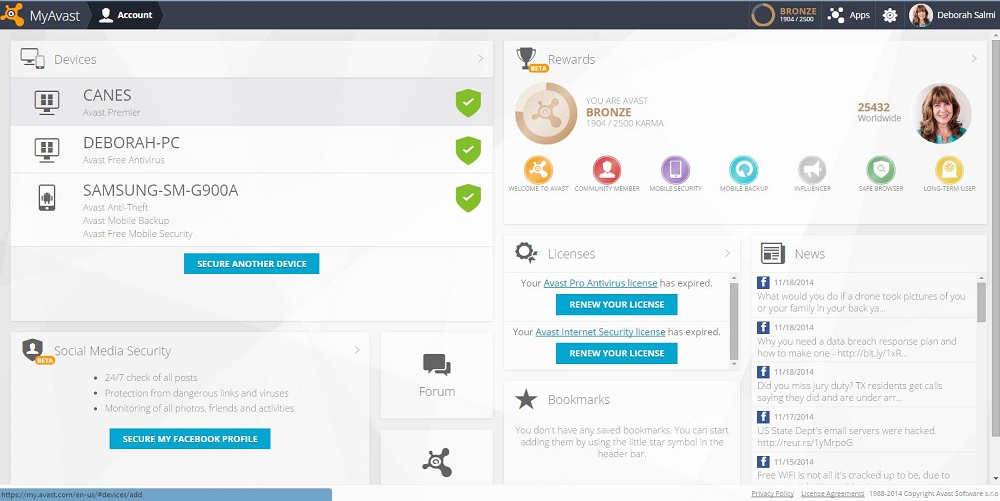
Keep track of your family’s devices using your Avast Account

The average US family owns four mobile devices, plus Internet-connected computers and other devices. Your Avast Account helps you manage their security.

Avast Account screenshot

Manage all your devices with a free Avast Account.

Keeping your security software up-to-date on all of these devices can quickly get confusing, and with today’s risks you want to make sure everything has adequate protection. Your Avast Account can simplify that task greatly.

Here’s what you get with an Avast account

Management made easy

  • Register any Avast free product which you have installed and which requires registration.
  • Manage multiple Avast-protected devices (PC, smartphone, tablet) from one place.
  • Remotely control Android mobile devices with Avast Mobile Security and Avast Anti-Theft installed. This is especially useful in case of loss or theft of the device .

Information at your fingertips

You can find information about your connected devices.

  • License status
  • Expiration date
  • Basic statistics
  • Version of virus signature database
  • Logs of activities, and more

Earn Avast Reward points for free stuff

You can generate your own special Avast Free Antivirus link to give to your family members and friends. When they download their own protection using your link, you collect “Karma” points to earn a free copy of Avast Internet Security. In your Avast Account, you can see how many points you have, earn badges and even see how you’re doing compared to other users.

Give Avast feedback

We provide links to the Avast Community Forum where you can ask questions of our experienced “evangelists,” and the Feedback page, where you can give suggestions, report a problem, or just say thanks.

Secure your Facebook profile

You can secure your Facebook profile using Avast Social Media Security. We help you navigate thorough the frequently changing security and privacy settings in Facebook. In the future we plan to add security profiles on other social networks.

How do I get an Avast Account?

New registrations of Avast Free Antivirus will automatically create an Avast Account and connect your device automatically. Visit https://my.avast.com or click Account in the Avast user interface. Use of the Avast Account for accessing other Avast services is completely optional.

NOTE: It’s especially useful to connect any mobile devices that have Avast Mobile Security installed because it gives you remote control over your device if the device is stolen. These remote control features have not yet been implemented for PC or Mac devices, therefore if you are not interested in the activity log or other information, you don’t have to connect your device to your Avast Account at all.

When you do connect your device, please be patient because of the large amount of data we have to process; the device status isn’t updated in real-time. It could take up to a half hour before the actual security status and other device information appears on the devices page, so check again later.

Avast Software’s security applications for PC, Mac, and Android are trusted by more than 200-million people and businesses. Please follow us on Facebook, Twitter and Google+.

Reporting from AVAR 2014

Kicking off proceedings was Dr. Andrew Clark from CERT Australia (the Australian Government’s Computer Emergency Response Team) who highlighted the many challenges in cyber crime that the Asia Pacific region faces, and how collaboration with neighbouring countries is helping those efforts.

Industry veteran Graham Cluley reminisced on his more than 20 year career with tales of some of the first viruses and malware, many of which now seem so harmless compared to today’s standards.  He also included an amusing rendition of what he calls the “Anti Virus Industry Song”.

“Why can’t we have a virus called ‘Lumpy Trousers’?”, quipped Graham Cluley at one point in the conference, but there was no shortage of interestingly named threats during the conference – such as Dragonfly, Citadel, and even Chuck Norris.

The topic of the Internet of Things inevitably emerged, including discussion of vulnerabilities affecting hundreds of thousands of Internet router and gateway devices used by homes and businesses globally.  Hardware manufacturers were reminded once again not to build devices with backdoors, and to implement better security by design.

As the two day event concluded, a number of industry veterans took to the stage with their musical instruments to rock into the night, entertaining delegates and proving just how collaborative and supportive the Anti-Virus industry is as we all do our best to protect the world from the scourge of malware and online threats.

Image courtesy @alenkacz


Until next time, stay safe out there.

Update to Lollipop as soon as you can: These are the security improvements included in Android 5.0

Google has now launched the long-awaited Android 5.0, the new version of its mobile operating system. Do you want to know why you should update your smartphone’s software? We give you the first clues here.
lollipop-android

Adrian Ludwig, security engineer at Google, says in the official Android blog that their goal is to “stay two steps ahead of the bad guys” and this is Lollipop’s intention too. “Not only is Lollipop the sweetest update of Android to date, we also built in a rigid (security) Lollipop stick for the core and Kevlar wrapping on the outside—to keep you safe from the bad guys, inside and out.”

One of the most secure ways of keeping data safe is to use the screen lock or pattern. However, Google is aware that many users do not use this measure because, among other reasons, it makes it difficult to use the phone when it is connected to another device.

For this reason, the new operating system includes Smart Lock, which unlocks the phone when it is paired with a wearable or a hands-free device in the car via Bluetooth or NFC.

The phone can also be unlocked using facial expressions. Although this feature was available in version 4.0, in the new version of the Android operating system this application has been improved by constantly analyzing the user’s expressions.

Finally, in order to encourage users to install phone lock patterns and make them more secure, Android has included the option to receive on-screen notifications, even though the phone is locked, and access them more quickly.

Another security measure in Lollipop is related to encryption, which is no longer optional and will be really useful for less experienced users. Device encryption will be automatically enabled when the device is switched on. It uses a unique key that never leaves the device.

However, Google acknowledges that users with older devices that update their version of Android will have to enable the encryption feature manually themselves, which will not happen in devices shipped with this operating system.

Android has always tried to make sure that its apps access as little data on the phone as possible but in this respect its software has never been without its problems. Version 4.2 included Security Enhanced Linux, known as SELinux, which audited and monitored every action and left less room for attack.

SELinux defines the permissions of every user, app, process and file on the system and controls their actions and interactions following a strict security policy. This prevents any file – not even those downloaded from Google Play – from modifying the phone’s essential parameters.
lollipop-screen

Although this service was offered in previous versions, it has now been boosted to respond particularly to enterprise and government environment as, according to Ludwig, the majority of the members of different governments use Android. SELinux currently runs in enforcing mode, that is, all of the security policies are loaded and enabled on the device. It was not the same in previous versions, where the user could choose to use enforcing mode, permissive mode – where the security policies were loaded but not applied – or even turn it off.

Have you ever had your phone stolen? Having Lollipop installed could help you. It has the Factory Reset Protection feature, which disables stolen phones, only requiring the Google password to wipe the phone’s data remotely.

The new version of Android also keeps the device away from malicious websites when the user performs searches in the browser. In addition, it seems that everyone can create multiple user accounts to securely share the device with a friend or do so using guest user mode.

The heads of security at Android claim that the probability of a cyber-crook attacking the device using malicious software is 1 in 1,000. But the main dangers facing users is when the phone is lost or stolen. It is for these cases that the new security measures are designed. What are you waiting for to update your operating system?


The post Update to Lollipop as soon as you can: These are the security improvements included in Android 5.0 appeared first on MediaCenter Panda Security.

AT&T Stops Attaching Tracking Files to Mobiles

Wait… AT&T was tracking you with hidden codes?

The secret codes in tracking files, known as ‘header enrichment,’ consist of strings of numbers and letters that are appended to all data traffic that is transmitted from the phone. The header enrichment codes are used to track customers’ website visits and also which apps they use in order to provide advertisers with targeting information. The codes don’t contain personal identity information per se, but because they are unique to each customer and are transmitted along with any personal identity information that a customer voluntarily provides – such as name, address or phone number – together they create a sort of digital fingerprint that could be exploited.

AT&T said it ended the tracking files because its test project has ended. But competing mobile operator Verizon has a similar tracking number system in place, which Twitter’s mobile advertising division uses to target ads.

If you want to know if your mobile carrier is tracking your device, visit this page on ProPublica.org (go there from your mobile device) and click on the box that says ‘Does Your Phone Company Track You?’

Header enrichment technology was developed because traditional web cookies are a challenge for tracking apps on smartphones and tablets. The Open Mobile Alliance adopted an industry standard for injecting the codes in 2010. In response, Google has proposed an alternative Web protocol that prevents such header injections which, of course, the mobile industry is lobbying to defeat.

Avira’s security software for Android and iOS can scan your apps and emails for malware, and also block Trojans and stop Ransomware from restricting access to your data. Check out Avira Mobile Security for iOS or Avira Antivirus Security for Android for free protection.


The post AT&T Stops Attaching Tracking Files to Mobiles appeared first on Avira Blog.

Nigerian scam on Skype. Beware of it!

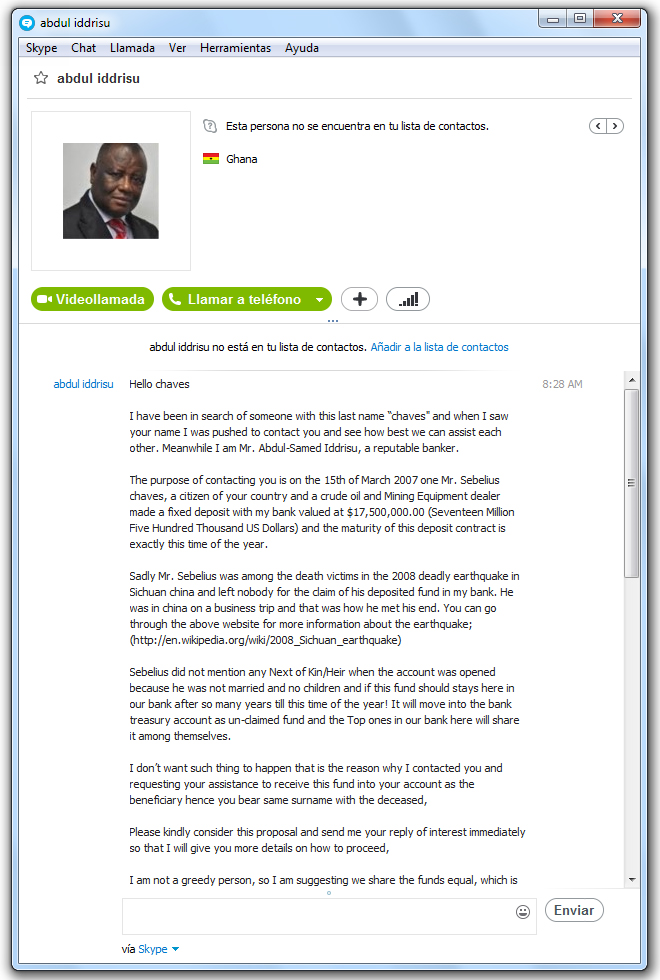
It seems that the notorious Nigerian scam is not only carried out via email. As we have been able to confirm, Skype is also being used to trick us into believing that someone with a ton of money wants to share their fortune and that we are the recipients of it.

This is the message that “reputable banker”, Abdul Iddrisu, sent to one of our colleagues on Skype.

skype-scam

In it he says that his bank has $17.5 million to give out, after the owner of this fortune died in an earthquake in China in 2008 and as our colleague has the same last name as the deceased, they have decided to give the money to him.

What does he have to do in exchange? Send his bank account number so that they can deposit it. As easy as that, and as unbelievable, right?

Indeed, it is neither believable nor true. Obviously nobody is going to contact you to give you $17.5 million, so never give out your personal data over the Internet. Neither should you deposit any money in exchange for an alleged prize or inheritance. Do not fall for this type of scam!

The post Nigerian scam on Skype. Beware of it! appeared first on MediaCenter Panda Security.

AVG Extends Global Partnership with ALCATEL ONETOUCH

AMSTERDAM and SAN FRANCISCO – November 18, 2014 – AVG Technologies N.V. (NYSE: AVG), the online security company™ for 188 million active users, today announced that it has extended its partnership with ALCATEL ONETOUCH, a leading smartphone brand  to provide AVG’s flagship AVG AntiVirus PRO for Android™ app on its latest Android mobile devices. This agreement will help ALCATEL ONETOUCH’s mobile customers stay safe online from the moment they turn on their new devices for a safer and simpler online experience out-of-the-box.

This marks the latest milestone in the partnership which has been in place since 2011. The AVG pre-loaded devices will be available across ALCATEL ONETOUCH’s global customer base, including a number of fast-growing, emerging markets such as India, Russia, Brazil and Mexico. Customers get a free 90-day trial of AVG AntiVirus PRO for Android, after which they can either purchase an annual subscription to retain its enhanced security features or choose the default AVG AntiVirus FREE for Android option to ensure their smartphone or tablet remains protected.

“Going online via a smartphone is fast becoming a standard activity for mobile users, and understandably our customers want peace of mind to know that they are browsing safely,” said William Dowie, Global Portfolio Director at ALCATEL ONETOUCH. “We continue to be committed to providing them with the best protection possible on our devices and our ongoing partnership with AVG demonstrates our investment in this.”

“We know that the emerging markets account for a large proportion of those going online for the first time – and that mobile often provides the means for doing this.  ALCATEL ONETOUCH is one of the world’s leading smartphone brands with a large presence in these markets, and we believe our combined offering is a cost-effective and smart option for new users there,” said David Ferguson, General Manager Consumer & Mobile, AVG Technologies.

AVG AntiVirus FREE for Android was the first mobile security application to exceed 100 million downloads on the Google Playâ„¢ Store. With the launch earlier this year of AVG Zenâ„¢, an application for Windows PCs and Android smartphones and tablets, AVG has expanded its mobile portfolio to help consumers retain control over their privacy, protection, and performance when using a connected device to get online.

The roll out of AVG AntiVirus PRO for Android is effective immediately.

About AVG AntiVirus PRO for Android

Protect & Keep Safe:

  • App Scanner: Helps stop, remove and prevent the spreading of viruses, worms, and trojans
  • File Scanner: scans your phone for viruses and removes them with a simple click, ensuring your contacts, bookmarks, text messages, music and videos are kept safe.
  • Safe web surfing: actively checks web pages in real-time before you land on that page. If it detects something suspicious, it prevents you from visiting the site.
  • App Lock: protects your privacy by enabling you to lock your apps, thereby securing them from being accessed by other people using your phone.

Find & Protect Your Phone:

  • Phone Locator: helps you locate your phone if lost or stolen. Locate it quickly via Google Maps or enable the SHOUT function which maximizes the volume of your ring tone even if your phone is on “Silent”
  • Phone Locker: keeps outside parties from accessing your personal information by allowing you to lock your phone remotely via SMS or from controls managed from the Anti-Theft service.
  • Camera Trap: if AVG Anti-Theft records 3 failed attempts by an intruder to unlock your phone, it takes a photo of them with the phone’s front-facing camera. The photo is then emailed to you with an alert to the attempted break-in.
  • Remote Wipe: helps preserve your privacy by enabling you to wipe all contacts, photos, and calendars, your text messages, browsing history and SD Card.
  • SIM Lock: locks your phone when the SIM card is replaced.

Enhance Performance:

  • Improve Performance: optimize battery, storage and mobile data usage.
  • Task Killer: shut down apps that may affect device performance.
  • Improved Battery Consumption: get notified when the battery is below the level you set. Use the new Power Save button to turn off device functions that consume your battery or use Auto Power Save to turn off several features that consume battery automatically when the battery power reaches the level you set.
  • Data Usage: keep track of your 3G/4G mobile data usage by getting notifications as you approach your monthly data limit.
  • Storage Usage: uninstall apps that you think use too much storage to free up space on your device.
  • App Backup: helps you back up all your apps to your SD Card so you never get caught without your favorite games, utilities or feeds.


###


About AVG Technologies (NYSE: AVG)

AVG is the online security company providing leading software and services to secure devices, data and people. AVG has over 188 million active users, as of September 30, 2014, using AVG’s products and services including Internet security, performance optimization, and personal privacy and identity protection. By choosing AVG’s products, users become part of a trusted global community that engages directly with AVG to provide feedback and offer mutual support to other customers.

All trademarks are the property of their respective owners.

www.avg.com


Contacts:

US

Katie Han

Waggener Edstrom for AVG

[email protected]

+ 1 (212) 551 4807

UK

Samantha Woodman

Waggener Edstrom for AVG

[email protected]

+ 44 (0)20 7632 3840