Category Archives: Antivirus Vendors
Antivirus Vendors
Darkhotel Bug Targets Executives Traveling in Asia, Report Says – Bloomberg
How Cyber Crime Gang Targets Travelling Executives Through Hotel Wi-Fi – ABC News
DarkHotel: A Sophisticated New Hacking Attack Targets High-Profile Hotel Guests – WIRED
Targeted Attacks against Tibetan Advocates using G20 2014 Summit Lure
APT actors trying to use big events as a lure to compromise their targets is nothing new. Tibetan NGOs being targeted by APT actors is also nothing new. Thus, surrounding the upcoming G20 2014 summit that is held in Brisbane, Australia, we were expecting to see G20 themed threats targeted at Tibetan NGOs. A Win32/Farfli (alias Gh0st RAT) sample ultimately confirmed our suspicions.
The post Targeted Attacks against Tibetan Advocates using G20 2014 Summit Lure appeared first on We Live Security.

MasterCard and Visa to end password authentication
MasterCard and VISA have revealed their plan to end the use of passwords for online payments, reports The Telegraph.
The post MasterCard and Visa to end password authentication appeared first on We Live Security.

Video: How to Install AVG Protection
In this video, Tony Anscombe explains how to install AVG Protection and AVG Zen

AVG Technologies and Google Renew Internet Search and Advertising Agreement
AMSTERDAM and SAN FRANCISCO – November 13, 2014 – AVG Technologies N.V. (NYSE: AVG), the online security company™ for 188 million active users, today announced it has signed a renewal of its Internet search and advertising services agreement with Google, Inc. This will help enable continued peace of mind among AVG customers with a unique and safer internet experience that’s powered by Google.
“We are excited to continue our relationship with Google,†said Andrew Reid, SVP at AVG Technologies. “With this agreement we will continue to offer AVG Secure Search powered by Google.â€
The agreement has a 16-month term. AVG’s secure search is part of its range of award-winning consumer product offerings. All of our products are designed to provide Internet users with a more secure online experience, no matter the type of device one uses.
###
About AVG Technologies (NYSE: AVG)
AVG is the online security company providing leading software and services to secure devices, data and people. AVG has over 188 million active users, as of September 30, 2014, using AVG’s products and services including Internet security, performance optimization, and personal privacy and identity protection. By choosing AVG’s products, users become part of a trusted global community that engages directly with AVG to provide feedback and offer mutual support to other customers.
All trademarks are the property of their respective owners.
Contacts:
US
Betty Taylor
On behalf of AVG Technologies
+ 1 (408) 981-7551
Â
UK
Samantha Woodman
Waggener Edstrom for AVG
+ 44 (0)20 7632 3840


IT Pros also guilty of risqué selfies on mobiles
ESET study reveals many IT professionals are guilty of storing indecent material on their mobile phones, which would leave them embarrassed if lost.
The post IT Pros also guilty of risqué selfies on mobiles appeared first on We Live Security.

How to upgrade your router with the latest firmware or replace it completely
It’s difficult to accept that we made an unwise purchase or even that a piece of technology has gone obsolete. But when it comes to the security of your home network, it’s time to face up to it.
Last February, Craig Young, a researcher at security firm Tripwire, published research showing that 80% of the 25 best-selling small office/home office (SOHO) wireless router models on Amazon had vulnerabilities. Because some routers, in fact, a lot of them, have so many non-patched vulnerabilities, the easiest way to secure your home network is to replace the router completely with a secure model.
Your WiFi network is not secured
How to update your router
But let’s not spend your money yet. Only four of the reported vulnerabilities were completely new, and many have been patched in later models, so you should first look for firmware updates. Some conscious manufactures release updates for their hardware controls and, if applied, could solve all (or at least some) known vulnerabilities.
Routers do not perform automatic updates, so the process requires appropriate patches to be manually downloaded and installed. Avast 2015 includes a Home Network Security scanner that can help you determine what needs to be done, explain why, and can direct you to the router manufacturer’s website.
Open the Avast user interface, click Scan from the menu on the left, then choose Scan for network threats. Avast will take a look at your router and report back any issues. In most cases, if there is an issue to be addressed, then it will direct you to your router manufacturer’s website.
Yes, Virginia, there is a Santa Claus Router Attack
If you’re not convinced that router attacks are something to be concerned about, then think back on the attack from earlier this year. Attackers remotely altered DNS configurations for more than 300,000 small office/home office (SOHO) routers, subsequently opening up victims to a host of compromises
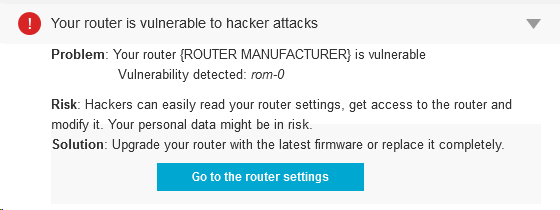
Among several vulnerabilities around, there is one that is quite common. It’s called ROM-0 and allows the attacker to easily gain control of the whole router and, subsequently, your Internet connection. In short, the attacker could request ROM-0 through HTTP (i.e. http://192.168.1.1/ROM-0) and then he can download all the important and secret data stored in your router: Your ADSL login/password combination, WIFI password and basically all your configuration data.
How to avoid attackers from downloading your Rom-0 configuration file and manipulating your router?
It’s simple (if you are comfortable around computers. Ask a techie to help you, if you’re not):
- Forward port 80 on the router to a non-used IP address on your network.
- Enter your router configuration and go to “Port forwarding†configuration.
- Send all http traffic, of all protocols, to star and end port 80 in a non-used local IP address (something like 192.168.0.xxx, where xxx would be a non-used IP).
There are free guides of “port forwarding†for quite a lot of routers. Check your model here.
Avast Software’s security applications for PC, Mac, and Android are trusted by more than 200-million people and businesses. Please follow us on Facebook, Twitter and Google+.