Category Archives: Antivirus Vendors

Antivirus Vendors

.NET goes open source and cross-platform

Microsoft’s .NET framework, which is used to build millions of websites and online applications, is taking further steps to go completely open-source, Microsoft has announced at the Connect() virtual development event. The company also stated its commitment to eventually ensure the free code runs on Mac OS and Linux too, Wired reports.

The post .NET goes open source and cross-platform appeared first on We Live Security.

Careful with photos from unknown sources in Android: They could now contain a nasty surprise

We now live in the age of the image. Hardly a day goes by when we don’t download or share an image of friends or family. The saying ‘A picture is worth a thousand words’ has become a motto for our everyday lives.

Well aware of this are those who prowl the Internet with malicious intent. They know that images are now swarming across the Web, and as such represent the perfect Trojan horse to conceal malicious content. In fact, had it not been for Axelle Apvrille and Ange Albertini, many have already tried. These researchers were responsible for uncovering a crack in the defensive wall of Google’s mobile operating system, through which images can be used to hide malicious software, which could then slip past the system’s protection.

android-mobile

At the latest Black Hat Europe event in Amsterdam, these cyber-security experts presented their work on the vulnerability in Android. Due to this flaw, malicious users could reach the smartphone or tablet of any user through an image which, when downloaded, would become a file that could infect the device.

According to Apvrille and Albertini, the malicious payload could be concealed in any image, regardless of format. Whether a .png or .jpg, what to the naked eye is simply a picture of a person, could simply be a front for code that would be released from the image and spread malware.

To demonstrate the existence of the vulnerability, they created a tool called AngeCryption, which let them convert images into packets. Thanks to this, they could hide anything they wanted to transmit from one device to another without security systems or Google’s own scanner being aware of its existence. So behind an apparently inoffensive image there could be an .apk, the type of executable file that allows applications to be installed.

pic-mobile

In the proof-of-concept presented by the researchers, they used an image of Darth Vader to hide a malicious app designed to steal photos, messages and other data from the devices it is downloaded to.

Imagine a contact sent you an image via WhatsApp and you downloaded it, without you knowing an app would be installed on your device that could search for and steal anything it found. This is precisely what this vulnerability allows.

“Such an attack is highly likely to go unnoticed, because the wrapping Android package hardly has anything suspicious about it,” explain Apvrille and Albertini. They also warn that this flaw has been present in all versions of Android so far.

The discovery of this security hole was kept quiet until the researchers were able to inform Google and the company’s security team had time to fix it. So are you now safe? Yes, but only if you remember to upgrade your smart phone or tablet. If you don’t, you will be exposed to potentially nasty surprises.

So we advise you:

  • To be careful with photos from unknown sources
  • Install any available Google updates.

Also, as prevention is better than cure, install our antivirus for Android devices. Why take unnecessary risks?

The post Careful with photos from unknown sources in Android: They could now contain a nasty surprise appeared first on MediaCenter Panda Security.

Creating the Next 2 Billion Smart Users

The smartphone will be the on-ramp to the Internet, if not the only ramp, for the next wave of new users – largely because it’s the easiest way for them to get there and broadband isn’t available. For one, the mobile Internet can reach places that wired connections can’t (and likely never will). Moreover, the price is right. The cost of owning a smartphone is decreasing as manufacturers and carriers alike compete for new users. Soon millions of people will hop online for the first time, all thanks to the smartphone.

It’s terrifically exciting, and it’s also a terrific challenge.


New Skills for a New World

Think of it this way, more than half of the human population is ready to dive into the digital world with little to no instruction. It’s like getting behind the wheel of a car for the very first time and heading right onto the highway. Just like driving, getting around safely in this new world demands a new set of skills. Every one of those new users will need guidance on any number of things, like how to prevent identity theft, how to protect their personal privacy, and even how to build a business online. The list goes on.

But who’ll be there to teach them those skills? After all, nothing like that is covered in an owner’s manual. Whose responsibility is it anyway? I believe it’s everyone’s responsibility and I’m far from the only one who feels this way.  It’s about changing social norms and learning how to care for yourself and the welfare of others on the Internet.  We’re familiar with the stories of teen sexting, over disclosure, identity theft, cyberbullying – much of which could be curtailed if we, as users, understand the consequence and knew how to avoid them.

Our core assumption is that the content exists but it’s not presented to the users at the right time in an engaging fashion at a point when choices are made.


The Smart User Mission

This September, I was privileged to attend the annual Clinton Global Initiative, where industry and world leaders gather to create innovative solutions that take on the world’s most pressing challenges. One of the topics AVG rallied around was “Digital Citizenship,” a growing movement based on the belief that everyone on the Internet is responsible for making it a better place. As a result, I’m pleased to announce AVG’s Smart User mission, which is our Commitment to Action as a member of the Clinton Global Initiative.

The objective of the Smart User mission is to create the next two billion smart users on the mobile Internet. Along with carriers, device manufacturers, developers, content providers, and organizations across the globe, our aim is to provide two billion mobile Internet users with the tools and information they need to be safer, happier, and more productive online.

The mission’s approach is to engage these mobile users right from the start – the very moment they start using their phones. It begins with the “Smart User” app, which will launch when users first set up their phones. Right away it will provide fun and engaging content to help users make educated choices about their security and privacy. From there the Smart User mission will provide users with continuous guidance as they spend more and more time online. We’ll be partnering with mobile carriers, device manufacturers to get the Smart User app into people’s hands, and a wealth of partners like design agencies and celebrities will help contribute content along the way.

We’re very lucky to have Common Sense Media already signed up as a partner. Their history of advocating for children, families, and schools is a natural fit. The content and guidance they’ll provide will be invaluable, and this partnership will help us accomplish the Smart User mission.

My hope is that you share the growing point of view that we’re all responsible for a better Internet, and that everyone can take an active role in making it happen—from technology providers and manufacturers to content creators and consumers. If you’re interested in joining us on this mission, please get in touch. There are plenty of avenues to partner up, get involved, and build the next wave of two billion Smart Users.Email [email protected].

Photo Courtesy of Barbara Kinney, Clinton Global Initiative

You can find more information on the Clinton Global Initiative at http://www.clintonfoundation.org/

Introducing a cleaner for iPhone, iPad & iPod Touch! 

Yes, this is not a typo for the first time, AVG PC TuneUp will also include an all-new AVG iOS Cleaner feature to help users get rid of the hidden leftover files, which can amount to thousands, from both iOS itself as well as apps used on a daily basis.

In this and the next blog post I’d like to talk about what’s new for our PC utility AVG PC TuneUp. Let’s jump right in?

AVG Cleaner for iOS – Wait, an iOS Cleaner for PCs?

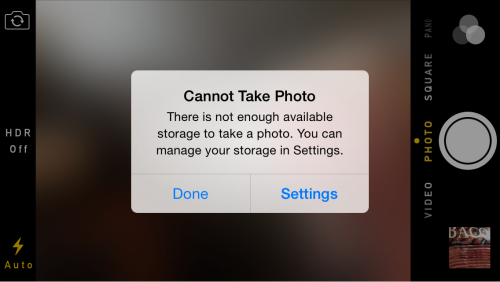
That’s right. We know that a lot of users out there are struggling with disk space on their iOS devices (iPad, iPhone, iPod touch). They’re getting messages like this when snagging a photo or downloading apps:

Also, iTunes seems to explicably show that there’s a lot of stuff in the “Other” or “Documents & Data” category. Well, if you’re running out of disk space, hidden clutter may be the culprit. That’s why we came up with AVG Cleaner for iOS. Since it’s technically not possible to have an app delete hidden temporary files and other unneeded files (more on that below), we’re doing that right from our PC and it’s the reason it’s part of AVG PC TuneUp.


How exactly does it work? (Step by Step)

Open up AVG PC TuneUp and select “Dashboard”. Then, go to the “Clean up” category.

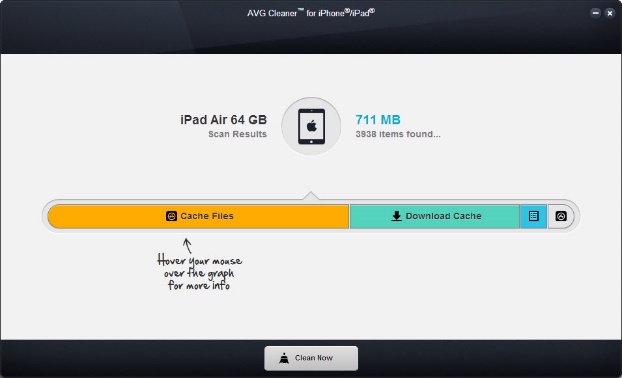
Connect your Apple device to your PC and click on ‘Clean Up iPhone, iPad or iPod touch’.


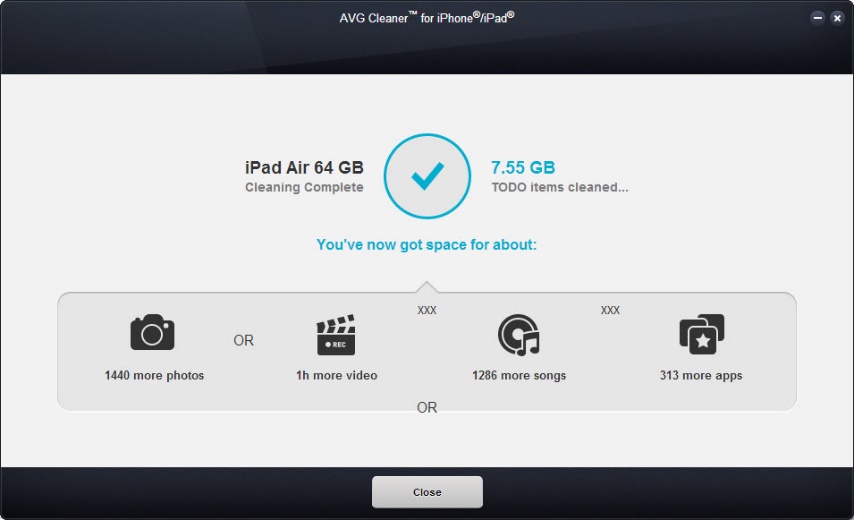
Hit the ‘Clean Now’ button. Have a look at the results.


How much did we clean up?

I was as surprised as you will be when I first laid my hands on an early version of our AVG Cleaner FOR iOS months ago: It found a LOT of unexpected files on my iDevices. I guess the biggest surprise was my iPad:

7.5 GB on my iPad. Another 500 MB on my iPhone 5S and more than 700 MB on my iPod touch. So how’s that even possible?

I found that rather incredible, and even more so after my iPad showed another 1 GB just a few weeks later:

Digging deeper, I found that many of the daily apps I use create a lot of temporary files without deleting them. For example, after 2-3 days of Spotify streaming, its offline cache grew up to 655 MB on my iPad. But what is all this stuff? Let’s find out:


What AVG Cleaner for iOS cleans up

Download Cache & Temporary Files

Most apps create a “Cache” and “Temporary Files” folder to store data that’s needed while they are running. Unfortunately, many apps tend to forget to clean out these hidden downloads, which may result in your iOS device running out of space soon.

AVG Cleaner™ for iOS cleans out these hidden cache folders. Even according to Apple’s official guidelines, the cache folder is safe to delete as it includes data that can easily be renewed or downloaded again by the app – so we’re not doing anything harmful to your device. In fact, it may help even solve some problems when one of these cache files gets corrupted or damaged by a bug in the app.


Thumbnail Cache

Every time you browse a photo related app, it creates thumbnail files to display the little previews (see image above), but may forget to delete them even if they’re no longer necessary.

AVG Cleaner™ for iOS cleans out all thumbnail files from 3rd party apps. It gets rid of all thumbnail files that are no longer being used and will only recreate the ones you need. Don’t worry, your stored photos will not be touched.


System Logs & Crash Reports

Every time an app crashes or an error occurs on your iPhone, iPad or iPod touch, a crash report and logs will be created. If you want to, these can be sent to Apple or the maker of the app. However, these reports take up valuable storage and may even contain personal information.

AVG Cleanerâ„¢ for iOS helps users delete system logs and crash reports, free up more disc space and the protect your privacy by removing personal information within these cookies.

Ok that’s it for now: Have you tried it out? Let us know how much you were able to clean up!

How can you tell if a shortened link is secure?

short-link

At some time in our (digital) lives, we’re bound to come across shortened links or URLs, on social networks, for example, you can’t avoid them.

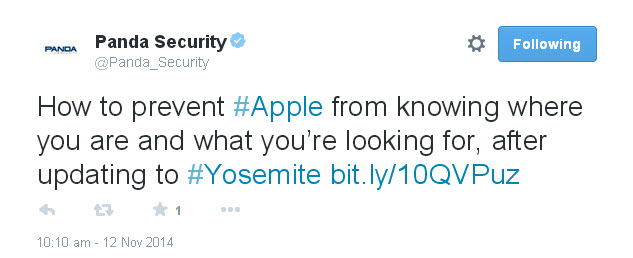
There’s no doubting that they are highly useful. In a tweet, for example, characterized by the famous 140-character limit, a shortened URL creates space to write something else. Moreover, they offer other characteristics, though one of these has become a double-edged sword: You don’t know where it will take you.
tweet-bitly

This is where you have to tread carefully. A shortened link is really a mystery. You don’t know which website it will take you to or what might appear on the screen. As such, these shortened URLs are the perfect tool for malware and phishing. Click them at your peril.

Yet there’s no need to panic. Just because you come across them every day on Twitter and they could contain a nasty surprise doesn’t mean that every one is a booby trap. Some simple caution and common sense can prevent a catastrophe on your computer.

To start with, be careful with the source of the URL. If it’s an online media channel or blog that is tweeting the headline of an article and a link to it, it is reasonable to suppose that the link will take you to the article. So click away! However, if you find a message from a known (or unknown) contact saying, “Hey, you look great in this photo!” and with a shortened link, be very wary.

Among the numerous services used to shorten inks, some are more reliable than others. The Google and Bit.ly services are among the most secure, though not so much so that you can confidently click them if the source is unknown.

How can you tell if a shortened link is secure?

Using your common sense is a good initial filter to apply when deciding whether or not to click, though it is not infallible. Fortunately, there are quite a few tools that let you expand shortened links, or in other words, see what’s really behind each link and avoid disasters.

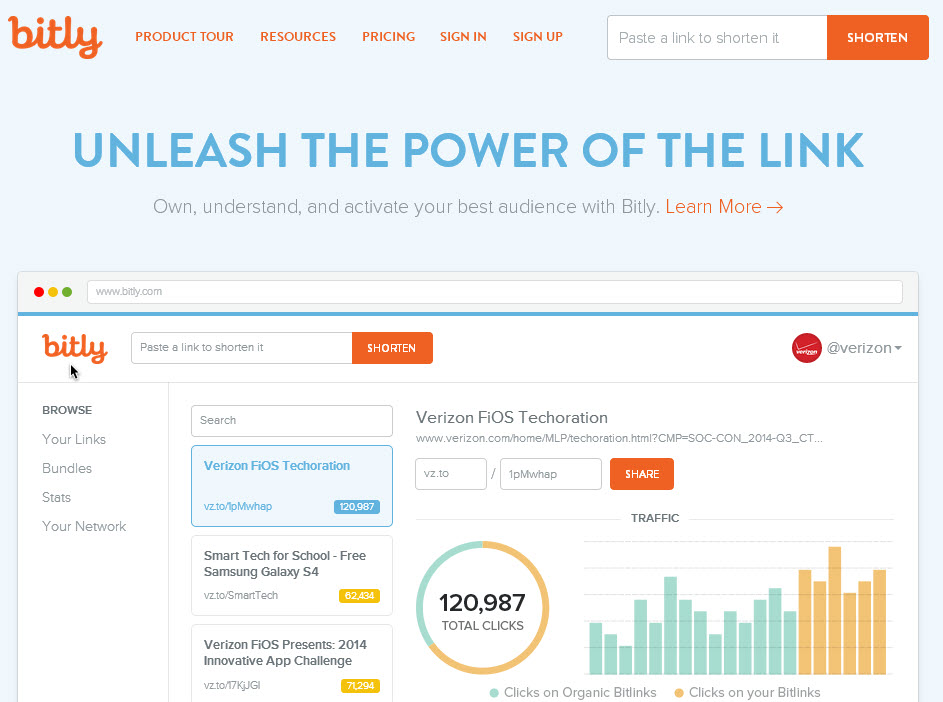
First, here’s a little trick if you come across Bit.ly or Google shortened links. Copy the link, paste it in your browser address bar and, before hitting ‘Enter’, add the “+” symbol. This way you can see the statistics associated with the URL, and more importantly, you can see which website it takes you to, among other things.
bitly-links

Apart from this useful trick, a browser extension or a visit to a certain website could also be enough to prevent any cyber-criminals from giving you a nasty surprise through an apparently interesting link.

Websites such as LongURL or Unshorten.it reverse the process of URL shorteners. Enter any suspect shortened URLs in these pages and you can see exactly where they take you.

As we said before, these are not the only ways of ensuring the security of the shortened URLs that you come across every day on social networks. Probably the most convenient way is to install an extension on your browser that tells you where these links point to without having to continually consult an external website as we described above.

Both for Google Chrome and for Mozilla Firefox, there is a solution to deal with the problem of shortened links.

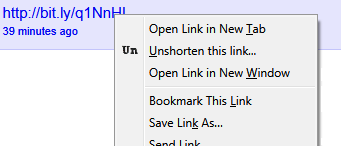
  • For Firefox, you can use the corresponding version of Unshorten.it. Whereas the website expands shortened links, the add-on for Firefox does so directly from the browser, thereby saving you a few seconds. Instead of having to open a new tab in the browser and cut and paste the URL, this extension means that you only have to right-click the shortened link and select the option: ‘Unshorten this link’.
unshorten

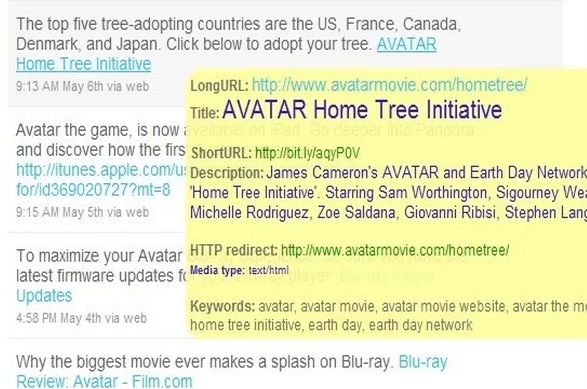
  • If you use Google Chrome, you also have plenty of options. For example, LongURL (that’s right, the Google browser version of the website we mentioned before), is an add-on that displays all the data regarding the shortened link – including the URL – when you pass the cursor over it.
long

Regardless of the method you choose, you’ll still have to employ some common sense to decide whether the page is bona fide or not. When you expand a link and the name of the website isn’t familiar or what you see is a completely incomprehensible Web address, you’d better be cautious and not go there. In this case, the saying is quite appropriate: ‘Better safe than sorry’.

The post How can you tell if a shortened link is secure? appeared first on MediaCenter Panda Security.