Category Archives: Antivirus Vendors
Antivirus Vendors
Cuckoo Sandbox vs. Reality

This kind of sandbox is normally sold as an appliance for companies with enhanced security requirements. A local specialist then investigates the results and classifies the analysed samples.

And part of the ITES project:

The post Cuckoo Sandbox vs. Reality appeared first on Avira Blog.
Sednit Espionage Group Attacking Air-Gapped Networks
The Sednit espionage group, also known as the Sofacy group, APT28 or “Fancy Bearâ€, has been targeting various institutions for many years. We recently discovered a component the group employed to reach physically isolated computer networks — “air-gapped†networks — and exfiltrate sensitive files from them through removable drives.
The post Sednit Espionage Group Attacking Air-Gapped Networks appeared first on We Live Security.


How to prevent Apple from knowing where you are and what you’re looking for, after updating to Yosemite
Apple has updated its operating system for Mac, so users can now get the long-sought after Yosemite OS X for free. Even though it has just appeared on the scene, the first alarm bells have already started to ring: Many users are unhappy about handing over even more private information to the technology giants.
The latest upgrade to Apple’s operating system includes an improved version of Spotlight, the search system that simplifies searching for files on the computer. So what’s different about Yosemite? It does the same as before but now it connects directly to the Internet through the Bing search engine and also searches your contacts and emails.

This way, your Mac computer runs your search both on your own system as well as on the Web. Spotlight also offers you ‘smart’ suggestions from the App Store, iTunes Store and the Internet in general based on your search history.
The system doesn’t just send information about your habits and location through Bing to Microsoft, it also reports this data in real-time to Apple’s servers. So both companies will have data about any search that anyone does through Spotlight.
Apple claims that it doesn’t receive individualized search details and that Microsoft only collects general search data, which at no time includes personal identification of users or device IP addresses. According to the company, this is because the devices only use a temporary and anonymous session ID, which lasts fifteen minutes and then disappears.
Yet most users are unaware that this latest update implies such a loss of privacy, as the option is enabled by default when updating the OS. So is it possible to evade such surveillance and all those ‘useful’ suggestions? Luckily for users it is.

How to prevent Apple from knowing where you are and what you’re looking for, after updating to Yosemite
Just go to ‘System Preferences’ in the Apple menu, where you will see the Spotlight icon. Click it to find a list of different categories including the option ‘Spotlight Suggestions’. Clear the checkbox. Then go through the categories until you find ‘Bing Web Searches’, and ‘Bookmarks & History’, which you should also disable.
If you use Safari, you will have to similarly disable ‘Spotlight Suggestions’ by clicking ‘Preferences’ and ‘Search’. And problem solved! Because if you don’t, Safari will send a copy of your searches to Apple.
To simplify things further, security developer and researcher Landon Fuller has created ‘Fix Mac OS X’, which lets you automate the process of disabling these options with a single click. According to Fuller, Spotlight isn’t the only feature with unnecessary changes that is introduced with the update, and he explains that his application will also fix other settings enabled by default.

This way, you can prevent these companies from saving your search data and then offering you certain services or products having analyzed your likes, needs or intentions. You will also prevent annoying, unwanted adverts and safeguard the files on your computer.
For the moment, Apple has declared that the company is wholly committed to protecting user privacy and, with respect to Spotlight, claims that it “minimizes the amount of information sent to Appleâ€, and even that the search tool “blurs the location on the deviceâ€, so the company doesn’t receive the exact location.
More | Panda Antivirus for Mac, compatible with Yosemite
The post How to prevent Apple from knowing where you are and what you’re looking for, after updating to Yosemite appeared first on MediaCenter Panda Security.
Is your data secure in the cloud?
It’s a very broad topic so I chose to focus my answers on three particular things.
When you put your data in the cloud, someone else holds it?
There’s a security gap between the private and public cloud. You might have invested heavily in your own private cloud or on premise systems, but data on the public cloud are not secured by you. Who controls this data? Who is responsible for it and who is accountable should something go wrong? This needs to be addressed as a priority. Consider that CTOs and CIOs must as part of SOX compliance procedures sign off on their company data being secured and under control. Yet if that data is held in the cloud and you cannot audit the security measures there, then the reality is that it is being managed by someone else – the cloud service provider.
So what we need to focus on is understanding how we can help businesses get back control of securing their data.
Cloud and mobile has changed the assumptions businesses had that they can control all the devices being used within their organizations to access their data.
With cloud services, businesses have limited authority to define what security is being used by their provider to protect their data. Company executives might not like this situation, but they will still have had to confirm that their data is secure and compliant with regulations. This is a no-win scenario for businesses.
That fact that critical data is stored on cloud services means that the business is now effectively in someone else’s hands. There is the additional challenge of how the IT department can control a situation where an employee has their own device and wants to use it to connect to this cloud-based data using tools like Salesforce, for example.
If the malware is running on that device, the IT manager is not in control of identifying and fixing that. They are in the position of having to guarantee to the business that company data is secured when in fact that might not be the case.
Hackers realized this pretty quickly. They started to target individuals within organizations when they were off the network and interacting with the cloud via a device in order to retrieve data they needed.
I expect that this risk will soon become untenable. And in the near future, that we will start to see companies pushing back on signing documents that their data stored in the cloud is secure because in reality, that data is no longer part of their business, no longer within their control.
In small to medium sized businesses, there is less likelihood they will even have any sort of systems in place to manage this and so they ultimately have less control and less confidence that their private, business data is safe in the cloud.
The Internet of Things means businesses need long-term perspective for their cloud strategy.
This brings me to this last point. If we fast forward two or even five years, and look at the impact of the Internet of Things, it’s clear we need to start thinking already about how to connect and manage these new devices and sensors for business. More importantly, we need to harness the data that is coming out of them. We’ll want them to be under control and we will all start to use services.
We also have privacy to consider. This is one of the rising stars in security. It’s a big challenge and even law enforcement agencies are becoming more active in this area.
As the panel drew to a close, I emphasized that things will start to change. Cloud service providers should start to work with their client teams on premise to give back to that business a degree of control. This will be the first step towards giving CIOs and CTOs that confidence to sign compliance documents because they will be able to verify that company data is indeed secure.



Apps For Our Veterans
As we celebrate Veteran’s Day in the U.S. this November 11th, I’d like to honor our uniformed men and women, both those who have served and those who continue to do so. I am very proud of my own military service and most veterans will tell you the same. If you are like many of us, and have friends or family members who have served, here are a five great apps/services to check out.
For Re-entry into Civilian Life
The U.S. Chamber of Commerce Foundation Hiring Our Heroes app, in partnership with Verizon, is a mobile one-stop shop developed to help veterans, transitioning service members, and military spouses searching for employment. The app gathers all of the program’s resources in one tool – enabling military members and their families to search for jobs and access free employment resources on virtually all mobile devices.
Militarylounge.com has an app called College Guide that provides a comprehensive list of universities that accept the G.I. Bill, a calculator of benefits, as well as a handbook of benefits that are available to vets and soldiers. Â A major benefit to the military is the G.I. Bill, which, in its post-9/11 form, provides full tuition and fees for public, in-state schools, plus a monthly allowance for housing and an annual stipend for textbooks. Over 6,000 institutions participate in the Post 9/11 GI Bill Yellow Ribbon Program.
For Health
Many veterans understandably have trouble navigating the complicated world of the Veterans Administration. Claims Coach, developed by The American Legion, is designed to help the process. It provides step-by-step guidance to help service officers through the process of filing for VA benefits. The free app features a nationwide directory of accredited American Legion service officers, a built-in organizer for appointments, documents and deadlines, and a wealth of other resources. Additionally, a personal secure file called “My Checklist” keeps everything in order, from the initial meeting with a service officer through VA’s decision and appeal, if necessary.
Unfortunately, but understandably, many of our troops come back from service traumatized from events. PTSD Coach was designed for veterans and military service members who have or may have Posttraumatic Stress Disorder (PTSD). This app was created by the VA’s National Center for PTSD in partnership with the Department of Defense’s National Center for Telehealth and Technology. It provides users with education about PTSD, opportunities to find support and tools to help manage the stresses of everyday life with PTSD. You can download it here.   It’s been downloaded more than 100,000 times in 74 countries. Features include:
- Information on PTSD and treatments that work
- Tools for screening and tracking symptoms
- Direct links to support and help
- And, as a mobile app, it’s always just a click or phone call away.
As the VA points out: Any data created by the user of this app are only as secure as the phone/device itself. Use the security features on your device if you are concerned about the privacy of your information.
For Families
Scout Military Discounts LLC has just launched SCOUT, a military savings mobile application for both iOS and Android devices. The new, free mobile app is designed to provide all U.S. veterans, military members and their families a way to easily access military discounts and freebies from anywhere, at any time from their mobile phone or other mobile devices.
The SCOUT app is available for download at Apple or Google Play. Use the search term SCOUT Military to find the app for download. And if you want to volunteer or get involved, go to scoutmilitarydiscounts.com. The SCOUT app is available for download at the Apple App Store and Google Play. This looks like a great app to use during the holiday season!
For Those Still Serving
So much support for our troops come from veterans friends and families. You can’t beat Skype for keeping in touch with troops at home or abroad.  Rules and regulations are different depending upon where a soldier is stationed, but veterans can communicate face to face with their overseas colleagues for practically nothing, and perhaps more importantly, spouses can keep in touch with loved ones that might be far away.
This Veteran’s Day, I want to wish all those who have served, and those who still do serve, the gifts of safety, health, and happiness. Thank you for your service.



How to disable access to your router from the Internet
When Avast Home Network Security (HNS) displays the following error: “Your network router is accessible from the Internet†that means that hackers can access your router’s administrative interface.
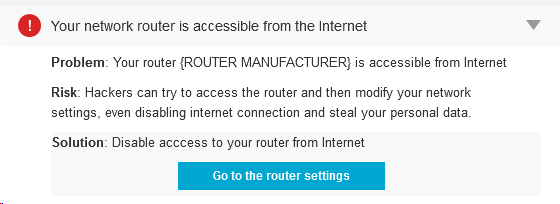
Your WiFi network is not secured
Although that doesn’t mean imminent threat, the fact that the router is accessible from the Internet is not good. A cybercrook could modify your network settings and even disable your Internet connection or, the worst, steal your personal data.
For sure, if you use the default password in your router, everyone can access your router. However, you won’t do that, will you? If you’re reading this article, we suppose you’re technically educated and will know that using the default password is a serious risk.
 Routers, especially Small Office/Home Office (SOHO) wireless routers, are usually quite vulnerable to all sorts of exploits and exposing the admin interface of the router to the Internet is like leaving your door unlocked when you leave home. According to Tripwire, “80% of Amazon’s top 25 best-selling SOHO wireless router models have security vulnerabilities.â€
Why should we worry about routers?
“Unsecured routers create an easy entry point for hackers to attack millions of American home networks,†said Vince Steckler, chief executive officer of Avast. “If a router is not properly secured, cybercriminals can easily gain access to an individual’s personal information, including financial information, user names and passwords, photos, and browsing history.â€
Set up a strong password
I already explained how to make sure you have the highest level of encryption set on your router. If you missed it, please go back and read my blog, How to turn on WiFi encryption in your router settings.
The next step is to replace thedefault administrator password.Some of the most common mistakes made, not only by common users but also from a significant number of IT professionals, are to use the default administrator password and use the popular WPS and its insecure technology that allows hackers to discover (much easier) the router encryption passphrase.
When creating a new password, make sure it is long and strong, using a mix of numbers, letters and symbols. If you have many visitors to yourhome, it’s a good idea to set up a guest network with a separate password.
Avast 2015 includes a Home Network Security scanner that can help you determine what needs to be done, explain why, and can direct you to the router manufacturer’s website. Read more about it on our blog, Your home network is at risk of cybersecurity attacks.
Avast Software’s security applications for PC, Mac, and Android are trusted by more than 200-million people and businesses. Please follow us on Facebook, Twitter and Google+.
Kickstarter campaigns wants your password on your wrist
A new wristband that aims to replace the password has launched a crowdfunding campaign on Kickstarter. At the time of writing, Everykey has passed the halfway mark on its $100,000 funding target with $56,586 pledged with 19 days to reach $100,000. Using Bluetooth, the Everykey promises “immediate access to a user’s password-protected electronics such as
The post Kickstarter campaigns wants your password on your wrist appeared first on We Live Security.

Realistic looking phishing websites work 45% of the time, Google claims
Google has teamed up with the University of California in San Diego to publish surprising new research about phishing, how effective it is and how scammers work their phishing operations.
The post Realistic looking phishing websites work 45% of the time, Google claims appeared first on We Live Security.


AVG Awards Gala celebrates exceptional partners of 2014
Our hugely successful Cloud Summit in Phoenix for partners and managed services providers (MSPs) came to a fitting conclusion with a dinner to celebrate the winners of the AVG 2014 Awards Gala. AVG’s first ever event of this kind celebrated top performing partners from all over the world that were judged to have shown outstanding commitment, entrepreneurship and technical proficiency in protecting and managing their customers’ critical business systems during 2014. It was a great thrill to be able to honor so many partners for their exceptional contribution to our success this year and I am proud to hold up their accomplishments as standards of excellence for every partner to follow.

We had over 150 nominations from around the world contesting awards in eight categories. Each nomination was judged by our panel of AVG CloudCare™ and Managed Workplace® experts. I saw dozens of examples of the highest caliber from familiar, long-standing names to new cloud-oriented start-ups working on some highly innovative and exciting projects across the globe.
Winners were selected on the basis of such criteria as their outstanding levels of professionalism to customers, their market influence and their exemplary use of the AVG cloud-based security and remote monitoring & management (RMM) business solutions portfolio.
The complete list of categories and winners is as follows:
Largest Deployment of Managed Workplace
Awarded to the partner with the largest deployment of our managed workplace solution
Winner: Corporate Technologies
Recipient: David Pekarna: Senior Networking Engineer
Largest Growth with Managed Workplace, NOC & HD
Awarded to the partner who has had the largest growth with our managed workplace solution, NOC & HD offerings
Winner: Net@work
Recipient: Mohit Govani: IT Director
Most Complete MSP offerings
Awarded jointly to two companies adjudged to have leveraged all the tool sets within AVG’s product offerings
Joint Winner: Tekmate
Recipient: Jason Reopelle
Joint Winner: Alura Business Solutions
Recipient: Jason Derstine, President & CEO
Most Innovative Partner
Awarded to the partner that has shown the most growth and advancement through innovative business strategies
Winner: Advanced Technology Solutions
Recipient: Bob Ascherl, Product Development Manager
Â
Community Partner of the Year
Awarded to individual MSP partners who have engaged, enriched, and helped to grow the AVG MW community
Winner: STF Consulting
Recipient: Sean Furman, President & CEO

Rookie of the Year
Awarded to a partner in their first year with AVG Managed Workplace who has shown the highest growth by aggressively deploying the solution and successfully launching their Managed Services offerings
Winner: 365 Managed IT
Recipient: Ken Stewart, Founding Partner
MSP of the Year
Awarded to the partner who has demonstrated outstanding growth, industry leadership, and customer service excellence with their Managed Services practice
Winner: TDARX
Recipient: Mike Shuping, President
To conclude, I should like to personally thank everyone that participated in our inaugural Partner of the Year Awards and many congratulations to the winners.
Already the bar has been set very high and I’m truly excited at what we can achieve together for our customers in the year ahead.

