Category Archives: Antivirus Vendors

Antivirus Vendors

What does iOS 8 mean for privacy?

Apple just released the next version of its mobile operating system, iOS 8, to the world for all devices from the iPhone 4S and newer. iOS 8 introduces many new bells and whistles including mobile payments on the iPhone 6 and 6 Plus, health data, and many other features. While it will take a little while to get used to and notice everything new, we wanted to let you know of the improvements in privacy and security being made in this new mobile OS.

With a big push into wearable computing and health information on your devices, the need for improved privacy and security may be at an all-time high. The three main areas of concern we look at to see how well Apple is keeping up their privacy and security standards would be Apple Pay, device settings, and general data protection.
 

Apple Pay

Apple Pay may be the biggest news outside of the Apple Watch to be released in quite a while for Apple. Not only are they now enabling every new smart phone user to pay at over 220,000 brick and mortar stores with their phone, but they hope to do so in a much more secure manner

With Apple Pay, you are enabling your phone to act as a payment service that connects to your credit card or bank account. Apple Pay actually takes this a step further and never stores your credit card information on the devices or servers, but rather generates one-time tokens that connect to your account each time you pay. This means that you’re never actually providing your real credit card details at the point of purchase, helping protect you from fraud.


Device Settings

Device settings have been mostly minor updates from one version of iOS to the next, and although the changes may seem small they can help put the privacy control back in consumer’s hands. In iOS 8, there are three updates that users should be aware of in the settings: default search engine, location data, and your contact list.

Apple is introducing a new option for default searches to satisfy the privacy conscious crowd, using DuckDuckGo. DuckDuckGo is a privacy oriented search engine that doesn’t collect information on your search terms or build a profile to target advertisements at you. In fact, the search engine doesn’t even keep track of what websites you visit through your searches. This enables the DuckDuckGo to provide the most private search in a consumer friendly manner. The one downside to DuckDuckGo is that your searches will not be tailored to you; so finding what you want may take a little bit longer.

Location data has always been one of two options prior to iOS 8, either always on or always off. With the introduction of iOS 8 however, there is now a new option to allow apps to only access your location while the app is running. This could prevent rogue apps from collecting and storing data about your location at any time of the day. This setting is configurable through the Location tab in the Privacy section of the settings app, although it does require apps to accept this as an option.

Finally, your contact list contains some of the most personal and private data you might have on your phone. There have been many examples of apps uploading and saving your contacts to their servers, and this was in part due to an all-or-nothing model for accessing contacts.

Contact information is necessary for sharing with friends, finding people to connect with, and other useful tools on your device, but it’s definitely not always needed in its entirety. For this reason Apple is now introducing better developer controls so that apps can request only certain parts of your contact list, such as just email addresses, or even search and get a single contact at a time. This benefits the user as they won’t need to hand over all of their data to every app, but rather only give away the information that is needed.
 

Data Protection

iOS 8 brings a large push towards health data and wearable computing to your devices. While these are great new tools, they also generate a lot of sensitive, personal information about you. To help keep this data safe, Apple is creating a protected, centralized location that requires specific access before apps can read the data. This allows you to control who you share it with.

Outside of data that devices are tracking on us, Apple also taken steps to prevent third parties from tracking you based on your device. One of the most common ways companies would put together a profile on users was to associate behaviors, such as apps used or websites visited, to a MAC address which is a unique string that each device has. This address acted as the key that put all the pieces of data together. Starting in iOS 8, your MAC address will become randomized whenever you are connecting to new Wi-Fi spots or apps are requesting your information. This should help make sure you stay more anonymous in the online ad tracking world.

Apple has made a great start protecting your data from hackers, trackers, and government agencies, but we need to remember that much of the control is in our own hands. It is highly recommended to set a unique password for each service you use, enable 2-factor authentication when you can, and pick obscure and hard to discover security questions to back up your account. One of the biggest vulnerabilities to our privacy is ourselves.


Check out our twitter account at @AVGFree or follow us on Facebook at facebook.com/AVG to stay up to date with all the latest privacy and security news around Apple and other popular companies. If there is anything in particular you want to see more of, leave us a comment below or at one of our social media accounts.

Image courtesy of iosmedya.com

What’s behind the rise in cybercrime? Find out from this recorded presentation

Home Depot says it was hacked to the tune of 56 million payment cards. What is behind the current wave of cybercrime? This recorded presentation offers answers and some defensive strategies for organizations at risk.

The post What’s behind the rise in cybercrime? Find out from this recorded presentation appeared first on We Live Security.

Join the Avast Beta 2015 and share your feedback

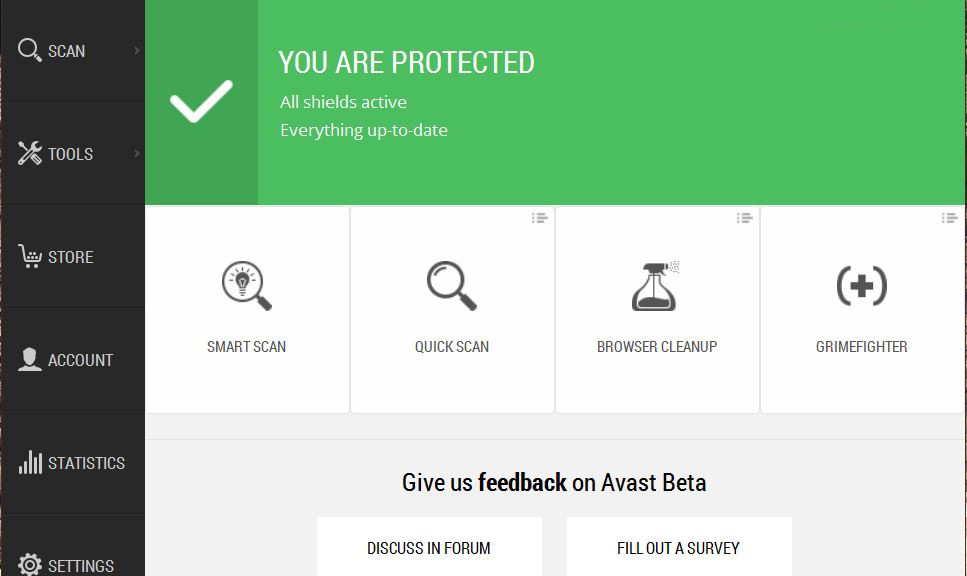
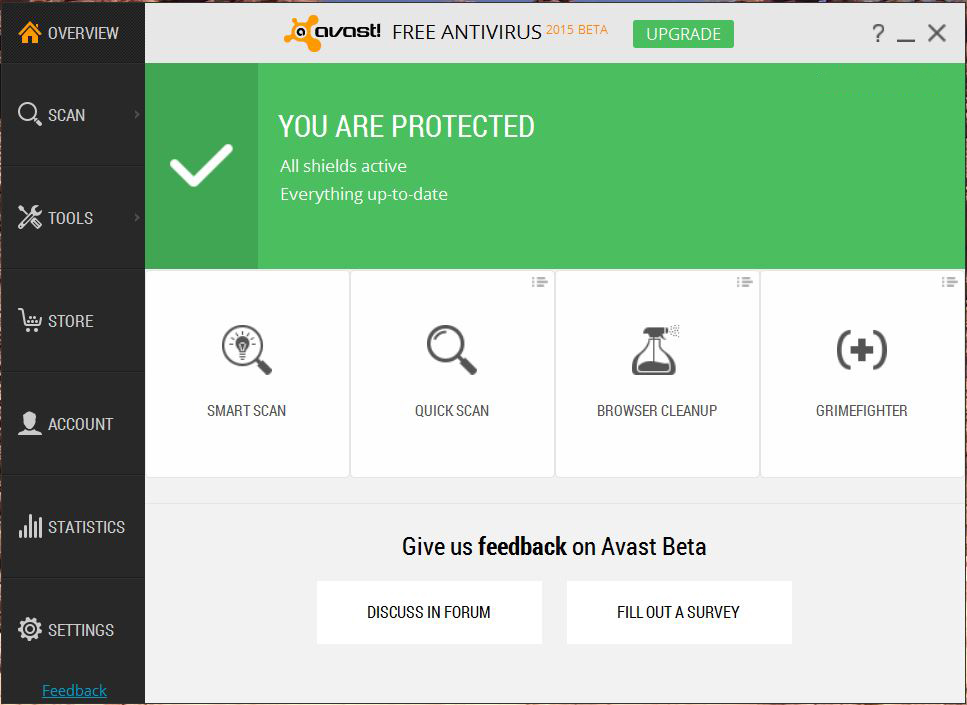
The Avast developers invite you to participate in the Avast 2015 beta test.

2015-Avast-beta

Your participation gives the team working on the latest versions of the world’s most trusted security products a chance to hear your voice – what’s working for you and what is not, how you like the experience, if you see performance or connectivity problems, etc. There are multiple new low-level functions which impact the whole system, so we need your feedback to tune everything for the final release.

Two new features introduced in Avast Beta 2015

Avast NG

Avast NG is a hardware-based virtualization solution capable of running each Windows process in a standalone, safe, virtualized environment (VM) which is fully integrated to your desktop. Each process is executed in its own instance of VM, which means it’s totally isolated from other applications. This feature is now powering Avast DeepScreen, resulting in better detection. The technology will also power the Sandbox and SafeZone components in the final release.

GrimeFighter Free

GrimeFighter will offer free cleaning of junk files and tuning of system settings. These tasks are performed by our Zilch and Torque minions.

Changes and other new features

  • Home Network Security scans your home network for vulnerabilities like WiFi status, connected devices, and router settings.
  • HTTPS scanning is able to detect and decrypt TLS/SSL protected traffic in our Web-content filtering component. This feature will protect you against viruses coming through HTTPs traffic as well as adding compatibility for SPDY+HTTPS/ HTTP 2.0 traffic.
  • SecureDNS protects against DNS Hijack on router/client including unsecured networks, public ones, etc. This feature is active in the paid versions only.
  • Smart Scan integrates all on-demand scans into one scan with different results and recommendations. Includes Antivirus, Browser plugins, Software updates, Home Network, and GrimeFighter.

To learn more about the Avast Beta 2015 , what to test, known issues, and to leave comments, visit the avast! Community forum thread dedicated to the beta test.

Avast Beta 2015 installation links

http://files.avast.com/beta9x/avast_free_antivirus_setup.exe
http://files.avast.com/beta9x/avast_pro_antivirus_setup.exe
http://files.avast.com/beta9x/avast_internet_security_setup.exe
http://files.avast.com/beta9x/avast_premier_antivirus_setup.exe

Thank you for using avast! Antivirus and recommending us to your friends and family. For all the latest news, fun and contest information, please follow us on Facebook, Twitter and Google+. Business owners – check out our business products.


Five Hidden Features to Boost Windows Performance

So, you think you know Windows 7 and 8 inside and out? Think again! In this week’s blog post, I am going to show you five little known features in Windows you may have never even heard of…


Power efficiency report

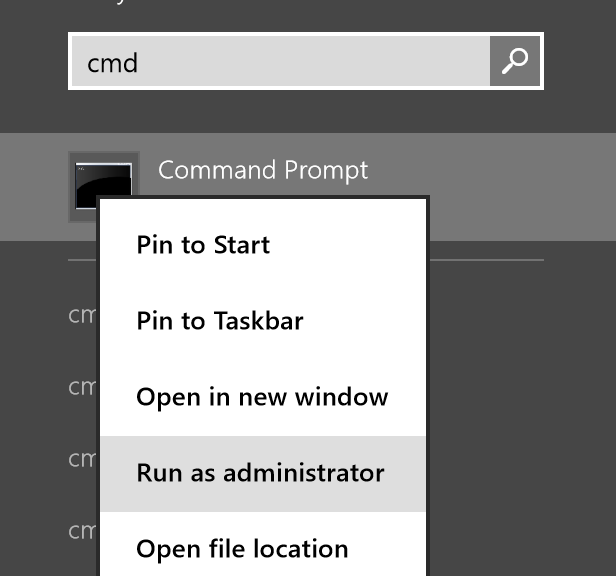
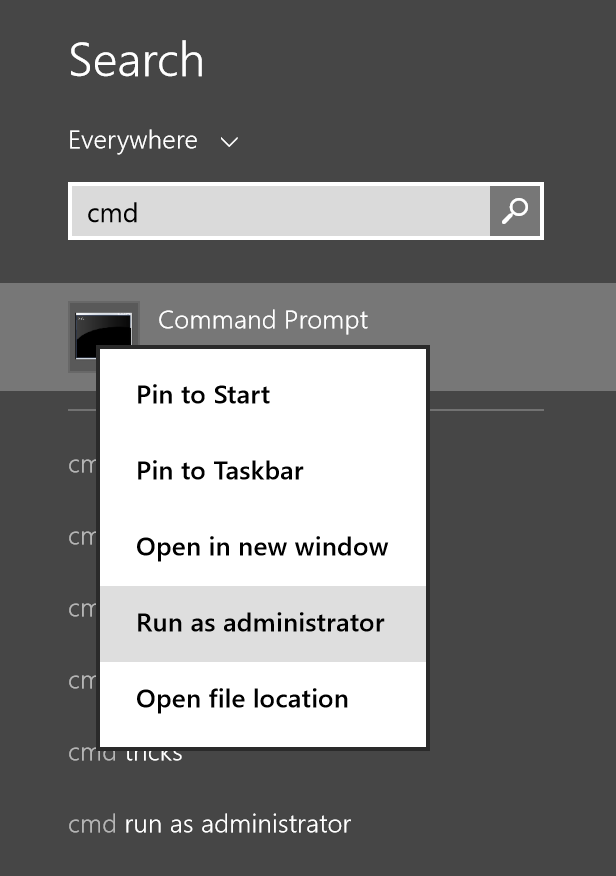
Here at AVG, we love our laptops to last as long as possible which is why this Windows feature is one of our favorites. Microsoft developed an in-depth method for checking power deficiencies in Windows 7 and 8, which is originally meant to be for the IT pro but can still be useful for everyone. The “Energy Efficiency Report” provides detailed information on processes, devices, and Windows settings that increase power levels and, thus, drain your battery quickly. So how can you access this feature? The process can be a bit tricky for less experienced users, but if you follow these instructions, you should have no problems. First, open the Start menu or the Start screen (in Windows 8) and type in “cmd”. Right-click on the “cmd” entry and select “Run as Administrator”:
2014-09-22_17-09-16


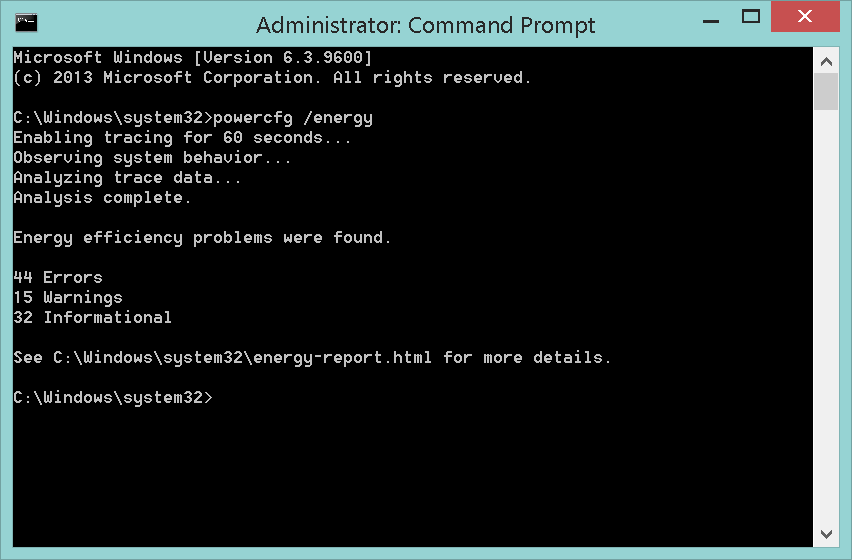
Once you’re in the command prompt, type in “powercfg /energy” and wait for the 60-second energy check to complete. When done, go to the location given by the powercfg command, such as displayed in the following image:

2014-09-22_17-12-16


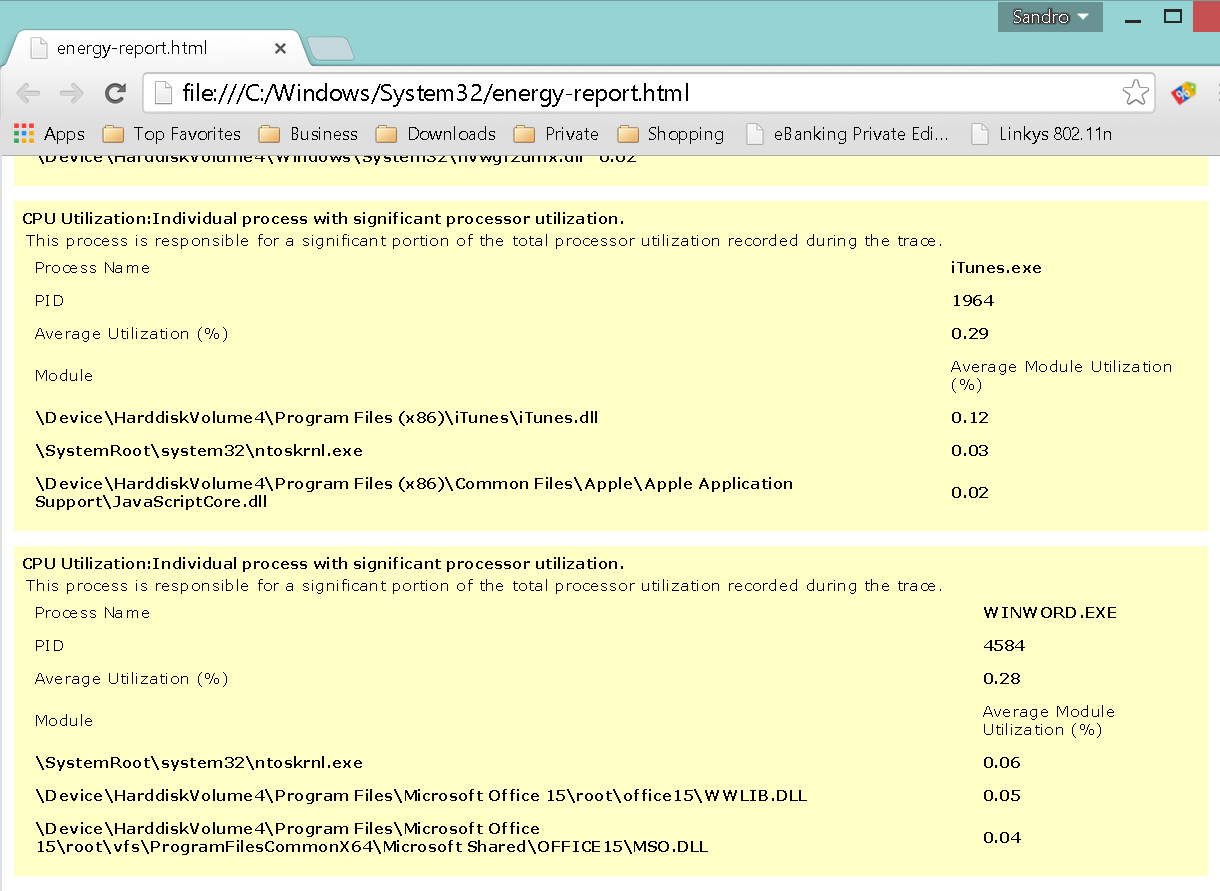
Note: Depending on your User Account Control settings, this report might also be stored in your user directory. To determine this, just look at the last line that tells you its exact location. Once you’ve opened the report in your browser, you will see several power errors and solutions. Not all errors found in that report will make sense, but you will see quickly when drivers or programs are the cause for poor battery life, such as:

2014-09-22_17-15-27


System health report

PCs lose performance and stability over time—this is a fact of computing life. The causes usually vary from too many third-party tools and junk to an old or faulty device driver, to malware and unfixed Windows bugs. You can check overall system stability by using another hidden tool called “System Diagnostics Report”.
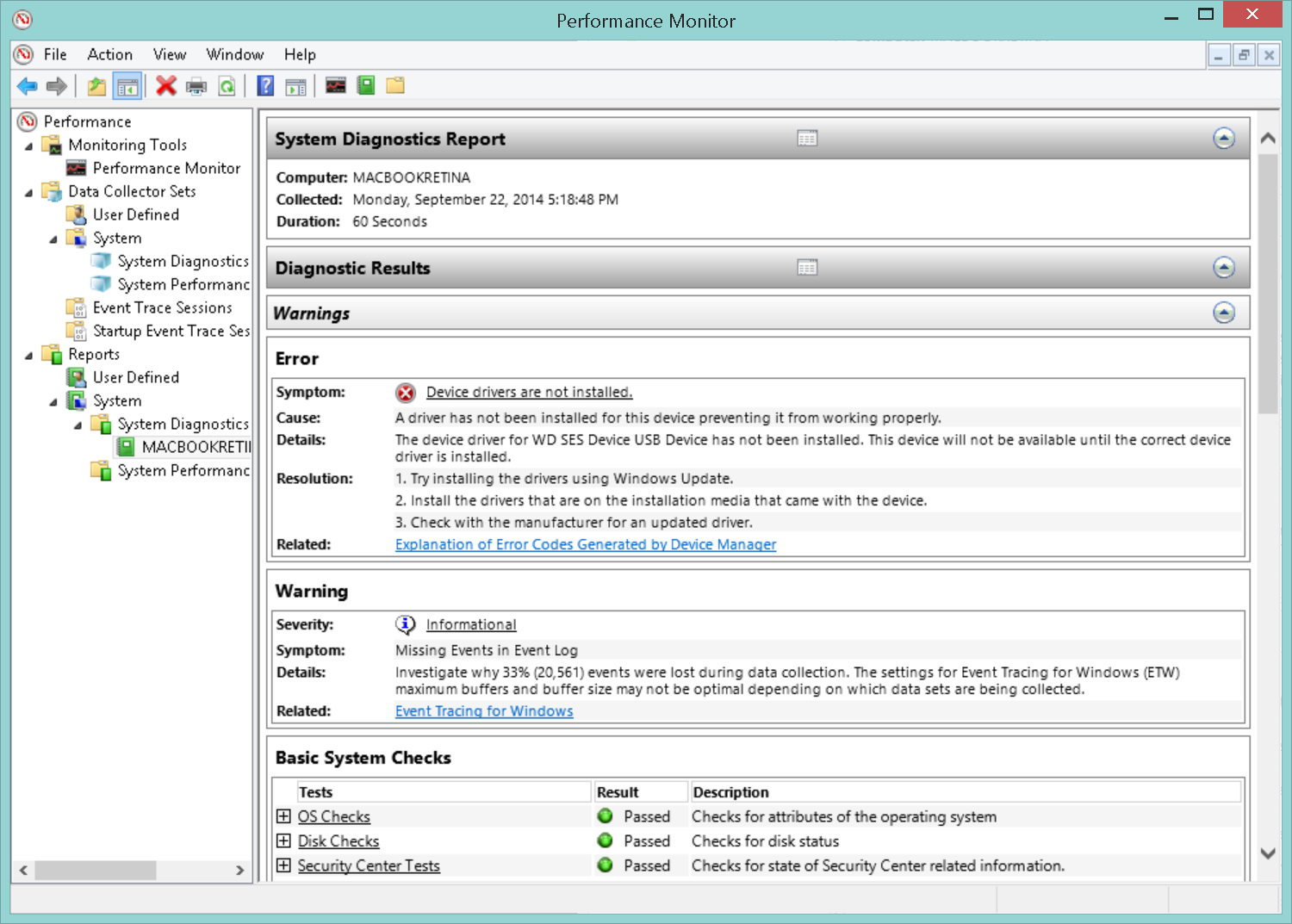
To access this tool, begin by pressing the “WINDOWS” and “R” keys at the same time. Doing so will open the “Run” window. Type in “perfmon.msc” and hit “OK”. On Windows 8 and 8.1, you have to click on “ReportsSystemSystem Diagnostics” and then double-click on the report for your PC. Yet again, your system will be observed for 60 seconds. Once completed, the “Diagnostics Results” should provide some ideas about what’s happening with your system. For example, it shows overall system utilization and Device Manager error codes. Going through each of these sections will help you figure out what’s wrong with your PC.

2014-09-22_17-22-24

Record your problems

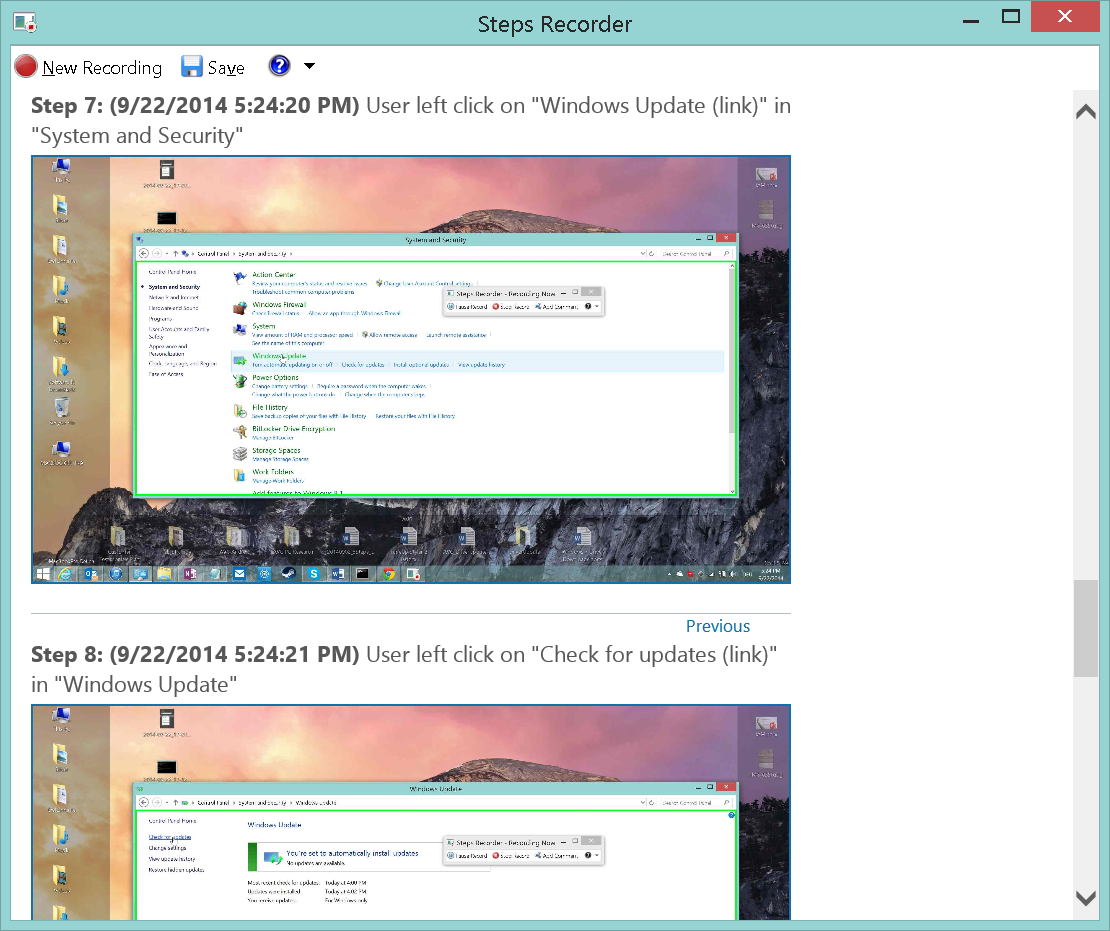
This is a great tool for Windows experts who are tired of hour-long support calls to their family and friends, helping them with their computer issues. Instead of having them describe what’s wrong with their PC, you can let them record each step that leads to the problem using “Problem Steps Recorder”. With this neat feature, Windows logs each step using text and screenshots and puts it into an easily readable HTML file for you to analyze! It’s also a good way to guide less experienced users through complicated steps—simply record each step for them, and send it over. This approach is much easier than writing massive guides via e-mail or spending another hour on the phone.
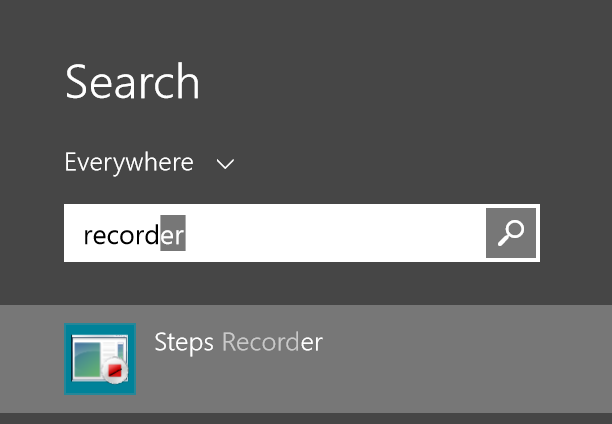
Here’s how you can launch Problem Steps Recorder: First, open up your Start menu or Start screen and type “Recorder” into the search box. Then, click on “Record steps to reproduce a problem” (Windows 7) or “Steps Recorder” (Windows 8). It’s that simple!

2014-09-22_17-23-11


Once you’re ready to record your problem or step-by-step instructions, just hit the record button and you’re good to go. When finished, hit “Stop record” and enter a name to save the session. Problem Steps Recorder automatically packs all the recorded images and HTML files into one nice and neat ZIP package that you can share! To look at the problem report before you send it, extract the ZIP file and double-click on the MHTML file, such as:

2014-09-22_17-24-51


If the steps are clearly visible and understandable, feel free to send the ZIP file to your friends or family so they can help you with your problem (or ask them to send the report to you if you’re trying to troubleshoot for them).

Repair system files

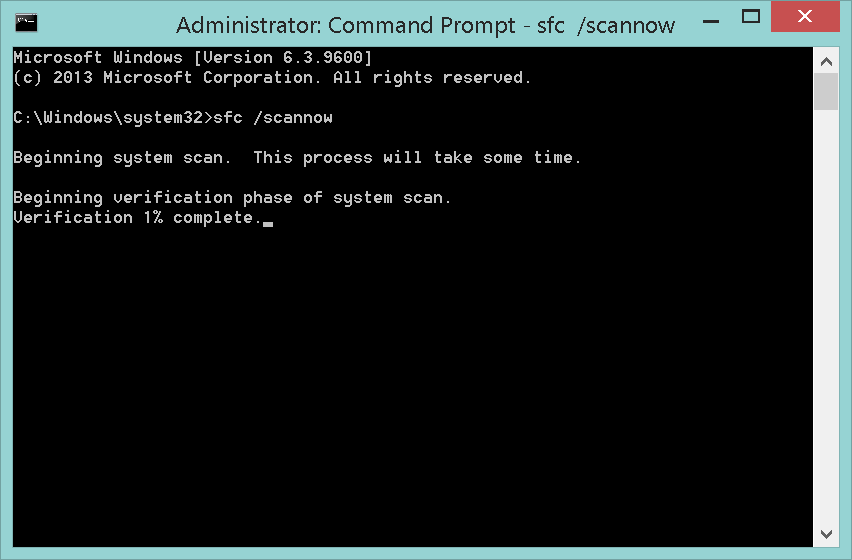
Does your Windows report missing or damaged files? Does your system crash for no reason or some applications fail to install or start? There’s something you can do to fix this. It entails letting Windows check on the integrity of important system files and replace them with the original (working) ones. To do this, consider the “System File Checker” as your little helper. Begin by opening up a command prompt with administrative privileges (see instructions in feature #1) and type in “sfc /scannow”. With this, Windows checks critical system files, informs you about any errors and tries to fix them—that’s it!

2014-09-22_17-25-46


Calibrate your screen

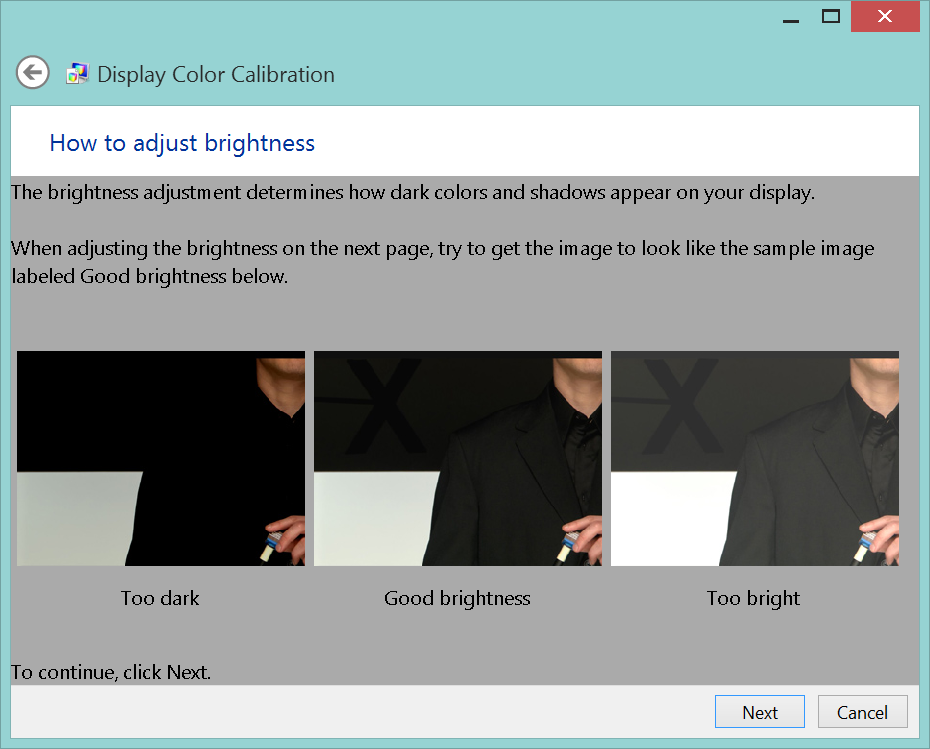
Are the colors of your desktop or photos not quite as brilliant as they should be? Do your images appear to be washed out? Windows can help you fix these issues and optimize your screen by using a built-in calibration feature to adjust brightness, contrast, sharpness, and color levels appropriately. To launch this feature, open up your Start menu or Start screen (in Windows 8) and type in “dccw” and hit the “Enter” key.

2014-09-22_17-26-51


The wizard pictured above will guide you through all the necessary steps to optimize screen levels.

These were just five features, but there are dozens of more (very hidden) gems in Windows 7 and 8. What’s your favorite feature that you discovered by accident or have just heard of? Share it with us in the comments section.

Panda Security launches new 2015 Consumer Line with XMT Smart Engineering Engine #Panda2015

  • Panda Security’s new consumer product line is now available. New solutions are lighter, safer and easier to use than ever before, and are based on the new XMT Smart Engineering architecture, a new engine for a new technological era
  •  Panda Global Protection 2015, Panda Internet Security 2015, Panda Antivirus Pro 2015, Panda Mobile Security and Panda Gold Protection leverage the power of cloud computing to combat maware threats

Madrid, August 13, 2014

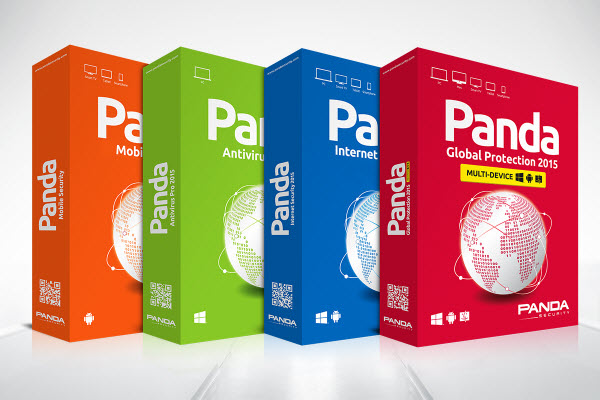
Panda Security, The Cloud Security Company, today announced the launch of its new line of consumer solutions. Panda Global Protection 2015, Panda Internet Security 2015, Panda Antivirus Pro 2015, Panda Mobile Security 2.0 and Panda Gold Protection are the five products included in the security company’s 2015 consumer line which this year boasts the new XMT Smart Engineering engine as its main new feature.

The results of the latest comparative tests conducted by independent laboratories such as AV-Comparatives, AV-TEST and Virus Bulletin, where Panda Security achieved the best scores in detection, protection and resource use, showcase the excellent capabilities of the new XMT engine. With XMT, different technologies interact with each other to achieve new levels of efficiency and greater detection and disinfection power to eradicate all threats.

“In a context in which 160,000 new malware samples are created every day, as reported by PandaLabs’ Q2 report, we are very much aware that we have to provide users with the best protection. And the best thing is that the engine with which we’re achieving the highest detection ratios in the industry’s leading tests is the basis of all our endpoint protection products,” said Álvaro Elorriaga, Global Retail Director at Panda Security. “Our aim is to continue integrating technologies in the platform to stay in pole position when it comes to detection, and provide our users with maximum protection and minimum impact on their systems”.

Minimum impact on performance

Designed to provide complete protection with minimal performance impact, Panda Security’s new 2015 Consumer solutions harness the power of cloud computing to combat the myriad security threats users face today: viruses, hackers, online fraud, identity theft and all other known and unknown threats.
new antivirus

“The new 2015 Consumer line is based on four pillars that have allowed us to further improve our security solutions, adjusting them to our customers’ needs: protection, lightness, flexibility and stability”, explained Hervé Lambert, Retail Product Marketing Manager at Panda Security.  

Cross-Platform Protection

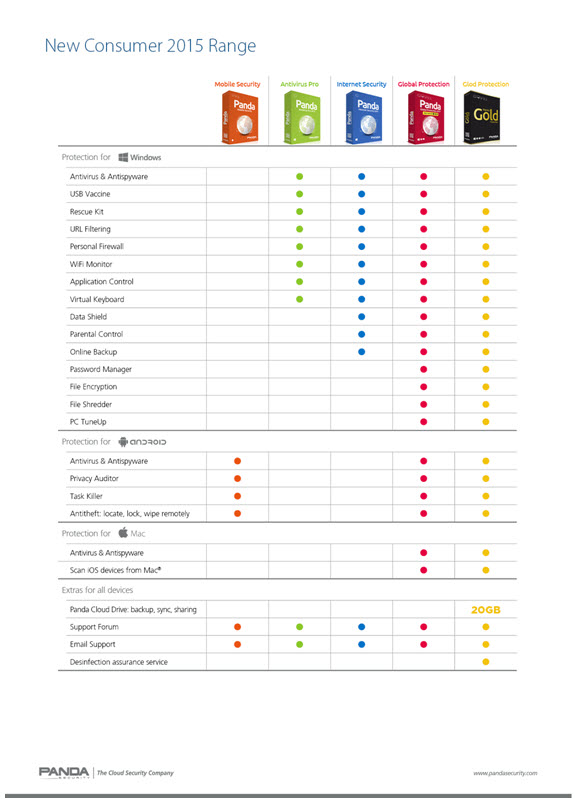
In addition to the new XMT engine, one of the most noteworthy features of Panda Security’s new 2015 solutions is the cross-platform protection provided by Panda Global Protection 2015 for Mac environments and even mobile devices. Furthermore, advanced users will find an additional layer of protection with Data Shield, a new module to protect user data against malware such as ransomware that tries to access sensitive information with malicious purposes (theft, deletion and encryption).

Additionally, the 2015 versions of Panda Internet Security and Panda Antivirus Pro include improved protection capabilities against viruses, hackers and Wi-Fi intrusions thanks to a Wi-Fi monitor that provides full visibility into all the devices connected to the wireless network. Along with these features, Panda Internet Security 2015 helps protect users’ children, identity and data with parental control, application control and online backup functionalities. “Despite Panda Antivirus Pro is the most basic solution in the entire line –it protects Windows environments only–, the truth is that it is much more than a simple antivirus. Besides providing fast and intuitive protection, it also includes other features such as a firewall, virtual keyboard, rescue kit and multimedia options”, explained Hervé Lambert.

New Panda Mobile Security Now Available on Google Play

Additionally, the new Panda Mobile Security 2.0 is now available on Google Play. This solution, designed to protect Android devices, includes features such as geolocation and anti-theft to remotely locate, lock and wipe lost or stolen devices. The new version is much more intuitive and user-friendly than before thanks to a brand new look and feel.

Panda Gold Protection


Panda Security’s 2015 Consumer product line also includes Panda Gold Protection, a complete solution designed to protect users’ data regardless of the device they are using: PC, Mac, and Android smartphones, tablets and Smart TVs. Panda Gold Protection is the only product in the entire 2015 line that features Panda Cloud Drive, an online backup and sync service with 20 GB of free space that allows users to store files securely in the cloud and access them from any computer, mobile device or Web browser at any time.

Users who want to take a free trial of Panda Security’s new 2015 solutions can go to http://www.pandasecurity.com/homeusers/

Also, users who want to buy Panda Security’s products can do so online on the company’s website or at the usual points of sale (retailers, dealers, shopping malls, etc).

Main features of Panda Security’s 2015 Consumer solutions
 

new consumer 2015 range

About Panda Security

Founded in 1990, Panda Security is the world’s leading provider of cloud-based security solutions, with products available in more than 14 languages and millions of users located in 195 countries around the world. Panda Security was the first IT security company to harness the power of cloud computing with its Collective Intelligence technology. This innovative security model can automatically analyze and classify thousands of new malware samples every day, guaranteeing corporate customers and home users the most effective protection against Internet threats with minimum impact on system performance. Panda Security has 80 offices throughout the globe with US headquarters in Florida and European headquarters in Spain

Panda Security collaborates with The Stella Project, a program aimed at promoting the incorporation into the community and workplace of people with Down syndrome and other intellectual disabilities, as part of its Corporate Social Responsibility policy.

For more information, please visit www.pandasecurity.com/


The post Panda Security launches new 2015 Consumer Line with XMT Smart Engineering Engine #Panda2015 appeared first on MediaCenter Panda Security.