Category Archives: Antivirus Vendors

Antivirus Vendors

How to make your social media accounts (almost) unhackable

Now more than ever, its important to make sure your social media accounts are safe and secure. Here are our 6 top tips to make your social media accounts almost unhackable.

The post How to make your social media accounts (almost) unhackable appeared first on We Live Security.

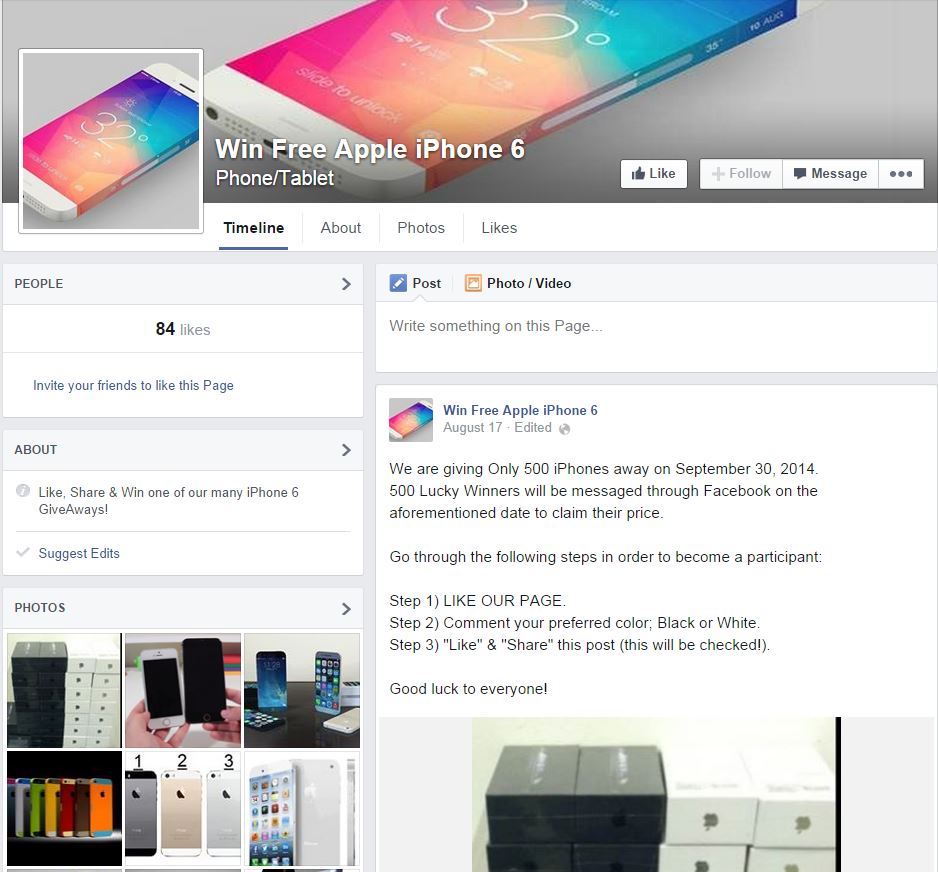
Free iPhone 6 Facebook scam does the rounds, right on time

Facebook scams tend to crop up in the run-up to a big Apple launch with around the same regularity as big Apple launches themselves. This week’s iPhone 6 launch is no exception, with Help Net Security noting that a Facebook page ‘offering’ free iPhone 6 units is, as usual, a total fraud.

This time, the scam promises a free iPhone 6 as soon as “three easy steps” are completed, which, as usual, involve a survey, which allows you to download a “participation application.”

When a victim completes the free iPhone 6 survey, all their friends are spammed with the fake promotion, Hoax Slayer reveals, but the three “easy” steps are anything but.

Each time someone completes a survey, the page claims there is an error, and they are directed to a further survey, according to Help Net. As always, the “free iPhone 6” never materializes.

Free iPhone 6: Nope, it’s a scam

“Some of the available surveys want you to provide your mobile phone number, ostensibly to go in the draw for extra prizes or offers. But, by submitting your number, you will actually be subscribing to a very expensive text messaging ‘service’ that will charge you several dollars every time they send you a message,” Hoax Slayer says.

“Alternatively, you may be asked to provide your name, address, and phone details, again, to supposedly enter you into a prize draw. But, fine print on the page will state that your details will be shared with third-party marketers. Thus, after submitting your details, you will likely be inundated with annoying phone calls, emails, and junk mail.”

“Meanwhile, the scammer who created the fake promotion will earn a commission. But, no matter how many surveys you complete, you will still not get to download your ‘application’.”

The site cautions against clicking on any link this week which offers a free iPhone 6, as this sort of big product launch is a prime target for cybercriminals, and any link is potentially suspect.

Something for free?

Mark James, ESET security specialist, says, “We all like the idea of something for free, that’s the approach these type of scams use. Deep down we know it’s not going to happen, but a lot of people will still click the like button or share that simple post in the hope it’s going to arrive.”

“We have seen these types of scams for years but they are still as effective today as they were when started, once we like or share the page we do all the marketing and advertising for the scammers thus providing a very valuable and potential dangerous page to initiate future scams or attacks.”

“I still encourage people to use the “front door” policy, i.e treat it like your front door: ‘When was the last time someone banged on your front door to offer you an iPhone 5 or 6 just for filling out a survey or a £10/£50 supermarket voucher for free?’ It just does not happen.”

The post Free iPhone 6 Facebook scam does the rounds, right on time appeared first on We Live Security.

What is Phishing?  

No doubt you have wondered and asked yourself on more than one occasion, what is phishing and how can it affect you.

All of us know that it is some type of scam, although perhaps there are many who don’t know exactly what it is or the techniques used by hackers and cyber-criminals.

So, exactly what is phishing? Basically, also known as email phishing, it involves sending emails, which appear to come from trusted sources, such as banks etc, though really they are aimed at stealing confidential information from users.

These emails usually include a link which when clicked, takes you to a spoof Web page. These pages appear genuine though they are really like a mirror that hides the criminals whose sole aim is to steal your personal data.

The problem is that users think they are in a trusted site and therefore enter the requested data. However, this confidential data will fall straight into the hands of the scammers and can then be used for some type of fraud.

That’s why it is always best to access web pages by typing the address directly in the browser.

what is phishing

How to recognize a phishing message

It’s not always easy to recognize phishing messages, particularly if you are a client of the company from which the message has supposedly been sent.

  • Even though the ‘From:’ field of the message shows the address of the company, it is not difficult for a criminal to alter the source address of the email in any mail client.
  • The email may have the logos and trademarks of the organization, yet these can easily be lifted from the company’s website.
  • The link in the email seems to point to the company’s website, though really it takes you to a fake page which will ask you for your user name, password, etc.
  • Very often these messages contain spelling or grammatical errors that you would not normally expect in official communications from the genuine company.

It’s also important to bear in mind that although phishing has traditionally used email, now, with the increasing popularity of smartphones and social networks, there are new channels of attack.

Another thing to be aware of is that although we normally talk about phishing in the context of banks, cyber-criminals often use any popular website or platform (Ebay, Facebook, Paypal, etc) as bait for stealing personal data.

But remember, no company will ever ask you to send them your personal details via email. If they do, be very suspicious!

Moreover, as a stich in time saves nine, you can always add an extra layer of protection by installing one of our new 2015 antivirus solutions. To do this, all you have to do is visit our free antivirus page and select the one that best adapts to your ideal level of protection.

The post What is Phishing?   appeared first on MediaCenter Panda Security.

Is it time you used two-factor authentication?

Two-factor authentication is an additional security measure that you can add to your online accounts to help keep them safe from attack and fraud.

“Two-factor” simply means that you need something other than your password in order to access your account. This normally comes in the form of a code generated by an app or sent to you in a text or email. Two-factor-authentication means that should your password be compromised, your accounts are still protected.

You may be familiar with two-factor authentication for online banking, where it has been used for a long time to validate logins and safely setting up transactions. Given its security benefits, many of the leading websites and services have enabled two-factor authentication for users. Google, for example, implemented the extra layer of security in early 2011, but many users still don’t realize that it is available.

While logging into accounts with two-factor authentication does require a little extra effort on behalf of the user, the extra layer of security does make it well worth-while.

How to Setup Two-Factor Authentication

In this example I will be setting up two-factor authentication on a Google account but similar instructions can be found for most popular sites such as Amazon, Dropbox and Facebook.

Before setting up two-factor authentication you need to make sure you have two things available. The first is a secure password, something you should already be using, on whichever services you use (Although you should have different password for each service for greater security). The second would be a device or application that can receive a code, most commonly a smartphone.

  1. Go to: www.google.com/settings/security
  2. Click “Set Up” under 2-step verification menu
  3. Chose how you would to receive your codes: SMS or codes
  4. Download Google’s Authenticator app for Android or iOS.
  5. Link your Authenticator app or device to your Google account using the code provided

Google-Authenticator

Once you are setup for two-factor authentication it’s ready to go in the wild. The next time a new device or browser tries to access your account they will need your username and password like before, but then you will need to enter in an access code pin that is either texted to you or synced to the authenticator app. Once the username, password, and pin number are all entered correctly you are logged in.

Two-factor authentication is one of the settings we believe strongly in to help mitigate password hacking because even if somebody does know your password they still can’t get into your account. It is important to remember however there are other methods to get access to your information so just using this helps secure your password login, but won’t guarantee all information is secure.  This is a great step forward to better security and privacy of your data and we highly recommend all users activate two-factor authentication wherever they can.

GTA V hacks warning as gamers ‘lose millions’ in online games

Gamers have reported losing millions of dollars to hackers running customized software which allows them to steal weapons, loot money, and even make people blow up in their own apartments, according to prominent Grand Theft Auto V YouTube reporter DomIsLive, who devoted an issue of his daily show to GTA V hacks this month.

Yahoo News reports that multiple players have been affected by glitches in online games, described variously as “unfairly modded”, ie using in-game tools, or simply as “hacked”.

DomIsLive, who has nearly half a million subscribers on YouTube, says that several of his subscribers reported losing “millions” in online games which had seemingly been hacked.

On Rockstar’s forums, various gamers complain about having lost large sums of in-game currency to similar GTA V hacks. DomIsLive claims to have seen multiple threads on the forums relating to the same or similar hacks.

GTA V hacks: Losing millions?

ESET Distinguished Researcher Aryeh Goretsky looks in detail at the blurred lines between cheating and crime in an extended blog post on We Live Security, saying, “Computer gaming is a huge and a wildly successful market, and as in any system that works at scale, there are going to be so-called businessmen or entrepreneurs who “seek to optimize their return on investment through whatever means possible” or, to put it more succinctly, criminals who abuse the ecosystem.”

It appears GTA V’s online game system is not exempt.

In one screenshot posted on DomisLive’s channel, a gamer complains, “Dear Rockstar, I have just been robbed of my weapons by an unfair modder. He stole my weapons, causing me to pay around 1,000,000 and I earned it fair and square, and I wondered if I could get my money back because I’m extremely frustrated.”

‘Rockstar may not reimburse money’

A Rockstar games representative replies, saying that the team will investigate, but warning that, “Rockstar will definitely look into this, however they may not be able to reimburse you with weapons and/or GTA dollars.”

It’s unclear whether one specific GTA V hack is responsible, or a multitude of methods. DomisLive advises his subscribers, “Losing their money in public sessions, I advise you to stay out of public sessions and stick to private sessions with this friend. If you see something strange happening, and if you see someone dropping their money, leave that lobby now.”

Responses from his subscribers seem to indicate that the problem is worse on Xbox 360 than on PlayStation 3. One poster says, “On Xbox it seems like every 20 sessions you join, you find one [a hacker]. On the PS3 I haven’t found that many, and from what people have told me, it’s because there aren’t that many.”

The post GTA V hacks warning as gamers ‘lose millions’ in online games appeared first on We Live Security.

Is your business prepared to continue? Watch now and get started with BCM

Business continuity is a term that can sound strange the first time you hear it; after all, you probably have every intention of being in business for the long haul. Right now you may be preparing the 2015 sales forecast and budget, with hopes for a great year ahead. But in your planning, have you thought about how your business would handle the bad things that can happen, from a computer virus outbreak to a biological virus outbreak, and all the other perils in-between, like fires, floods, tornadoes, hurricanes, earthquakes, and tsunamis?

Putting a plan in place to survive such “adverse events” is the goal of business continuity management or BCM, and it could well be the key to securing your digital future. Here is a 50 minute webinar that I recorded on this topic earlier this year. If you want to get a handle on planning for the future of your business, take a listen:

The post Is your business prepared to continue? Watch now and get started with BCM appeared first on We Live Security.

4 steps to avoid viruses

security

Protecting your computer is, very often, much easier than you might think. If you follow these four steps to prevent viruses, your computer won’t become infected again.

Take care with Java, Adobe Flash and Acrobat Reader

As we have seen in practically all the PandaLabs reports, these programs are a key target for cyber-criminals. That’s why it’s best to ensure they are always up-to-date or, if you don’t use them, uninstalled.

Viruses and malware can slip past antivirus programs and infect PCs by exploiting programs that haven’t been kept up-to-date.

Take care which programs you install

It is essential to be aware of what you’re installing or running on your computer. Virus creators earn a lot of money from programs or applications which, at first glance, seem harmless but can infect your computer when they are run. That’s why you should:

  • Never open messages from unknown sources.
  • Avoid non-secure web pages. You can recognize secure pages as the address begins with ‘https://’ and they display a padlock icon.
  • Use secure passwords.
  • Not provide confidential information via email.

Keep your Windows operating system up-to-date

Malware and viruses exploit security holes in outdated versions of Windows. To prevent this, you must install the latest security patches.

Windows makes this easy for you, so you can enable automatic updates so you don’t have to worry about it.

Use a good antivirus

A good antivirus can do much more than keep your computer virus-free. It can protect your identity and that of your business and can also prevent fraud when you shop online.

Find out what is the best antivirus for your needs from our new 2014 product range.

What’s more, if you have an antivirus with parental control, you can protect your children from danger on the Internet.

The post 4 steps to avoid viruses appeared first on MediaCenter Panda Security.

Printer security: Canon offers ‘fix’ after researcher plays Doom

Printer giant Canon is to provide a security fix “as quickly as is feasible” after a researcher exploited vulnerabilities in one of its wireless PIXMA products to run the classic shoot ‘em up game Doom on its colour display.

Security researcher Michael Jordon told the BBC in an interview, “Running Doom: that’s real proof you control the thing. The web interface has no username and password on it.”

Digital Trends said that the vulnerability, which allows access to printer controls via an unsecured web page, highlighted the problems not just of printer security, but that of the entire emerging “internet of things.”

Canon said that all new products would have a fix added as soon as possible, and that the fix would retroactively apply to products launched from 2013 onwards.

“At Canon we work hard at securing all of our products, however with diverse and ever-changing security threats we welcome input from others to ensure our customers are as well protected as possible,” the firm said.

Printer security: Deeper worries?

A search using Shodan (a specialist search engine which finds specific types of devices connected to the internet), revealed thousands of unsecured machines connected directly to the internet.

“This interface does not require user authentication allowing anyone to connect to the interface.  At first glance the functionality seems to be relatively benign, you could print out hundreds of test pages and use up all the ink and paper, so what?” Jordon writes.

He said that the problems (and the opportunity to run Doom) arose when you use the online interface to update the firmware, and raised serious printer security issues.

Persuading the printer to run Doom took “months”, he admits, but the issue is a serious one. Even printers not directly connected to the internet can fall victim, he said, by persuading their owners to click on a bogus link.

Vulnerable to remote attack

Jordon writes, “Even if the printer is not directly accessible from the Internet, for example behind a NAT on a user’s home network or on an office intranet, the printer is still vulnerable to remote attack.”

“A colleague (thanks Paul Stone) demonstrated this by making a web page that first scans the local network for vulnerable printers (using a technique called JavaScript port scanning). Once the printer’s IP address has been found, the web page sends a request to the web interface to modify the proxy configuration and trigger a firmware update.”

The post Printer security: Canon offers ‘fix’ after researcher plays Doom appeared first on We Live Security.