Hackers are getting more and more advanced and its companies like panda security who do a fantastic job keeping ahead of the game protecting us.
Category Archives: Panda Security
Panda Security

Are Your Passwords For Sale On The Black Market?

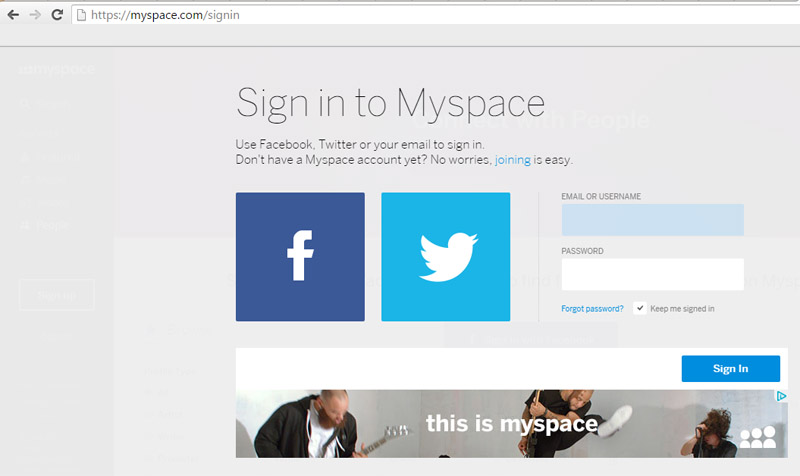
Myspace is joining the list of 2016’s data breach victims, alongside Tumblr and LinkedIn. Yes, Myspace still exists and in fact, if you registered for the social media site prior to 2013, your old log-in information could have been compromised.
360 million emails and passwords were leaked in what is being called one of the largest mass data breaches in internet history. A few days ago, LeakedSource—a search-engine capable of searching leaked records—claimed to have learned account log-in information for a massive number of MySpace users.
Myspace acknowledged in its blog that cyber-criminals have gained access to log-in information from those who registered prior to June 2013. Until that date, passwords were protected by the hashing algorithm “cryptographic SHA1”, which is an outdated and insecure system which is no longer recommended.
The black hat, Peace, recently put the leaked data up for sale on the dark side of the net for six bitcoin (approx. $2,800 US or €2,400). This cyber-delinquent is also behind the Tumblr leak, where 65 million accounts were compromised, and the LinkedIn data breach (117 million leaked). As with Myspace, Peace attempted to sell the stolen information from Tumblr and LinkedIn on the black market.
Remember the Ashley Madison scandal? Well, the number of passwords stolen in this data breach is higher than those stolen in the Ashley Madison leak. If we take into account that the number of stolen passwords is higher than those stolen during the Ashley Madison scandal (39 million passwords leaked), it is particularly worrying.
Prevention is Better Than Cure
Recently, LinkedIn required a password change for users whose personal data may have been compromised in the breach. Tumblr has done the same. For now, the former friend-network has ensured users that the matter is being investigated and that the company is implementing new security measures.
Nevertheless, internet users and social-network fiends should not wait for a big leak before they take steps to protect their privacy. One of the commandments of Internet safety is to periodically change passwords and to register different passwords with different services so if your data is compromised it only effects one set of log-in credentials.
One of the commandments of Internet safety is to periodically change passwords
With all those constantly-changing passwords, how can we remember them while remaining secure? It’s easy. You can use password managers like Dashlane, which allows you to determine a password’s level of security and control them from the same page.
There are also great security solutions that offer a larger degree of protection and include a password manager… all you need is a master password to access all of your favorite internet services. It maintains your online privacy… at all times!
The post Are Your Passwords For Sale On The Black Market? appeared first on Panda Security Mediacenter.
Beware of Online Invoices! A Newly Discovered Threat Has Already Crossed Borders
Just a few days ago we received an alert from Endesa, a Spanish electricity company, warning us of a new online scam targeting victims through fraudulent emails. The cyber-criminals send out fake invoices to Spanish users, using the Endesa name, and then the attack hits soon after. Unfortunately, the cyber-criminals were successful in their first attack and have expanded to other countries. It is very difficult to estimate the number of people who have received the email and who have fallen victim to this scheme.
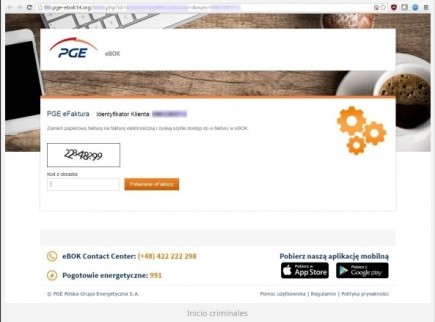
In the past few hours, a similar attack has arisen. The state-owned electric company in Poland, PGE, has fallen into this cyber-criminal network, amplifying this attack-method to an international level. Just like the incidents in Spain, important and sensitive information, belonging to both companies and individuals, have been infected after opening an infected file with the supposed electricity bill (which is really high, by the way).
We are facing a massive fraud that has transcended borders with a very lucrative goal: forcing you to pay a ransom to reclaim your personal files.
In both cases, the campaign has worked in a very similar way: by sending false invoices using the name of an electricity company, while infecting the computers of naïve victims with a locky computer virus. Although the malware has only reached Spain and Poland, it’s quickly growing and your country could be hit next. Here are some tips to help you combat this threat:
The Online Invoice Scam, Step-by-Step.
- In both of the analyzed cases, the email in question reaches the spam mailbox and in the subject box is the name of an electricity company that corresponds to the country.
- It appears as though the fake invoice is the same in both countries. After carefully analyzing the PGE situation, we see that the message may appear somewhat messy, with Polish characters inserted into the text at random.
- When the user wants to learn more about the factitious bill, they will click on the button with the text “See Your Invoice and Consumption” that appears below the energy consumption summary. But by then, it is too late. After clicking the fake button, the ransomware that is contained inside the Zip file is executed and a malicious Java code script begins to run on the system.
- In this case, the schemers continue to trick their target by asking them to complete a Captcha to gain access to the Zip folder. This makes users think that they are carrying out a safe action, but in reality, their cyber-security is being controlled by a very powerful ransomware.
- Once the malicious program has been executed, the user will be blocked from accessing personal files. Locky is an aggressive kidnapper and will only return the personal information once a ransom has been paid.
Don’t fall into a Scam That Is Tailor-Made for You
Each time, there are more detailed and customized attacks. Their creators are getting away with their wrong-doings using the names of prestigious companies, making it easy to fall into this trap.
One thing is clear: if you are not protected against this type of ransomware, your personal and company files are at risk of being abducted.
Avoiding this situation will free you from paying a ransom and will prevent giving up important information and time to the internet’s predators. There is one solution on the market that is able to control any and all types of threats, including Cryptolocker: Adaptive Defense 360.
When you receive an electric bill, you should only worry about how much energy you have consumed. Here at Panda, we will continue on our mission to detect and neutralize all threats and protect all of our customers.
The post Beware of Online Invoices! A Newly Discovered Threat Has Already Crossed Borders appeared first on Panda Security Mediacenter.

Learn how to protect your information on International Archives Day
 The entire world population generates and saves enormous amounts of essential information every day. We do so not only to remember and look back on the past, but also, our companies and institutions need this information to run efficiently and transparently.
That is why today, on International Archives Day, we wish to stress the importance of safe and responsible preservation for all kinds of files and, in particular, those which contain personal information belonging to people and companies. Do not forget: although an application, a program or an operating system can be re-installed, corporate or personal information is unique and should be a top priority.
Here are some tips to keep them from falling into the clutches of cybercriminals:
Backup Files
Now more than ever, ransomware is the greatest threat for companies and individuals, which is why backups are the most fundamental tool (and the last resort). They keep us from losing valuable information in the event of a cyber-attack. It is highly recommended to keep at least two backups: one stored in the cloud and a physical one (in an external hard disk, a pen drive, etc.)
Encryption
Before uploading files to the cloud, save them in a storage device or send them by e-mail. It is recommended that you encrypt the most sensitive information, at least, so that they will not be accessible if they fall into the wrong hands. An attacker who gains hold of your files will not be able to read their contents if this person lacks the encryption key, something that only you will have the power to.
Continuous Updating
Always keep your operating system, browser and applications updated to the latest version that is available. This allows you to protect the malware that usually takes advantage of the latest vulnerabilities. Operating your computer with an older version of software makes your most confidential information at risk for theft.
Do Not Use Unknown Computers or Networks
If you go on a trip and you plan on using a computer that is not yours, or connecting your mobile device to public Wi-Fi (such as at a coffee shop or at an airport…), make sure you avoid as much as possible accessing private and sensitive files. If you connect to an open Wi-Fi and you are forced to send personal or confidential information, make sure that it is encrypted and use a virtual network (VPN). Learn how to do so, here.
Install a Good Anti-virus
At Panda, we know how important your photos, videos and other files are for you. That is why we offer file encryption, backup and information protection with our anti-virus superstar: Panda Protection Service. With Panda, nobody can hijack your data! Enjoy the rest of your day.
The post Learn how to protect your information on International Archives Day appeared first on Panda Security Mediacenter.
Comment on CryptoLocker: What Is and How to Avoid it by Suncode
Great article explaining the cryptolocker malware, thanks for sharing
Comment on Panda Security makes your digital life easier and safer thanks to its new multi-device solutions by Panda Security
Hello Mithu,
Our colleagues from Tech Support can help you out. Please, contact them and explain to them what the problem is: http://support.pandasecurity.com/forum/
Thank you!

Why It Is Easier To Control Your Company’s iPhones With iOS 9
 It is increasingly common for employees to use their personal technological devices to complete job-related work, whether it is responding to a corporate email from their Smartphone, managing a client relationship from the ease of their tablet, or performing typical work tasks at distance from home, using a personal laptop.
Teleworking, and a trend called BYOD (Bring Your Own Device), are at rise and have made the people in charge of security companies increasingly aware of the risks involved with the use of these devices. These devices should be treated with the same protection measures as office computers and systems.
Apple is aware of this and has included a set of tools to facilitate what is called MDM (Mobile Device Management) in iOS 9. This will help employees control their devices and access company resources more securely.
Thanks to these developments, companies can control the traffic of any employee’s iPhone, track IP addresses or install an application to track their location, for example. To respect employee privacy, the Smartphone will show their users that these actions are being taken on their devices, like someone is browsing their history or seeing the location of their device.
Companies can see any employee’s iPhone location.
In addition, the latest version of iOS allows for application white lists or black lists, which makes it possible for IT security managers to decide what can run and what cannot in employee devices. Same with passwords: If a website is not on the list of trusted sites, the user will not be able to save their user name and password for upcoming sessions (“Do you want to remember your username and password?”).
The MDM tools that Apple has added to its mobile operating system also allow managers to configure notifications that employees can receive on their phones; they can decide what will be displayed and what won’t, by adjusting the permissions of each app. Lastly, the person in charge for the company can block devices or erase their contents, remotely.
The person in charge for the company can block devices or erase their contents, remotely.
Thus, Apple has strengthened the security of their devices for the business environment, which requires even higher standards than usual for sensitive company information. It is a great step forward, but it is not the only measure that should be taken by IT security managers. They should always install a good anti-virus in each employee device, which is also essential to avoid malware and cyber-attacks. Let’s remember: a single infected mobile could cost your company thousands of euros.
The post Why It Is Easier To Control Your Company’s iPhones With iOS 9 appeared first on Panda Security Mediacenter.
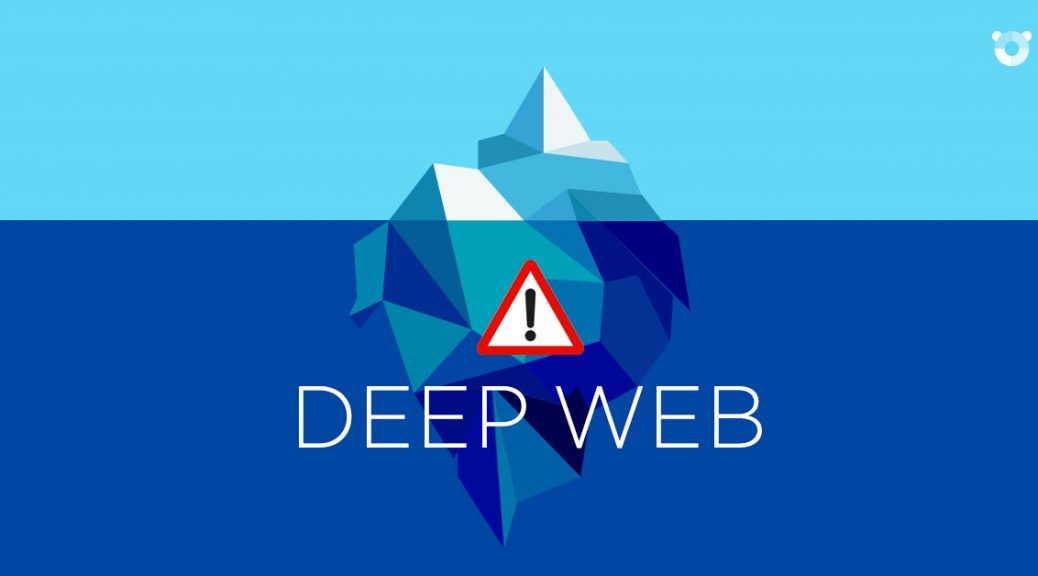
Tor and the Deep Web: Secrets from the Dark Side of the Internet
The “Deep Web” or “Invisible Web” is on the rise. Humans are curious by nature, and more and more internet users are going to the dark side. Everyone knows that the internet is a never-ending source of information, and search engines like Google, Yahoo and Bing can quench our thirst for information using just a few key words, with lists of information within seconds. But, are you aware that most of us are only accessing a mere 4% of the World Wide Web?
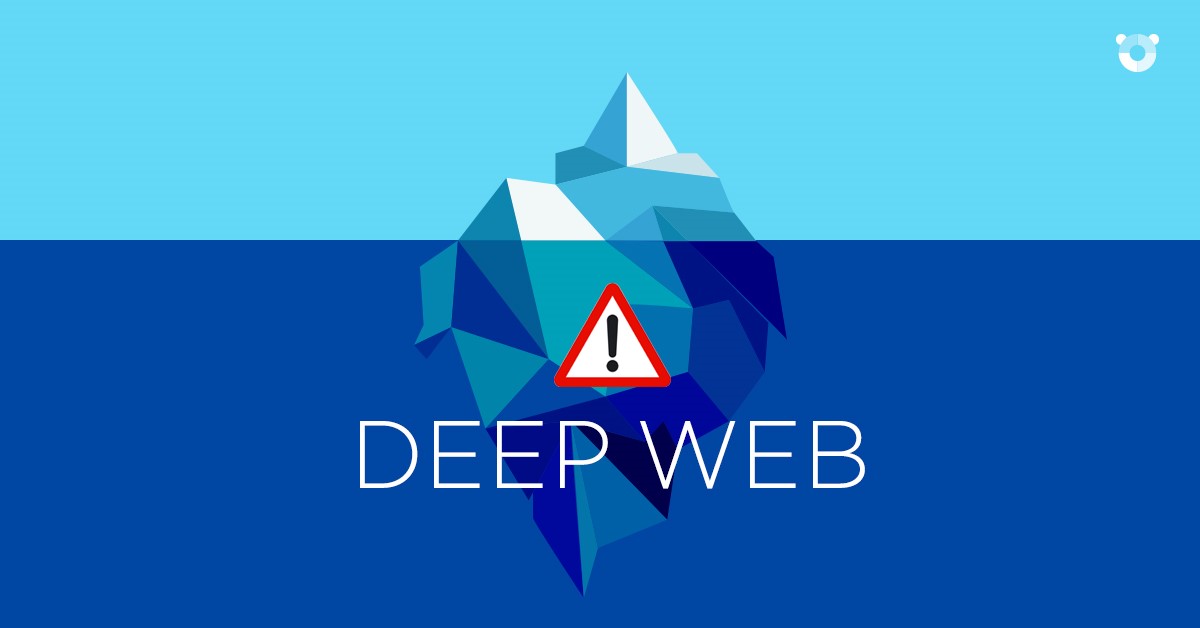
To understand this concept, you must imagine the entire Internet as an Iceberg.
We only know the tip of the Iceberg: The Deep Web’s Structure.
Like we stated in the previous paragraph, to better understand the Deep Web, it’s imperative to think of the entire internet as an iceberg that is divided into five parts, with each part more submerged than the previous.
Level 1. At the tip of the iceberg we will find all pages that we are able to access using search engines. This part is visible and accessible for “simple mortals” and the information is completely traceable.
Level 2. Below the surface of the water, we will find pages or sites that are not indexed (in other words, sites that aren’t visible) using traditional search engines (like Google or Yahoo). Therefore, they are only accessible to those who are “qualified”.
Level 3. If we dive even deeper into the cold water surrounding our iceberg we will begin to see very hard to find—and mostly illegal—information.
Level 4. As we grow closer to the most submerged point of our iceberg we will be able to find every type of illegal website. Most of them are monitored by the United States government (for example, child pornography websites).
Level 5. Once we have passed the four levels in the Deep Web we will reach the most hidden part of the internet, known as “The Dark Net”. A hacker’s paradise, this part of the web is built on a series of private networks that can only be accessed by “trusted” users. This is the darkest part of the web: it is not governed under the standard protocols and there is no security.
Tor: How to Access it in the Deep Web
Everyone is capable of accessing the deepest parts of the web, but to do so you have to use alternative search engines. Tor (The Onion Router) is a free software program that was designed by the United States Naval Research in the mid-90s to protect US Intelligence communications online.
Tor has a layered structure (hence, its name) that enables the user to navigate by jumping from one layer to another, ensuring that the user is protected by a cypher that prevents them from seeing your IP address. One of the Deep Web’s main characteristics is user anonymity.

Is it really possible browse the web anonymously?
Industry experts say that connecting through Tor can be risky. Tor does not allow the user to control which proxy they connect to, which could lead to threats like man-in-the-middle attacks and JavaScript infections, which violate user privacy.

The best way to avoid these type of attacks is to control the parts you can, like: the kind of operating system (Windows, Linux, etc.), the origin of the connection, the trustworthiness of the information that we share, etc. Organized gangs remain anonymous in the “Deep Web” thanks to their skill and organization in each of these areas.
Although the world of the Deep Web seems very fascinating, we must consider the enormous dangers that we might find. Panda will not accompany you on this journey!
The post Tor and the Deep Web: Secrets from the Dark Side of the Internet appeared first on Panda Security Mediacenter.
Comment on Panda Security makes your digital life easier and safer thanks to its new multi-device solutions by mithu golder
i lost my panda internet security. How to solved my internet security. please help me?
Be a Better Friend to the Environment with These Five Apps…
Though we often speak of electronic waste and the darker side of technology, whose insatiable energy consumption is causing serious harm to the environment, we can actually use technology for good. It’s possible for the internet and our Smartphones to be environmentally friendly.
This Sunday, June 5th, we celebrate World Environment Day. We wanted to take this opportunity to share some of our favorite applications that help us be more sustainable. Help us save the planet!
How Big is Your Footprint?
Our everyday routines have a greater impact on Mother Nature than we think. The first step in reducing our carbon footprint is to be aware of our actions. GiveO2 is an incredibly useful application that analyzes transportation activity and offers rewards if they are improved. Come on! “Compete to be the most sustainable!”
Leafully helps track how much electricity you consume by showing how your energy consumption is effecting the environment and how many trees are needed to offset the pollution.
We All Need Oxygen
You probably already recycle in one way or another; you try to save water, electricity, fuel and, in general, you try to respect our environment. But you can take it a step further. Applications like Gardenate educate users how to cultivate and take care of their gardens and vegetables. Don’t have a garden? This app can also help you take care of your household plants. It notifies you when you need to irrigate, fertilize or treat them.
Not a Star in the Sky
Light pollution is often forgot about in today’s busy world. Light pollution is when we are unable to see the sky clearly due to artificial lights and street lamps. Loss of the Night is an app that raises light pollution awareness by helping users measure skyglow. The app was created so that, in the future, “cities will save energy and money, while having appropriately lit streets, dark bedrooms, and a sky once again full of stars”.
I Can’t Hear You!
Noise, especially in large cities, is another way we are unknowingly damaging the environment. Apps like NoiseTube helps us track the noise level in the most bustling and quietest cities. Users are able to measure the noise level in their surrounding area then upload it to the app, enabling any Smartphone user to participate in “global noise mapping”.
Take Action
It is time to take action and help save our planet. There are a multitude of apps (like Go Green) that offer advice and recommendations for a more sustainable lifestyle. Are you part of the solution or part of the problem? Find out if you are helping or hurting the environment and, if necessary, change what you’re doing. Check out the official
Go with peace as you download these apps, but make sure to download them off an official site like Google Play, the App Store, or the Windows Store, to avoid malware threats. And remember to have a good anti-virus on your device that will help you protect yourself from any of threat.
The post Be a Better Friend to the Environment with These Five Apps… appeared first on Panda Security Mediacenter.