Category Archives: Panda Security

Panda Security

Tips to help shield your reading devices

PandaSecurity_World_Book_Day

Today, April 23rd, we celebrate World Book Day. Literature has evolved greatly in recent times, both in the way we enjoy it and the way we consume it. How we read, in the digital realm, has changed. In today’s on-the-go society, it is becoming less and less common for people to use paperbacks or hardcovers, and is becoming more and more common that we use many different platforms to enjoy reading. Now we read from our smartphones, tablets, eBooks … Electronic ink has been imprinted in our lives. We read everything and anything from short stories to novels, the news to blogs… we turn them into trending topics. We even share excerpts from the books we read on social media. Stories become viral thanks to transmedia storytelling and techniques.

Not only are we seduced with words, but audiovisual content plays a very important role in grabbing our attention. New technology enriches our reading, using videos or photos to interact with the reader. We live in the era of Branded Content. Struggling brands position themselves in a way that seems “organic” in the minds of consumers by offering unique and high-quality content. Now we are fluent in a new language, digital language, and the language in which today’s literature is based on. We write simpler and add hyperlinks. Digital writing is intended to be enjoyed only on-screen, 100%.

Tips to safeguard your reading device

We often forget that a computer virus in Windows can be passed to a smartphone whether it’s an iOS or Android, and a lot of these viruses can even infect our eReaders. To prevent malware from damaging our reading device, whatever it is, we must follow these guidelines:

1- Beware of USB ports: we must first analyze anything that can be inserted into a computer or electronic device. This is the simplest and most popular way cybercriminals can infect our devices.

2- Only buy or download eBooks from legitimate online stores or known editorial pages.

3- Beware of file size: if we introduce some eBook DRM we must be wary if it occupies more than 2Mb, as it could possibly be a virus that could damage the device.

4- Install an eBooks library manager: if the eBook is a virus or has one, the manager will alert us.

Like always, prevention continues to be the best option to help us enjoy our reading (or browsing) safely. Happy World Book Day!

The post Tips to help shield your reading devices appeared first on Panda Security Mediacenter.

your smartphone is no longer the “smartest” option

android2

Synching your smartphone and computer might increase your chances of being hacked

A classic piece of advice that helps keep email, social networks and other online services safe is by enabling something called two-step verification. This security mechanism makes it more difficult for a cyber-delinquent to access your account through two-step verification. When a different device from the “usual” one (different computer or smartphone) tries to access your account, they must enter a code that is sent to the mobile phone associated with the account in order to continue.

If a cyber-criminal is trying to get into your account, who in theory cannot access your smartphone, this two-step process makes it very complicated for him. Or so we thought.  A group of researchers from the Free University of Amsterdam showed us that this type of protection is becoming more and more flawed the better we communicate with each other using our different devices.  This means that the more computers, smartphones or devices that have access to your account and passwords, the higher your chances are of getting an account hijacked by a cyber-criminal.

The two-step verification is one of
the most popular security measures

In other words, because we are able to synchronize applications between two devices, like your computer and smartphone (and what you do in one can affect the other), the effectiveness of two-step verification decreases.


Computer android


Android and iOS, equally vulnerable

The study’s authors have showed us the possibility of installing apps offered through Android onto your smartphone remotely through the computer (accessing Google Play with the browser) or installing remotely through iTunes.

In both of the above cases, following slightly different strategies, they have managed to intercept the verification code that websites send to your smartphone through SMS when there is a two-step verification, so it is very possible that a hypothetical cyber-criminal could access your Facebook, Google or Amazon accounts—to cite just a few.

The verification code that websites
send you through SMS can be intercepted


Don’t stop doing what you’ve been doing

Just because you have found out about this vulnerability does not mean it is no longer advisable to activate this safety measure in all the services that offer it.  There will always be a few obstacles that you can put between the attackers and your personal information.

The post your smartphone is no longer the “smartest” option appeared first on Panda Security Mediacenter.

Be careful with CryptoBit, the latest threat detected

A few days ago at PandaLabs, Panda Security’s anti-malware lab, we discovered a type of ransomware that we believe is extremely important to talk about, especially because of its novelty and its unique features. The name of this new ransomware is CryptoBit.

If we compare it to what we’ve learned thus far from other ransomware, we can say that CryptoBit is a one-of-a-kind specimen. It’s different from other ransomware for many reasons, one of the main differences being the message that appears instructing the victim to rescue their files. Its additional features will be revealed in this article.

Analyzed Sample

This report focuses on the analysis of the following sample:

a67855dbd18652e99f13d29045b09391382bb8c817cda1e498cd01eb4a7bdf2c (sha256)

This sample is protected thanks to a “packer”, a trojan that disguises another type of malware. After “unpacking” it, we can notice that, in addition to a date of recent compilation (April 5, 2016 at 12:20:55 PM), there is a total lack of strings, evidence that the author of CryptoBit wished to hinder the analysis of your code, by any and all means.

Distribution

After analyzing the data provided by Panda Security’s “collective intelligence systems”, it is possible to determine the vector that was used to distribute CryptoBit is being used by the “Exploits Kits” that affect different web browsers.

Behavior

Once the sample’s behavior is unpacked and analyzed, we can more accurately determine the basic way CryptoBit works:
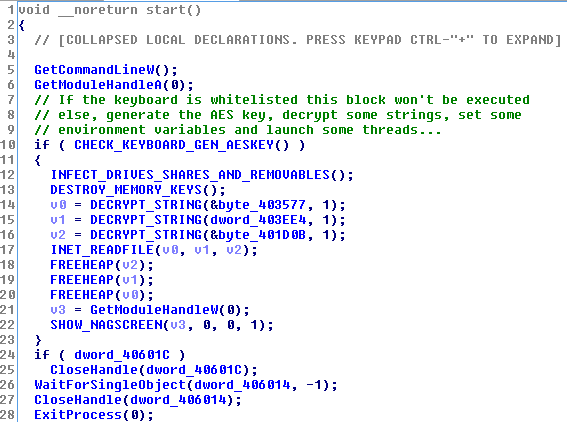
Cryptobit_1


The first thing CryptoBit does is check the keyboard’s configured languages. If the keyboard is configured with one of the following codes: 0x1a7, 0x419 (Russian) or 0x43f (Kazakh), the program does not end up encrypting any file.

After making sure that the keyboard is not in their blacklist, CryptoBit goes to all local disk drives, network folders, and removable drives (USB), searching for files containing any of the intended extensions. What is its objective? To encrypt the entire contents of the file (another unusual feature) in order to request their rescue later on.

In particular, CryptoBit is interested in the following file extensions:

ods crp arj tar raw xlsm prproj der 7zip bpw dxf ppj tib nbf dot pps dbf qif nsf ifx cdr pdb kdbx tbl docx qbw accdb eml pptx kdb p12 tax xls pgp rar xml sql 4dd iso max ofx sdf dwg idx rtf dotx saj gdb wdb pfx docm dwk qba mpp 4db myo doc xlsx ppt gpg gho sdc odp psw psd cer mpd qbb dwfx dbx mdb crt sko nba jpg nv2 mdf ksd qbo key pdf aes 3ds qfx ppsx sxc gxk aep odt odb dotm accdt fdb csv txt zip


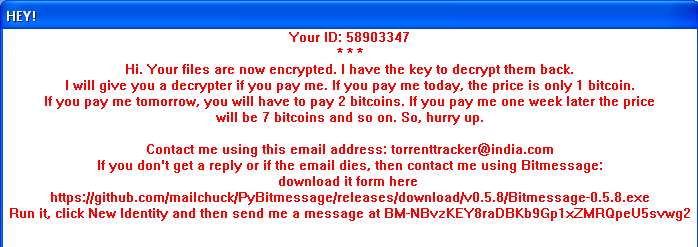
Once the process of file encryption has begun, the user can see a window on their computer similar to the one show below:
Cryptobit_2


In this message we see some details that draw our attention and which can be used to classify this new type of ransomware:

ID shown as “58903347”

In the number shown for the analyzed sample, this value is always the same. It does not matter if you run this Malware repeatedly, or if you do it on different devices.  This suggests that we will find ourselves with an ID of ransomware rather than a particular user (or computer).

The number of bitcoins you have to pay

In general, the required amount of Bitcoins are fixed, or have a limit. In this specific example, we see that the author (or authors) are requesting a bailout that is a little excessive.

How to get in contact with “them”

The user is not able to contact the hacker through a web server accessible via a URL, and they do not ask the user for anything in particular, at least they don’t at this exact moment.

They ask the user to contact them with using an email address that seems untrustworthy (ex. [email protected]). If the victim does not receive a response, they can also contact the hacker using an application called “Bitmessage”, a branch of another application that can be found in “GitHub”.

Additionally, if this message is not enough to convince them that their files have been encrypted, each time that this folder is accessed with one of these (now) indecipherable files, the user will discover a couple of extra files that were created intentionally:

 

Cryptobit_3OKSOWATHAPPENDTOYOURFILES.TXT

If we take a look at this file we will find the same message (this time in text format) that is shown to the user after their files are encrypted.

sekretzbel0ngt0us.KEY

In this second file we see a hexadecimal sequence with a length of 1024 which, once decoded, will correspond to a binary sequence of 512 bytes (or 4096-bits).

Later, in the “encrypted” section, it will show us the meaning of the file called “sekretzbel0ngt0us.KEY“, where encryption has been used to encrypt other files.

Another CryptoBit action that is visible to the user is an HTTP request that looks like:

http://videodrome69.net/knock.php?id=58903347

Notice: the requested script “knock.php” does not exist, what it’s doing is ignoring the intentions of the last action.

Encryption of Files

Encrypting files to encrypt other files, in each run, CryptoBit generates the algorithm AES, or “Advanced Encryption Standard” (a random key of length 32 bytes or 256 bits), making it practically impossible to decrypt files unless this information known.

In order for us to not lose this key which allows us to decrypt files if the ransom was paid, the author of this ransomware, stores the AES key generated with an encryption using the RSA algorithm.

A public key that is chosen is a length of 4096 bits and we find it “hardcoded” within the analyzed sample.

Once encrypted with a RSA AES key, it will be stored in the files named “sekretzbel0ngt0us.KEY“, making it only comprehensible if there are corresponding RSA “private keys” (which in theory, would only be in the possession of the cypher’s author.)

In this section, we notice a specific detail: the absence of calls to the native libraries that encrypt files using the RSA algorithm. CryptoBit uses a series of statically compiled routines that allow you to operate with large numbers (“big numbers”), making it possible to reproduce the RSA encryption algorithm.

Conclusion

As we can see, this newly discovered ransomware phenomenon is not going out of style. We are finding new samples every day that still surprise us. In this specific case, we aren’t as shocked by the use of “serious cryptography” (AES + RSA), something that is more and more standardized, but we are amazed by the ambition behind it and can appreciate its good design and interesting ideas.

As always, keep your antivirus updated and make sure to back up your important files.


Analysis of CryptoBit by: Alberto Moro, Abel Valero and Daniel Garcia


The post Be careful with CryptoBit, the latest threat detected appeared first on Panda Security Mediacenter.

Linked Out: how job-search platforms are being used for ransomware

job-search-ransomware

Infecting computers with a new type of Ransomware 

Sending out your resume into the net’s black hole can make the job application process feel hopeless.  Where do our resumes end up?  Do recruiters even read them?   The recipe for landing a job is already a difficult task in itself, but now we have to squeeze a little more fear into it.  Every time we apply for jobs, we could be falling prey to one of these new cyber-attacks that use ransomware to hold your computer hostage. 


Warn those fresh-grads that they could be fresh-meat

Digital-age criminals are posing as hiring companies on various job-posting websites.  The cyber-criminals are tricking both candidates and recruiters, asking them for too much information, like, credentials and economic information.  Know anyone on the job hunt? Are you familiar with LinkedIn?  Like we’ve stated before, these are becoming some of the best resources for cyber-criminals.

We’ve also seen these wrong-doers capture innocent job-searchers by “pretending” to be hiring managers from important companies, where they post false job advertisements so they can phish for credentials and other sensitive information.  In addition to phishing, we have been advised of another type of attack: a variant of malware that black-hats are using to infect company computer systems when their recruiters download, what they think to be, a candidate’s CV.

They wanna get ya with PETYA

This type of malware, called Petya, spreads via email. Here’s the process of infection:

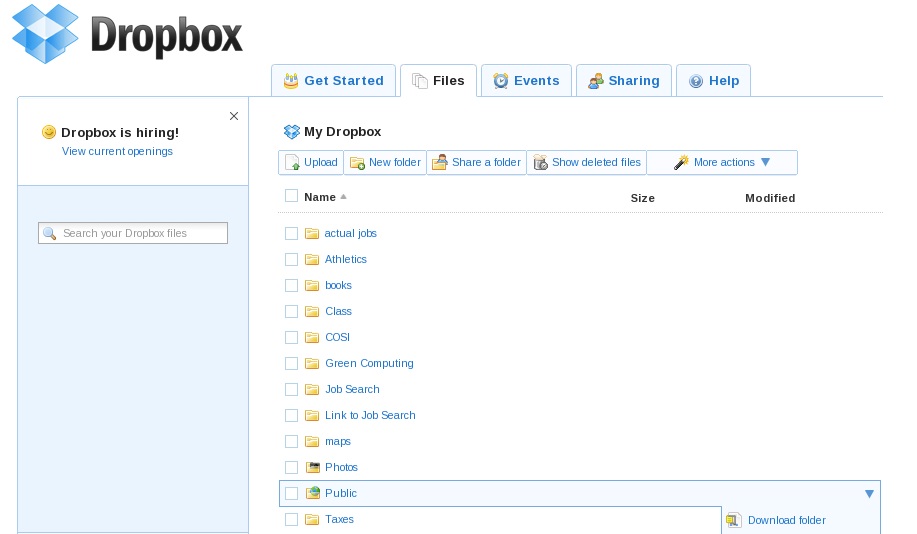
  1. HR managers of the organization receive an email from a potential candidate for a job, which includes a link to their resume and a photograph, both stored in Dropbox.
  2. When you click on the link, the user begins to download a self-extracting file that contains a Trojan.
  3. The malware gets into the antivirus program to help pave the way for its partner-in-crime, the ransomware, which later blocks the entire operating system.
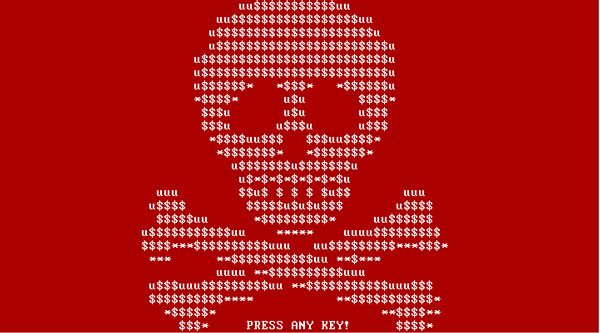
  4. Windows’ “blue screen of death” stamps the screen.  Dun Dun Dun.  If you try to restart the computer, you will see a skull on a red background with a message from the hacker. (Safe mode is pointless at this point because the malware disables it.)

Ransomware_imagen 2

Ransomware_image


The only way to regain control of your device and sensitive information is to pay a ransom.  Currently, the approximate cost to release a system and files is around 0.99 bitcoins which exchanges to approximately €431,379 (bitcoins: the first digital currency.  Although it has been said that this form of payment could be used for “legitimate” reasons, it’s more commonly used on the deep web as a form of payment for theft and the black market.)

It’s easy to be a victim in this scenario when there’s always someone looking to prey upon the desperate.  In the summer of 2015, a group of security experts identified a number of emails sent to companies with resumes, and in this case, in a ZIP compressed file containing a malicious code.

Despite the uncertainty and fear that comes with an attack of this type, don’t give into the pressure!  Paying the ransom does not guarantee that they are to unlock the infected computer (it might even motivate the perp to ask for an even larger sum instead.)

Infected, now what?

  • The solution for someone affected would be to consult a computer or security expert (like those that are part of our technical team) to guide you in the process of eliminating the ransomware from your system and browser, and reconfiguring your computer.
  • The absolute best way to prevent this kind of malware hijacking your system is by taking precautions, because generally, the users themselves are the ones opening (unknowingly) the doors to infection. 
  • Be sure to install all security patches and system updates, in order to keep the browser and antivirus updated.  Regularly back-up your files.
  • Try not to download documents or access links from unknown sources, and if you do, check their format. 
  • Lastly, keep updated with the new attacks and threats detected by security experts; this way you’ll know exactly what you should pay attention to.

As they say, prevention is always better than the cure.

The post Linked Out: how job-search platforms are being used for ransomware appeared first on Panda Security Mediacenter.

Facebook alerts you if someone tries to steal your identity

Facebook-identity-theft-photo-1

Connections are made and maintained online via social media

You can get insight into the life of a stranger through their Instagram photos, Snapchats, or profile pages, but when does it become too much? Our names alone can connect the dots for a perpetrator, making it easy to know our whereabouts. Information about where we work, where we went to University, or where our favorite coffee shop is…it’s all online.  Everything you “share” can have serious backlash: identity theft.

Celebrities are commonly impersonated online, on fake Instagram and Facebook accounts, but they are not the only ones who need to keep track of their digital reputations. A stranger can copy your photos and concoct their own version of your life.  It could be very possible that someone has already impersonated you.

Fight the fakes

The social network created by Mark Zuckerberg is fighting these fake accounts. A tool has been created that automatically notifies users who may be victims of phishing. This feature is already available in 75% of the world’s countries.

When Facebook detects that another person may be posing as you, they automatically notify you about the potentially “fake” profile. After that, the user can confirm or deny whether the profile is a fake. If it’s confirmed, Facebook gets to work; more specifically, the team manually carries out this part of the notification system.

Although they say impersonation is not a widespread problem, Zuckberberg has added this to the list of harassment he doesn’t want associated with his company. To fight it, they will continue their strict and controversial naming policy (requiring users to identify themselves with their real names), but will also actively pursue phishers.

Facebook-identity-theft-clones

Using our photos without our consent

Facebook has also launched two other security features that are next in line. One is a new system that reports the existence of intimate photos shared without the user’s consent and the other is a tool that lets them check the security status of images uploaded to their accounts. They have also introduced a feature that gives users the ability to manage the privacy settings of their photos (Who can see them? Do you really want them to be public?).

Though security is always advancing, the bad guys of the Internet are closely following behind. Next time you decide to upload personal photos, “check-in” to a geographical location, or update your work history on LinkedIn, remember that someone, somewhere might use your identity for their own personal gain.

The post Facebook alerts you if someone tries to steal your identity appeared first on Panda Security Mediacenter.
Introducing Panda Protection Service, who said cybersecurity was expensive?

Panda_Protection_Service_Antivirus


Technology is always changing, growing, and improving our lives, whether it is at a business or a personal level. Digital transformation affects everyone. In Spain, more than 26 million Internet users regularly access the Internet from different devices, but do they always do it safely? At Panda Security, we want to lead our users on the road to digitization, offering solutions like Panda Protection Service.

Save on cybersecurity

2015 holds the record as the year with the most malware created in history. In total, there were 84 millions of new samples detected and neutralized by PandaLabs, with an average of 230,000 per day. One of the main methods of attacks that has become increasingly popular is done by compromising routers in homes and businesses, allowing the attacker to be in control of the device for a continued period of time.

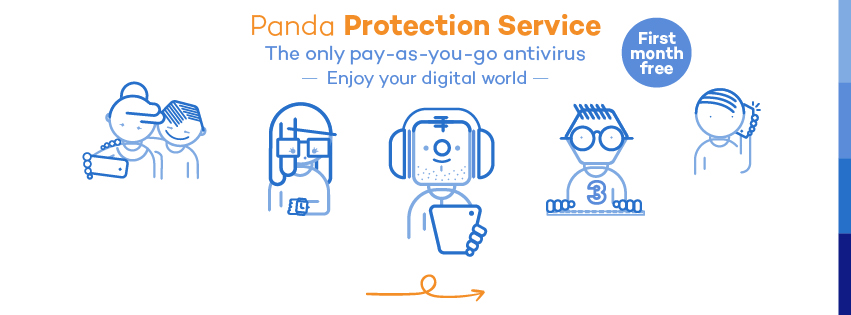
How can we protect our privacy and the privacy of our loved ones? Panda Protection Service was created to provide maximum protection for your devices and those of your family, by optimizing device performance in the most economical way. A monthly subscription system allows users to pay only for what they use with the flexibility of canceling the service at any time they choose.

Protect your digital world, no strings attached.

Consumers (currently known as “multiscreen users”) have changed. Not only have their habits changed, but they have changed in the way they interact with their devices, using more than one device at a time to do many different things. Social networks are the main catalysts of user activity. According to the latest study published by IAB, the most commonly used devices that are connected to Social Media are PCs (99% of users), phones (75%), tablets (28%), and lastly, Smart TVs, that are currently present in about 6,350,400 households.

Social media is the primary use of the Internet for most users (to see what’s going on with their friends, to send messages, post, chat, etc.), and can get expensive if preventative security measures aren’t taken. Try Panda Protection Service to safeguard all of your devices… the first month is free!


The post Introducing Panda Protection Service, who said cybersecurity was expensive? appeared first on Panda Security Mediacenter.

Uncovering the WhatsApp encryption


mobileAvid WhatsApp-ers were the first ones to notice the new security changes the company put into action last week.  Now, your conversations on WhatsApp are safer through end-to-end encryption.  With this new security system, your messages safely travel from mobile to mobile, from your hands to the person on the other side of the message.

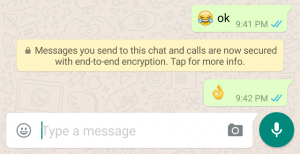
The notification would appear in a message like this:

FOTO 1 (ENG)

Say you are at your favorite coffee shop, sipping on a hot drink and you decide to connect to the Wi-Fi, but instead connect to a false Wi-Fi network (hackers set-up fake networks to gain access your information like e-mail, passwords and other information.)

In theory, cyber-criminals could steal your messages but it’d be pretty pointless without a decryption key. Breaking public keys, which are different for each message, would be both time-consuming and extremely complicated. Instead of juicy information, the third-party would see senseless characters in the place of the message.

The security measure reassures us that the content coming into our mobiles (i.e. text, photos, videos, files, and voice recordings) are completely private.iStock_000017519004_Large

But end-to-end encryption is not the solution to everything.

However, it is a giant step for the safety and quality of our chats.

Experts say there several factors to consider:

  • To make the system work, all participants must have updated their WhatsApp. If one of the members of a group still using an older version, the chats remain “unsafe”.
  • This security measure ensures that messages travel from one mobile to another securely, but they remain vulnerable to attack if they are stored on the devices. Not all “smartphones” are the smartest: some don’t encrypt their content but most modern ones do by default or at least allow it as an option (ex. the latest iPhone or Lollipop by Android).
  • Sometimes the juiciest of information is not shown in our messages, but in something called metadata, which is “data that provides information for other data” like who called who, when they called, for how long, etc.  In the end, if your sensitive information ends up in the hands of a country’s secret service or a judge, WhatsApp’s parent company, Facebook, would be responsible for it.  Do you trust them?


You should update your WhatsApp and enjoy the insurance of end-to-end encryption, but don’t solely depend on it for your full-protection and privacy. Although it’s a definite upgrade in mobile security, it’s still an insufficient form of protection.


The post Uncovering the WhatsApp encryption appeared first on Panda Security Mediacenter.
Five myths about security that most people still believe

FOTO PRINCIPAL

Myth #1: “The network would be safer if we shut down the deep web”

Looking for the GOOD in goodbye 

Where can you go to escape the grasp of Google’s tentacles? Some go to the deep net, an elusive online-abyss, buried deep in the network. In the recent poll by the Centre for International Governance and Innovation (CIGI), 70% of the people interviewed believe that getting rid of the deep web would be a good way to combat cyber-crime and terrorism.

Shockingly, radical groups like ISIS rarely use the dark web, as shown in a recent study by researchers Daniel Moore and Thomas Rid. ISIS propaganda and recruitment is spread throughout the internet, on “traditional” websites and networks, so their message can be heard everywhere.

Eliminating the dark web doesn’t mean a peace-seed will be planted in its place. The dark web is often used as a platform for expression in countries where freedoms are limited regarding communication and Internet access. So in a way, sweeping away the deep web could actually kill activism instead of terrorism.

Myth #2: Software must have back doors for governments

When one door closes another one opens

No need to hide the key under the mat, anymore. Following Snowden’s revelations regarding the activities of secret service cyber-surveillance and the Apple-FBI-San Bernardino controversy, most of the participants (63%) think that government intelligence agencies should have unlimited access to devices (for reasons of national security, of course).

If this is permitted, then the government wouldn’t have to go through the hassle of breaking Cyphers, those super complicated codes used for encryption that are unbreakable unless a vulnerability exists in the algorithm. The problem with this solution is that it would leave users vulnerable, who, at the same time, would be the main beneficiaries of these protective measures. Without encryption and back doors, programs and applications we use every day could easily be at the mercy of cyber-criminals.

FOTO 2

Myth #3: Cybersecurity is not for everyone

How to cover your tracks

Many users think that those privacy-protecting programs and services (recommended by Snowden and other activists) are not available to us “common people” but there are many ways for anonymous communication online. Browsing through the free software program Tor (The Onion Router) or implementing something called PGP (Pretty Good Privacy) encryption in your email may seem extremely complex, but anyone can do it using the tutorials that are available online.

Myth #4: Who would want to attack me?

You’re the fish they want to fry

Maybe you think that you’re not a target. But you’re wrong. In fact, the most attractive victims for cyber-crooks aren’t the pretty pennies, but the ones that are the easiest to attack. If you haven’t budgeted for antivirus protection, then you are exactly the fish they want to catch!

FOTO 1

Myth #5: Phones don’t need antivirus software

My $700 phone is unstoppable!

So you think your phone can do-it-all? That slow-mo video function won’t prevent you from getting hacked. There’s a long list of reasons you should install a good security solution on your smartphone or tablet. That dough you dropped on your latest-generation smartphone could actually double if your phone isn’t protected with the right antivirus system. Ransomware (a virus that “kidnaps” info from you then requires you to pay it back) is one of the most common threats amongst those super popular Android or iOS smartphones (with a ransom payoff at around $350US).

Don’t stop protecting! Learn more about the internet’s cockroaches

The post Five myths about security that most people still believe appeared first on Panda Security Mediacenter.

Internet giants join forces to reinforce email security with a new protocol

FOTO 1Gmail recently announced that they have approximately one billion active users per month.  That has made it possible for their other services like Android, Maps, YouTube, Chrome, and WhatsApp (owned by Facebook) to become widely popular.

Now, Google has another purpose: to make our emails safer. Google, Microsoft, Yahoo, LinkedIn, 1 & 1 Mail and Comcast (the leading provider of cable television in the United States) have joined forces to develop a new email protocol.

These companies have submitted a proposal to improve email security for the Internet Engineering Task Force (IETF), an organization that ensures that the network functions properly. The group of experts from these companies has proposed a new protocol, SMTP STS (Strict Transport Security).  But what’s the benefit of making it a standard?

In 1982, the world began using the Simple Mail Transfer Protocol (SMTP). This protocol sent all messages in plain text and did not include measures to prevent a cyber-criminal from intercepting emails.  In 2003 they presented SMTP STARTTLS to help improve security. Using this, the SMTP connections are secured by utilizing TLS protocol (Transport Layer Security) to encrypt messages, however, STARTTLS presents a security flaw: this protocol allows messages to be sent even though the server’s identity cannot be verified.

STARTTLS is vulnerable, especially with “man-in-the-middle” attacks, where the cyber-criminal is able to spy on messages sent between the mail’s sender and receiver without them knowing. For example, an attacker could convince the client that the server does not use SSL or could present a fake digital certificate, and by doing so, they could intercept emails.

FOTO 2

Google just launched the new SMTP STS standard to prevent a cyber-attacker from committing these crimes. With this, all emails are encrypted when sent and no cyber-criminals can spy on the communications channel. This protocol is similar to HTTP Strict Transport Security (HSTS), designed for the server and the web browser to interact using only secure communications.

The new system checks if the recipient uses SMTP STS and if they have a valid and updated certificate of encryption.  This ensures that the email is being sent through a secure server.  If there is a flaw, it will be detected before the email is even out of the box.  In the case of a flaw, the email will not be sent and the sender will be informed why. Using this protocol, we can prevent a cyber-attacker from spying on us.

According to Google’s latest data, 83% of the messages sent from Gmail to other providers, and 70% of those sent from other providers to another service, are already encrypted using TLS.  The protocol aims to increase the privacy of our emails.  But for now, the new SMTP STS is only a proposal that the IETF has six months to test.    The fact that these tech giants have already developed this project  suggests that it may be a reality soon.

At the very least, it is always advisable to have some service that protects your company’s mailbox traffic  against “malware” and “spam”.  Especially since emails contain a large amount of confidential data, even more in the corporate field, making email privacy extremely important.

The post Internet giants join forces to reinforce email security with a new protocol appeared first on Panda Security Mediacenter.

One out of five businesses are infected by Malware through Social Media

Imagen 2

“Log-out” is the hardest button to click. Can anyone deny that we are hooked on social media? Many of us do not even manage to hold back at work: taking our breaks to message friends on our open Facebook pages or reading what is happening on Twitter.

What at first seems an unimportant habit, can have serious repercussions.  Yes, an employee risks the chance of being caught in the act, but what about the company?

Osterman Research consultants have confirmed in their latest report that 18% of companies have suffered malware infections because of social networks.  Employees aren’t the only ones using these platforms, though.  Companies often have business profiles which makes it more difficult to detect the source of the problem. Imagen 1

According to this document, 73% use Facebook for work purposes, 64% use LinkedIn and 56% use Twitter.  Companies are also showing interest in collaborative platforms designed for them such as Microsoft SharePoint, different Cisco products, the Salesforce Chatter software solution and Connections, a platform developed by IBM.

All of these tools are useful to make a business more efficient, improve teamwork and speed decision-making within the corporation. Shared data, documents and activities are jointly managed using some of the options on the corporate platforms, while the social networks allow them to interact with customers, improve their public image and search for new employees.  This can also increase the possibility of a cyber-attack that can affect the company’s equipment where important information or passwords are saved to access services in the corporate cloud.

imagen principal

Experts warn that the attacks may be caused by careless workers publishing content that includes a geographic location, or even by an employee who is actually working with cyber-criminals. The report, prepared as a guide for best practices within the company, also provides precautions and measures that these businesses can take to avoid the possibility of unpleasant consequences by:

  • Conducting an internal audit.  This will determine what social networks are being used for within the company and their benefits. We don’t want to ban the use of social media (which would affect the performance of workers and their relationships with customers).  The audit will help assess what is necessary.
  • Setting company rules.  Setting clear standards will determine a safe and acceptable way to use these platforms. First, experts should identify the people or positions who are entitled to use these platforms.
  • Establishing rights regarding surveillance or monitoring of employees while using social networks.

Technology and Training

Of course it is important to educate workers and inform them of the standards, rules and the consequences of breaking them but at the same time businesses need to control their systems and equipment. To do this, those responsible for the company must hire qualified personnel and maintain the technology and software needed to prevent attacks and minimize future risks. If you do not take these measures, the repercussions could cost your company a lot of money.

The post One out of five businesses are infected by Malware through Social Media appeared first on Panda Security Mediacenter.