Category Archives: Panda Security

Panda Security

European Court Rules That Work Can Read Your Private Emails & Messages

In a recent judgement the European Court of Human Rights has ruled that it is acceptable for an employer to monitor their network including any employee’s private online communications.

In this case the plaintiff, who claimed a breach of his human rights, had been communicating to his fiancé and brother – on a work computer, during working hours, using a messaging app setup for work purposes. Brought to light during dismissal proceedings these private communications were shown as breach of company policy which banned all members of staff from sending personal messages during working hours.

boss spying

The court in Strasbourg ruled against the sacked staff member saying that it was not “unreasonable that an employer would want to verify that employees were completing their professional tasks during working hours”; similar to recent US rulings that employers have a right to look at the contents of an employee’s computer.

Company Policy

While judgements made by the European Court of Human Rights are binding, in the UK the ruling could be limited to unauthorised use of work devices during working hours for private communication.

Check your employer’s workplace policy as some employers allow for “reasonable personal use” of company systems, such as outside work hours, while others may impose a complete ban.

Your employer must inform you if it intends to monitor emails or internet use, either in your employment contract or workplace communication policy.

If your company operates a Bring Your Own Device (BYOD) policy, it must provide full details on the monitoring of communications when an employee makes use of their own device for work purposes.

Employers should also consider how their policies effect staff motivation and productivity to ensure the best efficacy.

It’s a Private Conversation

While the employers’ ability to either monitor private conversations or impose a complete embargo during working hours may be unpopular – it is completely legal.

If you don’t want your employers reading your personal messages, then only communicate using your own device in your own time.

The post European Court Rules That Work Can Read Your Private Emails & Messages appeared first on MediaCenter Panda Security.

Afraid you might have a virus? Analyze and disinfect your PC for free with Panda Cloud Cleaner!

malware computer

It might be that you’re too trusting and haven’t installed an antivirus on your PC, or that your license has recently expired, or that you have an antivirus but it doesn’t guarantee maximum protection and… maybe you’ve been infected!

If you notice that the performance of your computer has changed, or that simple tasks that previously worked fine are now running incorrectly, it’s likely that some type of malware (virus, Trojan, work, etc.) has installed itself on your PC.

How do I know if my PC is infected?

At Panda Security we make user security our priority, even those who don’t use our antivirus. This is why we offer a free tool that can analyze your PC, determine if it has been infected, and eliminate any type of malware that may be lurking on it.

You can download Panda Cloud Cleaner for free here.

disinfect pc

Why should I use Panda Cloud Cleaner on my PC?

  • It’s a tool that has been specifically designed to eliminate spyware, malware, and all types of viruses. It won’t miss a thing!
  • It’s lightweight and easy-to-use. It will only take a few minutes to download, install and analyze your computer.
  • It updates in real-time thanks to Panda Security’s Collective Intelligence. It learns from each analysis!
  • It continues working in offline mode (without Internet connection), no matter how aggressive the malware may be. You can leave it installed so that it’s there when you need it the most. 

Although it’s a very useful tool, you should keep in mind that Panda Cloud Cleaner isn’t an antivirus. It doesn’t protect you against new attacks, but rather eliminates the malware that is already on your PC. This is why we recommend that you use it in conjunction with an advanced security solution.

The post Afraid you might have a virus? Analyze and disinfect your PC for free with Panda Cloud Cleaner! appeared first on MediaCenter Panda Security.

WhatsApp to allow users to verify messages with a QR code

WhatsApp is set to unveil a new measure that will allow its millions of users to verify the validity of messages with a new encryption system that incorporates the scanning of a QR code.

According to XatakaAndroid, the developers of WhatsApp have leaked different sentences in various languages on the application’s collaborative translation portal, which many have taken as clues about new features that are set to be introduced.

whatsapp qr

This time, “the three leaked sentences mention a point-to-point encryption on WhatsApp, which protects the privacy of messages; the need to scan a QR code to verify that the chat is correctly encrypted, and the how to activate the tool, which will be from the settings menu”.

This means that each use can manually check if their conversations are secure, not because WhatsApp is ramping up its security, but rather that it can help each user to ensure that their privacy isn’t at risk. The only drawback to this feature is that both the sender and receiver must be in the same physical space for it to work.

To carry out this action, user A has to scan a QR code on the device of user B, and vice versa, which could prove to be difficult as if both people are in the same space then it’s unlikely they’ll have a chat over WhatsApp as opposed to face-to-face.

We’re still waiting for the application to confirm this new feature, so we’ll keep you updated when we know!

The post WhatsApp to allow users to verify messages with a QR code appeared first on MediaCenter Panda Security.

Everything you need to know to keep your Android safe in 2016

android

When the start of a New Year rolls around it is common for us to make new promises and resolutions to better ourselves during the coming months, be it hitting the gym more frequently, quitting smoking, or just keeping in touch with friends and family. Unfortunately, despite our best efforts, over time we slowly lose focus and put those goals off until next time.

However, there are some promises that we should keep, and one of them is to be more cautious when it comes to the security of our mobile devices. Seeing as we now use smartphones daily to complete a myriad of tasks, it’s essential to follow some simple steps to keep our beloved Android devices – the most popular operating system worldwide – free from danger.

Unlocking code

By default, your Android device can unlock itself by having a finger placed over the screen. In the event of theft or loss, make sure you have a better barrier of protection to stop others gaining access to the device. You can ensure this by simply setting a PIN or password for your device, once you make sure it’s not too easy to guess. If it seems too much of a hassle to have to introduce a password whenever you want to access your phone, then simply activate Smart Lock, which allows you to leave your Android device unlocked when at work or at home.

Prepare yourself for the worst

If the fateful day in which you lose your phone arrives, you’ll be glad to have been prepared by having Android Device Manager installed. It allows you to know where your phone is, and if it ends up in the hands of someone else, you can remotely block it. You can also remotely delete all information on the device, but before doing that make sure that you have…

Security copies

These are essential if you want to recover all of the information and applications that you had installed in the event of loss or theft, but also if the device breaks or gets infected by malware. Photos, videos, songs, and other files can be backed up to your Google account. For anything else, all you need is…

A good antivirus

It’s the number one security measure and the best barrier that you can put between your mobile and cybercriminals. A complete security solution with quick updates can protect your smartphone from recent and unknown threats. What’s more, as we indicated in the previous point, it will include features that allow you to make security copies and other basic functions that will make your device secure.

good antivirus

Apps from reliable sources

Be sure to only download apps from official stores such as Google Play, Amazon, and the device manufacturer’s website (Samsung, Sony, Motorola, etc.) and keep the option for “unknown origin” deactivated at all times, unless you want to install an app that comes from a secure source. If you do so, remember to deactivate it immediately.

Application verification

Even if you don’t install apps from unknown sources on your smartphone, it’s best to keep the Android application verification activated, which monitors the activity of your device to ensure that any anomaly is detected rapidly. If it comes across anything dangerous, it will recommend that you remove the application immediately.

Keep an eye on permissions

Whenever you install a new app on your device, a list of permissions will appear: access to camera, your list of contacts, Internet, etc. Unfortunately, we usually accept these without taking a good look at what it’s asking us. For example, does your torch really need to consult your GPS to know your location? If something seems unusual, then it’s best to be cautious. Luckily, from Android Marshmallow (6.0) on, a new permissions management system will make it possible to allow or deny each request on a case by case basis.

android smartphone

Encryption

All information on certain Android devices, such as Nexus 6 and 9, is encrypted by default. As for others, from the new version of the Jelly Bean (4.1) operating system on, you can activate it in the security options, making your device that bit more secure.

Two-step verification process

Your Google account is the epicenter of activity on your Android device, therefore keeping it safe is essential if you want to keep your mobile device secure, too. If you haven’t already done so, activate the double verification mechanism which will ask for a code every time that someone tries to access your profile from another device.

Be wary of public Wi-Fi networks

All it takes is €70 and 20 minutes for an attacker to steal your information via an insecure public network. Be careful when connecting to Wi-Fi in cafés, restaurants, libraries, or airports, and never use them for carrying out tasks involving your bank. Also, ensure that you can use a VPN to surf them.

The post Everything you need to know to keep your Android safe in 2016 appeared first on MediaCenter Panda Security.


What to do when someone steals your identity on Facebook

facebook

During the last few months of 2015, a generous promotion by Primark (the well-known Irish clothing giant) started to do the rounds on Facebook in Spain, whereby users were promised the chance of winning a gift-card worth €500 by clicking like on a publication. The year previous also saw a similar offer by Zara, another clothing giant, which saw the company raffling off store credit if you invited friends to attend an event. However, neither of these pages, offers, or events were related to the store in question, nor to any of their employees.

It turns out that these were fraudulent offers created by fake profiles, which used social engineering techniques to take advantage of users. Although these cases involved well-known stores, any of Facebook’s users could see their profile copied and stolen.

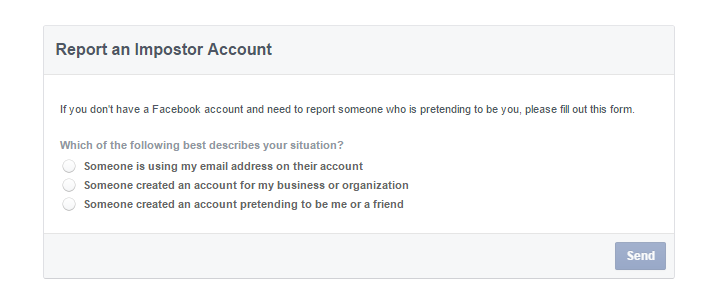
If you do ever come across a profile that is passing itself off as your own, or your company’s, then there is luckily a way to have it removed, as Facebook has a mechanism in place to report and stop the imposter in its tracks.

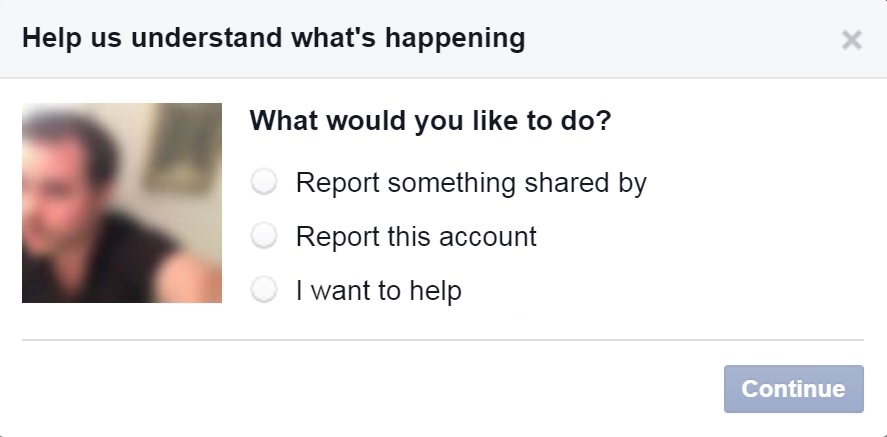
The first thing that you need to do is enter the fraudulent page (you can’t raise the alarm from your own profile), click on the button located to the right of the cover photo, and choose “report”. In the following window, which will open automatically, you have to select “report this account” and, later, follow the instructions on the screen.

facebook impostor account

However, there is also a chance that the imposter has blocked you, so that you can’t access the account. If this happens, you will have to ask a friend to report the false account. The friend will receive a message with a link to continue to process.

It is also possible that the person whose identity has been stolen doesn’t have a Facebook account. If this is the case, the social network has a section for events such as this in its help center.

Anyway, no matter what the situation, Facebook advises that you get in touch with a lawyer or a regulator before viewing the content that the imposter has posted on the page. The aim is to be informed fully of the situation and the legal options available to the affected party.

The social media website doesn’t just offer help to its users, but also provides information to the authorities to help them better understand how to act. What’s more, there is also a special section where they can present their own requests relating to an investigation.

report facebook

The repercussions that an imposter may face depend on what the false account was being used for. In Spain, for example, identity theft over a prolonged period of time (to the point where others are tricked into believing the false identity) is considered a crime that is punishable by up to three years in prison.

If the profile is used to gain personal information on other users with the aim of committing a crime, the situation is even more serious.

We all hope that this never happens to us, or to anyone that we know, but as always it pays to be prepared to act quickly if it should arise.

The post What to do when someone steals your identity on Facebook appeared first on MediaCenter Panda Security.

How Google hopes to revolutionize the way we access our accounts

google

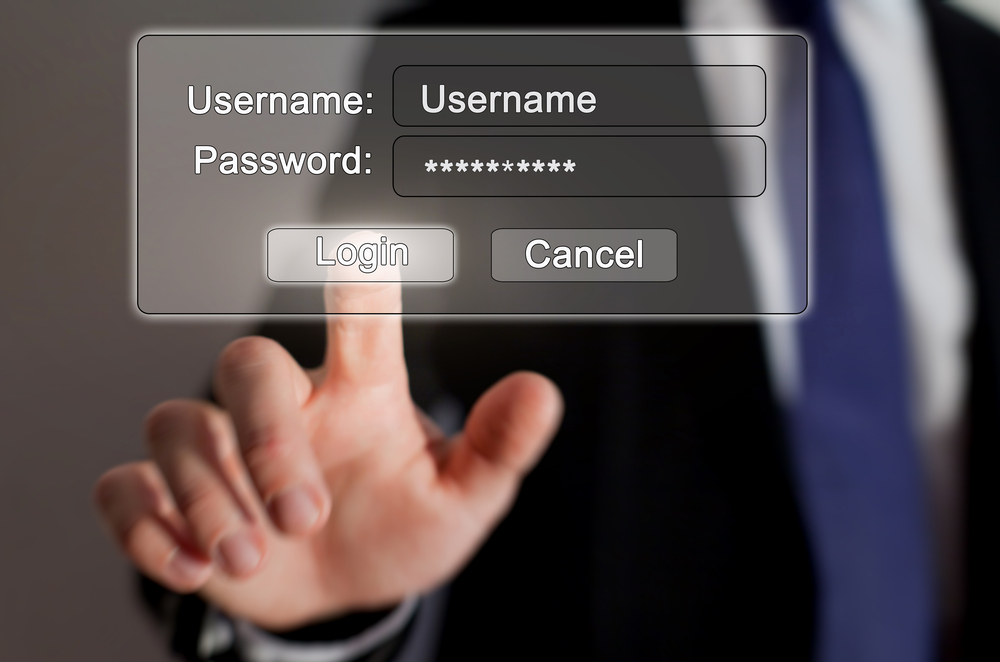
Google is about to put another nail in the coffin for traditional passwords. The search engine giant is testing out a new system of passwords that will take the place of the usual combination of letters, numbers, and symbols that we use to access services on our mobile phone.

At the moment, the new authentication method is only available for a select group of users, although the company has confirmed it will extend it to other users within the near future. Notorious passwords such as pizza, password, and 123456 will soon be confined to the past, joked a Google spokesperson at the announcement.

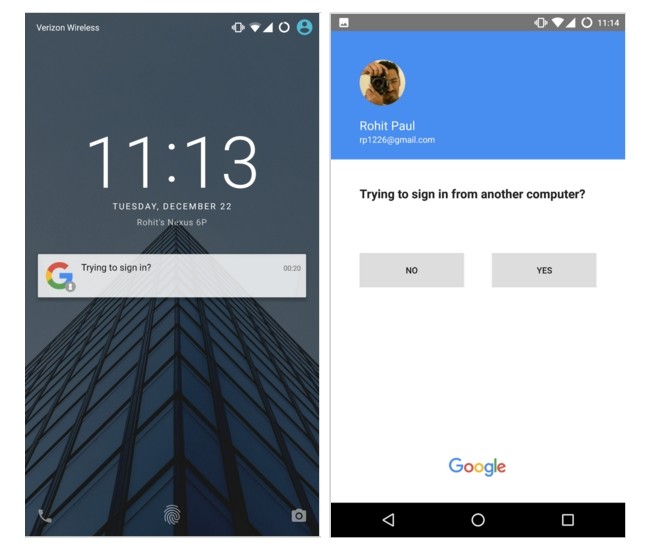
How the new system works is rather easy. Whenever we want to access our Google account – which is becoming more and more central to our lives – we will only have to enter our user name or email address.

By doing this, a notification will appear on our mobile phone, which is linked to the account, asking if we are trying to access from a different computer. By confirming this, we can access without any issues.

google passwords

The main advantage of this method is that it is extremely simple. With just one click of the smartphone’s screen it is possible to by-pass the process of entering a password or, in some cases, going through a two-step verification process.

What’s more, this new method should allow us to feel more protected when it comes to other people gaining access to our private accounts, as some people continue to use basic and easy to guess passwords, which do little to ward off cybercriminals.

google access

It’s not all doom and gloom for passwords, however, as they can still be used alongside the new method and will come in handy should you run out of battery on your mobile phone. The new identification procedure can still be used alongside the current two-step process, too.

In the event of losing the mobile phone, or having it stolen, your account won’t be at risk for long. You can long-in from another device (your laptop, for example) and from there remove the access permission for the mobile phone.

With this initiative, Google joins a list of multinational companies that are looking for alternatives to traditional passwords. Recently, Yahoo created its own system called Key Account, which has a lot in common with the system being trialed by Google. Whether we like it or not, traditional passwords may soon be confined to the annals of history.

The post How Google hopes to revolutionize the way we access our accounts appeared first on MediaCenter Panda Security.

The wave of emoticons that could crash WhatsApp

whatsapp emoticons

An emoji is worth a thousand words, or at least it is when you’re using WhatsApp. We’ve gotten used to expressing ourselves by using these colorful characters – be they smiley faces, grinning turds, or even animals – that it is strange to imagine ever communicating without them. In fact, a recent survey by Swiftkey in the USA managed to find out the most popular emoji by state, with some unusual results coming up, such as the smiling turd being the most popular one in Vermont.

So, due to the popularity of using emojis, it didn’t take long for cybercriminals to catch on to the fact that they could take advantage of their use, and some have started to use them to their advantage.

Following the WhatsApp scams of 2015, such as the message that invited you to download new emoticons but ended up stealing your contacts, 2016 has started out with a new vulnerability in the app, which is used by more than 900 million people worldwide.

Indrajeet Bhuyan, an 18-year-old from India, has just discovered that a cybercriminal, or even a friend who fancies playing a trick on you, could take advantage of a failure in WhatsApp’s system to remotely block your account.

The strategy to carry this out couldn’t be easier – all you need to do is send thousands of emojis in the same message and the app will close automatically. Bhuyan explained the entire process on the blog Hackatrick, where he also tells of his remarkable discovery.

After writing between 4,200 and 4,400 emojis on WhatsApp web, the teenager realized that the service began to slow down. Once the message was sent, he received an error message and the browser remained blocked.

However, when the person he was sending the message to connected, the message was received. Once opened, the application stopped working. During this phase, WhatsApp offered the usual options of waiting or closing the app. Despite this, the app would become blocked again due to the avalanche of emojis.

This young blogger has shown that the error can be produced in different web browsers (Firefox and Google Chrome) and various versions of Android (Marshmallow, Lollipop, and KitKat). Only iPhones were capable of resisting the chaos caused by the emojis, with WhatsApp for iOS only blocking itself for a few seconds.

The problem can be solved very easily, however. Instead of trying to read the message filled with emojis, the user should eliminate all of the chat without entering it. Although for some people, this is exactly the reaction that they hope to achieve.

For example, if a user has sent messages to another user that may contain private information, or has threatened another person via messages, they could send them this glut of emojis with the hope that the victim will delete the message entirely, eliminating all evidence.

Bhuyan also discovered a vulnerability that caused a shutdown of WhatsApp with a message of 2,000 special characters, although the company has since rectified this. He has just informed WhatsApp of his new finding and hopes that this fault is corrected in the next update.

The post The wave of emoticons that could crash WhatsApp appeared first on MediaCenter Panda Security.

All you need to know about the worrying popularity of Malvertising

Every morning, without fail, you log onto your computer and check your emails, read the news, and have a look at your social media accounts. While you do this it is likely that you’ll come across a few pop-up advertisements which you quickly close as they do little more than annoy you.

However, it’s likely that you haven’t stopped to think that these annoying ads could install a malware onto your computer without you, or the company that manages banners and advertisements, even realizing it.

Malvertising is the name that has been given to this technique that is quickly gaining popularity with cybercriminals. According to security experts, Malvertising has grown by 325% in the last year alone.

As opposed to Adware, which fills your pages with toolbars that aren’t usually malicious, cybercriminals use Malvertising to hide malicious coding in an advertisement and it isn’t even necessary for you to click on it to become infected.

How they carry out this attack is remarkably simple – the cybercriminal enters the network of the company that looks after selling advertising space online, taking advantage of the shared information between the company and its clients. The attacker then passes itself off as a different client and posts its own advertisement, albeit one that may contain a malicious coding in Javascript.

Panda_Security_News_Malvertising

Once the user loads the page, the seemingly innocent ad will appear. Without even clicking on it, the exploit will start to carry out its job by installing a malware on the computer. You may even end up having to deal with a banking Trojan, which is designed to steal your bank details while you are entering them online.

Cybercriminals have been using Malvertising for the past few years, and in 2009, The New York Times suffered an attack by this means when a pop-up passed itself off as an antivirus scanner and infected the users’ computers.

Last September, The Huffington Post was also a victim of Malvertising. Not long after, The Daily Mail, a British tabloid, also inadvertently redirected its readers to exploit kits designed to install malware on their computers. Yahoo and Forbes have also suffered similar problems, just like the famous adult sites YouPorn and Pornhub.

As these cases show, cybercriminals are opting to carry out their attacks on popular websites that see a large number of traffic so as to infect as many computers as possible.

Panda_Security_News_Malvertising_Adblock

So, if cybercriminals are using advertisements on websites that we generally trust to be safe, what are the advertising agencies doing to stop this and what can we do to protect ourselves?

The well-known platform Doubleclick, which is run by Google, shut down 524 million malicious advertisements in 2014 alone. Its spokespeople made reference to using malware protection tools in their fight against the cyber attackers.

For their part, the websites that have been infected could create their own ads or use sponsored content to protect their readers, although at the moment it doesn’t seem a viable solution as external advertising is necessary for them to survive.

Therefore, the best way to protect yourself against these attacks is to install an ad blocker, like Adblock, update Java from the official website, keep your web browser updated, and always use an antivirus. We need to take measures to keep these cybercriminals at bay, as even a simple advertisement could be dangerous.

The post All you need to know about the worrying popularity of Malvertising appeared first on MediaCenter Panda Security.

The 10 most alarming cyberattacks of 2015

panda_security_cyberatacks_2015_bug

Neither personal information nor fingerprints have been safe from cybercriminals in the past year and, as the year comes to a close, one thing is for sure – the more devices that we have, the more security we need.

Throughout the course of the year, cybercriminals have shown that they are capable of discovering and, taking advantage of, any vulnerability possible in order to get their hands on our data or to control our devices. Below is a roundup of the most damaging and alarming of these attacks.

Fingerprint theft

If fingerprints are seen as one of the most secure methods of biometric security (they are the current method of unblocking iPhones), the theft of information belonging to US government employees showed that there are serious things to consider with the system.

Last June, a group of cybercriminals managed to obtain the fingerprints of nearly six million federal workers, which could put not only their mobile phones in danger, but even the security of the country.

panda_security_cyberatacks_2015_fingerprint

Remote control of smart cars

Another of the big challenges facing cybersecurity is the issue of smart cars. Until there is a solution, these cars will continue to be vulnerable to manipulation. Last summer, two hackers showed that it was possible to take advantage of errors in the computer system onboard a Jeep Cherokee and took control of the car, even managing to apply the brakes on the vehicle, all carried out remotely.

Thousands of compromised Android devices

Not all of the vulnerabilities in the world of IT security are focused on modern tools or devices. In fact, smartphones have been at the center of a massive scandal in 2015, when thousands of Android devices were affected by Stagefright, a security failure which allowed cybercriminals to access any Android phone and control it without the owner knowing.

The online dating furor

Without a doubt the biggest scandal of the year was the leaking of information relating to more than 32 million users of the online dating site Ashley Madison. This sent shockwaves through the cybersecurity world and served to remind everyone, both platforms and users, of the dangers facing IT security.

panda_security_cyberatacks_2015_ashley_madison

A vulnerable infusion pump

The health and safety of people is also at risk due to the vulnerabilities of different devices. It’s not just smart cars that can be manipulated and involved in accidents, as this year an infusion pump used in hospitals to administer patients’ medicine had to be removed. It turned out that if a cybercriminal had connected to the hospitals’ networks, they could have accessed the machine, manipulating it and changing its settings.

Gas stations at risk

It’s not just hospital pumps that are in danger, as investigations carried out on both sides of the Atlantic uncovered the risks facing gas stations. Once connected to a network, these pumps could be attacked, and a cybercriminal could even cause one to explode.

A year to forget for Apple

2015 has been the worst year for Apple in terms of security as the number of attacks directed at its devices has increased five-fold on the previous year, while the number of new vulnerabilities has continued to grow. One such example is the bug Dyld, which was discovered over the summer and affected the MAC OS X operating system.

panda_security_cyberatacks_2015_apple

Data stolen via third-parties

15 million T-Mobile customers had their data stolen by cybercriminals this year. According to the company, the information wasn’t taken from their own servers, but rather stolen from the company that looked after payments for T-Mobile’s customers.

Data theft via web browsers

The biggest names in the technology sector haven’t escaped the year without a few scares. Last summer Firefox had to advise its users that a failure in the browser meant that cybercriminals could have looked for and stolen files without the victim realizing.

A bad end to the year for Dell

The final scandal of the year happened last month, when it was discovered that the latest models of Dell computers were hiding a serious security failure. Thanks to this vulnerability, cybercriminals were able to alter the communication between various different systems and steal information from the affected computers.

The post The 10 most alarming cyberattacks of 2015 appeared first on MediaCenter Panda Security.

Small Business Protection: Panda Security antivirus for microbusinesses and freelancers – Infographic

We’ve notice that the targets of cybercriminals are growing beyond private users and large corporations. Freelancers and microbusinesses are suffering daily attacks as they are an easy target for the bad guys and represent nearly 80% of the business sector in USA.

Thus, Panda Security designed a tailor-made solution: Small Business Protection. An antivirus that suits to your business needs: economical, quick and compatible with any PC.

Discover the advantages of Small Business Protection in this infographic!


PandaSecurity-Small-Business-Antivirus-Infographic


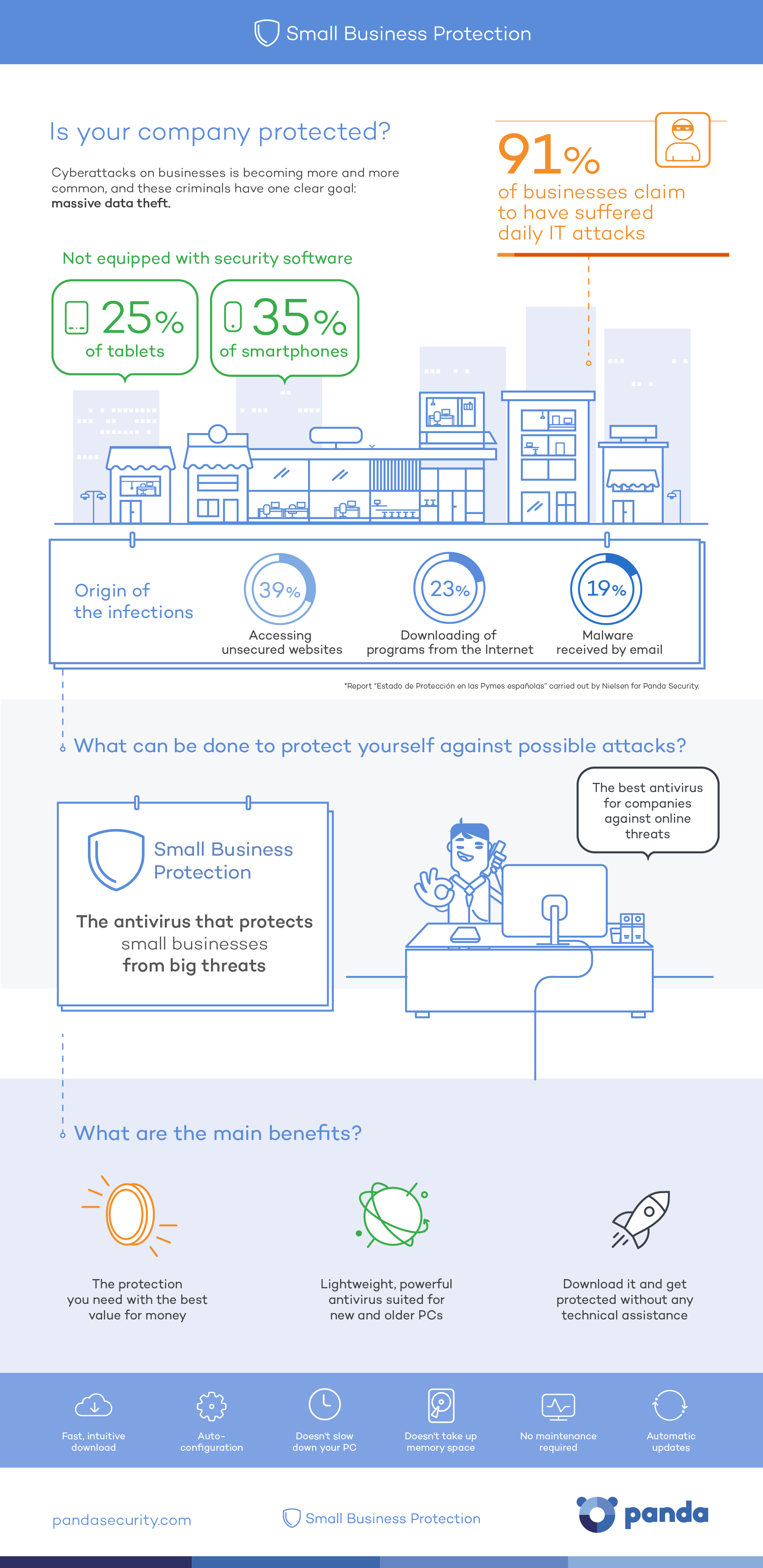
Is your company protected?

Cyberattacks on businesses is becoming more and more common, and these criminals have one clear goal: massive data theft.

Businesses are not equipped with security software on 25% of tablets and 35% of smartphones.

The origin of the infections are:

  • 39% Accessing unsecured websites.
  • 23% Downloading of programs from the Internet.
  • 19% Malware received by email.

What can be done to protect yourself against possible attacks?

The antivirus that protects small businesses from big threats.

The best antivirus for companies against online threats.

Small Business Protection!

What are the main benefits?

  • The protection you need with the best value for money.
  • Lightweight, powerful antivirus suited for new and older PCs.
  • Download it and get protected without any technical assistance.

The post Small Business Protection: Panda Security antivirus for microbusinesses and freelancers – Infographic appeared first on MediaCenter Panda Security.