Category Archives: Panda Security

Panda Security

Is there for a future for traditional text passwords?

“It doesn’t matter how complex or unique they are, your passwords can no longer protect you” (Matt Honan, Wired)

It is relatively easy to find a text password that current industry standards classify as safe: a score of characters that is a mix of numbers, letters and symbols may in a relatively incomprehensible pattern should suffice. We can also go one step further and opt for a random password generator.

That, however, means losing sight of the way we use the passwords: it will be safe enough not to be decipherable, but also complex enough to be easily forgotten, which could impede us from accessing everyday information of both personal and professional importance.
username and password

Not to mention that they can still be stolen or intercepted in various ways and this is the accumulation of problems which a few non-technology companies and financial institutions have generated.  They have long been experimenting with new alternatives for user authentication and all are based on the use of three main factors:

  • Knowledge: Elements that only the user knows. Text passwords or PINs are the main example, although not the only ones.
  • Possession: Elements that only the user has, like chips with inbuilt NFC.
  • Inherence: Elements that are unique to the user, such as a biometry of the face, retinas, fingerprints, or even brainwaves.

passwords, inherence, retina

Last January, Visa Europe published a study in which it affirmed that “the Generation Z is ready to replace passwords with biometry”. In fact, three out of every four young people between the ages of 16 and 24 agree that they feel more comfortable resorting to biometry, and a similar figure considered it a “faster and easier” option to current passwords. Finally, half of those that were surveyed predicted the end of traditional passwords by the year 2020.

Changing characters for emojis

The company Intelligents Environments recently presented, just as we did previously on this blog, its unusual idea for replacing PINs – passwords of emojis or emoticons. Although it may seem a rather silly idea, there are a few factors to consider when it comes to replacing the traditional PIN – like symbols, they are much easier to remember and more user-friendly, and what’s more, the huge variety of emoticons available means that there are up to 3,498,308 million different combinations (compared to just 7,290 currently available). The negatives include the time we would lose scrolling to insert the symbols.

passwords, emoticonos

Facial biometry via selfies

Not long ago, Mastercard carried out an experiment with a group of 500 customers by using an application that allowed the users to identify themselves by using a selfie when shopping online. The app analyzed the photo by using facial recognition technology and the compared it with a second image of the card holder which was located on Mastercard’s database (all this, they say, transmitting the data so that the company will not be able to reconstruct the user’s face). The matching of features in both images is what gives the green light for the transaction to be completed.

Speaking to CNN, MasterCard executive Ajay Bhalla said his company wants to “identify people for what they are, not what they remember […] we have to remember too many passwords, and that creates problems for both consumers and companies”. Bhalla is convinced that the new selfie generation will have no problem in adopting this system.

A step further: brainwaves

Just a few weeks ago, a group of researchers at Binghamton University (New York) published a study that raised a new theory – that the brain waves produced when the human brain reacts before certain words could be used in future as a substitute for passwords, since each person has a particular and distinct reaction to the same terms. Subsequently, attempts to ‘train’ a computer system to recognize each user based on their brain signal resulted in a success rate of 94 %.

This authentication system, which combines factors of recognition (the buzz word here) and inherent (the distinctive pattern of brain waves), would come to solve the problems of validating the biometrics: “If the fingerprint of a user is usurped,” says researcher Sarah Laszlo, “the victim cannot create a new one because they still have the same finger. However, in the unlikely event that it were a brain footprint copied, the user could easily start it again“.

The Abacus Project, the multifactor proposal by Google

In the recent Google I/O 2015, the company from Mountain View submitted its own proposal to ensure the security of mobile devices – a software capable of combining biometrics and the detection of patterns of use (pressure, speed, speech and typing, location) to identify whether or not the person using the device is the regular user or not. The good news is that the only hardware that this system requires is already integrated in the latest generation of smartphones.

The post Is there for a future for traditional text passwords? appeared first on MediaCenter Panda Security.


The invisible trail left by your device’s battery which leads right to you

battery, track

While smartphones and tablets continue to have more features which help make our lives easier, their battery life isn’t usually something which users are happy with.

Now, whilst the manufacturers are working on extending its shelf-life, the batteries are in the spotlight for another reason. This time, the engine of these mobiles is putting user privacy at risk by leaving a trail of all your movements online.

The fact what businesses and cybercriminals are able to find out this information is down to a characteristic of HTML5, the latest version of the language used to create webpages. This function allows webpages to know the status of the battery and adapt what it shows.

So, in the event that our battery hasn’t got a lot of energy left, websites written in HTML5 can be loaded (if the developer allows) with all unnecessary items removed in order to save resources and power.

battery, cybercriminals

This isn’t a new characteristic as it was introduced in 2012 and works with Chrome, Opera, and Firefox. Recently, however, a group of French and Belgian investigators have published a study which shows that the information received this way is specific and puts our security at risk.

It is possible to tell the percentage of battery remaining and the estimated life before it completely runs out, but what is really worrying is that this data is collected every 30 seconds (almost in real time).

In addition, researchers have also found that, after several visits, you can find the maximum capacity of the battery and eventually identify the user each time you visit a particular website, creating a kind of digital trail.

It also doesn’t make much difference if you surf incognito. In fact, neither the firewall of a computer or using a VPN are enough to escape this monitoring by HTML5. As if that were not enough, everything happens without the user being aware, since the website does not have to ask permission to gather all this information.

Beyond technical features like this that endanger our privacy – and that will probably be changed soon, following the controversial study – users should remember how to protect their privacy in the digital environment and also protect themselves with the best security tools available – it’s your security that’s at risk.

The post The invisible trail left by your device’s battery which leads right to you appeared first on MediaCenter Panda Security.

Google will block extensions that try to deceptively install themselves on your browser

browsing

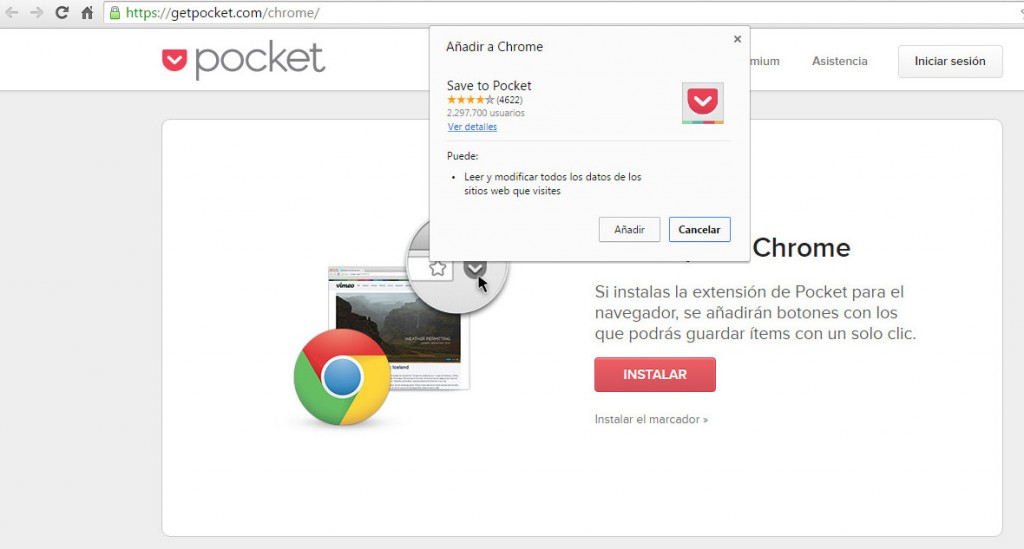
Surely this has happened to you before: you’re browsing online and you come across a blog or website that has a plugin for Chrome that you think looks interesting or useful. You check out the developer’s website, have a look at the benefits and decide to download it. You click on the corresponding button and you see something like this:

chrome, browser

All you need to do is click add to get the extension. So, since Google implemented inline installation in 2001 it’s been as easy as that. Before then, the plugins needed to be installed via the Chrome Web Store.  They are now staying there in the internet giant’s servers, but can also be downloaded from other pages. If you want the extension of Pocket, you can get it on the Pocket website.

Even though it’s logical, this process is proving to be quite the headache for Google. Some schemers are abusing this method so that you accidentally install dangerous extensions which could compromise your security. How are they doing this? Well, they trick you, by making you believe that they are necessary updates in order to view a video, for example:

plugin, trick

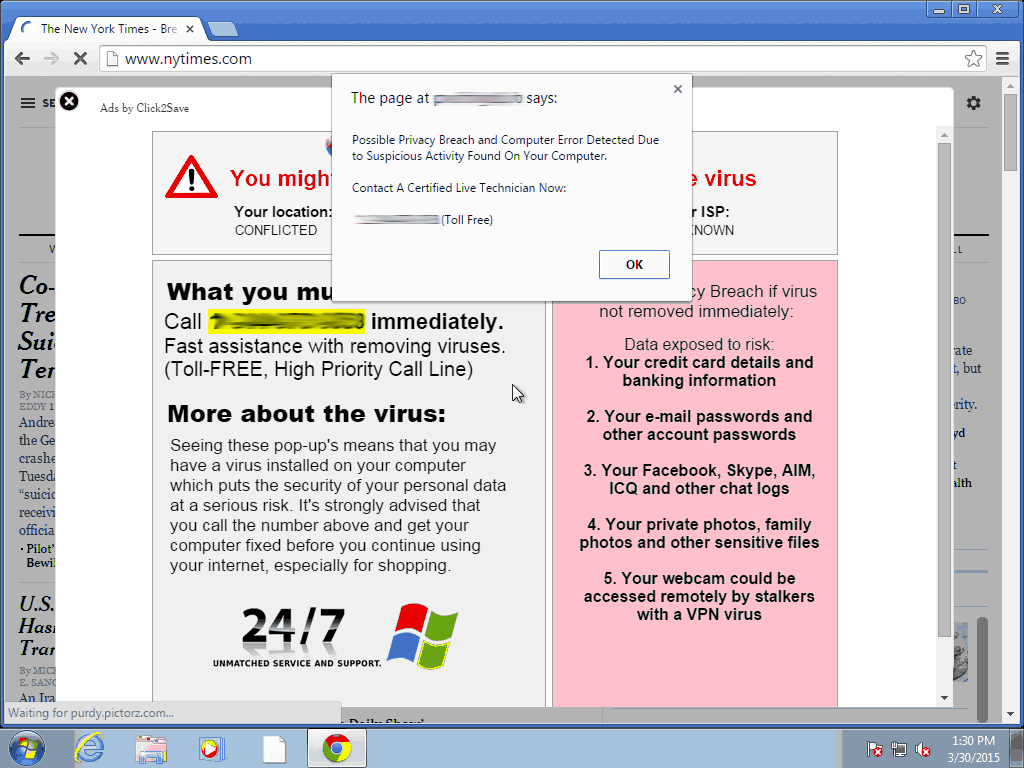
If you fall for this trick and click on the link, a box will appear that allows for the installation of the extension – like the one we showed you earlier in the article. In other words, you’ll be left with a plugin that you didn’t want and one which you have given a whole host of permissions to, which means it can do a lot of things to your browser such as filling it with ads like this:

inline installation

Pretty annoying, no? To avoid this, Google will prohibit the installation of plugins from webpages that abuse inline installation. Each time it spots one with bad intentions, it will blacklist it. From then on, every use user who tries to download the extension will be directed to the Chrome Web Store so that they check if it is installed. This way they’ll realize that it wasn’t an update for Flash Player.

The hunt for these schemers, which was announced on the company’s official blogs, will begin on September 3rd. It is expected to affect only 2% of the extensions as, unfortunately, the practice isn’t very extensive yet. That aside, Google states that it is “an important step towards maintaining a healthy ecosystem of extensions.”

This isn’t the first measure they have taken to achieve their objective. In May of this year they rolled out a change in the policies relating to extensions that impedes installation if it is stored outside of its own servers. Even if the download is done from another site using inline installation, the file that runs your browser comes from the Chrome Web Store.

According to a recent study which analyzed 48,000 plugins, they found that 130 were malicious and a further 4,712 were considered as suspicious. Google safeguarded some avenues of attack but left others exposed, such as the ones they will close off in September. Thanks to these measures, Google is making it progressively more difficult for its controls to be breached.

The post Google will block extensions that try to deceptively install themselves on your browser appeared first on MediaCenter Panda Security.

It’s possible to access Dropbox and Google Drive accounts without needing user passwords

security, cloud

As the number of connected devices increases, so too does the use of platforms which allow us to synchronize them all and access our files from any location. Saving documents on the cloud is especially useful in the corporate world, where all of the team is able to access and modify information without the need to send emails or use external memory systems.

As we have already mentioned on various occasions, despite being useful and efficient, the cloud system isn’t completely risk free. During this year’s BlackHat USA, an event that draws together security experts from all around the world, there was a new revelation relating to cloud security.

The group on question discovered a new type of attack called the Man in the Cloud (a variation on the classic Man in the Middle), which allows cybercriminals to access synchronized file services.

dropbox

By doing this, they can reconfigure platforms such as Dropbox, Google Drive or Microsoft’s OneDrive and turn them into tools for stealing information. One of the most dangerous and worrying aspects of this is that the criminals don’t need to have the passwords in order to access the information.

In an effort to speed up the process, a lot of the most popular applications don’t ask users for their login details every time. Instead of this authentication, it relies on an identification key or a token, which is saved in a file or register.

The problem is that even when the key is encrypted, cybercriminals are able to eliminate the encryption. To make matters worse, some platforms such as Dropbox don’t renew the code even when the user changes the password. That means that to steal information, the attacker only has to install the identifier on its own system.

google drive

One of the experts who uncovered this attack has developed a test to manipulate the encryption of the keys. It consists of a malware that the victim downloads from a link included in an email or when they access an infected webpage.

Once inside, besides stealing documents and confidential information, the attackers can manipulate the files, encrypting them so that the users are unable to access them. They are also able to install a back door on the device which allows them even more control over it.

To avoid these types of attacks, the best thing to do is use storage and synchronization tools such as Panda Cloud Drive, which is included in the Gold Protection version of our security solutions.

The post It’s possible to access Dropbox and Google Drive accounts without needing user passwords appeared first on MediaCenter Panda Security.
EDR technology – much more than just standard protection

Traditional viruses, defined as executables that were sent en masse to cause infection on a large scale, are already controlled by protection systems (Endpoint Protection Platforms). These are popularly known antiviruses which, as the name suggests, protect the system of the user. The problem is that cybercriminals have evolved greatly in recent years and so has their manner of attack.

Cybercriminals change their spots every day and advanced threats are now the main focus. Direct attacks, ransomware (a technique, such as Crypotolocker, that steals information from the infected computer), zero day attacks, persistent threats… they are all spreading through the market. Businesses and everyday users are at risk, not just of information theft, but also the economic fallout of being targeted. It can also reflect badly on a company if it suffers an attack and can damage its reputation.

Fortunately, the security industry has begun to react and many big players in this sector have unveiled platforms which go far beyond just protecting your system – they can detect advanced threats while at the same time giving the best response possible to possible incidents. We are talking about EDR platforms, or Endpoint Detection and Response, to give them their full name. This term was coined in 2013 by the security analyst Gartner Chuvakin and is a trend that we at Panda Security have turned into a true star product with our Adaptive Defense 360 solution.

“The protection offered by EPP (Endpoint Protection Platform) solutions, including those that possess a traditional antivirus, isn’t enough,” explains Eduardo Fernández Canga, an expert at Panda Security. “Antiviruses are still important; they are products that protect against known threats. The problem is that some new forms still manage to enter the system. It’s not good enough to just protect your system, you also need tools that allow you to detect new threats. It’s impossible to say that we can block all malware but we can detect it and act in the best way possible,” he added.

edr technology

A comprehensive and customized solution

This is where a solution like Adaptive Defense 360 comes into play. Designed by over a five-year period by Panda’s experts, this solution is compatible with Windows and soon will be available on Android devices. “Protection solutions that detect a threat always generate an identifier and include a black list. The problem is that if there is an executable that is not on this blacklist then it assumes that it is good and does nothing against it. However, Adaptive Defense does not rely only on a blacklist. It is suspicious of everything running on the endpoint,” emphasizes our expert.

So, how does this platform work? The first thing that it does is install an agent on the user’s device. Then it analyzes the behavior of every application that is running on the system. It then sends information to the cloud regarding the behavior. By using big data and data mining tools, Panda is able to classify 95% of all that shows up, including goodware and malware. To cover the remaining 5%, Panda depends on its group of expert analysts who are able to analyze and classify what the system misses.

detection

An important differential, when compared to other solutions on the market, is that Adaptive Defense draws up a white list “for the client which we use to analyze executables,” says Fernández. Furthermore, the platform doesn’t just classify the executables but rather makes sure that their behavior doesn’t change. “Normally white list solutions aren’t capable of detecting a change when they have classified an executable like goodware. However, we generate a pattern for each executable, so if the latter leaves the pattern then it generates an alert,” adds our expert.

This last part is a relevant factor that allows customers to work with vulnerable applications such as old versions of Java, Chrome or Internet Explorer. “Many businesses feel obligated to work with software which only functions with these applications. Therefore the only way they can be protected while using them is to have a system like Adaptive Defense,” insisted Fernández.

Full control of the information flow in the organization

Another advantage of Adaptive Defense is that it allows the system administrator to know exactly what damage the malware has caused to the computer. Moreover, it allows you to know and control who has access to these harmful executables. For example, it may be the case that an employee accesses confidential information and sends it to someone outside the company. Adaptive Defense, although it doesn’t block these actions, detects them and informs the administrators.

In fact, going a step further, Adaptive Defense is a powerful tool to precisely analyze, understand and visualize the flow of information that occurs both within our organization and outward, and vice versa. “The administrator can know who, how and when data is accessed, with the all of the advantages that it entails,” says Fernández Canga.

The post EDR technology – much more than just standard protection appeared first on MediaCenter Panda Security.

Everything that could go wrong when you send an unencrypted email (and how to avoid it!)

key, encrypt

Everything that you send in an email, from the attachments to the text, goes on a dangerous journey every time that you click send. Its path is filled with traps that cybercriminals can use to steal your information.

One of the tips that you should follow to protect the content of your emails is to encrypt them. This way, even if someone is able to access your emails, they won’t be able to read the content.

Although it might surprise you, the journey that your emails take isn’t as straightforward as you might think. It isn’t a simple matter of going from A to B, but rather the emails pass through different routes which put them at risk of attack from cybercriminals:

  • Step 1: The email that you send from your device to your company’s server. Larger companies generally make sure that this is a safe route and look after it. If you see a green icon or a lock icon in the address bar then you can relax  it’s secure. The journey, however, continues…

email, protect

  • Step 2: Next you email needs to pass through different serves until it reaches its destination. This part of the journey is the most dangerous as the email can be intercepted at any time, especially if the server used by the receiver isn’t protected correctly. The worst thing about this stage is that users are completely blind – there is no way of knowing how secure the connection is between the two servers. The only way to be sure is to encrypt your messages.


  • Step 3: Not only is it going between two servers, but the email still has to travel to the computer or the mobile device. This stage can also be complicated and, furthermore, once it arrives at the other device it can still be under threat. You have to remember that computers are always at risk if the correct security procedures aren’t followed.

With so many different ways to steal information from emails, it is vital to protect the content and attachments that you send.

padlock security

There are many ways to encrypt your emails and some messaging services offer it as an option. There are other options to ensure increased protection for your emails, such as the one offered by Panda, which encrypt your attachments to make sure that the content is secure. It isn’t necessary to be an expert to protect your online security, but it is better to behave like one.


The post Everything that could go wrong when you send an unencrypted email (and how to avoid it!) appeared first on MediaCenter Panda Security.
Ashley Madison. Should your company invest in cyber insurance?

ashley madison

What started out as a dating site – albeit a controversial one at that – has turned into a nightmare. Ashley Madison, a dating site for married people who are looking to have an affair on the side, suffered a devastating cyberattack this week as hackers published private details relating to nearly 40 million users.

The information released contained names, phone numbers, email addresses and even sexual preferences. The fallout of the attack, which took the form of a 10GB database on the “dark web” that could be accessed through a specialized web browser called Tor, was felt around the world. One radio show in Australia had listeners calling in to see if their partners had had accounts on the website, resulting in some unsavory moments.

This has resulted in the company’s reputation – like that of its users – lying in tatters and calls into the question the credibility of similar websites. How can a person be expected to sign up to a confidential website if their private information is so easily at risk of being exposed?

This is an example, recent and extreme, of what a cyberattack can mean for your company. The average cost of data theft is around $3.8 million (€3.4 million), according to the latest report by the Ponemon Institute. This is an increase of 23% compared to what a company would have lost to a hacker in the previous year.

Cyber insurances for companies

The damage done to a company’s credibility may not be repairable but there is at least a way of preventing the economic fallout from being too harsh. Large corporations are away of the risk that is posed and are looking for solutions. This has resulted in an increase in cyber insurance, which has seen an increase from 10% to 26% in the last year in the United State alone. It is estimated that up to 60 different insurance firms are offering this service.

Information theft is also a worry for European businesses and they are heading for a more rigorous legal framework for data protection, with a new law on the way. Protection against possible regulatory fines and penalties is something that every potential cyber-insurer must cover in Europe.

In general terms, you could say that there are two distinct risks that these policies cover: direct risks, which affect the company itself, and indirect risks which affect third parties (clients and users). In a typical information leak, the direct cover would help to defray the costs of notifying about an attack and the following analysis, the repair and restoration of the data, and the victims’ verification service. The indirect cover would take care of the costs of fines, legal fees, judges, and complaints on behalf of users.

hacking computer

So, is it worthwhile for your company to contract a cyber-insurer or is this just another way for insurance companies to increase their revenue by exploiting unchartered territory? It depends and the first thing to consider is rather obvious; prevention is always better than the cure. A good antivirus for businesses y and following recommended security steps is the best defense against a cyberattack.

That said, the main advantage of these insurance policies is that the company can continue operating if it suffers an attack. It doesn’t prevent or decrease the chances of being targeted, but it allows you to relax knowing that the future won’t be so grim.

However, no matter what insurance the company has, it will never recover its reputation after an attack and this can be devastating. According to a report by Ponemon, a cyberattack can cause a company to lose up to 4% of its clients and customers in some sectors.

So, if your company finally decides to contract a cyber-insurer there are a few things to consider. The insurer should offer retroactive cover (which pays for breaches that take place before the policy is activated), cover for unencrypted documents (text documents, spreadsheets, etc.), third party information, information stored on the cloud and mobile devices, and that it is clear what the company considers to be negligence – so they don’t leave you high and dry at the worst moment.

The post Ashley Madison. Should your company invest in cyber insurance? appeared first on MediaCenter Panda Security.

The most sought-after professional profiles in the information security sector

security jobs

Direct attacks, identity and information theft of all sorts (especially social engineering), persistent advanced threats… the risks associated with information security are continually multiplying in a world which is increasingly more digital, mobile, and multi-device based. With this backdrop it is no surprise that cybersecurity experts are in high demand along with professionals in other sectors such as information analysis, big data technology, and data scientists.

So, which are the most desired profiles in security departments? Which training do these professionals need to have and how much are they paid? To get the answers to all of these questions, and to help security experts and the businesses which are looking for them have a realistic idea of how they fit into the marketplace, we have consulted two HR experts with specific experience in the IT sector. Sára Álvarez, Spring Professional manager at Adecco, is in no doubt – engineers and security technicians, as well as auditors specialized in this area and even pre-sales engineers, are the most sought-after roles in security departments.

María Mosquera, executive manager at Michael Page Technology, adds that Logic Security Managers, IT Security Technicians and Experts, Security Managers, Ethical Hacking Experts, and CISOs (“this is generally a position attained after a promotion from another management role”) are the job profiles that are in demand. They are particularly sought-after by consultancy firms “where there are parts of the business solely dedicated to information security”. The role of CISO, she says, “is generally reserved for larger companies”.

Professionals that are requested more and more

“In recent years we have identified a clear need for these profiles in different customers in different sectors. It is a reality that security is increasingly important in companies because everything is already in the network,” states Alvarez. “In 2014, especially, we saw that the focus of the security companies completely changed. Whereas before these profiles were sought out as needed, nowadays they fill their departments with expert, permanent staff in in order to prevent data leaks and other threats. The demand for security professionals almost doubled last year compared to 2013”.

jobs security

Mosquera agrees with Adecco’s spokeswoman about the growing relevance that security has taken in all organizations, which she says typically have a specific department or work with external consultants specialized in the field. “Hence the demand for relevant specialists to simulate Ethical Hacking security attacks and be ready to counter them,” she added.

Necessary training

Regarding the training demand for these profiles, it is diverse but always related, obviously, to the world of information technology. “Normally these roles have an extensive background in systems and, over time, have been specializing in security,” said Alvarez, although Mosquera says that besides being IT graduates, many professionals in the field of security are telecommunication engineers.

Of course, both agree on the importance of these experts having a series of certifications: “The most important are those such from ISACA, such as CISA, CISSP, and CISM, others like CEH, CRISC, and SIEM. They should also know how to handle tools with ad hoc security solutions at companies like Panda Security, Palo Alto Networks, Bluecoat Systems, Symantec, etc.,”, explains the spokeswoman from Michael Page Technology.

While the more technical positions require more practical training on certain products, they majority related to the management or security strategy, for example, the auditor, which should develop contingency plans and data protection, need more certifications linked to such development plans, with knowledge of the existing data protection rules (in Spain the LOPD), and the advising on information systems, etc.”, reveals Álvarez.

So, how much are they paid?

And now the big question – what is the salary for profiles related to information security? “The positions from technician to manager and expert, often range between €45,000 and €65,000 gross per year, depending on whether the position is for a consultancy or end company. In consulting, the categories above manager can reach €75,000. For the position of CISO, the salary range depends on the size of the department and consequently of the organization, but may be around between €80,000 and €120,000 gross,” reveals Mosquera.

Alvarez is more conservative regarding the salaries. “The lowest profile, the technician, can start from €30,000 gross per year, but if the professional has certifications, speaks English and relevant experience, the salary may be higher, from €35,000 to €37,000. Security engineers earn between €35,000 and €45,000 euros gross per year, the architects, who are the most powerful on a technical level, earn between €40,000 and €52,000, auditors start out with a salary of €42,000 and security managers start with €50,000″. The Adecco spokewoman also highlights a role that is on the rise in the security sector, that of presale management, whose salary is between €35,000 and €46,000 gross per year.

The trend in salaries of these experts, of course, is increasing. Keep in mind that many times it is not easy to find these profiles and, above all, retain them in companies that literally raffle the best. Therefore, another trend that is beginning to prevail in many companies is addressing HR policies aimed at retaining these profiles by other incentives such as training, and social benefits, etc.

The post The most sought-after professional profiles in the information security sector appeared first on MediaCenter Panda Security.

Six challenges for the Chief Information Security Officer

CISO

The increasingly complex landscape that society’s mass digitization has established, driven by mobility and permanent connectivity, coupled with the new risks and threats that are proliferating in the market – which are becoming more and more sophisticated-, has created new challenges for the Chief Information Security Officer (CISO). Let’s see what they are here.

  1. The technological scenario is diversifying… and becoming more complicated

Although it may seem hard to believe, but not long ago people exclusively used personal computers and networks highly controlled by the IT manager in a way that, just by protecting the organization’s perimeter, the company was safe from possible attacks. But the technology landscape today is very different and systems on the premises (both personal and located at the company) have given way, on many occasions, to systems based on the supply model, known as cloud computing.

On the other hand, data is no longer generated and stored only in the data center but, mostly on mobile devices which proliferate amongst employees and which, on many occasions, are not even provided by the company, but are personal (although they are also used for work purposes without the access control applications used previously). Even the corporate network’s intelligence has jumped from the data center to the professionals’ devices. Furthermore, the network today is starting to provide connection to the most varied devices, and increasingly will be taking into account the trend towards the so-called Internet of Things.

mobility

This scenario requires CISOs to have a new approach which responds to these new models (cloud) and practices (the famous BYOD or the use of personal devices in the work environment). It is essential they have very specific policies in this respect and, above all, they should inform their employees about them, explaining what action should be taken to avoid risking their company’s information. It is also essential to protect the mobile device from the data center with the new software tools (many of which are delivered as a service or cloud model), and those which manage mobile devices, provided by the security suppliers, whilst not forgetting to shield the internal network and corporate assets.

In addition, with regards to the adoption of the cloud, it is necessary to agree with the cloud providers which security controls must be applied and, of course, only upload assets and core systems to the cloud if the safety standards are the highest and comply with the relevant regulations of data protection, etc.

  1. Threats are getting more dangerous

The second but no less important challenge for CISOs is the change in the type of attacks and threats that has occurred in recent times. Cyberattacks that were conceived by hackers in the past to overcome an IT barrier have given way to persistent and targeted threats by groups of crooks whose purpose is information theft, espionage, or economic profit.

Chief Information Security Officers should be aware of this new reality and know that, although it is difficult to avoid the attacks, it is possible to mitigate its effect if they react quickly and they are ready. Experts recommend adopting a security approach based on methodology and betting on standards already recognized in the industry as CoBit or ISO 27000, and frequently conducting audits to see the degree of preparation when facing an incident of this type.

Improving risk management is possible, thanks to the constant monitoring of increasingly sophisticated threats that occur on computers and on the net. There are many tools already available on the market and their implementation and deployment (many work in service mode) is simple.

  1. Budgets still tight

Recent years have been characterized by a fall, or at least an important adjustment in IT budgets still suffered by many companies, even though the economic situation is beginning to improve. Fortunately the senior management of all kinds of companies is increasingly aware that spending on information security is absolutely necessary. So while it is a challenge to justify expenditure in the IT area, the truth is that for security managers this task is easier, especially after some notorious attacks produced in the industry like the one suffered by Sony Pictures, amongst others.

Proof of this is that the expense on security has continued to increase exponentially in recent times (even in times of crisis) and, according to Gartner, it will reach 76 billion dollars globally this year 2015, which is to say that it will increase more than 8% compared to the year before. The growing adoption of the previously mentioned mobility and cloud computing technologies, as well as social networks, will promote the use of new technologies and security services of up to the year 2016, according to the consultant.

  1. Scarcity of qualified personnel

The human resources related to information security are scarce and have a high cost, a reality which is another great challenge to the person in charge of this area. More problematic, however, is to be able to retain these professionals in a market where companies all bid for them. What can be done? It won’t hurt if the CISO, among his other roles, takes the time to promote talent and development promotion programs for employees in his area which wouldn’t only involve an economic consideration but would also bring benefits that go beyond that (flexible working environment, high level of training, etc.) in order to keep these so coveted and, at the same time, necessary employees.

talent

  1. Awareness and alignment with the business

Not only must the Chief Information Officer (CIO) be aligned with the business but also the Chief Information Security Officer. So that, beyond having solid knowledge in the field of communications and information technology and how to ensure security in applications and systems, the CIO will need to know how to guide your company to enter new markets, embrace new technologies and geographic areas in such a way that the business risks are mitigated as much as possible.

Having the ability to establish bridges between the business team and the systems engineers and application developers will also be a more than necessary task for the new Chief Information Officers.

  1. Make security invisible for the user

As is the case of IT in general, it is necessary to work to make the information security invisible and transparent for the organization and its users (employees, partners, suppliers, customers). The work involved behind the scenes (linking security with the business information) is hard but necessary.

The post Six challenges for the Chief Information Security Officer appeared first on MediaCenter Panda Security.

How can I stop people from connecting to my Wi-Fi?

wifi

Paying for a fast and reliable Wi-Fi connection at home only to find out that your neighbor is stealing the signal from you is pretty annoying. Not only is it frustrating, but there is also the legal aspect to think of – everything that is viewed and downloaded by the Wi-Fi connection is your responsibility.

In the majority of cases it isn’t enough to protect your network by using the long and complicated password that comes with the router. Nor is it enough if you change it and create an even more difficult one.

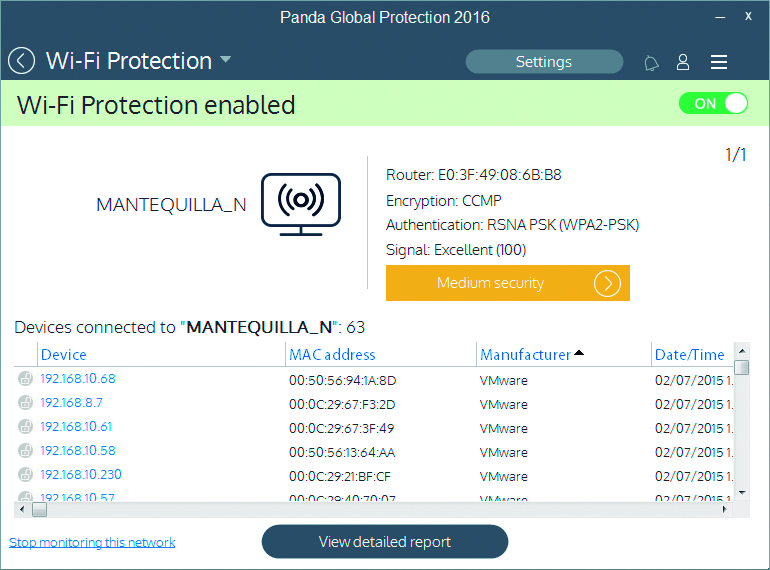
If you want to know who is connecting to your Wi-Fi and how to stop your connection from being open to the public, the best thing you can do is use the Wi-Fi protector and monitor that you can find in the new line of 2016 Panda product.

protect wifi

This feature allows you to see all of the devices that are connected to your network and lets you block an intruder if you detect one. This will stop them from being able to reconnect again.

Furthermore, the monitor will provide you with the following information:

  • Wi-Fi networks that you are connected to: network name, Mac router address, encryption, signal strength.
  • Device information: name or Mac, manufacturer, date/time of connection, etc. It allows you to give the devices nicknames so as to recognize them easily.
  • Information on the saturation of the default channel: by changing to the channel recommended by Panda, you can increase your connection speed.
  • History of connections made with different devices. This lets you review who has connected to the network and identify intruders.

So, are you ready to protect your Wi-Fi connection?

DOWNLOAD ANTIVIRUS

The post How can I stop people from connecting to my Wi-Fi? appeared first on MediaCenter Panda Security.