Category Archives: Panda Security

Panda Security

Disposable email address: easy, free and safe

smartphone on the hand

After searching in Google for what appears to be ages, finally you find a web page that seems reliable, you start reading and realize that it contains all the information you were looking for! But your happiness is shattered when, suddenly, the host asks you to verify you are not a robot! A robot?! To prove you are a human being you enter your email address and register to the web page.

You rarely stop to think that your email will be captured in the platform’s database and that from now on, it will probably collapse your inbox with spam or fill your email up with malware. The solution to this problem is not to sing up to these web pages with your personal email account, but use instead a disposable one.

There are many programs out there that offer creating disposable email accounts, accounts that last a short period of time and whose spam won’t bother you. Some of the platforms that allow you creating temporal emails accounts are: Maildrop, Yopmail, Air mail, Guerrilla mail, Now my mail, Hide my ass, Mailinator o Email Temporal Gratis.

Most of them don’t require much registration information, others allow you to forward messages, and in some cases, you are able to select the account’s expiration date.

Mailinator, for example, is one of the longest-standing free disposable email services, which denies access to emails with attachments, and by doing so it prevents malware from entering the account. You just have to choose an available name and you may enter your temporary inbox. But we must warn you, these are shared accounts, so there might be more people using it.
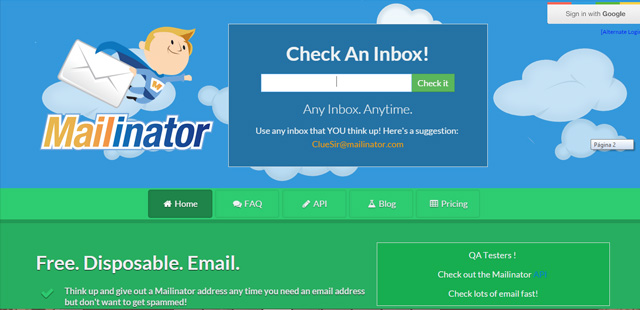
mailinator

Another option is installing a browser extension to create disposable email accounts without accessing a web page. There is an extension available for both Firefox and Chrome, it is called Trashmail. You can create a new account in Trashmail by clicking on “Register a new account” and filling out all the information required, even the email address to which it will redirect your messages.

The next step is selecting your preferences on the General tab: you can choose the message’s lifetime and notify your regular email when the temporal email has expired.
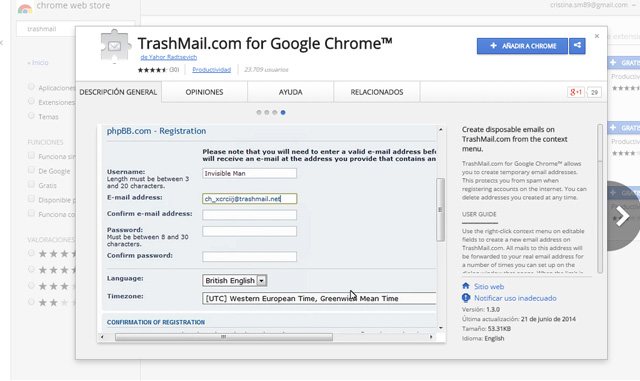
trashmail

You can also create an alias of your own email address. For example, in Gmail you can receive the messages sent to [email protected]  and the email will arrive to [email protected].

Once you are inside the platform you register yourself with the first address, the alias, so the platform’s database only registers your alias email and won’t fill up your inbox. You can also choose which messages go directly to the trash, which are forwarded to other email accounts or which simply stay on your inbox, just by setting some filters. But you must take into account you will be sharing your real email address.

So, now you know, the next time a website asks you for your email address don’t jump in and write your personal or business one. Be cautious and use a disposable email address. You have everything to gain: it is easy, free and safe.

The post Disposable email address: easy, free and safe appeared first on MediaCenter Panda Security.


How to solve your problems with your computer or smartphone

premium assistance

Do you have a virus in your computer and don’t know how to remove it? Don’t know how to set your Wi-Fi connection? You have a new smartphone and need to set it up?

Don’t worry! Ask for our remote assistance and enjoy a hassle-free digital life.

We have three different plans for you to choose from. Which meets you needs:

Fix&Protect Plan

Keep your computer virus-free.

  • Basic TuneUp/Optimization of Windows on 1 computer.
  • Disinfection of viruses and spyware.
  • Resolving any technical or IT security queries.
  • Installation and configuration of Panda Antivirus PRO (3 months of service).

Family Plan

Configure your home Wi-Fi network, as well as your PC, Mac or smartphone.

  • All options included in the Fix&Protect Plan.
  • Technical assistance for up to 5 devices.
  • Setting up your home Wi-Fi connection.
  • Setting up privacy settings on social networks.
  • Setting up your smartphone or tablet.
  • TuneUp/Optimization of your PC, Mac or smartphone.
  • Installation and configuration of Global Protectio on 5 devices (3 months service).

Complete Plan

A security expert will assist you anytime, anywhere.

  • All the options included in the Digital Home Plan.
  • Technical assistance for up to 10 devices.
  • Configuration of security on Web browsers and email accounts.
  • Troubleshooting of problems on your operating system or any other app or software.
  • Assistance with peripherals such as printers, cameras, scanners, etc.
  • Installation and setup of Global Protection on up to 10 devices (3 months service).

Try our remote assistance and forget about your problems. Call us free of charge and we will inform you about how it works!

The post How to solve your problems with your computer or smartphone appeared first on MediaCenter Panda Security.

The Pirate Bay has grown clones loaded with malware. Beware!

A few weeks ago, a court in Madrid issued a statement to block access to the home page of ‘The Pirate Bay’ and all associated domains. The court based on the premise of the Spanish “Ley Sinde” to provide torrent downloads stopping in Spain, as it has in 13 other countries.

the pirate bay

So much for the theory; but the practice is a bit different. Although the judges established a 48 hour limit for all operators to veto these webs to its users, some have still to execute the warrant.

But the issue won’t be solved when they proceed. For years, members of ‘The Pirate Bay‘ have ensured its continuity through mirror pages, exact copies of the original site.

Any one of them gives you access to a server where you can find a copy of the torrents available for downloading movies, music and other files. So, you can keep downloading through The Pirate Bay just using alternative paths.

At the beginning there were a few dozen of these clones, but now this number is exorbitant. IsoHunt, another platform for sharing documents, is the one to blame. After the end of last year, when the Swedish police arrested some members of The Pirate Bay and led to the system crashing, the responsibles of this other web sympathized with them.

pirate flag

The result of their effort to keep up the torrent (pirate) flagship is the project called: The Open Bay, a fully editable open source version of the original site. Using this template, anyone with a basic knowledge of web design and programming can develop a site that indexes the contents of The Pirate Bay, IsoHunt and KickAss Torrents.

Now that ‘The Pirate Bay’ is operational again and banned in most countries, some people use the tool The Open Bay with even less lawful purposes than just sharing files without respecting a license. Cybercriminals insert parts of the content of an alleged mirror page (via iframe) on other websites that use the WordPress content management system.

the pirate bay code

So far it seems that there is no bigger problem, if it wasn’t because the address (which we are not going to tell you for your own safety) doesn’t lead to download site. When someone clicks on the link, a malware infects their computer and records the owner’s information, as bank details or passwords, sending them later to the criminals.

Why WordPress? This tool is not insecure on its own; cybercriminals based their attack on the outdated versions of some plugins, which have vulnerabilities, allowing the criminals insert the iframe with the malicious link.

The number of infected sites is still unknown, but the only way to avoid this code straining in our software is to keep WordPress and all its plugins up-to-date. Internet users that want to keep enjoying The Pirate Bay’s services, do it at their own risk.  We just advise them to be cautious and vigilant.

The post The Pirate Bay has grown clones loaded with malware. Beware! appeared first on MediaCenter Panda Security.

Adaptive Defense 1.5, the enterprise solution that seeks security against advanced and targeted attacks

Panda Security announces Adaptive Defense 1.5, the new version of the managed service that ensures security against Advanced Persistent Threats (APTs) and targeted attacks in enterprise environments. Adaptive Defense has a disruptive approach compared to traditional blacklist-based malware detection systems.

The major new features of Adaptive Defense 1.5 include the disinfection service, the ability to view the status of endpoints in real-time and the ability to manage the settings from a single Web console.

adaptivedefense

Protection against targeted and zero-day attacks

An APT (Advanced Persistent Threats) is new generation malware that uses multiple infection vectors at the same time and for an extended period of time, remaining hidden on the computer, and whose main objectives are industrial espionage and data theft.

Traditional antivirus solutions are not capable of detecting these types of attacks, nor of disinfecting the computers infected by them. Adaptive Defense, however, proposes a new security model based on supervision, control and classification of the behavior and nature of every application run in order to provide robust and complete protection, only allowing legitimate applications (goodware) to run.

In addition, the ability to incorporate it into the customer’s existing infrastructure, coexisting with traditional antivirus solutions and with the SIEM solution used by the company, coupled with its disinfection capabilities, make Adaptive Defense the complete and definitive enterprise tool against all types of malware, including targeted and zero-day attacks.

“With the blocking modes of Adaptive Defense 1.5, we can ensure complete and robust protection for all companies. These modes only allow applications classified as goodware to run, making it the ideal solution for companies that require a ‘Zero Risk’ security policy”, explains Josu Franco, VP Corporate Development at Panda Security.

Real-time audit service

Adaptive Defense 1.5 constantly scans the applications that try to run, and automatically classifies all applications using Machine Learning techniques in Big Data environments under the supervision of specialized PandaLabs technicians. If malware is identified, the user receives instant warnings with a comprehensive report detailing the locations, infected machines and the actions performed by the malware. The execution graphs allow the administrator to view the events triggered by the malware, providing clear and thorough information about the actions performed by malware, the recipients of the messages and the files created. Furthermore, the new version of Adaptive Defense identifies software with known vulnerabilities installed on the network.

The post Adaptive Defense 1.5, the enterprise solution that seeks security against advanced and targeted attacks appeared first on MediaCenter Panda Security.

Ugly Mail: How to know if your emails are being tracked

computer

Someone is spying on your company’s emails. Probably in your office names like Yesware, Bananatag or Streak don’t ring a bell, but they know a lot of things about you, and how your corporate email is managed.

Because of these three services, anyone that sends an email to your corporate account might know when, where and with what device was the email read. So, all this information is known by the sender and also by these tracking tools.

How do these applications work? Simply insert a transparent 1×1 image into an email, and then notifies the sender where and when that email has been read.

Is like this that some companies sneak into your office’s privacy to find out if you are ignoring them, and taking, as they are already in, any information about your employees habits. Now, thanks to a Chrome extension you will be able to know who is using your email as a Trojan horse to snoop in your business.

Its name: Ugly Email. This tool alerts the user which emails in his inbox are being tracked by one of these three services.

If you want to use Ugly Email in your office computer, you just need to do is follow this link to the Chrome extension and click on “Add to Chrome”. From that moment on, Ugly Email will allow you to know which emails are being tracked.

It will mark the emails containing a tracking pixel with an eye icon next to the subject heading.

ugly email

As Ugly Mail’s creator, Sonny Tulyaganov, explains, this tool detects the tracked emails but doesn’t store, save, or transmit any data from your email account; everything takes place on the user’s computer.

But for now the extension Ugly Email has its limitations: it is only available for Chrome, it only works with Gmail and it only effective detecting emails tracked by Yesware, Bananatag and Streak, the three more popular tools but not the only ones.

However Tulyaganov says that Ugly Email will be soon available for Firefox and Safari, the default browser in Apple’s operating system. He also indicated that it will continue adding more tracking services in the future.

This extension won’t prevent others to track the emails they send to your corporate account, but at least you will know who wants to know the time you read the email and from where. Stop it then, is on you.

More | How to increase the privacy of your Gmail account

The post Ugly Mail: How to know if your emails are being tracked appeared first on MediaCenter Panda Security.

With only 70€ someone can steal your information on a public WiFi network!

wifi coffee

It is available in hotels, restaurants, libraries, airports or train stations. Nowadays most locations offer public WiFi networks and we don’t hesitate to enjoy its benefits. It is easy and free. We take out our smartphone, our tablet or our laptop and we connect to them without thinking that a cyber-attacker could intercept our device and steal our data.

We have advised you more than once to take precautions before using them, though you probably think that no one in the coffee shop has the knowledge to spy on you. We are sorry to tell you that you are wrong: the attacker does not need a big budget or any special computer skills to steal your data. Actually, if he tries he will be able to do spy on you without any difficulty.

“All you need is 70 euros, an average IQ and a little patience”, says the hacker Wouter Slotboom.  The security expert showed how, in just 20 minutes, he was able to get the personal information of almost all the users of a coffee shop in Amsterdam, even the history of their Google searches.

wifi poster

With only a laptop and a small device the size of a pack of cigarettes, Wouter launched a program and the antenna began to intercept the cellphones and laptop signals in the establishment. Then he ran the classic “man in the middle” attack, making his network to be the intermediary between the victim and the source: users believe they were connecting to the local network, but instead they were connected to the fictitious one the security expert deployed. He claims all the programs needed to do this can be easily downloaded from the internet.

In a short period of time, 20 users were connected to the network. But not only that, Slotboom was able to get their MacIDs and even see the specifications of their mobile phones, an information that could have easily been used for detecting the security gaps of each device. He even discovered what application was using each user.

This hacker asked the Dutch journalist who accompanied him to write his username and password. Within seconds, the data was in his possession. If we use the same password on multiple services, a technique not recommended but highly used, a cyber-attacker could easily access all the details of our virtual life. He also explained how to divert traffic, making the user believe he is entering his banks’ web but instead he is in a cloned site.  This technique can be used to clean you out virtually.

You are probably thinking that because Slotboom is a security expert these tasks come easy to him, but in fact even a child could access your devices if they are connected to a public network, literally. Recently, Betsy Davis, a seven-year-old British girl, was able to spy the communications of the devices around her, which were connected to a public WiFi network, in just ten minutes.

The virtual private network (VPN) provider Hidemyass conducted this experiment to point out these networks insecurities. Betsy created a Rogue Access Point (using the same attack “man in the middle”) and began intercepting data following just the instructions she found searching in Google. The messages from the other users of the public network started coming to her instead to arriving at their rightful recipient.

wifi street

If even Betsy is capable of spying on the devices connected to a public network, you should start being more careful and stop thinking that the people next to you in the coffee shop are harmless.

Although the best advice we can give you is not to use these networks, if you have to we recommend you to use a VPN service to connect through a private network, and that you access web pages with secure https protocol. Also avoid making bank transactions from an open network, in the unluckily event that there is a thieve waiting to empty your account.

Here you have some tips on how to connect to a public network safely, just in case. Its better be safe than sorry.

The post With only 70€ someone can steal your information on a public WiFi network! appeared first on MediaCenter Panda Security.

How to avoid having your company’s files cyber kidnapped?

Advanced Persistent Threat

Over the last few years we have seen how ransomware infections have increased exponentially. Until now we have alerted mostly home users, but what happens when companies are the target?

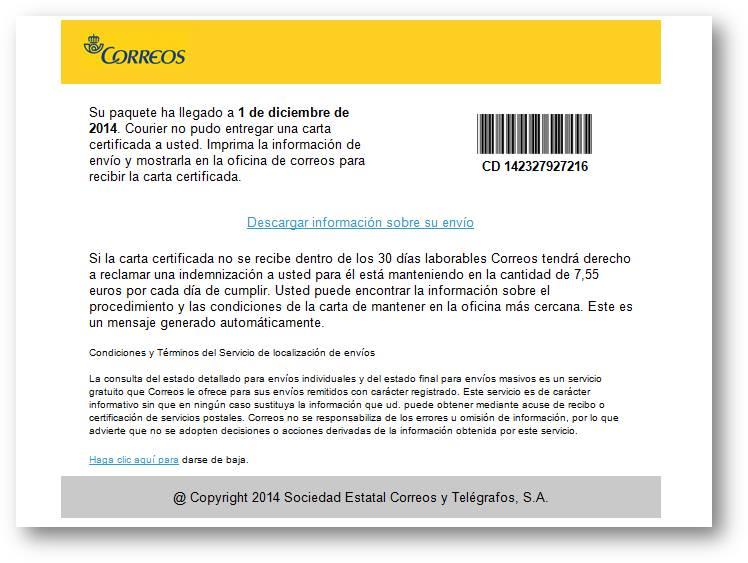
Without going any further, in Spain, between November and December 2014, most senior executives of companies listed on the stock market received emails that supposedly came from the national post service. These emails managed to evade corporate anti-spam systems and perimeter protection, limiting to 30 the number of recipients in each company.


We must be aware that normally the information kidnapped is vital for the proper functioning of the company, and that’s why, in many cases, they don’t hesitate to pay the ransom. Therefore, corporate email services, documents and personal databases are the most common target for cybercriminals.

In that sense and unlike the attacks targeting individuals, the ransom requested is much higher and depends on the size of the company. Sometimes it can reach thousands of euros.

correos ransomware

In addition, we mustn’t forget that companies receive a large number of packages, gifts, etc. so it is not weird to receive a post service notification with something pending to receive. Hence, the success of this social engineering to obtain downloads and malware execution.

Companies or organizations that paid the ransom were victims in successive campaigns, from other sources of infection or from new versions of the malware. That’s the main reason why you shouldn’t pay any ransom at all, because no one guarantees you that they will give it back.

How to prevent ransomware in your company or organization?

Protecting your business against ransomware, directed attacks and advanced persistent threats APTs is the best thing you can do to prevent your company’s files being kidnaped by cyber attackers. However common belief has that in spite of the investments you won’t still be completely protected against future ransomware versions… Is there a definitive solution against these types of current and future threats?

Yes there is! Panda Adaptive Defense is our advanced protection exclusive service for businesses and organizations. With Adaptive Defense you will be able to detect, bock and disinfect all new generation malware that might stop your business daily activity and generate big financial losses.

In addition, with Adaptive Defense you will be able to block in real-time applications specially designed to evade other IT security measures and to prevent future unknown attacks, as you control each and every process carried out by the user on your corporate IT infrastructure.

Are you ready to protect your business from ransomware?

Try Adaptive Defense now.

The post How to avoid having your company’s files cyber kidnapped? appeared first on MediaCenter Panda Security.

The White House has been hacked

White House hacked

White House deputy national security adviser Ben Rhodes informed about a cyberattack to the White House.

Rhodes told the CNN that hackers gained unauthorized access to the computers non-classified systems and sensitive information, though their classified systems weren’t compromised.

Rhodes wouldn’t confirm or deny if the attack was carried out by Russian hackers or when it happened, but he hinted that it hadn’t been recently. (Wasn’t in the salt couple of days)

Without going into details, during his report he commented that a series of security measures to evaluate and mitigate the damage have been taken.

The post The White House has been hacked appeared first on MediaCenter Panda Security.

A Google Play with less malware? Android apps will be supervised by humans

google play

An X-ray Scan application? A tool to detect lies? In Google Play there are many apps with doubtful behavior. Obviously, neither of the ones mentioned deliver what they promise. Most are just looking to bombard with advertising, but there are some cases of undercover malware, like the game Balloon Pop 2 (which has already been removed from the platform), that stole WhatsApp conversations of those who installed it in their phones.

The online store of Android operating system has been repeatedly accused of accepting any software without a thorough analysis of their origin, functionality or permits. Nevertheless, Google disregarded the critics and kept using the same methods to verify whether an application meets the requirements.

The Mountain View giant uses a system known as Bouncer, an automated process that supposedly analyzes the tools before published them, rejecting them if it detects any type of malware or fraudulent behavior. However, the platform’s catalog shows that it doesn’t always fulfill its tasks effectively.

apps

It seems like now Google has changed its mind. The company recently announced that the verification will no longer be automated but it will incorporate human inspections attempting to improve the process. Stating that this is not a future intention, the new mechanics has been several months in place.

According to the company, a team of experts review the applications and identifies possible violations of the policy established for developers. The new addition will help the products to be published on the platform “within minutes or hours after sending them, instead of days or weeks.” Although, maybe is the speed one of the reasons why there is a lack in the control.

In the same statement they announced that there will also be an increase of the information provided to the developers about the evaluation and publication process. They will receive a more detailed “feedback” in order to know why their tool has been rejected or suspended, so they can remedy any irregularities.

google developers

Although Google has started walking in the right direction (or at least shows that intention), is difficult to evaluate yet if their efforts will produce the expected results. Nevertheless, there still remains an important point that is not even mentioned in their announcement: what will happen with the fraudulent or malicious applications already published on the platform?

There is no need to go far back in time to check that there are still new apps being detected as illegal behavior. Security experts from the Spanish National Institute of Cybersecurity recently alerted of the existence of two applications (Naked Scanner and Super Jumper X) whose alleged functionality is to see people in their underwear.

Those who fall into the trap end up subscribed to a premium messages service that is reflected on their phone bill. As if this wasn’t enough, one of these apps offered their users to download an antivirus after showing them fake security alerts. Sadly for many users this warning arrived late: Naked Scanner exceeds 50.000 downloads and Super Jumper X has more than 1.000.

Given this scenario, it seems risky to lower your guard. Keep paying attention to the applications you download from Google Play and do not trust services that promise a little or no realistic product: they are usually a scam.

The post A Google Play with less malware? Android apps will be supervised by humans appeared first on MediaCenter Panda Security.

How to manage your company’s computer security?

antivirus for business

It is possible that you have asked yourself this same question if you own a company or are the responsible of the IT department of one.

We have always stressed the importance of being able to manage the security of the endpoints in the network anywhere, anytime, regardless of the platform from which the process is running.

The usage of Cloud Computing in companies has experienced a significant increase in recent years due to, among other things, cost savings and flexibility to access our information when we need it.

To protect this new way of working we need a security solution that tailor to it. Where can you find it? Endpoint Protection Plus, our antivirus for business.

How to manage your company’s computer security?

  • Control management console.

Manage your antivirus and firewall protection, even upgrade to the latest product version from a single Web browser. Control your security centrally from a single console for your entire network, including remote offices and Mac and Linux computers.

  • Disinfects workstations and endpoints infected.

Resolve security issues launching Panda Cloud Cleaner Monitor to repair any workstations infected by advanced, non-conventional malware.

  • Real-time monitoring.

You will be able to know the status of your IT infrastructure in real time. Also generates and sends reports detailing the protection status, detections and inappropriate use of resources.

  • Profile-based protection.

Assign profile-based protection policies, ensuring the most appropriate policies are applied to each group of users.

  • Web monitoring and filtering.

With Endpoint Protection Plus you will be able to increase user productivity by preventing and/or monitoring access to content belonging to categories considered unproductive or dangerous during working hours.

  • No more saturated mailboxes.

Reduce the risk of attacks on your servers with the content filter feature. Improve the users’ protection by filtering unwanted and malicious messages with the anti-spam engines.

The post How to manage your company’s computer security? appeared first on MediaCenter Panda Security.