Category Archives: Panda Security

Panda Security

The FBI’s most wanted cyber-criminal used his cat’s name as a password

Not for the first time here, we find ourselves talking about passwords. In January, the software company SplashData listed the most popular passwords of 2013, on the basis of millions of passwords found on the Internet. Among the most frequently used were simple combinations: ‘123456’ was in first place followed by ‘password’.

We’ll have to see what comes out in the next report, though we’ve already seen how even cyber-criminals can make such a simple mistake.

Jeremy Hammond was arrested in Chicago in 2012. In those days he was the most wanted cyber-criminal. He had managed to compromise the Web page of Stratfor, an intelligence and espionage firm whose customers include the U.S. Defense Dept.

The authorities managed to track him down with the help of Hector Xavier Monsegur, leader of the now defunct hacker group Lulz Security. This organization was the alleged perpetrator of the attack on the CIA’s website in 2011 and the theft of Sony Pictures user account details in the same year.

They finally caught him, though Hammond had time to shut down his Mac laptop before the police got into his house. To start it up again they needed his password.

saved-password

Hammond is now serving time in Manchester Federal Prison. While behind bars, he’s explained that hacking Stratfor’s Web page was not difficult. The main error, he claims, was that those responsible for the site had not encrypted their customers’ credit card details.

His own error, however, was quite different. Hammond has acknowledged that the weak point of the computer that he had used for a number of ‘jobs’, and which no doubt let police IT experts get into the machine, was its password. “Chewy123” is simply the name of his cat (plus the obvious sequence of numbers).

We have often spoken here of the techniques you can use to avoid making the same error as Hammond. Make sure your password is complex, and never use a sequence of numbers or letters.

There are also tools available to check the strength of your passwords, and you should change them regularly and use a password manager.

However much you think your data won’t be of interest to anyone, cyber-criminals can exploit information in many ways, not just for direct financial gain. And it’s not just large organizations that are targeted by hackers. IT security experts have recently warned of the leaking of passwords from platforms such as Gmail and Dropbox.

It’s difficult to stay ahead of cyber-criminals, but it’s not too hard to ensure that your passwords don’t figure in the ranking of the worst combinations. We all have to start somewhere.

The post The FBI’s most wanted cyber-criminal used his cat’s name as a password appeared first on MediaCenter Panda Security.

With NFC, even the most expensive smartphones are vulnerable

mobile-security

Nowadays we are defined by our phones. When you buy a smartphone, you automatically become a convert, defending the benefits of your particular brand over others. Some users become part of the Apple faithful, flocking to their exclusive stores to buy designer iPhones. Others are Google fanatics, with alerts set in their Nexus 5 to warn of the imminent arrival of Nexus 6. Compulsive Amazon shoppers click away on their Fire Phone cart, while traditionalists continue to trust in the numerous and much-lauded features of Samsung Galaxy.

Unless you are one of those who has joined the retro phone trend and have renounced WhatsApp forever, we are sorry to inform you that your smartphone -whatever the make- has a security flaw. Specifically, in the use of NFC (‘Near Field Communication’), a wireless communications system that lets you transfer data at high frequency over short distances, at a range of 10 centimeters. In fact, NFC is a subset of RFID (Radio-frequency identification) systems that have been used for years now to identify pets (microchips). So if dogs can be recognized through this system, why not phones?

In smartphones, NFC allows data to be exchanged between devices, although a more interesting use for this technology is that it allows our phones to be used as credit cards.

smartphones

You can already use your NFC to pay for things thanks to Google and its PassWallet app. Apple, not wanting to be left behind, has introduced the Apple Pay system with iPhone 6. And now banks are getting on the mobile payment technology bandwagon. In the future, we will even be able to use phones as subway tickets or door keys. NFC offers the potential for all-in-one devices with myriad uses.

If you weren’t previously aware of this technology, then you must be marveling at the thought of not having to rummage around drawers looking for your wallet or keys. Well, it’s true, but don’t get too excited. Even though the system operates over very short distances, it still has security flaws. In the recent Pw20wn Mobile 2014 competition in Tokyo, where there was a reward of US$150,000 (€120,000) for the sharpest hackers on the planet, security flaws were detected in the NFC systems of many top-of-the-range phones.

Two separate groups of experts demonstrated during the competition different ways of compromising the NFC technology on Samsung Galaxy S5. These hackers are two-nil up on one of the most prestigious smartphones on the market.

mobile

Even the all-powerful Google has been unable to keep its precious Nexus 5 free from security problems. In the Pw20wn Mobile 2014 competition, a third NFC attack forced the pairing of devices thanks to a combination of two malicious programs.

And it’s not the first time that an NFC security hole has been uncovered in Google’s device. Charlie Miller, an ‘ethical hacker’, was able to communicate with a Nexus S through a chip placed near the device, as he demonstrated at Black Hat 2012 in Las Vegas. After this he forced the phone to enter a malicious website, from where he took complete control of the phone by exploiting the NFC vulnerability. The Nokia N9 was also subject to the same attack on this occasion.

Although there can be no doubt that the detection of these flaws improves the security of our smartphones, perhaps for the moment at least we all feel a little safer keeping our money and the keys to our houses in our pockets, handbags or under a pile of papers on our desks. Even the sharpest hacker would find it difficult to exploit a security hole there.

Nevertheless, your NFC could still be useful for many things. And no doubt it will gradually become more secure. For the moment, fans of Nexus 6 are looking forward to getting their hands on it, and plans are afoot to unlock the phone automatically with the help of an NFC ring on the user’s finger. Could the phone’s PIN also be hacked? Let’s see.

The post With NFC, even the most expensive smartphones are vulnerable appeared first on MediaCenter Panda Security.

BlackBerry Messenger. The app that lets you chat only to those you want to.

BBM-iphone

A few years back, when we discovered that our parents’ business phones could be used for more than just sending emails, something changed. BlackBerry Messenger made everyone want to switch to this new device which let you chat with friends for free.

I have to admit that practically all my friends started out with a BlackBerry and for months we did nothing but send messages back and forth via the application. I remember worrying about whether the message that had been delivered (the famous ‘D’) had been read, or when I didn’t get a reply after a message that had been read (‘R’).

Over time, it became apparent that other apps, such as WhatsApp and Viber offered just as much and more. That’s why we left BB chat behind in favor other messaging apps.

Previously BBM could only be installed on BlackBerry devices, while competitors had versions for all operating systems. But now you no longer need to feel nostalgic about the dancing, hugging icons, because you can now download BBMessenger for Android,  iOS  or Windows Phone, free.

Though it seems incredible, I still speak with a friend who only has BBM, and what’s more, he has no interest in WhatsApp or other such apps.

BBM-chat

The great advantage that it offers, according to my friend, is that you can speak only to whom you want to. BBM continues to work by invitation. This means that to add someone to your contacts they have to give you their app PIN. So in the end you have a list of contacts that you have ‘chosen’. Other than that, the way it works is pretty much the same as before.

New features in BlackBerry Messenger

Perhaps one of the more interesting new features is the BBM store. It’s a sticker store, a bit like Line where you can buy different images to add to your chats.

BBM-stickers

Another thing you will come across with the new BBM are the chats on the BBM Channels, which could be between people, brands or communities. For example, you could create a new channel to talk about a given topic or sign up to an existing BBM Channel.

What do you think? Do you miss your BBM chats? Vintage is now the latest thing, and they don’t come more vintage then BBM…


The post BlackBerry Messenger. The app that lets you chat only to those you want to. appeared first on MediaCenter Panda Security.

AirHopper, the malware that infects your corporate network even though you are not connected to the Internet

Seems logical, doesn’t it? If your company has ever warned you that you must tread very carefully when browsing the Internet so that your computer (and sooner or later, every computer in the office) does not get infected with a virus, it would be normal to think that going offline is not a bad (although drastic) alternative.

We are very sorry but you cannot rest easy even if the computer you use at work is not connected to the Internet; it is still vulnerable unless you have an enterprise antivirus solution like Panda Advanced Protection Services.

disconnected-computer

To start, a pen drive can easily replace the Internet for malicious pursuits. Your work computer’s USB port will thereby become your Internet connection, as far as viruses are concerned, as this would be its entrance.

However, USB ports are not your work computer’s only weak spot if you do not have an Internet connection. There are other vulnerabilities that compromise, and greatly, the security of your computer.

One of these vulnerabilities lies in the radio receivers on smartphones and electromagnetic signals, as proven by AirHopper, a malware that can infect a computer and collect data from it without needing it to be online.

Although it sounds complicated, a group of researchers in Israel have proved it in a study: A computer without an Internet connection is also vulnerable. To start, the cyber-crook needs to install AirHopper on the computer. That is undoubtedly the largest hurdle faced by data thieves because unfortunately, the rest is a breeze.

Once AirHopper is installed on the computer, the malware uses the monitor to emit electromagnetic signals whenever a key is pressed. The cyber-criminal, who must be within seven meters of the computer, will need a smartphone with FM radio to receive the data typed on the computer.

According to the researchers, the data can be transmitted from the computer to the cyber-criminal’s smartphone screen at a rate of 13 to 60 bytes per second.

It might not seem like a fast method that downloads large amounts of data but it is fast enough for a cyber-criminal to steal passwords in just 8 seconds or short texts that you type into your work computer.

AirHopper

Fortunately, it is a type of attack that will probably not go beyond being a proof of concept, as in order to carry it out the cyber-criminal needs physical access to the computer in order to infect it, and then needs to be close by in order to receive the data you type on their smartphone. In addition, not all monitors can emit electromagnetic waves that are strong enough.

So now you know; if you want to keep your company secure from these types of threats, request a free demo of Panda Advanced Protection Services and our team of experts will help you with whatever you need.

The post AirHopper, the malware that infects your corporate network even though you are not connected to the Internet appeared first on MediaCenter Panda Security.

5 Tips for secure browsing on International Computer Security Day

Next Sunday, November 30, is International Computer Security Day. As we do not want you to get caught off guard, we give you 5 tips for secure browsing every day of the year.

International Computer Security Day

5 Tips for secure browsing

Increase the security of your passwords

Passwords are, in most cases, the only barrier between cyber-crooks and your personal data. Increase the security of your passwords for accessing all the online services you use.

And remember: Don’t use the same password for all of your services!

Keep your computer’s operating system updated

Viruses and malware exploit security vulnerabilities in outdated versions. If you want to avoid this, you need the latest security patches.

Windows, for example, simplifies the task with automatic updates so that you don’t have to worry about it.

Do not connect to unknown Wi-Fi networks

It is normal when abroad or when you have used up all of your data to look for open Wi-Fi networks to connect and browse the Internet free of charge. We all do it but that does not mean that it is secure.

Take precautions and follow these tips for connecting to a public Wi-Fi network.

Shop on well known websites with a good reputation

When shopping online, make sure that the URL of the website that appears in the browser address coincides with the website you think you are browsing, and that the address starts with HTTPS. Shopping on trusted websites with a good reputation will prevent you from falling victim to data or identity theft.

In addition, it is important to check that the privacy policy is in a visible place and is up-to-date. Knowing how to return what you buy is another important aspect to consider.

Use the best antivirus

A good antivirus does a whole lot more than keep your computer virus-free. It protects your identify, your business and also neutralizes online fraud attempts when shopping online.

Do you know which one best suits your needs? Panda has the best antivirus for you.

The post 5 Tips for secure browsing on International Computer Security Day appeared first on MediaCenter Panda Security.

Panda Internet Security 2015 achieves Virus Bulletin certification

Virus Bulletin

Congratulations are in order! Panda Internet Security 2015 has achieved Virus Bulletin certification!

In addition to this good news in itself, we also achieved it the first time that we presented this product. This proves its consistency and confirms what we have been saying for the last few months: the effectiveness of the XMTâ„¢ Smart Engineering engine included throughout our 2015 Consumer line.

Panda Internet Security 2015

This engine allows each technology to interact with the rest to reach higher detection and disinfection levels. With it we have achieved the best protection and resource consumption rates on the market, which reflect its excellent capabilities.

Have you tried any of our products? Choose the best antivirus for you!

The post Panda Internet Security 2015 achieves Virus Bulletin certification appeared first on MediaCenter Panda Security.

Panda Security launches Panda Cloud Office Protection 7.1

Panda Security, The Cloud Security Company, announces the new features of version 7.1 of Panda Cloud Office Protection (PCOP), Panda Security’s cross-platform solution that offers the best cloud-based protection rapidly, easily and efficiently. In addition to the features included in the previous version, such as the ability for the user to act independently in the event of infections or problems detected, this version also includes improvements aimed at meeting the requirements of medium-sized and large customers who need greater control.

 Panda Cloud Office Protection 7.1 incorporates various technological and functional innovations compared to the previous version of the solution, with special emphasis on giving the user greater control and management. These new features include:

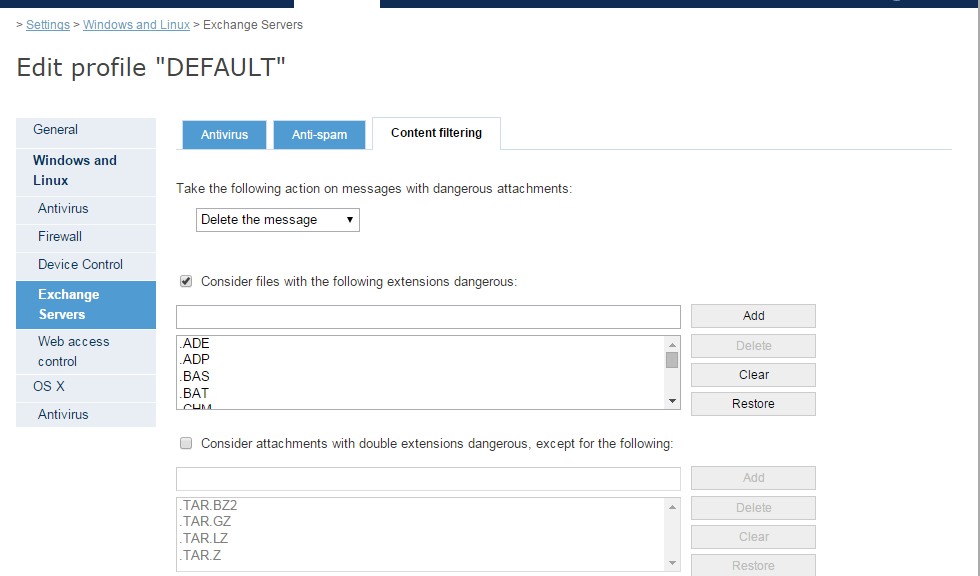
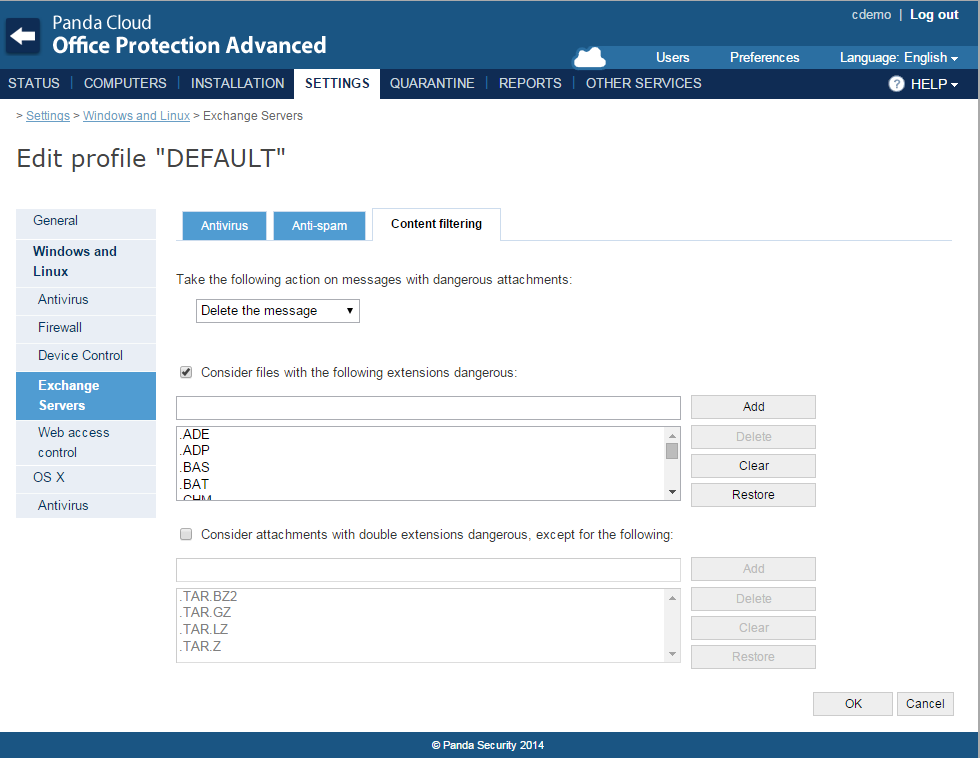
  • Content filtering for the Exchange protection, which allows emails to be filtered by the extension of the attachment, neutralizing dangerous attachments or attachments with a multiple file extension.
  • Whitelists included in device control. This feature allows different exclusions to be applied to different groups of computers selected by profile. In addition, whitelisted devices can be used without any restrictions, regardless of the settings.
  • Mobile device control. This option allows the user to block access to mobile devices.
  • New local console on the endpoint. This console provides PCOP administrators and partners with a tool to enable or disable the endpoint protection in a rapid and timely manner, without having to use the PCOP Web console.
  • Ability to upgrade to new versions from the PCOP Web console. Notifications will appear in the console to indicate that a new version is available.

PCOP 7.1_EN


“With Panda Cloud Office Protection 7.1 we want to foster independence of the network administrator, easing management of the solution, including whitelists and offering reports that help give the user greater control”, says Roberto Fernandez, Product Manager at Panda Security. “The goal of this new version is to offer PCOP administrators and our partners a tool that allows them to quickly secure their corporate environments,” he concludes.

The post Panda Security launches Panda Cloud Office Protection 7.1 appeared first on MediaCenter Panda Security.

Rootpipe, WireLurker and Masque Attack, the latest vulnerabilities on Apple devices

You have heard it more than once but it is a myth. It always has been. It does not matter how many times you have been told, Macs do have viruses. It is true that, until not too long ago, Apple computers were not a major target for cyber-crooks, but things are changing.

However, the fact that viruses do affect Macs is nothing new. Back in 1982 malware swarmed the old Apple II. That distant beginning of viruses on Apple machines was just an experiment but it already reflected the harsh reality. Gradually, at a much slower pace than PCs, Macs are also suffering the effects of some infection or other.

mac-viruses

The myth that there are no Mac viruses does have a basis, as malware has not roamed freely around Apple computers for various reasons. The main reason is that as Macs were not as widely-used, they were dismissed by cyber-crooks for developing malicious software targeting these machines.

However, the increasing presence of Macs on the market has changed this trend. They are popular and cyber-crooks do not want to miss the opportunity to spread their seeds of evil through these machines.

So, there are a few threats to bear in mind if you have a Mac and the dangers are increasing. In recent months quite a few vulnerabilities have been discovered that put the computers of the company managed by Tim Cook in the firing line.

Rootpipe and WireLurker, Mac vulnerabilities

One of them is Rootpipe. Discovered by a Swedish hacker just a few days ago, it is a critical security hole in OS X Yosemite, the latest version of Apple’s operating system. The flaw, for which a patch is not expected until the beginning of next year, allows cyber-crooks to act as the software administrator on third-party computers. In other words, get into your Mac without your consent.

The vulnerability and Apple’s delay in releasing a patch are very worrying but they are not the only security problem facing Mac users recently. A few days after Rootpipe was discovered, WireLurker came to light, a new malware family affecting Apple devices created in China and which has come to be considered the largest threat to them so far.

In this case, Mac users and the company can rest easier, as the Cupertino firm, which has identified 146 infected apps, has stopped the virus from spreading any further by blocking the apps responsible.

If you want to block Mac OS X malware as well as Windows malware, try the best antivirus for Mac.

padlock

Masque Attack, security flaw on iPads and iPhones

The cherry on this cake, which in just a few weeks brought the Apple device security myth crashing down, came with Masque Attack. A security hole in the majority of iPads and iPhones that makes them vulnerable to cyber-attacks.

Masque Attack allows cyber-crooks to access users’ personal data, even managing to get control of their devices. In this case, the Cupertino firm did react rapidly, but not fixing the threat but by releasing a statement down playing the importance of Masque Attack and insisting that iOS and OS X have various measures that warn users against installing potentially malicious software.

In any case, the best thing you can do to make sure that your iPad and iPhone are kept secure is to download apps from trusted sites only, such as the App Store, as the door cyber-crooks use to access your device is no other than making you download a malicious app. So remember, only download things from reliable sites and of course, forget about Apple not having any viruses.

The post Rootpipe, WireLurker and Masque Attack, the latest vulnerabilities on Apple devices appeared first on MediaCenter Panda Security.

Electronic voting may not be 100% secure (but neither is traditional voting)

urn

You must start from a base: no voting system is 100% secure. Neither traditional nor electronic. Ballot stuffing is a practice as old as elections themselves and it refers to one of the multiple techniques used throughout history to tamper with election results: submitting multiple ballots per person.

There is also the personation technique, deceased voters who come back to life for one day to vote; and electoral registration fraud, voters registering illegally in a constituency that does not correspond to them. That is not to speak of the buses that pick up people from the villages to take them to the capital to vote, the party obviously covering the expense.

Electronic voting, the essence of so-called “cyber-democracy”, is not safe from fraud. In fact, there is a perception that it is even less secure, easier to tamper with than methacrylate ballot boxes.

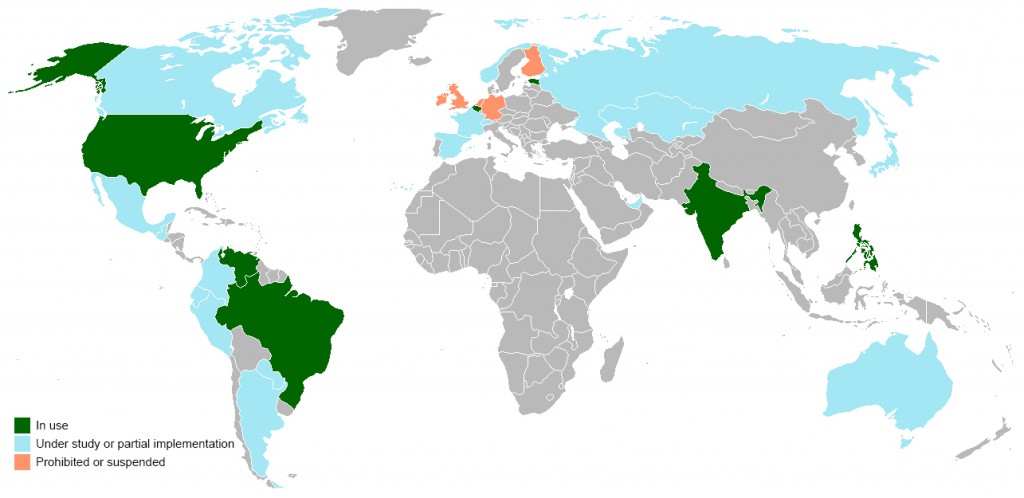
For example, a recent study by researchers Dan Zimmerman and Joe Kiniry analyzes the risks of voting via email, one of the methods already being used in various countries, and advise against using it. And quite a few European countries have gone back on their decision to use online voting, due to the controversy that has arisen.

world-electronic-voting

The Netherlands, pioneer in implementing electronic voting (a legal provision being put in place in 1965), decided to go back to using ballot papers in 2008, two years after the publication of a study that revealed a serious security problem in the system.

In 2009, following a long legal battle, the German Federal Constitutional Court ruled electronic voting unconstitutional, as it considered that it did not allow citizens without technical knowledge to supervise the election process. In the same year, Ireland scrapped the online voting system. Finland halted its program in 2010, after invalidating the results of the first pilot test, which was carried out in 2008.

The United Kingdom carried out more than thirty pilot tests between 2002 and 2007, but none of them returned sufficient guarantees for authorities. The Electoral Commission suspended the implementation of electronic voting in 2008.

In Spain, the surprise political party that was successful in the European elections, Podemos, is using an electronic voting system to make internal decisions. It is called Agora Voting and involves three phases: One, the party’s responsibility is to make sure that the person voting is who they say they are; the second and third, registration and counting of the votes, are the shared responsibility of the so-called “voting authorities” (independent observers who certify that no personal interests contaminate the process). All of the software used is free software and after voting, each voter can check the integrity of the vote using an identifier.

podemos-voting

In this case, the largest crack in the system is in the Podemos registration or membership system, which only asks for a national identity card number and phone number. Both of these things, as already proved, can be faked.

To sum up, as Eduardo Robles, cofounder of Agora Voting, said, there is not a big difference between the traditional voting system and the electronic. “Can ballot papers get lost? Of course, but it is very difficult because they are kept guarded. Can ballot boxes be tampered with? Yes.” And the same happens with the virtual ones.

Security mechanisms improve very quickly but so do the techniques used by the attacker. While there is interest in changing the results, ballot stuffing will continue to evolve.

The post Electronic voting may not be 100% secure (but neither is traditional voting) appeared first on MediaCenter Panda Security.
Malware figures beat records with more than 20 million new samples identified in the third quarter of the year

Panda Security, The Cloud Security Company, has released the latest data from the PandaLabs Quarterly Report for the third quarter of the year. The main conclusions of the study include an increase in the malware created compared to the previous quarter, with a total of 20 million new samples created worldwide, and at an average rate of 227,747 new samples every day.

The global infection rate was 37.93%, compared to 36.87% the previous quarter.

Trojans are increasing

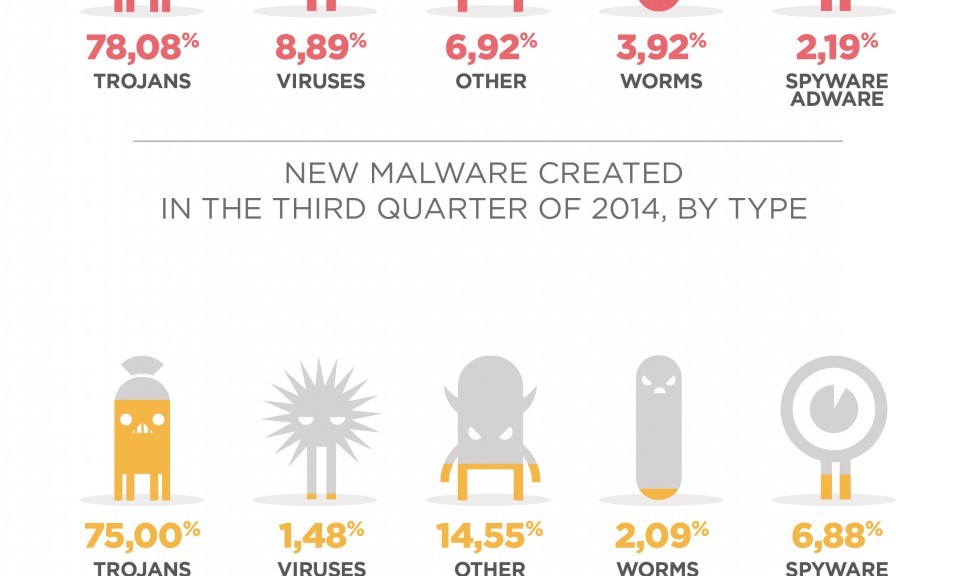
Trojans are still the most common malware type (78.08%), increasing compared to the second quarter of the year. In second place, and a long way behind, are viruses (8.89%) and worms (3.92%).

“Over recent months cyber-crime has continued growing. Cyber-crooks are still creating malware in order to infect as many computers as possible and access confidential data”, says Luis Corrons, Technical Director of PandaLabs at Panda Security. “But corporate environments have also come under attack. For example, over the last three months large companies have been the subjects of some scandals, such as the infamous “Celebgate”, in which photos of actresses and models hosted on Apple’s iCloud service were leaked, or the theft of Gmail and Dropbox passwords”.

Trojan infections are up while PUPs are dow

Furthermore, Trojans were again the most malware prolific threat during the period, accounting for 75% of infections, compared to 62.80% in the previous quarter. PUPs are still second in the ranking, representing 14.55% of the total, which is a lower rate than in the second quarter when infections that used this technique amounted to 24.77%. These are followed by adware/spyware (6.88%), worms (2.09%) and viruses (1.48%).

01_ENInfections by country

The data recorded for each country shows that China is still at the top, reaching an infection rate of 49.83%, falling for the first time in a long time from 50% of computers infected. China is followed by Peru (42.38%) and Bolivia (42.12%).


As you can see the ranking of countries with the highest infection rate is dominated by Asia and Latin America.

The full report is available here.

The post Malware figures beat records with more than 20 million new samples identified in the third quarter of the year appeared first on MediaCenter Panda Security.