Tag Archives: featured1

Avast at Mobile World Congress 2015

MWC2015

Stop by for a visit with Avast; booth 5K29.

New mobile apps, a live Wi-Fi hack, results of a global Wi-Fi experiment, a demonstration of mobile malware, and Avast mobile experts can all be found at Avast’s booth (hall 5 stand 5K29) at this year’s Mobile World Congress in Barcelona.

Open Wi-Fi Risks and Live Demonstration

Connecting to public Wi-Fi networks at airports, hotels, or cafes has become common practice for people around the world. Many users are, however, unaware that their sensitive data is visible to hackers if they don’t use protection. This data includes emails, messages, passwords and browsing history – information you don’t necessarily want the guy sipping the latte next to you at the cafe to see. Avast experts traveled to different cities across the U.S., as well as Europe and Asia, to find out how much information is openly shared via public Wi-Fi. They found that one-third of browsing traffic in New York City, San Francisco and Chicago is openly visible for hackers.

At the Congress, Avast will conduct a Wi-Fi hack demonstration. The demonstration will allow visitors to see, first hand, what a hacker can access if they don’t use protection. Participants can connect to Avast’s (password protected) Wi-Fi network to browse and send messages as they normally would when connected to open Wi-Fi. To demonstrate how this information would look through the eyes of a hacker, their activities will be displayed on a screen at the Avast stand.

Mobile Malware and Simplocker Demonstration

Mobile malware is often perceived as a myth, yet Avast currently has more than one million samples of mobile malware in its database. Avast recently discovered a new variant of the mobile ransomware, Simplocker, which will also be demonstrated during the Congress. Visitors can see how the malware disguises itself, behaves, and will learn how they can protect themselves.

Introducing Avast’s New Suite of Apps

Avast will be introducing a suite of new apps at this year’s Mobile World Congress, including productivity and security apps for Android and iOS. Avast GrimeFighter and Avast Battery Saver address two of the most common complaints for Android users: storage concerns and battery life. Avast GrimeFighter helps users free extra storage on their devices by identifying unimportant data for one-tap removal, while Avast Battery Saver extends battery life up to 24 hours by learning the user’s behavior and optimizing features to preserve battery power.

Avast SecureMe is a dual solution app that helps iOS users identify secure Wi-Fi connections and protect personal data while using public Wi-Fi connections.

Wi-Fi Security, a feature available in Avast SecureMe, and coming soon to Avast Mobile Security for Android, prevents users from falling victim to Domain Name Server (DNS) hijacking by exposing vulnerabilities in routers they want to connect to.

We look forward to meeting you!

If you are attending this year’s Mobile World Congress, feel free to stop by the Avast booth to speak with Avast experts, learn more results from Avast’s global Wi-Fi experiment, see Avast’s new mobile apps and participate in the Wi-Fi demonstration. If you aren’t attending, make sure to check our blog, follow us on Twitter and Instagram, and like us on Facebook for updates during the Congress!

Note to media: If you would like to set up a meeting with Avast, please email [email protected].

 

What are Advanced Persistent Threats? Interview with Fernando Andrés

files

On several occasions we have discusses the need for effective protection against Advanced Persistent Threats in corporate environments, however, do companies really know what we are talking about? Are they ready to implement such protection?

Fernando Andrés, Global Panda Advanced Protection Service General Manager, helps us clarify the meaning of this concept and explains how Panda Security’s corporate solutions are the best fit for corporate needs.

  • What are Advanced Persistent Threats?

Simply put, I would define them as Threats 3.0. They are the evolution of the threats that have always existed in the digital world, but extremely sophisticated and overwhelming in number. All of them have the following features in common: they are financially motivated, extremely selective and, unfortunately, perfectly capable of bypassing traditional defenses.

  • What are the biggest security threats that companies face today?

Every threat that goes after a company’s most precious asset: sensitive corporate information and any other data that can be easily monetized by attackers, such as credit card data, for example.

  • Adaptive Defense leverages state-of-the-art technologies praised by analysts, customers and partners in the technology industry. What is the solution’s differentiating factor?

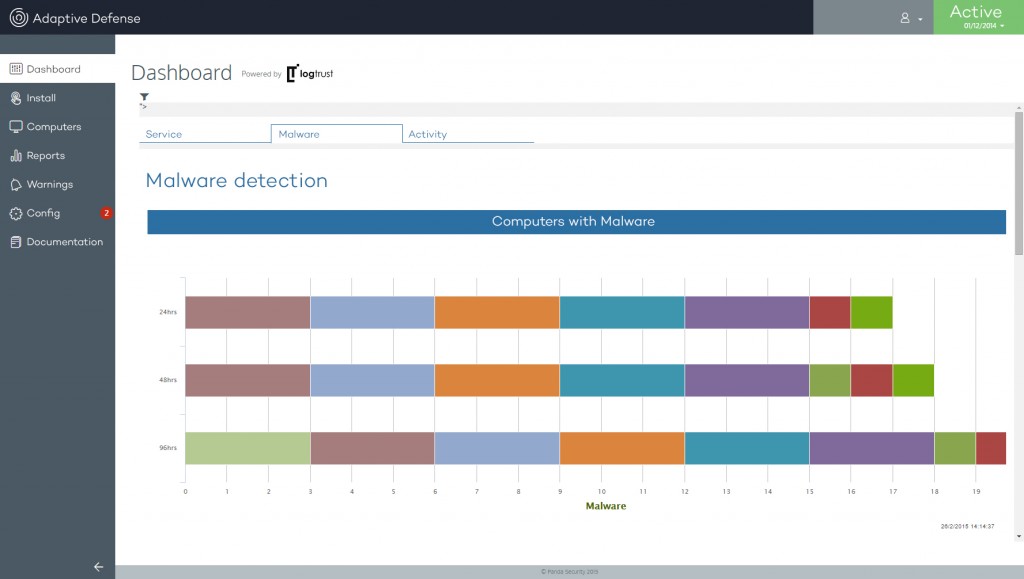
The differentiating factor is that Adaptive Defense is capable of stopping and blocking advanced threats. It neutralizes what others cannot as shown to many of our customers.

adaptive defense

This has been possible thanks to the effort of our R+D department, which has pioneered the application of technologies such as Cloud Computing, Big Data and Collective Intelligence to the IT security world. We have developed a service designed to constantly audit network resources, detecting and blocking advanced threats, and ensuring immediate response to computer security incidents.

  • What type of company is Adaptive Defense designed for?

Corporate customers without doubt. Companies of a certain size with sensitive information they need to protect. Our experience shows that Adaptive Defense is best suited for companies with more than 100 employees.

  •  Why should a company install Adaptive Defense?

Because it works. It stops these particularly dangerous threats, protecting businesses.

  • The last few months have been dominated by a particularly destructive malware –CryptoLocker– and Adaptive Defense is the only product that can detect it. How can this type of malware affect a company?

CryptoLocker is designed to blackmail businesses by stealing their most valuable asset: corporate data. CryptoLocker can really sink a company. Would you hire the services of a company which left your personal or financial data exposed?

As I mentioned before, Adaptive Defense provides unique benefits. It has shown its full potential detecting what other vendors can’t detect or detect too late. Unlike other solutions that act reactively when the damage is done, we deliver proactive protection.  This new approach has increased the demand for this type of service, especially among corporate accounts.

The post What are Advanced Persistent Threats? Interview with Fernando Andrés appeared first on MediaCenter Panda Security.

How to secure the files your company stores in the cloud

cloud

Goodbye CD, DVD and pen drive. When you need to share a document with a work colleague or you have to take work home, you no longer need to use physical storage devices: the cloud has everything you need.

Services like Dropbox, Mega or Box have become more popular recently, gradually sending physical storage drives into oblivion.

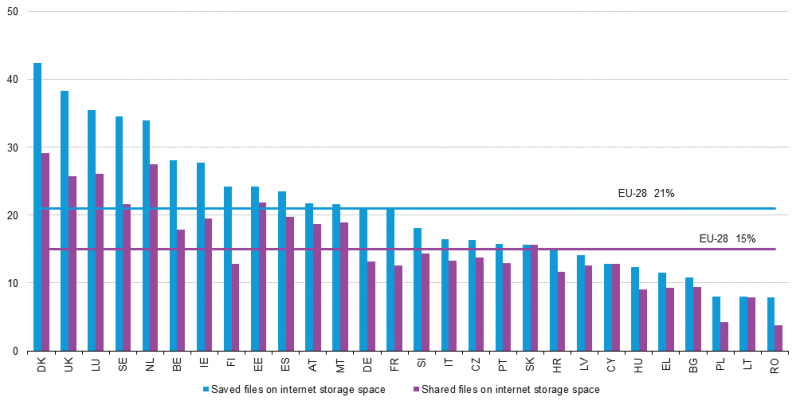
More specifically, and according to Eurostat, 21 percent of European Union citizens used the cloud as storage space in 2014. In fact, this figure is only the average for EU countries and in some countries, like Denmark and the United Kingdom, the percentage of citizens who use the cloud to store files greatly exceeds 30 percent.

countries in the cloud

There is no doubt that the business world is largely responsible for the growing use of the cloud for storing and sharing files. More convenient than using physical devices and more economical than installing internal servers, the cloud seems to have gotten into our offices too.

The advantages of services like Dropbox are obvious. However, when using virtual storage spaces to store and share your company’s information their security measures could leave much to be desired.

A few months ago, a vulnerability was discovered in Dropbox that disclosed personal files, and at the end of 2014, 7 million passwords for this service were leaked. If the fact that confidential corporate information is one of the main targets of cyber-criminals is added to these serious security flaws, the conclusion is obvious: your company’s files are not completely secure in the cloud.

However, your company does not need to steer clear of these services from fear that a cyber-criminal will steal its document, but you will have to take certain precautions before using them. The key is in passwords, file encryption, two-step verification and the best enterprise antivirus solution.

In this case, Panda Cloud Fusion can protect, manage and provide remote support for all the devices in your company’s network anytime and anywhere.

dropbox

Firstly, it is essential to follow the tips on how to create strong passwords, like any other service. You know: letters, numbers, uppercase, lowercase, a symbol or two and if possible, never use the same password as the one you use for your email, Facebook and other services.

As regards file encryption, some virtual storage services store our documents encrypted. Although Dropbox does not, Mega, the cloud platform of the controversial Kim Dotcom, does encrypt your files. However, nothing is perfect. Mega stores on its servers a copy of the key for decrypting your files, so it is not 100% secure either. One of the best options is for you to encrypt your files before uploading them to the cloud using one of the services that allows you to do this.

Finally, some of these services (like Dropbox or Google Drive) allow you to enable two-step verification of your account. This system combines the password that you choose with a password that the service sends to one of your devices (almost always to your phone in a text message or an app). This adds a second layer of security that makes it difficult for someone to access your account.

The cloud is convenient, yes, but you have to pay attention to security.

The post How to secure the files your company stores in the cloud appeared first on MediaCenter Panda Security.

Systems Management strengthens its capabilities to control all types of devices

Panda Security announces the features of the new version of Systems Management, the cross-platform solution that allows you to manage, monitor and provide support to all types of devices from a web console, inside or outside the network.

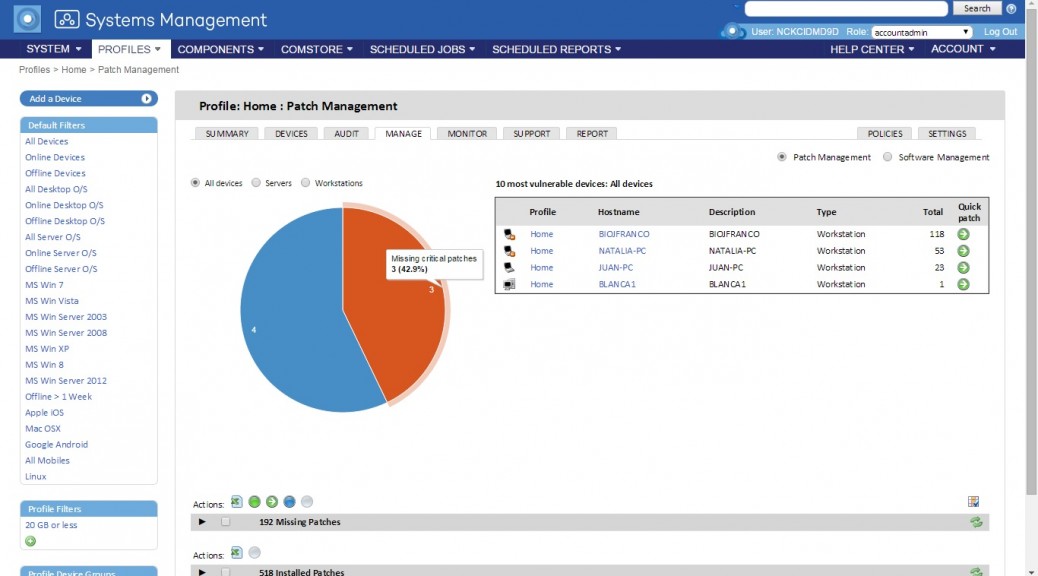
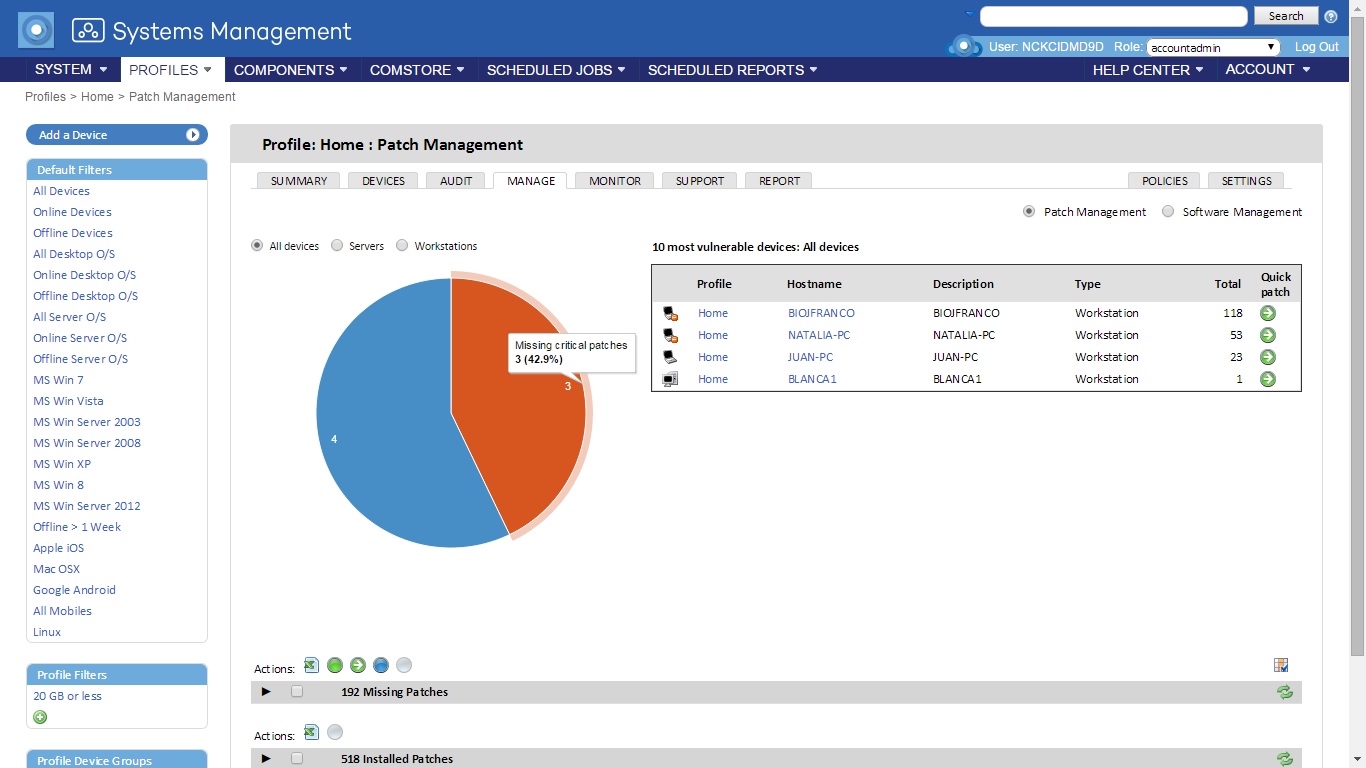
The latest version of Systems Management includes new features that allow simple and centralized management. One of its main features is that agents can be installed remotely from the web management console. Once a Systems Management agent has been installed on a device, it will automatically detect network computers that do not have Systems Management in order to install it at a click. Another of its key features is the ability to add individual patches to the policies created, offering greater control in patch management.

Greater security for iOS phones

In addition to the features currently supported on smartphones and tablets, which allow you to carry out a hardware and software inventory, geolocalize them and wipe them remotely; the security of iOS devices can be significantly strengthened by defining the characteristics of the passwords set by the user. Furthermore, functions can be blocked, such as installing games and apps to ensure more productive use of the device and the VPN and Wi-Fi settings of handsets can be configured centrally.

“The new features of Systems Management offer companies simpler management and increase user productivity”, says Manuel Santamaría, Product Manager Director at Panda Security. “All of this results in cost reduction, favouring independence of the IT administrator and providing the best security for the client’s IT network”, he concludes.

Systems Management_ScreenShoot_EN

The post Systems Management strengthens its capabilities to control all types of devices appeared first on MediaCenter Panda Security.

Are you as smart as your smartphone?

Smart phone

How do I find my apps on this thing?

Not too many years ago we had phones that only made calls. Smartphones are the newest generation of phones that bring a lot of possibilities right to our fingers through the apps specifically designed for them. We all got used to the Windows (or Mac) world, but now we are witnessing a revolution from “standard” programs and some specialized tools to a world where every common thing can be done by our smartphones. Sometimes it seems, that the device is smarter than we are!

But can it protect itself from the increasing number of threats?

You’ll find a lot of articles on the Internet which state that security companies exaggerate the need for mobile security and antivirus protection. You’ll read that Google Play and the new security technologies of Android Lollipop are the only things necessary for security. I could post many examples of such (bad) tips, but I don’t want to waste your time or mine.

Do you use only Google Play as your app source?

A common (and wise) security tip is to stick with Google Play for downloading apps. This is good advice despite the fact that we see here in the Avast blog that Google Play fails to detect some apps as malware. Look for our mobile malware senior virus analyst Filip Chytry’s articles. He continuously discovers holes in Google Play security.

However, what if you want apps that have been banned from Google Play? No, I’m not talking about (just) adult apps. Google banned anti-ad apps, for instance. So where is a safe place to get them? The answer is simple: outside of Google Play. The Amazon Appstore for Android is quickly increasing the possibilities.

Do you think that clean apps can’t become bad ones?

Clean apps can become bad ones, and with the new Google Play permission scheme, you may not even notice. This makes updating your apps (another very common and wise hint) an additional complication.

As the apps we love can turn against us, the best tip of all is that you install a mobile security app that helps you know what it being added to your phone.  Avast Mobile Security updates its virus database very often to detect the latest threats and allows you to install securely all the apps you love.

This makes you smarter than your smartphone! ;-)


Speaking with Gartner about Advanced Persistent Threats

Advanced Persistent Threat

Despite the continuous and growing investments in computer security –Gartner estimated that in 2013 enterprises spent more than $13 billion on firewalls, intrusion prevention systems, endpoint protection platforms and secure Web gateways–, it is clear that the war against malware is far from being won.

In fact, the consulting firm warns that “All organizations should now assume that they are in a state of continuous compromise” (“Designing an Adaptive Security Architecture for Protection from Advanced Attacks”, February 12, 2014). It is precisely with the aim of informing our customers and users in general of the real danger posed by advanced threats that we offer readers this exclusive newsletter that includes the aforementioned Gartner report.

The subject is really important, as shown by the following data: 85 percent of targeted attacks against businesses go undetected for weeks or more, and 92 percent of incidents are discovered by a third party, according to Verizon’s 2014 Data Breach Investigations Report.

To fight this situation, Panda Security proposes the use of services capable of detecting and combating advanced threats: Panda Advanced Protection Service monitors and controls every application running in an organization. The service, designed for large enterprise customers, consists of an agent installed on every endpoint on the network, a cloud infrastructure, and the constant monitoring and assistance provided by PandaLabs security experts.

The post Speaking with Gartner about Advanced Persistent Threats appeared first on MediaCenter Panda Security.

Business owners rejoice – you can now get business-grade security for free from Avast

Avast is pleased to offer the World’s First Free Business-Grade Security to small and medium-sized businesses.

Avast for Business protects SMBs for free

In a move that will make a difference to the security of local businesses across the USA and the UK, Avast launches Avast for Business—a free, easy to use, cloud-managed security offering that protects small to medium-sized businesses (SMBs) from viruses and cyber attacks.

This is the first free information security product built specifically for businesses with cross-platform protection, meaning that it protects both PCs and Macs. It solves a problem that many businesses have: No IT staff, lean IT budgets, lack of know-how, or even any security at all.

“Since 2001 we’ve delivered great, free security products for home users,” said Vince Steckler, Chief Executive Officer of Avast. “We believe the time is right to provide great security that is not only free, but also simple for SMBs to implement and manage. A small business may not view their customer database or online orders at the same level as data of an enterprise. Avast for Business addresses the problem of those businesses using consumer products and not being adequately protected; it gives those enterprises a business-class solution they can grow with.”

Avast for Business is easy for SMB owners to install, configure and manage advanced security solutions with or without the help of a full-time IT manager. Users are able to effortlessly monitor, manage and protect devices anywhere, anytime from Avast’s cloud-management console.

“Anybody can use the interface,” said Kyle Barker of Championship Networks, an Avast partner in North Carolina, USA. “If you’ve ever seen a simple installment of Avast, you’ve seen the interface, you know the controls. Anybody that ever used the small office console already knows every feature that’s in this product. It’s a simple transition.”

From the easy-to-navigate console, users have the ability to configure robust reporting and alerting to easily stay on top of what is happening inside of their environment. Avast for Business features include:

  • Free Essential Antivirus protection (File Shield, Web Shield, Mail Shield)
  • HTTP and HTTPS Threat Scanning & Integrated Browser Protection
  • A Web-based management console that is accessible anywhere, anytime.
  • Robust reporting and alerting engine
  • Cross-Platform Support including Windows and Mac OSX.

For advanced security requirements, Avast for Business also offers premium services. There are no limits on the number of protected devices, and businesses can activate and deactivate licenses as needed. This allows them to grow comfortably without the concern of overwhelming costs.

“It’s very easy to choose on a month to month basis the number of licenses you want. Any number of licenses can be mixed from free and premium and you can change this on a month to month basis,” said Barker.

Later in 2015, Avast will introduce programs for managed service providers and the reseller channel, to benefit from the power of free. In the spring, Avast will form its first ever partner advisory council in order to bring partners closer to Avast, to discuss features and functions specific to their needs.

Dating Apps on your company’s phone. Be careful not to reveal too much personal information!

dating apps people

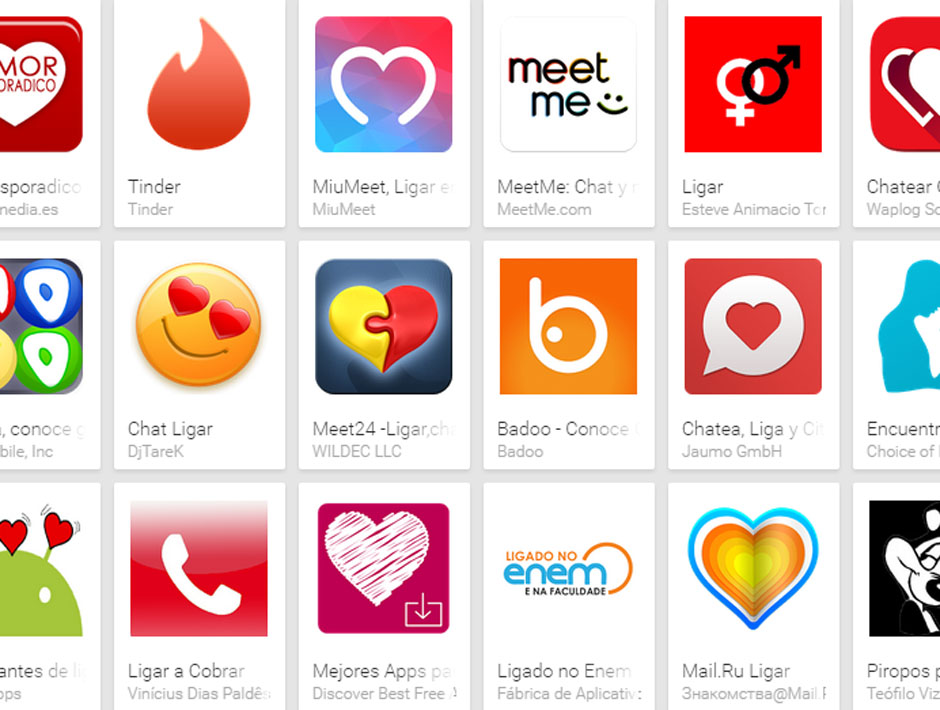
Your personal life is not incompatible with your professional life, and even less so on your smartphone, a device we use for almost everything these days. People use the same phone for work, social networking and even dating through apps like Tinder.

In principle that shouldn’t be a problem. However, a report published by tech giant IBM shows that this could put personal user information and corporate data at risk.

Tinder is just one of the dozens of dating apps that have recently emerged, and the number of their users grows exponentially.

dating apps play store

IBM’s analysis was based on the 40 most popular dating apps available on Play Store. The company‘s experts concluded that 63 percent of all apps had security flaws and were vulnerable to hacking. Consequently, any criminal that could access any of these applications would be able to obtain not only personal user information but also corporate data.

The study revealed that 73 percent of dating apps had access to GPS location information. With this data, an attacker could track users’ movements and find out where they live, where they work, who they meet and where they spend their spare time.

Additionally, an attacker could take control of a phone’s camera or microphone to access the user’s photographs or calls and gain knowledge of their professional activities, for example.

smartphone GPS

Purchasing and credit card information could also end up in criminal hands. Crooks could also install malware on the device, monitor the user’s activities or even spoof their identity, taking control of their account profiles and acting on their behalf. In an attempt to give users peace of mind, IAC (the parent company of Tinder, Match and OKCupid) promptly denied that any of its apps could be exploited in any of these ways.

IBM’s security experts also analyzed the devices used by employees of different organizations. In this case, researchers found that for 50 percent of enterprises analyzed, employee-installed dating apps had access to professional data.

Apart from presenting these alarming results, the US multinational offered up some tips to users of these apps:

  • Use unique passwords for all your online accounts. Make your passwords complex enough to be secure and, as previously suggested on other occasions, change them regularly.
  • Always apply the latest patches and updates to your apps and devices as soon as they become available. This will fix any identified bugs.
  • Use only trusted Wi-Fi connections when on your dating app.
  • Review app permissions before installing them and after any software upgrade or updates are made. These permissions will indicate the data that the app can access. If they look suspicious, maybe you should just go for another, less dangerous app.

If you yourself use any of these apps don’t be afraid. Check the software’s conditions of use and if you think the app is not trusted, simply uninstall it. You can always leave your phone aside and turn to more traditional methods to find your ‘special one’. ;)

The post Dating Apps on your company’s phone. Be careful not to reveal too much personal information! appeared first on MediaCenter Panda Security.

Americans willingly risk privacy and identity on open Wi-Fi

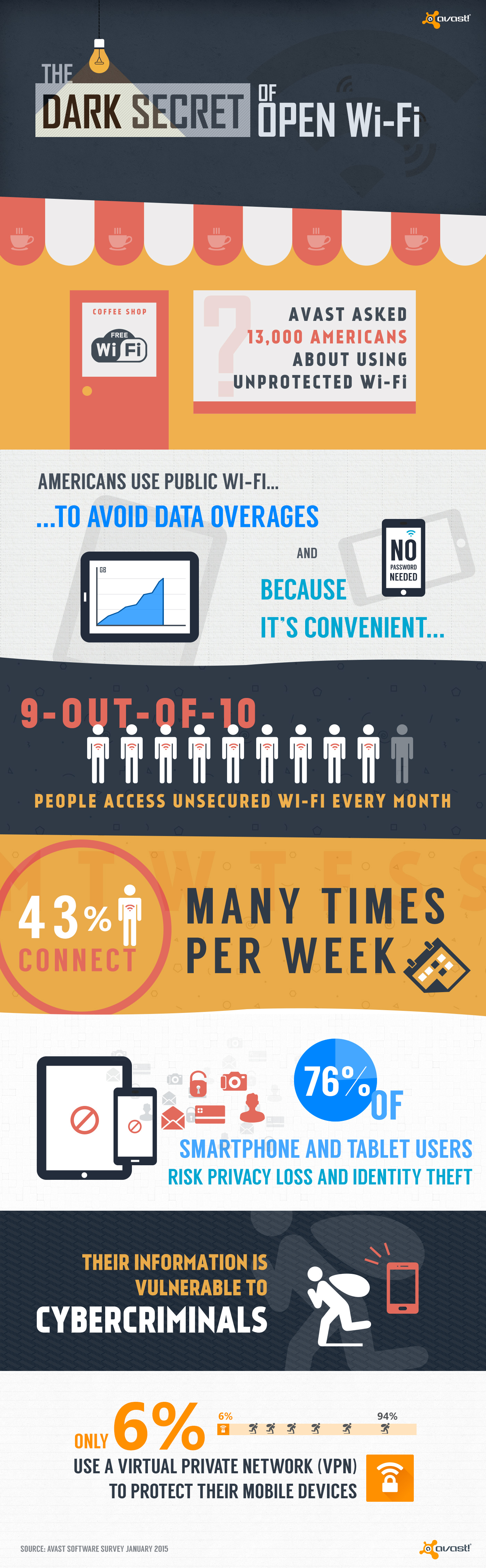
Is the convenience of open Wi-Fi worth the risk of identity theft? Most Americans think so.

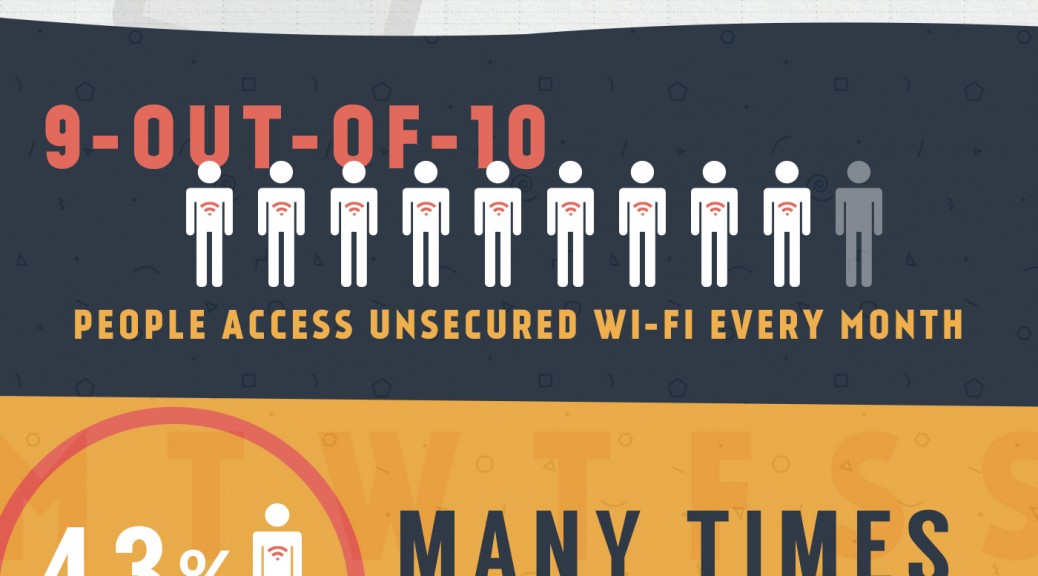
In a recent survey, we found that only 6% of Americans protect their data by using a virtual private network (VPN) when using public Wi-Fi with their smartphone or tablet.  That leaves a whopping 94% unprotected. Why is this?

Do people not know the risks of using unsecured public Wi-Fi?

Is avoiding data overages or the convenience of no password more important than the data on their devices?

Are they not aware that there is protection available?

Are they scared they won’t understand how to use VPN because of the technical sounding name?

The truth about open, public Wi-Fi

The truth is that using unprotected Wi-Fi networks could end up costing you your privacy and identity when you use them without protection like Virtual Private Network (VPN) software. This is because unsecured networks, those are the ones that do not require registration or a password, give cybercrooks easy access to sensitive personal information.

“As mobile cloud storage becomes more popular and the quest for free Wi-Fi continues to grow, open networks that require no passwords place unprotected consumers at great risk of compromising sensitive personal data,” said Jude McColgan, president of mobile at Avast.

“The majority of Americans don’t realize that all the personal information on their mobile devices becomes defenseless over public Wi-Fi if used without protection. These networks create an easy entry point for hackers to attack millions of American consumers on a daily basis.”

WiFi survey blog

Avast can protect you and it’s not hard or expensive

“Unfortunately hacking isn’t a complicated process – there are tools available online that anyone can easily use to steal personal data,” says Ondrej Vlček, Chief Operating Officer at Avast. “Avast SecureLine VPN allows users to browse the web anonymously and safely, especially while using open Wi-Fi.”

Avast SecureLine VPN protects your Internet connections with military-grade encryption and hides your IP address. If that sounds like mumbo-jumbo to you, what it means is that essentially our VPN protection makes your device invisible to cybercriminals. In addition to that, using the VPN hides your browsing history, so no one can monitor your behavior online. We assure you, it’s as easy as can be to use.

Avast SecureLine VPN is available for Android phones and tablets on Google Play and for iOS devices in the Apple App Store. We also have VPN available for Windows PCs.

Is logging into your smartphone, websites, or apps with a fingerprint secure?

Fingerprint authentication

Fingerprint authentication is not as safe as you would think

Just because logging in with you finger is convenient doesn’t mean it’s the best method to use.

Some days ago we told you about increasing your security on sites and in services by using two-factor authentication. More and more services are using this two-factor log in method. They require that you use “something you know” like a PIN or a password, “something you have” like a token app in your smartphone, and even “something you are” like your fingerprints, for instance.

Many top smartphones – starting with iPhone 5s and newer Androids – are moving to fingerprint authentication technology. That means you can unlock your phone using your finger. It’s more convenient than typing a PIN or password because you always have your finger with you (we hope!).  And you would think that it is more secure than using a gesture or pattern to unlock it.

Unfortunately, it’s not. Here’s why:

The authentication process requires that a site or a service (or your smartphone) could recognize you for a thing you know: A PIN or a password. This information must be stored in the service server (or hardware) and it must be matched, i.e., the combination of two pieces (generally username and password) must match to allow access to the right person.

Both you and the service must know this secret combination. But that’s the problem; nowadays, a lot of sites and services have been compromised and pairs of username/passwords have been hacked and sold on the black market.

But what about using your fingerprint? It’s the same scenario.  The information about your finger and the technology to match your fingerprint is stored in servers. If they are hacked, your exact, and only, information would be in their hands.

It gets worse.

You can change your credentials to log into a site or service, but you can’t just change your finger! Well, most of us have 9 more chances after the first one is compromised, but still –  there are more than just 10 services you want to use. You can change your passwords indefinitely, you can use a stronger password, you can use a password generation service –  you’ve got the idea… But you don’t have that many choices with your fingerprint.

It gets even worse.

Everything you touch reveals you. You’re publishing your own secret.

Can you imagine banks or stores letting you use your fingerprint to gain access to your account without even a card? Coincidentally, just hours ago a news report was published saying the Royal Bank of Scotland and MasterCard recently made announcements regarding fingerprint authentication services. They announced that customers can log into the banks’ mobile banking app using their fingerprint. It’s interesting that this article says 16- to 24- years olds are driving this decision because

they want to avoid security slowing down the process of making a payment, with 64% of those surveyed saying they found existing security irritating.

This decision by major banks does not give us confidence in the security of the younger generation and their bank accounts. We venture to wonder about the police with their databases full of prints. What could be done with millions of fingerprints stored by the government?

By the end of last year, young researchers from the Chaos Computer Club showed that your fingerprints could be obtained by photos of your hands and from anything you touched. See the full presentation in this YouTube video. If you have the curiosity to see all the video, you’ll see that using your iris could also be simulated with high quality printed photos. At 30:40 starts the iPhone fingerprint hacking. They took 2 days to develop the method and presented it in a few minutes. Amazing and scary.

Here’s another video with a quick summary of the research.

How to make yourself and your phone more secure

This blog is a source of great information. Earlier this month, we shared 14 easy things you can do right now to make your devices more secure. Please read 14 easy tips to protect your smartphones and tablets – Part I and Part II.

As always, make sure your Android device is protected with Avast Mobile Security. Install Avast Mobile Security and Antivirus from the Google Play store, https://play.google.com/store/apps/details?id=com.Avast.android.mobilesecurity