Tag Archives: featured1

The Most Effective Tools to Keep Your PC Malware-free

pandasecurity-panda-cloud-cleaner

Malware creation continues to break records on an international level, as proven with the data from Q1 of 2016. Experts are identifying new malware samples every day that endanger the internet security on all of our devices.

Our day-to-day lives are effected, if not immersed, in unprecedented technological changes. As the world continues to become more digital, our personal and work environments continue to be susceptible to the +227,000 new threats that lurk on the internet.   Although our online habits continue to change and reflect these developments, we must remember that technology also opens the door for extremely aggressive cyber-attackers who are financially motivated. But, if we take preventative and adequate security measures, we will be able to protect ourselves from financial harm.

Panda Security would like to accompany our users in their digital transformation by offering solutions for a wide variety of devices and for different budgets; let’s work together to prevent, detect, and remove any kind of malware that is trying to sneak into your computer (and your bank account). Taking care of our computers’ “health” is the best way to save money… don’t wait until it’s too late! Tools like our Panda Cloud Cleaner are the best for working against cyber-crime.

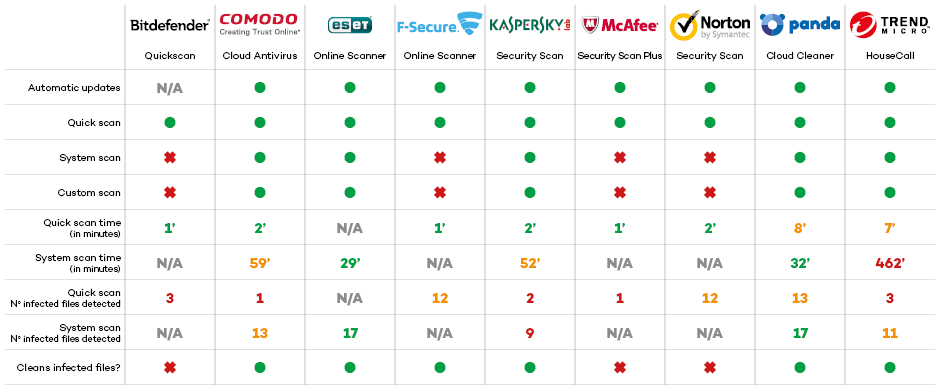
In a recent test comparison, Panda Cloud Cleaner has proven to be one of the best free anti-virus tools in the market. Among the number of solutions tested and analyzed, Panda Cloud Cleaner was rated as outstanding in analysis modes (it is both fast and complete), and was able to eliminate all malware without having to install another anti-virus tool.
pandasecurity-table-cloud-cleaner

As you can see, Panda Security’s solution is rated as one of the most effective solutions for detecting and disinfecting malware.

Businesses maximize their profits by taking advantage of the newest technology and latest products that are lighter, more efficient, and easy-to-use. One of the tools you can add to this is the newly designed Panda Cloud Cleaner, with new ways to detect, disinfect, inform, and protect from the start. Panda’s top priority is to keep users safe and maximize security in all aspects of our digital lives.

The post The Most Effective Tools to Keep Your PC Malware-free appeared first on Panda Security Mediacenter.

Do Your Employees Download Pirated Software? How To Prevent It:

pandasecurity-software-1There are many popular programs that might be available on a user’s home computer, but that are not available at their workplace. A popular image editing program like Photoshop, or Microsoft Office, might be too expensive for a small or medium-sized company that could opt out for more affordable, or even free, software solutions.

However, some employees are unwilling to conform to using these less popular tools, and often, they try to install pirated versions on their computer at work (that are unauthorized on their company computers). The consequence of downloading pirated versions goes far beyond the obvious legal repercussions, which can be very serious for companies. Pirated software is one of biggest entry doors for malware to enter companies.

Pirated software is one of biggest entry doors for malware to enter companies.

To prevent employees from using unlicensed software, which has the potential to compromise your company’s computers, it is essential to establish a proper software management policy (SAM).

pandasecurity-software-2

First of all, businesses should maintain an updated inventory of all active software (i.e., a list of all licensed programs and the workers who use them). Overall, this will serve to detect the programs that are necessary for employees’ work, and which ones should resign.

It is also important to control the detailed information associated with these licensed programs: when the program was bought, when it needs to be renewed, if there are any updates or patches that have not been downloaded yet; this will prioritize our resources so we are able to control budgets and facilitate decision making.

Businesses should maintain an updated inventory of all active software in order to better manage budgets and facilitate decision making.

It is also important to educate and sensitize workers about good practices in relation to software. Unfortunately, on many occasions the company technical departments are unaware of the programs that their colleagues are installing without permission. In fact, around 30% of employees use tools that their bosses don’t know about.

The problem is bigger than it may seem. In 2015, according to a study by the Business Software Alliance (BSA), 39% of software installed on computers worldwide are unlicensed. Those companies using unlicensed software programs are basically drilling holes for cybercriminals, giving them a way to enter their systems and allowing them to endanger their company with malware.

Downloading pirated software increases the likelihood of having a cyber-attack. It is important that you protect your business with advanced cyber-security solutions, like Adaptive Defense 360.

The post Do Your Employees Download Pirated Software? How To Prevent It: appeared first on Panda Security Mediacenter.

Good-bye Before H-Allo: Experts Don’t Approve of Google’s New Messaging App

Allo_FOTO1

During their annual developer event, Google I/O, the superior search engine introduced the public to Duo and Allo, which have been …. In the market of instant messaging apps, compared alongside its rivals of WhatsApp and Facebook Messenger.

Google’s main dish, Allo, has raised the bar of virtual assistants and bots, which are going to revolutionize the way we interact online. The tool will learn how to talk-the-talk—it will be able to capable of human interaction without having to pinch their brain or move a finger.


Allo will protect messages using end-to-end encryption


If, for example, you are invited to go out to dinner, the app will not only suggest a phrase to help you accept the invitation, but that will also book the restaurant for you, if you want it to, AND the restaurant chosen will be in-line with your preferences. According to Google, Allo will do all of this without compromising our privacy and security. As with WhatsApp, Allo will include end-to-end encryption to protect our messages.

So what is the problem? The chat encryption… which has become an extremely controversial topic. The security measure in the app will not be enabled by default, it will only work after we have activated incognito mode.

Thai Duong is one of the Google engineers responsible for the chat’s development. He wrote about this on his blog, but soon after, he deleted the paragraph. He wrote, “if the incognito mode with end-to-end encryption and disappearing messages is so useful, why not use it by default in Allo?” Many of us are wondering the same thing, which is precisely the reason Duong decided to remove the post, which would have made him into a voice for change or activism.

“Google’s decision to disable end-to-end encryption by default in its new #Allo chat app is dangerous, and makes it unsafe”, said the ex-analyst on Twitter, bringing to the light the NSA’s dirty laundry. “Avoid it for now”, he warned his followers.


Another privacy-defender, Christopher Soghoian, has also decided to voice his opinion against the decision that was taken by “Google’s legal teams and company” in order to avoid “upsetting the government”.

The post Good-bye Before H-Allo: Experts Don’t Approve of Google’s New Messaging App appeared first on Panda Security Mediacenter.

Zuckerberg Twitter hack could have been avoided with better passwords

Avoid having your online accounts hacked like Mark Zuckerberg’s by managing your passwords correctly.

The recent news of celebrity social media accounts, including Mark Zuckerberg’s, being hacked should be seen as an important reminder to how valuable passwords are. Who knows if the cybercriminals that hacked the accounts just tweeted strange things or if they went a step further and read the celebrities’ direct messages or more. 

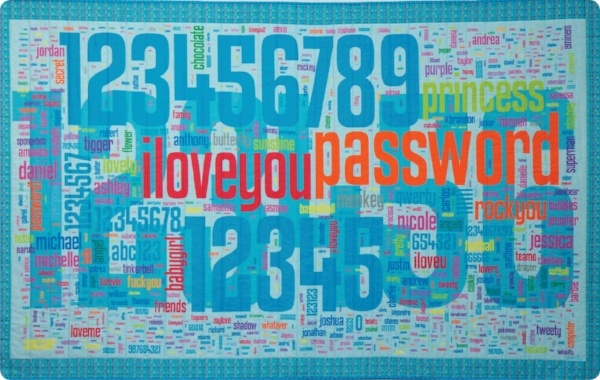
password_quilt-755842-edited.jpg

Most people create easy passwords like these and never change them

Are Your Passwords For Sale On The Black Market?

FOTO_1

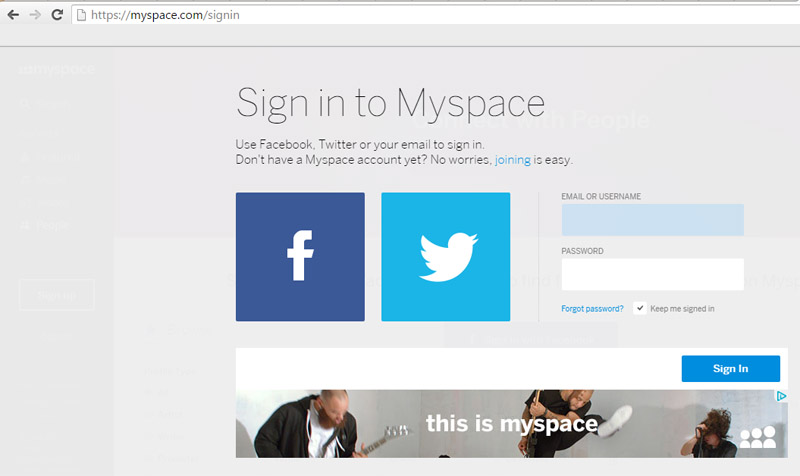
Myspace is joining the list of 2016’s data breach victims, alongside Tumblr and LinkedIn. Yes, Myspace still exists and in fact, if you registered for the social media site prior to 2013, your old log-in information could have been compromised.

360 million emails and passwords were leaked in what is being called one of the largest mass data breaches in internet history. A few days ago, LeakedSource—a search-engine capable of searching leaked records—claimed to have learned account log-in information for a massive number of MySpace users.

Myspace acknowledged in its blog that cyber-criminals have gained access to log-in information from those who registered prior to June 2013. Until that date, passwords were protected by the hashing algorithm “cryptographic SHA1”, which is an outdated and insecure system which is no longer recommended.

The black hat, Peace, recently put the leaked data up for sale on the dark side of the net for six bitcoin (approx. $2,800 US or 2,400). This cyber-delinquent is also behind the Tumblr leak, where 65 million accounts were compromised, and the LinkedIn data breach (117 million leaked). As with Myspace, Peace attempted to sell the stolen information from Tumblr and LinkedIn on the black market.

Remember the Ashley Madison scandal? Well, the number of passwords stolen in this data breach is higher than those stolen in the Ashley Madison leak. If we take into account that the number of stolen passwords is higher than those stolen during the Ashley Madison scandal (39 million passwords leaked), it is particularly worrying.

FOTO_2

Prevention is Better Than Cure

Recently, LinkedIn required a password change for users whose personal data may have been compromised in the breach. Tumblr has done the same. For now, the former friend-network has ensured users that the matter is being investigated and that the company is implementing new security measures.

Nevertheless, internet users and social-network fiends should not wait for a big leak before they take steps to protect their privacy. One of the commandments of Internet safety is to periodically change passwords and to register different passwords with different services so if your data is compromised it only effects one set of log-in credentials.

One of the commandments of Internet safety is to periodically change passwords

With all those constantly-changing passwords, how can we remember them while remaining secure? It’s easy.  You can use password managers like Dashlane, which allows you to determine a password’s level of security and control them from the same page.

There are also great security solutions that offer a larger degree of protection and include a password manager… all you need is a master password to access all of your favorite internet services. It maintains your online privacy… at all times!

The post Are Your Passwords For Sale On The Black Market? appeared first on Panda Security Mediacenter.
Out of storage? Photo Space creates space on your iPhone

New Photo Space app fits 7GB worth of photos into 1GB of space

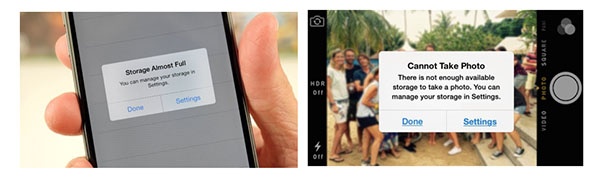
How many times have you seen a message like this?
out_of_space_on_iPhone

If you are like the thousands of iPhone users around the world, then you see that message all too frequently. Of course, it always pops up just as you want to take a picture. 😬

People told us that to get more space they resort to uninstalling apps and deleting photos. A few get storage from iCloud, but they complain that they have no control and it gets expensive to pay for more space.

None of those are very good solutions. So we came up with something better.

Avast Photo Space

Photo Space is a free app that takes your high-quality photos and optimizes them to reduce the amount of storage they occupy. That means that you get 7 times more space for your photos and apps. 

Beware of Online Invoices! A Newly Discovered Threat Has Already Crossed Borders

endesa 4

Just a few days ago we received an alert from Endesa, a Spanish electricity company, warning us of a new online scam targeting victims through fraudulent emails. The cyber-criminals send out fake invoices to Spanish users, using the Endesa name, and then the attack hits soon after. Unfortunately, the cyber-criminals were successful in their first attack and have expanded to other countries. It is very difficult to estimate the number of people who have received the email and who have fallen victim to this scheme.

In the past few hours, a similar attack has arisen. The state-owned electric company in Poland, PGE, has fallen into this cyber-criminal network, amplifying this attack-method to an international level. Just like the incidents in Spain, important and sensitive information, belonging to both companies and individuals, have been infected after opening an infected file with the supposed electricity bill (which is really high, by the way).

We are facing a massive fraud that has transcended borders with a very lucrative goal: forcing you to pay a ransom to reclaim your personal files.

In both cases, the campaign has worked in a very similar way: by sending false invoices using the name of an electricity company, while infecting the computers of naïve victims with a locky computer virus. Although the malware has only reached Spain and Poland, it’s quickly growing and your country could be hit next.  Here are some tips to help you combat this threat:

The Online Invoice Scam, Step-by-Step.

  1. In both of the analyzed cases, the email in question reaches the spam mailbox and in the subject box is the name of an electricity company that corresponds to the country.
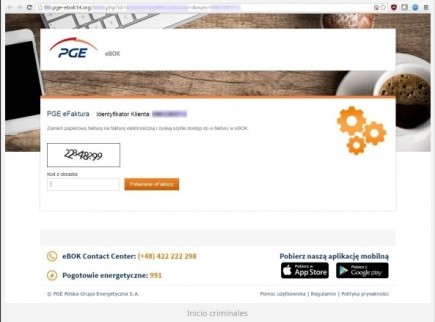
  2. It appears as though the fake invoice is the same in both countries. After carefully analyzing the PGE situation, we see that the message may appear somewhat messy, with Polish characters inserted into the text at random.
  3. When the user wants to learn more about the factitious bill, they will click on the button with the text “See Your Invoice and Consumption” that appears below the energy consumption summary. But by then, it is too late. After clicking the fake button, the ransomware that is contained inside the Zip file is executed and a malicious Java code script begins to run on the system.
  4. In this case, the schemers continue to trick their target by asking them to complete a Captcha to gain access to the Zip folder. This makes users think that they are carrying out a safe action, but in reality, their cyber-security is being controlled by a very powerful ransomware.
  5. Once the malicious program has been executed, the user will be blocked from accessing personal files. Locky is an aggressive kidnapper and will only return the personal information once a ransom has been paid.

Endesa 3

Don’t fall into a Scam That Is Tailor-Made for You

Each time, there are more detailed and customized attacks. Their creators are getting away with their wrong-doings using the names of prestigious companies, making it easy to fall into this trap.

One thing is clear: if you are not protected against this type of ransomware, your personal and company files are at risk of being abducted.

Avoiding this situation will free you from paying a ransom and will prevent giving up important information and time to the internet’s predators. There is one solution on the market that is able to control any and all types of threats, including Cryptolocker: Adaptive Defense 360.

When you receive an electric bill, you should only worry about how much energy you have consumed. Here at Panda, we will continue on our mission to detect and neutralize all threats and protect all of our customers.


The post Beware of Online Invoices! A Newly Discovered Threat Has Already Crossed Borders appeared first on Panda Security Mediacenter.

The newest phishing spam: “Security Alert!!!”

Fake phishing email impersonating Avast warns of 5 deadly trojans. 

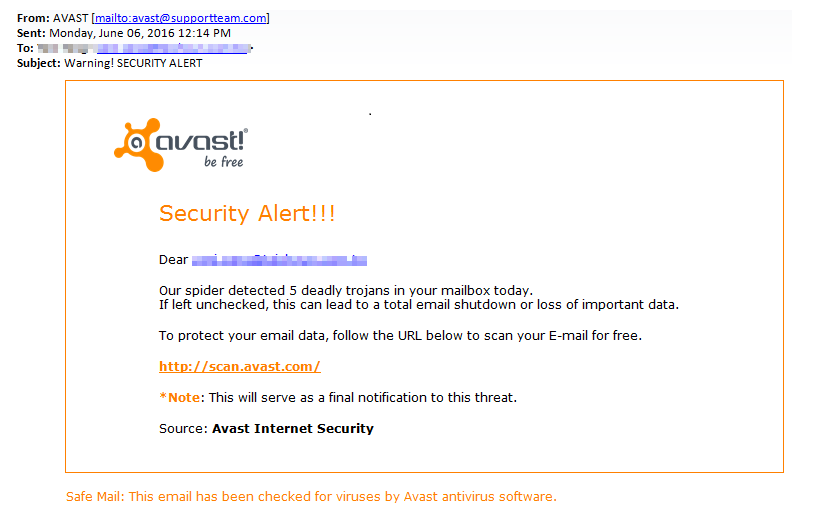
Guess who hackers disguised themselves as in a recent phishing campaign? That’s right Avast! A laughable fake Avast alert email trying to harvest webmail addresses is being sent out via a spam message which leads to several domains where attackers have prepared a simple form to collect victims’ email addresses and passwords. This is what it looks like:

email_small.png

Received spam in a phishing scheme impersonating Avast

Learn how to protect your information on International Archives Day

The entire world population generates and saves enormous amounts of essential information every day. We do so not only to remember and look back on the past, but also, our companies and institutions need this information to run efficiently and transparently.

That is why today, on International Archives Day, we wish to stress the importance of safe and responsible preservation for all kinds of files and, in particular, those which contain personal information belonging to people and companies. Do not forget: although an application, a program or an operating system can be re-installed, corporate or personal information is unique and should be a top priority.

Here are some tips to keep them from falling into the clutches of cybercriminals:

Backup Files

Now more than ever, ransomware is the greatest threat for companies and individuals, which is why backups are the most fundamental tool (and the last resort). They keep us from losing valuable information in the event of a cyber-attack. It is highly recommended to keep at least two backups: one stored in the cloud and a physical one (in an external hard disk, a pen drive, etc.)

Encryption

Before uploading files to the cloud, save them in a storage device or send them by e-mail. It is recommended that you encrypt the most sensitive information, at least, so that they will not be accessible if they fall into the wrong hands. An attacker who gains hold of your files will not be able to read their contents if this person lacks the encryption key, something that only you will have the power to.

Continuous Updating

Always keep your operating system, browser and applications updated to the latest version that is available. This allows you to protect the malware that usually takes advantage of the latest vulnerabilities. Operating your computer with an older version of software makes your most confidential information at risk for theft.


Do Not Use Unknown Computers or Networks

If you go on a trip and you plan on using a computer that is not yours, or connecting your mobile device to public Wi-Fi (such as at a coffee shop or at an airport…), make sure you avoid as much as possible accessing private and sensitive files. If you connect to an open Wi-Fi and you are forced to send personal or confidential information, make sure that it is encrypted and use a virtual network (VPN). Learn how to do so, here.

Install a Good Anti-virus

At Panda, we know how important your photos, videos and other files are for you. That is why we offer file encryption, backup and information protection with our anti-virus superstar: Panda Protection Service. With Panda, nobody can hijack your data! Enjoy the rest of your day.


The post Learn how to protect your information on International Archives Day appeared first on Panda Security Mediacenter.