Tag Archives: featured1

Independent test shows Avast offers best HTTPS protection in the market

Dollarphotoclub_84782325.jpg

Every day, 50,000 infected unique URLs of HTTPS-protected websites are detected and blocked. Scientists from the Concordia University in Montreal, Canada, have tested 14 antivirus programs offering HTTPS scanning and found that these programs create more security problems than they actually solve. There was only one exemption from this: Avast. The only issue mentioned in their study is a lack of revoked certificates checking by Avast, which has been in the market since November 2015 and is fixed in 2016 products.

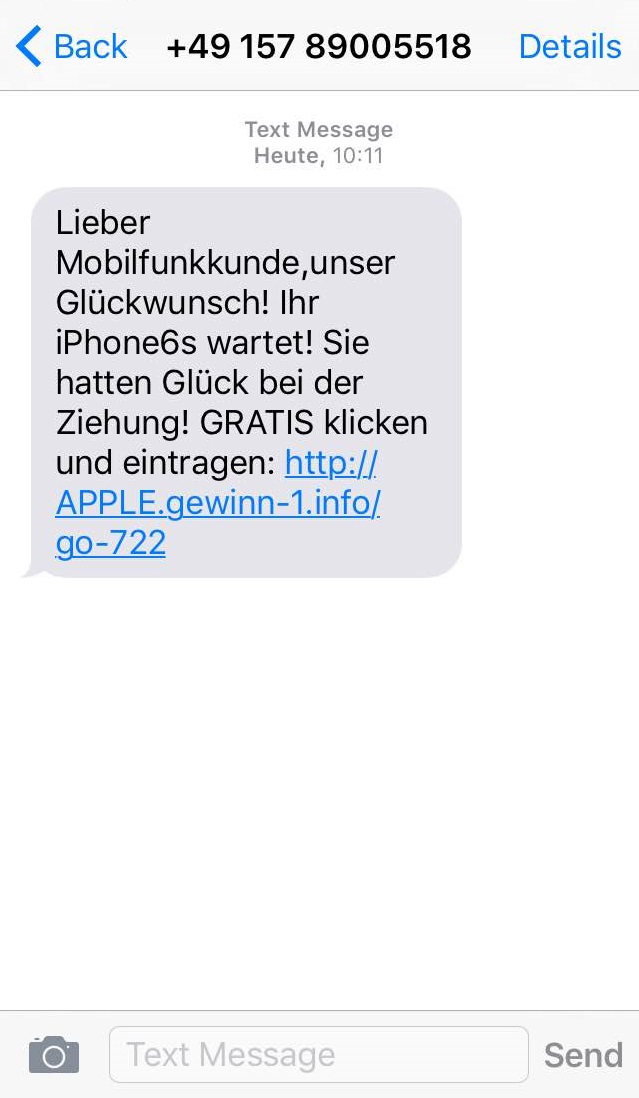
Your iPhone6s is not waiting for you – despite what the text message says

What’s the deal with these “you won something” texts?

I recently received a text message saying an iPhone 6s is waiting for me. I normally delete these messages, but this time I was curious… I have been considering upgrading from my iPhone 5 for a while now J. So, I decided to consult with my friend, Avast senior malware analyst Jan Sirmer and see what would happen if I believed the text.

iPhone_scam_text.jpg

How did they get my number?

The first question I had about this was: How did they get my number? “A computer probably sent it to you,” said Jan. How did a computer get my number? “There are programs that allow computers to send text messages to a bunch of numbers at once. They probably use the same area code and the rest of the digits in the number are generated by the program.”

A Kidnapping Survival Guide: How to Combat Digital Ransomware (Part 2)

ransomware2

You have already read some of our tips to help prevent the most feared and common cyber-threat of the moment, ransomware; it can hijack your computer and all the computers in your company. Its main strength is that it is able to block computers and encrypt files, and the only one who is able to decrypt it is the cyber-criminal that created it, which is why so many victims are paying the ransom demanded by these attackers.


When an attack is this sophisticated, the only way to combat it is by taking precautions. Any recommendations you may have can help you, but there is a key measure that is worth mentioning: the backup copies are your best allies to resist the escalation of a cyber-abduction.


In the second part of this guide, we will explain what is essential and how you can handle a ransomware attack.


First of all, ransomware does not block everything. If your devices have been infected, the first thing you should check is that the information is really encrypted. There are mediocre cyber-criminals that are taking advantage of the success of better-prepared, cyber-crime mafias. They do these second-rate jobs in order to simulate attacks that in reality don’t actually hijack your files, and then they reap the benefits. If you do not know how to distinguish a real threat from an imposter, make sure to consult an expert before forking the cash over to the bad guys.


Another important thing to consider: Do you have a backup? After you have verified that the attack is in fact a legitimate ransomware, the first thing you need to ask any security professional is if your company has backup copies of everything that is important. It is the only effective defense. If you have backups, you can eliminate the infected system completely, load your backups, and then everything will be back to normal.


Uses reliable tools. Not all programs are equally effective in creating backups. Unfortunately, many organizations have found that the software used to create a backup is not able replace the detailed information exactly the same as it was before the ransomware attack. Choose your work team carefully and protect your files. Good security solutions offer reliable tools.


For security reasons, it is better to keep your backups offline. In addition to this, if you want to keep ransomware from dragging you down, do not store backups on a shared disk. The more isolated your backups are from the network that is possibly infected, the more likely you are to survive and retrieve your sensitive information from them.


Make several different copies. Even if you are the most careful while carrying out these procedures, there is always a fragile moment. Those few minutes when the disk guarding your backup is copying the data, and is connected to the rest of the network. In that precise moment you are vulnerable to a cyber-criminal. In order to prevent infection, it is advisable to backups in several periods: in real time (if resources permit it), daily, weekly and monthly. They must be separate backups, and at least one of them should be disconnected from the rest of the network.

The post A Kidnapping Survival Guide: How to Combat Digital Ransomware (Part 2) appeared first on Panda Security Mediacenter.


How to Recover a Stolen Smartphone

recuperarmovil1You wake up to the beep-beep! ring of an alarm and, as you eat your breakfast, you comfortably read about the current events on your Smartphone screen without needing to listen to the radio, watch television or turn on the computer. On your way to work, while on public transportation, you take advantage of the time and play a game you’ve downloaded. You chat with your friends on WhatsApp at all hours of the day and even share photos of your outings on Facebook. Even checking emails from your boss has become a somewhat lighter task thanks to this thing that goes with you everywhere: your Smartphone.


Mobile phones and tablets have become part of our day-to-day. Most people argue that without them, our lives would be more complicated and boring. Their necessity makes it of upmost importance that we educate ourselves on how to protect these devices to ensure the privacy of the personal data they hold.

What if your Smartphone disappeared?

What would you do if you lost your Smartphone or it was stolen?


We have shared a multitude of tips that will help keep your terminal from disappearing into the reach of a cyber-criminal, but what if your Smartphone physically disappeared? What would you do if you lost it or had it stolen? Let us hope that you will never have to find out, but just in case, you should prepare yourself.  We have good news: we present to you a free App that will help you if your phone is stolen, and help you hunt the thief who took it.


The App, which you can test for free, allows you to locate the terminal in case of theft or loss. You can see the location of your mobile phone or tablet on a map and can even lock the device or erase data remotely. This will prevent a third party from using your phone and accessing your personal information.

What about Smartwatches?


Connecting Panda Security to your Android Wear Smartwatch is one of the simplest ways you can protect and recover your device. If you activate the anchor mode in your watch you will know where it is at all times.  If it’s too far away, an alarm will go off.  If it is stolen, you will be able to see its location on a map, block it from being used and delete information.


What are you waiting for? Protect your most precious technological goods with the best anti-theft application.

The post How to Recover a Stolen Smartphone appeared first on Panda Security Mediacenter.

Time to change your LinkedIn password

LinkedIn members’ login credentials are being sold on the dark web.

The 2012 breach of social networking site LinkedIn, has come back to haunt us. That breach resulted in 6.5 million members’ credentials being stolen. Articles published in the last day report that the number was way short of reality – it’s actually more than 167 million email and password combinations – or nearly all the members of LinkedIn. 

linkedin-1-686150-edited.jpg

Time to change your LinkedIn password

LinkedIn members’ login credentials are being sold on the dark web.

The 2012 breach of social networking site LinkedIn, has come back to haunt us. That breach resulted in 6.5 million members’ credentials being stolen. Articles published in the last day report that the number was way short of reality – it’s actually more than 167 million email and password combinations – or nearly all the members of LinkedIn. 

linkedin-1-686150-edited.jpg

Locky is far from dead

A brief update on Locky, the latest ransomware targeting PCs.

Beware of emails from random email addresses with subject lines like “Upcoming Payment – 1 Month Notice”. These emails typically come with a zip attachment that attackers have created to run a script that downloads and runs the now well-known ransomware, Locky. These phishing emails prove that Locky is not going anywhere anytime soon.

The emails are written in typical phishing style. The attacker tries to entice a potential victim to read the email and subsequently download the attachment. Attackers seem to be targeting   small and medium sized businesses, to gain access to valuable company data.   

Locky_email_content.pngContent of the email.

Avast Software Updater can help protect you from security loopholes, like the recent 7 Zip vulnerabilities

Last week, Talos discovered multiple vulnerabilities in 7-Zip, a popular, open source file archiver. The vulnerabilities are particularly severe as many products, including antivirus software, implement 7-Zip in their software. When vulnerabilities are found, it is the responsibility of software owners to patch them. However, these patches are useless, unless users update their software.

Avast is not affected by these vulnerabilities, but if you are a non-Avast user we recommend you update your antivirus software, if you haven’t done so already.

About the vulnerabilities

The two vulnerabilities found are CVE-2016-2335 and CVE-2016-2334. The first vulnerability is an out-of-bounds read vulnerability, which exists due to how 7-Zip handles Universal Disk Format (UDF) files and could allow attackers to remotely execute code.

The second vulnerability is an exploitable heap overflow vulnerability, found in the Archive::NHfs::CHandler::ExtractZlibFile method functionality. In the HFS+ file system, files, depending on their size, can be split into blocks. There is no check to see if the size of the block is bigger than size of the buffer, which can result in a malformed block size which exceeds the buffer size. This will cause a buffer overflow and heap corruption.

What you should do

As mentioned above, it is up to software publishers to provide their users with vulnerability fixes, but these are futile if users don’t take action and update their software. It is vital that you frequently update all software, including your operating system, on a regular basis.

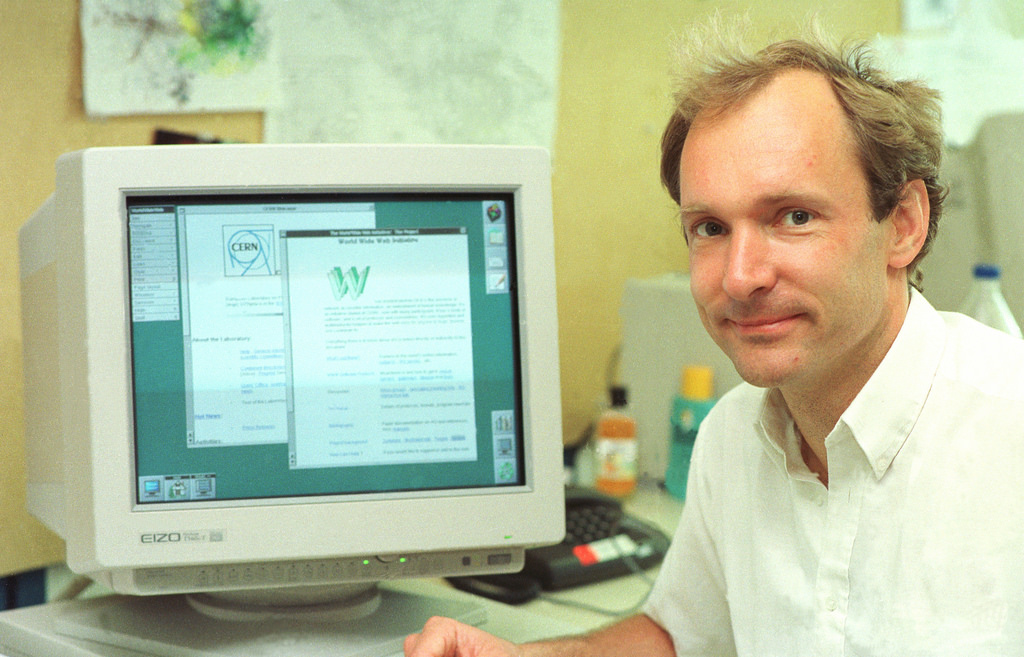
Even the inventor of the World Wide Web can be hacked. What about us?

contraseñas_FOTO2Even the inventor of the World Wide Web, Mr. Tim Berners-Lee, can have his password stolen. The hackers were able to access IT resources belonging to the organization that governs the Web (W3C). This makes us wonder: Is there a company that isn’t vulnerable to this type of attack?


We all face the same problem: We are only as strong as our weakest link. Stealing the password belonging to a single employee, especially if their access level is high (for example, a manager), is sufficient means for a cyber-criminal to sneak into a company’s entire system.


According to a recent report by the Cloud Security Alliance (CSA), nearly a quarter (22%) of the IT breaches in companies began with a single password leak. In addition, 65 per cent of the study’s participants believe that there is a medium to high chance that there will be future risks caused by a compromised password.


A fourth of IT breaches began with a single password leak


contraseñas_FOTO1

Pictured: Tim Berners-Lee, the inventor of the World Wide Web

Like many others, Tim Berners-Lee’s situation could have been easily avoided. If an attacker gained access to the back door of the W3C it was because Berners-Lee repeated passwords. It is possible that he used the same password as the one he used for the IRC chats he used to communicate with his team.


The intruder initially got into the system using Berners-Lee’s information, then the same password opened other access points without problem. It was even possible to sneak into the web’s editing area, retouch the founder’s profile, and leave an encryption seal to prove that the cyber-criminal had been there.


To avoid being in this situation, there’s a simple and effective measure that should be followed by everyone in your company: use a different password for every service. That way, if one of your passwords is stolen, cyber-criminals will not have access to other resources belonging to your company.

Likewise, it’s also important to have a dependable security solution for your business to fall back on, like Panda Adaptive Defense 360, which is able to combat the theft of corporate information against both external and internal threats.

The post Even the inventor of the World Wide Web can be hacked. What about us? appeared first on Panda Security Mediacenter.
A Kidnapping Survival Guide: How to Combat Digital Ransomware (Part 1)

Kidnappers can easily take your digital information using one of the most dreaded types of malware: ransomware. Cyber-criminals are relying more and more on these malicious programs to block our computers.  Now, they are asking for larger amounts of money if you want them to “give back” access to your hard-drive.

The losses that a business can incur from an attack of this kind are enormous, which is why it is essential to be knowledgeable about the basic precautions that should be taken if you are in this type of situation.  First to prevent these types of attacks; and then to fight them.

We have prepared a summarized guide with the essential things that you need to be aware of. Here they are:

  • Do not forget the basics. Ignore any of the “simple” measures, which can be fatal for your company’s security. For example, if you allow your company’s employees to open email attachments containing executable files (like a Windows screensaver), then you are opening the door for cyber-attacks.


  • Remember that “human factor”. People are your business’ weakest links when it comes to security, since it is usually much easier to trick them then to trick a machine. It is essential that you give your team the right skills (for example, teach them how to recognize a supplanter or a suspicious email). Your employees can be your company’s best shield against ransomware, or they can be the black hole your organization falls into.


  • Perform an inventory of all of your company’s hardware and software. If something leads us to grow suspicious of a potential attack, it is important to know what “it” is and where we can find “it”.  How fast you are able to respond to an incident will largely depend on how long it takes you to locate the affected computers and systems.


  • Compartmentilize your company’s network, or in other words, divide your company’s network into areas with different access profiles. Apply internal rules to define the type of communication that can be exchanged between these groups and the privileges they have during certain events, in order to prevent greater problems.


  • The safety of our corporate network isn’t the only thing we need to worry about. Every computer (computers, tablets, mobile…) used by employees in the organization must be protected because they are both an entry point and a first line of defense against any type of infection. For instance, when a laptop connects from an external network not belonging to the company, the risk for infection is multiplied. We must prepare ourselves.


  • Buy a good security solution for your company. If you are constantly updating your database, then an anti-virus will more likely and more rapidly be able to detect all kind of threats, even some of the newest ones.

The post A Kidnapping Survival Guide: How to Combat Digital Ransomware (Part 1) appeared first on Panda Security Mediacenter.