
Tag Archives: featured1

What to do when someone steals your identity on Facebook

facebook

During the last few months of 2015, a generous promotion by Primark (the well-known Irish clothing giant) started to do the rounds on Facebook in Spain, whereby users were promised the chance of winning a gift-card worth €500 by clicking like on a publication. The year previous also saw a similar offer by Zara, another clothing giant, which saw the company raffling off store credit if you invited friends to attend an event. However, neither of these pages, offers, or events were related to the store in question, nor to any of their employees.

It turns out that these were fraudulent offers created by fake profiles, which used social engineering techniques to take advantage of users. Although these cases involved well-known stores, any of Facebook’s users could see their profile copied and stolen.

If you do ever come across a profile that is passing itself off as your own, or your company’s, then there is luckily a way to have it removed, as Facebook has a mechanism in place to report and stop the imposter in its tracks.

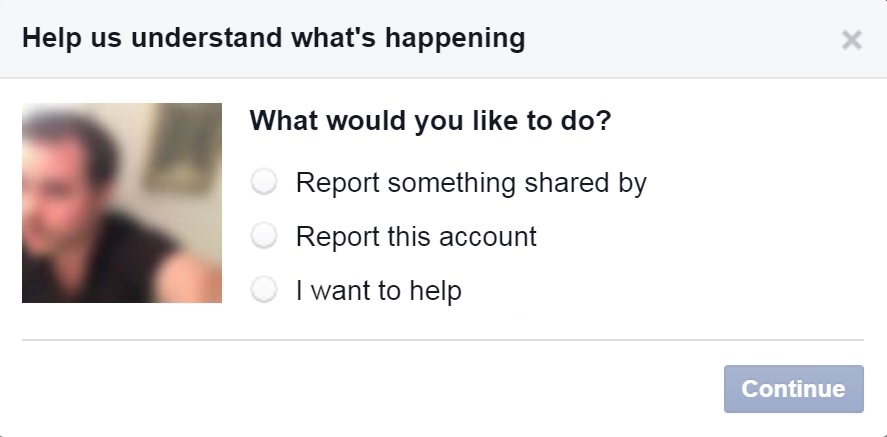
The first thing that you need to do is enter the fraudulent page (you can’t raise the alarm from your own profile), click on the button located to the right of the cover photo, and choose “report”. In the following window, which will open automatically, you have to select “report this account” and, later, follow the instructions on the screen.
facebook impostor account

However, there is also a chance that the imposter has blocked you, so that you can’t access the account. If this happens, you will have to ask a friend to report the false account. The friend will receive a message with a link to continue to process.

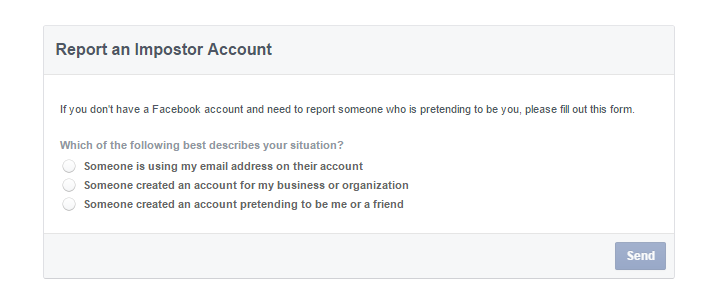
It is also possible that the person whose identity has been stolen doesn’t have a Facebook account. If this is the case, the social network has a section for events such as this in its help center.

Anyway, no matter what the situation, Facebook advises that you get in touch with a lawyer or a regulator before viewing the content that the imposter has posted on the page. The aim is to be informed fully of the situation and the legal options available to the affected party.

The social media website doesn’t just offer help to its users, but also provides information to the authorities to help them better understand how to act. What’s more, there is also a special section where they can present their own requests relating to an investigation.
report facebook

The repercussions that an imposter may face depend on what the false account was being used for. In Spain, for example, identity theft over a prolonged period of time (to the point where others are tricked into believing the false identity) is considered a crime that is punishable by up to three years in prison.

If the profile is used to gain personal information on other users with the aim of committing a crime, the situation is even more serious.

We all hope that this never happens to us, or to anyone that we know, but as always it pays to be prepared to act quickly if it should arise.

The post What to do when someone steals your identity on Facebook appeared first on MediaCenter Panda Security.


How Google hopes to revolutionize the way we access our accounts

google

Google is about to put another nail in the coffin for traditional passwords. The search engine giant is testing out a new system of passwords that will take the place of the usual combination of letters, numbers, and symbols that we use to access services on our mobile phone.

At the moment, the new authentication method is only available for a select group of users, although the company has confirmed it will extend it to other users within the near future. Notorious passwords such as pizza, password, and 123456 will soon be confined to the past, joked a Google spokesperson at the announcement.

How the new system works is rather easy. Whenever we want to access our Google account – which is becoming more and more central to our lives – we will only have to enter our user name or email address.

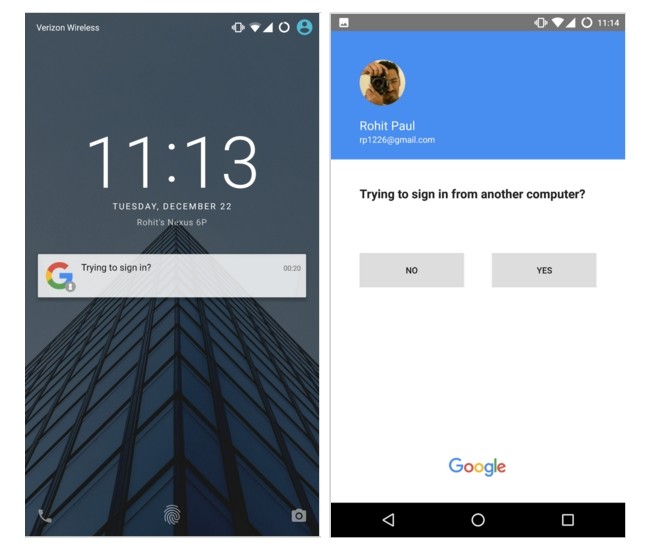
By doing this, a notification will appear on our mobile phone, which is linked to the account, asking if we are trying to access from a different computer. By confirming this, we can access without any issues.

google passwords

The main advantage of this method is that it is extremely simple. With just one click of the smartphone’s screen it is possible to by-pass the process of entering a password or, in some cases, going through a two-step verification process.

What’s more, this new method should allow us to feel more protected when it comes to other people gaining access to our private accounts, as some people continue to use basic and easy to guess passwords, which do little to ward off cybercriminals.

google access

It’s not all doom and gloom for passwords, however, as they can still be used alongside the new method and will come in handy should you run out of battery on your mobile phone. The new identification procedure can still be used alongside the current two-step process, too.

In the event of losing the mobile phone, or having it stolen, your account won’t be at risk for long. You can long-in from another device (your laptop, for example) and from there remove the access permission for the mobile phone.

With this initiative, Google joins a list of multinational companies that are looking for alternatives to traditional passwords. Recently, Yahoo created its own system called Key Account, which has a lot in common with the system being trialed by Google. Whether we like it or not, traditional passwords may soon be confined to the annals of history.

The post How Google hopes to revolutionize the way we access our accounts appeared first on MediaCenter Panda Security.
Microsoft ends support for older versions of Internet Explorer

Internet Explorer icon

Update from an older Internet Explorer to avoid security risks

After January 12th, only the most current version of Internet Explorer available for a supported operating system will receive technical support and security updates.

People using Internet Explorer 8, 9, and 10 will no longer receive security or technical updates after Tuesday, January 12th. This means that the older versions of Internet Explorer can be exploited by hackers which puts your computer and your data at risk. One last patch will be released January 12th with a reminder to upgrade your browser. If you do not upgrade to Internet Explorer 11, you will begin to receive “End of Life” upgrade notifications urging you to make the switch to Internet Explorer 11. Windows 10 and Windows 8.1 users should upgrade to Internet Explorer 11. Windows 7 users with Internet Explorer 9 or 10 should upgrade to Internet Explorer 11.

Choose a different browser

If you want to stay with a Microsoft product, then you also have the option to switch to Microsoft Edge, their latest, most modern browser, but you must also be using Windows 10.

This is a good opportunity to try another browser like Google Chrome, Firefox, or Opera.  We recommend Google Chrome as an alternative to Internet Explorer because of its security features and automatic updates.

There are plenty of alternative browsers to switch to as well; those that specialize in gaming, privacy, media consumption, and other things. Check out this listing of 10 obscure, highly specialized browsers from PCWorld.

How to check which version of Internet Explorer you are using

  1. 1. Open the browser
  2. 2. Click the gear or Question icon on the top right
  3. 3. Select ‘About Internet Explorer’ and a pop-up will appear with the version of your browser

Follow Avast on FacebookTwitterYouTube and Google+ where we keep you updated on cybersecurity news every day.

The wave of emoticons that could crash WhatsApp

whatsapp emoticons

An emoji is worth a thousand words, or at least it is when you’re using WhatsApp. We’ve gotten used to expressing ourselves by using these colorful characters – be they smiley faces, grinning turds, or even animals – that it is strange to imagine ever communicating without them. In fact, a recent survey by Swiftkey in the USA managed to find out the most popular emoji by state, with some unusual results coming up, such as the smiling turd being the most popular one in Vermont.

So, due to the popularity of using emojis, it didn’t take long for cybercriminals to catch on to the fact that they could take advantage of their use, and some have started to use them to their advantage.

Following the WhatsApp scams of 2015, such as the message that invited you to download new emoticons but ended up stealing your contacts, 2016 has started out with a new vulnerability in the app, which is used by more than 900 million people worldwide.

Indrajeet Bhuyan, an 18-year-old from India, has just discovered that a cybercriminal, or even a friend who fancies playing a trick on you, could take advantage of a failure in WhatsApp’s system to remotely block your account.

The strategy to carry this out couldn’t be easier – all you need to do is send thousands of emojis in the same message and the app will close automatically. Bhuyan explained the entire process on the blog Hackatrick, where he also tells of his remarkable discovery.

After writing between 4,200 and 4,400 emojis on WhatsApp web, the teenager realized that the service began to slow down. Once the message was sent, he received an error message and the browser remained blocked.

However, when the person he was sending the message to connected, the message was received. Once opened, the application stopped working. During this phase, WhatsApp offered the usual options of waiting or closing the app. Despite this, the app would become blocked again due to the avalanche of emojis.

This young blogger has shown that the error can be produced in different web browsers (Firefox and Google Chrome) and various versions of Android (Marshmallow, Lollipop, and KitKat). Only iPhones were capable of resisting the chaos caused by the emojis, with WhatsApp for iOS only blocking itself for a few seconds.

The problem can be solved very easily, however. Instead of trying to read the message filled with emojis, the user should eliminate all of the chat without entering it. Although for some people, this is exactly the reaction that they hope to achieve.

For example, if a user has sent messages to another user that may contain private information, or has threatened another person via messages, they could send them this glut of emojis with the hope that the victim will delete the message entirely, eliminating all evidence.

Bhuyan also discovered a vulnerability that caused a shutdown of WhatsApp with a message of 2,000 special characters, although the company has since rectified this. He has just informed WhatsApp of his new finding and hopes that this fault is corrected in the next update.

The post The wave of emoticons that could crash WhatsApp appeared first on MediaCenter Panda Security.
All you need to know about the worrying popularity of Malvertising

Every morning, without fail, you log onto your computer and check your emails, read the news, and have a look at your social media accounts. While you do this it is likely that you’ll come across a few pop-up advertisements which you quickly close as they do little more than annoy you.

However, it’s likely that you haven’t stopped to think that these annoying ads could install a malware onto your computer without you, or the company that manages banners and advertisements, even realizing it.

Malvertising is the name that has been given to this technique that is quickly gaining popularity with cybercriminals. According to security experts, Malvertising has grown by 325% in the last year alone.

As opposed to Adware, which fills your pages with toolbars that aren’t usually malicious, cybercriminals use Malvertising to hide malicious coding in an advertisement and it isn’t even necessary for you to click on it to become infected.

How they carry out this attack is remarkably simple – the cybercriminal enters the network of the company that looks after selling advertising space online, taking advantage of the shared information between the company and its clients. The attacker then passes itself off as a different client and posts its own advertisement, albeit one that may contain a malicious coding in Javascript.

Panda_Security_News_Malvertising

Once the user loads the page, the seemingly innocent ad will appear. Without even clicking on it, the exploit will start to carry out its job by installing a malware on the computer. You may even end up having to deal with a banking Trojan, which is designed to steal your bank details while you are entering them online.

Cybercriminals have been using Malvertising for the past few years, and in 2009, The New York Times suffered an attack by this means when a pop-up passed itself off as an antivirus scanner and infected the users’ computers.

Last September, The Huffington Post was also a victim of Malvertising. Not long after, The Daily Mail, a British tabloid, also inadvertently redirected its readers to exploit kits designed to install malware on their computers. Yahoo and Forbes have also suffered similar problems, just like the famous adult sites YouPorn and Pornhub.

As these cases show, cybercriminals are opting to carry out their attacks on popular websites that see a large number of traffic so as to infect as many computers as possible.

Panda_Security_News_Malvertising_Adblock

So, if cybercriminals are using advertisements on websites that we generally trust to be safe, what are the advertising agencies doing to stop this and what can we do to protect ourselves?

The well-known platform Doubleclick, which is run by Google, shut down 524 million malicious advertisements in 2014 alone. Its spokespeople made reference to using malware protection tools in their fight against the cyber attackers.

For their part, the websites that have been infected could create their own ads or use sponsored content to protect their readers, although at the moment it doesn’t seem a viable solution as external advertising is necessary for them to survive.

Therefore, the best way to protect yourself against these attacks is to install an ad blocker, like Adblock, update Java from the official website, keep your web browser updated, and always use an antivirus. We need to take measures to keep these cybercriminals at bay, as even a simple advertisement could be dangerous.

The post All you need to know about the worrying popularity of Malvertising appeared first on MediaCenter Panda Security.

Android security updates roll out to fight “Stagefright” type bug

Android Mediaserver vulnerability looks similar to the Stagefright bug.

Android-malware

Android mediaserver malware resembles Stagefright

Android owners may recall the Stagefright bug, the “worst ever Android vulnerability yet discovered”. That malware exposed a billion (that’s nearly every) Android device on the face of the earth to malware.

The latest critical bug has similarities to Stagefright, but exists in Android’s mediaserver. Google warns that an attacker could use the bug to remotely run malware hidden in video or audio.

In an announcement published in the Nexus Security Bulletin for January, Google said it has fixed 12 vulnerabilities affecting Android versions 4.4.4 to 6.0.1. Five are rated as critical security bugs. Partners were notified about and provided updates for the issues on December 7, 2015 or earlier, said the post.

“The most severe of these issues is a Critical security vulnerability that could enable remote code execution on an affected device through multiple methods such as email, web browsing, and MMS when processing media files.”

How to protect yourself from the Android bug

The good news is that Google says, “We have had no reports of active customer exploitation of these newly reported issues.” Because of enhancements in newer versions of the Android platform, exploitation for many issues on Android is made more difficult. Regardless, Google encourages all users to update to the latest version of Android where possible.

  1. 1. Don’t ignore updates from Android – when you receive a notification about an update, accept it, and upgrade to the latest version of Android.
  2. 2. Avoid opening video and audio files you receive via text or email. Delete all messages you get, without opening it first, from any sender you do not recognize.
  3. 3. We recommend users disable “auto retrieve MMS” within their default messaging app’s settings, as a precautionary measure for the moment. You can find detailed directions in the Avast FAQ.
  4. 4. Install Avast Mobile Security on your Android devices.

Follow Avast on Facebook, Twitter, YouTube e Google+ where we keep you updated on cybersecurity news every day.


Notes from the 2016 AT&T Developer Summit

The 2016 AT&T Developer Conference took place on January 2-5 in Las Vegas, Nevada.

The 2016 AT&T Developer Conference took place on January 2-5 in Las Vegas, Nevada.

For nearly 10 years, AT&T has been bringing an annual developer conference to their partners and collaborators. This year, they creatively chose to combine their conference with a hackathon in order to encourage the participation of budding developers and to support young talent in achieving career-related goals.

This year’s conference and hackathon, which took place on January 2-5 in Las Vegas, Nevada, was packed with an array of topics split into six main sessions: devices and wearables, IoT, real-time communications, video, network advances and the connected home.

I’ve put together several of the sessions that stood out to me as especially relevant to the evolution of today’s technology.

Your world, protected and connected // Stephen Vincent

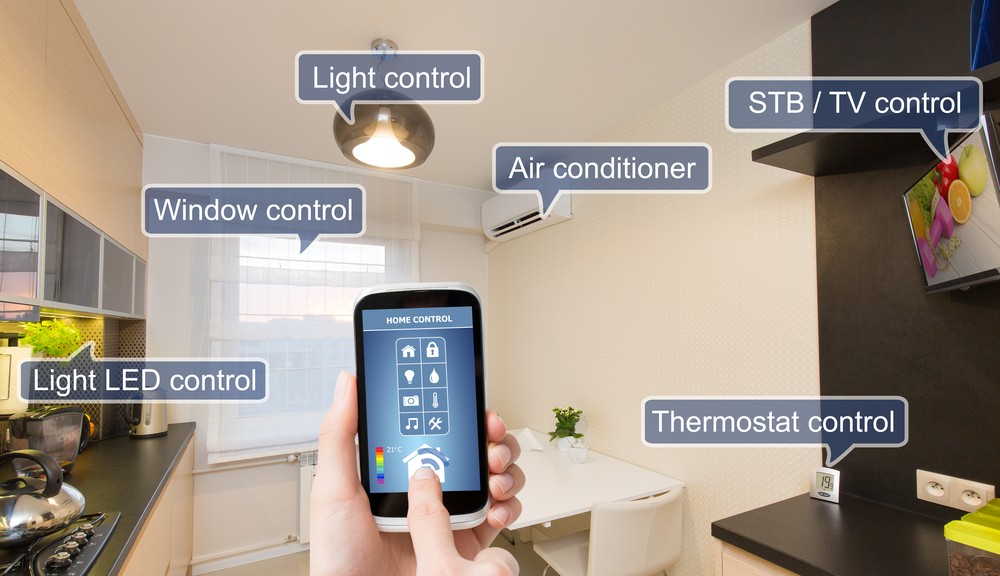
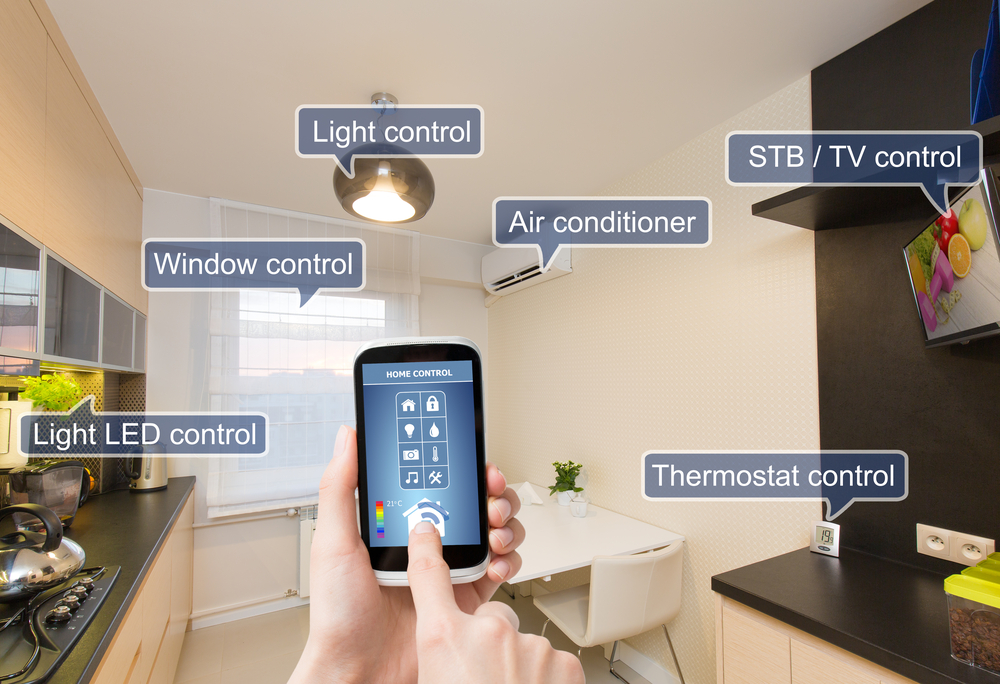
Abstract: Interactive security and home automation systems are evolving to become effortless for end users. Devices like smart thermostats learn the routines and patterns of users to ensure the consumer is returning home to their optimal temperature, thus increasing comfort and lowering home energy costs. Voice command and response systems allow users to speak naturally to their home security and automation system without learning complicated rules or programs. Lawn sprinklers and window blinds can be controlled by weather data indicating rain or shine. A day’s worth of user-generated surveillance video can be reviewed for significant events quickly and at the user’s convenience. Securing the home is a great benefit, but what about securing the personal IoT for the end user when not at home? In this session, we’ll discuss how Digital Life is a key contributor in the latest industry trends. We invite the developer community to join us on our quest to put the connected home to work for the end user.

View the slides from this session here.

Smartphones and beyond :Technologies for devices and IoT // Ginger Chien

Abstract: Smartphones, which will still be dominant in people’s lives for some time to come, have reached a state of maturity. This year’s phones will see mostly incremental advances offering improved capability and performance. Yet the smartphone will play an essential role through its familiar power and presence that will support the rising category of connected IoT devices, whether those be personal, wearable, distributed, or other forms yet to be seen. Join this session to learn about advances in the areas of smartphone and IoT device technology as well as get an idea of what the future of devices may hold.

View the slides from this session here.

Monetizing behavioral data analytics // Carole Le Goff and Dr. Brian Eriksson

Abstract: What can your home discover about your habits? When does a change in behavior at home demand intervention? How does this differ when considering yourself, or your teenager, or your mother across the country? This information can all be learned from home IoT sensor data combined with intelligent analytics, which can help you make a decision about how to act. Unfortunately, there is a wide gap between raw sensor data and actionable information. In this session, we will discuss gleaning behavioral context from this data and initial use cases to monetize this information. We’ll describe the science and challenges behind learning from IoT sensor data from the point of view of marketers and product managers explaining new revenue generating services as well as software engineers and data scientists.

View the slides from this session here.

Best Practices for the Unknown: Wearables, Devices & Things // Bill Weir and Pete Rembiszewski

Abstract: There are exciting new areas to explore in the bold new world of IoT and wearables, but there are also big land mines waiting for developers. Not only will we cover issues such as standards, security, network issues, data overload, and privacy, but also actionable tips, strategies, and techniques that developers can use to mitigate the risks.

View the slides from this session here.


As announced at the AT&T conference, a new tool called AT&T ARO helps users analyze their apps’ performance. Users can utilize the free diagnostic tool to improve their battery life, data usage, and responsiveness.

In addition to these valuable sessions led by highly talented speakers, Kevin Spacey was in attendance as the conference’s celebrity speaker. Spacey delivered a quality talk that emphasized the importance of companies making an effort to support and motivate young developers and IT professionals in their career paths.

This year’s AT&T conference and hackathon was a unique and educational experience. At Avast, we’re already looking forward to next year’s event!


Follow Avast on FacebookTwitterYouTube e Google+ where we keep you updated on cybersecurity news every day.

Internet of Things: What you need to do to protect yourself

The Internet of Things (IoT) join together physical devices that we use every day with information technology.

Make sure your Internet of Things is secure

We can use devices to monitor our health and fitness, our houses, our environment, and our factories and cities.

Using internet-connected devices expands our ability to control and monitor in the real world.  The IoT is literally changing our lives.

The Internet of Things has the potential to fundamentally shift the way we interact with our surroundings. The ability to monitor and manage objects in the physical world electronically makes it possible to bring data-driven decision making to new realms of human activity – to optimize the performance of systems and processes, save time for people and businesses, and improve quality of life.” ~ McKinsey Global Institute study

The potential economic impact of the IoT is astounding  – as much as $11.1 trillion per year by 2025 for IoT applications, projected by the same study.

But is there a downside?

In many people’s minds, surveillance, privacy issues, and data breaches seem to be someone else’s problem. “Should I be concerned about all of this?,” people who have “nothing to hide” think. Recently, we published how the Internet of Things can be hacked and what issues arise from the fact that we’re almost 100% online and connected.

Nowadays, all this technology passes through very well-known and yet problematic points: Our home network security. When our early version of Avast 2015 was released, we published many articles about Home Network Security. During the past year, we gathered lots of proof and conducted social experiments to show that…

Your security is as strong as your network security

To protect your security and privacy, you must assure that your network and communications are safe. Although this seems like rocket science, some basic – but effective – measures can and should be taken. It’s really not rocket science, so even us common folk can follow the steps below to make sure we’re prepared to a secure our IoT life.

  1. 1. Device protection: Install security software on all your connected devices. Avast is a worldwide leader in providing security for Windows, iOS, and Android devices. They can stop malicious actions and make all the difference when you’re online. Your device protection also depends on its own installed software security, thus, keep all your apps and operational system up-to-date.
  2. 2. Network protection: Not all antivirus software provides for proper network protection. If a cybercrook invades one of your devices –most commonly the router – all your network, devices, and data could be compromised. Avast has unique features to allow you to scan your network and find if there is any open door to hackers. 
  3. 3. Security best practices: There are numerous “best” practices, some of which will save you a lot of headaches. The most important is using different passwords for each online service or site and protecting yourself in open or public Wi-Fi networks.  Avast Passwords to manage all your passwords and Avast SecureLine to safely connect you to Wi-Fi, will give you peace of mind.

Avast premium versions include all the protection you need including Home Network Security. You can download and test them for free from the Avast website.


Follow Avast on Facebook, Twitter, YouTube e Google+ where we keep you updated on cybersecurity news every day.

Mutating mobile malware and advanced threats are on the horizon as we approach 2016

Bad guys know that people are moving their computing to mobile, so they are adapting

Bad guys know that people are moving their computing to mobile, so they are adapting

Yesterday, we walked you through a set of our 2016 predictions in regards to home router security, wearables and the Internet of Things. In addition to these important topics, mobile threats are not something that should be ignored as we move into 2016.

“Most people don’t realize that mobile platforms are not really all that safer or immune from attack then desktop platforms,” said Ondřej Vlček, COO of Avast. “Most people use mobile devices in a more naive way then they use a PC because they just don’t understand that this is a full blown computer that requires caution.”

 Hackers have done their homework to prepare for the new year

Over the course of this year, we’ve seen a list of notable mobile threats that jeopardized the privacy and security of individuals. Our own mobile malware analyst, Nikolaos Chrysaidos, has a few ideas about several issues that could crop up in the new year:

  • Android malware that can mutate. This superintelligent family of malware is capable of altering its internal structure with new and improved functions, changing its appearance, and if left unmonitored, spreading on a viral scale. And yes, this concept is just about as scary as it sounds.
  • More security vulnerabilities that can be exploited as a result of fuzzing. This year, there was a good amount of research on fuzzing, making it more and more of a familiar concept to both good and bad guys within the digital world. Fuzzing is a technique that is used to discover security loopholes in software by inputting massive amounts of data, or fuzz, into a system with the intent of overloading and crashing it. Next year, these vulnerabilities could look similar to Stagefright, the unique and dangerous vulnerabillity that, when exploited, left mobile devices vulnerable to spyware.
  • Smarter social engineering techniques. Now that most people know about certain vulnernabilities and their potential consequences, hackers can take advantage of this knowledge and use it to their advantage. For example, a hacker could trick users into installing their malware by telling them that an MMS is waiting for them but can’t be sent via text message due to risks associated with the Stagefright bug. Users are then prompted to click on a malicious download link. Although we could see more of these advancements in 2016, the concept isn’t completely new – this year, an example of this type of technique could be seen within OmniRat spy software.
  • APTs on mobile. In 2016, Advanced Persistent Threats (APTs) could be used to target politicians. This could be accomplished by using spyware (similar to Droidjack or OmniRat) in combination with specific social engineering techniques that could aid hackers in gaining access to powerful and influential individuals.

With this list of potential threats and risks in mind, it becomes clear that our mobile devices hold more value than just our apps and contacts. As hackers‘ techniques grow smarter, it’s important that we do the same in regards to the way that we approach our security.

Protect your Android devices with Avast Mobile Security. That and other apps like our new Wi-Fi Finder and Avast Cleanup & Boost are free from the Google Play Store.


Follow Avast on FacebookTwitterYouTube, and Google+ where we keep you updated on cybersecurity news every day.

The 10 most alarming cyberattacks of 2015

panda_security_cyberatacks_2015_bug

Neither personal information nor fingerprints have been safe from cybercriminals in the past year and, as the year comes to a close, one thing is for sure – the more devices that we have, the more security we need.

Throughout the course of the year, cybercriminals have shown that they are capable of discovering and, taking advantage of, any vulnerability possible in order to get their hands on our data or to control our devices. Below is a roundup of the most damaging and alarming of these attacks.

Fingerprint theft

If fingerprints are seen as one of the most secure methods of biometric security (they are the current method of unblocking iPhones), the theft of information belonging to US government employees showed that there are serious things to consider with the system.

Last June, a group of cybercriminals managed to obtain the fingerprints of nearly six million federal workers, which could put not only their mobile phones in danger, but even the security of the country.

panda_security_cyberatacks_2015_fingerprint

Remote control of smart cars

Another of the big challenges facing cybersecurity is the issue of smart cars. Until there is a solution, these cars will continue to be vulnerable to manipulation. Last summer, two hackers showed that it was possible to take advantage of errors in the computer system onboard a Jeep Cherokee and took control of the car, even managing to apply the brakes on the vehicle, all carried out remotely.

Thousands of compromised Android devices

Not all of the vulnerabilities in the world of IT security are focused on modern tools or devices. In fact, smartphones have been at the center of a massive scandal in 2015, when thousands of Android devices were affected by Stagefright, a security failure which allowed cybercriminals to access any Android phone and control it without the owner knowing.

The online dating furor

Without a doubt the biggest scandal of the year was the leaking of information relating to more than 32 million users of the online dating site Ashley Madison. This sent shockwaves through the cybersecurity world and served to remind everyone, both platforms and users, of the dangers facing IT security.

panda_security_cyberatacks_2015_ashley_madison

A vulnerable infusion pump

The health and safety of people is also at risk due to the vulnerabilities of different devices. It’s not just smart cars that can be manipulated and involved in accidents, as this year an infusion pump used in hospitals to administer patients’ medicine had to be removed. It turned out that if a cybercriminal had connected to the hospitals’ networks, they could have accessed the machine, manipulating it and changing its settings.

Gas stations at risk

It’s not just hospital pumps that are in danger, as investigations carried out on both sides of the Atlantic uncovered the risks facing gas stations. Once connected to a network, these pumps could be attacked, and a cybercriminal could even cause one to explode.

A year to forget for Apple

2015 has been the worst year for Apple in terms of security as the number of attacks directed at its devices has increased five-fold on the previous year, while the number of new vulnerabilities has continued to grow. One such example is the bug Dyld, which was discovered over the summer and affected the MAC OS X operating system.

panda_security_cyberatacks_2015_apple

Data stolen via third-parties

15 million T-Mobile customers had their data stolen by cybercriminals this year. According to the company, the information wasn’t taken from their own servers, but rather stolen from the company that looked after payments for T-Mobile’s customers.

Data theft via web browsers

The biggest names in the technology sector haven’t escaped the year without a few scares. Last summer Firefox had to advise its users that a failure in the browser meant that cybercriminals could have looked for and stolen files without the victim realizing.

A bad end to the year for Dell

The final scandal of the year happened last month, when it was discovered that the latest models of Dell computers were hiding a serious security failure. Thanks to this vulnerability, cybercriminals were able to alter the communication between various different systems and steal information from the affected computers.

The post The 10 most alarming cyberattacks of 2015 appeared first on MediaCenter Panda Security.