Tag Archives: featured1

In 2016, your home will be a target for hackers

Your home and the devices in it will be a viable target for cybercrooks in 2016.

Back in the good ol’ days of the early 2000s until just a few years ago, all we had to be concerned about was security on our desktop computers and laptop. In the intervening years, mobile devices have become so ubiquitous that hackers have turned their sights on them, especially Android devices.

But starting in 2015, everyone began to realize just how close to home cybersecurity really is. Home networks are the new gateway, and 2016 will be the year that vulnerabilities in the Internet of Things (IoT) and wearable devices combined with weak home router security will lead to personal attacks.

Our internet-connected world will be increasingly difficult to secure

Our internet-connected world will be increasingly difficult to secure

The weak link is your home router

“The security situation with home routers is actually pretty bad,” Ondrej Vlcek, COO of Avast told Fast Company. “Most of the companies do a relatively good job of . . . patching the vulnerabilities, but the problem is that no one updates the firmware in the routers. The user doesn’t at all, and usually the ISP doesn’t either.” He added that we saw the most attacks on routers by far in 2015.

“Right now, attackers are targeting routers en masse,” said Pavel Sramek, an Avast Virus Lab research analyst. “It’s highly probable that they’ll expand their target list to network-attached storage  and “smart” TVs as well, since the security aspect of these devices has been almost completely neglected by their manufacturers so far.”

“Many of the companies and engineers don’t really think about security,” says Vlcek. Data, for example, is often transmitted without any encryption, making it easy to steal or fiddle with.

Since this is the time of year to look forward, I asked several of our Avast Virus Lab research analysts about what to expect in 2016 for home networks, wearable devices, and all the gadgets that make up the Internet of Things.
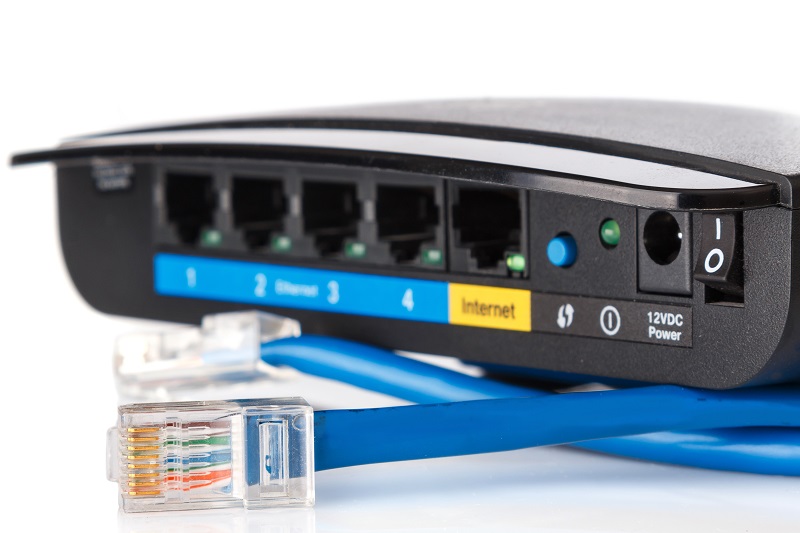
Router and ethernet cable

2015 was the biggest year for router attacks

Is it easy for hackers to break into home networks and is there enough motivation at this time to go to the trouble?

As it stands now, home networks are still not the easiest way for cybercrooks to hack into people’s lives, our team of experts agreed. “Not the easiest way, but too easy to be comfortable with,” said Sramek.

“As more and more devices are becoming smarter and connected to the net, through the Internet of Things, cybercrooks will have more chances to get into the personal home network,” said Sramak’s colleague in the Virus Lab, Nikolaos Chrysaidos.

The motivation is already there too.

“For years, (PC) viruses were the ultimate goal for the bad guy. The goal was to get their hands on users’ data, like credit card information, or to create botnet networks to allow them to send out spam or to do DDoS (distributed denial of service) attacks,” said Vlcek. In a similar manner, cybercrooks have already started to turn internet-connected home devices into “zombies to collect data.”

“The amount of attacks will rise rapidly in 2016,” said Sramek. “Turning IoT devices into zombies is half of their plan. The other is hijacking the network connections of users with devices that are difficult to attack otherwise, like iPhones.”

How do regular people make their home gateways smarter and more secure?
“As a bare minimum, people need an automated vulnerability scanner on a PC in their network, like Avast’s Home Network Security, to check for the most common issues leading to cyberattacks,” said Sramek.

Since we’re still in early days, can threats for IoT devices be eliminated before it gets out of control?

Just like with PC and mobile security, home users can prevent many attacks by applying safe practices and using existing solutions like Avast’s Home Network Security to understand what the vulnerabilities are.

Jaromir Horejsi adds that in addition to educating users about badly configured and insecure home IoT devices, we could use “more secure web browsers, because Firefox, Chrome, and IE are so easy to hack.” He predicts that cybercrooks will create DDoS malware to infect various IoT devices with weak passwords and it will take a combination of home user’s knowing what they’re up against along with manufacturers and ISPs taking more responsibility for safety to overcome the looming threat.

Do you expect to see an increase in attacks through wearable devices?

“In 2015, we have seen many vulnerabilities in wearables. Those vulnerabilities could be used by attackers to extract stored data and use them in personalized social engineering attacks,” said Chrysaidos.

“Today we are seeing a big shift toward social engineering attacks which are ingenious and sophisticated,” said Vlcek. Social engineering uses techniques to trick people into installing malware or adjusting settings that they don’t fully understand.

The biggest target for 2016 is mobile

Phones and tablets are the data collection points for most wearables and Internet of Things devices, so they are targeted for the data they store or the data that passes through them. Mobile devices – smartphones and tablets – are where people are now, and the bad guys know this.

“Bad guys today realize that most people are moving their computing to mobile,” said Vlcek. “They are catching up by coming up with new techniques that gets the job done even without malware.”

“Phones store a lot of personal information nowadays that can be monetized in underground forums. As valuable data exist in our devices those can be treats, and targets, for the cybercrooks,” said Chrysaidos.

Visit our blog tomorrow to read about the upcoming mobile threats for 2016.


Follow Avast on FacebookTwitterYouTube, and Google+ where we keep you updated on cybersecurity news every day.


Small Business Protection: Panda Security antivirus for microbusinesses and freelancers – Infographic

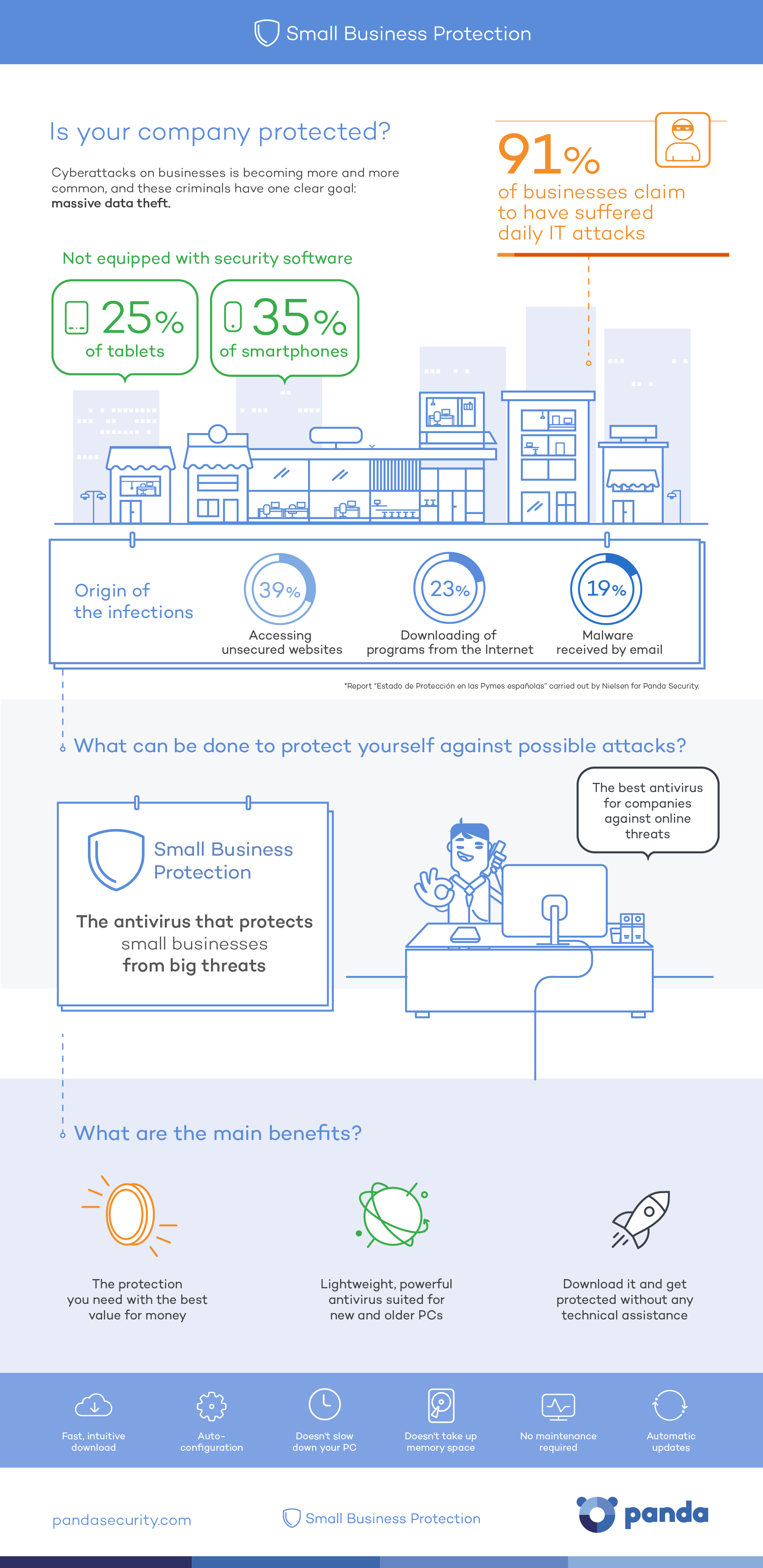
We’ve notice that the targets of cybercriminals are growing beyond private users and large corporations. Freelancers and microbusinesses are suffering daily attacks as they are an easy target for the bad guys and represent nearly 80% of the business sector in USA.

Thus, Panda Security designed a tailor-made solution: Small Business Protection. An antivirus that suits to your business needs: economical, quick and compatible with any PC.

Discover the advantages of Small Business Protection in this infographic!


PandaSecurity-Small-Business-Antivirus-Infographic


Is your company protected?

Cyberattacks on businesses is becoming more and more common, and these criminals have one clear goal: massive data theft.

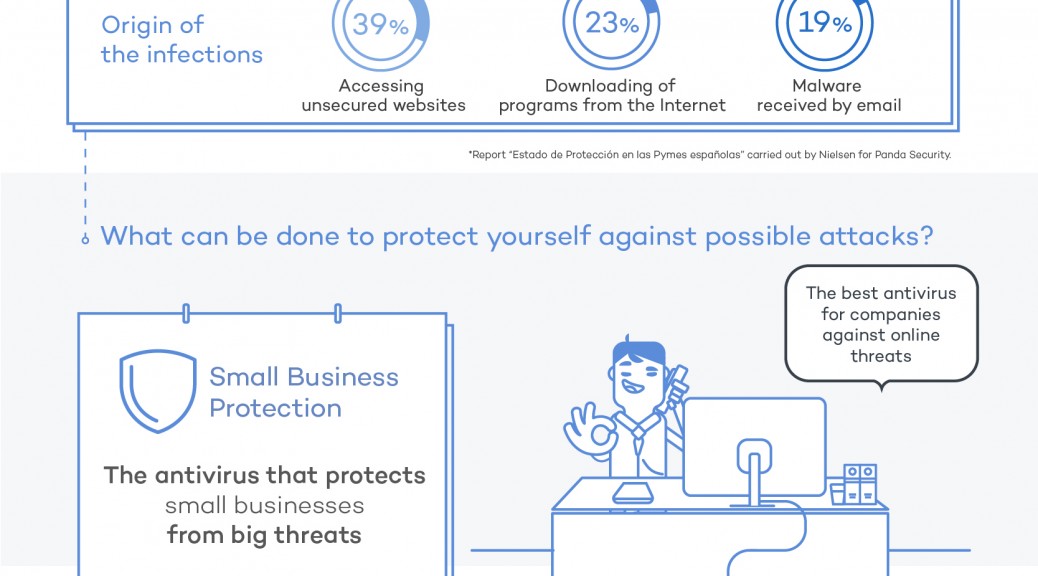
Businesses are not equipped with security software on 25% of tablets and 35% of smartphones.

The origin of the infections are:

  • 39% Accessing unsecured websites.
  • 23% Downloading of programs from the Internet.
  • 19% Malware received by email.

What can be done to protect yourself against possible attacks?

The antivirus that protects small businesses from big threats.

The best antivirus for companies against online threats.

Small Business Protection!

What are the main benefits?

  • The protection you need with the best value for money.
  • Lightweight, powerful antivirus suited for new and older PCs.
  • Download it and get protected without any technical assistance.

The post Small Business Protection: Panda Security antivirus for microbusinesses and freelancers – Infographic appeared first on MediaCenter Panda Security.

Mr. Robot was our favorite show of 2015

Back in May, I pulled my new copy of Entertainment Weekly out of the mailbox and flipped through it quickly, as I usually do before sitting down to read the whole thing. An article about an unusual premier of a new TV show called Mr. Robot caught my eye. The cyberthriller’s pilot episode was set to make its debut online and through alternative viewing services like Xfinity On Demand, iTunes, Amazon Instant Video, XBOX, and Google Play almost a month earlier than its USA Network television debut on June 24.

USA Network's Mr. Robot tops all the 'Best TV show of 2015' lists

Mr. Robot tops all the ‘Best TV show of 2015′ lists

The next Monday morning, I shared the news about the show with my colleagues, and we all vowed to watch the new drama about a cybersecurity expert who joins an underground hacker group, as soon as we could. We hoped it would be a more realistic version of the security issues we face today than CSI: Cyber or any number of Hollywood movies. We even contemplated having a weekly viewing party with Avast Virus Lab researchers and getting their comments live, a la Mystery Science Theater 3000, if the show was good.

A twist in the plot

The very next day after the initial discussion, one of my colleagues, and regular blog writer, Stefanie Smith, received an email from a Mr. Robot production staff member asking if we would be interested in having an Avast antivirus product make an appearance on one of the upcoming episodes. At the time, a few weeks before the pilot episode even aired, this was a difficult call – but our decision to be a part of the show, even for a brief moment, proved to be the right one.

Mr. Robot has consistently been named one of 2015’s best TV shows, and it received Golden Globe nominations for Best Series, Best Actor for Rami Malek, and Best Supporting Actor for Christian Slater.

We didn’t watch it together with the Virus Lab guys, but every week after the show, we got their expert opinions about the hacks depicted on Mr. Robot. Here’s some of our favorite moments from season one:

1.     Avast guest stars on Mr. Robot

Mr_Robot_03The show’s protagonist, Elliot, attempts to hack into a prison’s network, and fellow hacker, Darlene, helps him by uploading an exploit onto USB sticks. She drops the sticks on the ground, and a police officer picks one up and foolishly inserts it into his work PC. The idea was to inject a customized payload to compromise and gain access to the prison’s network – and then BAM! Avast detects the exploit!

2.     Operation Meltdown

@whoisMrRobot

via USA Network

Elliot wants to control the Steel Mountain secure data facility’s climate control system to overheat it, thus melting ECorp’s tape-based backup. He uses a complicated gateway-impersonating MiTM (man in the middle) attack, ‘Raspberry Pi’, to accomplish his goal. He eventually connects Raspberry Pi to Steel Mountain’s heating and cooling systems. This 3xpl0its.wmv plot is reminiscent of the point of entry in the real-world Target attack.

3.     “People make the best exploits”

via USA Network

via USA Network

One of cybercrooks most successful methods is social engineering; psychological techniques used to exploit human weaknesses. Throughout the show’s episodes we saw examples of this technique. Even among the more sophisticated hacks, these are the ones that freaked us out the most.

Hackers want your personal information

Elliot uses a password-cracking tool many times on the show. On one occasion, he wants to hack his therapist’s new boyfriend, Michael. He calls Michael pretending to be from his bank’s fraud department, confirming his address and asking him security questions to verify his account: What is his favorite baseball team? His pet’s name? Using the information he gathered combined with a dictionary brute force attack, which systematically checks all possible passwords until the correct one is found, Elliot hacks Michael’s account.

Hackers want to steal company data

In episode d3bug.mkv, one of Elliot’s colleagues, Ollie, received a music CD from a fake rapper that turns out to have malware on it. The infection that resulted gave ‘The Dark Army’ access to Ollie’s laptop webcam which was used to spy on him and his girlfriend, Angela. The hacker tells Ollie he has photos of Angela, and even Angela’s and her dad’s banking information and social security number. He threatens to blackmail Ollie if he does not spread the malware within his employer, Allsafe’s, systems.


4.     Mobile devices are vulnerable

via USA Network

via USA Network

ECorp baddie, Tyrell, uses a backdoor to get into assistant Anwar’s Android device to install an app that could allow remote access. It’s not strictly necessary to root the phone – just gaining physical access to the phone is all he needed. In this episode, Tyrell used an SD card with an application called RooterFrame to gain access, but the actual Android APK is Framaroot.

Elliot needs to remove a hacked server in episode wh1ter0se.m4v, but has to do it by creating an Allsafe service ticket. This request requires his boss, Gideon, to send the ticket, and he uses two-factor authentication to receive a temporary, second code sent to his phone. Elliot asks Darlene to send Gideon’s phone hundreds of MMS files to drain the battery, forcing him to charge it- and leave it in his office unattended. Elliot takes physical possession of the device, gets the security token and logs into Gideon’s account to submit a request to take down the server.

5.     Real-life physical hacks

Elliot picks the bathroom lock. He explains that “the lock-pick is every hacker’s favorite sport. Unlike virtual systems, when you break it you can feel it.”

Avast was the only roadblock that Elliot ran into that he couldn’t beat. You can protect your own PCs, Android devices, and Macs with Avast Antivirus products. Our flagship product, Avast Free Antivirus, was chosen as PCMag’s Editors’ Choice 2016 for the best free antivirus. Visit the Avast website to check out all our security software.

Follow Avast on FacebookTwitterYouTube, and Google+ where we keep you updated on cybersecurity news every day.
Facebook hoax promises giveaway of 4.5 million company shares

When I was checking my Facebook News Feed this morning, I found this message.

Facebook newsfeed hoax

Facebook newsfeed hoax

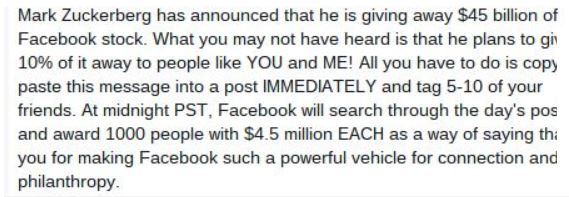
It seems one of my friends was very excited because Facebook founder, Mark Zuckerberg, was scheduled to give away 4.5 million shares of Facebook stock at midnight. To enter this lottery-like giveaway, all you had to do was copy and paste the message to your own news feed. The message, and variations like it, go on to say that the winners will be announced  live on today’s Good Morning America. Other variations look like this,

Facebook newsfeed hoax Metro

Facebook hoax image via metro.co.uk

Like others before it, this viral Facebook message is a hoax. You will not be entered by copying and pasting a message. And Mr. Zuckerberg is not giving away 4.5 billion dollars to 1,000 random Facebook users. If this message makes its way to your News Feed, please do not copy and paste it or share with your friends. The best action is to delete it and maybe go buy yourself a lottery ticket. The odds will be a little better. ;-)

Using surveys to better understand viral stories

Facebook is actually doing something about these hoaxes. Early in December, the Facebook newsroom published a News Feed FYI: Using Surveys to Better Understand Viral Stories. In the article they described how they have started using surveys to improve the news feed experience. Every day they ask thousands of people to rate their experience, share suggestions for improvement, and help them infer what might be an interesting story so they can work their algorithms to take that into account when ranking. Here’s what they say about that,

People also take story surveys where they see two stories that could be in their News Feed and answer which they’d most want to see. We compare their answer to the order we would have put these stories in their News Feed. If the story picked is the one News Feed would have shown higher up, that’s a good sign that things are working well. If the story picked is the one we would have put lower down, this highlights an area for improvement.

So if you receive one of these surveys, make sure you fill it out – your feedback will help to eliminate this type of clutter in everyone’s News Feed. :-)


Follow Avast on FacebookTwitterYouTube, and Google+ where we keep you updated on cybersecurity news every day.
Apple implements security measures following disastrous year

apple

Following a spate of security breaches and concerns, Apple has taken the steps to ensure that 2016 doesn’t see a repeat of the software problems that it suffered in recent months. The security measures have been widespread, with updates to their operating systems for mobile (iOS) and Mac (OS X), its television service (Apple TV), the Safari web browser, and the operating system for its much publicized smartwatch (watchOS).

This move was prompted by the worrying number of vulnerabilities that were present in its software. To give you some idea of the state of array that Apple found itself in, when an update for the 9.2 version of iOS was released, it was said to include a solution for more than fifty security issues that had been discovered, while the number of problems on OS X were said to have reached more than one hundred.

mac

Nearly half of those vulnerabilities allowed for a cyber attacker to take control of the device by accessing it via a malicious application that had been unwittingly installed.

It seems strange that Apple has to patch up security issues in its software when, for many years, fans of the brand vehemently boasted that there were no malware risks that could damage the luster of the brand.

However, it turns our this is false, and not only have threats existed for decades, but the past year has been one of the most devastating in the brand’s history.

According to a recent study, the number of malicious programs created for the Mac operating system in 2015 was five times higher than the total amount created in the previous five years, making it a low point for the security of Apple devices and its users.

keyboard

This bad news comes with an ironic silver lining for Apple – if there are more and more malware samples being created for its operating it systems, it means that the brand itself is becoming more popular. Until now, keeping in mind that Windows (or Android, in the case of mobile devices) has the lion’s share of the market, it was logical to think that cybercriminals would put more effort into taking advantage of the Microsoft operating system.

However, this growth means that Apple is now looking more and more attractive to cybercriminals, as they look to get bigger rewards from their malware. The company ended the year having covered up many holes in its security armor, but that’s just the start of it – it’s likely that the next year will see more holes that need covering up.

More | Panda Antivirus for Mac

The post Apple implements security measures following disastrous year appeared first on MediaCenter Panda Security.

Happy Holidays from Avast!

Merry Christmas! Happy Holidays! Seasons Greetings!

All of us at Avast raise our glass in a toast to all of you, the global community of people who help us keep cyberspace secure. You motivate us everyday, and we wish you the happiest of holidays and a New Year full of joy, peace, and security. Cheers!


Follow Avast on FacebookTwitterYouTube, and Google+ where we keep you updated on cybersecurity news every day.

Find free, safe Wi-Fi hotspots with Avast’s new Wi-Fi Finder app

Avast Wi-Fi Finder helps you automatically connect to the nearest free Wi-Fi in your range

Avast Wi-Fi Finder helps you automatically connect to the nearest free Wi-Fi

Avast Wi-Fi Finder saves your data and roaming fees by locating safe and reliable connections.

Install Avast Wi-Fi Finder now on your Android device.

Everyone loves free Wi-Fi. You can surf the web, check your email or newsfeed, make Skype video calls across the world, or stream games, movies, and music – without eating up your data plan. That’s a great deal! Or is it?

The problem with free Wi-Fi hotspots is they can’t be trusted to be safe and keep your data secure. Cybercrooks can eavesdrop on your conversations and even break in to steal personal information.

When you need to find safe Wi-Fi, use Avast Wi-Fi Finder

Our new mobile app, Avast Wi-Fi Finder, lets you instantly search for available networks on the map or browse through a list. Wherever you are in the world, you can always find a safe connection, because after a successful beta test, we launched the app with nearly 800,000 networks in our database. The more people who use Avast Wi-Fi Finder, the bigger and better that database will become.

Avast Wi-Fi Finder also tests the speed of the network and performs our unique Wi-Fi security check. In case a vulnerability is found, you can easily protect yourself with the integrated app Avast SecureLine VPN (a small fee applies).

Android users: Learn more about Avast Wi-Fi Finder or visit the Google Play Store to download Avast Wi-Fi Finder. You can thank us by leaving +1s and 5-star ratings on the Play Store with a review to help the next person.


Follow Avast on FacebookTwitterYouTube, and Google+ where we keep you updated on cybersecurity news every day.

 

6 simple steps for safely using mobile bank applications

money

The way that we carry out our banking operations has changed dramatically over the years. With the increase in Internet use a decade ago, it helped to remove the need to go to our banks or ATMs to manage transactions or to move money around. In the past couple of years the landscape has changed even further, with the advent of smartphones meaning we can also look after our finances on the go.

Thus, if you have a smartphone then it is likely that you will also have downloaded the official app of your bank. Most banks have invested greatly in ensuring the security of these apps, as any potential problems could be devastating for the reputation of the bank. These apps often have limits set on the amount of money they can transfer to minimize the risks and some demand a code from a token or card reader to authorize any transaction.

However, as with all apps, it pays to be safe and take precautions when using your banking application, just as you would with your credit cards, especially with Christmas just around the corner – a time when we are usually busy transferring money and checking our statements more than usual.

To help you stay safe, here are a few easy tips to help you bank safely from the comfort of your smartphone.

  1. Only use official apps

This may seem slightly silly, but you need to make sure that you’ve downloaded the official app from your bank.

  1. Keep the app updated

This piece of advice goes for all applications that you install, but with banking apps it is even more important. With each update, the developer may have included increased security defenses, which if you haven’t updated to, could leave you exposed.

  1. Select the SMS authorization option

Search for this option in the app, which means your bank will send you an SMS every time money has been lodged or removed from the account. This will allow you to spot any discrepancies before it’s too late.

  1. Log out when not in use

When you have finished using the app, it is very important that you log out of the app. This will help protect you in the event of your phone ending up the hands of the wrong person.

  1. Use a phone tracker

Getting a phone tracking app is an efficient way of remotely deleting information from your device in case you lose it or it is stolen.

  1. Install a trusted antivirus

A good antivirus will protect you from any suspicious activity or malicious apps. Panda offers solutions for both Android and iOS users in the form of Panda Mobile Security for Android and Panda Antivirus for Mac, which also scans iPhones for malware.

Finally, if you suspect that you have been the target of banking fraud, contact your bank immediately.

The post 6 simple steps for safely using mobile bank applications appeared first on MediaCenter Panda Security.

Top 4 malicious phishing scams to look-out for during the holidays

Cybercrooks take advantage of the busy holiday season to launch scam campaigns.

Cybercrooks take advantage of the busy holiday season to launch scam campaigns.

Be aware that cybercrooks send “special” offers via fake email campaigns during the holiday season.

The holiday season is a time for decorations, cheerful music, shopping, spending time with loved ones, and unfortunately, for cybercriminals hoping you will fall for phishing scams.

“Cybercriminals use the same tactics they always do, but target people more during the holiday season with “special” offers via fake email campaigns. These fake email campaigns can trick people into downloading malware and/or can trick people into giving attackers their personal information”– Jan Sirmer, senior malware analyst at Avast.

We decided to take a look at a few recent examples of malicious emails, more specifically their email subject lines and the email addresses they were sent from. Our goal was to see how cybercriminals are taking advantage of the holiday season.

Here’s what you should look out for:

  1. The Fake Holiday Offer

Whether it be membership offers or special shopping deals, be cautious of the offers you receive around the holidays by email.  Some of them might be too good to be true and are fake or some may come from trustworthy businesses whose email accounts have been hacked.  Here is an example:

‘CHRISTMAS OFFERS.docx’ From: “Nicole*” <[email protected]*

This could be a tempting offer, especially if your upcoming New Year’s resolution is to lose weight. The original email address belongs to an actual business owner, lending credence to the scam. Unfortunately, cybercriminals understand this and misuse business email addresses, such as this, to send out phishing emails to customers, because they know customers trust the business and there is a better chance they will fall for the scam.

  1. The Fake Shipment Updates

Cybercriminals are also aware how important it is to receive online orders on time, so they spoof package delivery services, using emails with subject lines such as:  ‘Your latest DHL invoice: MSE7396821′ from [email protected] and ‘Reminder: Shipment status change for package # 82274150′ from: “USPS 2015″ [email protected] are being sent.

It is always important to pay attention to the email address the email is being sent from, not just the name attached to the email address. You can also check if the email is real by visiting the shipping site directly from your browser to track your order. If the package or invoice number do not appear in the system, then you know the email is a scam and should delete it.

  1. The “Congratulations you won a gift card!” … Not!

Money can get tight around the holidays, so you may be tempted by scams that offer gift cards or cash. Here are some of the scam emails we have seen offering cash for the holidays:

‘Cash Out for the Holidays’ from “U.S. Bank Consumer Finance Wholesale Mortgage” [email protected]

Incoming email ‘Apple Store Gift Card’ From “Apple AppStore” [email protected]

It is safe to say that washbowlsnm531 probably isn’t an Apple employee…

And here are two classic spam emails we have all probably seen before:

‘You WON best buy gift card 500$’ from Best Buy [email protected]

‘AMAZON e-giftcard 100$’ from “Amazone.it” [email protected] 

  1. The holiday e-card! – from your favorite Cyber Criminal

To move away from the shipping and offer scams for a moment, criminals are also taking advantage of people’s excitement over holiday e-cards. We discovered multiple emails claiming to contain a Hallmark e-card from various “Hallmark” email addresses, but we took a closer look and found that most e-card and online gifting services send out greetings from the sender’s email address, not from the company’s email addresses. Hallmark has been targeted by fraudulent emails, like the ones below, so often in the past that they have a dedicated a support page to address the problem.

Scam Holiday e-cards:

‘You’ve received A Hallmark E-Card!’ from [email protected]

‘You have received A Hallmark E-Card!’ from [email protected]

If you receive an email from Hallmark or another online greeting company or gifting service’s claiming you have received an e-card or gift, do not open it or open any attachments or links. Again, these emails should be sent to you with your friend’s email address and if you are not sure, contact the service directly to confirm the email is safe.

How to protect yourself from the Grinches of the cyberworld

Jan Sirmer, senior malware analyst at Avast, shares some tips on how you can protect yourself from the various phishing scams going around during the holiday season:

“It is vital you have antivirus installed on all of your devices (laptops, android phones). Antivirus software, like Avast, will detect and block phishing attacks before they can affect you. You should also make sure all of the software on your devices are up-to-date. Attackers often exploit vulnerabilities, which can be found in outdated software. Finally, you should always be cautious when opening links or attachments in emails. If anything seems off, double check to make sure the email actually came from a trusted source – better to be safe than sorry!

*Name and email address have been changed to protect the business that was hacked


Follow Avast on FacebookTwitterYouTube, and Google+ where we keep you updated on cybersecurity news every day.


Attacks on Android and large-scale infections are among the main security threats in 2016

security trends

Panda Security, global leader in cloud based security solutions, has announced its predictions regarding the main problems that could affect IT security in 2016. The coming year will be filled with threats that could affect private users, small businesses, and large corporations.

The creation and spreading of new malware samples, aimed at infecting users, will continue growing at an exponential rate, just as we have seen in in 2015 where the number of new samples registered daily reached 230,000.

During 2016 there is a predicted increase in infections via JavaScript and a growth in the number of cybercriminals using Powershell, a tool included in Windows 10 that allows scripts with all types of functionalities to be executed, which could be used to attack users.

Large scale and mobile based attacks

Cybercriminals are looking for ways to attack the greatest number of users and businesses, while achieving the greatest possible profit.

Because of this, they will continue to use tools such as Exploit Kits, as many current solutions aren’t capable of combatting this type of attack effectively, which means its rate of infection is very high. For the same reason, malware on mobiles will also increase, especially for Android, which is the most popular operating system on the market.

“Although Android attacks have been commonplace in recent years, the news for 2016 is the manner in which mobiles will be infected. We will see more threats that root the device, which makes eliminating it a near impossible task for an antivirus, except for those that come installed from the factory”, says Luis Corrons, Technical Director of PandaLabs.

There will also be an increase in direct attacks through rootkit techniques, which allow the hackers to hide themselves from the operating system and security solutions.

Internet of Things and mobile payment

2016 will be the year in which the Internet of Things flourishes, with more devices than ever connected to the Internet.

With this in mind, cybercriminals will carry out attacks on these devices, as we have already seen in 2015 in the case of cars whose software is connected to the Internet, which allowed for the remote control of the vehicle.

Payment platforms on mobile devices will be under scrutiny as cybercriminals looks to take advantage of them, as they could be easy ways for criminals to steal money directly.

“If any of the platforms becomes more popular compared to the others, it will be the first one to be looked at by the attackers as they search for weaknesses in its system”, continued Luis Corrons.

Main challenges for security

In the face of the current panorama, where the number of threats is growing exponentially and attacks are becoming more sophisticated, users and businesses will have to adopt extra security measures to remain protected against the dangers of the Internet in 2016.

What’s more, for businesses there are also threats that could seriously damage both their reputation and finances. Cybercriminals will make it their goal to steal confidential information relating to the company (financial data, strategic plans, etc.), and even information belonging to their customers. Once they have it, they will try to blackmail the company into paying a ransom to get the information back, a method known as Cryptolocker.

To face the complexity of these attacks, and those that await us in 2016, it will be necessary for users and businesses to have security tools and solutions that analyze and classify the behavior of all executables, and that also offer advanced protection to prevent and act against security threats.

The post Attacks on Android and large-scale infections are among the main security threats in 2016 appeared first on MediaCenter Panda Security.