Tag Archives: featured1

How many people connect to unknown Wi-Fi hotspots without even knowing?

An Avast team calling themselves the Security Warriors, comprised of intra-departmental specialists, are running experiments in the streets of San Francisco. They spent a few days setting up the first of them and have already gathered some interesting statistics. In Filip‘s words, here is what they have done so far and what they want to achieve. 

Security Warriors

Filip Chytrý , president of mobile Gagan Singh, Bára Štěpánová, Jaroslav Slaby, and Vladislav Iliushin. Not pictured: Ondrej David

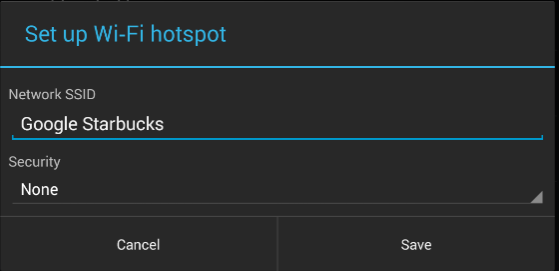
One of our first experiment’s objectives is to analyze people’s behavior by seeing how they have their devices preset in terms of outside communication. We didn’t have to go far to find out – it’s pretty disturbing. Currently, we have a variety of devices prepared for different traffic experiments but now we are using them for one really easy target – to analyze how many people connect to a fake hotspot. We created fake Wi-Fi networks called Xfinity, Google Starbucks, and Starbucks. From what we’ve noticed, Starbucks is one of the most widespread networks here, so it’s pretty easy to get people’s devices to connect to ours.
wifi hotspot

Wi-Fi networks screen


What is the problem we’re trying to point out?

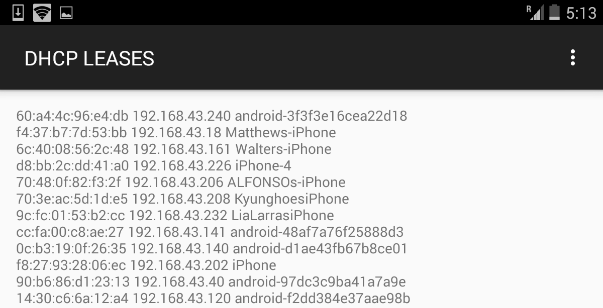
Once your device connects to a known SSID name at your favorite cafe, the next time you visit, it will automatically try to connect to a network with the same name. This common occurrence becomes a problem because it can be misused by a hacker.  Armed with some basic information, a hacker can figure out what you are doing and even which device you have. It is just a matter of time to come up with the right technique to hack into your device. After a day of walking around with my tablet, we gathered some telling statistics. DHCP leases From data we gathered in seven hours, we found that 264 people connected to our fake Wi-Fi networks and generated 512,000 data packets*.
  • 52% connected from an Apple device
  • 42% connected from an Android device
  • 10% connected from a tablet or notebook
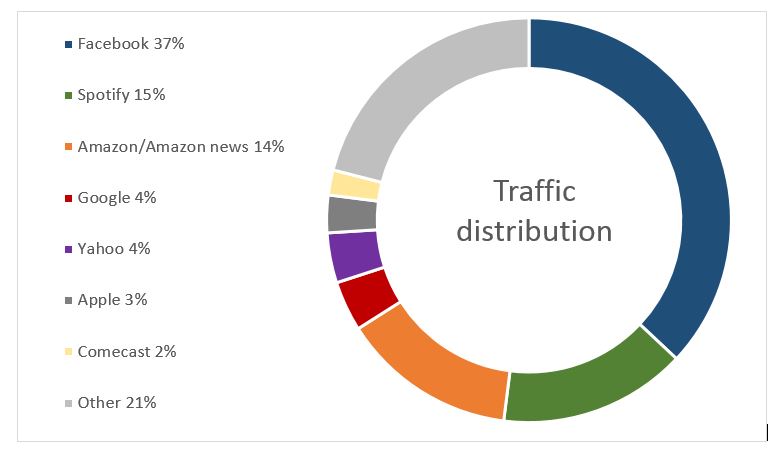
 

traffic distribution

Percentage of traffic distribution generated from those devices

  • 70% of them have the Facebook app installed
  • 30% of them have the Twitter app installed
  • 30% of them accessed a Google-related service
  • 20% browsed a webpage

What is on our tablet?

The device used for this experiment is a pretty simple off-the-shelf Nexus 7 with a rooted LTE modem. We set up fake hotspots and used tools to catch TCP dumps. Later on, we analyzed who was doing what. Nothing hard at all. Our hotspots are movable, so I have one tablet with me at all times with a fake Wi-Fi network called Google Starbucks. If you see that hotspot somewhere in town,  you might want to watch your device more carefully. ;-) Did I mention we did this using only a tablet? We do have a couple of other things up and running, but that‘s something for another blog.

Golden Gate bridge

Traffic flowing over the Golden Gate Bridge

If you want to be involved and aware of how these things work, you can catch up with us in San Francisco. Up until now, we have let the traffic flow as it should and gathered data, but next, we‘ll play a bit with redirection. :-) *A packet is the unit of data that is routed between an origin and a destination on the Internet or any other packet-switched network.


Follow Avast on FacebookTwitterYouTube, and Google+ where we keep you updated on cybersecurity news every day.

Demand grows across the world for cybersecurity experts

people

During the second quarter of 2015 there were 230,000 new malware samples created daily. This is one of the alarming details to emerge from the latest PandaLabs report, the security laboratory of Panda Security, which analyzes cyberattacks carried out during this period. The document also reveals that the threats aren’t just directed at individuals, but also at private businesses.

Some example include Ryanair, which suffered a loss of $5 million, or the online dating site AdultFriendFinder, which saw its users’ sensitive information published online.

Businesses are continually becoming more and more conscious of the danger posed by these attacks, both in economic terms and what it means for their customers. According to a survey carried out by PwC, budgeting for IT security, on a global level, has grown by 24% during the last year.

money

Businesses nowadays can count on a team of experienced and specialized security experts who can help to protect their networks and systems. However, the sheer scale, complexity, and amount of malware that is created by cybercriminals means that, in many cases, IT departments aren’t able to cope with the onslaught.

In the State of Cybersecurity 2015 report, experts from U-Tad analyze the threats that affect businesses, institutions, and individuals. They reflect that, although 37% of companies plan on employing more cybersecurity professionals, 92% of them claim to have problems finding candidates that meet the requirements.

These experts claim that there is a lack of specialized workers in this sector and estimate a shortfall of more than one million people on a global level.

people working

From a business point of view, this information is an opportunity in the cybersecurity market, which will grow from $106 million in 2015 to over $170 million in 2020, according to MarketsandMarkets.

As the U-Tad experts indicate, the sectors most interested in safeguarding their systems against threats are banking, aerospace, and the manufacturing industry. SMEs also need professionals, especially those involved in cloud based storage solutions.

The survey done by U-Tad also reveals another significant statistic – 75% of the organizations surveyed are believed to be exposed to the risked related to the actions of their own employees. Practices such as BYOD (Bring Your Own Device), whose risks we’ve already explained to you, are responsible for this.

In Spain, for example, the National Cybersecurity Institute estimates that there are more than 42,000 professionals working in the IT security sector, and that the demand for workers continues to grow. The organization even offers grants to students, because the only way to cover the demand for professionals is to create specialists that can tackle the goals of the present and future.

The post Demand grows across the world for cybersecurity experts appeared first on MediaCenter Panda Security.

Is Facebook‘s “Most used words” quiz a privacy thief?

The “Most used words” app became a Facebook hit within days of its launch. At the moment of writing this article, it has been used by nearly 18 million users globally. There are many controversies about user privacy in relation to data that is collected by the app.

“Most Used Words“ is an unexpected privacy nightmare. Source http://en.vonvon.me/

“Most Used Words“ is an unexpected privacy nightmare. Source http://en.vonvon.me/

Earlier this week, the British company Comparitech published a blog post about the privacy nightmare caused by this innocent-looking Facebook app. “Most used words” is presented as a simple, playful quiz in which Facebook scans through and analyzes users‘ posts in order to generate a collection of words they use most frequently on Facebook. Sounds like fun, right? Before you try it yourself, take a closer look at this data-hungry wolf in sheep’s clothing – after some analysis of the app, it has turned out to be a privacy thief. When using the app, users give away following details:

First, the app asks for a couple basic pieces of information:

1. Name

2. Everything you’ve ever posted on your timeline

But then, it asks users to agree to give away the following personal details:

3. Profile picture, age, sex, birthday,and other public info

4. Entire friend list

5. All of the photos and photos you’re tagged in

6. Education history

7. Hometown and current city

8. Everything you’ve ever liked

9. IP address

10. Information about the device you’re using, including browser and language

Let’s face it — our concept of the privacy has  unarguably changed in the age of the Internet and social media. In the digital world, we leave our fingerprints on a daily basis while browsing, shopping, playing, and chatting on multiple devices. Regardless of our online activities, there should be limits as to how companies collect, store and process our personal data. In this case, the owner of the app, South Korean company vovon.me, can be accused of a serious breach of user privacy.

What do you give away when installing “Most used words”?

According to Vonvon’s official terms and conditions, you agree to your personal information being used in the following ways:

1. Used after the termination of your membership to the website and/or use of Vonvon’s services, for any reason whatsoever. (This basically means that you already gave away your data if you used the app.)

2. Stored on any of Vonvon’s servers at any location, including the countries that have little to no legal regulations regarding data privacy.

3. Sold to the third parties, which you agreed to according to this statement: […] We do not share your Personal Information with third parties unless We have received your permission to do so, or given you notice thereof (such as by telling you about it in this Privacy Policy) […]

4. Used in any manner by the third parties, as Vonvon doesn’t take any responsibility for it: […] this Privacy Policy does not apply to the practices of entities Vonvon does not own or control, or to individuals whom Vonvon does not employ or manage, including any third parties to whom Vonvon may disclose Personal Information[…]

How to protect yourself?

We have good and bad news for you. The bad one is that if you have already installed any of Vonvon’s apps, it’s unfortunately no longer possible to protect your privacy. (See point 1 in the paragraph above.)

If you haven’t used it yet, let this be a lesson to you. The same lack of privacy concerns can also be seen in other permission-hungry apps – this is why a weather forecast app would like to have access to your pictures and a cooking app requests your IP address.

We also advise you to review the current list of apps that you have already installed on Facebook, determine if you use them on a regular basis and pinpoint what kind of data the apps are requesting from you. You can do this by doing the following:

1. Select Settings in the top right of Facebook

2. Click Apps in the left menu

3. Hover over an app or game and click to edit its settings

You can find out more about Facebook apps‘ privacy and security in the About Apps section of the Help Center.

If you are an Avast user, log in into your Avast account and go to Social Media Security > Apps — we will guide you how to analyze each of your apps‘ security.

You might be surprised how many apps you have installed throughout the years, so don’t forget to make an audit of your apps on a regular basis.


Follow Avast on FacebookTwitterYouTube, and Google+ where we keep you updated on cybersecurity news every day.

How to keep your kids safe on Snapchat

snapchat

If your child has a smartphone then it’s likely that they’ve installed one of the many different social networks that place photos as their primary way of communication. It seems almost unthinkable that a few years ago we weren’t all worrying about the best angle for a selfie or whether to snap a quick picture of our food to upload to Instagram before it goes cold.

A photo and video messaging app that has seen a huge surge in popularity is Snapchat. This app, which is primarily aimed at a younger audience, allows users to send videos and images to their contacts with the premise that these messages will be automatically eliminated after a few moments. Users set a time limit for how long recipients can view their Snaps (as of September 2015, the range is from 1 to 10 seconds) after which Snapchat claims they will be deleted from the company’s servers.

However, the application has seen some worrying issues relating to its security. For example, just last year the credentials of 4.6 million U.S. Snapchat users, such as usernames and phone numbers, were made public on the Internet. Despite introducing a new two-step verification process to help boost the app’s security, here are a few things to keep in mind before you let your child get too snap-happy.

How to keep your kids safe on Snapchat

  1. Warn your child over what content to send

Even though your child might think that they are sending the picture of video to their friends, remind them that the app has been hacked in the past and that if it happens again, their images could be made public. So advise them not to send something they wouldn’t want the whole world to see.

  1. Remind them that pictures can be saved

Despite the notion that pictures sent to contacts expire automatically after a set period of time, there are various ways around this and it’s worth pointing it out to your children.

For example, users are often able to take screenshots of photos and videos which are intended to be ephemeral using standard screen capture features on their smartphone or even by using special software to save the image.

  1. Don’t let strangers contact your children

So after following the above steps, next is to ensure that a stranger can’t send your child unsuitable images or contact them. To change the settings to ensure that only their friends can send them messages, tap the ghost icon at the top of the screen to access your child’s profile, then tap the gear cog icon in the upper-right corner, under the Settings menu go to “Receive Snaps from…” and ensure that it says “My Friends” instead of “Everyone”.

Finally, if someone has been harassing your child you can delete and block them from the same section of the menu as the step above. You can also write to [email protected] and they will resolve the issue. If still don’t feel comfortable letting your child use the app, you can delete their account and entering the username and password.

Remember, no matter how much freedom you want to allow your children when using social media, it always pays to keep them informed of the dangers it can pose, too.

The post How to keep your kids safe on Snapchat appeared first on MediaCenter Panda Security.

Why Big Data is the new focus for information security

big data

Big Data is the current buzzword in the technology sector, but in fields such as security it is much more than this – businesses are starting to bet strongly on the implementation of tools based on the collection and analyzing of large volumes of data to allow them to detect malicious activity. What started out at a fashionable term has turned into a fundamental part of how we operate.

So, what exactly are the advantages of Big Data? Well, have a think about the current situation in which the use of mobile devices is growing, the Internet of Things has arrived, the number of Internet users is reaching new highs, and quickly you realize that all of this is prompting an increase in the number of accesses, transactions, users, and vulnerabilities for technology systems. This results in a surge in raw data (on the World Wide Web, on databases, or on server logs), which is increasingly more complex and varied, and generated rapidly.

Given these circumstances, we are encouraged to adopt tools that are capable of capturing and processing all of this information, helping to visualize its flow and apply automatic learning techniques that are capable of discovering patterns and detecting anomalies.

Big Data and Machine Learning: looking for a needle in a haystack

A lot of existing cyberattacks have something in common – they are designed to block the noises made by IDS/IPS alters (a medium-sized company could experience tens of thousands of alerts each day), hiding itself among the large amount of information generated by the daily operations of the targeted businesses. The key to detecting these intrusions lies in recognizing this small trail of anomalies, which is like a modern version of finding a needle in a haystack. Luckily, this is exactly what Big Data does.

Faced with the daily wave of alerts, it is inevitable that a human alone would be incapable of detecting, in real-time, unusual concentrations of attack with specific sources, types, or aims. However, where the human fails, algorithms of machine learning (low-level algorithms that don’t follow specific instructions, but rather detect patterns in the data) are able to “learn” normal system activity and detect, in real-time, any unusual activity on the device.

The key for using Big Data for security analysis is based on the promise that while humans are less effective given the increase in the amount of data to analyze, machines can use this information to improve the detection of anomalies, in the same way that surveys are more reliable when they include more people.

Adaptive Defense, Panda’s Big Data based solution

Adaptive Defense, a product recently launched by Panda to put an end to APTs, a new generation malware that traditional antiviruses are incapable of combatting, is an example of how to successfully apply Big Data and Machine Learning to security tools.

Adaptive Defense is capable of continuously analyzing, in real-time, software that tries to run on a system, automatically classifying all of the applications thanks to the Machine Learning algorithms. This allows the user to receive immediate alerts with detailed reports explaining the nature and activity of the malware, and even activating blocking modes that only allow for the running of software classified as goodware.

Keep in mind: Big Data is data, too

Using Big Data as a central tool in cybersecurity strategies beings with it, as we’ve already seen, an extensive list of advantages, but it also generates new worries. If the analysis of these massive volumes of data perfects the detection of malicious activity that is capable of generating leaks, the possibility that this new type of data could cause a leak could have massive legal and trust repercussions than we have ever seen.

The post Why Big Data is the new focus for information security appeared first on MediaCenter Panda Security.

Can shopping extensions help you find the best prices?

Protect your privacy while finding the best online prices.

The holiday shopping season is upon us and shoppers are flocking to the Web to find online deals and coupons. Shopping extensions for your web browser can help you find the best prices, but how do you know you are finding a great deal from a SAFE and trusted retailer?

There are several shopping tools that can help you find the lowest price from around the web, but I’ll start with the one that finds low prices and guarantees the safety and integrity of the online shop – Avast’s very own SafePrice.

Avast SafePrice finds the best prices from trusted retailers

SafePrice find the best deals from TRUSTED online shops

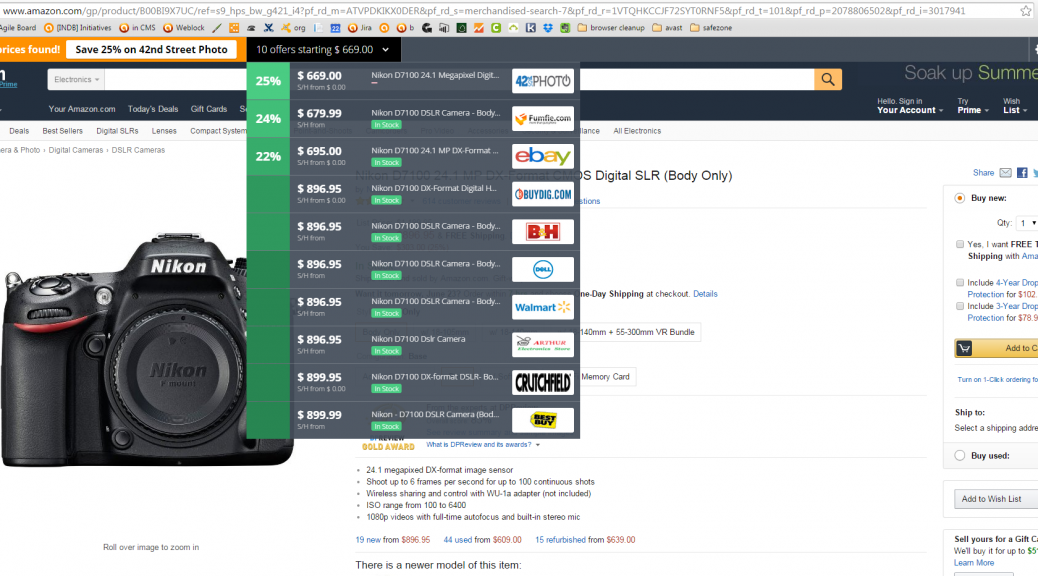
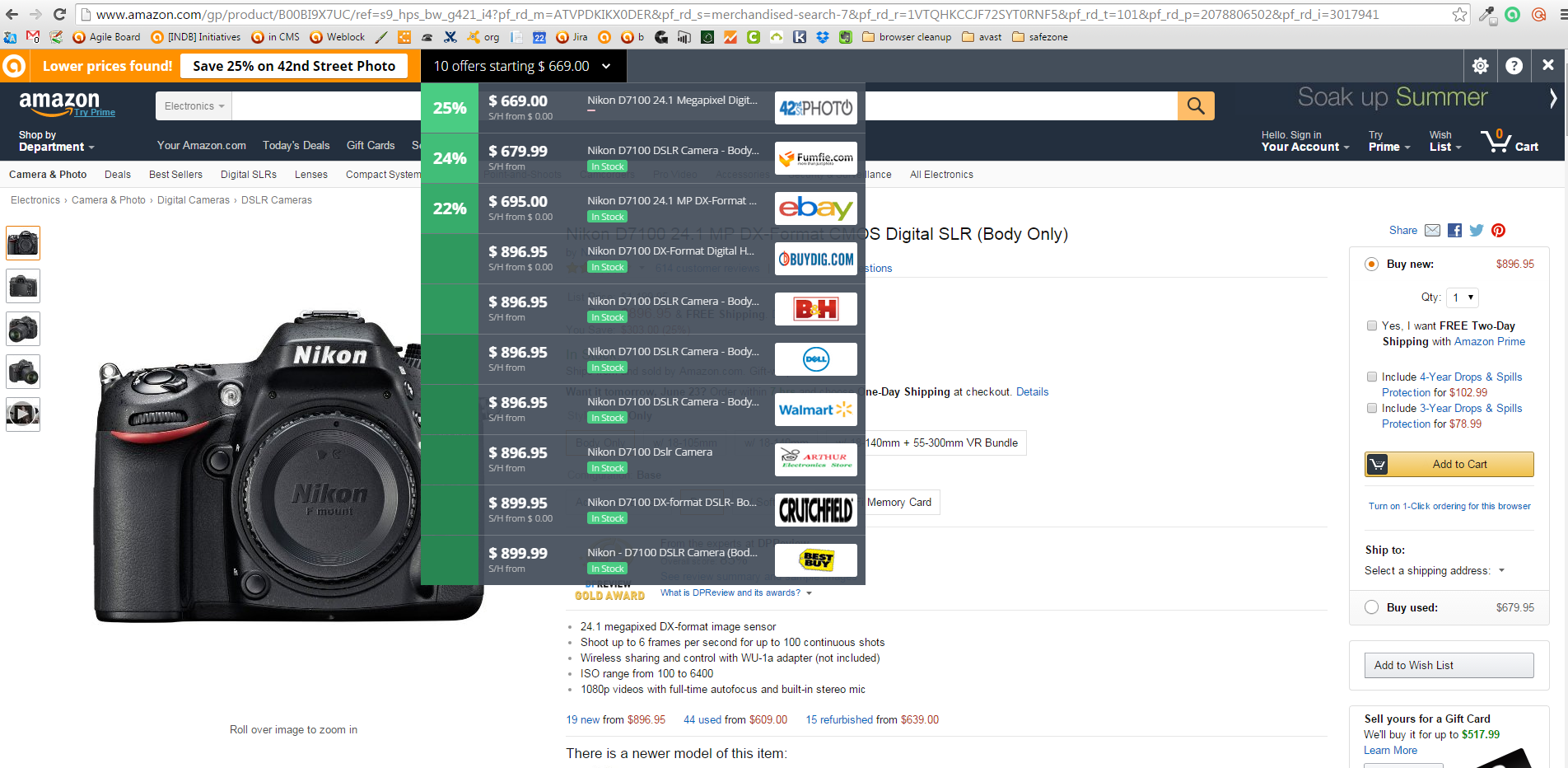
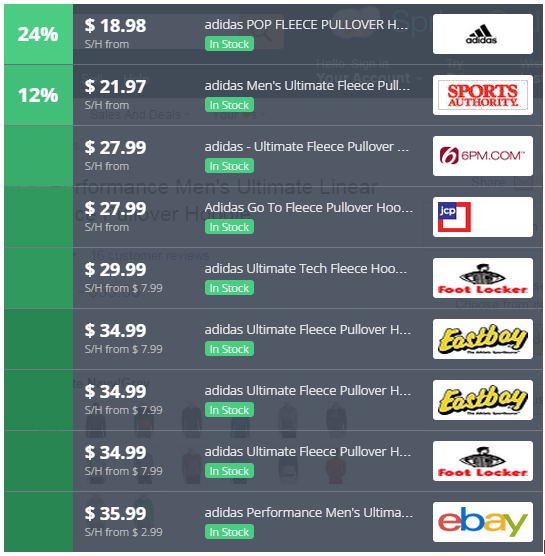
Instead of visiting price comparison sites first, all you do is go to your favorite online store and pick out what you want to buy. SafePrice checks the price against thousands of verified stores, then displays the best deals and coupons at the very top of your browser. The bar is invisible when you’re not shopping.

Avast users already have SafePrice installed. If you are not an Avast user, but wnat to use it to find trusted stores, then add the extension to Chrome from the Chrome Web Store.

SafePrice price comparison listHere’s what SafePrice does:

  • Offers coupons for savings on the same or similar products
  • Ensures that you’re buying from reputable dealers
  • Offers secure online price comparisons
  • Highlights the best deal
  • Provides easy customization capabilities
  • Hides from view when you’re not shopping
  • Offers deals without taking you to another site

SafePrice protects your privacy

SafePrice will never compromise your privacy. The specific products you are searching for and the URLs of the shopping sites you visit are communicated to our server. All personally identifiable information is stripped from this data in real time, so that the data that comes into our servers is completely anonymous.

Other shopping tools

InvisibleHand

InvisibleHand discreetly notifies you if the product you’re shopping for is available more cheaply from another retailer or travel site. It also shows you deals on hotels, rental-cars, and flights. Available for Chrome and Firefox.

Honey

Click on the Honey ‘Find Savings’ button during checkout and Honey will automatically apply coupon codes to your shopping cart. Available for Chrome and Firefox.

The Camelizer

For power-shoppers, this extension lets you track product price history information for items on Amazon, Best Buy, and Newegg. If you don’t need to buy the item now, you can sign up for price drop alerts via email or Twitter. Available for Chrome and Firefox.

RetailMeNot Coupons

For those who want to shop from their Android device (last year 53% of us did!), you can install RetailMeNot and search for the top deals and coupons from over 50,000 retailers.

Read our tips for safe shopping online.


Follow Avast on FacebookTwitterYouTube, and Google+ where we keep you updated on cybersecurity news every day.

‘Tis the Season to Shop Online

The holiday season is coming up and we expect that many will opt to shop online to avoid the big crowds in city centers, malls and stores. 

In America, Cyber Monday, the cyber version of shopping day Black Friday, was born in the mid 2000s. Cyber Monday sales have steadily increased since its inception and according to IBM Digital Analytics, sales grew 8.5% in 2014. According to ComScore, purchases are now also being made from smartphones with overall spending from mobile devices in the millions.

Americans aren’t the only ones who have embraced Cyber Monday, many other retailers around the world have come together to offer deals on the Monday after U.S. Thanksgiving and in China, Singles’ Day (November 11th) has become a major ecommerce day with 27,000 online merchants participating in 2014

via v3.co.uk

via v3.co.uk

This is not only an exciting time for online retailers and online shoppers but also for cyber criminals. I spoke with our senior malware analyst, Jaromír Hořejší about how cybercriminals are preparing for Cyber Monday:

Cybercriminals will use the same tactics they always do, but target consumers more during Black Friday with “special” offers via fake email campaigns to trick people into shopping on fraudulent sites to steal their information and money.

It is, therefore, vital you have antivirus installed on all of your devices. Antivirus software, like Avast, will detect and block phishing attacks before they can affect consumers.

Consumers should also make sure all of the software on their devices is up-to-date. Attackers often exploit vulnerabilities, which can be found in outdated software and by exploiting outdated software they can infect your device to then steal your financial information while you shop online.

In addition, consumers should shop at online stores that are known and credible. Credible sites usually use the HTTPS protocol, assuring secure communication. You can recognize if a site is using the HTTPS protocol by the little padlock in the address bar of your browser. If you are on a check out page and you don’t see the HTTPS padlock, do not enter your personal data and financial information!

How to minimize risks while shopping online

  • Use a payment service or your credit card – Experts agree that payment services like PayPal are safe because of their security practices and the encryption technology they use. Link it to a credit card so you get your credit card’s fraud protections in addition to PayPal’s. If you only use a credit card, designate one card for online purchases so if something unusual happens, you don’t have to track down all your other cards.
  • Keep a paper trail – Once you place your order, print or save records of the transaction. Check your credit card statement to make sure transactions match and there were no unauthorized charges.
  • Avoid shopping while using public Wi-Fi – Unsecure public Wi-Fi hotspots do not give you any protection from hackers who want to monitor what you are doing online. It’s not difficult for someone to intercept and modify communications between you and another site. If you have to do it, then use a Virtual Private Network (VPN) so your communications will be encrypted.
  • Use a secure browser – the new premium versions of Avast 2016 include SafeZone browser, which isolates banking and payment sites in a protected space, so users have an extra secure place to bank and pay bills online.

 Follow Avast on Facebook and Twitter  for more security tips, news, and trends. 

Black Friday and Cyber Monday: How to shop safely online

shopping online

As the year draws to a close, many retailers take the opportunity to slash the prices on goods, allowing us to take advantage of some great offers. With Christmas just around the corner, events such as Black Friday are great ways to get gifts for friends and family at significantly lower prices.

However, the if the idea of being surrounded by hundreds of frantic shoppers, worn out sales assistants, and long queues fills you with dread, then perhaps Cyber Monday is the shopping event for you. This term, which was coined in 2005 and falls on the Monday following Thanksgiving in the USA, was thought up by marketers to promote online shopping, with special deals that aren’t available in-store.

So, now that you don’t have to worry about the stressful experience of going to the store, we’ve put together a few tips to ensure you won’t have any stressful experiences after shopping online. Take a look below and make sure your Cyber Monday is a safe and stress-free one!

Black Friday and Cyber Monday: How to shop safely online

  1. Stick to well-known websites

The first thing you can do to be safe while shopping online is to only use trusted, official websites. Start your shopping by going directly to the store’s website as opposed to using a search engine to find what you need. Also, only continue if you see that the website is secure by checking that the URL begins with HTTP and that the lock symbol is present. 

  1. Only use a secure Wi-Fi connection

This is a fundamental one, yet people continue to ignore it. Public Wi-Fi may be convenient, especially if you are relaxing at a café and spot a bargain online which you can’t resist. However, it’s best to carry out purchases from the safety of your home, where you have control over who else is connected to your network.

  1. Check your statements

Keep up to date with all transactions carried out with your bank account as the sooner you spot something unusual, the quicker and easier it will be to avoid bigger problems. If you spot something suspicious, contact your bank immediately.

  1. Be aware of the returns policy

When shopping online, remember that the returns or exchange policy may be different to that in store. Also, some stores may only offer store credit on reduced goods, so always check before you buy.

  1. Keep your computer updated and protected

Giving out your bank details online involves an element of trust, so the best way to ensure that nobody else gets their hands on you sensitive information is to have a protected and up-to-date computer. Keep your operating system updated and always use a trusted antivirus that best fits your needs.

  1. Be wary of email offers

It’s common to be bombarded with emails offering you great discounts or offers, but treat them with suspicion. Avoid clicking on links sent via email and verify that the offers are valid on the official website instead.

The post Black Friday and Cyber Monday: How to shop safely online appeared first on MediaCenter Panda Security.

The security flaws affecting connected cars

cars

If we imagine a world where the only cars that are on the highways are all smart cars, then we can rest assured that driving will be a lot safer. These cars are able to communicate between themselves to avoid collisions and can take alternative routes if they detect that there has been an accident ahead.

They are also unable to jump red lights as they receive orders which impede them from doing so. In fact, it’s possible that in the future we’ll see that traffic police needn’t even have to raise their arm to stop the cars, as this can be done remotely. The Internet of Things has arrived with the mission to save lives in the automotive industry.

The National Highway Traffic Safety Administration (NHTSA) in the United States estimates that the technology based on these cars could prevent more than half  a million accidents and more than one million deaths each year in the United States alone. General Motors has already announced that vehicle to vehicle technology will be launched on the Cadillac in 2017.

However, the fact that these cars are able to communicate with one another is a worry for security experts, as they could be prey for cyber-attackers.

The problem arises when someone is able to listen in on these communications between the cars to guess where the vehicle is. This has already been demonstrated by the security expert Jonathan Petit at the Black Hat Europe conference.

Just one month ago this investigator showed that a simple laser pen was able to confused a smart car, making it think that there was an object in front of it when it reality there was nothing. Now he explains how these cars can be tracked easily.

smartcar

Connected cars use a Wi-Fi range to be able to communicate from hundreds of meters. This helps them to avoid collisions with one another as they have a complete map of all cars in their proximity. The difference between them and smart cars, which draw up outlines of their surroundings by using the LIDAR which is placed on the roof of the car, connected cars don’t see those around them, but rather detect them.

The information sent from car to car is encrypted and is only related to their position and speed. They don’t send information such as the registration plate, but each message has a digital signature so as to avoid false messages and misunderstandings that could provoke accidents.

Petit took advantage of this digital signature to carry out his tests, at the University of Twente in the Netherlands. He placed two sniffing stations in different points around the campus, which were dedicated to collecting the information from this network. He also parked a V2X vehicle (vehicle-to-everything) on the campus, which was able to collect all information that came from a connected car, be it with another vehicle or object.

Fifteen days later, the vehicle had transmitted more than two and a half million messages and the sniffing stations had detected nearly forty thousand, just 3% of the total. With this information and the digital signatures, he was able to identify the vehicles, predict where they were situated on the campus with a precision of 78%, and even guess where they were with a 40% success rate.

traffic

Petit and the group of investigators from the University of Twente believe that governments or cybercriminals could use this system on a larger scale to be able to monitor all of the cars within a city. “The thieves could wait until police cars are out of a determined area to commit a theft”, explained Petit.

It’s as easy as that to compromise the security of connected and smart cars using this technique, which allows someone to guess the location, speed, and direction of the car.

Considering that the stations currently cost around $550 (€511), Petit thinks that for the moment the only way to carry out this attack would be with a Raspberry Pi and a Wi-Fi radio.

For some experts, one of the possible alternatives would be the every message is signed off with a pseudonym which changes every five minutes in the hope that the cybercriminal wouldn’t be able to identify the car and track it.

Petit has explained that this modification would only imply an additional cost of 50% for the attacker, who would only need to install more stations.

That said, for now there is no reason to panic. This security expert is working with Ford, General Motors, and other manufacturers in the development of strategies so that connected cars are safer. In a few years we will be able to enjoy the advantages of these cars with the security guarantee that we deserve.

The post The security flaws affecting connected cars appeared first on MediaCenter Panda Security.

Novena, the computer that doesn’t hold any secrets

novena computer

“Has the computer become a black box, even to experienced electrical engineers? Will we be forever reliant upon large, opaque organizations to build them for us? Absolutely not, we say. And to prove our point, we built our very own laptop, from the circuit boards on up.”

With this statement the creators of Novena have summed up the philosophy behind their unusual project – an open code and open hardware computer. Their objective is to guarantee that the user has total control of its security.

This concept, which is a computer primarily aimed at experts, engineers, and hackers, but also available for any user who wants to take their privacy into their own hands, is available thanks to a successful crowdfunding campaign in which the initial target of $250,000 was surprassed.

“We wanted to be able to inspect and understand as much of the system and its components as we could, so if we came across bugs or other anomalous behavior, we could rely on our wits to figure it out, rather than on the profit-motivated (and often empty) promises of a vendor‘s sales team. As a result, we decided to produce a laptop that was as free as possible of closed-source embedded firmware”, stated those behind the initiative.

For this reason they chose Debian, a division of Linux, as the operating system and went for a type of hardware that was open to being configured freely. This allows the user to download the layouts, documents, and to know in detail how to build or modify the system.

novena pc

The idea is that this community of users can improve the code and each one of the terminal’s components on their own, or even change them for others according to their needs. They can also add them without any problem, which is different to what happens with normal laptop computers, which “are impossible to hack because there is no physical space to place other things”.

“Want to add a pulse oximeter to Novena so you can measure the level of oxygen in the blood running through the capillaries of your finger? Or maybe a barometer so you can monitor your airliner’s cabin pressure? With just a few screws you can mount your customization inside Novena’s laptop case”, claim its creators.

novena wires

Due to this versatility, the computer is pretty different to what we are used to seeing on the market. First of all, it looks different, being quite big and slightly awkward, looking more like a laptop you’d see from the early 2000s. Secondly, it doesn’t perform quite as well as products that run with Windows or Mac OS X, despite being more expensive.

“Admittedly, we did not delude ourselves that we could build a laptop that would be faster, smaller, or cheaper than those of Apple, Dell, or HP,” says Huang. “However, we did set out to build a machine powerful and convenient enough to use every day.”

This is more than enough for the hundreds of people who are more concerned with their security and privacy, as they have already placed their bets on this innovative product as evidenced in the success of the crowdfunding project. Considering the world we live in, following the Edward Snowden’s revelations on cyberespionage, an initiative like this is always welcomed.

“Such transparency is unprecedented,” claim the guys behind Novena. “We hope it will encourage other engineers to follow in our footsteps and help users reclaim their technological independence.”

The post Novena, the computer that doesn’t hold any secrets appeared first on MediaCenter Panda Security.