Tag Archives: google

Is your “secret answer” hard to guess?

When it comes to recovering our account details, we are all familiar with questions such as “what is the name of your favorite sports team” or “what city were you born in”. Know the answer to this question and you’re well on your way to resetting a password and getting back into your account.

However, Google has just released a paper documenting its findings after analyzing the strength of hundreds of millions of secret questions and answers.

The findings led the search giant to conclude that secret questions are neither secure nor reliable enough to be used as a standalone account recovery mechanism. That’s because they suffer from a fundamental flaw: their answers are either somewhat secure or easy to remember—but rarely both.”

The most obvious example of a weak secret question in action was the answer to “what is your favorite food”, giving hackers a 19.7% chance of cracking it in a single guess among English-speaking users.

On the other hand, just as with passwords, secure answers to secret questions are often very difficult to remember. One example of a strong secret answer was “what is your frequent flyer number” but that only had a recall rate of 22%.

So if easy to remember answers are too simple and secure answers are too difficult to remember, what should we do?

The most important recommendation that Google provided to adding extra security to the account recovery process was to add an SMS or secondary email address. Just like adding two-factor authentication for a password, including one of these two extra steps will help dramatically reduce the risk that an attacker could maliciously recover your account details.

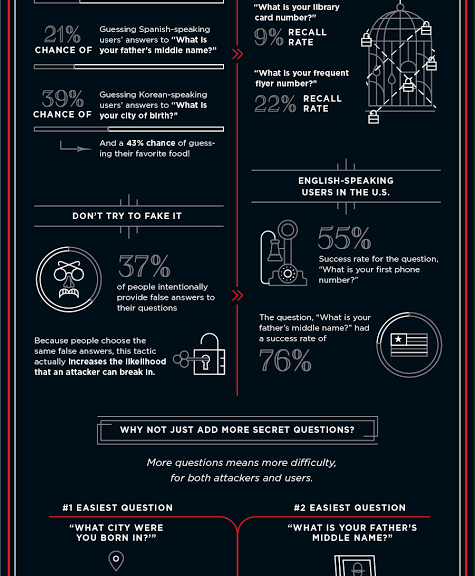
For more information on Google’s report check out the infographic below:
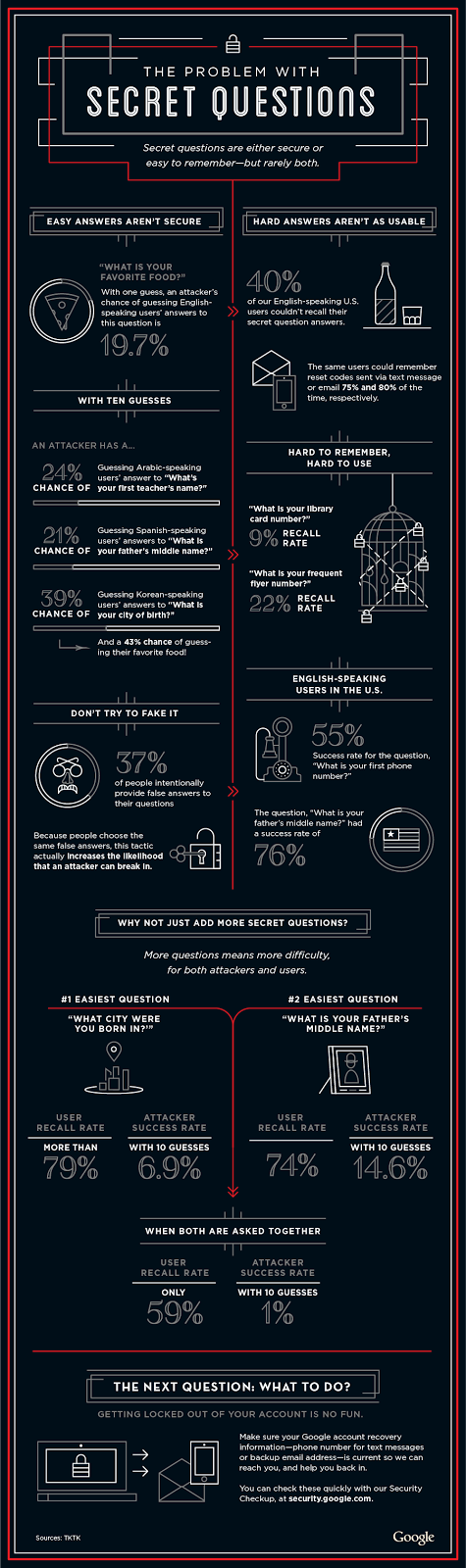
Google Secret Answer Infographic


Distracted Drivers Pose a Greater Challenge on our Roads than Driverless Cars

Google announced last Friday that a prototype of its own self-driving car will hit the streets in its hometown of Mountain View, CA in a pilot test.  Each car will be equipped with a human ready to take over the wheel, if needed, and the car speed will be capped at 25 mph.

Google also revealed its track record for autonomous vehicle safety with impressive results thus far. In the 1.7 million miles of the manual and autonomous driving Google has logged in the past six years, there have only been 11 minor accidents—all of which were caused by other drivers—and none resulting in injuries.

Google’s Chris Urmson, director of its driverless car program, said in a statement: “…not once was the self-driving car the cause of the accident.”

These early numbers are impressive, especially since these driverless cars have been on the road for 10,000 miles a week and in some crazy driving conditions.

About those accidents, Urmson noted: “Rear-end crashes are the most frequent accidents in America, and often there’s little the driver in front can do to avoid getting hit; we’ve been hit from behind seven times, mainly at traffic lights but also on the freeway. We’ve also been side-swiped a couple of times and hit by a car rolling through a stop sign.”

You can see a detailed report by Urmson in his article on Medium.

Video

Ready for the road

Though some continue to question the safety of testing driverless vehicles on public highways, and we have a ways to go before autonomous driving hits prime time… it’s also good to keep in perspective the impact of human error (the cause of 94% of accidents) and the risk of distracted drivers.

Lot’s of people aren’t paying attention on our roadways, which Google’s driverless cars have experienced.

People are eating, drinking, smoking, talking on cell phones, adjusting their entertainment consoles, navigating via digital maps, or you name it.  On any given day, Distracted.gov estimates over 660,000 vehicles are being driven by someone using a hand-held cell phone… And it has been shown that a lot of our distraction has to do with drivers using smartphone technology while behind the wheel.

In fact, AT&T this week released an alarming new survey that shows that motorists have expanded their behind-the-wheel activities from just talking and texting to use of Facebook, Twitter, taking selfies and even videos.

Here are a few of AT&T’s salient numbers of smartphone activities undertaken while driving:

  • 70% people engage in smartphone activities while driving
  • 61% text
  • Nearly 40% use social media
  • About 30% surf the net and/or use Facebook
  • 17% snap selfies
  • 14% use Twitter, Integra
  • Around 10%-plus use video chat and Snap Chat


AT&T revealed the research along with its launch of its expanded “It Can Wait” ad campaign, moving its focus from just texting while driving to include other smartphone driving distractions.

Other recent studies indicate that anything that takes your attention away from the road for just two seconds or longer can increase the risk of an accident from four to 24 times…Sending or reading a text takes your eyes off the road for 5 seconds, according to info collected by Distracted.gov. Imagine the seconds devoted to viewing real-time social media feeds, or framing a selfie?

People very well should be concerned about bumps in the road for fully autonomous cars, which are a lot more than smartphones on wheels. But the usage of smartphone technology inside our autos poses another and very real safety challenge and far bigger threat today that we need to be more focused on and deal with!

I applaud AT&Ts effort and those of others to educate the public on the problem of technology-induced distracted driving – although a lot more than education needs to be done.

And I also applaud Google’s goal to have smart self-driving cars in the future to at least share the burden of driving with humans. It may not solve all of our roadway safety problems in the future – but it sure may help!

In the meantime, it’s incumbent upon all of us in technology industry who are contributing to our increasingly connected mobile future, to be vigilant about all aspects of our products’ safety, security, and privacy.

Title image courtesy of Google.

Distracted Drivers Pose a Greater Challenge on our Roads than Driverless Cars

Google announced last Friday that a prototype of its own self-driving car will hit the streets in its hometown of Mountain View, CA in a pilot test.  Each car will be equipped with a human ready to take over the wheel, if needed, and the car speed will be capped at 25 mph.

Google also revealed its track record for autonomous vehicle safety with impressive results thus far. In the 1.7 million miles of the manual and autonomous driving Google has logged in the past six years, there have only been 11 minor accidents—all of which were caused by other drivers—and none resulting in injuries.

Google’s Chris Urmson, director of its driverless car program, said in a statement: “…not once was the self-driving car the cause of the accident.”

These early numbers are impressive, especially since these driverless cars have been on the road for 10,000 miles a week and in some crazy driving conditions.

About those accidents, Urmson noted: “Rear-end crashes are the most frequent accidents in America, and often there’s little the driver in front can do to avoid getting hit; we’ve been hit from behind seven times, mainly at traffic lights but also on the freeway. We’ve also been side-swiped a couple of times and hit by a car rolling through a stop sign.”

You can see a detailed report by Urmson in his article on Medium.

Video

Ready for the road

Though some continue to question the safety of testing driverless vehicles on public highways, and we have a ways to go before autonomous driving hits prime time… it’s also good to keep in perspective the impact of human error (the cause of 94% of accidents) and the risk of distracted drivers.

Lot’s of people aren’t paying attention on our roadways, which Google’s driverless cars have experienced.

People are eating, drinking, smoking, talking on cell phones, adjusting their entertainment consoles, navigating via digital maps, or you name it.  On any given day, Distracted.gov estimates over 660,000 vehicles are being driven by someone using a hand-held cell phone… And it has been shown that a lot of our distraction has to do with drivers using smartphone technology while behind the wheel.

In fact, AT&T this week released an alarming new survey that shows that motorists have expanded their behind-the-wheel activities from just talking and texting to use of Facebook, Twitter, taking selfies and even videos.

Here are a few of AT&T’s salient numbers of smartphone activities undertaken while driving:

  • 70% people engage in smartphone activities while driving
  • 61% text
  • Nearly 40% use social media
  • About 30% surf the net and/or use Facebook
  • 17% snap selfies
  • 14% use Twitter, Integra
  • Around 10%-plus use video chat and Snap Chat


AT&T revealed the research along with its launch of its expanded “It Can Wait” ad campaign, moving its focus from just texting while driving to include other smartphone driving distractions.

Other recent studies indicate that anything that takes your attention away from the road for just two seconds or longer can increase the risk of an accident from four to 24 times…Sending or reading a text takes your eyes off the road for 5 seconds, according to info collected by Distracted.gov. Imagine the seconds devoted to viewing real-time social media feeds, or framing a selfie?

People very well should be concerned about bumps in the road for fully autonomous cars, which are a lot more than smartphones on wheels. But the usage of smartphone technology inside our autos poses another and very real safety challenge and far bigger threat today that we need to be more focused on and deal with!

I applaud AT&Ts effort and those of others to educate the public on the problem of technology-induced distracted driving – although a lot more than education needs to be done.

And I also applaud Google’s goal to have smart self-driving cars in the future to at least share the burden of driving with humans. It may not solve all of our roadway safety problems in the future – but it sure may help!

In the meantime, it’s incumbent upon all of us in technology industry who are contributing to our increasingly connected mobile future, to be vigilant about all aspects of our products’ safety, security, and privacy.

Title image courtesy of Google.

Google introduce new Chrome extension rules to help protect users

Google has just introduced new rules for Chrome extensions to help crack down on unwanted and malicious extensions by only making Chrome extensions available via the official Chrome Store.

According to their blog post announcement, Google’s test phase for the rule saw a 75% drop in users complaining about unwanted extensions. Google wrote:

“We originally did not enforce this policy on the Windows developer channel in order to allow developers to opt out. Unfortunately, we’ve since observed malicious software forcing users into the developer channel in order to install unwanted off-store extensions. Affected users are left with malicious extensions running on a Chrome channel they did not choose.”

The move to a centralized marketplace for extensions is a great way for Google to establish quality control for Chrome extensions, just as it and Apple have with their respective app stores.

Chrome extensions are a great way to customize and optimize your browsing experience. For example AVG’s Crumble extension blocks online trackers and cookies allowing you to surf without surveillance.

You can install the extension for free from here: Crumble Chrome extension.

Checking which extensions you are using is very easy to do.

How to check which extensions you are running

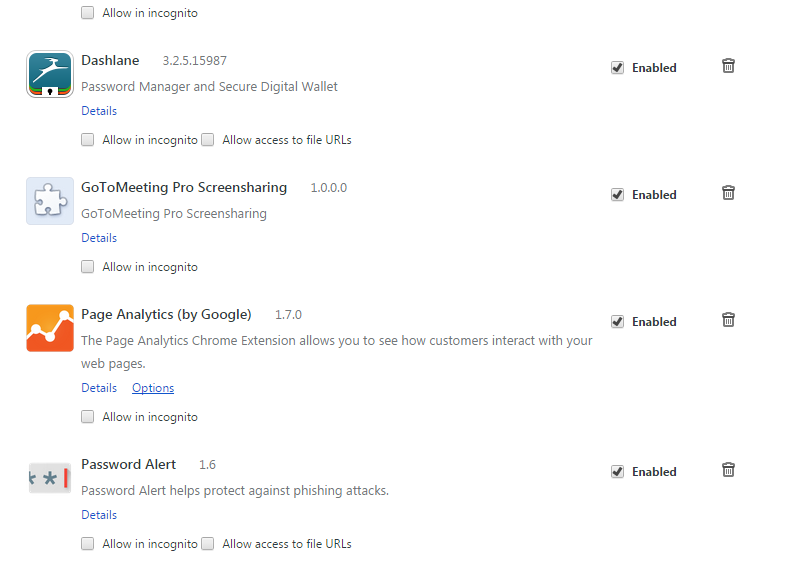
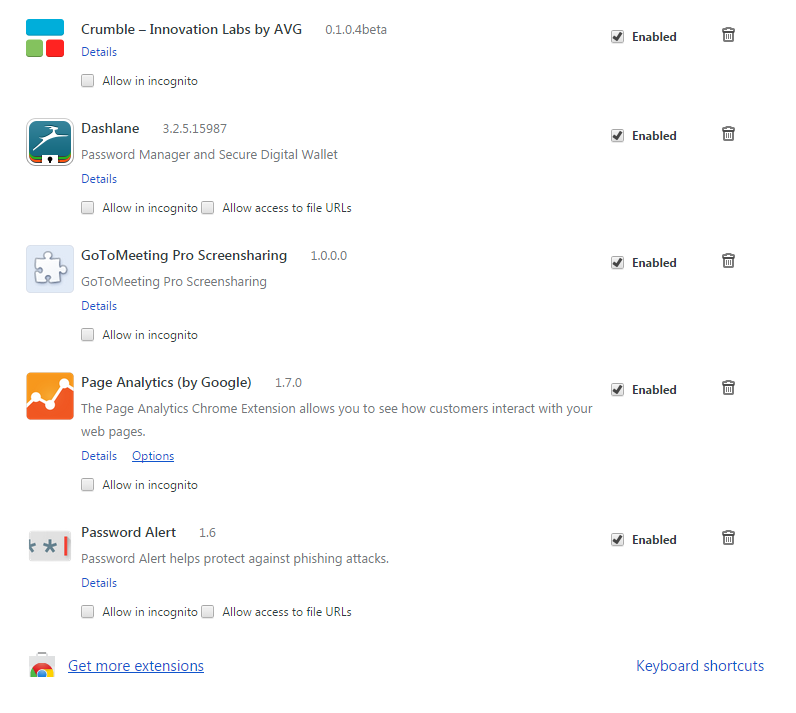
Checking which Chrome extensions are active is quick and easy. Within Chrome, open the menu in the top right and select More Tools. Select Extensions from the menu.

Here you can view which extensions are currently running, add and remove extensions.

Chrome Extensions


Google introduce new Chrome extension rules to help protect users

Google has just introduced new rules for Chrome extensions to help crack down on unwanted and malicious extensions by only making Chrome extensions available via the official Chrome Store.

According to their blog post announcement, Google’s test phase for the rule saw a 75% drop in users complaining about unwanted extensions. Google wrote:

“We originally did not enforce this policy on the Windows developer channel in order to allow developers to opt out. Unfortunately, we’ve since observed malicious software forcing users into the developer channel in order to install unwanted off-store extensions. Affected users are left with malicious extensions running on a Chrome channel they did not choose.”

The move to a centralized marketplace for extensions is a great way for Google to establish quality control for Chrome extensions, just as it and Apple have with their respective app stores.

Chrome extensions are a great way to customize and optimize your browsing experience. For example AVG’s Crumble extension blocks online trackers and cookies allowing you to surf without surveillance.

You can install the extension for free from here: Crumble Chrome extension.

Checking which extensions you are using is very easy to do.

How to check which extensions you are running

Checking which Chrome extensions are active is quick and easy. Within Chrome, open the menu in the top right and select More Tools. Select Extensions from the menu.

Here you can view which extensions are currently running, add and remove extensions.

Chrome Extensions


Address-Spoofing Bug Haunts Android Stock Browser

There’s an easily exploitable vulnerability in the Android stock browser that enables an attacker to spoof the URL in the address bar and force a victim to visit a malicious site while believing he is visiting a benign one. Security researcher Rafay Baloch discovered the vulnerability and developed the technique for exploiting it. The problem […]

Google introduce new account security measure

One of the most convenient things about having a Google account is that you can use it to log into various accounts across the web.

However, according to a Google blog, users that log in to third party sites using their Google credentials are potentially at risk of phishing attacks.

Password Alert


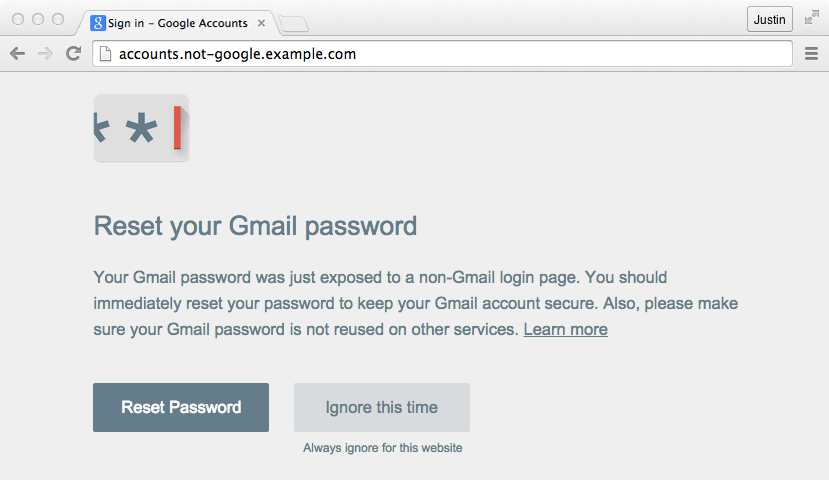
To help protect users, Google has introduced a new free to use Chrome extension called Password Alert. Here’s how it works:

“Once you’ve installed and initialized Password Alert, Chrome will remember a “scrambled” version of your Google Account password. It only remembers this information for security purposes and doesn’t share it with anyone. If you type your password into a site that isn’t a Google sign-in page, Password Alert will show you a notice like the one below. This alert will tell you that you’re at risk of being phished so you can update your password and protect yourself.”

Gmail password reset


While the extension is designed to provide Google users with an extra level of protection when surfing the web it is still a work in progress.

Security researchers have already discovered a number of workarounds the extension but Google is continuing to work on the vulnerabilities.


How to check which extensions you are running.

Checking which Chrome extensions are active is quick and easy. Within Chrome, open the menu in the top right and select More Tools. Select Extensions from the menu.

Here you can view which extensions are currently running, add and remove extensions.

Chrome extensions