Tag Archives: Internet Security

Google to publicly shame websites that aren’t using HTTPS

https

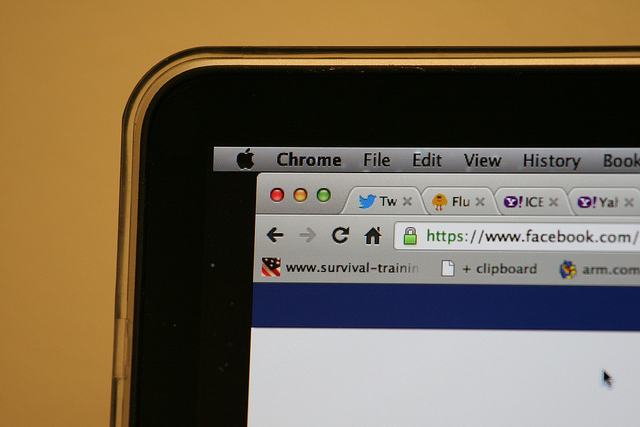
It’s likely that one more than one occasion you’ve noticed the small green lock icon that appears in the address bar when you’re using the Internet. This little icon means that the site you are using is secure as the page is using HTTPS (Hypertext Transfer Protocol Secure).

HTTPS encrypts all communications to protect confidential data on the web, from user names to passwords, messages, or credit card info. In order for this to work correctly, it is essential that banking websites or online stores use the secure version of GTTP.

The HTTPS system also guarantees that anyone using the Internet is able to access the official page of a company as opposed to a false one which has been designed to trick the user and steal their money or info. It also protects that website against third-parties which might try to intercept the connection in order to install a malware.

Google has spent a long time organizing a silent campaign in favor of the use of HTTPS with the hope that eventually all websites will end up using the system, putting an end to the risk of data theft for web users. It’s telling that even the government of the United States is concerned about the use of HTPPS, and requires that all of its web pages be encrypted with the service.

Less than a month ago, Google announced that it would favor the indexation of HTTPS sites that had a HTTP equivalent. What’s more, Google has decided to offer new tools to developers so that they can easily include this protocol. Now it is trying to publicly list the owners of websites that aren’t using this protocol, a project that the security team already debated at its forums in 2014.

secure web

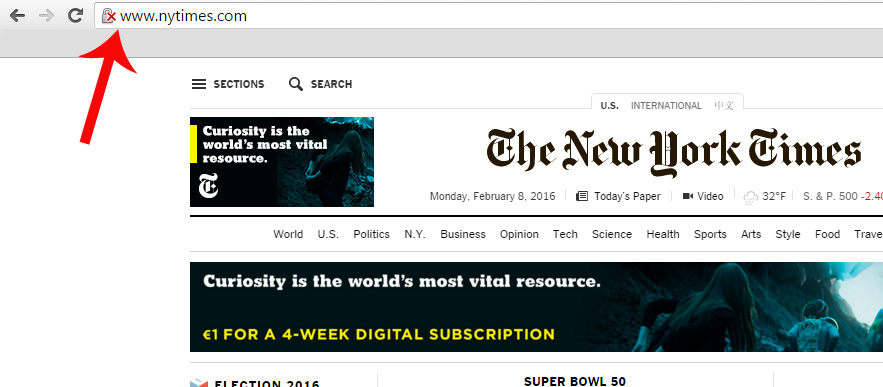
Up to now, on Chrome there was a red X on the gray lock when the browser detected problems with the TSL/SSL certification of the website which guarantees the establishment of secure communications on the Internet, which makes it possible for a third-party to access the user data. It also shows us this warning when the web connection is encrypted, but Chrome has detected a mix of command sequences (a page based on HTTPS loads content based on HTTP), which could allow a third-party to take control of the page.

Google plans to openly display websites that use HTTP protocol by marking them with a red X. Parisa Tabriz, Chrome Security Engineering Manager, tweeted that she planned to highlight these pages: “HTTP, we’re readying to call you out for what you are: UNSAFE!”

A few days ago, at the Usenix Enigma security conference, an expert from CloudFlare showed how users can already decide if they want all pages that use HTTP protocol to appear with the red X symbol. To do this, all you need to do is enter chrome://flags and select “mark non-secure as” and then “mark non-secure origins as non-secure.” In this moment, a gray lock will be added to your address bar, indicating insecure webpages.
unsecure web

A Google employee, who wished to remain anonymous, has confirmed to Motherboard that the intention is that Chrome will include this alert by default and has assured there will be more clues in the near future.

For now, Google has yet to make an official announcement on the matter, so those who wish to know when a webpage isn’t secure need to manually select this option.

So, if we keep in mind that only 1 in 3 users take notice of the current SSL security warnings from Chrome which warn us if someone is trying to steal our confidential information, it’s likely that some will end up ignoring the red X, too. Due to this, it is necessary that we are more aware of the dangers that we face by leaving our data on insecure websites.

The post Google to publicly shame websites that aren’t using HTTPS appeared first on MediaCenter Panda Security.
Bargains, cards, and WhatsApp emoticons… the Valentine’s Day scams are here!

san valentin

Saint Valentine’s Day has as many lovers as haters. From those that love to spend the day with their significant other, or even celebrate singledom with friends, to those that hate being told when they should celebrate being in love.

What none of us are free from, however, are the ways in which cybercriminals try to trick us online. These criminals use any opportunity to claim new victims and this time of the year is no different – what may start out as a wonderful date could end up being a marriage from hell!

Valentine’s Day Bargains

Over the course of the next few days we will see online stores promoting special offers just for this occasion. These include an iPhone 6 for just €100, for example. In this case, just keep the old refrain about “there being no such thing as a free lunch” in mind.

WhatsApp Emoticons

We know that nearly everyone is dying to get new emoticons for WhatsApp and cybercriminals use Valentine’s Day to take advantage of this. You might see them trying to offer special, romantic themed emoticons but don’t download them – all you’ll get is malware! Remember to only download from official stores.

Gifts and SPAM for Valentine’s Day

Even though you already know what you’re buying for your partner, you’ll surely receive lots of emails with wonderful suggestions. In most cases it’ll just be spam, but be careful if they come with an attachment as it could contain malware. Delete them and you won’t need to worry about any unwanted gifts!

san valentin spam

Romantic cards filled with malware

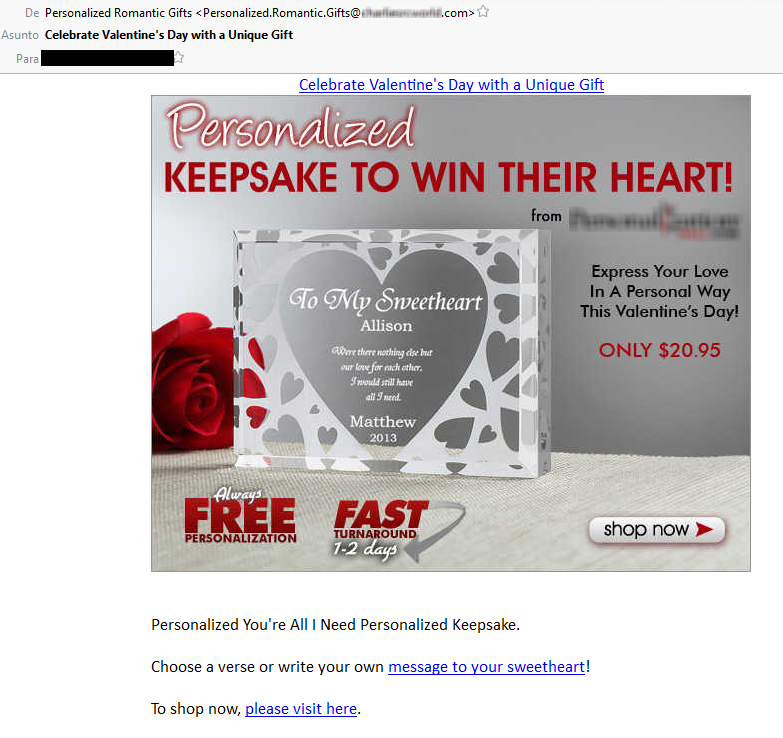
It’s pretty likely that you’ll receive an email with a supposed Valentine’s Day greeting. This digital card needs to be downloaded to be viewed… and we’re sure that you won’t be surprised to learn that this is just another way of infecting your computer with malware. So remember, don’t click on links that come from unknown sources.

Phishing for your passwords

Another of the attacks that could be seen over the next few days are the ones that try to get your login details for Facebook and Twitter. These are done by phishing attacks and use the romantic holiday as an excuse to launch attacks. Our advice is to never, ever give out your login details over the Internet.

The post Bargains, cards, and WhatsApp emoticons… the Valentine’s Day scams are here! appeared first on MediaCenter Panda Security.
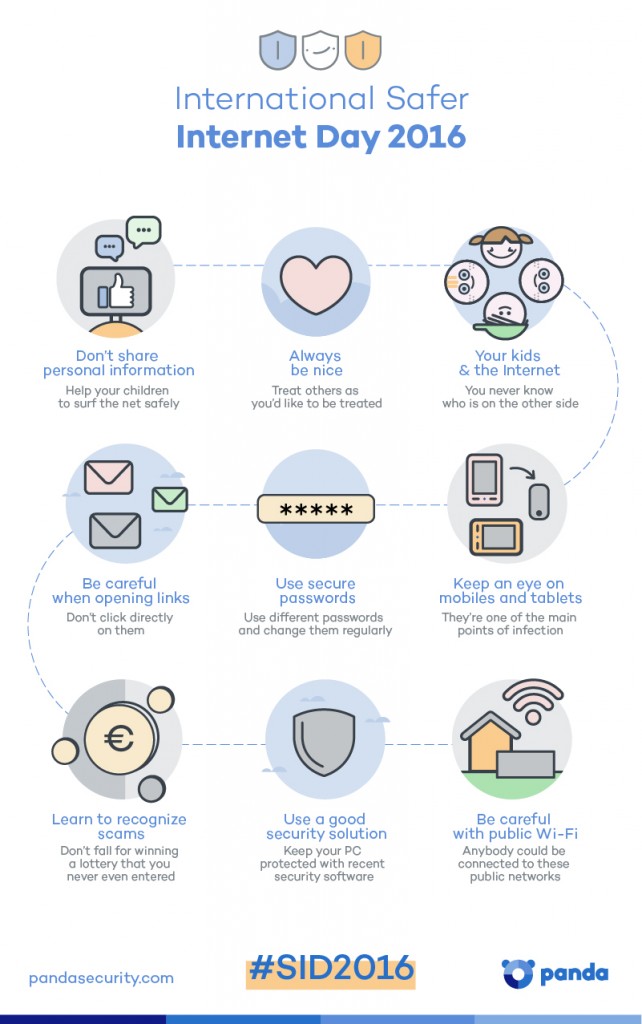
International Safer Day 2016 – Infographic

Panda Security - International Safer Internet Day - Infographic

If you want to share this infographic, here it is the code:

The post International Safer Day 2016 – Infographic appeared first on MediaCenter Panda Security.
Employees’ selfies and the dangers of cybercrime for critical infrastructures

selfie kitchen

When one works in a power plant, a water treatment facility, a gas plant, a recycling center, or any other critical infrastructure for a country, it’s essential to be extra careful about what you post on social media.

It might seem to be common sense, but IT security experts have raised worries over the amount of selfies taken by employees in these centers, which have started to appear across different sites such as Facebook, Twitter, and Instagram.

With the recent blackout which affected more than 80,000 people in Ukraine still fresh in the memory, the proliferation of selfies that could reveal security secrets in these installations could become a problem that needs to be stamped out immediately.

IT systems that could be compromised as a result of worker indiscretion are named SCADA – the initials are taken from Supervision, Control and Acquisition of Data – and they are continually used to manage all types of industrial processes, which means that their security is extremely important.

dangerous selfie

They allow you to obtain information from anywhere, in real-time, about the automated operations in a factory (or a gas station, for example), in such a way that the decision making and remote management of these installations is easy and economically sensible.

On the other hand, however, if a cybercriminal manages to enter the systems, especially if he manages to take control or alter the function of the machines, it could result in unrepairable damage.

Businesses, governments, and professionals from the sector are growing more and more aware of the risk that these infrastructures are exposed to. This is usually because they fear that the weakest link in the chain, which is always a person, could commit a silly mistake with their smartphone.

Just as has been discussed dedicated forums, IT security experts in the industrial sector have been able to locate these selfies, and other things, on Facebook and Instagram in which it is possible to see valuable information on the SCADA systems.

Furthermore, they have also discovered panoramic photos and virtual tours of the control rooms and the critical infrastructures, which are available for anyone to view, on the companies’ websites. This could allow someone with malicious intentions to extract information relating to employees, shift patterns, etc.

In fact, the German security expert Ralph Langner discovered that an image of the Natanz nuclear plant in Iran, distributed by president Ahmadinejad’s own press office, had been used by the creators of Stuxnet malware to attack the country’s nuclear program.

The image, which was happily shared by the Islamic regime, showed a control monitor for the SCADA system that was controlling its new uranium centrifuges. A real treat for their western enemies!

The post Employees’ selfies and the dangers of cybercrime for critical infrastructures appeared first on MediaCenter Panda Security.
How can I stop Cryptolocker from accessing my information?

It’s likely that you’ve asked yourself, on more than one occasion, how you can avoid a ransomware from gaining access to your private information and encrypting all of the files and data stored on your devices.

data shield

As we always say, it is fundamental that you keep your operating system updated to avoid any security issues. It’s also wise not to open emails or attachments from unknown sources, and avoid browsing on insecure websites. We also can’t forget the need to have a good antivirus or security solution installed and updated. This can help protect our data.

Our new line of products that include Panda Internet Security 2016, Panda Global Protection 2016, and Panda Protection Service offer an additional security layer against malware that tries to access sensitive user information (to steal, erase or encrypt said information), such as the infamous Cryptolocker. In this case, the encryption is done using a unique, private key for each computer that stores on its servers, thus making it hard to recover the data even if the malware is disinfected and eliminated from the PC.

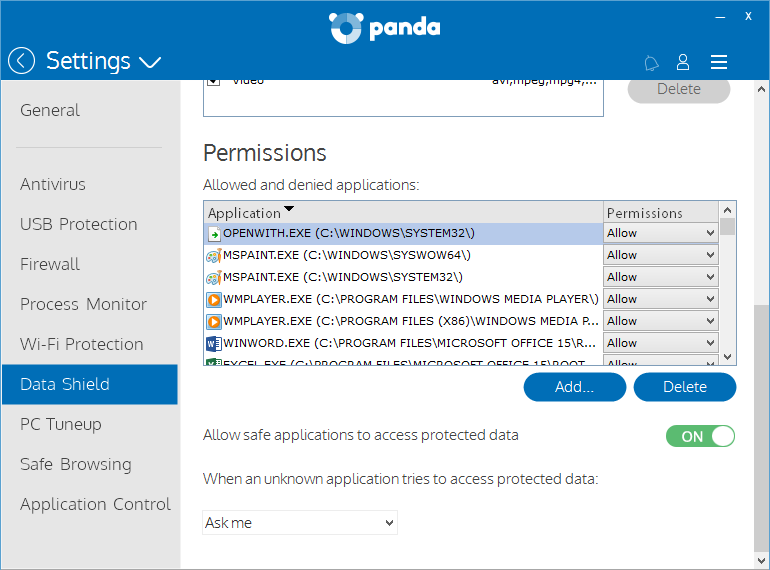
This data protector allows the user to define the location of the data to be protected and to set the access permissions granted to installed programs. This means you can keep your most valuable information safe, even if a ransomware gets into your computer.

The first time you open the interface you will see the assistant that will allow you to activate Data Shield.

datashield

With this feature, you can define which programs can access your files and give permission to application so that they too can access your data.

This option is activated by default and grants access to the files for all applications that Panda considers secure. Furthermore, you can establish which action is carried out when an unknown application accesses sensitive information: Deny or Ask Me.

data

How to stop a Cryptolocker accessing your computer

  • Use common sense.
  • If you receive a message from an unknown source with an attachment, don’t download it.
  • Be careful when browsing the Internet. Avoid downloading programs from suspicious websites.
  • Even if you know the source, take the necessary precautions before opening these files.
  • Neutralize keyloggers. These programs are used by cybercriminals to capture and steal your passwords. Use a virtual keyboard to enter your most sensitive access codes such as those for your bank or email account.
  • Finally, and most importantly, protect yourself with an updated antivirus, separate from your operating system (Windows, Mac, or Android).

We also remind you of the importance of having a good backup system for your most important files. It will help you to minimalize the damage caused not just by malware infections, but also if you have problems with your hardware or other issues with your computer.

The post How can I stop Cryptolocker from accessing my information? appeared first on MediaCenter Panda Security.

How to deal with Internet Explorer’s slow death without putting your computer at risk


At this point, if you are confused by the different versions of Microsoft products that still have updates and those that don’t, it’s perfectly understandable. There has been a lot of back and forth over the past few months, but it is important that you take a few minutes to understand the situation and check that you have the right software so that your computer remains secure.

On January 12, Bill Gates put in motion the end of Windows 8 and all versions of Internet Explorer older than version 11. There are, however, some exceptions and special cases that we will look at in detail later. The reason behind taking these older versions out of circulation is that Microsoft wants to replace them all with its new product, Edge, but it can’t do it overnight, thus it slowly rendering older versions obsolete.

What you need to know is how the changes will affect you if you are a home user or head of IT at a small company. Don’t fear, however, as it’s not as complicated as it may seem.

computer

Internet Explorer for home users

You have a problem if your computer runs on Windows 8, – you will have to update to either 8.1 or 10 – or if you’re using Windows 7 and your version of Internet Explorer is older than version 11.

If you find yourself in the first scenario then the solution is easy. Updating to version 8.1 (which is done via the Windows Store, not Windows Update) and version 10 is free, and when you update the operating system you will no longer need to worry about Internet Explorer – if you opt for version 8.1 you will automatically have the latest version, and if you go with version 10 you’ll have Microsoft’s new browser, Edge, by default.

If your current operating system is Windows 7, it’s possible (although not very likely) that you fall into the second category. You needn’t worry if the latest updates are active on your computer, but it’s never a bad idea to have them just in case.

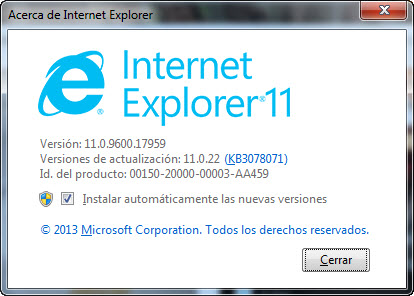
To carry this out, open Internet Explorer and press ALT + Y on the keyboard. This will bring up the menu bar and you should then click on “Help”, followed by “About Internet Explorer”, so that another screen will pop up where you can test the version that you have installed.

internet explorer

You don’t need to do anything if, as shown in the image, you have Windows 11 installed. If it says that you have any other version, you must update your browser via Windows Update.

The final possibility is that your computer’s operating system is even older, such as Windows Vista or Windows XP. If it is the latter, you should check it out as this version hasn’t been updated since April 2014, so it’s high time you sorted that out.

If you have the controversial Windows Vista then you are the exception to the rule – Microsoft will continue to publish patches for Internet Explorer 9, the final browser to work on this operating system, until April 2017.

laptops

Internet Explorer for businesses

Everything that we’ve said above for home users is also applicable for corporate users, although, unfortunately, there are some cases in which an update to Internet Explorer 11 or Edge isn’t possible.

Some companies stick with outdated versions because the apps that they use daily don’t work with other browsers. If you are in charge of a technical department at one of these companies and it’s not possible to change the tools that you’re working with, then there are a few precautions that you can take to minimize the consequences of not updating.

If you have no other choice but to use an outdated, and insecure, version of Internet Explorer then you need to follow these tips:

  • Install the latest patch available (the one that was published on January 12), which corrects some critical vulnerabilities that allowed for the execution of remote code via the browser.
  • Reduce privileges on computers which will continue to use the old version of Internet Explorer. If they haven’t got administrator permission, then a lot of the attacks that they could face will be rendered useless.
  • Only use the computers with outdated browsers for their apps that can’t be run any other way. Browse and carry out other tasks on different computers.
  • If there is no other computer available, install a second browser (Google Chrome or Mozilla Firefox, for example) on the computer with the outdated software. Set up the firewall so that Internet Explorer can’t access more than the page of the application that needs to be used on it.

By following these steps you will reduce the risk, but you aren’t completely secure – you will still be using a computer that is exposed to all types of threats. A good antivirus solution can protect you from many of them, but it is still essential that you work with updated software.

The post How to deal with Internet Explorer’s slow death without putting your computer at risk appeared first on MediaCenter Panda Security.

Password Security — Who's to Blame for Weak Passwords? Users, Really?

The majority of Internet users are vulnerable to cyber threats because of their own weaknesses in setting up a strong password. But, are end-users completely responsible for choosing weak passwords?

Give a thought.

Recently we wrote an article revealing the list of Worst Passwords of 2015 that proved most of us are still using bad passwords, like ‘123456’ or ‘password,’ to secure our

How Google hopes to revolutionize the way we access our accounts

google

Google is about to put another nail in the coffin for traditional passwords. The search engine giant is testing out a new system of passwords that will take the place of the usual combination of letters, numbers, and symbols that we use to access services on our mobile phone.

At the moment, the new authentication method is only available for a select group of users, although the company has confirmed it will extend it to other users within the near future. Notorious passwords such as pizza, password, and 123456 will soon be confined to the past, joked a Google spokesperson at the announcement.

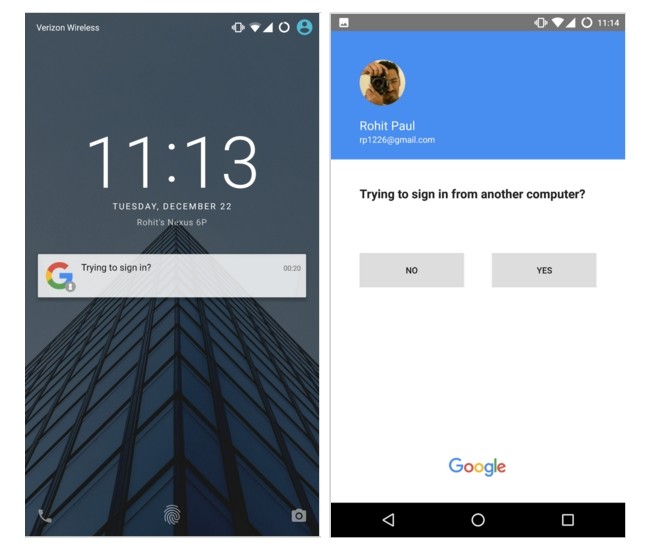
How the new system works is rather easy. Whenever we want to access our Google account – which is becoming more and more central to our lives – we will only have to enter our user name or email address.

By doing this, a notification will appear on our mobile phone, which is linked to the account, asking if we are trying to access from a different computer. By confirming this, we can access without any issues.

google passwords

The main advantage of this method is that it is extremely simple. With just one click of the smartphone’s screen it is possible to by-pass the process of entering a password or, in some cases, going through a two-step verification process.

What’s more, this new method should allow us to feel more protected when it comes to other people gaining access to our private accounts, as some people continue to use basic and easy to guess passwords, which do little to ward off cybercriminals.

google access

It’s not all doom and gloom for passwords, however, as they can still be used alongside the new method and will come in handy should you run out of battery on your mobile phone. The new identification procedure can still be used alongside the current two-step process, too.

In the event of losing the mobile phone, or having it stolen, your account won’t be at risk for long. You can long-in from another device (your laptop, for example) and from there remove the access permission for the mobile phone.

With this initiative, Google joins a list of multinational companies that are looking for alternatives to traditional passwords. Recently, Yahoo created its own system called Key Account, which has a lot in common with the system being trialed by Google. Whether we like it or not, traditional passwords may soon be confined to the annals of history.

The post How Google hopes to revolutionize the way we access our accounts appeared first on MediaCenter Panda Security.
The 10 most alarming cyberattacks of 2015

panda_security_cyberatacks_2015_bug

Neither personal information nor fingerprints have been safe from cybercriminals in the past year and, as the year comes to a close, one thing is for sure – the more devices that we have, the more security we need.

Throughout the course of the year, cybercriminals have shown that they are capable of discovering and, taking advantage of, any vulnerability possible in order to get their hands on our data or to control our devices. Below is a roundup of the most damaging and alarming of these attacks.

Fingerprint theft

If fingerprints are seen as one of the most secure methods of biometric security (they are the current method of unblocking iPhones), the theft of information belonging to US government employees showed that there are serious things to consider with the system.

Last June, a group of cybercriminals managed to obtain the fingerprints of nearly six million federal workers, which could put not only their mobile phones in danger, but even the security of the country.

panda_security_cyberatacks_2015_fingerprint

Remote control of smart cars

Another of the big challenges facing cybersecurity is the issue of smart cars. Until there is a solution, these cars will continue to be vulnerable to manipulation. Last summer, two hackers showed that it was possible to take advantage of errors in the computer system onboard a Jeep Cherokee and took control of the car, even managing to apply the brakes on the vehicle, all carried out remotely.

Thousands of compromised Android devices

Not all of the vulnerabilities in the world of IT security are focused on modern tools or devices. In fact, smartphones have been at the center of a massive scandal in 2015, when thousands of Android devices were affected by Stagefright, a security failure which allowed cybercriminals to access any Android phone and control it without the owner knowing.

The online dating furor

Without a doubt the biggest scandal of the year was the leaking of information relating to more than 32 million users of the online dating site Ashley Madison. This sent shockwaves through the cybersecurity world and served to remind everyone, both platforms and users, of the dangers facing IT security.

panda_security_cyberatacks_2015_ashley_madison

A vulnerable infusion pump

The health and safety of people is also at risk due to the vulnerabilities of different devices. It’s not just smart cars that can be manipulated and involved in accidents, as this year an infusion pump used in hospitals to administer patients’ medicine had to be removed. It turned out that if a cybercriminal had connected to the hospitals’ networks, they could have accessed the machine, manipulating it and changing its settings.

Gas stations at risk

It’s not just hospital pumps that are in danger, as investigations carried out on both sides of the Atlantic uncovered the risks facing gas stations. Once connected to a network, these pumps could be attacked, and a cybercriminal could even cause one to explode.

A year to forget for Apple

2015 has been the worst year for Apple in terms of security as the number of attacks directed at its devices has increased five-fold on the previous year, while the number of new vulnerabilities has continued to grow. One such example is the bug Dyld, which was discovered over the summer and affected the MAC OS X operating system.

panda_security_cyberatacks_2015_apple

Data stolen via third-parties

15 million T-Mobile customers had their data stolen by cybercriminals this year. According to the company, the information wasn’t taken from their own servers, but rather stolen from the company that looked after payments for T-Mobile’s customers.

Data theft via web browsers

The biggest names in the technology sector haven’t escaped the year without a few scares. Last summer Firefox had to advise its users that a failure in the browser meant that cybercriminals could have looked for and stolen files without the victim realizing.

A bad end to the year for Dell

The final scandal of the year happened last month, when it was discovered that the latest models of Dell computers were hiding a serious security failure. Thanks to this vulnerability, cybercriminals were able to alter the communication between various different systems and steal information from the affected computers.

The post The 10 most alarming cyberattacks of 2015 appeared first on MediaCenter Panda Security.

Apple implements security measures following disastrous year

apple

Following a spate of security breaches and concerns, Apple has taken the steps to ensure that 2016 doesn’t see a repeat of the software problems that it suffered in recent months. The security measures have been widespread, with updates to their operating systems for mobile (iOS) and Mac (OS X), its television service (Apple TV), the Safari web browser, and the operating system for its much publicized smartwatch (watchOS).

This move was prompted by the worrying number of vulnerabilities that were present in its software. To give you some idea of the state of array that Apple found itself in, when an update for the 9.2 version of iOS was released, it was said to include a solution for more than fifty security issues that had been discovered, while the number of problems on OS X were said to have reached more than one hundred.

mac

Nearly half of those vulnerabilities allowed for a cyber attacker to take control of the device by accessing it via a malicious application that had been unwittingly installed.

It seems strange that Apple has to patch up security issues in its software when, for many years, fans of the brand vehemently boasted that there were no malware risks that could damage the luster of the brand.

However, it turns our this is false, and not only have threats existed for decades, but the past year has been one of the most devastating in the brand’s history.

According to a recent study, the number of malicious programs created for the Mac operating system in 2015 was five times higher than the total amount created in the previous five years, making it a low point for the security of Apple devices and its users.

keyboard

This bad news comes with an ironic silver lining for Apple – if there are more and more malware samples being created for its operating it systems, it means that the brand itself is becoming more popular. Until now, keeping in mind that Windows (or Android, in the case of mobile devices) has the lion’s share of the market, it was logical to think that cybercriminals would put more effort into taking advantage of the Microsoft operating system.

However, this growth means that Apple is now looking more and more attractive to cybercriminals, as they look to get bigger rewards from their malware. The company ended the year having covered up many holes in its security armor, but that’s just the start of it – it’s likely that the next year will see more holes that need covering up.

More | Panda Antivirus for Mac

The post Apple implements security measures following disastrous year appeared first on MediaCenter Panda Security.