The so-called Deputy Dog APT group has surfaced again with a means of keeping its command and control servers under wraps that involves Microsoft’s TechNet online resources.
Tag Archives: Malware
Some GTA V Mods Serve You Malware
What it’s all about
aboutseven, a newly registered member on the GTA forums, was the first one to notice that all was not well with the processes running on his computer. “I came across something pretty startling today after reviewing my processes that were running on my computer. I tend to do this a lot out of paranoia, just checking that I don’t have stuff running in the background that I don’t want running, or if I ever possibly run into something that is out of the ordinary that could possibly be malware. I happened to notice that the Windows C# compiler running the background as csc.exe”, he wrote in his post.
After looking into it some more he dredged up a file called Fade.exe, which hijacked a part of the registry in order to being launched at boot. Some more testing revealed that a GTA mod named Angry Planes was to be held responsible for the malware landing on his system. Since the discovery, other players are claiming they’re finding similar harmful files on other mods as well, such as No Clip.
What it does
So, why exactly is Fade.exe such a problem? To answer the question, let’s just take a look at the modules that are loaded with the mod, according to another forum user named ckck:
- “Facebook spam/credential stealing module
- Twitch spam/credential stealing module
- com spam/credential stealing module
- A Steam spamming module
- A Steam module that evaluates the items in your inventory and their value based on current market value
- A Keylogger module that logs individual button presses in an XML like format, it also includes information about context switches (switching from one app/window to another)
- A UDP flooding module
- I hadn’t deciphered and didn’t see in action.”
What you can do
In case you have one of the mods installed, make sure to scan your computer with your AV and remove the malicious files. Keeping in mind that Fade.exe also sniffs around your Facebook, Steam, and Twitch accounts, make sure to change all your passwords as well.
The post Some GTA V Mods Serve You Malware appeared first on Avira Blog.
The Triumphant Finale of CSI: Cyber
It’s been a couple of months since we left our heroes on CSI: Cyber, and boy, have they been busy. They have apparently solved many crimes using cyber-sleuthing, acquired some decidedly non-cyber firearms skills, and, in the case of our man Krumitz, taken up running. We wanted to check in and see how our merry band […]
CryptoLocker: What Is and How to Avoid it
CryptoLocker is a new family of ransomware whose business model (yes, malware is a business to some!) is based on extorting money from users. This continues the trend started by another infamous piece of malware which also extorts its victims, the so-called ‘Police Virus’, which asks users to pay a ‘fine’ to unlock their computers. However, unlike the Police Virus, CryptoLocker hijacks users’ documents and asks them to pay a ransom (with a time limit to send the payment).
Malware installation
CryptoLocker uses social engineering techniques to trick the user into running it. More specifically, the victim receives an email with a password-protected ZIP file purporting to be from a logistics company.
The Trojan gets run when the user opens the attached ZIP file, by entering the password included in the message, and attempts to open the PDF it contains. CryptoLocker takes advantage of Windows’ default behavior of hiding the extension from file names to disguise the real .EXE extension of the malicious file.
As soon as the victim runs it, the Trojan goes memory resident on the computer and takes the following actions:
- Saves itself to a folder in the user’s profile (AppData, LocalAppData).
- Adds a key to the registry to make sure it runs every time the computer starts up.
- Spawns two processes of itself: One is the main process, whereas the other aims to protect the main process against termination.
File encryption
The Trojan generates a random symmetric key for each file it encrypts, and encrypts the file’s content with the AES algorithm, using that key. Then, it encrypts the random key using an asymmetric public-private key encryption algorithm (RSA) and keys of over 1024 bits (we’ve seen samples that used 2048-bit keys), and adds it to the encrypted file. This way, the Trojan makes sure that only the owner of the private RSA key can obtain the random key used to encrypt the file. Also, as the computer files are overwritten, it is impossible to retrieve them using forensic methods.
Once run, the first thing the Trojan does is obtain the public key (PK) from its C&C server. To find an active C&C server, The Trojan incorporates a domain generation algorithm (DGA) known as ‘Mersenne twister’ to generate random domain names. This algorithm uses the current date as seed and can generate up to 1,000 different fixed-size domains every day.
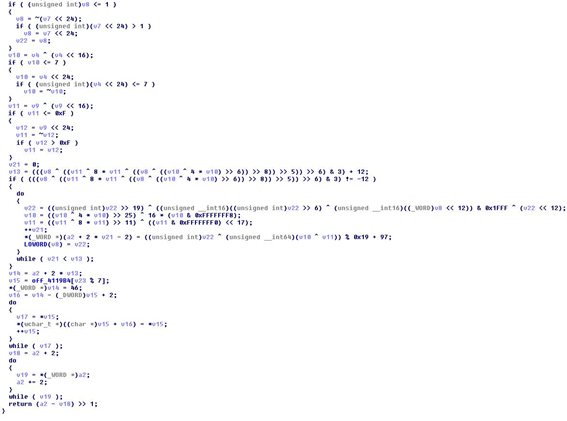
After the Trojan has downloaded the PK, it saves it inside the following Windows registry key: HKCUSoftwareCryptoLockerPublic Key. Then, it starts encrypting files on the computer’s hard disk and every network drive the infected user has access to.
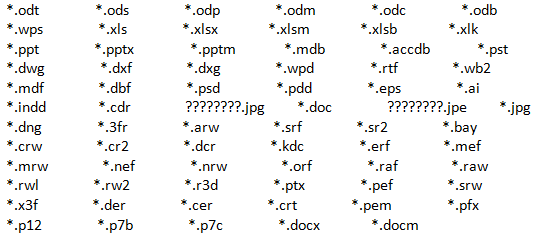
CryptoLocker doesn’t encrypt every file it finds, but only non-executable files with the extensions included in the malware’s code:
Additionally, CryptoLocker logs each file encrypted to the following registry key:
HKEY_CURRENT_USERSoftwareCryptoLockerFiles
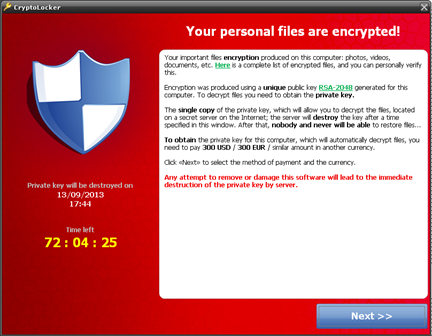
When the Trojan finishes encrypting every file that meets the aforementioned conditions, it displays the following message asking the user to make a ransom payment, with a time limit to send the payment before the private key kept by the malware writer is destroyed.
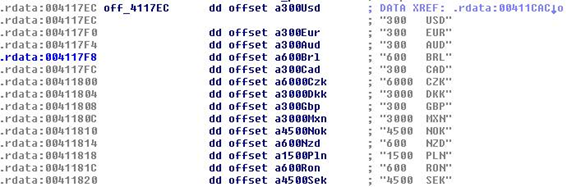
Curiously enough, the malware doesn’t ask users for the same amount of money, but incorporates its own currency conversion table.
How to avoid CryptoLocker
This malware spreads via email by using social engineering techniques. Therefore, our recommendation are:
- Being particularly wary of emails from senders you don’t know, especially those with attached files.
- Disabling hidden file extensions in Windows will also help recognize this type of attack.
- We’d like to remind you of the importance of having a backup system in place for your critical files. This will help mitigate the damage caused not only by malware infections, but hardware problems or any other incidents as well.
- If you become infected and don’t have a backup copy of your files, our recommendation is not to pay the ransom. That’s NEVER a good solution, as it turns the malware into a highly profitable business model and will contribute to the flourishing of this type of attack.
The post CryptoLocker: What Is and How to Avoid it appeared first on MediaCenter Panda Security.
Jamie Oliver website makes a meal of malware clean-up
The website of celebrity TV chef and food activist Jamie Oliver has been compromised with malware for the third time this year, potentially infecting the computers of the site’s visitors.
The post Jamie Oliver website makes a meal of malware clean-up appeared first on We Live Security.

Default Credentials Lead to Massive DDoS-For-Hire Botnet
Tens of thousands of home and office-based routers have been hijacked over the last several months to stage a distributed denial of service attack campaign.
New Facebook scam promises “shocking video,†but contains only malware
When you see what this Facebook clickbait really links to, your jaw will drop.
The post New Facebook scam promises “shocking video,” but contains only malware appeared first on We Live Security.

5 practical tips to avoid ransomware in your email
Tips to avoid ransomware in your email – a common way for extortion-based malware to propagate itself.
The post 5 practical tips to avoid ransomware in your email appeared first on We Live Security.

‘Macro virus’ are back: threats of the past that will haunt us in the future

Maybe you don’t remember, but in 1999 Melissa was an extremely popular name within cybersecurity. This cyber virus infected more than 100.000 computers in only three days. It was a macro type malware, that is, a virus that hid the malicious source code in an Office document programming. When the user opened a Word or Excel document containing Melissa, it quickly infected all the Microsoft Office products. Its propagation speed broke records.
Almost 20 years after, ‘macro virus’ are becoming again a worldwide plague. Microsoft has confirmed this trend, and according to the company, there are more than half a million computers infected, especially in the United States, United Kingdom, France, Italy or Germany.
Cybercriminals have realized that the most simple and traditional methods continue working, and therefore, they try infecting computers through Word with these simple virus. “In the past couple of months, we have observed the resurgence of malicious VBA macros (programmed in Visual Basic for Applications),” said security expert Gabor Szappanos in a recent study entitled ‘Virus is not dead’. “This time, not self-replicating virus, but simple downloader Trojan codes”.
Office 2007 repelled a great extent of these virus- macros were disabled in the configuration by default- but attackers found new ways of spreading the virus. This Hungarian researcher has studied how the virus creators rely on an external attack vector: our own behavior. “They prepared the content of the documents in such a way that it would lure the recipient into enabling the execution of macros, and thus open the door for infection”, explains Szappanos. The user opens the document, enables the macros as directed and the virus begins to roam freely.
The point is that every day we receive dozens of emails with potentially dangerous attachments. Although we are aware that clicking ‘run’ on an ‘.exe’ file can be risky, we don’t stop to think it when an Office document asks us to enable our macros. We just accept it without thinking about the consequences.
The macro virus come-back reveals that neither the sophistication nor the novelty are the most important factors when quickly spreading malware. They just need a naive user to willingly open a document from an unknown sender.
The fact is that we hardly ever stop to think why someone would want us to download an attachment. We just open it, despite the risks to our safety. Now, we will have to think it twice.
The post ‘Macro virus’ are back: threats of the past that will haunt us in the future appeared first on MediaCenter Panda Security.

Virus in the name of WhatsApp! Now via email!

Profits are not the only thing brought by the voice calls in WhatsApp. We are sure that some of you are also worried about this.
According to RedesZone, this new service has reactivated, and made more believable, an old scam. Do you want to know how does it work? We will tell you! If you wonder how it works, keep reading…
- You receive an email which informs you that you have a pending voice message, supposedly/technically from a friend/ one of your contacts.
- If we want to listen to it, we just have to click on the “autoplay” button in the email.
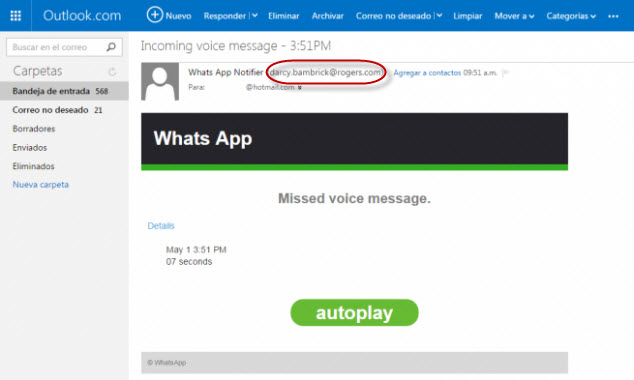
If there was any doubt, you are not downloading a voice message, instead you are downloading malware.
That’s why, so you don’t fall for this kind of scams, you should take this into account:
- WhatsApp doesn’t send notifications for pending messages.
- If we look closely to the sender’s address: [email protected], we will see it doesn’t have to do anything with WhatsApp.
- The application won’t never refer to itself as Whats App.
The best thing you can do is just ignore these emails and install in your computer the best antivirus, which will block the malware in your computer.
The post Virus in the name of WhatsApp! Now via email! appeared first on MediaCenter Panda Security.