Tag Archives: Mobile Security

your smartphone is no longer the “smartest” option

android2

Synching your smartphone and computer might increase your chances of being hacked

A classic piece of advice that helps keep email, social networks and other online services safe is by enabling something called two-step verification. This security mechanism makes it more difficult for a cyber-delinquent to access your account through two-step verification. When a different device from the “usual” one (different computer or smartphone) tries to access your account, they must enter a code that is sent to the mobile phone associated with the account in order to continue.

If a cyber-criminal is trying to get into your account, who in theory cannot access your smartphone, this two-step process makes it very complicated for him. Or so we thought.  A group of researchers from the Free University of Amsterdam showed us that this type of protection is becoming more and more flawed the better we communicate with each other using our different devices.  This means that the more computers, smartphones or devices that have access to your account and passwords, the higher your chances are of getting an account hijacked by a cyber-criminal.

The two-step verification is one of
the most popular security measures

In other words, because we are able to synchronize applications between two devices, like your computer and smartphone (and what you do in one can affect the other), the effectiveness of two-step verification decreases.

 

Computer android


Android and iOS, equally vulnerable

The study’s authors have showed us the possibility of installing apps offered through Android onto your smartphone remotely through the computer (accessing Google Play with the browser) or installing remotely through iTunes.

In both of the above cases, following slightly different strategies, they have managed to intercept the verification code that websites send to your smartphone through SMS when there is a two-step verification, so it is very possible that a hypothetical cyber-criminal could access your Facebook, Google or Amazon accounts—to cite just a few.

The verification code that websites
send you through SMS can be intercepted


Don’t stop doing what you’ve been doing

Just because you have found out about this vulnerability does not mean it is no longer advisable to activate this safety measure in all the services that offer it.  There will always be a few obstacles that you can put between the attackers and your personal information.

The post your smartphone is no longer the “smartest” option appeared first on Panda Security Mediacenter.

Viber adds End-to-End Encryption and PIN protected Hidden Chats features

In Brief
Viber, the popular mobile messaging app announced Tuesday that it has added full end-to-end encryption for video, voice and text message services for its millions of users.

Here, the end-to-end encryption means only you and the person you are communicating with can read the content, and nobody in between, not even the company and if court orders company to provide user data, they

Uncovering the WhatsApp encryption


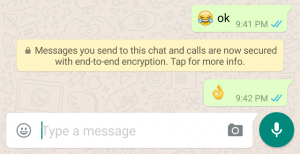
mobileAvid WhatsApp-ers were the first ones to notice the new security changes the company put into action last week.  Now, your conversations on WhatsApp are safer through end-to-end encryption.  With this new security system, your messages safely travel from mobile to mobile, from your hands to the person on the other side of the message.

The notification would appear in a message like this:

FOTO 1 (ENG)

Say you are at your favorite coffee shop, sipping on a hot drink and you decide to connect to the Wi-Fi, but instead connect to a false Wi-Fi network (hackers set-up fake networks to gain access your information like e-mail, passwords and other information.)

In theory, cyber-criminals could steal your messages but it’d be pretty pointless without a decryption key. Breaking public keys, which are different for each message, would be both time-consuming and extremely complicated. Instead of juicy information, the third-party would see senseless characters in the place of the message.

The security measure reassures us that the content coming into our mobiles (i.e. text, photos, videos, files, and voice recordings) are completely private.iStock_000017519004_Large

But end-to-end encryption is not the solution to everything.

However, it is a giant step for the safety and quality of our chats.

Experts say there several factors to consider:

  • To make the system work, all participants must have updated their WhatsApp. If one of the members of a group still using an older version, the chats remain “unsafe”.
  • This security measure ensures that messages travel from one mobile to another securely, but they remain vulnerable to attack if they are stored on the devices. Not all “smartphones” are the smartest: some don’t encrypt their content but most modern ones do by default or at least allow it as an option (ex. the latest iPhone or Lollipop by Android).
  • Sometimes the juiciest of information is not shown in our messages, but in something called metadata, which is “data that provides information for other data” like who called who, when they called, for how long, etc.  In the end, if your sensitive information ends up in the hands of a country’s secret service or a judge, WhatsApp’s parent company, Facebook, would be responsible for it.  Do you trust them?


You should update your WhatsApp and enjoy the insurance of end-to-end encryption, but don’t solely depend on it for your full-protection and privacy. Although it’s a definite upgrade in mobile security, it’s still an insufficient form of protection.


The post Uncovering the WhatsApp encryption appeared first on Panda Security Mediacenter.

When a Metaphor means more than an implied comparison

You are going to want to ​think twice before clicking on that LOLCat. A new proof of concept security vulnerability, dubbed Metaphor, could affect hundreds of millions of Android users.

NorthBit, an Israeli based software research company, has created an exploit in the same software library that the Stagefright vulnerability took advantage of. You may remember that last July 950 million Android devices were put at risk by Stagefright, in which it used an MMS (multimedia messaging service) software weakness that put Android customers at the mercy of hackers who could take complete control of their phone.

Metaphor, was demonstrated by NorthBit by sending an email message with a link to cat photos. The victim clicks the link to view the adorable and hilarious cat photos but unknowingly, in the background the malware is delivered.  This exploit is a hole that allows a hacker to gain access.  This access could be used to deliver malware that could potentially take control of key operations of your phone.  In this particular example, the exploit is not instant – the user does need to engage with the content on this page for the exploit to be successful.

NorthBit’s research paper detailing the findings is not malicious, it’s for demonstrative purposes only. However, there is enough information provided that a professional hacker could use it to create their own fully working exploit and as you see in the video, to take control of some of the operations of your phone.

Since the original vulnerability was disclosed last year, Google released a number of patches that resolved Stagefright; but as we can see with this new disclosure, the media software still offers hackers a route to exploit devices.

The Metaphor exploit affects devices that are using Android Operating Systems: 5.1, 5.0, 4.0, down to 2.2 with some devices more vulnerable than others.

If you have an Android phone, what should you keep in mind?

  • Be cautious of clicking on links from senders you do not recognize: In the example with the cat photos, the victim is opening the MMS it based on emotion around the content. If you don’t recognize it then don’t open it (no matter how cute or grumpy the cat is)!

And remember, the content could be targeted to something that you might be interested in, for me this would be motorbikes.

  • Always download and accept the updates to the operating system: While many phones do this by default some older versions do not. Keep in mind that patching your phone today may not fix this issue but it could fix other issues, so it’s always a good idea to run the updates.
  • Ask Questions: If you are unsure whether there are updates or how to download them a simple internet search should help. If you’re still unsure then contact your carrier.


Follow AVG on Twitter @AVGFree

Follow me on Twitter @TonyatAVG


New feature in Avast Wi-Fi Finder: Offline Mode

Dollarphotoclub_91770694.jpg

Avast Wi-Fi Finder’s Offline Mode helps you find hotspots without an Internet connection.

It’s never a pleasant experience to find yourself roaming around a foreign city unable to find Wi-Fi hotspots, especially when you’re unable to use your own data plan to begin with. In these cases, wouldn’t it be great to have a tool that could simply work its magic and locate nearby hotspots?

Metaphor exploit: A follow-up to Stagefright that puts millions of Android devices at risk

Android-StageFright-Exploit

(Image via Enterprise Security Today)

Last summer, it was nearly impossible to avoid the news about the Stagefright vulnerability. At the time of its unveiling, security researchers believed Stagefright to be the worst Android vulnerability to be discovered. Nearly a year after its discovery, Metaphor is the most recent embodiment of the vulnerability to rear its ugly head.

Social engineering, a popular technique used to lure victims into becoming infected with malware, can also play a key role in encouraging victims to open web pages that allow the exploit to take place and for Metaphor to be fully effective.