Tag Archives: Mobile Security

The safe mobile company, a fantasy?

mobile

Mobile companies are now a reality. Nobody doubts that accessing corporate applications through smartphones and / or tablets is not only convenient but also necessary, for increasing productivity to levels which were thought impossible until a few years ago. In addition, the demand by workers, employees and companies’ suppliers for access to the organizations’ mobile satellite systems, applications and certain data, is imperative. The problem, however, is that the boom in mobility has also brought certain risks which many companies are not yet aware of.

A company is not secure anymore if it only limits itself to protecting the traditional organizational perimeter.  It is no longer enough to have firewalls, threat management solutions, antispam and content filtering. Now it is necessary to protect access and not only from a PC. So it is essential to have a real strategy and best practice regarding the use of mobility in the company:  a strategy that in addition to ensuring the safety of the devices also incorporates other elements such as the protection of data and applications with which the mobile users interact. In addition, this strategy must be compatible with another requirement: that it does not interfere, in any way with the agility and entrepreneurial dynamism which the use of mobile devices provides.

Secure devices and encrypted communications

One of the first requirements to be included in any mobile security strategy is to protect mobile devices with antimalware security software. Yes, malicious software attacks not only the operating systems of traditional desktops or laptops. Recently especially Android, Google’s mobile operating system which is the most widespread in the market, and iOS, the Apple platform, have become a focus for cybercriminals. Even so, and despite the evangelization of the leading manufacturers of security software, there are still many companies (as also occurs with users on a personal level) who have not protected their mobile devices with the high risk that this entails. It is an indispensible task to have antivirus software in place and, of course, updated.

Another important aspect, in addition to encrypting communications on mobile devices so that no data can be intercepted, is to use a user authentication device that goes beyond the traditional password. In fact, many mobile devices already allow by default identification by fingerprint and there are even some prototypes which will bring recognition through the iris as standard practice. There is no need, however, to use biometrics.  The use of passwords can also be combined with other means of identification, for example involving the use of email or text messages to the mobile itself, other security tokens, etc. In this respect, organizations should train employees to use the correct identification tools and to know how to act in case of loss or theft of the device.

Beware of third-party software

It should also establish policies that restrict employees from using third party software that may cause risks for companies. There are many professionals who, when installing an app of dubious origin or which, although it seems authentic is in fact an imitation created by cybercriminals, see how their device is attacked and consequently the security of data handled by their organization seriously compromised. Following this line, the consultants, Gartner, advise that jailbreaks on iOS devices and rooting on Android phones should be avoided, these being two practices which give the user administrator privileges with the risks which this involves for companies.

Interestingly, the experts at Gartner claimed in a public study in 2014 that most of the security breaches which will occur on mobile devices in 2017 (up 75%) will be the result of a bad configuration of applications built for these gadgets. An example of this is the misuse of personal cloud services through apps that users of smartphones and tablets have installed. The best defense, they argue, is that the company should install a fixed configuration for this type of device under the umbrella of a management policy for mobile equipment which must be complemented with other tools for data protection.

The consultants also recommend that companies should specify which platforms and operating systems should be used for their mobile devices by their employees and that versions which cannot be updated or supported should be avoided, and that users should be required to register or be certified when entering applications such as virtual corporate email, VPNs, wireless and other shared applications. What is essential, they stress, is that the security team know what types of systems and applications its employees need to access and for what purpose, in order to establish the appropriate controls. Also, mobile devices must be configured to prevent wireless networks that are not safe and users should be recommended to disable the Bluetooth option to avoid unexpected scares.

Controls and audits are highly recommended

Finally, it is also recommended that companies undergo regular audits and controls (at least once a year) to evaluate the quality and robustness of their mobile security policy. It should not be forgotten that security incidents not only entail negative economic repercussions and loss of core assets such as the company’s own data or that relating to customers (or citizens, in the case of government departments) but also damage reputation and image. And to remedy this is just to be more aware of the new realities of today’s organizations, now completely mobile.

The post The safe mobile company, a fantasy? appeared first on MediaCenter Panda Security.

Smart Lock: Enjoy your unlocked phone while you are in a ‘trusted’ place

smartlock android

We already know the importance of choosing well our passwords. In addition, if we want to do anything on our cellphone we have to follow this steps: enter our PIN, our code or pattern we have set to unlock the screen… something we are continuously doing as the phone locks itself every two seconds to save battery.

As far as security is concerned, laziness makes for a poor counselor, but sometimes all these boring actions are too much. We do not face the same risks at home watching TV than when we are walking on the street, at a bar or at any other place.

That is why, Google’s new initiative seems logical: Android versions 5+ (Lollipop) allows you to distinguish between what you consider safe locations and which pose a risk.

But, the operating system does not detect the danger itself (we haven’t reached that point yet), you have to indicate it. Something similar to what happens when your computer connects to a new wireless network and Windows asks you if it is a public access point, your work or your home. The difference is that when using Android, there are no warning pops-up reminding you to change the configuration.

Once the place is specify, the phone will recognize via GPS if you are actually there or not, and will activate or deactivate the feature that asks you to enter your PIN to unlock the screen.

If you pinpoint your home as a safe place, for your convenience this option will be disabled whenever you are inside, so you won’t have to continuously enter the code. On the contrary, as soon as you leave the perimeter, it will automatically activate and restore the protection standards.

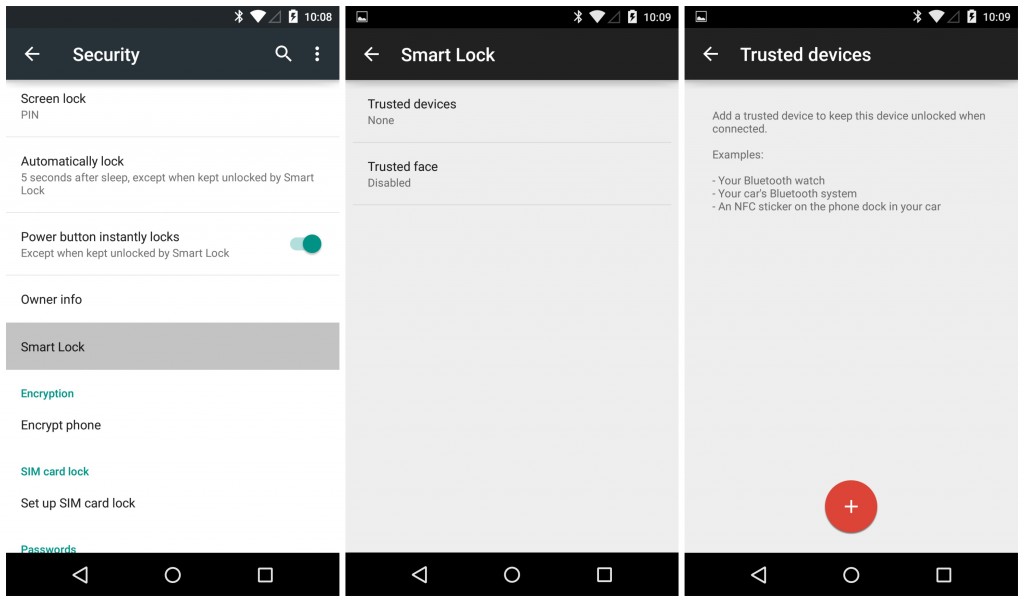
If you want to start using the system, go to “Settings”, then to “Security”. Once deployed the tab, go to “Trusted agents” and there you tap on “Smart Lock”, to enable it.

Smartlock mobile

Then you just have to select your trusted locations and add them to “Trusted places”. To add a place, the phone asks for an address or location to find it in Google Maps.

Each time you want to change these options, you will have to enter the password, PIN or the pattern you chose to unlock the device, this is a security measure which prevents someone unauthorized from making changes.

Despite that the option is useful and that it saves us from wasting time locking and unlocking our phone, setting it up has some implications. The most important is that the screen lock not only disappears while you are in a trusted place, but also for 80 meters around. ‘Google Lock’ can be an advantage, if you use it wisely.

The post Smart Lock: Enjoy your unlocked phone while you are in a ‘trusted’ place appeared first on MediaCenter Panda Security.
How to find your phone – 3 alternatives to the rescue

how to find phone

Have you ever wonder if there is a way of locating your phone in case you lose it or it gets stolen? Well, relax, because the answer is yes! There is a way you can find your phone, how? Here we explain to you three ways of doing it! Keep reading. You have 3 ways of doing it.

How to find your phone

With Panda Mobile Security

Thanks to the mobile and tablet location system in our antivirus for Android, you can recover your device if you lose it!

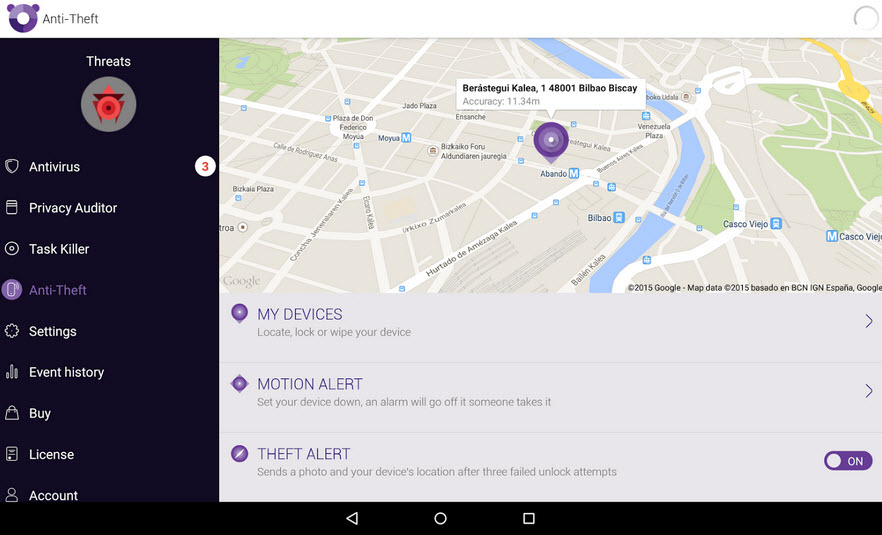
Panda Mobile Security tracks and displays on a map your lost or stolen tablet or phone so you can find it quickly. You will also be able to block the device and erase all your personal information remotely to prevent others from accessing your most valuable information.

find phone

In addition, our service has an antitheft application that protects the user and ensures the phone’s safety. Panda Mobile Security makes a picture of the user and sends it via email together with the device’s location every time the user fails to enter the password.

If the device runs out of battery, Panda Mobile Security will geo-locate it and save this information, so it can be used later if necessary.

You can also use Google…

To find your Android phone or tablet with Google, you must do it through the site in English, since this feature it is only available in this language.

Once you are in the web site you will only need these three magic words: ‘Find my phone’. This Google search will result in a map, which will display your phone’s location with a precision that may vary a few meters, as the service informs.

In addition, if it is nearby but you still can’t find it, Google can make it ring, even if the device is in silence.

And if you have an Apple device: Find my iPhone

If you are an Apple user and you have lost any of your devices, don’t worry! You can find them with iCloud. Don’t know how, just follow this few steps:

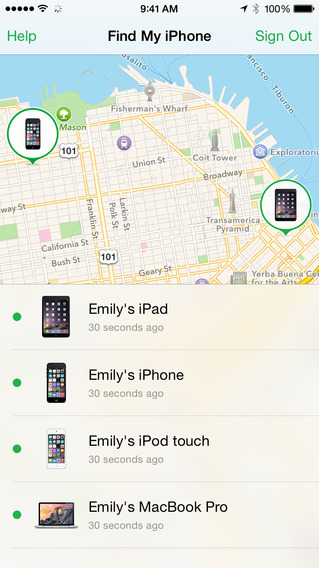
  • Access your iCloud account or use the Find my iPhone app in another device to locate your iPhone, iPad, iPod touch or Mac on a map.
    find my iphone
  • Using Lost Mode you can track your phone, see where it is and where it has been.
  • Once you locate it, you can lock it and send a message with your contact number. So, whoever finds it can call you but can’t access the rest of your information.
  • If you think your device has fallen into the wrong hands, you can remotely erase it and restore your iPhone, iPad, iPod touch or Mac to its original settings.

And last but not least…

Phone locators

When we wrote this article we found lots of webs that offer a series of services which they call ‘phone locators’. But what they actually do is take advantage of those users who have lost their phone or tablet.

So, if we use these web pages, in addition to not finding our cell phone, we will waste our time and money. That is why, we recommend you not to trust any web if it asks you for any kind of financial compensation or personal information!

The best thing you can do to find your cell phone is to use official services like iCloud, Google or the feature included in our antivirus for Android.

The post How to find your phone – 3 alternatives to the rescue appeared first on MediaCenter Panda Security.
Address-Spoofing Bug Haunts Android Stock Browser

There’s an easily exploitable vulnerability in the Android stock browser that enables an attacker to spoof the URL in the address bar and force a victim to visit a malicious site while believing he is visiting a benign one. Security researcher Rafay Baloch discovered the vulnerability and developed the technique for exploiting it. The problem […]

Windows 10: Use bug-free Android Apps with it!

microsoft smartphone

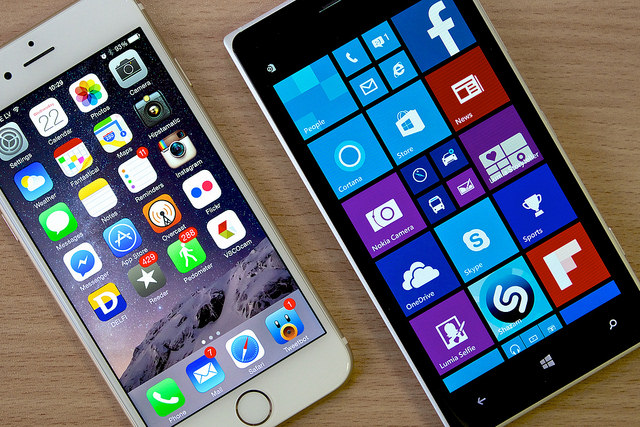
When Satya Nadella became Microsoft’s CEO, one year ago, he suggested that things were going to change and mobility will be his main focus. Although the company has been trying it for some time now (i.e. when they bought Nokia for over 7.000 million dollars), they have never been able to stand out in the smartphone world.

Their lack of success may be in part because of their operation system uniqueness. While Windows has always been the most popular among desktop computers and laptops, they haven’t been able to win over the smartphone users. Android and iOS have always been one step ahead.

If we look into the applications market we see how the difference increases, the first two platforms are very attractive for a great number of developers, who rarely or never remember Microsoft’s virtual store. However, Microsoft has changed its tactic and now work under the maxim “if you can’t beat them, join them”, adding “and improve their product as much as you can”.

During the recent conference BUILD 2015, the company announced that applications for Android and iOS may be used in Windows tenth operational system, which will be launched this summer. The projects Islandwood (for Apple’s operational system) and Astoria (for Android) allow this translation, providing the necessary means.

Developers will have at their disposal a “universal platform”. This tool includes a complete kit to port the code written in Java for Android apps and in Apple’s language, Objective C.

windows iphone

But Microsoft wants to go one step further, they are also committed to safety. Not only will you be able to use the applications that were before just available in other phones, but also they assure they won’t fill up your device with malware.

Because if Google Play is full of all kinds and origins of tools, it is also full of virus and vulnerabilities that threaten your data. We have explained in other posts the many malicious apps in the platform and about security holes in Apple’s operating system.

Microsoft knows well Apple’s disadvantages and doesn’t want them in Windows 10. That’s why, together with the two previous mentioned projects, they are offering the possibility of eliminating the bugs from the apps before they are in Window’s operating system.

With this same ‘universal’ tool developers can analyze their apps for malware and then get rid of it. But the tests don’t end here, once the programs are ready they will have to go through a review team that will give them a final approval before publishing it in the store.

Within this group there are security experts that will analyze again the tools and will exclude the newly arrived that hide some kind of malicious software in their code.

It seems that Microsoft is stepping up in security matters, though we will have to wait some months until we can prove if their initiative stand out over the efforts of its competitors. If they fail to keep their promises, Windows platform will become a den of bugs fed from several fronts.

The post Windows 10: Use bug-free Android Apps with it! appeared first on MediaCenter Panda Security.