Tag Archives: Tips

Everything that could go wrong when you send an unencrypted email (and how to avoid it!)

key, encrypt

Everything that you send in an email, from the attachments to the text, goes on a dangerous journey every time that you click send. Its path is filled with traps that cybercriminals can use to steal your information.

One of the tips that you should follow to protect the content of your emails is to encrypt them. This way, even if someone is able to access your emails, they won’t be able to read the content.

Although it might surprise you, the journey that your emails take isn’t as straightforward as you might think. It isn’t a simple matter of going from A to B, but rather the emails pass through different routes which put them at risk of attack from cybercriminals:

  • Step 1: The email that you send from your device to your company’s server. Larger companies generally make sure that this is a safe route and look after it. If you see a green icon or a lock icon in the address bar then you can relax  it’s secure. The journey, however, continues…

email, protect

  • Step 2: Next you email needs to pass through different serves until it reaches its destination. This part of the journey is the most dangerous as the email can be intercepted at any time, especially if the server used by the receiver isn’t protected correctly. The worst thing about this stage is that users are completely blind – there is no way of knowing how secure the connection is between the two servers. The only way to be sure is to encrypt your messages.


  • Step 3: Not only is it going between two servers, but the email still has to travel to the computer or the mobile device. This stage can also be complicated and, furthermore, once it arrives at the other device it can still be under threat. You have to remember that computers are always at risk if the correct security procedures aren’t followed.

With so many different ways to steal information from emails, it is vital to protect the content and attachments that you send.

padlock security

There are many ways to encrypt your emails and some messaging services offer it as an option. There are other options to ensure increased protection for your emails, such as the one offered by Panda, which encrypt your attachments to make sure that the content is secure. It isn’t necessary to be an expert to protect your online security, but it is better to behave like one.


The post Everything that could go wrong when you send an unencrypted email (and how to avoid it!) appeared first on MediaCenter Panda Security.

How can I stop people from connecting to my Wi-Fi?

wifi

Paying for a fast and reliable Wi-Fi connection at home only to find out that your neighbor is stealing the signal from you is pretty annoying. Not only is it frustrating, but there is also the legal aspect to think of – everything that is viewed and downloaded by the Wi-Fi connection is your responsibility.

In the majority of cases it isn’t enough to protect your network by using the long and complicated password that comes with the router. Nor is it enough if you change it and create an even more difficult one.

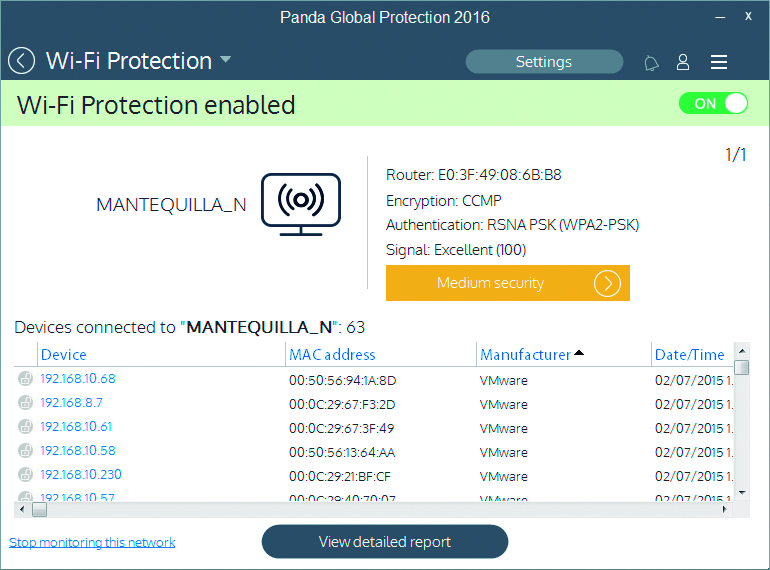
If you want to know who is connecting to your Wi-Fi and how to stop your connection from being open to the public, the best thing you can do is use the Wi-Fi protector and monitor that you can find in the new line of 2016 Panda product.

protect wifi

This feature allows you to see all of the devices that are connected to your network and lets you block an intruder if you detect one. This will stop them from being able to reconnect again.

Furthermore, the monitor will provide you with the following information:

  • Wi-Fi networks that you are connected to: network name, Mac router address, encryption, signal strength.
  • Device information: name or Mac, manufacturer, date/time of connection, etc. It allows you to give the devices nicknames so as to recognize them easily.
  • Information on the saturation of the default channel: by changing to the channel recommended by Panda, you can increase your connection speed.
  • History of connections made with different devices. This lets you review who has connected to the network and identify intruders.

So, are you ready to protect your Wi-Fi connection?

DOWNLOAD ANTIVIRUS

The post How can I stop people from connecting to my Wi-Fi? appeared first on MediaCenter Panda Security.

10 ways to ensure your security while shopping online

That online shopping increases day by day is not news. If you are an average user, you are probably already aware of the normal precautions and have taken them yourself. Ease of use and convenience when browsing for different products or searching for the best prices has improved greatly. However, at the same time, online threats and frauds have also increased exponentially. Therefore, from time to time, all of us must review our behavior and think again if our habits are secure.

Follow a few simple tips to stay safe while shopping online

Follow a few simple tips to stay safe while shopping online

Best practices while online shopping

1. Use your own computer or mobile device when shopping. It seems obvious, but you cannot trust a computer that does not belong to you, even your best friend’s computer. It might not have appropriate protection and it could already be compromised by malware. So, always use your own device, install an anti-malware solution and before you start doing anything that involves your money, scan your network to discover if it is safe.

2. Use your own Wi-Fi connection with a strong password. You must use a non-standard password for your network and router. Router vulnerabilities and weak passwords allow cybercrooks easy access to your home network. This sounds complicated, but it’s really not. Avast Home Network Security can help you by guiding you to the manufacturer’s website. The blog post will help you understand what it does and why it’s important.

3. If you cannot avoid using public/open Wi-Fi, use a VPN to encrypt your communications, or it could be eavesdropped on and your financial data and credit card credentials could be stolen. Avast SecureLine VPN offers strong encryption for Windows, Mac, and Android devices.

4. Choose your online store wisely. Focus on the best-known ones, where you can read other consumers’ opinions and reviews. We prefer the official site, especially if you are buying apps, so you can avoid fakes or other software bundled together with what you want. Nevertheless, this is not enough. Rogue apps have been know to slip into official stores like Google Play or Windows Store. You really need to have a security app installed and updated in your device: why don’t you do it right now with free Avast Mobile Security?

5. Look for a safe site. Nowadays, all the safe sites use HTTPS protocol (you know, that little padlock in the address bar of our browser). Avast products also scan your HTTPS traffic and prevents many threats. Do not give personal information: common sense is a good security measure, why would you need to inform your birthday to the online store? Moreover, while you are browsing, take your time to check refund policies, privacy policy (what do they do with your personal data), and product guarantees.

6. Search for the best price. You may find the free tool Avast SafePrice (available as a browser plugin called Avast Online Security) useful in helping you find the best offers online in trusted stores.

7. Do not use the same password for all your accounts. You must be aware that if you have an account or have done business with any company that falls victim to a breach, hackers sell your passwords to other cybercrooks. Use different passwords in different sites and a password service.

8. Keep your own computer up-to-date. A lot of security issues start when hackers exploit vulnerabilities in the software installed in your computer. The more popular software they are, the better for hackers. Adobe, Oracle, and Microsoft are only recent examples.

9. Keep a paper trail. Print or save your transaction records; it will be easier for any post sale issue. While you have a trail, you can check your credit card statement to make sure transactions match and if there were unauthorized charges.

10. Prefer safe payment options like your credit card or PayPal. Do not send money directly to the store or vendor. Credit cards have built-in protections and you can receive a refund in case of fraud.

Follow Avast on Facebook, Twitter, YouTube, and Google+ where we keep you updated on cybersecurity news every day.

5 tips for protecting your YouTube account

youtube

Videos, videos, and more videos! The millions of YouTube users are probably unaware of the dangers when surfing the platform looking for the next viral hit. However, this Google service is in the eye-line of many cybercriminals.

Through phishing attacks, they try to obtain passwords to access information such as bank data associated with your YouTube channel. The problem may be even greater if the account you use is owned by the company for which you work.

So, in the event that you have a YouTube channel which you use frequently, take note. Carelessness can end up being very expensive taking some precautions will serve you in the long run.

5 tips to protect your YouTube account

1. Be careful with shortened links

To begin with, be wary of any shortened link that reaches you, no matter where it comes from. While most are safe, some hide nasty surprises, like a malware that is automatically downloaded to your computer to steal information. Before clicking, make sure you know where the link will lead you to.

password

2. Use secure passwords

A key aspect in preventing a phishing attack is to have a strong password. It should include a mix of uppercase, lowercase, numbers, symbols and the maximum number of possible. In addition, it is recommended to change your password every three months if you can. This way you’ll be able to ensure that the cybercriminals are stopped in their tracks.

3. Change your  password frequently

As if it needs to be repeated, but be cautious with your password – do not use the same one you use on other platforms and don’t have it written down. We must tread warily in the digital world, but the physical world can be just as dangerous.

4. Don’t give your information away via email

You shouldn’t trust emails that you receive that request the password with which you access your YouTube account. In fact, if it comes from Google itself, be extra wary – an attack uncovered a few months ago shows that a malicious URL, in the guise of a company link, could make users enter their information without realizing it.

5. Fill out the recovery form on Google

It is important that you fill out the recovery form on your Google account. Although you may not like the idea of ​​giving your phone number to the company, it is a good way to avoid bigger issues if you discover that someone tries to enter your account – you’re the only one who has access to the recovery code on your phone.

In short, common sense and some thoughtfulness when creating your password can save you some massive headaches later. Just check carefully where you enter your personal details and this will stop cybercriminals from getting their hands on it.

The post 5 tips for protecting your YouTube account appeared first on MediaCenter Panda Security.

Six quick tips for safer and happier gaming

Gaming is not immune to malware, phishing, scams, viruses, trolling, or abuse. Whether you’re new to playing games, a casual gamer or a hard-core veteran, there are always new threats emerging from the murky depths of the digital world that can lay waste to your gaming fun.

These 6 easy tips can give you a head-start to having a safer and more secure gaming experience.

  1. Buy from reputable and trusted stores to avoid malware
    If you’re looking at purchasing anything online, you should try and purchase from reputable, trusted and well established stores. This will greatly reduce the risk of malware, virus and ransomware infections.If you’re using Android devices you should stick to Google play and avoid sideloading. For iOS devices, use the App store. PC and Mac users can use these trusted online stores or platforms: Steam, Uplay, MacGameStore, com, GreenmanGaming, Origin just to name a few. Console gamers can of course buy new or used games from bricks and mortar stores, and digital copies can be bought via their respective online store – Xbox has the Xbox marketplace and the Playstation offers games via the Playstation Network.When in doubt about the credibility of online stores, do some research. Look for online reviews or ask around in forums before making a decision to buy.


  1. Secure your all your accounts
    If you’re using online stores, gaming networks or app stores that contain your personal and financial details, you’ll want to do the following:

    • Keep your login details private and secured with a strong password.
    • Always require a password to login to an account, and remember to logout when you’re finished.
    • Disable in-game or in-app purchases, or require a password to enable purchases.
    • For an added layer of security, you can use prepaid cards or vouchers instead of providing your credit or debit card details.
    • If in doubt about the security of your data being stored by an online service provider, then remove it.


  1. Be careful using emulators
    A game emulator is a software program that emulates a video game or game system. Some of the software used to load games can contain malicious code. Try to avoid using emulators if possible unless you know what you’re doing and are aware of the risks.
    If you desperately want to play a retro game, then you can always visit the Internet Archive which offers a free web based library of video games that were made in the 70’s through to the 90’s – https://archive.org/details/internetarcade.


  1. Don’t feed the trolls
    If you encounter abuse or harassment while playing network games or Massively Multiplayer Online Games (MMO/MMOG), don’t react or engage with the abuser. Instead, ignore and support anyone who is being abused and use the game or gaming network’s report function to report abuse to the developer, support team or moderator. If possible document any incidents so you can provide credible proof.


  1. Keep your personal details private
    Beware of revealing too much. When playing games online with others, try and keep your personal details as private as possible – other players don’t need to know your address, telephone number, email, age, gender etc. – this will help avoid abuse or harassment in the real world and also reduce the risk of identity theft.


  1. Install an antivirus solution and keep software up-to-date
    You should always try and keep all your devices up-to-date. Not just the operating system but all your software too, including games. Developers or manufacturers regularly find vulnerabilities which they patch with software updates.If you’re playing on a PC, Mac or mobile you should consider installing an effective antivirus solution just in case. PC users you can install AVG AntiVirus Free to help protect against any nasties that might want to infect your system, it also has a handy game mode that won’t slow down your PC while you’re playing games. Mac users can download AVG AntiVirus for Mac for free, and if you’re an Android user you can download AVG AntiVirus for Android via the Google Play Store.

If you have any other tips you’d like to share, please let us know via Facebook or Twitter Enjoy your gaming and stay safe out there.

Tapjacking – when the danger camouflages itself on Google Play

tapjacking, android

After many attempts, we have finally gotten it into our heads that it is essential that we read the small print before we install any application on our devices. If it mentions anything that strays far from what the app is about (for example, a flashlight that tries to use your GPS) it’s best to ignore it unless you are completely confident in the product.

Just because an application requires a lot of permission to be installed doesn’t mean that there is anything to be concerned about but it should still serve as a caution. Luckily, the majority of people are aware of this and look at the small print in detail, leaving cyber attackers to look for other ways to trap their victims.

One of their more dangerous techniques is known as tapjacking – a weakness in the Android operating system that allows for malicious activity to be hidden under the guise of a regular app. This technique lets malware, which could potentially steal credit card details, disguise itself as an inoffensive videogame application.

danger, mobile, android

In February of this year Google released its Android Security Acknowledgements and included on this list were two investigators – Stephan Huber and Siegfried Rasthofer. They were thanked for their help in detecting the possible security breach and for helping the company to uncover how these attacks were being carried out.

How tapjacking Works

It works in a surprisingly simple way – you download an application and open it, which triggers the installation of a second, this time malicious, application. Then, when you press a button on the seemingly innocent application, you are actually clicking a button on the malicious application that is hidden within it. So, as its name suggests, the trap is in the tap.

So, imagine this scenario. You have downloaded an application and on the main screen there is a button that says “Start Game”. You click it to begin but, unbeknownst to you, this has triggered the downloading of the dangerous malware. On the next screen you continue clicking away, oblivious to the dangers, and without realizing you have accepted the terms and conditions of the dangerous malware that has hidden itself on your cellphone.

In the video below we have a clear example of how this form of attack works – the user clicks on “Start Now” to begin downloading images of adorable kittens and, without realizing, grants permission to the attacker to take screenshots on the device.

VIDEO

How the attack works is a lot easier than it might seem. This is due to the type of pop-up notifications that were developed by the programmers of Android applications. There were developed to give alerts to users – such as the one that appears if the battery is running low – but if they appear in full screen and with a button that doesn’t react to your clicks, then they are in fact a dangerous tool used by cybercriminals.

Apart from installing the malware and tricking you into accepting the terms of installation, the attacker can use tapjacking to steal your passwords or to even carry out actions using your bank details.

They key to protecting yourself from this attack is, yet again, in the permission stage. Even though these dangerous applications don’t request a lot of information before being installed, there is one thing which they all have in common – they will ask for permission to show system alert windows, something which isn’t common in other types of applications. If this happens to you, be wary. Check out reviews and opinions from other users on Google Play and ask yourself whether you trust in the application’s creator.

A good antivirus could also come to your rescue in this situation. Just because you can’t see the danger doesn’t mean it’s not there. Fortunately, our security tools are there to shine the light on it.


The post Tapjacking – when the danger camouflages itself on Google Play appeared first on MediaCenter Panda Security.

10 tips to stop cybercriminals from ruining your vacation

pc

Now that we’re entering into that time of year when planning your summer getaway is high on the agenda, there are always some things we can do in order to divert burglars’ attention from our vacant houses – don’t leave all the curtains and blinds closed over; ask a neighbor to collect your mail from the mailbox; be sure to leave a light on at night, etc.

However, these traditional forms of protection are now no longer enough. Our lives revolve around technology more than ever now and this also poses a risk during the vacation period, but don’t fear – these are some measures you can take to stop cybercriminals from ruining your summer.

10 tips to stop cybercriminals from ruining your vacation

1 – Don’t shout it from the rooftops

First of all, don’t post on social media about your upcoming vacation. If you really can’t avoid it, then don’t reveal too many details about your plans. This information could be useful for someone with a sinister motive and could leave your home and valuables exposed.

Another thing, make sure you deactivate your GPS. This way you don’t have to worry about it giving away clues of your whereabouts which might avert criminals to the fact that you’re out of town.

2 – Make a copy of everything

If you have decided that you’re going to take your laptop or tablet (or even just your smartphone, from which you can’t be apart!), don’t forget to make a security copy of everything on it and leave that at home.

This isn’t just to protect you against theft, but rather because you never know if you might lose it or have an unfortunate accident. It pays to think ahead!

3 – Protect yourself

Antivirus, firewall… make sure that all of your security measures are fully functioning before you head off on your travels. In the event that you need to connect to public WIFI, you can rest assured knowing that your device is secure.

4 – Avoid public connections

Despite having confirmed that your device is in good health, try to avoid using public WIFI as much as possible. By connecting to public WIFI you run of the risk of any cybercriminal accessing your personal information.

wifi airport

5 – Just stick to your own computer

Unless it is an emergency, try to avoid using computers that aren’t your own. This includes those that are available in your hotel or internet cafes because any information that you enter into them could be compromised. This could put your privacy and security at risk.

6 – Change your passwords

If you have no other choice but to use a public computer, do so with caution. Only use secure webpages, try to use it through a Virtual private Network (VPN) so that the information is coded, and change your passwords as soon as you have finished.

password

7 – Be wary of offers

Summer is a prime time for fraudulent offers. You should err on the side of caution if you see an offer online or receive one to your email account. Check out other reviews on it, check that the webpage is safe, and that all of the facts are real so as to avoid being duped.

8 – Deactivation of your smartphone

Prepare your cellphone for the worst – if you lose it or it is stolen, you’ll be glad that you activated one of the applications that allows you to locate your phone or deactivate it remotely. Android devices come with this feature built in thanks to the Android Device Manager and also you can usea our antivirus for Android.

find phone

9 – Buy with caution

When completing a purchase online, such as hotel or flight reservation, keep an eye on your personal details. Electronic payment systems and credit cards come with security measures which mean you can shop safely online. However, make sure that unauthorized purchases don’t appear in your account. If you spot anything out of the ordinary, change your passwords and contact your bank.

10 – Be careful with USBs

If, during your vacation, someone shares something with you via a USB on your computer, be sure to scan it with an antivirus first. Not only are there hidden dangers on the internet, but also on USBs, which can hide a nasty surprise.

The post 10 tips to stop cybercriminals from ruining your vacation appeared first on MediaCenter Panda Security.

If you like videogames, check out these safety steps!  

game boy

The good times are rolling for videogame companies as the sector has witnessed sustained growth in the last few years and, luckily, 2015 doesn’t look like it’s about to break this trend. According to recent estimates by Newzoo, an industry consultant, businesses in the sector are expecting global gaming revenues of $91.5 billion dollars – an increase of 9.4% compared to the previous year.

This rapid growth is in large part thanks to the boom in mobile and tablet gaming, which have registered revenues of $20.6 billion and $9.4 billion, respectively. They have also seen the largest rise increase compared to the previous year – 21% and 27%, respectively – although they still trail video consoles ($25 billion) and computers ($27 billion), which continue to lead the sector.

Despite this all being great news for video gamers, we still have to keep in mind the increasing danger posed by cyber-criminals. In the last few months we have seen some not-so-pleasant attacks which have been of a worrying frequency.

Last summer we saw how a wave of Distribution Denial of Service (DDoS) attacks infiltrated, to name a few, popular platforms such as the Playstation Network, Xbox live, Twitch and Origin. The attacks, which denied users access to online gaming, were repeated again over the festive season. Groups such as Lizard Squad and Anonymous claimed responsibility for accessing, and leaking, as many as 13,000 passwords and credit card details from these platforms.

In January of this year, various users of Origin (Electronic Arts) complained that the service – including the online store – was carrying out charges to their bank accounts for purchases that the users hadn’t authorized. Twitch, Amazon’s well known streaming page, asked its users to change their passwords at the end of March following an attack that could have left log-in details exposed.

videogames

With this in mind, the best thing that any gamer can do is to take precautions when playing online. By following some simple steps you can avoid trouble if your favorite gaming platforms are targeted.

How to play safely

  • Don’t use your personal email address on gaming sites. If you create a new one, or even a disposable account, the hackers won’t be able to access personal information such as your contact list.
  • If you don’t play on buying games or add-ons during, don’t give out your credit card details – it’s an unnecessary risk.
  • Some platforms offer you the possibility of verifying your identity in two steps in order to protect your account. Don’t overlook this invaluable tool.
  • Before entering personal details into the registration form, ensure that it is an official page and not a copy. Phishing attacks are, sadly, rampant and a good way to make sure you’re not being duped is to click on the logos and links to verify their authenticity.
  • Finally, and most importantly, keep your antivirus up to date. Our antivirus software will detect fraudulent pages and the possible malware that will try to install itself on your computer.

By following these tips and using common sense, you can enjoy your favorite games without fear of anything bad happening during your gaming experience. Online security is no joke, so it is important to always play safely.

The post If you like videogames, check out these safety steps!   appeared first on MediaCenter Panda Security.

Public WiFi networks. Are they safe?

free wifi

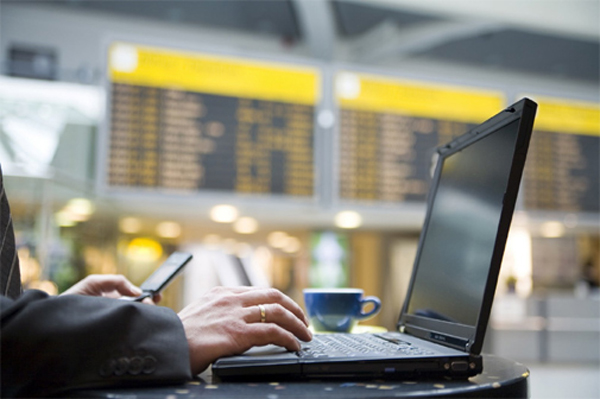
Airports, hotels… On vacation we also spend the whole day connected to the Internet. WhatsApp has in many countries become an essential tool for personal communication. We all want to be able to check Facebook, post photos on Instagram, tweet something we’ve seen, and answer work emails from wherever we  are… and it’s possible. We mostly do all these things from a smartphone, or perhaps from tablets or (increasingly less) from laptops.

It is quite common to scan for and connect to public WiFi networks which aren’t password-protected and let you connect to the Internet cheaply and simply. In fact, a typical selling-point of many restaurant chains nowadays is that they offer free WiFi connections to customers, and in many places there are public WiFi hotspots provided by local councils.

Even though the price of mobile data connections has dropped considerably (largely thanks to competition and technological advances), and connection speeds continue to increase (GPRS, 3G, HDSPA, 4G…), most users, if they can, still try to avoid using mobile data. The reason is simple: many of the mobile data rates on offer include a limit on data download volume, and once this threshold is exceeded, either the connection speed drops or the charges increase. Moreover, not everywhere has good mobile data coverage, and that directly affects the connection speed. And that’s not to mention the question of data roaming when traveling to other countries, where prices are very often completely prohibitive.

It’s obvious that most of us at one time or another will try to connect to a public WiFi network. Is it safe? What are the risks? Can anyone spy on data sent from my device? Can I get infected if the network is malicious? These are some of the questions that we’ll answer below.

When you connect to the Internet from home or from your office, you know who is responsible for the network and which people can connect to it.  However, on a public network, anyone can be connected, and you have no idea of their intentions. One of the first questions that arises concerns the level of security on any Web page that requires you to enter your login credentials.
wifi airport

How to connect safely to a public WiFi network

Could someone connect to the same network and spy on data communications?

Yes, anyone connected to the network could capture the data traffic sent from your device, and there are simple, free apps available for this purpose.

Does this mean that someone could steal my Facebook username and password?

No. Fortunately, Facebook, along with many other social networks, webmail services, online stores, etc. have secure Web pages. You connect to them via SSL, which you can see on your browser (depending on which one you use) when the padlock icon is displayed next to the page address. This means that all the data sent to this page is encrypted, so even if it is captured by a third-party, it cannot be read.

What about other websites? Could someone see which pages I’m visiting, or access the data I enter on unencrypted site?

Yes. It’s very simple to capture this information, and anyone could see what pages you connect to, what you write on a forum or any other type of unencrypted page.

So as long as the Web page is secure, I’m alright, aren’t I?

Yes, but it must really be secure. Capturing network traffic is just one type of possible attack. If the hotspot has been deliberately set up by an attacker, they could, for example, alter the settings of the WiFi router to take you to the page they want. Imagine you enter www.facebook.com in your browser, yet the page you see is not really Facebook but a copy, so when you enter your username and password you are giving it directly to the attacker. Or, worse still, the page you are taken to contains an exploit which infects your device without you realizing. In any event, the fake page won’t be secure, which should help you detect that it is not the real site.

But is this still the case if I know that the WiFi hotspot is reliable, such as in a shop or restaurant?

Yes. although it is obviously safer, no one can guarantee that the router hasn’t been compromised, or that the DNS configuration hasn’t been changed, which would enable an attack like the one described above where you’re directed to a fake page. In fact in 2014, security holes have been discovered in popular routers which allow them to be hacked so an attacker could easily change the configuration.

This is chaos! Is there any way of protecting myself against these attacks?

Yes. One good way is to use a VPN (Virtual Private Network) service. This ensures all data traffic from your device is encrypted. It doesn’t matter whether the site is secure or not, everything is encrypted. When you are connected to the VPN, the router’s DNS settings are not used in any event, so you’re protected from the types of attack described above.

And what about password-protected WiFi networks? Is there the same risk?

This in effect ensures that only people who know the password can connect to the same WiFi access point, nothing else. In a way, you could say that this reduces risks by reducing the number of people who can connect, although the same kind of attacks can still occur in the same way as on an open network without password protection.

Does this apply to all types of devices or just to computers?

To all kinds: computers, tablets, smartphones or any other device with which you can connect to a network.

And so what about WhatsApp? Can anyone see my chats or the photos and videos that I send?

No. Fortunately that information is now encrypted. Previously it wasn’t, and in fact, an app was developed that allowed you to see people’s chats if you were connected to the same network. This is no longer possible, although there is a way someone could find out your phone number if you are connected to WhatsApp on the same network as them, but that’s the most they can do.

The post Public WiFi networks. Are they safe? appeared first on MediaCenter Panda Security.

Seven things your kids shouldn’t do online

Online Children

It’s not unusual nowadays to hear people say that if you want to know how to operate any technical device, ask a child, and they’re not kidding! Computers, tablets or smartphones with Internet access are all a part of children’s lives and kids seemingly take to the digital world likes ducks to water.

Such access to technology and the Internet from such an early age means parents now have to control not only what kids watch on TV, but also the content they can be exposed to over the Web.

The Internet offers so many positive things for children but it can also leave them unprotected against threats or even dangerous people.

Seven things your kids shouldn’t do online

1. Talk to strangers

Kids Talk to Strangers

Social networks, WhatsApp… there are now many channels through which strangers can contact your children. The naivety of children often means they aren’t aware of where danger can be lurking. The anonymity afforded by the Internet is almost more dangerous than in real life.

2. Share personal information

Many of the things we do on the Internet involve sharing, in one way or another, confidential information. Adults tend to be far more aware of what data they can reveal than children are. You should talk with your children and make them aware of the dangers of providing certain information online.

3. Play without time limits

Almost all children want to download games to keep themselves amused and to have new challenges. In theory, this doesn’t become a problem until they end up spending all their free time doing it. This can affect their relationship with their environment and with other children of their age and they can ignore other responsibilities in order to keep playing. What do we recommend? Set a time limit for everything.

4. Having a profile in Social Networks

Facebook, Tuenti, Twitter, Ask.Fm, Instagram… Nowadays, there are multiple platforms in which children would like to be present, but is it recommended? The age at which someone can have an account depends on the platform. Find out more about it when talking to your child about this, and most importantly, control the privacy of their information once they have logged in.

5. Download inappropriate apps

Google Play and Apple Store offer thousands of apps, many of which are designed to make our everyday lives easier, but it is essential to know exactly what you are downloading and what information you give to and receive from these apps. Not all download sources are safe or trustworthy. Even within Google Play there are malicious apps that subscribe you to premium-rate SMS services or install other programs without your consent. Tell your children to ask your permission before downloading an app and find about it yourself first.

6. Enter websites with inappropriate content for children

Frightened-child

Deliberately or not, children may visit websites with content that is ill-suited for their age group. In many cases, just checking the browser history on the computer, tablet or smartphone is not enough. Parental control features let you decide the websites that kids can visit and block those that are inappropriate.

7. Believe they’ve won something

We all receive constant invitations to take part in a prize draw or even messages claiming that we have won some fantastic prize. In order to claim the prize, you are almost always asked to provide some personal information. It’s important to teach children that nobody is going to give them a latest generation smartphone just because they send in their personal data.

8. Suffer cyber-bullying

Given the seriousness of these attacks, children often hide the truth about cyber-bullying from their own parents. Cyber-bullying is bullying among children but carried out across the Web. It is carried out by people from the child’s environment, so it’s important to observe their reactions when using the Internet or interacting with other children on social networks. This way you can detect if there is anything wrong or if their behavior changes.

The post Seven things your kids shouldn’t do online appeared first on MediaCenter Panda Security.