Learn some tips from your favorite hacker and apply them to your company’s IT security plan. It’s time to take some notes!
Tag Archives: Tips

How to update Avast Antivirus

Avast Antivirus protects more than 230 million devices around the world. That means that we need to keep our products updated in order to offer the best protection for our users.

Privacy: Google My Activity displays collected data
What data are collected by Google? What possibilities does Google offer to avoid the collection of said information? This article will tell you all about it.
The post Privacy: Google My Activity displays collected data appeared first on Avira Blog.

Reselling Business and Home User Information
 It is important to protect businesses against threats that lurk in the cyberworld. The threats may seem innocent at first, but usually, those are the ones that cause the most damage. Reselling your hard drive, for example, may seem like a simple task, but it could actually open the door for cyber delinquents.
A recent investigation found that, out of 200 hard drives bought off of second-hand websites like eBay or Craigslist, more than 2/3 still contained highly sensitive information from the previous owner. A good amount (11%) stored private data from businesses.
Some of the gems that the investigators were able to rescue from the storage devices included social security number, CVs, corporate emails (9%), CRM records (1%), spreadsheets with projected sales or inventories (5%). Imagine what an ill-intentioned hacker could do with this lot of private information.
Formatting: The Bare Minimum
The scariest part of it all is that most owners believe their hard drives were wiped clean before putting them for sale online. Two out of every five devices (36%) indicated that the content was cleared from the system, by means of the Recycling Bin (which is really just another extra folder) or by the delete button.
The Recycling Bin is really just another extra folder on the computer.
Not one of these elimination techniques are affective enough to completely get rid of all information on hard drives. With the right know-how, it could actually be quite easy to securely and permanently recuperate the previously deleted data. If you format the device multiple times, the information could be completely overwritten. Nevertheless, there is only one way to be completely certain the hard drive’s content has completely disappeared: destroy it.
If you plan on recycling, reusing or reselling your machines, “attempting” to delete their contents is not an option. In the majority of the tested hard drives, the owners did not even take the first step towards security. Only 10% of the investigated hard drives went through an erasure process, such as formatting in various steps.
The post Reselling Business and Home User Information appeared first on Panda Security Mediacenter.

Ten Steps That Will Guarantee Cybersecurity in Your Business

In a recent study by Panda Security in collaboration with Nielsen, 91% of Spanish SMEs confirmed that they were victims of daily IT attacks. The viruses that wreaked havoc on their systems included Trojans (33%) and spyware (25%). The viruses entered the company systems from unsecure websites (39%), downloaded programs (23%), and email malware (19%).
It is fundamental for both small and medium-sized companies to allocate resources for security and establish security policies, otherwise the losses can be substantial and costly. The losses can include anything from information theft to a temporal IT collapse.
Here are some of the most basic, yet crucial, cybersecurity tips for SMEs:
Protect Your Office
Of course the easiest way to directly attack a company’s systems is by having physical access to the IT equipment. Companies should control who enters facilities with identification cards or some kind of biometric identification. Pay special attention to external personnel (cleaning services, external companies, etc.) and visitors, and make sure that they identify themselves properly. Alarms and video surveillance systems are other great ideas.
Secure Passwords
As a rule of thumb, all of your employees should use passwords that mix capital and lowercase letters, numbers and symbols, and should refrain from using personal information, etc. It is also important that they change passwords frequently, at least once every six months.
Keep Your Software Up-to-Date
In respect to downloading and running programs on company computers, there is an easy rule to follow: if you don’t need it, don’t install it; if you need it and you install it, keep it updated; if you stop using it, uninstall it. If you follow these rules you will save yourself from a lot of headaches.
Don’t let Your Employees Download Pirated Software
As we explained earlier, pirated copies of programs are common entry points for malware. In order to keep these unlicensed programs from threatening your company, it is important to establish an adequate software management policy. This includes keeping an updated inventory, controlling program licenses, and educating your employees.
Be Careful with USBs
Be aware of all external devices that connect to your company’s devices, whether they are external hard drives, memory cards, or anything else that could poke holes into your system and threaten sensitive data. To avoid problems, provide your employees with secured pen drives (the kind that encrypt information and are password protected) and define what information can be transferred using this type of device or should be sent by other means. Likewise, make sure that all appropriate files that come from external devices are tested with an antivirus before they are copied or run on company computers.
Back-up Your Data
Ransomware has grown to be the largest threat to companies. If you want to keep valuable information safe during a cyber-attack, backing-up your files and information is fundamental. We recommend that you keep two backups: one stored on the cloud and another physical copy (an external hard drive, pen drive, etc.).
Invest in Hardware
There are several inexpensive devices that are easy-to-use and will help improve the security in your systems. Some of this hardware includes security cables for laptops, U2F keys, accessories for securely charging up your mobile device in public hot spots. Setting aside sufficient capital for security hardware can save your business money in the long run.

Educate Your Employees
The weakest link in your company’s security chain is the people. Training and educating your workforce should be a priority. That alone could save you from fraud and vulnerabilities that begin with phishing and social engineering.
Their Vulnerabilities Are Your Vulnerabilities
Employees may be the weakest link, however, businesses that provide products and services for your company are an even bigger threat. It is important to legally protect yourself from the vulnerabilities that one of these suppliers may have and carry out inspections periodically, in order to ensure that all related businesses respect good security practices.
Install an Antivirus
When using computers or mobile devices, before they are connected to the internet you need to install a good antivirus. This measure is fundamentally important at both home and at work. A cybersecurity solution for businesses will protect your organization’s devices and information in all types of circumstances, even when employees are careless or make errors.
The post Ten Steps That Will Guarantee Cybersecurity in Your Business appeared first on Panda Security Mediacenter.
Are Your Passwords For Sale On The Black Market?
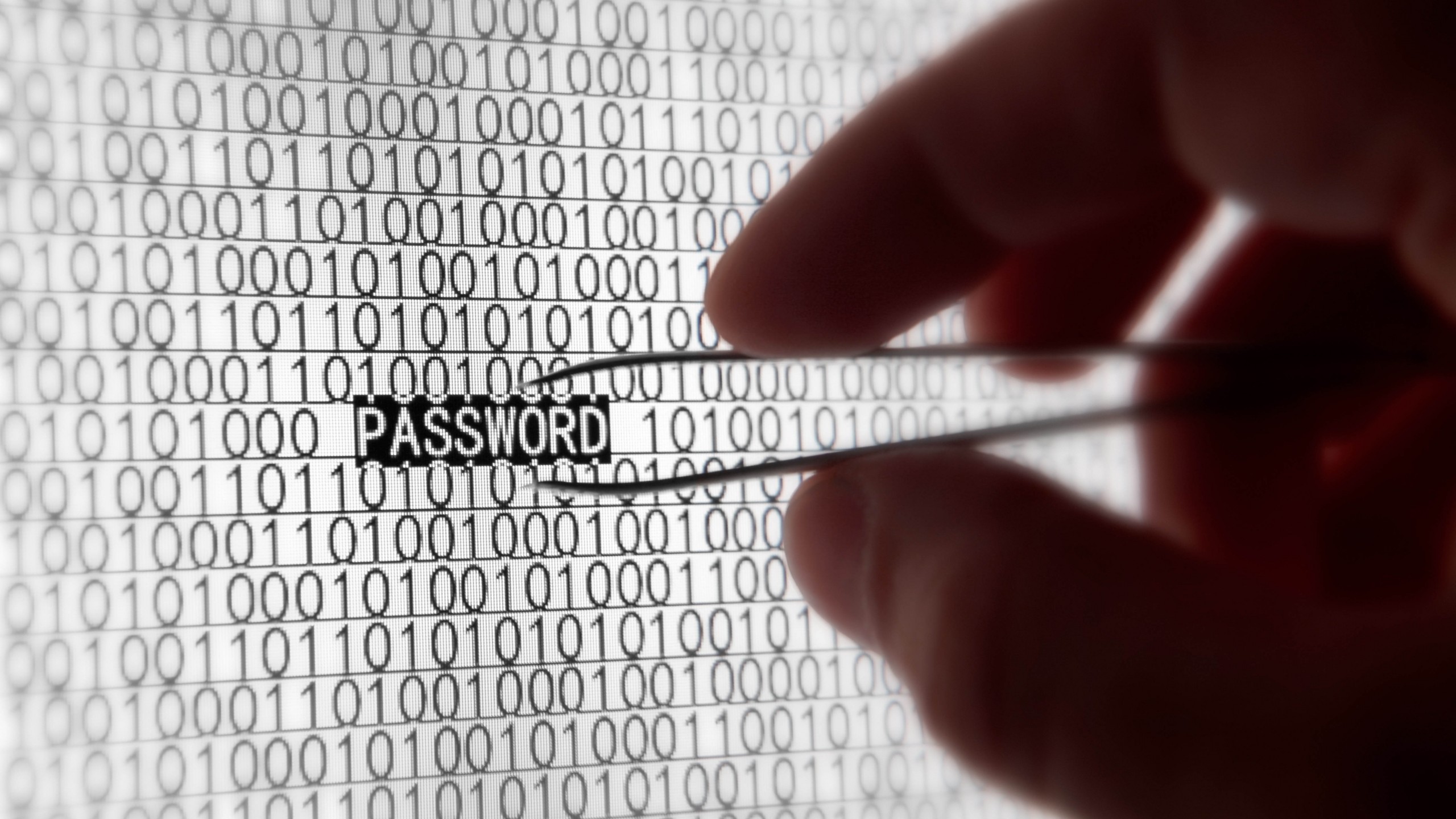
Myspace is joining the list of 2016’s data breach victims, alongside Tumblr and LinkedIn. Yes, Myspace still exists and in fact, if you registered for the social media site prior to 2013, your old log-in information could have been compromised.
360 million emails and passwords were leaked in what is being called one of the largest mass data breaches in internet history. A few days ago, LeakedSource—a search-engine capable of searching leaked records—claimed to have learned account log-in information for a massive number of MySpace users.
Myspace acknowledged in its blog that cyber-criminals have gained access to log-in information from those who registered prior to June 2013. Until that date, passwords were protected by the hashing algorithm “cryptographic SHA1”, which is an outdated and insecure system which is no longer recommended.
The black hat, Peace, recently put the leaked data up for sale on the dark side of the net for six bitcoin (approx. $2,800 US or €2,400). This cyber-delinquent is also behind the Tumblr leak, where 65 million accounts were compromised, and the LinkedIn data breach (117 million leaked). As with Myspace, Peace attempted to sell the stolen information from Tumblr and LinkedIn on the black market.
Remember the Ashley Madison scandal? Well, the number of passwords stolen in this data breach is higher than those stolen in the Ashley Madison leak. If we take into account that the number of stolen passwords is higher than those stolen during the Ashley Madison scandal (39 million passwords leaked), it is particularly worrying.
Prevention is Better Than Cure
Recently, LinkedIn required a password change for users whose personal data may have been compromised in the breach. Tumblr has done the same. For now, the former friend-network has ensured users that the matter is being investigated and that the company is implementing new security measures.
Nevertheless, internet users and social-network fiends should not wait for a big leak before they take steps to protect their privacy. One of the commandments of Internet safety is to periodically change passwords and to register different passwords with different services so if your data is compromised it only effects one set of log-in credentials.
One of the commandments of Internet safety is to periodically change passwords
With all those constantly-changing passwords, how can we remember them while remaining secure? It’s easy. You can use password managers like Dashlane, which allows you to determine a password’s level of security and control them from the same page.
There are also great security solutions that offer a larger degree of protection and include a password manager… all you need is a master password to access all of your favorite internet services. It maintains your online privacy… at all times!
The post Are Your Passwords For Sale On The Black Market? appeared first on Panda Security Mediacenter.
Out of storage? Photo Space creates space on your iPhone
New Photo Space app fits 7GB worth of photos into 1GB of space
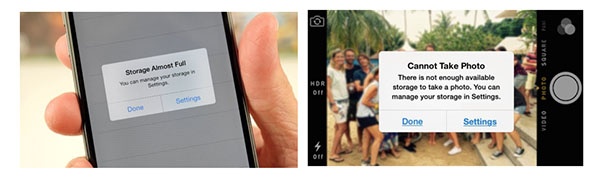
How many times have you seen a message like this?
If you are like the thousands of iPhone users around the world, then you see that message all too frequently. Of course, it always pops up just as you want to take a picture. 😬
People told us that to get more space they resort to uninstalling apps and deleting photos. A few get storage from iCloud, but they complain that they have no control and it gets expensive to pay for more space.
None of those are very good solutions. So we came up with something better.
Avast Photo Space
Photo Space is a free app that takes your high-quality photos and optimizes them to reduce the amount of storage they occupy. That means that you get 7 times more space for your photos and apps.


Learn how to protect your information on International Archives Day
 The entire world population generates and saves enormous amounts of essential information every day. We do so not only to remember and look back on the past, but also, our companies and institutions need this information to run efficiently and transparently.
That is why today, on International Archives Day, we wish to stress the importance of safe and responsible preservation for all kinds of files and, in particular, those which contain personal information belonging to people and companies. Do not forget: although an application, a program or an operating system can be re-installed, corporate or personal information is unique and should be a top priority.
Here are some tips to keep them from falling into the clutches of cybercriminals:
Backup Files
Now more than ever, ransomware is the greatest threat for companies and individuals, which is why backups are the most fundamental tool (and the last resort). They keep us from losing valuable information in the event of a cyber-attack. It is highly recommended to keep at least two backups: one stored in the cloud and a physical one (in an external hard disk, a pen drive, etc.)
Encryption
Before uploading files to the cloud, save them in a storage device or send them by e-mail. It is recommended that you encrypt the most sensitive information, at least, so that they will not be accessible if they fall into the wrong hands. An attacker who gains hold of your files will not be able to read their contents if this person lacks the encryption key, something that only you will have the power to.
Continuous Updating
Always keep your operating system, browser and applications updated to the latest version that is available. This allows you to protect the malware that usually takes advantage of the latest vulnerabilities. Operating your computer with an older version of software makes your most confidential information at risk for theft.
Do Not Use Unknown Computers or Networks
If you go on a trip and you plan on using a computer that is not yours, or connecting your mobile device to public Wi-Fi (such as at a coffee shop or at an airport…), make sure you avoid as much as possible accessing private and sensitive files. If you connect to an open Wi-Fi and you are forced to send personal or confidential information, make sure that it is encrypted and use a virtual network (VPN). Learn how to do so, here.
Install a Good Anti-virus
At Panda, we know how important your photos, videos and other files are for you. That is why we offer file encryption, backup and information protection with our anti-virus superstar: Panda Protection Service. With Panda, nobody can hijack your data! Enjoy the rest of your day.
The post Learn how to protect your information on International Archives Day appeared first on Panda Security Mediacenter.

Do you know the social sites your tweens and teens are using?
We help you recognize popular social sites where your pre-teens and teenagers hang out.
Facebook maybe the number one stop for your teenager, but it’s not the only social media platform that’s popular. Seven out of 10 teenagers report that they use more than one social site to communicate with their friends and meet strangers. Here’s a rundown of the most frequently used social media platforms among teens. For now.



A Kidnapping Survival Guide: How to Combat Digital Ransomware (Part 2)

You have already read some of our tips to help prevent the most feared and common cyber-threat of the moment, ransomware; it can hijack your computer and all the computers in your company. Its main strength is that it is able to block computers and encrypt files, and the only one who is able to decrypt it is the cyber-criminal that created it, which is why so many victims are paying the ransom demanded by these attackers.
When an attack is this sophisticated, the only way to combat it is by taking precautions. Any recommendations you may have can help you, but there is a key measure that is worth mentioning: the backup copies are your best allies to resist the escalation of a cyber-abduction.
In the second part of this guide, we will explain what is essential and how you can handle a ransomware attack.
First of all, ransomware does not block everything. If your devices have been infected, the first thing you should check is that the information is really encrypted. There are mediocre cyber-criminals that are taking advantage of the success of better-prepared, cyber-crime mafias. They do these second-rate jobs in order to simulate attacks that in reality don’t actually hijack your files, and then they reap the benefits. If you do not know how to distinguish a real threat from an imposter, make sure to consult an expert before forking the cash over to the bad guys.
Another important thing to consider: Do you have a backup? After you have verified that the attack is in fact a legitimate ransomware, the first thing you need to ask any security professional is if your company has backup copies of everything that is important. It is the only effective defense. If you have backups, you can eliminate the infected system completely, load your backups, and then everything will be back to normal.
Uses reliable tools. Not all programs are equally effective in creating backups. Unfortunately, many organizations have found that the software used to create a backup is not able replace the detailed information exactly the same as it was before the ransomware attack. Choose your work team carefully and protect your files. Good security solutions offer reliable tools.
For security reasons, it is better to keep your backups offline. In addition to this, if you want to keep ransomware from dragging you down, do not store backups on a shared disk. The more isolated your backups are from the network that is possibly infected, the more likely you are to survive and retrieve your sensitive information from them.
Make several different copies. Even if you are the most careful while carrying out these procedures, there is always a fragile moment. Those few minutes when the disk guarding your backup is copying the data, and is connected to the rest of the network. In that precise moment you are vulnerable to a cyber-criminal. In order to prevent infection, it is advisable to backups in several periods: in real time (if resources permit it), daily, weekly and monthly. They must be separate backups, and at least one of them should be disconnected from the rest of the network.
The post A Kidnapping Survival Guide: How to Combat Digital Ransomware (Part 2) appeared first on Panda Security Mediacenter.