Multiple cross-site scripting (XSS) vulnerabilities in the Spider Facebook plugin before 1.0.11 for WordPress allow (1) remote attackers to inject arbitrary web script or HTML via the appid parameter in a registration task to the default URI or remote administrators to inject arbitrary web script or HTML via the (2) asc_or_desc, (3) order_by, (4) page_number, (5) serch_or_not, or (6) search_events_by_title parameter in (a) the Spider_Facebook_manage page to wp-admin/admin.php or a (b) selectpagesforfacebook or (c) selectpostsforfacebook action to wp-admin/admin-ajax.php.
Monthly Archives: February 2015
SA-CONTRIB-2015-045 – Node Access Product – Cross Site Scripting (XSS) – Unsupported
- Advisory ID: DRUPAL-SA-CONTRIB-2015-045
- Project: Node access product (third-party module)
- Version: 6.x, 7.x
- Date: 2015-February-11
- Security risk: 11/25 ( Moderately Critical) AC:Basic/A:User/CI:Some/II:None/E:Theoretical/TD:All
- Vulnerability: Cross Site Scripting
Description
The Node Access Product module provides ‘Node access’ settings for product nodes, whereby users who purchase the product are granted view access to content, which can be predefined either by taxonomy, by node, or by Views.
The module doesn’t sufficiently sanitize node titles leading to the possibility of cross-site scripting by an attacker.
This vulnerability is mitigated by the fact that an attacker must have a role with permission to create/edit content.
CVE identifier(s) issued
- A CVE identifier will be requested, and added upon issuance, in accordance with Drupal Security Team processes.
Versions affected
- All versions of Node Access Product
Drupal core is not affected. If you do not use the contributed Node Access Product module, there is nothing you need to do.
Solution
If you use the Node Access Product module you should uninstall it.
Also see the Node access product project page.
Reported by
- Pere Orga of the Drupal Security Team
Fixed by
- Not applicable.
Coordinated by
- Rick Manelius of the Drupal Security Team
- Aaron Ott provisional member of the Drupal Security Team
Contact and More Information
The Drupal security team can be reached at security at drupal.org or via the contact form at https://www.drupal.org/contact.
Learn more about the Drupal Security team and their policies, writing secure code for Drupal, and securing your site.
Follow the Drupal Security Team on Twitter at https://twitter.com/drupalsecurity
Drupal version:
SA-CONTRIB-2015-046 – Taxonomy Tools – Cross Site Scripting (XSS)
- Advisory ID: DRUPAL-SA-CONTRIB-2015-046
- Project: Taxonomy Tools (third-party module)
- Version: 7.x
- Date: 2015-February-11
- Security risk: 14/25 ( Moderately Critical) AC:Basic/A:User/CI:Some/II:Some/E:Theoretical/TD:All
- Vulnerability: Cross Site Scripting
Description
Taxonomy Tools module provides alternative ways of managing taxonomy terms.
The module doesn’t sufficiently escape node and taxonomy term titles when displaying them, allowing a malicious user to inject code.
This vulnerability is mitigated by the fact that an attacker must have a role with permission to create or edit nodes or taxonomy terms.
CVE identifier(s) issued
- A CVE identifier will be requested, and added upon issuance, in accordance
with Drupal Security Team processes.
Versions affected
- Taxonomy Tools 7.x-1.x versions prior to 7.x-1.4.
Drupal core is not affected. If you do not use the contributed Taxonomy Tools module,
there is nothing you need to do.
Solution
Install the latest version:
- If you use the Taxonomy Tools module for Drupal 7.x, upgrade to Taxonomy Tools 7.x-1.4
Also see the Taxonomy Tools project page.
Reported by
- Pere Orga of the Drupal Security Team
Fixed by
- Mārtiņš Bērtiņš the module maintainer
Coordinated by
- Rick Manelius of the Drupal Security Team
- Aaron Ott provisional member of the Drupal Security Team
Contact and More Information
The Drupal security team can be reached at security at drupal.org or via the contact form at https://www.drupal.org/contact.
Learn more about the Drupal Security team and their policies, writing secure code for Drupal, and securing your site.
Follow the Drupal Security Team on Twitter at https://twitter.com/drupalsecurity
Drupal version:
Facebook ThreatExchange Platform Latest Hope for Information Sharing
Facebook announced ThreatExchange, an API-based platform for the exchange of attack and threat data.
AVG AntiVirus PRO is first security app to enter Google Play Revenue Chart
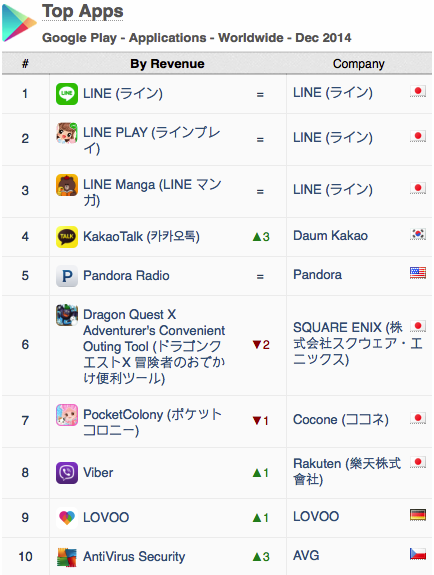
AVG’s position in the Top 10 chart is according to the App Annie Index for December 2014, produced by mobile app analytics company App Annie. The report, which analyzes trends and downloads for apps across all the major app stores, looks at both the popularity of apps and the revenue they drive.
In the report, App Annie details the incredible growth that they have tracked in security apps. And one year after climbing into the top ten apps for downloads, AVG AntiVirus PRO Android Security – referred to AntiVirus Security on Google Play – has become the first security app to enter the Top 10 Revenue Chart (excluding games) on the Google Play Store.
Proven demand
Increased demand comes after a busy 2014 for cybersecurity events and suggests consumers are more security conscious as a result.
There is demand for security apps – the continued popularity of AVG AntiVirus Security FREE, which was the first security app to exceed 100m downloads on Google Play, shows this. People, however, are not only protecting their devices with free security apps but are willing to invest in the solutions that they trust.
This is echoed in the recent MEF Global Consumer Trust Report where 64% of those studied use software or apps to guard passwords and protect against malware and only one in ten (11%) take no steps to protect their device.
Highly Rated
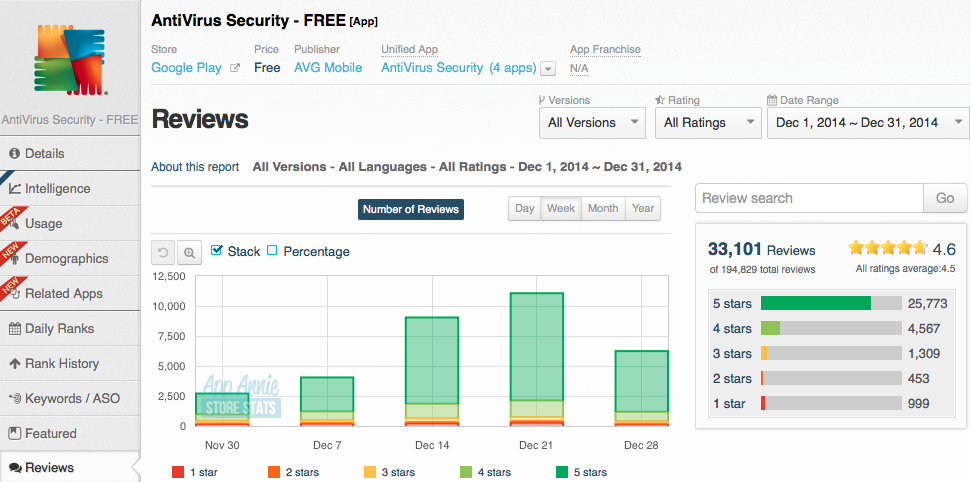
AppAnnie’s report also highlighted that AVG AntiVirus Security FREE is receiving overwhelmingly positive reviews from the public.
During December, AVG’s AntiVirus Security FREE received an average rating of 4.6 from over 33,000 reviews, with 77% of all users awarding us a maximum score of five stars.
The future is bright
At AVG, we’re already looking ahead to a world where mobile devices are not just secured, but integrated across the Internet of Things. Through AVG Zen, we deliver a single dashboard from which a customer can manage the security, privacy and performance of all their devices and those of their family, all in one place.

Security terms explained: What does Zero Day mean?
One of the terms I’m most often asked to explain is what a “zero day” vulnerability or exploit is; let’s look at what that phrase entails.
The post Security terms explained: What does Zero Day mean? appeared first on We Live Security.
Microsoft Group Policy Vulnerability Affects All Windows Computers
Details were released on two Microsoft Group Policy vulnerabilities affecting all Windows machines going back to Windows Server 2003. The flaws were addressed in separate Patch Tuesday security bulletins.
Why iOS devices could be one tap away from disaster
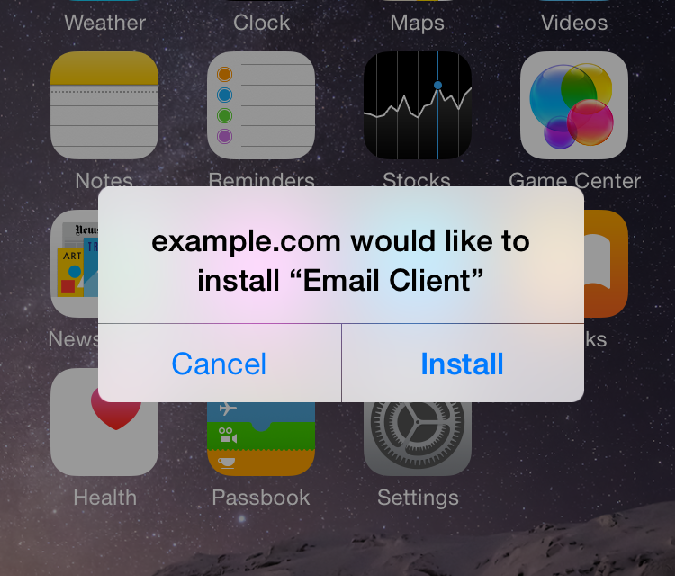
Users who don’t pay attention to warning messages on their iPhones or iPads run the risk of becoming infected with malware that can steal their personal information such as text messages, contact lists, pictures and even their location.
If you’ve followed our advice in the past for keeping your iOS device secure, you’ll know that you should be doing the following:
- Install updates – keep up to date, and that includes your apps too.
- Keep a backup – use iCloud or Dropbox for photos and backup your device.
- Never “jailbreak” – this is the method for breaking the factory security.
- Activate anti-theft – such as “Find my iPhone/iPad” to locate a lost or stolen device.
BUT despite this, did you know you could still be just one tap away from disaster?
As reported in Macworld, security researchers uncovered spyware dubbed “XAgent” that is delivered via a phishing attack and can spread to other iOS users via contacts in your address book.
For more tips on staying safe from phishing, check out my blog “How To Protect Yourself from Phishing Attacks”
The good news is that you can do something about this, as all the users affected by this particular threat (and previous ones using the same technique) almost certainly “infected themselves” by ignoring vital warning message prompts.
Apple advise iOS users here to be mindful to only download and install apps from the Apple App Store and to be cautious of so-called “enterprise apps” that are only intended for employees of large businesses.
Therefore, if you don’t work for a company that is specifically requesting you to install an app and you see these following prompts – make sure you answer them correctly to protect yourself from inadvertently installing malware.
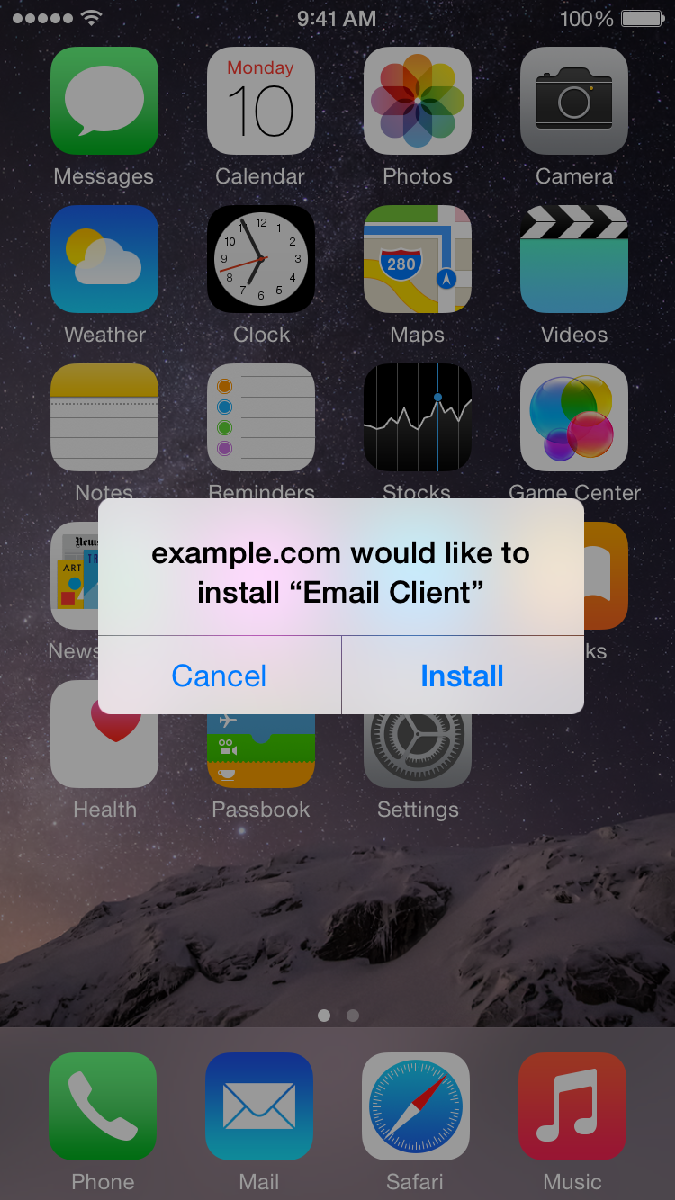
To protect yourself in this example you click CANCEL
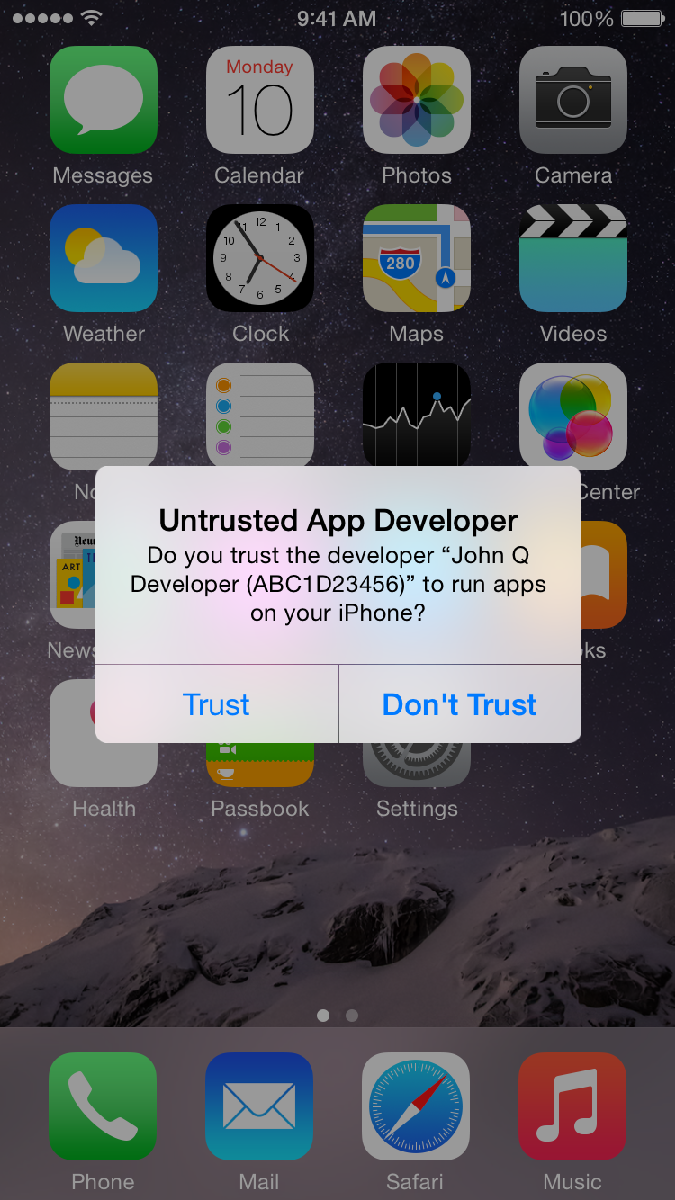
To protect yourself in this example you click DON’T TRUST
You might have also seen a similar Trust or Don’t Trust option available when connecting your iPhone or iPad to a friends computer – and again the safer option is always Don’t Trust.
Until next time, stay safe out there.
Title image courtesy of iMore
Mandiant Incident Response Conference 2015 Call For Papers
The sixth annual Mandiant Incident Response Conference (MIRcon 2015) has announced its call for papers. It will take place November 3rd through the 4th at the Washington Hilton, Washington, DC, USA.
LG DVR LE6016D File Disclosure
LG DVR LE6016D suffers from a remote file disclosure vulnerability.