Why “Chip and PIN” is more secure than “Swipe and Sign”  

This change to “chip and PIN” has already occurred in many other countries and has reduced credit card fraud – in particular “card skimming” and “cloning” whereby somebody can make a copy of your credit card and use it elsewhere.

Most credit cards now contain a “smart chip” on them that are much more secure than the “magnetic stripe”.  The reason for this is that the smart chip is actually a tiny-computer that can interact directly with a payment terminal or ATM – and they’re designed never to give up their secret information.  Whereas a magnetic stripe reveals all its data and is easily copied.

U.S. business owners who fail to upgrade their payment terminals to support chip & PIN by October will also become liable for any fraudulent transactions as American Express, Discover, MasterCard and VISA get set to implement the change.  However, some “pay at the pump” Gas stations will be exempt until 2017.

The good news for all of us though is that insisting on a PIN at the point of sale means your card, if lost or stolen, is useless to whoever might get hold of it – except for contactless transactions which don’t require a PIN under a certain transaction amount.  As always you should still protect your credit cards the same way you do with cash.

Five (5) quick PIN tricks and tips:

  1. Did you know YOU can change your PIN at any time? You can easily change the PIN assigned to your new card at an ATM (usually at an ATM belonging to your bank) – just look for the “select new PIN” or “Other” options.
  2. How long is your PIN? It can be between 4 and 6-digits in length – personally I like to use 5 just to be different!
  3. Don’t use your date of birth! Having a 4 or 6-digit PIN can be a temptation to store your birthdate, but it should be obvious that this is something to avoid at all cost!
  4. Don’t use predictable key combinations! Try to avoid choosing a PIN that uses a combination of keys that form a pattern – for example, 2580, 1234, 1379.
  5. Never write your PIN down! Now that you know how to change the PIN yourself, you should be able to choose one that you’ll never forget – so make sure you don’t write it down or store it anywhere, like on your mobile device – doing so will almost certainly be a violation of your credit card issuer’s acceptable usage policy.


Until next time, stay safe out there.

Title image courtesy of thisismoney.com

Android malware Fobus now targeting users in the U.S., Germany and Spain

Mid January we informed you of a data-stealing piece of Android malware called Fobus. Back then Fobus mainly targeted our users in Eastern Europe and Russia. Now, Fobus is also targeting our users in the USA, United Kingdom, Germany, Spain and other countries around the world.

Fobus can cost its unaware victims a lot of money, because it sends premium SMS, makes calls without the victims’ knowledge and can steal private information. More concerning is that Fobus also includes hidden features that can remove critical device protections. The app tricks users into granting it full control of the device and that is when this nasty piece of malware really begins to do its work. You can find some more technical details and analysis of Fobus in our previous blog post from January.

Today, we decided to look back and check on some of the data we gathered from Fobus during the last six months. We weren’t surprised to find out that this malware family is still active and spreading, infecting unaware visitors of unofficial Android app stores and malicious websites.

The interesting part of this malware is the use of server-side polymorphism, which we suspected was being used back in January but could not confirm. We have now confirmed that server-side polymorphism is being used by analyzing some of the samples in our database. Most of these have not only randomly-generated package names, but it also seems that they have randomly-generated signing certificates.
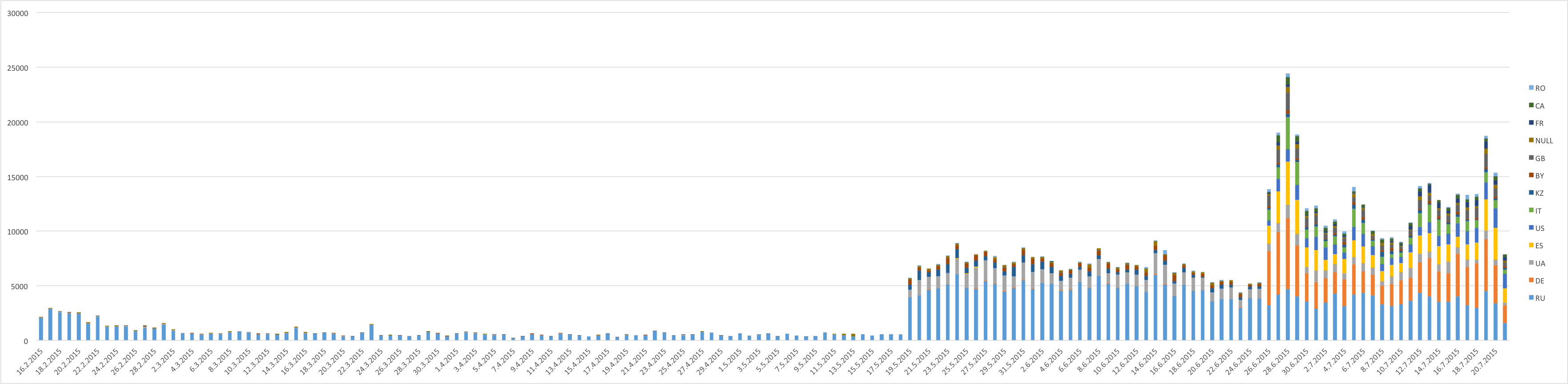
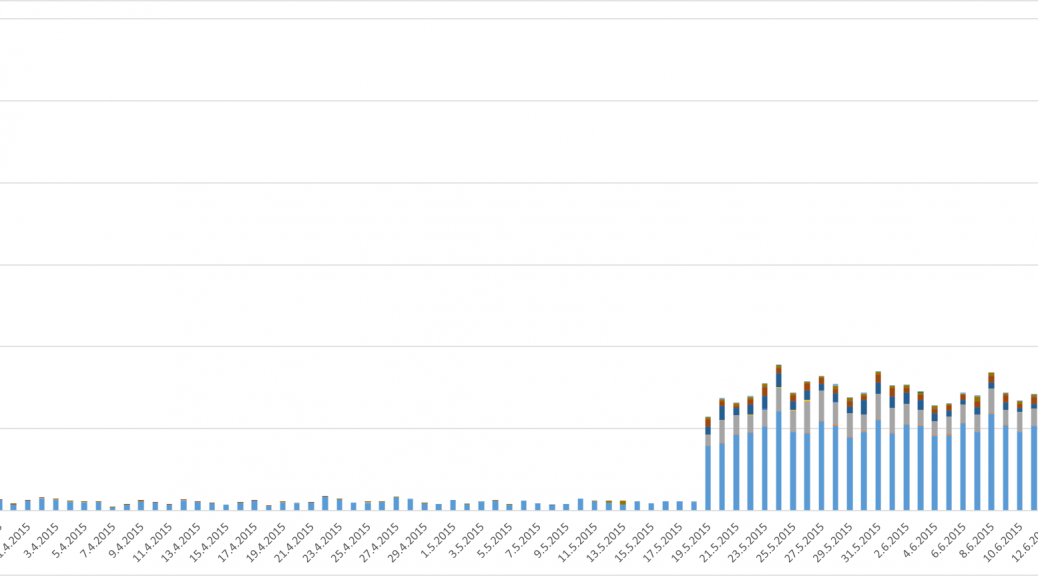
Number of users who have encountered Fobus

Number of users who have encountered Fobus

Geographical reach expanded from the East to the West

Previously, we predicted that we would probably see a steady growth in the number of encounters users have with this malicious application. A review of the results, however, beats all of our predictions. At the beginning, this malware mainly targeted mobile users in Russian speaking countries. As our detections got smarter and we discovered new mutations of Fobus, we discovered that many other countries are affected as well. Now Fobus, although it still mainly targets users in Eastern Europe and Russia, is also targeting our users in the USA, Germany, United Kingdom, Spain, and other countries around the world.

The above graph shows the number of unique users (user IDs) encountering Fobus per day. The graph is also geologically divided by country codes as reported by the users’ connection location.

Number of times users encountered Fobus by country (as of July 21, 2015):

  • Russia: 87,730
  • Germany: 25,030
  • Spain: 12,140
  • USA: 10,270
  • UK:  6,260
  • Italy: 5,910

There are two great leaps visible in the graph, which mark the days when new versions of Fobus were discovered and new detections protecting our users were released. These three detections seem to be particularly effective at their task. The high impact in countries outside of Russia and English speaking regions, which can be seen in the graph, is a little surprising. Especially considering that the malware typically is only in Russian and English and even the English version contains some strings in Russian. Seems like the authors were too lazy to translate their own app properly…
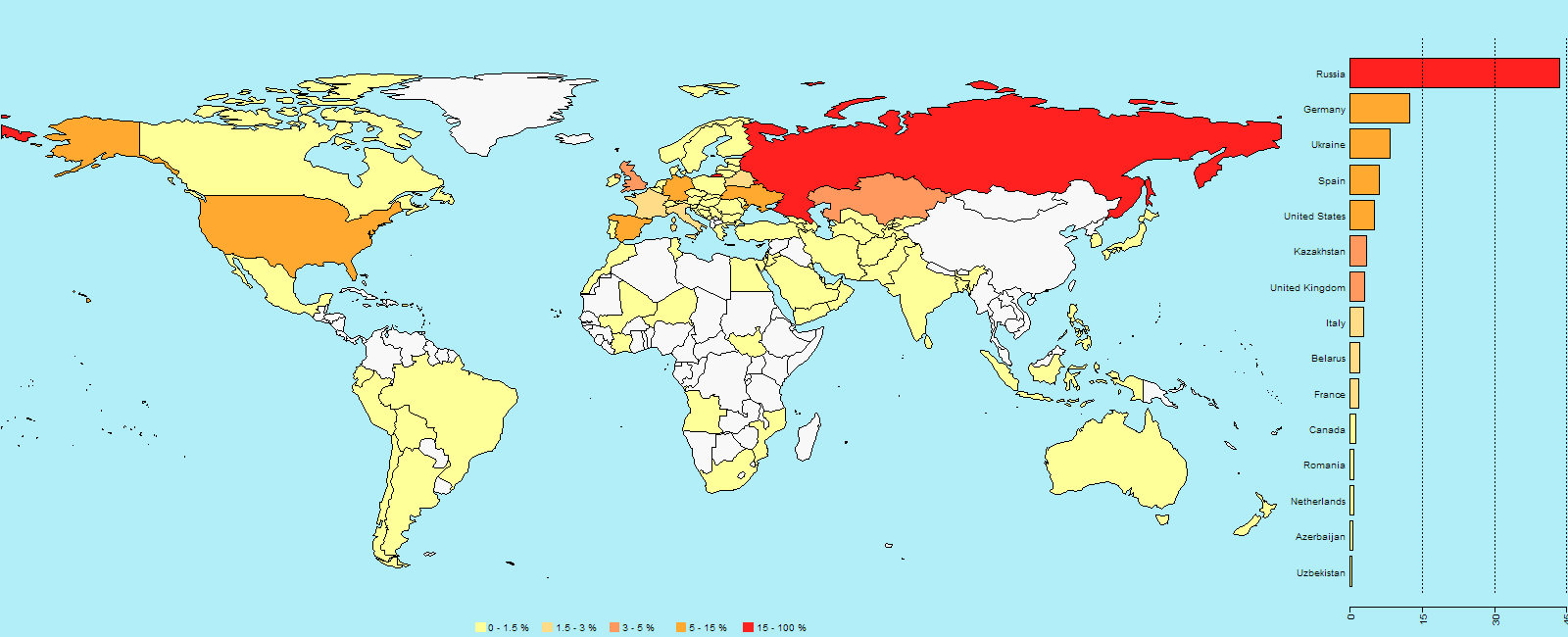
World map showing the percentage of users who encountered Fobus

World map showing the percentage of users who encountered Fobus

An app, built just for you

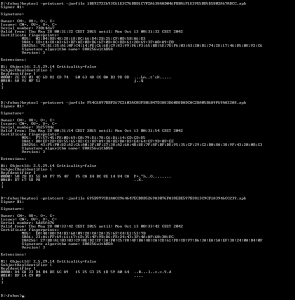
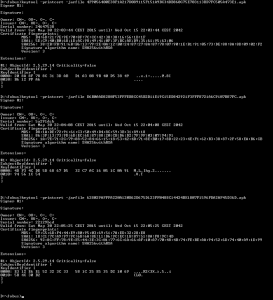
Now, let’s dig into the analysis. We will look at the certificates used to sign some of the Fobus samples. We already mentioned the problems connected with generating unique applications for each victim (server-side polymorphism). This does not only apply to rebuilding, repackaging and obfuscating each instance of the app itself, but also extends to their signing certificates. To back this up, we analyzed around 4,000 samples and data and inspected the usage of these certificates. We verified that each build of the malicious app is typically seen by one user only, even though its signing certificate can be used to sign multiple apps. Virtually all of the samples we have are very low prevalent, meaning that different users only very rarely see an app instance multiple times. As for the signing certificates, we believe that they are being regenerated on a timely basis. We were able to pick a few examples of such certificates from our statistics.
certs_may_28certs_may_30


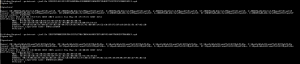
As you can see from the screenshots above, these certificates are dated the 28th and 30th May 2015 and the time differences in the beginning of the validity period between these certificates are in the order of minutes, sometimes even seconds. We have also found some samples that have certificates with randomly generated credentials altogether.
certs_random

The above provided screenshot is an example of such randomly generated certificates.

To conclude, we would like to encourage you to think twice about the apps you install on your phone. Especially if the apps you download are from third party stores and unknown sources. If you download apps from the Google Play Store you’re on the safe side. Requiring nonstandard permissions – especially permissions that don’t seem necessary for the app to properly function – may be a sign that something fishy going on. You should be very suspicious of an app that requests device administrator access and think twice before downloading it.

Acknowledgement

Special thanks to my colleague, Ondřej David, for cooperation on this analysis.

Axigen Cross Site Scripting

Axigen’s WebMail Ajax interface implements a view attachment function that executes javascript code that is part of email HTML attachments. This allows a malicious user to craft email messages that could expose an Axigen WebMail Ajax user to cross site scripting or other attacks that rely on arbitrary javascript code running within a trusted domain.

HP Security Bulletin HPSBMU03380 1

HP Security Bulletin HPSBMU03380 1 – Multiple potential security vulnerabilities have been identified with HP System Management Homepage (SMH) on Linux and Windows. The vulnerabilities could be exploited remotely resulting in Denial of Service (DoS), Cross-site Request Forgery (CSRF), execution of arbitrary code, unauthorized modification, unauthorized access, or disclosure of information. Revision 1 of this advisory.

Why you should change your Skype password now

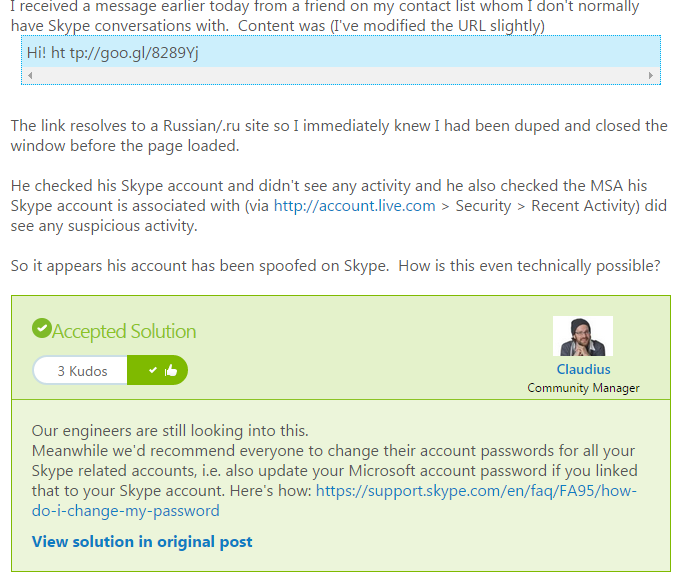
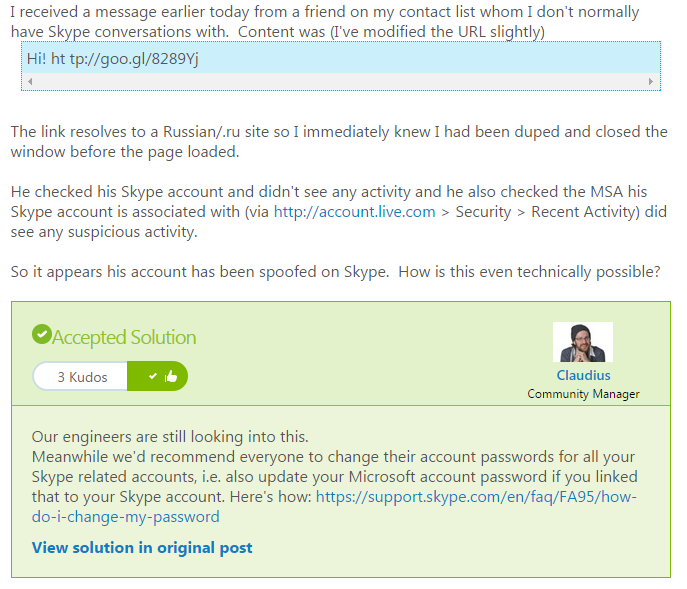
The advice comes as a response to users complaining in the Skype forum that they have been apparently receiving malicious links from friends.

This sort of attack, where attackers either gain access or can mimic an authentic account is known as spoofing and can be very successful due to the level of trust that people have in their own contacts.

Skype Spoofing


If you think that you or someone you know has been a victim of spoofing, here are three things that you should you do.


Don’t click

Normally, spoofing or phishing emails will contain a link to a site. Don’t click on it, especially if it is a shortened link as seen in the Skype forum example. If you believe it could be genuine, hover over the link and your browser will reveal the final destination of the link.


Get protection

As cyberattacks get ever more complicated and better disguised, it can become difficult to stay protected. That’s why it’s important to get the best possible antivirus solution that can help keep you safe not just from viruses and malware but additional tools like AVG’s LinkScanner technology can scan links and attachments to check whether they are safe even before you click on them.


Changing your password

Just as Microsoft advised on the Skype forums, if you believe you’ve been a victim of any kind of spoofing or account fraud, it’s important to change your password. If someone has access to your account you should put a stop to that as soon as possible.

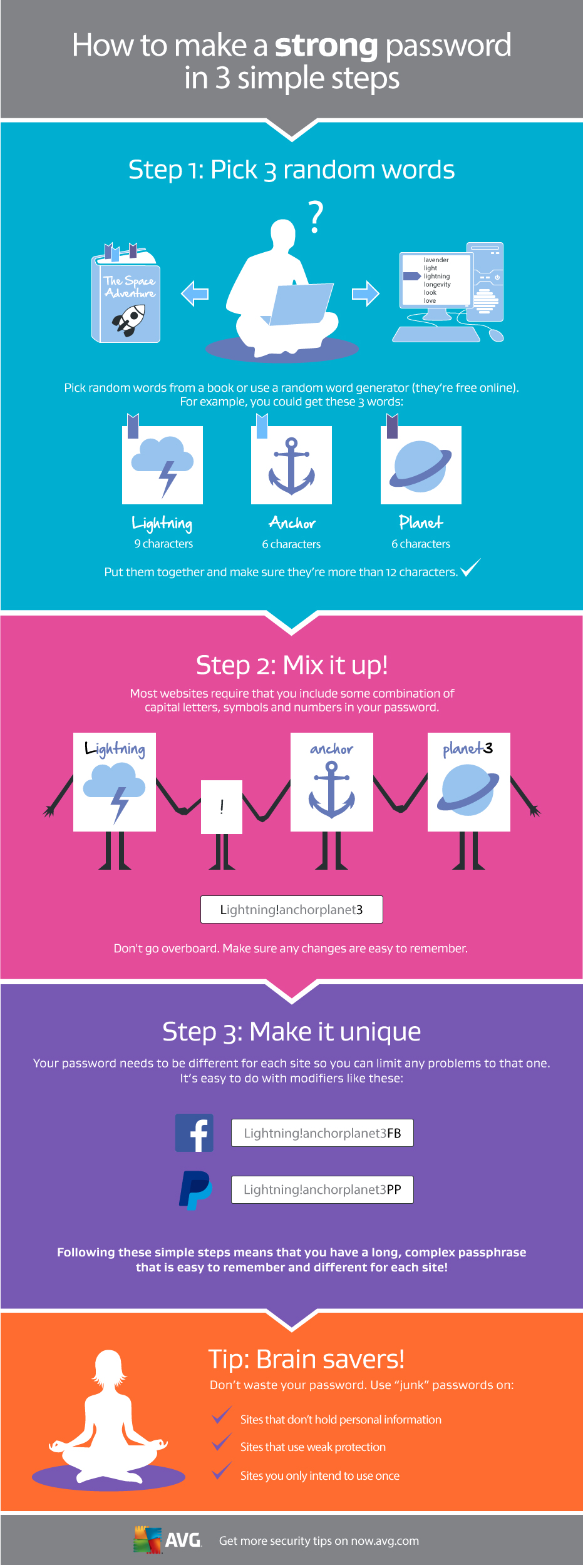
Take a little time when developing your new password and make sure that it gives you as much protection as possible.

For help doing this, take a look at the graphic below that will help you create a strong, unique password in three simple steps.

Making a strong password