Category Archives: Avast

Avast

Is the Ashley Madison data breach worse than other data breaches?

Ashley Madison calls itself the “most famous website for discreet encounters between married individuals”. Now, the platform for infidelity and dating has been hacked and its user database of 40 million cheaters with their real names, addresses, financial records, and explicit information were stolen. Discreet is done.

Did the married Ashley Madison customers really think their extramarital activities could be discreet?
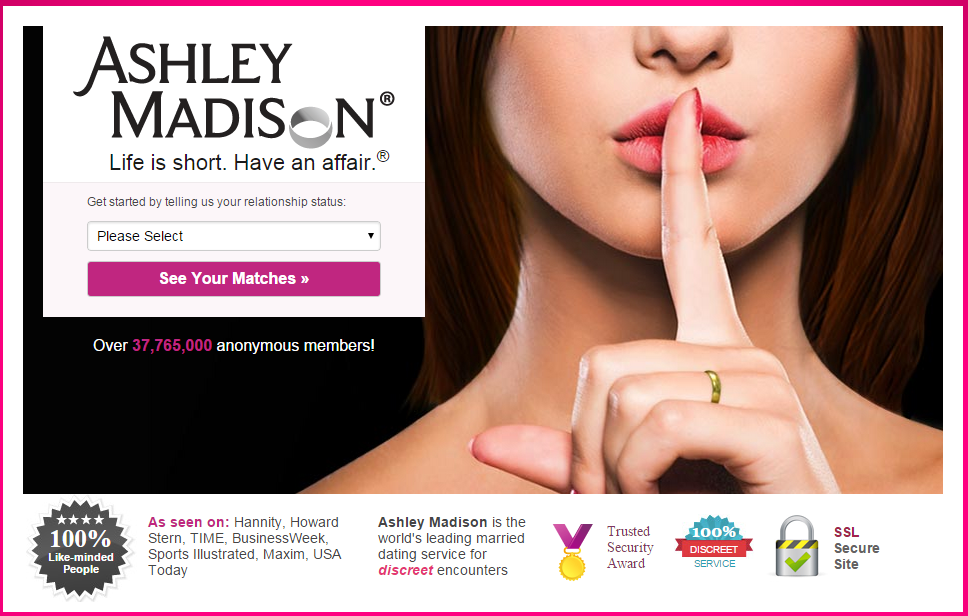
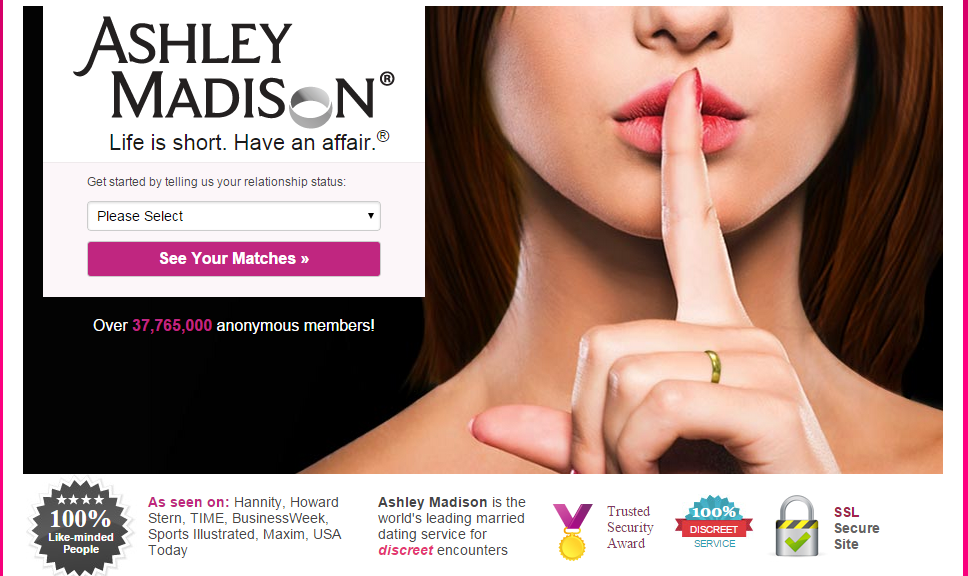
Ashley Madison hookup site gets hacked

image: www.ashleymadison.com

The past months and years, Target was hacked, Home Depot, BlueCross BlueShield, and even the U.S. government was hacked and data of tens of millions of people were exposed. Wal-Mart, CVS, and Costco had to take down their photo service websites last week as they are investigating a possible data breach. News about new data breaches break every month, sometimes even every week. Just in May, the dating site AdultFriendFinder was hacked, and sensitive information about 3.5 million people was leaked. It shouldn’t come as a surprise to Ashley Madison users that this data breach happened. It was just a matter of time.

Avid Life Media (ALM), the owner of Ashley Madison, seems to have the same stance. In a statement to the media, published by Brian Krebs who first reported the hack, they said: “The current business world has proven to be one in which no company’s online assets are safe from cyber-vandalism, with Avid Life Media being only the latest among many companies to have been attacked, despite investing in the latest privacy and security technologies.”

Hackers holding ALM ransom
According to reports, a hacker group called “The Impact Team” seems to be behind this breach and they reportedly demand a ransom from ALM. The hacking group is threatening to expose “all customer records, including profile with all the customer’s secret sexual fantasies and matching credit card transactions, real names and addresses, and employee documents and emails” if ALM does not take down Ashley Madison and their other casual dating platform, Established Men.

Moral reasons for the hack
In a document, The Impact Team explained its apparent moral motives behind the breach. Regarding the Ashley Madison users, they write “they’re cheating dirtbags and deserve no such discretion”, and describe Established Men as a “prostitution / human trafficking website for rich men to pay for sex.

Furthermore, they call out ALM for misguiding its users by offering a “full delete” feature that will allegedly delete your payment and address details from its database for a fee of $19. The Impact Teams writes: “It’s also a complete lie. Users almost always pay with credit card; their purchase details are not removed as promised, and include real name and address, which is of course the most important information the users want removed.” According to the hackers’ manifesto, ALM made $1.7 million in revenue alone with this feature in 2014.

How did The Impact Team get access to the data?

According to information revealed to Brian Krebs by ALM, it is likely that the data breach happened through somebody who internally had access to ALM’s technical systems, like a former employee or contractor.

As this data breach puts sensitive personal information at risk – is it worse than previous breaches, like the Target breach that exposed customer credit card numbers?

Jaromir Horejsi, Senior Malware Analyst at Avast said,

From what we know about the technical circumstances of how this happened, it isn’t worse than other breaches. As a former employee or contractor might have been involved, this doesn’t sound like something that required a sophisticated hack. However, more sensitive personal data is involved, and that is what is making people shiver.”

On the other hand, if somebody is cheating on their spouse, they always are walking on thin ice and have to fear that their partner will find out about it some way or another. This is nothing new.

“What’s more sensitive in this case, is that address and financial data was revealed and therefore could be abused for identity theft,” Jaromir Horejsi added. “The personal data may be sold on hacking forums and later used for spamming the affected individuals. It also didn’t take long until the data from the AdultFriendFinder breach made its rounds on hacking forums. People should take this seriously. What users can learn from this is that any information shared online can be stolen. Just because things take place or at least start in the virtual world doesn’t mean that they have a lower impact on your real life. Users that may be affected should start monitoring their credit card statements for unusual activities and report them to their bank.”

In theory, it would also be possible for the hacker group to start blackmailing individuals – in this case it would be best for those affected to be upfront with their partner to take the wind out of the criminal’s sails. However, judging from the type of ransom the hacker group is demanding, this is rather unlikely – as their real goal seems to be to take down Ashley Madison and Established Men.

Follow Avast on Twitter where we keep you updated on cybersecurity news every day.

Android malware Fobus now targeting users in the U.S., Germany and Spain

Mid January we informed you of a data-stealing piece of Android malware called Fobus. Back then Fobus mainly targeted our users in Eastern Europe and Russia. Now, Fobus is also targeting our users in the USA, United Kingdom, Germany, Spain and other countries around the world.

Fobus can cost its unaware victims a lot of money, because it sends premium SMS, makes calls without the victims’ knowledge and can steal private information. More concerning is that Fobus also includes hidden features that can remove critical device protections. The app tricks users into granting it full control of the device and that is when this nasty piece of malware really begins to do its work. You can find some more technical details and analysis of Fobus in our previous blog post from January.

Today, we decided to look back and check on some of the data we gathered from Fobus during the last six months. We weren’t surprised to find out that this malware family is still active and spreading, infecting unaware visitors of unofficial Android app stores and malicious websites.

The interesting part of this malware is the use of server-side polymorphism, which we suspected was being used back in January but could not confirm. We have now confirmed that server-side polymorphism is being used by analyzing some of the samples in our database. Most of these have not only randomly-generated package names, but it also seems that they have randomly-generated signing certificates.

Number of users who have encountered Fobus

Number of users who have encountered Fobus

Geographical reach expanded from the East to the West

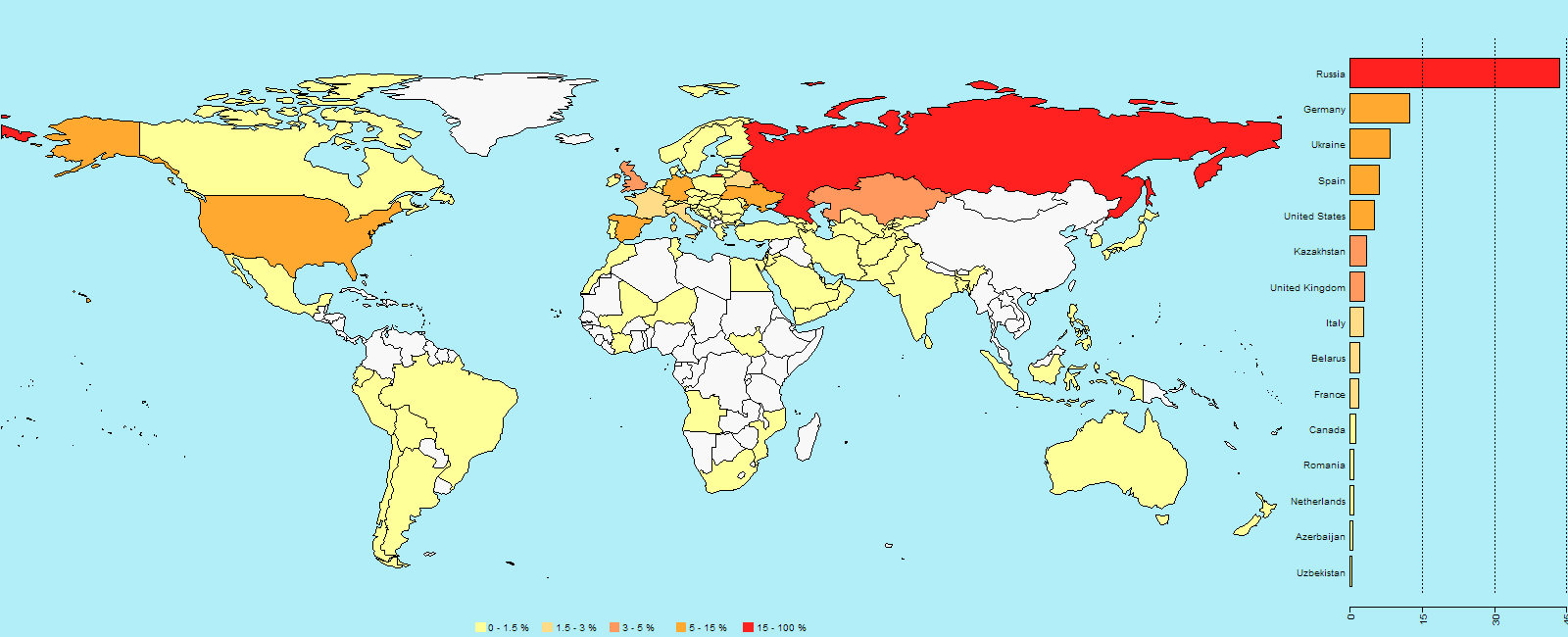
Previously, we predicted that we would probably see a steady growth in the number of encounters users have with this malicious application. A review of the results, however, beats all of our predictions. At the beginning, this malware mainly targeted mobile users in Russian speaking countries. As our detections got smarter and we discovered new mutations of Fobus, we discovered that many other countries are affected as well. Now Fobus, although it still mainly targets users in Eastern Europe and Russia, is also targeting our users in the USA, Germany, United Kingdom, Spain, and other countries around the world.

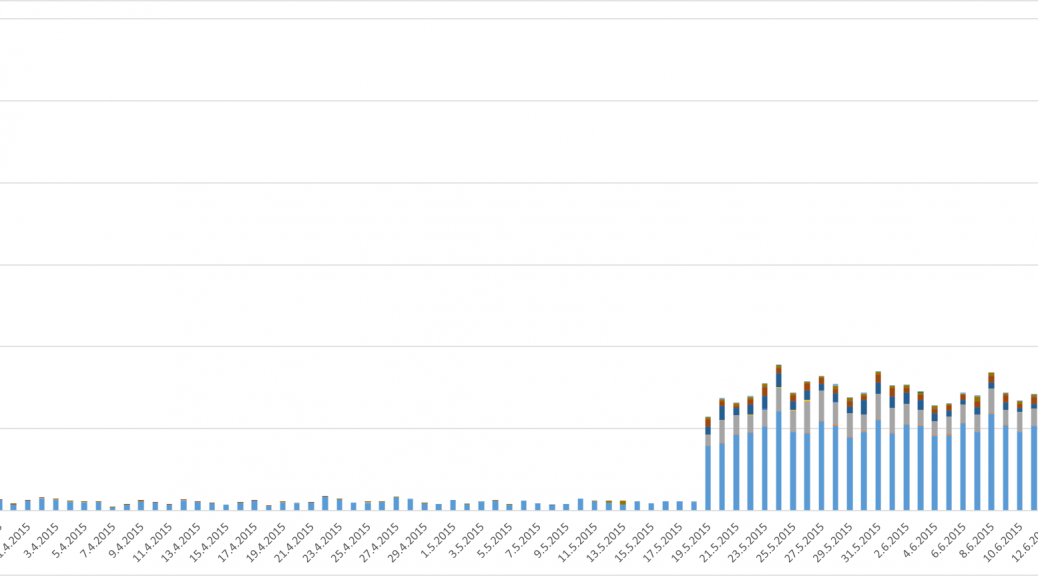
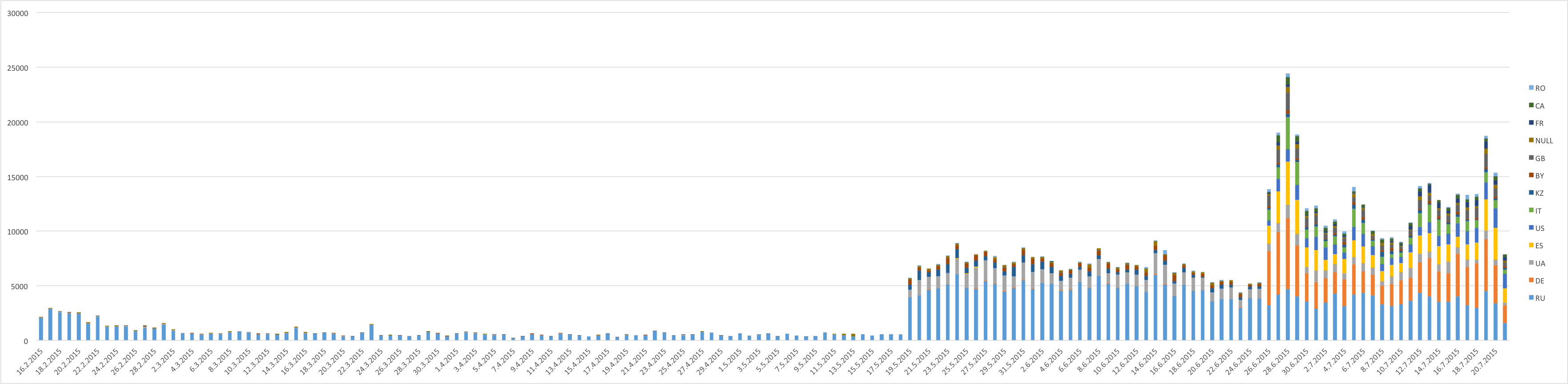
The above graph shows the number of unique users (user IDs) encountering Fobus per day. The graph is also geologically divided by country codes as reported by the users’ connection location.

Number of times users encountered Fobus by country (as of July 21, 2015):

  • Russia: 87,730
  • Germany: 25,030
  • Spain: 12,140
  • USA: 10,270
  • UK:  6,260
  • Italy: 5,910

There are two great leaps visible in the graph, which mark the days when new versions of Fobus were discovered and new detections protecting our users were released. These three detections seem to be particularly effective at their task. The high impact in countries outside of Russia and English speaking regions, which can be seen in the graph, is a little surprising. Especially considering that the malware typically is only in Russian and English and even the English version contains some strings in Russian. Seems like the authors were too lazy to translate their own app properly…

World map showing the percentage of users who encountered Fobus

World map showing the percentage of users who encountered Fobus

An app, built just for you

Now, let’s dig into the analysis. We will look at the certificates used to sign some of the Fobus samples. We already mentioned the problems connected with generating unique applications for each victim (server-side polymorphism). This does not only apply to rebuilding, repackaging and obfuscating each instance of the app itself, but also extends to their signing certificates. To back this up, we analyzed around 4,000 samples and data and inspected the usage of these certificates. We verified that each build of the malicious app is typically seen by one user only, even though its signing certificate can be used to sign multiple apps. Virtually all of the samples we have are very low prevalent, meaning that different users only very rarely see an app instance multiple times. As for the signing certificates, we believe that they are being regenerated on a timely basis. We were able to pick a few examples of such certificates from our statistics.

certs_may_28certs_may_30


As you can see from the screenshots above, these certificates are dated the 28th and 30th May 2015 and the time differences in the beginning of the validity period between these certificates are in the order of minutes, sometimes even seconds. We have also found some samples that have certificates with randomly generated credentials altogether.

certs_random

The above provided screenshot is an example of such randomly generated certificates.

To conclude, we would like to encourage you to think twice about the apps you install on your phone. Especially if the apps you download are from third party stores and unknown sources. If you download apps from the Google Play Store you’re on the safe side. Requiring nonstandard permissions – especially permissions that don’t seem necessary for the app to properly function – may be a sign that something fishy going on. You should be very suspicious of an app that requests device administrator access and think twice before downloading it.

Acknowledgement

Special thanks to my colleague, Ondřej David, for cooperation on this analysis.

How iOS users can stay protected against iScam threat

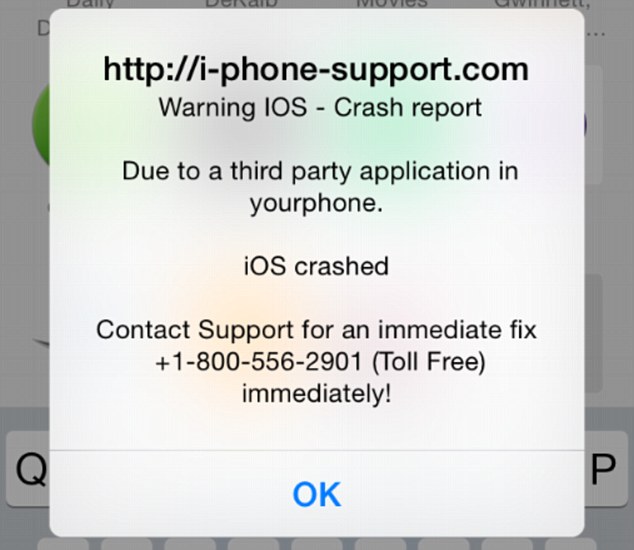
iScam displays a "crash report" to affected users. (Photo via Daily Mail)

iScam displays a “crash report” to affected users. (Photo via Daily Mail)

It’s a common belief (and myth) that Apple products are invincible against malware. This false line of thinking has recently again been refuted, as iPhone and iPad users have been encountering a ransomware threat that freezes their Internet browsers, rendering their devices unusable. The ploy, commonly known as iScam, urges victims to call a number and pay $80 as a ransom to fix their device. When users visit an infected page while browsing using the Safari application, a message is displayed saying that the device’s iOS has crashed “due to a third party application” in their phone. The users are then directed to contact customer support to fix the issue.

How to clean your system if you’ve been infected by iScam

  • Turn on Anti-phishing. This can be done by visiting Settings > Safari and turn on ‘Fraudulent Website Warning’. When turned on, Safari’s Anti-phishing feature will notify you if you visit a suspected phishing site.
  • Block cookies. For iOS 8 users, tap Settings > Safari > Block Cookies and choose Always Allow, Allow from websites I visit, Allow from Current Websites Only, or Always Block. In iOS 7 or earlier, choose Never, From third parties and advertisers, or Always.
  • Allow JavaScript. Tap Settings > Safari > Advanced and turn JavaScript on.
  • Clear your history and cookies from Safari. In iOS 8, tap Settings > Safari > Clear History and Website Data. In iOS 7 or earlier, tap Clear History and tap Clear Cookies and Data. To clear other stored information from Safari, tap Settings > Safari > Advanced > Website Data > Remove All Website Data.

Check out Apple’s support forum for additional tips on how to keep your device safe while using Safari.

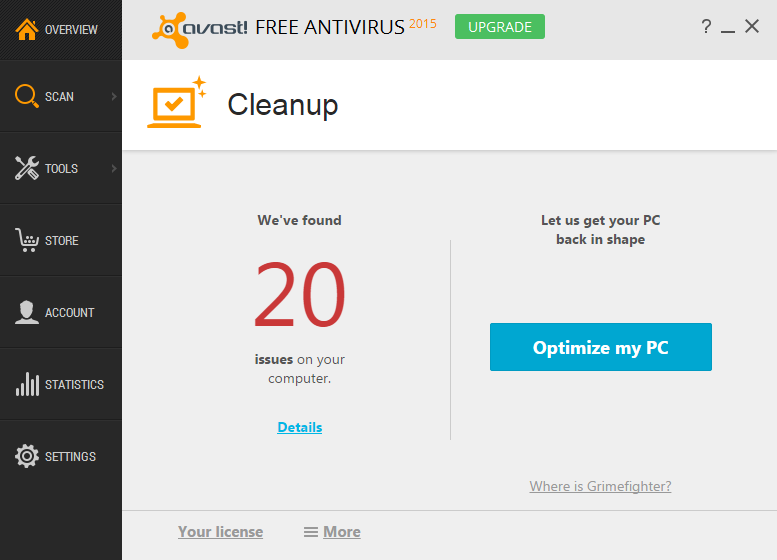
GrimeFighter is now Avast Cleanup

Optimize your PC with Avast Cleanup’s advanced scanning features.

Change is good, especially when it pushes us forward and encourages us to improve. We’ve recently made a change that will benefit our users and make their experience using our products even better. Our PC optimization product formerly known as GrimeFighter has now emerged as Avast Cleanup. In addition to the name change, there’s more to this transition that Avast users can be excited about. In Avast Cleanup, we’ve got a bunch of great benefits for you to enjoy:

  • Rid your PC of up to 5x more junk. Avast Cleanup continues to search for junk files, unnecessary app processes and system settings that slow down your PC’s performance. The amount of issues detected by Avast Cleanup have been improved fivefold, ensuring that your PC is cleaned as thoroughly as possible.
  • Keep it clean, keep it fast. Avast Cleanup’s quick and easy scan is 10x faster, now capable of transforming your PC in minutes or even seconds. As always, exact scan times may vary due to Internet connection or amount of issues found.
  • Win precious space back with new, advanced scanning features. Even a new PC can be loaded with unnecessary apps. Avast Cleanup checks when you update a program or uninstall an app, ensuring that any unnecessary leftover files don’t take up space on your PC. Since you’re immediately informed if unneeded files are discovered, you can save more space on your device than ever before.
  • Organize Avast Cleanup to work around your agenda. You can schedule a daily clean, select which programs you want to load upon startup, and choose what you clean in a scan. What’s more, Avast Cleanup discreetly runs in the background while you go about your daily activities.

Avast Cleanup helps you store more of what you actually want and to accomplish it in just a few minutes. Don’t let your PC become a test of your patience — try Cleanup for yourself. Here’s how:

  • For licensed users, all you need to do is install the latest version of Avast. Your GrimeFighter will then be automatically updated to Avast Cleanup. You’ll receive a notification letting you know that the update was successful.
  • For users who have updated to the latest Avast version but haven’t yet purchased Avast Cleanup, you can do so either from our website or, better yet, directly through the program by navigating to the store link on left menu of the interface.
  • For users who haven’t updated, you can also buy Cleanup within Avast. For now, you’ll still see it as GrimeFighter and you’ll need to do an update to the latest version of Avast in order for it to work.

How to thoroughly wipe your phone before selling it

Make sure your Android phone is wiped clean before you sell it.

Every day, tens of thousands of people sell or give away their old mobile phones. We decided to buy some of these used phones to test whether they had been wiped clean of their data. What we found was astonishing: 40,000 photos including 750 photos of partially nude women and more than 250 male nude selfies, 750 emails and texts, 250 names and addresses, a collection of anime porn, a complete loan application, and the identity of four of the previous phone owners.

How did we recover so much personal data?

The problem is that people thought they deleted files but the standard features that came with their operating system did not do the job completely. The operating system deleted the corresponding pointers in the file table and marked the space occupied by the file as free. But in reality, the file still existed and remained on the drive.

With regular use of the device, eventually new data would overwrite the old data but since the person was selling the phone, that never happened and the files were still intact.

It works the same way on your PC. I used free software to recover deleted photos that I thought were missing forever because they had not been overwritten yet.

You can permanently delete data with Avast Anti-Theft

Avast’s free app for Android, Avast Anti-Theft, actually deletes and overwrites all of your personal files. All you do is follow these steps to delete personal data from your smartphone before you sell it or give it away.

1. Install Avast Anti-Theft on your Android device. The app is free from the Google Play Store.
2. Configure Avast Anti-Theft to work with your My Avast account. This gives you remote access to your phone through your PC.
3. Turn on the thorough wipe feature within the app.
4. Log in to your My Avast account from a PC to wipe your phone. This will delete and overwrite all of your personal data.

Follow Avast on FacebookTwitter, YouTube, and Google+ where we keep you updated on cybersecurity news every day.
Patches from Adobe, Oracle, and Microsoft released

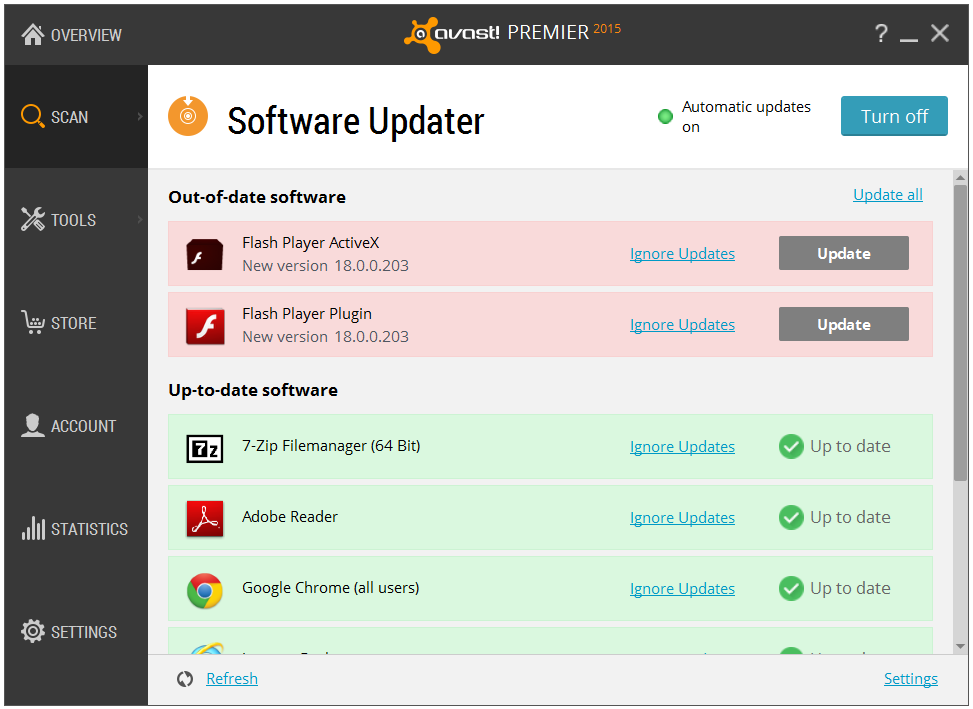
Avast Software Updater helps you apply software updates.

Earlier this week, we told our readers about the three Flash Player zero-day vulnerabilities that were found in stolen files that were leaked from the Hacking Team. We advised Avast users to disable Flash until the bugs are fixed.

It doesn’t look good for Flash. Because of the continuing security problems facing the 20-year old platform, Google and Mozilla each announced this week that their Web browsers will eventually be dropping default support for Adobe Flash, and Facebook’s new security chief wants to kill Flash. For now you can still use it, but the reports of it’s death are not greatly exaggerated…

Adobe has released security patches for Windows, Mac OS X, and Linux. Adobe Flash Player installed with Google Chrome will be automatically updated to the latest Google Chrome version. Users of Internet Explorer 10 and 11 for Windows 8.x will be automatically updated to the latest version.

Another Hacking Team zero-day vulnerability was discovered in Microsoft’s Internet Explorer. Microsoft released a total of 14 security bulletins, 4 ‘critical’ and the remainder ‘important’ in their July Security Bulletin.

And finally, Oracle released a security update to fix the Java zero-day exploit reportedly used to attack military and defense contractors from the U.S. and spy on NATO members. The Critical Patch Update Advisory also includes 193 new security updates; 99 of which could be exploited by remote attackers.

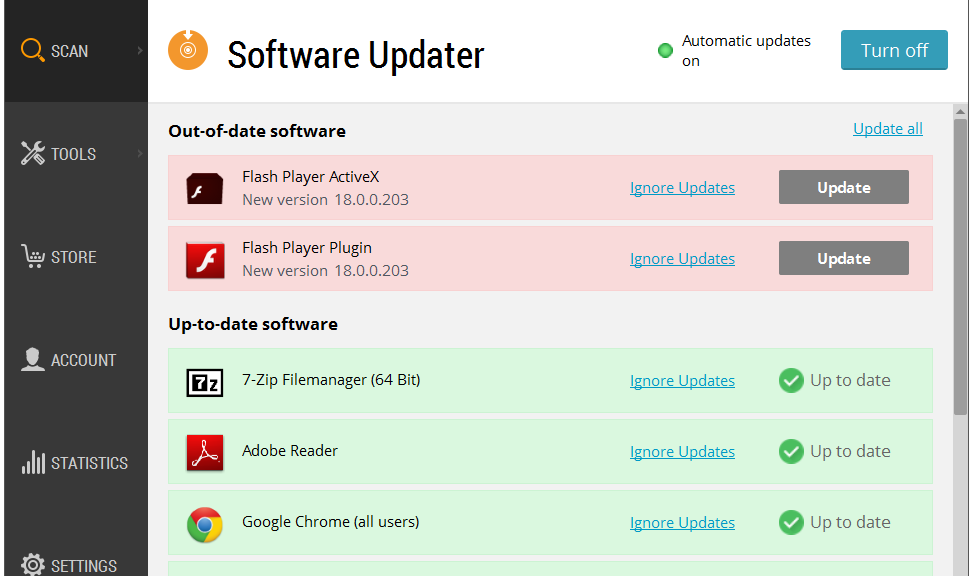
Avast Software Updater can help you with most software updates. To find it, open your Avast user interface. Click Scan on the left side, then choose Scan for outdated software. You an then decide how to proceed.

Avast Software Updater shows you an overview of all your outdated software applications

Avast Software Updater shows you an overview of all your outdated software applications

Follow Avast on FacebookTwitter, YouTube, and Google+ where we keep you updated on cybersecurity news every day.
 

Mr. Robot Review: da3m0ns.mp4

This week’s episode was a little confusing for me – and I’m not only referring to the trippy dream Elliot has while going through his drug withdrawals.

Operation Meltdown

It seems I wasn’t the only one who had questions about the hacks in this week’s episode; Forbes published an interview they did with Michael Bazzell, Mr. Robot’s technical consultant and cyber crime expert explaining the hack attack on E Corp that Elliot comes up with at the beginning of the show.

In the article, Michael Bazzell explains how Elliot plans on destroying E Corp’s data storage facility, using Raspberry Pi. Sounds like a very yummy method – too bad there’s an “e” missing at the end of “pi”! Michael explains that Raspberry Pi is a very small computer that can be accessed via the Internet through its built-in cellular chip. Using this, Elliot wants to control the facility’s climate control system to overheat it, thus melting E Corp’s tape-based back up.

While Forbes focused on the more complex hacks that targeted large corporations like E Corp and Allsafe, I was intrigued by the two physical hacks in the show.

@whoisMrRobot

via USA Networks

Beep Beep

The first “IRL” hack is when two members of FSociety hack a minivan – keep in mind that FSociety does everything in their power to not leave a trail, so they need a stolen car to get to E Corp’s data facility center in order to prevent being caught.

The FSociety guys casually sit on a sidewalk and wait for someone to park and lock their car. Using what looked like an old radio to me but is more likely a transmitter, they were able to send a command to unlock the car – politely thanking “mom” for giving them the opportunity to steal her car. Once inside the car, they connect the car to their laptop using a cable and ran the code to get the car started.

I asked my colleague, senior malware analyst Jaromir Horejsi, what he thought of the hack:

All they needed was the cable and specialized control software for cars. This software can access data from sensors in the car and it can control the car’s behavior. With that, they just had to connect everything together and select their desired actions. – Jaromir Horejsi

FREEZE…Your car keys?

This method of hacking a car seemed a little old school, given that there are now so many cars on the road that are keyless and start with a push of a button. Nick Bilton, technology writer and Disruptions columnist for The New York Times, recently had his car hacked and stolen and  he wrote an interesting column about his experience.

Nick describes how he was standing in his kitchen and watched as two teenagers stole his Toyota Prius. Prii and many other modern cars are keyless and require the fob key to be within a certain range to start. Nick did more research into how it was so easy for the teens to steal his car right in front of his home and found that there are various gadgets on the market that can unlock BMWs, Toyotas and many other keyless cars. These gadgets are radio transmitters that either use brute force to cycle through car key fob codes or simply amplify the distance the car searches for a key fob, as was done in Nick’s case.

The solution Nick found to this problem? Putting his key fob into his freezer, which acts as a Faraday Cage that blocks external electric fields.

Do Not Disturb

En route to E Corp’s data storage facility, Elliot vomits due to his withdrawal symptoms and the FSociety team has to make a stop for him to recuperate. They stop at a hotel and plug a small device into the room’s key card lock port. Within the blink of an eye they have entered the room and made themselves at home.

This made me ask myself: Can someone really enter a hotel room that easily? (I also thought it was rather convenient that they just happen to have this device with them, but I won’t get into that here ;)).

I did some research online and found out that it is very possible to hack one’s way into a hotel room and that this was proven back in 2012 by Cody Brocious. You can find his paper describing how he hacked the Onity HT lock system for hotels here.

However, we are now in year 2015 and times are changing! Now, many major hotel chains, like Hilton and Starwood, are using NFC and Bluetooth keys combined with mobile apps in place of key cards and physical keys.

The security of any application and system depends on its design and proper implementation. Vulnerabilities cannot be avoided. However, it depends on whether these vulnerabilities are exploitable or not. If exploitable, it depends on who discovers them first the good or the bad guys. If discovered, it also depends on how quickly they are mitigated. Customers should not be discouraged from using new technology. Conversely, the more people use new technologies, the higher the chance is that potential problems are discovered and fixed — the same goes for mobile apps that work as hotel room keys. –Jaromir Horejsi, senior malware analyst at Avast

Let us know what you think of this week’s Mr. Robot episode in the comments below and make sure to follow us on Twitter and Facebook for security news updates!

Follow Avast on FacebookTwitter, YouTube, and Google+ where we keep you updated on cybersecurity news every day.
Widespread iScam ransomware originates from US servers

iPhone and iPad users who turn on Avast SecureLine VPN while on unsecured Wi-Fi are protected from iScam.

It’s a common belief (and myth) that Apple products are invincible against malware. This false line of thinking has recently again been refuted, as iPhone and iPad users have been encountering a ransomware threat that freezes their Internet browsers, rendering their devices unusable. The ploy, commonly known as iScam, urges victims to call a number and pay $80 as a ransom to fix their device. When users visit an infected page while browsing using the Safari application, a message is displayed saying that the device’s iOS has crashed “due to a third party application” in their phone. The users are then directed to contact customer support to fix the issue.

iScam displays a "crash report" to affected users. (Photo via Daily Mail)

iScam displays a “crash report” to affected users. (Photo via Daily Mail)

In the midst of this vexing threat, Avast’s suite of security applications identifies URLs which contain malicious content. When discovered, these addresses are flagged for malware and then stored in our blacklist database.

While scanning for malicious URLs, we discovered that many of the servers related to iScam are located in the United States. While iScam has affected users located in both the U.S. and U.K., the origins of the threat have remained fairly nebulous up until this point. Here are a few examples of where we’ve discovered malicious servers in the U.S.:

  • Scottsdale, Arizona (system-logs.info)
  • Concord, North Carolina (pcassists.info)
  • Kirkland, Washington (Adbirdie.com)
  • Chicago, Illinois (pcsafe.us)
  • Los Angeles, California (clevervc.com)

Every cloud has a silver lining – in this case, you can celebrate the fact that you’re protected from iScam using Avast SecureLine VPN. Not only does Avast SecureLine VPN protect you while browsing on unprotected Wi-Fi networks, but it also scans websites to check for malicious content and keep you from becoming affected by them. Once Avast SecureLine VPN is installed onto your iPhone or iPad, it automatically notifies you of the risks of connecting to unsecured Wi-Fi and you have the option of connecting to the secure VPN. Once turned on, Avast SecureLine VPN creates a private ‘tunnel’ for your data to travel through, and all your activities done over the Internet – inbound and outbound through the tunnel — are encrypted. If a website is infected with iScam, Avast SecureLine VPN blocks it, so users will not encounter the scam. For your best protection, Avast SecureLine VPN is available to download in iTunes.

How to clean your system if you’ve been infected by iScam

  • Turn on Anti-phishing. This can be done by visiting Settings > Safari and turn on ‘Fraudulent Website Warning’. When turned on, Safari’s Anti-phishing feature will notify you if you visit a suspected phishing site.
  • Block cookies. For iOS 8 users, tap Settings > Safari > Block Cookies and choose Always Allow, Allow from websites I visit, Allow from Current Websites Only, or Always Block. In iOS 7 or earlier, choose Never, From third parties and advertisers, or Always.
  • Allow JavaScript. Tap Settings > Safari > Advanced and turn JavaScript on.
  • Clear your history and cookies from Safari. In iOS 8, tap Settings > Safari > Clear History and Website Data. In iOS 7 or earlier, tap Clear History and tap Clear Cookies and Data. To clear other stored information from Safari, tap Settings > Safari > Advanced > Website Data > Remove All Website Data.

Check out Apple’s support forum for additional tips on how to keep your device safe while using Safari.

More than one in 10 American mobile users is the target of mobile malware

Threat analysts and malware researchers in the Avast Virus Lab detect and neutralize threats as soon as they appear.

Threat analysts and malware researchers in the Avast Virus Lab detect and neutralize threats as soon as they appear.

The Avast Threat Report provides an overview of global threat activity.


Avast malware researchers and Avast customers work 24/7 to protect each other.

Avast protects 230 million people worldwide in more than 186 different countries — we are present in more countries than McDonalds and protect more people than any other antivirus security provider. We stream 250 micro updates a day that protect our users from attacks. This is made possible by the 230 million devices we protect that simultaneously act as de facto sensors. These sensors provide us with information about suspicious files to help detect and neutralize threats as soon as they appear. Once we identify a suspicious file on a single device, it is reported back to the Avast servers and all Avast users around the world are immediately protected. This is called our Community IQ – it not only lets us better protect our users but also gives us valuable insights into the current security landscape.

Top targeted countries

Romania, Turkey and Vietnam were targeted the most in terms of PC threats in Q1 of 2015, with Romanians having a 54% chance of encountering threats. In France, Germany, Brazil, Great Britain and the United States, the chances were much lower; nonetheless, nearly one out of every three PC users encountered threats in these countries.

Percentage of PC threats encountered by country:

  • 41 percent Russia
  • 37 percent Spain
  • 34 percent Brazil and France
  • 29 percent Germany
  • 28 percent United States and Great Britain

Within the mobile sphere, Romania also had a high chance of encountering malware, along with China and Malaysia.China was targeted the most, which is most likely due to the fact that the Google Play Store is blocked in the region and, therefore, mobile users download apps from third-party stores.

The number of users accessing the Internet in China via mobile devices has surpassed the number of users accessing the Internet via PC this year, which also makes them an attractive point of access for cybercriminals on the hunt for a widespread target pool.

Percentage of mobile threats encountered by country:

  • 21 percent Russia
  • 16 percent Spain
  • 12 percent United States
  • 10 percent Brazil
  • 8 percent France and United Kingdom
  • 6 percent Germany

Top detections and exploits

Despite Android being fairly secure, mobile malware did grow dramatically with potentially unwanted programs (PUPs – a cute acronym for a not-so-cute threat), including adware, dominating the top ten Android detections.

On the PC side, the majority of the top ten detections included LNK files. LNK files are used to create shortcuts that typically point to an executable file or script and appear on one’s computer desktop as an icon, tricking users into using malicious shortcuts.

In terms of exploits, two of the biggest vulnerabilities that were exploited targeted Javascript and an HTML parser. The first exploit, targeting Javascript, could lead to a remote code execution in Internet Explorer versions 6 to 10 The second, on the other hand, targeted an HTML parser in Internet Explorer 10, and if successful, the attack could lead to remote code execution. Even if the attack was unsuccessful, it could still cause a denial of service.

Malicious ways

We observed a variety of tricks that cybercriminals use and one interesting, less common technique cybercriminals use is domain rotation. This method regularly creates new domains and subdomains and redirects malicious traffic to them. This is done to avoid blacklisting and capitalizes on the fact that it takes time for antivirus software to find and check these new domains, releasing new detections after they’ve been properly examined. Fortunately, Avast uses advanced algorithms to recognize domain rotations and block infected subdomains.

We also watched ransomware targeting PCs and mobile devices evolve. For example, PC ransomware CryptoWall did not originally use anonymization networks in earlier versions. CryptoWall 2.0 began using TOR to communicate with the command and control (C&C) server and now CryptoWall 3.0 uses I2P (Invisible Internet Project) a lesser-known anonymization network to avoid being blocked. Mobile ransomware Simplocker, on the other hand, reappeared in February 2015 using asymmetrical cryptography, making it impossible to recover encrypted data without accessing the C&C server.

Global Wi-Fi experiment

We not only observe malware threats, but we also ventured out of the office to further explore the security risks of public Wi-Fi. Our mobile security experts traveled to nine cities in the United States (San Francisco, Chicago, New York), Europe (Barcelona, London, Berlin), and Asia (Seoul, Hong Kong, Taipei) to observe public Wi-Fi activity.

Our observations revealed major security flaws in Wi-Fi hotspots and showed how easy it is for hackers to view users’ browsing activity, searches, passwords, videos, emails, and other personal information. While security issues were found in all cities, the experiment showed that users in Asia are more prone to attacks than users in both Europe and the U.S. Users in Berlin and San Francisco were most likely to take the necessary steps to protect their browsing.

Our experiment also shed light on the fact that a significant portion of users browse primarily on unsecured HTTP sites while connected to open Wi-Fi networks. HTTP traffic is not encrypted and is therefore unprotected, meaning that our team was able to view all of the users’ browsing activity, including domain name and page history, searches, personal log information, videos, emails, and comments. Taking this a step further, it was even possible for the Avast researchers to see products that a user browsed on eBay while not being logged in to the site as well as articles that people read on Wikipedia.

We have put together a security report for the first quarter of 2015, which includes a list of top targeted countries, threats, exploits, domain detections and much more. Open the full Avast Threat Report here.

Follow Avast on FacebookTwitter and Google+ where we keep you updated on cybersecurity news every day

Do third-party app stores pose a threat to mobile security?

Android Malware

Malware detected on Android

Over time, we’ve noticed the presence of some fairly heated user debates disputing the necessity of security or antivirus apps for Android devices. This could have been sparked by our recent post which argues that you can’t always rely on the security of Google Play or because of the myth that antivirus companies create viruses to sell more software.

Certain security gurus claim that if users stick to downloading and purchasing apps using only the Google Play Store, nothing bad will happen to their devices. However, we found that this line of thinking is not 100% correct, as was demonstrated through the discovery of a rogue Dubsmash app or in the infamous case of apps on Google Play posing as games and infecting millions of users with adware. Despite these findings, there are some users who still feel that they’re safe whenever using Google Play. This feeling of false security could have negative consequences; for example, when your data or financial information is stolen or when you have to resort to resetting your device in order to cleanse it of malware.

So, we know we can’t rely on the Google Play Store all the time, but are third-party stores more secure? Of course not. In this case, how is it still possible that it’s not a problem to use third-party stores? First of all, it’s necessary to point out that there are certain legitimate and clean third-party stores, such as Amazon and FDroid. At the same time, there are tons of shady stores and even more black market .apk files promising to deliver you the latest features of a cracked app.

With these things in mind, how can users navigate the world of third-party stores?

Android's default .apk handler

Android default apk handler

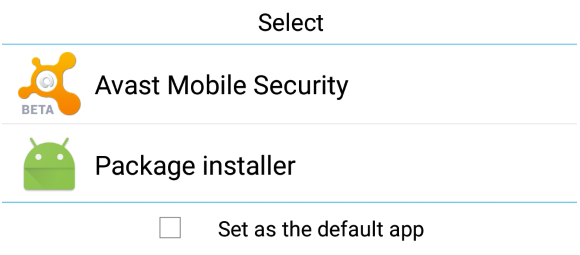
Besides the well known (and default) security options of Android, there is another useful feature that remains more or less unknown by average users: the default app feature. When Android (and also Windows) is about to open a file, it looks into its database to determine which application should be used and launches it. If you set Avast Mobile Security to be run at this preliminary stage of an app’s installation, it will scan the .apk file before it is opened and the installation process has begun. If any mistake or bug is detected, the process is halted and you’ll be given the option to uninstall the app.

If you have already installed Avast in your Android smartphone or tablet and this option is no longer shown, the easiest option will be to uninstall it, reboot and install it again. When the dialog pops up, choose Avast as your default handler for .apk files. As mobile malware reached the one million Android sample mark last year, the Avast database continues to grow exponentially. Avast Mobile Security also performs very well with new and unknown malware, as independent tests show us.

You can be safer and have a complete peace of mind while using third-party stores if you keep Avast Mobile Security running as your default installation package app. Download Avast Mobile Security for free on the Google Play Store.