Category Archives: Avast

Avast

Adobe Flash zero-day vulnerabilities threaten your security

Last Friday, Adobe confirmed two new “critical” zero-day flaws in the Adobe Flash Player browser plugin 18.0.0.204 – and earlier versions – for Windows, Mac OS X, and Linux. Today, a third flaw was found. Adobe Flash Player is a widely distributed multimedia and application player used to enhance the user experience when visiting web pages or reading email messages.

We recommend disabling Flash until the bugs are fixed. 

Three "critical" zero-day flaws in Adobe Flash Player discovered

Three “critical” Flash zero-day flaws in Adobe Flash Player discovered

Security experts say the two flaws were found in stolen files that were dumped earlier this month from Hacking Team, an Italian security firm that sells communication interception and surveillance software to governments around the world. The third one came from the same documents.

“Successful exploitation could cause a crash and potentially allow an attacker to take control of the affected system,” Adobe said in their blog. “Depending on the privileges associated with the user account targeted, an attacker could install programs on the system, alter or delete data, create new accounts with similar user rights, or cause a denial-of-service.”

“Adobe is aware of reports that exploits targeting these vulnerabilities have been published publicly. Adobe expects to make updates available during the week of July 12, 2015,” the blog said.

We recommend you do the following:

  • Remove or disable Flash until Adobe sends out a fix.
  • Once a patch is released by Adobe, update immediately.
  • Run all software as a non-privileged user (one without administrative privileges) to diminish the effects of a successful attack.
  • Avoid visiting websites or following links provided by unknown or untrusted sources.
  • Avoid clicking on links contained in emails or attachments from unknown sources.

To verify the version of Adobe Flash Player installed on your system, access the About Flash Player page, or right-click on content running in Flash Player and select “About Adobe (or Macromedia) Flash Player” from the menu. If you use multiple browsers, perform the check for each browser you have installed on your system.

Affected systems:

  • Adobe Flash Player 18.0.0.203 and earlier for Windows and Macintosh
  • Adobe Flash Player 18.0.0.204 and earlier for Linux installed with Google Chrome
  • Adobe Flash Player Extended Support Release 13.0.0.302 and earlier for Windows and Macintosh
  • Adobe Flash Player Extended Support Release 11.2.202.481 and earlier for Linux

Ohio school district teams up with Avast for Business

Avast teamed up with Chillicothe City School District in Ohio to provide free antivirus software their schools.

The best defense is a good offense.

The best defense is a good offense.

Educational institutions manage sensitive data including names, birthdays, and even social security numbers. That data needs to be secured to ensure sensitive student data remains confidential. Tyler Hisel is an IT technician the Chillicothe City School District in Ohio. Tyler recently started protecting his school with Avast for Business. “We had AVG before switching to Avast and we really needed to simplify our security solution.”

Servicing an entire school district’s IT needs is a challenge. That’s why Tyler said he needed software with easy-to-use centralized management where he could monitor the district’s devices. “Avast was cost saving and had lots of features that I was surprised came free,” said Tyler.

Tyler discovered Avast for Business by searching for free antivirus software for business. He explored all of the options and after considering the alternatives decided that Avast for Business was the best antivirus software for the district. “All we wanted was a simple security solution that worked, and I knew we didn’t have to pay a fortune for it.”

Budget wasn’t the biggest factor in Tyler’s decision but he claimed that it was definitely important. There were other security solutions that fit most of Tyler’s qualifications but he says that Avast for Business’ nonexistent price tag and centralized management made it the clear choice. When asked if he would recommend Avast to others he replied saying, “We’ve told businesses in the area about it already!”

Tyler’s final thoughts on Avast for Business were simply this, “I’ve got to hand it to you, it’s really an impressive product and it being free just makes it better.”

Avast for Business is free for schools, small and medium sized businesses and non-profit organizations. Visit our Avast for Business website to learn more and sign up.

Does Avast slow down my computer?

When your computer slows to a crawl, it is very frustrating. One of the worst things that people do when trying to restore the performance of their PC is to remove the security software. Getting rid of your protective barrier just opens you up to threats that could make things even worse.

So you know that you need a security product on your computer, but you don’t want any software to impact the speed or performance. That’s why an excellent choice is Avast antivirus products.

Avast got the highest rating for Performance from AV-ComparativesAvast provides high detection rates and good protection against malware, but it does not degrade system performance or annoy users by being resource hungry.

But don’t take my word for it.

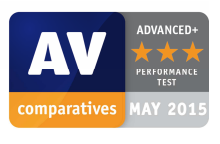
AV-Comparatives, a well-known and trusted third party testing lab, recently tested 20 antivirus and internet security products. Avast Free Antivirus topped every single one of them – paid security suites and free antivirus protection – and received an Advanced Plus three star award for the May 2015 Performance Test.

Reasons why your PC may be slow

It is not always security software that is responsible for a slow system. Other factors can play a role, which means that with a few tweaks your systems performance can be improved.

Old hardware If you try to install modern software into your old computer, it could start running at a snail’s pace, because the hardware simply is not capable of running the software. Ideally, buying a new PC with a multi-core processor is the best solution. However if your budget does not include a new computer, then you could add more RAM.

For Windows 7 or Windows 8, you should use a minimum of 4 gigabytes of RAM. If you use Windows XP or Vista, switch to Windows 8.1 64-bit. Avast security products are compatible.

More than one security program is not good. It’s not advised to run more than one security program with real-time protection at a time. Please uninstall any trial software that came with your PC before installing different protection. You can find a list and instructions to remove here. We recommend you follow their instructions before proceeding with the uninstallation.

Make sure your software is up-to-date. The most up-to-date software contains fixes and patches that makes it run at its best. Avast has ended product updates for older consumer versions of Avast Antivirus. Versions 8.0.1497 and lower continue to receive threat updates but do not receive any patches or technical support. The latest version of Avast has enhanced features and higher detection rates to protect your computer from malicious attacks.

Clean out the clutter. Clutter from leftover files and registry entries, unneeded shortcuts, adware, toolbars, and bloatware can slow your computer down. Getting rid of the junk can bring new life to your machine.

If your hard disk is almost full you could transfer movies, images, and other infrequently used files to an external disk. For the best performance, you should leave 20% of your disk space free.


Mr. Robot Review: Eps1.2d3bug.mkv

Elliot, Mr. Robot’s anti-hero cyber-security engineer by day and vigilante hacker by night, has been having a life-style crisis. In episode 3, Elliot longs to live what he calls a bug-free life, otherwise known as a regular person.

“Was he drinking Starbucks?”

“Was he drinking Starbucks?”

However, he is quickly pulled back into F Society’s hold when emails exposed during the threatened data dump revealed that E Corp executives had knowledge about the circumstances which led to his father’s death. We will leave the intrigues and plot theories, especially if Mr. Robot is real or a figment of Elliot’s imagination, to the internet. Right now, let’s look at the hacks highlighted in this episode.

At minute 7:40, you see Elliot in the hospital after Mr. Robot had pushed him off the high wall they were sitting on in the previous episode. His psychiatrist, Krista, is in the hospital and explains that the police wanted to do a drug panel, but Elliot refused. Elliot admits he has been taking morphine. Krista says the only way she can approve his release from the hospital would be if he commits to a bi-monthly drug test. Elliot starts thinking about how he will get around this problem by hacking the hospital’s IT. The IT department is lead by one single person, William Highsmith, with a budget of just $7,000 a year. According to Elliot, he uses useless virus scans, dated servers and security software that runs on Windows 98. It’s one of the reasons why Elliot made that particular hospital his primary care facility, since he can easily modify his records to look average and innocent.

Stefanie: Wow, wouldn’t it be an unusual that a hospital would actually use old infrastructure and have little budget for their IT? I also found it a bit odd that they have just one IT guy, I mean healthcare data is REALLY sensitive and definitely one of the last things I would want to have accessed by hackers!

Walter MegoWell, unfortunately, this situation is a very real in American hospitals. Last year, the Healthcare Information and Management Systems Society (HIMSS), reported that one out of five hospitals indicates that a lack of adequate financial resources was a barrier to the implementation of new technology, and another one fifth said that a lack of staffing resources was a barrier. In the same report, 20% of hospital IT leaders indicated their organization had experienced a security breach in the past year. Now, if you think about hackers like Elliot – you can imagine that some breaches probably go unnoticed. The real number of data breaches and hacks affecting healthcare institutions are most likely higher – scary, right?

We learn more about Angela’s boyfriend Ollie and his sticky situation. Last episode Ollie received a music CD that turned out to have malware on it. The infection that resulted gave an unknown hacker access to Ollie’s laptop webcam which he used to spy on him and Angela. The hacker tells Ollie he has photos of his mistress, Angela, and even Angela’s and her dad’s banking information and social security number. He threatens to blackmail Ollie if he does not spread the malware within Allsafe’s systems.

Stefanie: This part creeped me out, despite all of the crazy stuff we have seen so far on the show! First, let me ask: How easy is it for someone to hack your laptop’s webcam? I have heard tons of stories like this in the news, but I want to believe this isn’t as easy as it may be…

Walter Mego: Unfortunately, you are right to be creeped out and afraid. Webcam hacking is relatively easy and it’s not only built in laptop cameras that we have seen being hacked and streamed to other online, it’s also baby monitors with cameras and CCTV cameras. In terms of laptops, all hackers have to do is get you to install hacking software, which is often easier than people maybe think. In this episode, we see that Elliot hacked Shayla by obtaining her login credentials using a phishing scam. Phishing scams can also be used to trick people into downloading software and once a hacker has installed certain software on your laptop they can control your webcam to watch your every move and even record via your webcam. To prevent this, you should change your CCTV, baby monitor and external webcam’s passwords. If your laptop has a built in camera, you can simply cover it up with a post it, but you should really make sure you have antivirus installed on your computer and make sure it’s always up to date to catch malicious software. 

Stefanie: The other part that also scared me about this situation was how the personal information the hacker collected not only affected Ollie, but Angela and her dad as well. Do you think people are aware of how much a hacker can do if they collect your personal information?

Walter Mego: Absolutely not. People often say “here, look at my phone, I have nothing to hide” or do not protect themselves while connected to open Wi-Fi, because they think their activities and data are uninteresting. I think people underestimate the value of the data on their devices. This is the perfect example of that and the hacker didn’t even steal any of Ollie’s money while hacking, he just gathered personal information. Granted Ollie was having an affair (not very cool of him), which was what Ollie was unhappy about having potentially exposed, the hacker also got a hold of Angela’s dad’s social security number, because her bank account was linked to her dad’s account – something Ollie probably wouldn’t have thought he had on his laptop. If you hack someone and collect enough valuable and personal information, I am sure you can blackmail anyone to a certain extent using that information.

At minute 35:25 we see Tyrell do some simple Instagram stalking and he finds out where Anwar, the CEO’s assistant, hangs out. After an encounter with Anwar, Tyrell does something to Anwar’s phone that gives him valuable information.

Stefanie: We see on the cell phone’s display that Tyrell is rooting Anwar’s device. Why do you think he does this?

Walter Mego: We are not entirely sure of Tyrell’s motives, but it’s likely he targeted Anwar to gain access to the name of the candidate for the CTO job that he wants. Tyrell uses a backdoor in Anwar’s Android device to install an app that could allow remote access. It’s not strictly necessary to root the phone – just gaining physical access to the phone is all he needed.

Can’t get enough of Mr. Robot? Watch Avast’s Hack Chat video series.

Every week we discuss the hacks on Mr. Robot, plus current cyberthreats, nostalgic web tech, and Tips & Tricks on how to protect yourself and your devices. Subscribe to our YouTube Hack Chat channel and don’t miss a single episode.

Top 10 most annoying browser toolbars

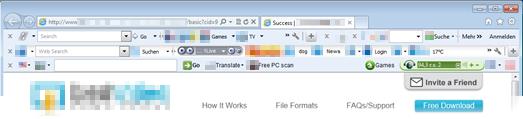
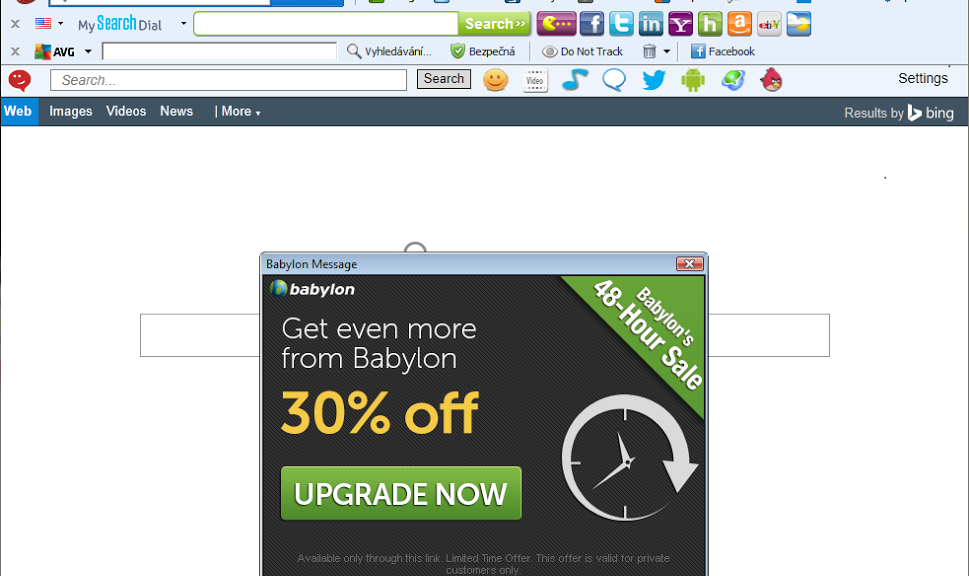
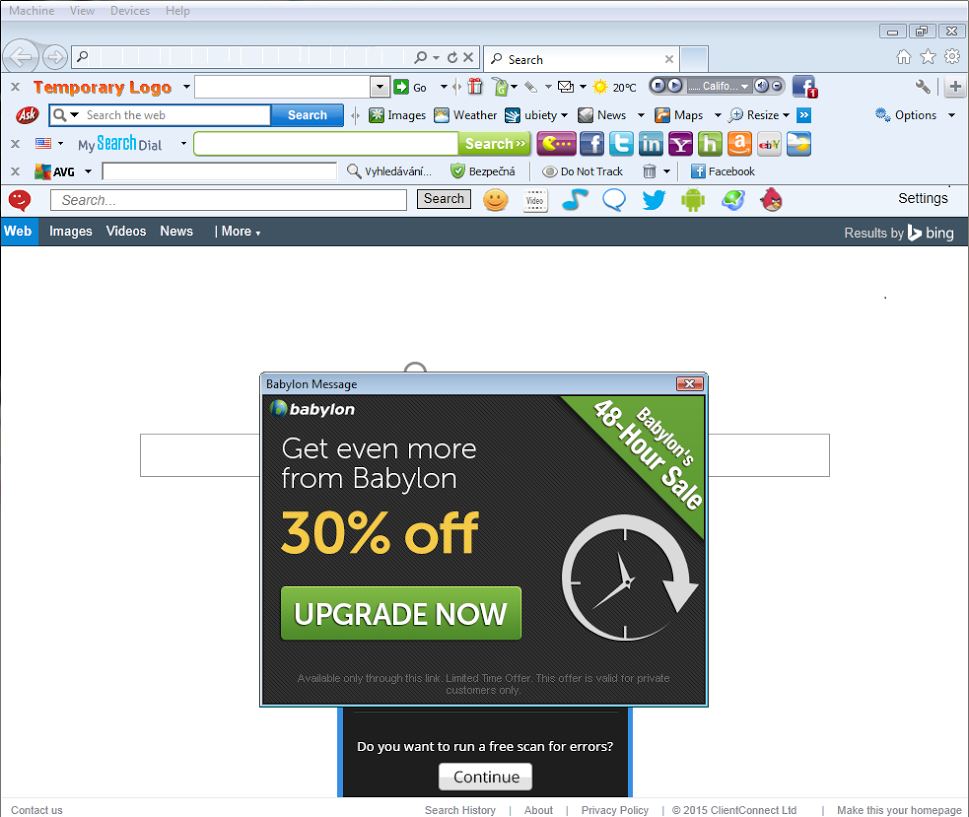
It usually happens after you download something free. You go back online and your browser suddenly looks unfamiliar. There’s new buttons and weird icons in the place of what you used to have. A strange search page from a company you have never heard has taken the place of your homepage.

How did I get that annoying toolbar?


Avast Browser Cleanup removes annoying toolbars

You have inadvertently downloaded a browser toolbar that came bundled with other software.

Free programs, like Adobe Reader, often include add-ons like toolbars or browser extensions. Most of the time, during the installation of the software, an opt-out option will be presented for the add-on. But, lots of people click through without reading, and when they’re finished they discover they have downloaded something they didn’t intend to.

To keep this from happening in the first place, slow down and read the screens. You could save yourself lots of time and headaches if you do.

What do browser toolbars do to my computer?

  • Change your homepage and your search engine without your permission or awareness
  • Track your browsing activities and searches
  • Display annoying ads and manipulate search results
  • Take up a lot of space inside the browser
  • Slow down your surfing speed
  • Fight against each other and become impossible for the average user to fully uninstall

In some cases, toolbars or add-ons can be quite useful, but Avast users have rated only 4% of toolbars as “good” or “useful”. The rest are “poor” or “very poor”.

The ten most unpopular toolbars are:

TOOLBAR NUMBER OF REMOVALS
Mindspark 18,358,334
Conduit 13,924,453
 Ask.com  11,773,062
 Delta Search  6,136,056
 FastStart  4,862,671
DealPly 4,253,676
 Yontoo Toolbar  4,020,969
SearchTheWeb (Iminent) 3,442,706
 IncrediBar  2,729,797
Sweet 10 packs / SweetIM 1,948,958

How do you get back your normal browser?

Avast Browser Cleanup has identified more than 60 million different browser add-ons and removed more than 650 million from users’ browsers in the past two years. Avast Browser Cleanup can help you remove annoying browser toolbars and regain your normal browser settings.

Avast Browser Cleanup is integrated in all free and premium Avast products. It can also be downloaded by users of other security programs as a standalone version.

AP students go nuts for Avast SecureLine VPN?

This morning, our colleagues who work on our Avast SecureLine VPN product informed us that there was a significant increase in downloads in the U.S. This made us curious, as we didn’t have any specific campaigns running that would explain this dramatic spike in downloads. In the App Store, we jumped tothe 6th spot in the utilities category (and as we were coming from the 200th spot, this says a lot)!

We decided to turn to Twitter to see what was going on and discovered that teenagers were the cause of the trend. This shouldn’t have really surprised us, as teens are trendsetters and experts at dispersing viral content via social media channels.

SecureLine VPN

Why would our Avast SecureLine VPN go viral amongst teens?

Why are American teens downloading our Avast SecureLine VPN to access content via our server in New York? We know a lot of people like to use our VPN product to watch content from home while travelling, but we have never seen this many people connecting to a server within their own country.

AP (Advanced Placement) scores available on the East Coast first

Reading through the product-centered tweets, we realized why so many teens were downloading our VPN – they wanted to see their AP scores ASAP :). Apparently, APscore.org announced that the results of AP exams would be published by location, the first region being the East Coast.

What is Avast SecureLine VPN and how did it help students across the U.S. (to hopefully sleep well at night knowing they did well on their AP tests!)

Avast SecureLine VPN (virtual private network) creates a virtual shield and tunnels traffic to a proxy server. The proxy server protects your personal data, thus preventing hackers from accessing your files and other sensitive information stored on your device. Avast SecureLine VPN also anonymizes your location, an added advantage that can be used when you’re travelling and want to access content that may otherwise be blocked. Alternatively, like in the case of all these students, access your AP scores as if you were from viewing them from New York!

We are afraid Vaibhav may be right (we appreciate your condolences man!)…

However, we decided to extended the 7-day free trial for an additional 30 days and have come up with a list of reasons why you AP students should continue to use Avast SecureLine:

  • You’ll be starting college soon and we suspect that means you will be spending many hours at Starbucks studying, writing papers, hanging out with your friends or on dates. This means you’ll be using Starbucks’ free Wi-Fi and, as with other things in life, we highly recommend you use protection! Wi-Fi hacking doesn’t require a high level of skill and when you connect to open Wi-Fi networks, hackers can see which websites you’re visiting, what you’re looking for on Amazon or eBay – it’s as if they are peering over your shoulder (creepy!). Avast SecureLine encrypts your data, thus protecting you from Wi-Fi snoops.
  • You may study abroad (and I personally recommend you do so!). Studying abroad is great – you learn a different language, get to know other cultures, sample exotic foods, and make tons of friends from across the globe – but you will probably miss home during this exciting time. Avast SecureLine can bring you a bit closer to home to help with homesickness. Content like Netflix, Hulu and Pandora is not always available in countries outside of the U.S., but with SecureLine VPN, you can connect to a server in the states to watch your favorite shows from home or listen to the latest hits your friends are all raving about.
  • A one-year subscription of SecureLine for Android and iOS costs as much as a selfie stick. As nifty as selfie sticks are, they are banned in many places, such as Disney theme parks, the Palace of Versailles and the majority of museums and concert halls across the world. So, instead of buying a selfie stick you can’t use in all the cool places you want to visit this summer, invest in one year of SecureLine VPN to protect you during your first (and hopefully best) year of college :)

SecureLine VPN is available for PC, Mac, Android and iOS.


Welcome to the Team, Remotium!

I’m glad to announce that we have acquired Remotium, a leader in virtual enterprise mobility, headquartered in Silicon Valley. Remotium’s award-winning and patent-pending technology, the Remotium Virtual Mobile Platform (VMP), provides enterprises with secure access to business-critical applications from anywhere and from any mobile or desktop device. With this product, corporate mobile users have all their personal data and apps resident on their mobile (iOS or Android) while all their corporate data and apps reside and execute on a server and are only displayed on the mobile. This is the perfect fit for bring-your-own-device (BYOD) environments.

Remotium‘s mobile solutions address the needs of modern enterprises. As more and more companies support BYOD policies, the question of how to implement these policies efficiently and securely is top of mind for everyone. As people bring their own devices to work, the lines between business and private data become blurry. In a study, IBM found that millions of people use dating apps on company smartphones, which could expose themselves and their employers to hacking, spying and theft. Out of the 41 dating apps analyzed by the researchers, 26 had medium or high severity vulnerabilities.

With Remotium’s technology, companies have the visibility and security needed to ensure data integrity and corporate compliance. At the same time, users enjoy increased privacy, as well as apps that look and feel consistent across mobile and desktop platforms. Remotium was named “Most Innovative Company” at RSA® Conference 2013 and won the Best of Show award at Interop Tokyo in June 2015.

With this acquisition we are expanding our mobile offerings into the enterprise space. Although our near-term approach with Remotium is to make the products successful in the enterprise market, we also see a tremendous opportunity to leverage this innovative technology within our traditional consumer and SMB markets.

We are pleased to add the Remotium staff to our team of more than 600 Avast employees – together we will further accelerate Remotium’s growth and expand its capabilities across enterprise mobility platforms.

Avast Browser Cleanup removes unwanted browser add-ons

Most Internet users are familiar with this problem all too well: After downloading a video player, Java, Flash updates or other software, the browser has suddenly changed. New buttons and icons in all colors and sizes along with an URL entry bar take up valuable real estate on your browser. The browser runs noticeably slower – and the results look different. Most annoying is that the advertising becomes more prominent.

Our free utility gets rid of annoying toolbars and restores hijacked searches.

Over the past two years, Avast Browser Cleanup has identified more than 60 million different browser add-ons which are often bundled with other free software, such as video players, Java and Flash updates. These toolbars typically occupy the horizontal space below a user’s browser and can include buttons, icons, and menus. Despite removing and re-installing a browser, toolbars will often remain, which is a behavior similar to malware.

 “We’ve entered the decade of unwanted add-ons — Google is now cracking down and removing ad-injecting toolbars from its Chrome store. Avast detects these toolbars and many more and is focusing on helping users battle browser toolbars that are one of the biggest consumer security outbreaks since spyware,” said Vince Steckler, Chief Executive Officer of Avast.

While not malicious per se, browser add-ons that come as toolbars can hijack and switch a user’s search preferences and can be extremely difficult to remove once installed. Avast Browser Cleanup removes these unwanted toolbars from Google Chrome, Mozilla Firefox, and Internet Explorer and lets users restore their search engine preference. Previously available as a feature in Avast Free Antivirus, Avast Browser Cleanup has now been made available as a new, free stand-alone product.

The new version of Avast Browser Cleanup includes improved browser compatibility, support of the latest browsers, more homepages to choose from when resetting the browser, and more aggressive detection of toolbar protectors that make removal difficult. Additionally, Avast Browser Cleanup now runs in the background, notifying the user when it detects a potentially unwanted or malicious toolbar.

Are you an Avast user? You already have Avast Browser Cleanup.

Avast Browser Cleanup is integrated in all Avast antivirus security products, including the free version.

Use another antivirus product? You can use stand-alone Avast Browser Cleanup.

If you don’t use Avast as your antivirus protection, Avast Browser Cleanup can be downloaded as a free stand-alone software.

Mr. Robot Review: Ones and Zer0s

Another week, another Mr. Robot episode! Last Wednesday the second episode of Mr. Robot aired (Ones and Zer0s). This episode did not disappoint! It was dark, gloomy, but also included lots of technical things that made us once again question: How can this affect me?
via: USA Network

via: USA Network

This week I sat down with freelance security and privacy journalist, Seth Rosenblatt, to discuss the episode.

At the beginning of the show, Elliot has a bit of an involuntary meeting with E-Corp now interim CTO, Tyrell Wellick. After this meeting, Elliot goes home and hacks Tyrell. What he notices is that E-Corp mail servers haven’t been patched since “Shellshock” and that Tyrell does not use two-factor authentication nor does he have a complex password. Elliot realizes that this was all too easy and that Tyrell must have wanted Elliot to hack him. He then goes nuts and burns his chips and SIM cards in the microwave, tears apart his hard drive, destroys his mother board.

Stefanie: Lots of interesting stuff happened in this scene! Can someone hack me like Elliot hacked Tyrell? What is the Shellshock vulnerability and can it still affect me as a personal user?

Seth: If Tyrell wanted Elliot to hack him, he made it pretty easy for an experienced hacker like Elliot. I bet many people, who do not put a lot of thought and effort into their online security, can be easily hacked. The fact that E-Corp hadn’t patched their servers since Shellshock seemed a bit odd, but again this was maybe intentional to make it easy for Elliot to hack, in the hopes of blackmailing him later on. In terms of the average user, Shellshock is a vulnerability that affects systems using BASH (a Unix based command processor used by Unix- based systems such as Linux and Mac). Patches for Shellshock have long been issued, so if you update your operating system regularly you have nothing to worry about.

Stefanie: Elliot used the same “brute-force” method we talked about last week to figure out Tyrell’s password. If it’s that easy, should I use two-factor authentication in addition to having a complex password for my accounts?

Seth: In terms of using two-factor authentication, this is something that is not used enough in my opinion! It may be more work to log into accounts, but it makes your accounts more secure. Popular sites like Facebook, Twitter, and Google all offer two-factor authentication and if you don’t already use it, do it now! Of course, you should use a complex password for every account you have, because as we learned in the first episode, Elliot is able to hack a lot people due to their weak passwords.

Stefanie: Did Elliot really have to physically destroy everything?

Seth: Elliot physically destroyed his entire computer because he was afraid Tyrell would be able to use his hack as evidence and blackmail. This was a bit extreme, but in this case he could have just destroyed his hard drive and theoretically some of the memories on the motherboard. Again, unless you are afraid someone may physically come after you, it is not necessary to physically destroy things.

Later on in the episode Elliot’s boss, Gideon, asks Elliot if he knew about the DAT file found during the E-Corp hack. Elliot tells Gideon he thought it was a junk file.Mr. Robot’s fsociety releases an anonymous-style video threatening E-Corp with “data dumps” to the media from the terrabytes worth of company employee emails and files they’ve stolen, if their laundry-list of demands is not met. 

Stefanie: What is a DAT file and why would Elliot think it is a junk file?

Seth: A DAT file is just a data file. Unlike .PDF or .DOC files, DAT files do not specify which program should open it, so you would need to know which program the DAT file was created for. DAT files are mostly sent as email attachments.

Stefanie: The Sony Pictures hack last November included data dumps. How serious a threat is that to a company?

Seth: It can be devastating. With the Sony hack, we saw a continuous flow of sensitive corporate data, personnel records including salary details, as well embarrassing correspondence between senior executives leaked to the press. Who knows what nefarious things a company like “Evil” Corp has in their files. Mr. Robot would hit ‘em where it hurts.

Around the 22:41 point, Mr. Robot asks Elliot to use his Allsafe company security clearance to hack the Comet P.L.C. to increase the pressure of the gas-lines nearby in order to blow-up “Steel Mountain” a natural gas refinery near a data-storage facility used by major corporations.

Stefanie: Can even an above average “hacker” like Elliott access municipal utilities and gain access to dangerous and highly controlled industrial processes like ones regulating the valves for gas lines?

Seth: Unfortunately, the answer is yes. On the whole, it has been proven that industrial infrastructure remains woefully vulnerable to computer attacks that could have devastating consequences. Our nations’ energy grid is continually under attack – in fact, in 2014, there were 79 incidents investigated by Homeland Security. Russian hackers have already infiltrated software that controls electrical turbines in the U.S., and in the case of one major U.S. energy provider, spyware sat on their computers for a year. It got there by one employee clicking on a bad link in an email.

When explaining how the gas plant will go kablooey, Mr. Robot says that when they blow up the pipeline, then Darlene’s worm will kick into gear at the data center and the “Dark Army” will take care of redundant back-ups at the Chinese facility.

Stefanie:We’ve heard of worms like Stuxnet, is that the kind of thing you think fsociety is planning to use? And who could the Dark Army be?

Seth: Stuxnet was developed to infiltrate software and remotely shut down Iran’s uranium enrichment facilities, so it is reasonable to assume that fsociety will deploy a similar worm. It was the first known malware with the ability to cause physical damage to electrical or mechanical devices, and data centers with gaps between IT and facilities systems could be vulnerable.

 As for the Dark Army, we don’t know whom Mr. Robot is talking about, but there does exist mercenary hackers for hire. They sell their skills to nation-states or militant groups and do a good job of covering their tracks before going on to the next customer.

In minute 27:59 Elliot hacks into the account of his drug dealer, Fernando Vera. His password is eatdick6969. Elliot discovers that Fernando does all his drug transactions through email, chat messages, and Twitter. Digging deeper, Elliot also learns that Vera uses code-words in his tweets, that are timed with recent news articles. Words such as “Biscuit” and “Clickety” are clearly references to guns and gun sales. “Food”, “Seashells” and “gas” are codes he uses for bullets. 

Stefanie: Drug-dealers have used code-words for drugs since phone calls were invented. Why is this significant? Is this news headline code-wording a pattern used in underground organizations? Have there been recent examples? 

SethAs criminal investigations today can include checking a suspect’s emails, instant messages, and Twitter history, drug dealers need to find a way of getting around these investigations and blur messages so investigations get harder and their communications history cannot be used as proof against them. The news headline code-wording pattern helps to constantly have new code words, which makes it harder for the police to understand the message behind the code. Just last fall, in the U.S. a drug trafficking ring was disrupted that spoke about “Hurricane Sandy” when speaking about one of their drugs.

What’s surprising though is that Fernando uses his personal accounts and public Twitter messages in order to do his drug dealing business. Drug dealers often use pre-paid phones for their “business” that don’t have an account and therefore the owner cannot be identified. Also, they frequently dispose of the phones and get new ones to obfuscate their activities and whereabouts.

In minute 32:14, Elliot picks the bathroom lock. He explains that “the lock-pick is every hacker’s favorite sport. Unlike virtual systems, when you break it you can feel it.”

Stefanie: When I saw this scene, this sounded familiar to me – last year I had the pleasure to meet Kevin Mitnick, once the most-wanted hacker of the United States, hunted by the FBI. Today, he is a reputable security consultant – the hacks he does today have the purpose of finding security issues in order to fix them. When I met him, he handed me his business card – and it was in the form of lock picks.

Seth: Absolutely, this is not just a cliché, hackers like to hack – not just in the digital sense, but also in the real world!

 

Arizona school simplifies and saves with Avast’s free business software

Avast for Business just made life easier and saved money for administrator Dale Kvittem-Barr at Peace Lutheran Church and School.

Avast for Business protects a private school for free

Avast for Business simplified a private school’s security management – for Free!


Schools house a large quantity of sensitive data and Kvittem-Barr knows that security software is a must. But, managing 50 devices is a challenge.

“When I started here, we had Norton and each computer had its own individual license. It was a nightmare. I switched all of the school’s computers to the free Avast consumer product. When I heard there was a free business solution and that it had a centralized management dashboard I knew we had to have it.”

With Avast for Business, Kvittem-Barr no longer has multiple licenses to manage and he can see his entire network anytime, anywhere.

“The cloud-based system makes sense because the entire network can be updated constantly from the dashboard so I don’t have to run around to every computer anymore.”

For his mixed platform networks, Kvittem-Barr says Avast for Business just works for him.

“We have Macs and PCs so to be able to protect them both with the same console is great!”

And the software keeps him continuously informed about threats to the school.

“The notifications have been really helpful because I can see which computers are being hit harder than others and make sure I focus on those.”

Budget is an issue for all schools and Kvittem-Barr said that his school’s savings with Avast for Business were substantial. As for plans to spend the savings he says,

“Yeah, we were actually able to purchase a lot more computers and a device charging cart.”

Find out how your school can save money with Avast for Business.