Category Archives: AVG

AVG

AVG AntiVirus for Android “Marshmallow” update, now easier to use

At AVG we are constantly improving our products, ensuring you get the best experience and features to help keep your digital world safer and more secure.

We’ve recently updated our popular AVG AntiVirus for Android app. It provides compatibility with the latest version of Android, and it has improved performance and is even easier to use.

 Google’s latest Android operating system update (called ‘Marshmallow’) has been released, so we’ve ensured AVG AntiVirus for Android is compatible and ready to install, so that there’s no disruption to the security and protection of your device and its data.

We’ve also taken the easy-to-use interface and improved it further! The design has been updated in line with Google’s Material Design principles for a more attractive and unified experience on your Android device.

AVG Anti-Theft & App Lock now share the same PIN. That’s one less code you need to remember to access your advanced security features.

If you don’t already use the Anti-Theft feature, you’ll want to consider enabling it to help secure your data in case your device is ever lost or stolen. It allows you to:

  • Sound an alarm on your device
  • Lock your device
  • Locate your device on Google Maps
  • Wipe your personal data

The ability to erase your personal data from a device is very useful these days, if not essential. Once enabled, it will help you avoid a potential data breach which, as we’ve seen, can have serious consequences.

We’ve also introduced some additional fixes and improvements behind-the-scenes to ensure you get the best experience and protection for your mobile device.

If you haven’t already updated AVG AntiVirus for Android, we recommend you update now. If you don’t have security software installed yet, download AVG AntiVirus for Android for free from Google Play to help protect your devices against viruses, malware and spyware.

10 Tips for Safe Holiday Travel

Preparing for a travel holiday involves a huge amount of planning. In today’s world where many things have become faster and easier to achieve with the aid of modern technology you’d think there would be less to consider when going away, but technology can actually add to the list of concerns rather than shortening it.

So before you head off on your travels, consider these 10 tech tips that can help make your holiday safer and less costly while still staying connected.

  1. Roaming Fees
    Check that your mobile is going to work internationally. Even if you don’t intend using it’s there in case of emergencies. Contact your carrier to see if they have a calling plan for the country you are visiting. For example, some phone carriers offer travel packs or roaming options for most places you might visit. Spending between $20-95 initially, dependent on location, can end up saving you hundreds of dollars expense when roaming without a plan.
  1. Controlling Data Usage
    Apps running in the background can eat away at your data and run up expensive charges without you knowing. Going through every app and adjusting data usage settings is a big task, so switching off data roaming completely and only using apps when connected to Wi-Fi is a simple way of keeping data costs under control.
  1. Wi-Fi Safety
    Using public networks in coffee shops, airports and hotels can help you stay connected, however caution should be taken when connecting to them. Avoid disclosing any sensitive information when using a free Wi-Fi hotspot, including banking, credit card information or other personal data. Consider using a virtual private network (VPN) — software that protects your data by encrypting it — so that when using public Wi-Fi networks your data can’t be intercepted.
  1. Audit Apps
    Make sure that you update all the apps on your device before leaving home. Also, take the time to remove the ones that you no longer need, they may be using valuable space, consuming power or using data in the background.
  1. Security Software
    The most important software for your protection online is an antivirus app, as it will help keep you safe when browsing for tourist information on the go. If you don’t already have one, you should install one like AVG AntiVirus for Android.
  1. Anti-theft Software
    Enable and register your device to protect it against theft. AVG Antivirus for Android has an anti-theft option that allows you to lock, locate and, if necessary, wipe your device if it is lost or stolen.
  1. Location Data
    Switch off location based services for apps that don’t need them. Posting a picture online with location data switched on can reveal to burglars that you aren’t home. It may also reveal to pickpockets and thieves your exact location and make you a potential target.
  1. Credit Cards and ATMs
    Inform your bank that you’ll be travelling and where you’re travelling to. This will avoid any transactions being declined because they’re outside of your normal banking habits.Unfamiliarity with the environment might tempt you into using ATMs in locations that aren’t necessarily safe. If possible always use an ATM at a bank. Also, watch out for devices or odd attachments on ATMs — they might be devices that criminals use to skim (copy) your card.When shopping try and use a credit card instead of your debit card that connects to your bank account. If you have new wireless payment cards consider getting a protected wallet.
  1. Using the cloud
    Using cloud storage for your data can be really convenient. If someone steals your device it means you can still have access to your data, be it photos, travel documents or flight itineraries.
  1. Lastly, use your instinct and have a great vacation.


AVG’s Q3 App Report Out: Latest Top 10 Draining Apps Identified

In the eight years of smartphone evolution since the original iPhone, we’ve seen 4k displays, 8 core processors, and 4G mobile speeds that give many broadband connections a run for their money.

What hasn’t changed much, is that your phone battery is mostly drained by the end of the day, your data limit gets capped before the end of the month, and your 16 GB of storage fills up after only months of using a new phone.

But it’s not always the device at fault, with apps being largely to blame for the constant use of intense graphics, out-of-control notifications, and never-ending background checks that drain the battery.

This is where our latest AVG App Performance & Trends Report comes in – Gathered from over a million anonymous devices worldwide, our statistics show which apps consume the most battery life, storage and data volume. We also provide a good idea about which apps are trending.


What are the top app sinners this month?

  • Ashley Madison
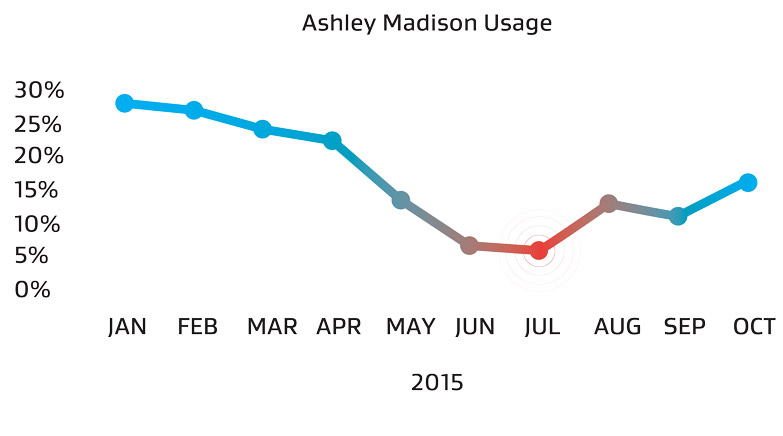
    A sinner in the truest sense of the word, Ashley Madison app usage is back up to almost where it started – despite being the victim of a massive hack which saw millions of its cheating users leaked and potential lives destroyed.Ashley Madison usage
  • Running Out of Space? Facebook & Kindle Could be the Reason
    When your phone is running low on storage, the first thing you usually do is delete photos and music, right? Not so fast! It’s also the data within apps that can amount to Gigabytes of hidden storage. According to our telemetry, Facebook, Kindle and the Japanese NTT Docomo Email Client rank among the top storage-eating apps that store more files for offline use than you might think.
  • Look Who’s Talking Now: KakaoTalk & WhatsApp On the Rise
    Facebook, Instagram and Google Play (the store app) are still in the top 10 resource-drainers, but now they’re joined by WhatsApp and KakaoTalk.
  • Tamagotchi-esque Apps Making a Big Comeback, Draining Your Battery
    Supercell, now coming in strong and only behind the literal King of the mobile gaming market, is now securing another spot in the top 10 most resource-hungry apps, with its Clash of Clans.Talking Tom

Download the entire App Report here.


What can you do to keep your apps under control?

First of all, an app that appears on the top of our lists for storage, data or battery drain doesn’t mean they’re ruining the performance of your phone. It is important to weigh the pros and cons of running a good mix of apps that give you the desired results you want.

Do the self-check: To see what’s consuming all of your smartphone’s battery life, storage or mobile data, we’ve developed App Manager, which is a feature within AVG Cleaner for Android. It quietly observes your phone’s performance and gives you an overview of:

  • The largest apps on your phone
  • Apps you haven’t used in a long time
  • Top mobile data-consuming apps
  • Top battery-draining apps

Ashley Madison App Rebounding to Pre-hack Highs

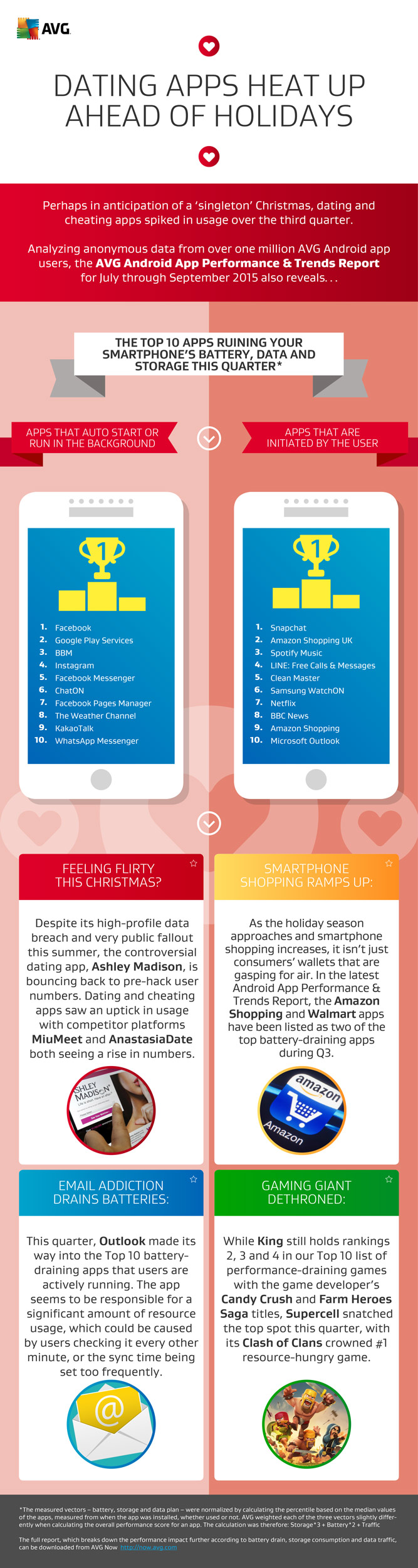
AMSTERDAM – December 8, 2015 – Despite its high-profile data breach and very public fallout this summer, the controversial dating app Ashley Madison is bouncing back to pre-hack user numbers, according to the findings of the latest Android App Performance & Trends Report. Compiled on a quarterly basis since Q3 2014, by AVG® Technologies N.V. (NYSE: AVG), the online security company™ for more than 200 million monthly active users, and using anonymous data from over one million AVG Android app users, the report aims to highlight app usage trends among consumers, and identify apps having the most effect on Android battery life, storage and mobile data volume.

Perhaps in anticipation of a ‘singleton’ Christmas, dating and cheating apps, in general, saw an uptick in usage over the third quarter, with Ashley Madison competitor platforms MiuMeet and AnastasiaDate both joining the app in seeing a rise in numbers from the previous quarter.

Also examining the apps most likely to negatively impact device performance, the report saw popular retail apps, Amazon Shopping and Walmart, emerge as two of the top battery-draining apps – suggesting that the holiday season could well be as tough on devices as it is on wallets.

The following 20 apps – differentiated by those run at start up or run by the user – consumed the most overall battery drain, storage usage and mobile data combined.


Run at Start Up Run by User
Ranking App Ranking App
1 Facebook 1 Snapchat
2 Google Play Services 2 Amazon Shopping UK
3 BBM 3 Spotify Music
4 Instagram 4 LINE: Free Calls & Messages
5 Facebook Messenger 5 Clean Master (Boost & AppLock)
6 ChatON Voice & Video Chat 6 Samsung WatchON (Video)
7 Facebook Pages Manager 7 Netflix
8 The Weather Channel 8 BBC News
9 KakaoTalk 9 Amazon Shopping (Global)
10 WhatsApp Messenger 10 Microsoft Outlook


“Over the last year, we have been focused on helping our users understand which apps have the biggest impact on their smartphone performance. Based on the findings from all four quarterly App Reports, to date, and the engagement they have driven with consumers, we have developed a tool called AVG App Manager,” said Tony Anscombe, Senior Security Evangelist at AVG Technologies.

 “With AVG App Manager, Android users are able to see which apps are affecting their individual smartphone’s performance and then use this information to make better-informed choices about how to best manage their smartphone resources,” Anscombe concluded.

Available through AVG Cleaner for Android, the AVG App Manager observes the phone’s performance and gives an overview of app usage, including how each app is affecting storage, battery and mobile traffic.

The full report can be downloaded from http://now.avg.com/avg-android-app-performance-report-q3-2015


About AVG Technologies (NYSE: AVG)

AVG is the online security company providing leading software and services to secure devices, data and people. AVG’s award-winning technology is delivered to over 200 million monthly active users worldwide. AVG’s Consumer portfolio includes internet security, performance optimization, location services, data controls and insights, personal privacy and identity protection for mobile devices and desktops. The AVG

Business portfolio – delivered by managed service providers, VARs and resellers – offers

IT administration, control and reporting, integrated security and mobile device management that simplifies protection for businesses.All trademarks are the property of their respective owners.

www.avg.com

Contacts:

North America:
Deanna Contreras
Tel: +1 415 371 2001
Email: [email protected]

Rest of World:
Zena Martin
Tel: +44 7496 638 342
Email: [email protected]

Press information: http://now.avg.com

AVG Android App Performance Report Q3 2015

Press Release

Ashley Madison App Rebounding to Pre-hack Highs

Full report

AVG Technologies Android App Performance Report Q3 2015 (PDF)

Performance Optimisation Guide

AVG Technologies Android Performance Optimisation Guide 2015 (PDF)

Blog Post

AVG Q3 App Report: Latest Top 10 Draining Apps Identified

Images

AVG Q3 Android App Performance Report related images (zip)

Infographic

AVG Q3 Android App Report 2015 – Dating apps heat up ahead of holidays (PDF)

AVG Q3 Android App Report 2015 Infographic

Teaching the Next Two-Billion Smart Users How to “Drive” on the Internet

When you got behind the wheel of a car for the first time, you probably underestimated the power of the vehicle in your hands. Most likely, you had someone teach you how to drive and educated you on the good and bad that can come of it, preaching that your chances of having a safe and enjoyable experience are best if you know the rules of the road and learn how to practice a little defensive driving.

It’s really no different when teaching kids how to navigate the Internet.

According to recent findings out of Common Sense Media, online media use is at an all-time high and when we give our children access to the Internet; be it through a smartphone, tablet, PC or any other connected device, we are really giving them access to a powerful vehicle. It’s the job of parents, educators and other influencers to teach safe and responsible Internet use.

Last year I first introduced the Smart User initiative in which AVG vowed to make meaningful strides in educating Internet users from its dangers with the right content at the right time. One year and multiple partnerships later, the Smart User mission is well on its way. While it’s everyone’s job to keep kids and those new to the Internet informed, here are some things you can do as a parent to help your child successfully and safely use the Internet.

  1. Have your child sit in the passenger’s seat while you drive
    If you think your kids are ready for the Internet, next time you’re using it, have them sit and watch how you safely navigate. Make sure to point out signs of danger and things to avoid clicking. Describe what you’re doing, and why.
  1. Have your child lean over and grab the wheel
    Now that they’ve seen firsthand how the Internet works, have your child lean over your shoulder and do a bit of safe clicking.
  1. Switch seats; it’s time for them to take the driver’s seat
    With you at a safe distance but not hovering over them, let your child use their connected device. If they run into trouble they can always rely on you to be nearby.

Finally, don’t forget to continue your education on the Internet’s latest threats and risks by visiting our blog regularly at now.avg.com. For more information on #SmartUser, visit smartuser.com.

Making the case for channel-delivered cybersecurity

For our AVG partners and distributors these findings may not come as a surprise, but it presents another opportunity for the channel to help fill these security gaps with value-added solutions, best practices and excellent customer service.

According to the topline results of the survey, 36% of global organizations lack confidence in their ability to detect sophisticated cyber attacks. Linked to this, 36% don’t have a threat intelligence program, and 18% don’t have identity and access management programs – little wonder then that 69% thought that their IT security budgets should be increased by half.

Protection from cyber attack should be a priority for all businesses and as the EY data has shown, many organizations could benefit from the guidance of the channel. AVG partners, including A+ Computers and Services, DB Computer Solutions, MCC Computers Ltd., SortMyPC and many more, are already addressing the gaps using AVG Business products.

Channelnomics editor Jessica Meek also highlighted findings from the EY survey in her recent article, again, emphasizing the opportunity for the channel to help IT professionals prioritize security, provide solutions and services, and also act as trusted advisors on industry developments.

A few key stats to note:

  • 88% of respondents did not believe their information security infrastructure fully meets their organization’s needs
  • 57% said that the information security function suffers from a lack of available talent
  • 47% said they don’t have a security operation center
  • 54% said they lacked a dedicated function to focus on the impact of emerging technologies

AVG Business products like AVG Managed Workplace and AVG CloudCare are great examples of how our partners are using end-to-end solutions to help resolve security issues, staffing and infrastructure challenge for their clients.

AVG CloudCare offers a modern approach to security with streamlined access to advanced features through one centralized pane of glass. Ease of deployment, through one click installation and activation, helps our partners become more agile. The product can be used for managing services, proactive monitoring, content filtering, cloud backup, daily reporting, providing secure sign-on and more, essentially helping our partners act as outsourced IT departments for their clients.

AVG Managed Workplace also offers powerful automation to help partners proactively manage and monitor clients’ networks.  Deployment and update of security tools are easily handled by automation helping to ensure a strong security posture at all times. With premium remote control integrated at no additional cost to the remote monitoring and management platform, partners gain cost savings as well as reporting tools to streamline billing and prove client ROI.

These flexible and powerful AVG solutions empower businesses to address security issues and run more effectively and efficiently. That’s powerful reassurance to give your clients.

Top 10 Phishing Emails to look out for this Holiday Shopping Season

Black Friday and Cyber Monday are huge shopping occasions, not only in the US but across the world. Last year it was reported that the US spending over Thanksgiving reached an all time high with $89 billion being spent online.

Email campaigns offering deals and discounts are commonplace these days and every week retailers try to tempt me with discounts in an attempt to generate online sales. This dynamic method of communicating means that offers can be targeted based on my purchase history and the preferences I may have shared with the retailer.

On my shopping list this year are things I’ve been holding back purchasing in anticipation of discounts and offers that will surely land in my inbox, or that I might able to find online. One of them is a new laptop for my son.

But there’s also a dark side to some email that arrives in inboxes. Cybercriminals know that we get excited by deals and offers, or need to maintain our online payment methods, and they use this knowledge in an attempt to scam us. Most of us think of this as spam and just delete it, but sometimes it is difficult to identify the real emails from the fake ones.

Recently, I asked our research team which organizations in the US are being impersonated the most in emails. Specifically the ones used in “phishing” emails that attempt to gain access to your accounts, or trick you into providing your credentials so they can steal your hard earned cash.

The list below is compiled by AVG’s Web Threats Team from anonymous data from more than 200 million users and our own spam honeypot system.

  1. American Express
  2. Apple
  3. Bank of America
  4. Chase Bank
  5. Ebay
  6. FedEx, UPS, DHL
  7. Intuit (Taxes)
  8. Paypal
  9. Wells Fargo
  10. Westpac Bank

If you live outside the US then your list will look fairly similar with local banks from your country taking the place of the US banks in this list.

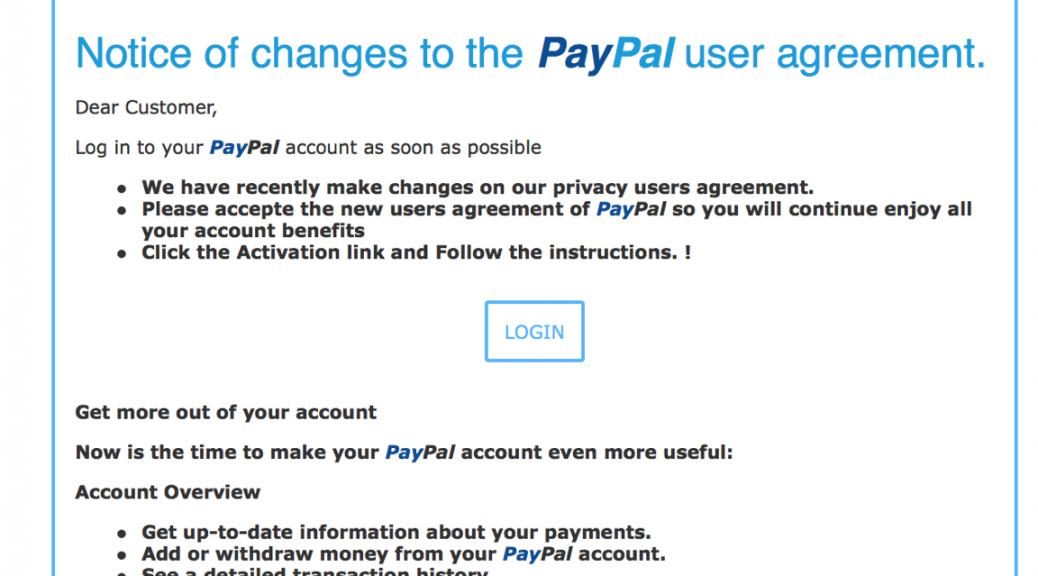
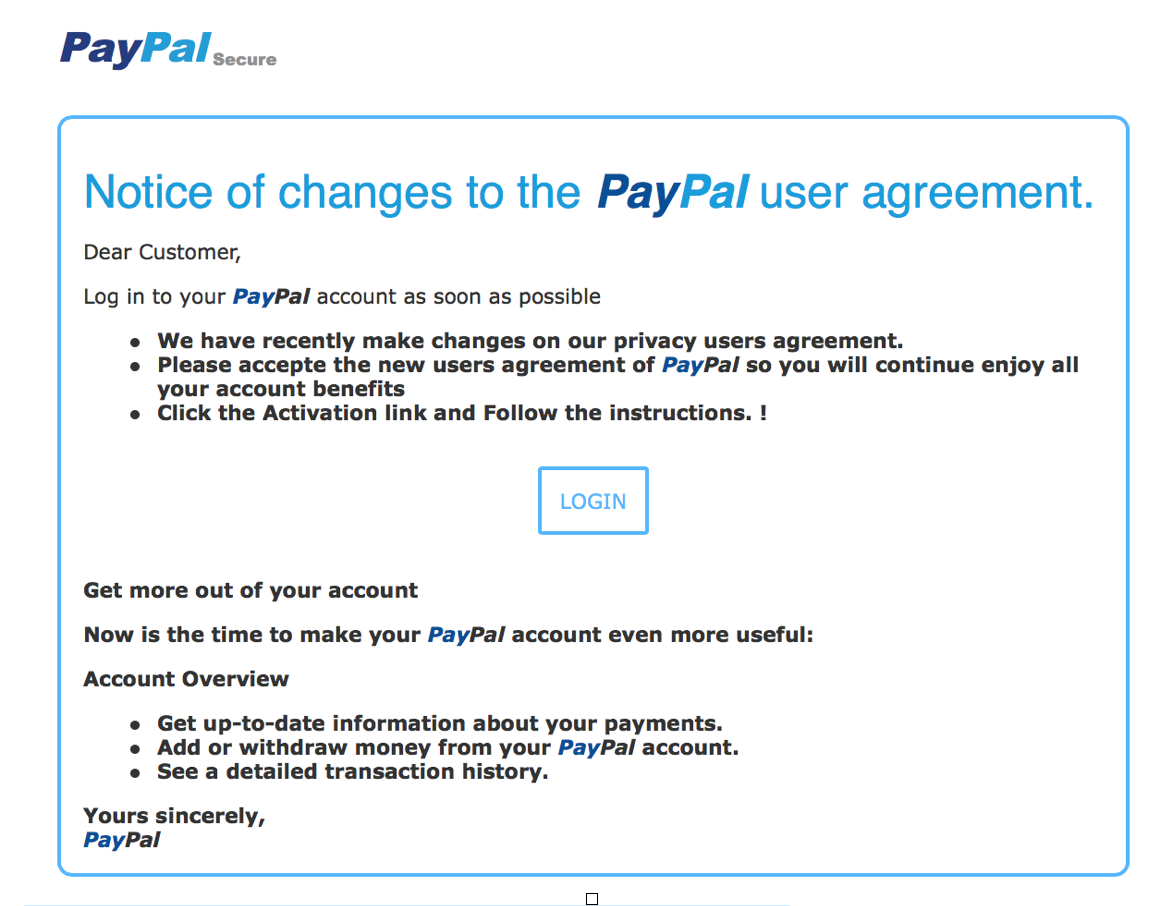
Checking my inbox from last week I count six emails that look like they are from Paypal, inspecting the emails closely I find that two of them are fraudulent phishing emails, both trying to get my login and password.


PayPal scam


The email looks and feels as though it came from Paypal, but there are some clues that point to its true nature.


  • If your email provider or security product, such AVG Internet Security, marked the email as Junk or Spam, then there is a very high probability that it is.
  • Look at the email address that sent the email, does it look correct? The address may include other parts for example [email protected] would be a legitimate address but if the address is [email protected], then this would be incorrect as it needs to be paypal.com on the last part of the address.
  • In the example you can see its asking for incomplete account details to be submitted, I know my account is up to date so why are they asking such questions.
  • Has the email got the mandatory elements that companies need to use, registered office details, unsubscribe options, etc.
  • If you have clicked on it, and you shouldn’t if any of the above are true, then check the URL in the address bar, is the address https://www.paypal.com, is the padlock there and does part of the address go green to show that the site has a valid digital certificate. If no to any of these then close the browser.

If at any point you think the email is spam and fraudulent then do not open or click on any links, just delete the email. Opening the email will download the content which the cybercriminals mark so that they know the email was opened and that your email account is active, they will send you more!

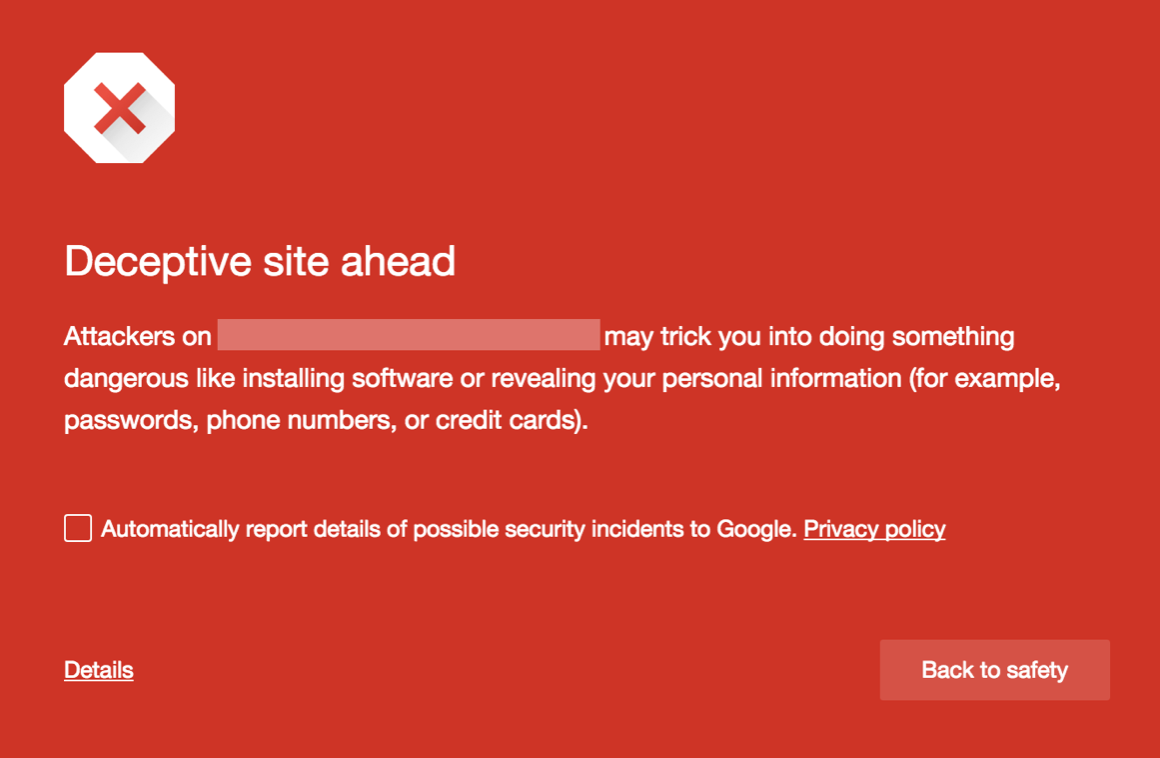
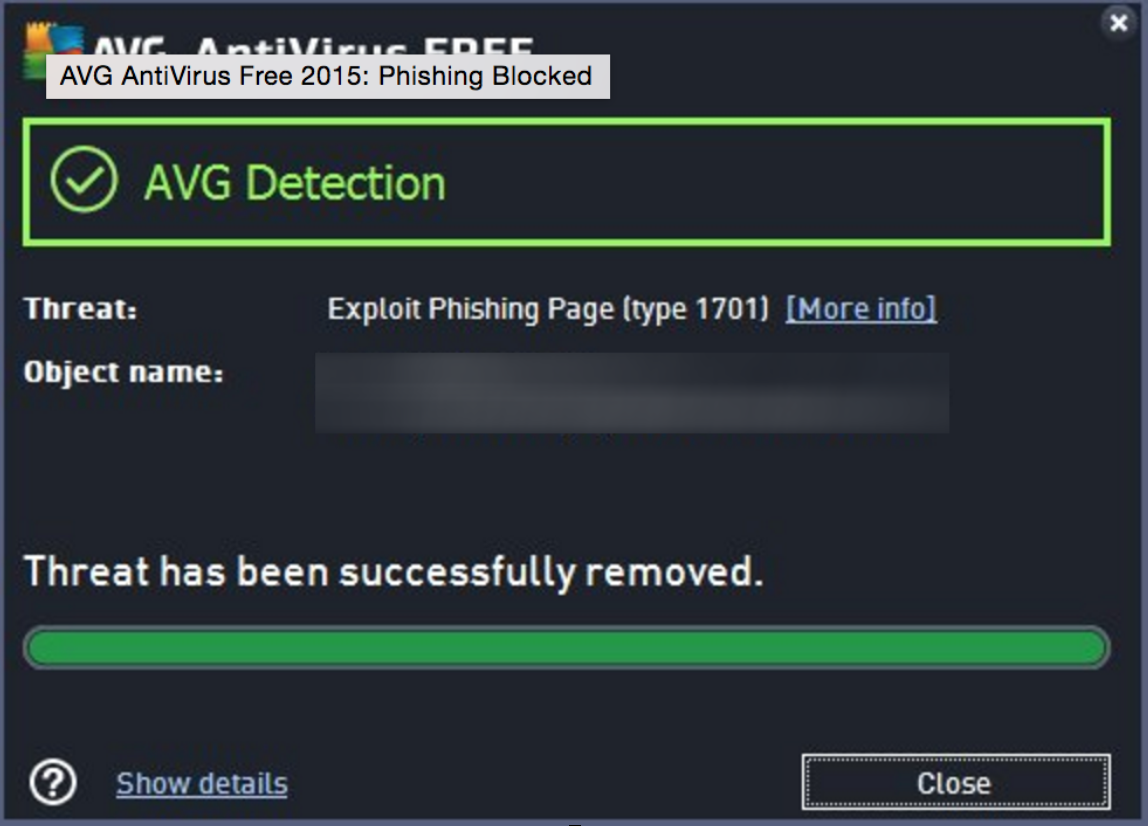
If you did click the link and you have up to date anti-virus software, such as AVG AntiVirus FREE, or AVG AntiVirus FREE for Android, then you should see a detection screen like the one below or your browser may also show a warning screen.

phishing warning

phishing detected

What do you do if you think the email was real and have not clicked or opened it, that’s an easy one. Open your browser and go to paypal.com and login. I am sure if there is important account information they need they will ask for it when you login.

It’s important to have updated Anti-Virus software, as these types of attacks use websites that change and disappear in minutes to try and hide from detection. Having up to date security software gives you the best possible chance of being protected.

All this should not put you off finding that great deal or bargain online, but I hope these tips help you check what you click on or open and visually check it looks real. I know I will be looking for that deal this week and will be delighted if I find it online so I don’t need to join the crowds in store.


Talking toys bring connected Christmas closer

Many parents will have noticed the invasion of talking, AI-enabled toys hitting the shelves this holiday season. Once inanimate, mute objects on which we had to project personalities, movement and more, the latest high-tech toys are increasingly learning to think for themselves – with sometimes worrying consequences.

One of the most talked about recent examples of such a toy is Barbie. The beloved companion of many, Barbie recently became more interactive than ever with the launch of a Wi-Fi connected version that listens, replies and learns over time. As anyone who has heard Barbie’s suggestion to hold a “pizza party!” will well know, the power of speech isn’t new to the doll – the latest release however is branching out considerably further, combining Wi-Fi and ‘machine learning’ to be able to have entire conversations with playmates.

Much like Siri or Cortana, Hello Barbie is mic’d up and connected to a server in the Cloud which analyzes what is said to the doll and then selects an appropriate response. Learning as she goes along, Barbie mimics a real life friend by remembering details that she can drop into future replies.

While this might be every kid’s dream, it’s likely to be a real cause for concern for the more privacy and security conscious parents among us.

Much of the technology we use on a daily basis is now equipped to ‘listen’ to us in a similar manner in order to facilitate easier, more human interaction. As already mentioned, the most obvious example of this are personal assistants like Siri and Cortana which sit on our mobile devices and activate at our command. An easy enough use case to understand. What can be alarming however, is when technology not traditionally designed to listen to us is enabled to. Smart TVs, for example, have been in the press recently due to their ability to listen to conversations, capture the data and relay it to third parties. Even connected baby monitors have been called out due to their susceptibility to hacking.

As with any connected device, the debated risk is that Hello Barbie could offer an easier in for hackers attempting to intercept your Wi-Fi network. While ToyTalk which manages the toy’s cloud connection emphasizes the security measures it has taken, it also admits that ‘no device is 100% secure.’ On top of their security concerns, parents might also wonder what is happening to the data being captured as their child chats away to Barbie. Is it being stored anywhere? Yes. Is anyone listening to it? Yes. Will that child end up being bombarded with advertising for other talking toys?  Hopefully not – according to ToyTalk, it does share recordings with third-party vendors, but only to improve their products. In any case, it sounds like any secret told to Barbie in confidence won’t stay that way for long!

Whether you like it or not, talking toys could be here to stay. This year, Elemental Path launched CogniToys – talking and listening dinosaurs enabled by IBM’s Watson, the famous artificially intelligent computer able to ‘understand’ human language. Another example is Ubooly, a cuddly bear described as the ‘Learning Toy that Listens’, becoming interactive once connected to a smartphone or tablet. Though only two examples, it’s just a matter of time before more of these toys hit the shelves.

So how do you feel about toys that listen? Will you be letting Barbie say hello to your child? With Christmas just around the corner, it’s worth considering the security implications of the latest high-tech toys available this season, and how connected you want your child to be.

 ‘Connected Cuddlies’ set to up the 2,190 hours tots spend online a year

LONDON, 24 November 2015: With parents gearing up for the online shopping blitz that is Black Friday and Cyber Monday later this month, AVG Technologies – the online security company for more than 200 million monthly active users – has released new research revealing the amount of time today’s kids are currently spending online and what this year’s ‘must have’ toys mean for their screen time and security risk.

The study, conducted among 2,200 UK parents, reveals that one in six (16%) 4-6 year-olds are spending up to six hours online each day, clocking up a massive 2,190 hours every year. The figure is three times higher than the UK average of 2 hours a day, for children aged 4-16.

However, with a new wave of internet-enabled toys – dubbed ‘Connected Cuddlies’ – topping kids’ wish lists this Christmas, this figure could significantly increase with the amount of additional screen time such ‘soft toys’ will add to their day.

The stats also show that two-thirds (66%) of kids already own one or two smart devices by the time they are six years old – a number that ignores the connected toy category completely.

The findings suggest that parents, too, are unaware of the online implications of connected toys like ‘Hello Barbie’, ‘My Friend Freddy’ and ‘Furby Boom’. With toy sales this Black Friday weekend likely to follow the trend set in 2014, exceeding those of the week prior to Christmas, parents need to be increasingly savvy about the type of toy – and subsequent connected commitments – they’re buying their child this holiday season.

Tony Anscombe, an online security expert at AVG Technologies, explains: “With key functionalities of these toys dependant on features such as WiFi connectivity, voice recognition and data collection within apps, parents must understand that the toy they are handing their child is a connected device. As with any connected device, it comes with security and privacy considerations – knowing what data is being collected, where it’s being held and how it can be protected is paramount.

“It’s easy to get caught up in the Christmas shopping culture, being persuaded to purchase by enticing online offers, or even pressure from our own children. However, as parents we must be conscious that the deals we strike online don’t prevent us from keeping our kids safe online – whether they’re ‘logging on’ with a tablet or teddy.

Further findings from the research and advice for parents on how to help their children remain safe online this Christmas no matter what gift they get, along with blogs from Anscombe, can be found at http://now.avg.com/.


About the Research / Methodology
:

AVG commissioned an online survey, interviewing 2,200 UK adult parents (aged 18-65) with one or more children aged 4-16 years old. The market research company, Vanson Bourne, carried out the fieldwork between 4-12 June 2015 using their propriety panels.


About AVG Technologies:

AVG is the online security company providing leading software and services to secure devices, data and people. AVG’s award-winning technology is delivered to over 200 million monthly active users worldwide.

AVG’s Consumer portfolio includes Internet security, performance optimization, and personal privacy and identity protection for mobile devices and desktops. The AVG Business portfolio – delivered by managed service providers, VARs and resellers – offers IT administration, control and reporting, integrated security, and mobile device management that simplify and protect businesses.

All trademarks are the property of their respective owners. www.avg.com


Press office contacts:

AVG UK Press Office, Waggener Edstrom Communications

AVG UK