Category Archives: AVG

AVG

AVG at the 21st Internet Identity Workshop

The Internet Identity Workshop (IIW) recently held their 21st Meeting and AVG was one of the sponsors.  Once again hosted at the Computer History Museum in Mountain View, California, this academic conference is focused on finding, probing and exploring the issues related to identity management.

The organizers, Phil Windley (@windley) and Kaliya Hamlin (@IdentityWoman) have managed to keep the IIW event rich with content, and suitably engaging to attract a loyal following of technical people.

The core themes of the conference were around trust, identity, privacy and technology – areas that we at AVG are very passionate about!

While a lot of users are quite proficient with the “sticky note system” for managing their internet identity, passwords and usernames – this conference by contrast is aimed at highly technical and advanced solutions that one day might provide a better and more secure alternative.

Technological advancement is happening quickly in the world of identity, and even a relatively new technology such as OAuth 2.0 is old news at IIW, with this year’s conversation all about the Blockchain – a technology utilized by the well-known cryptocurrency, Bitcoin.

Whereas previous identity recommendations have centered around technologies that look like an unbreakable-black-box, the Blockchain discussion is driven by a general consensus for complete transparency underpinned by cryptography that provides security and integrity.

The notion of using a Blockchain, which is a type of ‘distributed ledger’ offers the possibility of providing a secure history of every transaction – a chain of trust, which also acts as a permanent record of your identity that cannot be removed or tampered with.

This model of establishing trust is quite intuitive and human. We trust people who are trusted by others, and so forth. For example, it’s the way Google search rankings work (pages that link to other pages), and the way that SSL certificates are signed so you can trust your banking website.

“No, I am your father!”, from Darth Vader in Star Wars, just wouldn’t have carried the same element of surprise to Luke if they had access to Blockchain technology!


AVG Managed Workplace wins CRN Tech Innovator Award

Since joining AVG Business, the team and I have been focused around the clock on the products, services, and sales & marketing strategies that will drive success for our partners in 2016. While we still have work to do as we head into next year, I’m taking a few minutes today to congratulate our team and partner community on a recent product award from CRN.

Just two months out in the market and AVG Managed Workplace 9.2, our remote monitoring and management (RMM) platform with premium remote control, is the winner of the CRN Tech Innovator Award for Managed Services.

The platform is our best remote monitoring and management (RMM) solution to date. With premium remote control integrated directly at no extra cost, we have made it easier than ever for our partners to provide remote IT management services to their business customers. Our development process, as always, was heavily influenced by the input of our partners from across the globe.

Winning product recognition like this is a true testament of our partners’ support and their feedback helps us keep innovating and responding to the market needs.

Don’t just take it from me. We have many partners that are already using AVG Managed Workplace 9.2 to protect, secure and manage their clients’ networks and systems, and have great things to say.

Here is a quick look at the feedback:

“The new remote control feature is fabulous and we use it continuously. Almost instantly at the time we get a help desk call, we are remoting back into that desktop. We have a 12 minute SLA for an initial communication. To be able to get back in and have the engineer fixing the problem that quickly is amazing. Exceptional, responsive customer service is a top priority for Mirazon. AVG Managed Workplace is the product that allows us to do that. It gives us the critical information and details we need to resolve problems quickly and keep our customers very happy.”
– Karen Albers, Partner, Mirazon


”Without a doubt, AVG Managed Workplace’s reporting features are what enable us to close more business deals with healthcare providers. The Inventory Control, Content Filtering, and Network Health reports in particular are invaluable and what our clients want to see day-in and day-out. Plus, the remote control features allow our Support Engineers to proactively work on machines in the background and fix issues while physicians are still treating patients.”
– Shawn Miller, President and CEO, ConXit Healthcare Technology Group Inc


“We recently previewed AVG Managed Workplace 9.2 and immediately noticed the advantages of the remote control features, the faster speed and the added tools. We are looking forward to making this available to our IT support teams as soon as possible to deliver excellent customer support.”
– Luis Flores, Help Desk Analyst, Tecnet Canada


“We’re very pleased with the new release of AVG Managed Workplace and specifically with the improvements with Patch Management and Maintenance releases. Now we’re able to automate more tasks, more easily and provide proactive services to end customers.”
— Elias Grim, Director of Support, Alura Business Solutions


As businesses continue to struggle with security and protection, we will continually strive to provide superior products and services that help our customers successfully and securely compete in today’s rapidly changing environment. This latest award from CRN is further recognition that our strategy is paying off. Thank you for your support!

Windows 10 November 2015 Update – What You Need To Know

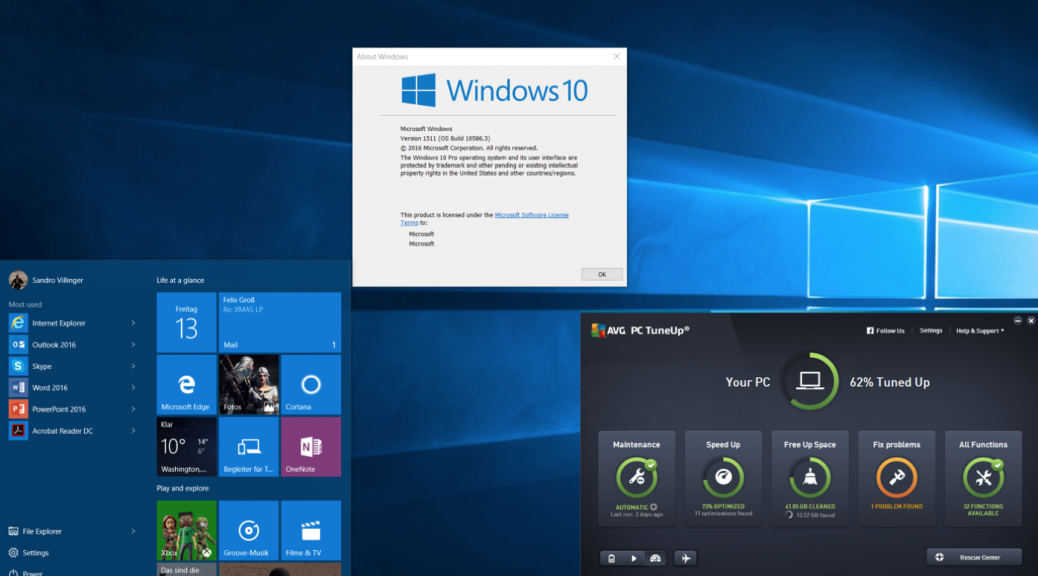
Microsoft recently rolled out its first big update for Windows 10, or as they call it “November Update/ Version 1511”. While it’s not a massive change, it brings along a couple of new features to the table. This article shows you how to get it, what’s new, and how to solve the top issue that users encountered with this new Windows 10 build.
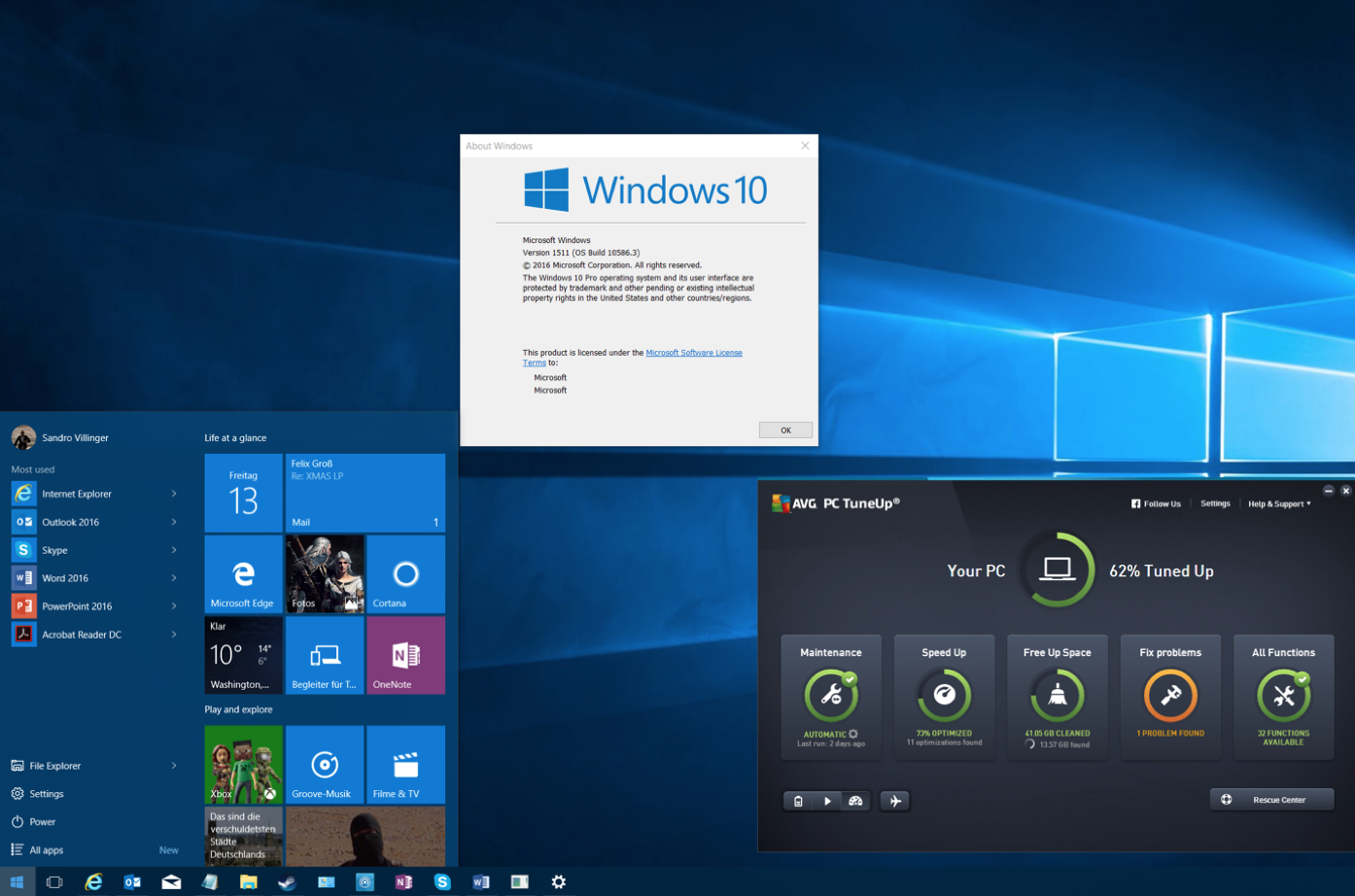
 

What You Need To Know


It’s coming to Xbox, too
If you’ve got an Xbox One, you’ll be getting the entire backend of Windows 10 including all its performance enhancements along with a major UI redesign and backwards compatibility with over 100 Xbox 360 games.


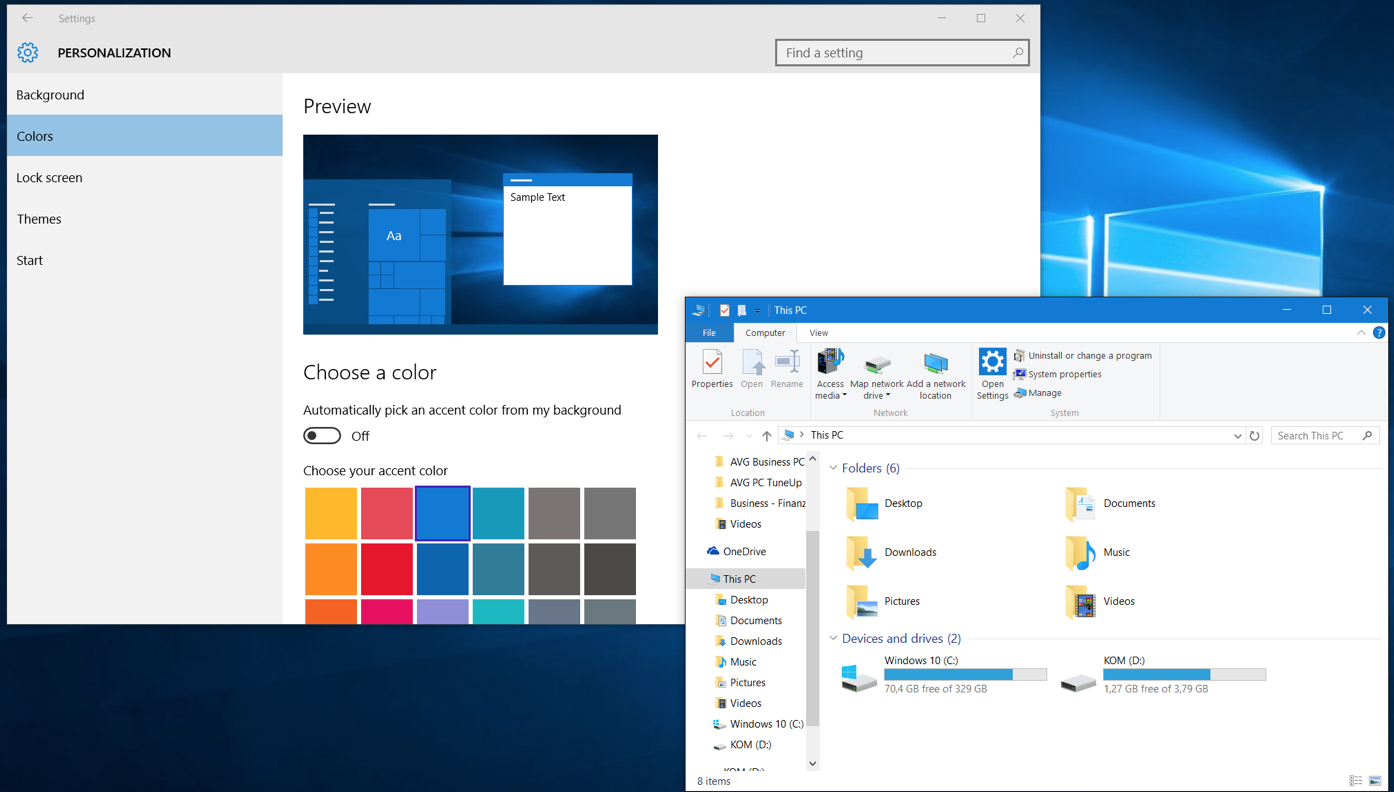
New color schemes

You can now apply the color of your taskbar to all elements (windows, action center etc.) of Windows to make it look not just white, here’s an example:

Edge browser with previews

Microsoft’s much cleaner and leaner “Edge” browser now sports a tab preview if you hover your mouse-over it:
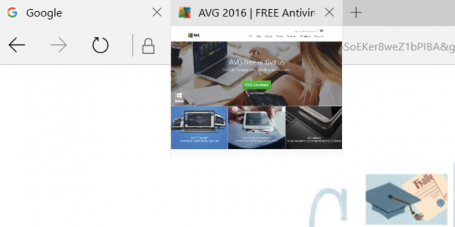
Edge browser with preview

You can also stream any video from within edge to a DLNA or Miracast enabled device, such as an Xbox.


Cortana improvements

Microsoft Cortana, which is similar to Google Now and Apple’s Siri, now tracks movie or event registrations and reminds you two hours before the event starts. It can also track Uber rides to tell you when your driver will be arriving. You can now also use the “Ask Cortana” feature within PDF documents and ask it for specific words and find more about a certain topic.


Find my device

Afraid of your laptop getting stolen? Then you can use the new Windows 10 Update to frequently store the location of your device so you can track it – just in case. You’ll find the new “Find My Device” feature in your settings window under “Update & Devices”.
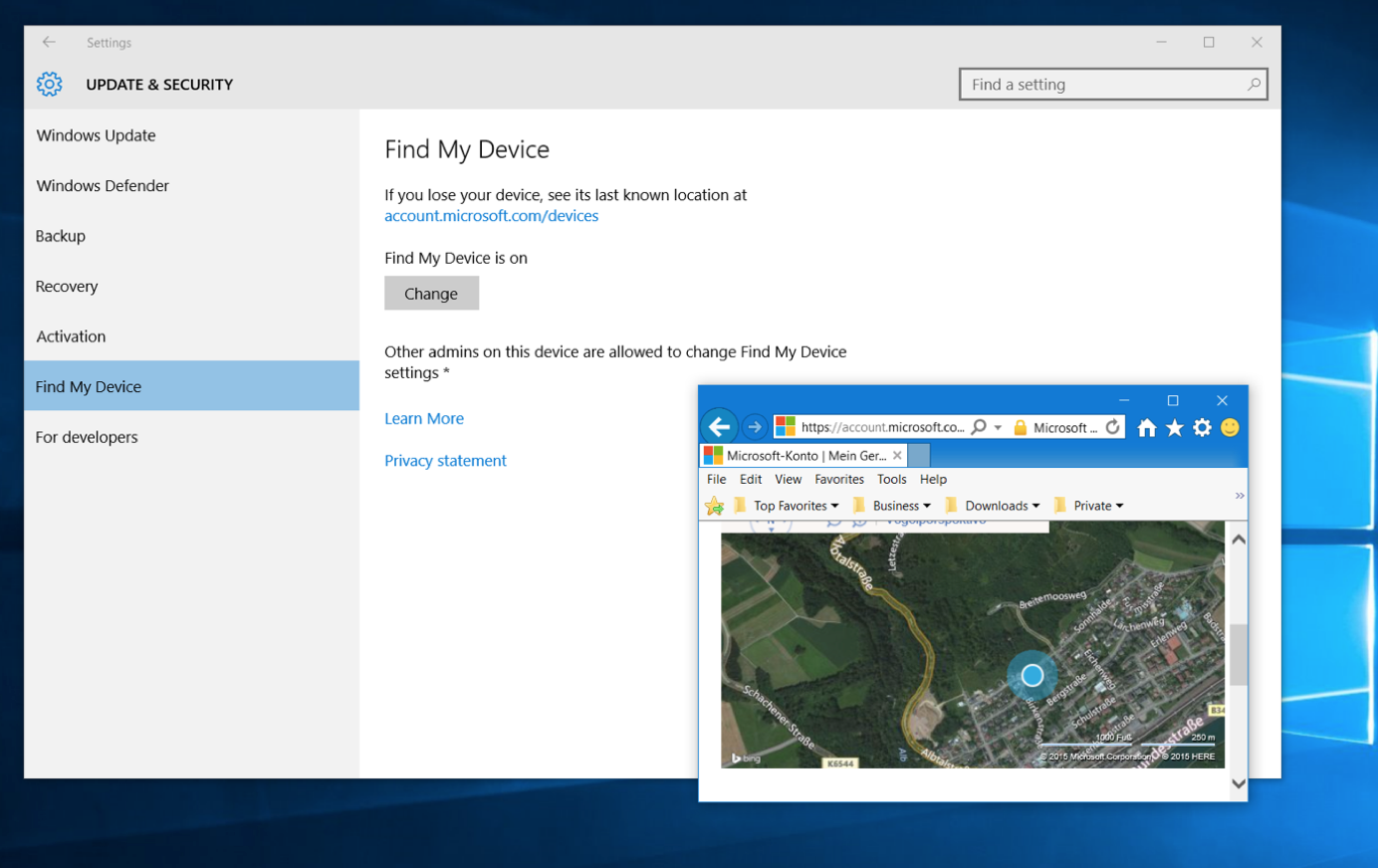
Windows 10 find my device feature


Five Tips To Get You Started


Not getting the update? Try this.
If the 1511 November update is not appearing for you, make sure you’ve not upgraded to Windows 10 in the past 31 days, otherwise Microsoft wants to prevent you from losing the ability to revert back to Windows 7 or 8, just in case. But once that month has passed, you’ll be able to upgrade.

Also, you should make sure that you’ve not delayed updates to Windows or that this setting hasn’t been set accidentally: Go to your settings app (click on Start and then on Settings), go to Updates & Security, go to Windows Update and Advanced options. Make sure that Defer upgrades isn’t checked. Go back and click the Check for updates button.


Want to clean install? Here’s how.
If you’ve upgraded from 7 to 8 to 10 to this November release and feel your PC has just too much crud left, we recommend trying out AVG PC TuneUp to clean up upgrade leftovers and junk.

In some cases a clean install may be the only solution to get your PC back up to speed. Microsoft originally announced that you could download the DVD files (ISO) from https://www.microsoft.com/en-us/software-download/techbench and create a bootable USB using the Media Creation tool, however, they have since made some changes, as reported here by ZDNet, that you should be aware of.


Got a flickering start menu? Try this.
A lot of people seem to have issues opening up the start menu or getting random flickering. To solve this problem, do this:

  1. Press CTRL+SHIFT+ESC to open task manager. Next, click on File and Run New task.
  2. Check the Create this task with administrative privileges
  3. Type in Powershell and hit OK. Then type the following command (better to copy and paste it):

    $manifest = (Get-AppxPackage Microsoft.WindowsStore).InstallLocation + ‘AppxManifest.xml’; Add-AppxPackage -DisableDevelopmentMode -Register $manifest

  4. Hit Enter, close the window and reboot. This should solve the flickering.


Check the advertising settings
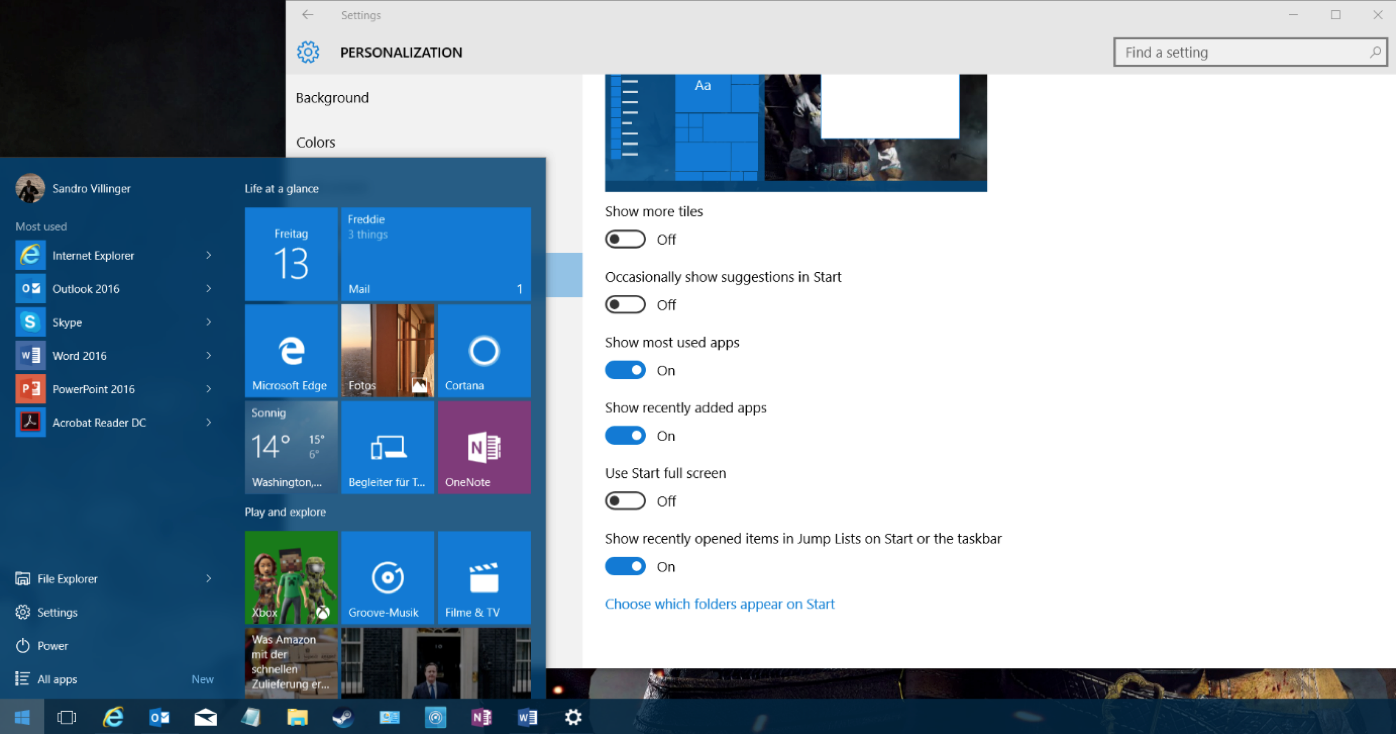
Microsoft now uses the Start menu to show ads for new apps. If you want to turn this off, open up your settings app (Start and then Settings) and go to Personalization. Click on Start and then uncheck the Occasionally show suggestions to Start entry to turn this off.

Sync your Edge settings
Ready to move away from Internet Explorer and over to Edge? The only thing that held me back was the browser synchronization, which is now built-in as of this new update. Open up Edge by clicking on the Edge icon (not to be confused with the purposely similar looking IE icon):

To sync settings and import your IE browser favorites, click on the three dots in the top right and click on Settings. Scroll down and click on Sync to enable it. Go to Favorites and click on Import.

From now on, all your settings will be synced across your laptops, desktops PCs and even Windows Phones if you have one.

Extra tip: In our testing, the new update doesn’t break any AVG products, so you can keep on protecting and tuning your PC.


AVG Business strengthens team with new General Manager

With more than 20 years of industry experience and an impressive track record building high-performing SMB sales and marketing teams, Fred will be a valuable asset to our AVG Business team as we accelerate our business to effectively support our channel partners and their SMB customers, in 2016 and beyond.

Through Fred’s vision and direction, we will offer more flexibility, more value and more ways for our partners and their clients to succeed. A core part of this will be building strong relationships with our channel partners and providing a full suite of managed services and security solutions, with simplicity in mind, and with the business, marketing and technical training to deliver excellent service for their SMB customers.

In this role, Fred will be drawing on his extensive channel, solutions selling, cloud computing and managed service experience, while working closely with our partners to respond to their challenges and equip them for success.

Before joining AVG, Fred spent eight years at Cisco Systems, where he held roles as Director of Partner Organization & Commercial Business in the Netherlands and Northern Europe. He has also had leadership positions at Copaco, one of the largest ICT distributors in the Netherlands, and Compaq Computers.

We wish Fred a warm welcome as we continue to stay strong behind our vision and strategy of being the Online Security Company offering integrated and easy-to-use security services for our channel partners and their SMB customers, with the reassurance that their applications and data are protected on any devices anytime, anywhere.

We look forward to sharing updates as we head into this exciting next phase together.

It’s Cyberattack Season: Did You Get Your Immunization Shot?

There’s a term in public health known as “herd immunity.” The idea is that when a critical number of people are immunized against a contagious disease, most members of that community become protected against the disease, whether or not they received an inoculation.

Breaking the chain of a disease’s transmission enables us to interrupt the ability of the pathogen to set in at a broader scale in our community. In this way, vaccinations protect people who have and haven’t been vaccinated.

The same principle applies to our digital lives which are just as connected, if not more connected, to digital threats and “pathogens” that steal our data and identities, disrupt our productivity, and mar our public profiles.  We spend a great deal of time and energy investing in firewalls and the technical parts of our infrastructure to protect data and privacy, but what about our behavioral practices?

Do we take the time to inoculate ourselves against habits that could risk the digital wellbeing of our family and friends? Or do we, for example, still ask family members for Social Security numbers via email? Or send credit card information and/or passwords insecurely?

“The important principle here is that there are things I can do to help ensure a safer online world for you, and vice versa.”.

If, for example, you posted a compromising photo on social media, I can opt to not re-post it, protecting you from further harm. And if everyone who comes across the photo does the same, we’ve inoculated you from damage even though you had failed to protect yourself.

This is the mindset that we need to adopt in being good digital citizens and embodying the characteristics of a “smart user.” By doing so, we can create an entire network and community of safety and protection.

Most of us, especially the youth and others around the world who are coming online for the first time, are particularly vulnerable. We were all the same at some time. When I worked at Netscape, for example, and got my first email message from a friend “stranded in Thailand,” asking for money – I almost fell for it! On the exposure curve, I was just like a lot of new users today.

Let’s take a page from the herd immunity playbook and create a safer and more private digital world for all of the new users coming online, in addition to helping these users become more educated in smart online behaviors.

AVG has committed to a smart user digital citizenship initiative to build a better web. Please join us or see how you can support this initiative. Because after all, the more you do to help make the web a safer place, you do so not only for yourself but for the whole herd.

To learn more, please visit smartuser.com.

Getting the care you deserve for your digital life

Being connected and enjoying your digital life these days means dealing with many devices.  Computers, smartphones, tablets, game consoles, printers, and don’t forget they all need a reliable Internet connection too!

And despite all that money you spend on your technology, when things go wrong and you spend hours searching for a solution that doesn’t work, it can be very frustrating and lonely.

Having to solve a technical problem quickly when you don’t know the answer can feel a bit like you are the contestant on a live TV game show!  The only difference is there’s no 50/50 or “ask the audience” option – instead you’re only left with “phone a friend”.

Then what happens when your friend can’t help?  Or if you know that calling your “friend” is going to leave you with more questions than answers, or you’re going to get “that look” they give you; like you’re the dumbest person on the planet.

Instead, let me suggest a new friend, a really smart and non-judgmental friend, who will help you with technical problems on your PC, Mac, tablet, smartphone or game console.

Your new friend is called AVG Go :)

AVG Go offers remote technical support 24 hours a day, 7 days a week. I bet your other friends are never THAT available!

Our dedicated tech experts can help you with:

  • troubleshooting operating system issues
  • installing and configuring software
  • setting-up and configuring your router and Wi-FI to get you online
  • diagnosing and removing viruses, spyware, & malware.

If you sign up for the AVG Go Total Care Plan, you also get our award-winning protection and performance products for unlimited devices with AVG Ultimate. All of these products are included:

  • AVG Internet Security for Windows
  • AVG AntiVirus PRO for Android
  • AVG AntiVirus for Mac
  • AVG PC TuneUp for Windows
  • AVG Cleaner for Mac
  • AVG Cleaner PRO for Android.

For more information visit AVG Go or, if you’re in the US or Canada, call 1-844-234-6038* now for your FREE consultation.

*AVG Go is currently available in the US and Canada and we hope to bring you more locations in the future.

Web Summit 2015 — security was a hot topic

200 startups gave their pitches at the Web Summit this year in Dublin. Over 2,100 startups participated, the vast majority of which had “poster board” displays and one or two eager founders giving their elevator pitch. That makes the Web Summit a welcome change to other conferences that typically rotate around industry giants.

Two messages seemed to pervade the conference this year: location and security. The “location” bit was the move of the Web Summit from Dublin to Lisbon next year. As you can imagine, this was a bit of a blow to the locals, and they could not stop talking about it.  Hopefully Lisbon imports Guinness and Jameson so that a little bit of Dublin carries over.

“Security” discussions seemed more prevalent than ever before. The recent breaches at TalkTalk and Ashley Madison were discussed over and over again…and the recent UK decision to store web histories for everyone for a year was a hot topic, as was the Safe Harbor European Court of Justice ruling. But, more than that, the need for both security and privacy was raised in almost every context: from publishing your web app to talking to IoT devices. The phrase “the Internet of unpatchable crud” was being thrown around often.  Interestingly, many of these conversations were underway before people learned that I was with AVG, and thus involved with security and privacy issues directly.

Further, a lot of the discussions focused around personal security, not just enterprise security. This is a change from a year ago, or even six months ago. This bodes well for AVG’s move into protecting people as well as devices and data.

AVG has been pushing something called “the law of least data” with IoT groups for a while now. The core idea is that data should be routed as directly as possible between entities. This augments the idea of “storing only required and essential data” that has been a mainstay of good data design for a long time. My canonical example is my thermostat talking to my furnace. While setting up the relationship between the two may require the cloud, the day to day control and feedback between the two should not have to leave my house (i.e., my local area network). Even if encrypted, an eavesdropper could probably tell when someone was at home based on the volume of traffic between the two. This is a simple idea, but an important one. When you extend that thinking to many connected devices, including those dealing with health and security, you can imagine the impacts of not respecting the “law of least data.” However, the business/capitalistic forces at work today mean that every vendor wants to backhaul all data to the cloud under the rubric of “data is the new currency.” This is a dangerous architecture and one that we should all be challenging.

Many people, when asked about their personal data leaking, have a fairly resigned attitude. They say, “it is not a big deal, and I get more personalized offers; I know the tradeoffs I am making.” I like to use a simple example to help people understand that seemingly innocuous data is still valuable and can be used in unexpected ways. If you are a serious cycler, you will probably sign up for a bike ride sharing application.  It is fun; you can compete against others as motivation and track your personal progress online. However, thieves also sign up for these services. Using the simple logic that users who ride the most often and the farthest probably have the most expensive bikes, led the thieves to steal bicycles easily using the location tracking data in the services.  Again, you can extend this idea to all types of data to understand that, by default, we should be keeping our data safe and secure.

So, it was refreshing to see these, and other, security topics being actively discussed at the Web Summit. It bodes well for our industry that this is now top of mind.


Web Summit 2015 — security was a hot topic

200 startups gave their pitches at the Web Summit this year in Dublin. Over 2,100 startups participated, the vast majority of which had “poster board” displays and one or two eager founders giving their elevator pitch. That makes the Web Summit a welcome change to other conferences that typically rotate around industry giants.

Two messages seemed to pervade the conference this year: location and security. The “location” bit was the move of the Web Summit from Dublin to Lisbon next year. As you can imagine, this was a bit of a blow to the locals, and they could not stop talking about it.  Hopefully Lisbon imports Guinness and Jameson so that a little bit of Dublin carries over.

“Security” discussions seemed more prevalent than ever before. The recent breaches at TalkTalk and Ashley Madison were discussed over and over again…and the recent UK decision to store web histories for everyone for a year was a hot topic, as was the Safe Harbor European Court of Justice ruling. But, more than that, the need for both security and privacy was raised in almost every context: from publishing your web app to talking to IoT devices. The phrase “the Internet of unpatchable crud” was being thrown around often.  Interestingly, many of these conversations were underway before people learned that I was with AVG, and thus involved with security and privacy issues directly.

Further, a lot of the discussions focused around personal security, not just enterprise security. This is a change from a year ago, or even six months ago. This bodes well for AVG’s move into protecting people as well as devices and data.

AVG has been pushing something called “the law of least data” with IoT groups for a while now. The core idea is that data should be routed as directly as possible between entities. This augments the idea of “storing only required and essential data” that has been a mainstay of good data design for a long time. My canonical example is my thermostat talking to my furnace. While setting up the relationship between the two may require the cloud, the day to day control and feedback between the two should not have to leave my house (i.e., my local area network). Even if encrypted, an eavesdropper could probably tell when someone was at home based on the volume of traffic between the two. This is a simple idea, but an important one. When you extend that thinking to many connected devices, including those dealing with health and security, you can imagine the impacts of not respecting the “law of least data.” However, the business/capitalistic forces at work today mean that every vendor wants to backhaul all data to the cloud under the rubric of “data is the new currency.” This is a dangerous architecture and one that we should all be challenging.

Many people, when asked about their personal data leaking, have a fairly resigned attitude. They say, “it is not a big deal, and I get more personalized offers; I know the tradeoffs I am making.” I like to use a simple example to help people understand that seemingly innocuous data is still valuable and can be used in unexpected ways. If you are a serious cycler, you will probably sign up for a bike ride sharing application.  It is fun; you can compete against others as motivation and track your personal progress online. However, thieves also sign up for these services. Using the simple logic that users who ride the most often and the farthest probably have the most expensive bikes, led the thieves to steal bicycles easily using the location tracking data in the services.  Again, you can extend this idea to all types of data to understand that, by default, we should be keeping our data safe and secure.

So, it was refreshing to see these, and other, security topics being actively discussed at the Web Summit. It bodes well for our industry that this is now top of mind.


Web Summit 2015 — security was a hot topic

200 startups gave their pitches at the Web Summit this year in Dublin. Over 2,100 startups participated, the vast majority of which had “poster board” displays and one or two eager founders giving their elevator pitch. That makes the Web Summit a welcome change to other conferences that typically rotate around industry giants.

Two messages seemed to pervade the conference this year: location and security. The “location” bit was the move of the Web Summit from Dublin to Lisbon next year. As you can imagine, this was a bit of a blow to the locals, and they could not stop talking about it.  Hopefully Lisbon imports Guinness and Jameson so that a little bit of Dublin carries over.

“Security” discussions seemed more prevalent than ever before. The recent breaches at TalkTalk and Ashley Madison were discussed over and over again…and the recent UK decision to store web histories for everyone for a year was a hot topic, as was the Safe Harbor European Court of Justice ruling. But, more than that, the need for both security and privacy was raised in almost every context: from publishing your web app to talking to IoT devices. The phrase “the Internet of unpatchable crud” was being thrown around often.  Interestingly, many of these conversations were underway before people learned that I was with AVG, and thus involved with security and privacy issues directly.

Further, a lot of the discussions focused around personal security, not just enterprise security. This is a change from a year ago, or even six months ago. This bodes well for AVG’s move into protecting people as well as devices and data.

AVG has been pushing something called “the law of least data” with IoT groups for a while now. The core idea is that data should be routed as directly as possible between entities. This augments the idea of “storing only required and essential data” that has been a mainstay of good data design for a long time. My canonical example is my thermostat talking to my furnace. While setting up the relationship between the two may require the cloud, the day to day control and feedback between the two should not have to leave my house (i.e., my local area network). Even if encrypted, an eavesdropper could probably tell when someone was at home based on the volume of traffic between the two. This is a simple idea, but an important one. When you extend that thinking to many connected devices, including those dealing with health and security, you can imagine the impacts of not respecting the “law of least data.” However, the business/capitalistic forces at work today mean that every vendor wants to backhaul all data to the cloud under the rubric of “data is the new currency.” This is a dangerous architecture and one that we should all be challenging.

Many people, when asked about their personal data leaking, have a fairly resigned attitude. They say, “it is not a big deal, and I get more personalized offers; I know the tradeoffs I am making.” I like to use a simple example to help people understand that seemingly innocuous data is still valuable and can be used in unexpected ways. If you are a serious cycler, you will probably sign up for a bike ride sharing application.  It is fun; you can compete against others as motivation and track your personal progress online. However, thieves also sign up for these services. Using the simple logic that users who ride the most often and the farthest probably have the most expensive bikes, led the thieves to steal bicycles easily using the location tracking data in the services.  Again, you can extend this idea to all types of data to understand that, by default, we should be keeping our data safe and secure.

So, it was refreshing to see these, and other, security topics being actively discussed at the Web Summit. It bodes well for our industry that this is now top of mind.


Google drops Chrome support for old operating systems

Are you still running an old PC operating system like Windows XP or Vista?

There are some risks running an unsupported operating system — the biggest is falling behind with security updates and fixes.

As years roll by it’s necessary for companies to “deprecate” (a fancy way of saying “make obsolete”) older versions of their software. This becomes necessary because it’s hard coordinating and supporting many different versions.

Google has announced that from April 2016 they will no longer be supporting their popular Chrome web browser for certain older operating systems.

The operating systems affected are:

  • Windows XP
  • Windows Vista
  • Mac OS X 10.6 (Snow Leopard)
  • Mac OS X 10.7 (Lion)
  • Mac OS X 10.8 (Mountain Lion)

How does this affect me?

Chrome will continue to work on the operating systems mentioned above, but will no longer receive updates and security fixes.

If you continue to use an old operating system, and software that is no longer supported, then you will likely be more vulnerable to new and emerging security threats.

What can I do?

To avoid vulnerabilities and the risk of infection from malware and viruses, we recommend that you always keep your operating system and all your software up-to-date.

Consider upgrading your operating system where possible for the best protection and productivity, and if this means upgrading your old computer, it may well be worth exploring.  Think about it, the cost of data loss from a security breach could be costlier than the price of new hardware.

And while you’re at it, installing an effective antivirus and security suite is worth it for peace of mind — PC users can download AVG AntiVirus Free, and Mac users can download our free AVG AntiVirus for Mac.