Category Archives: AVG

AVG

AVG boosts Bugcrowd bounty

One of the ways we proactively improve our security is through participation in the AVG bug bounty program on Bugcrowd.  We have recently reviewed the rewards offered as part of this program and now offer up to USD$1,000 per bug.

We appreciate and reward the efforts of security researchers who, within the strict terms of the bounty program, are able to responsibly disclose vulnerabilities found in our nominated PC based client side applications.

If you have skills and experience reverse engineering binary code, or you like breaking AntiVirus engines in your spare time, then this could be the stimulating and rewarding challenge you’ve been looking for.

Bugcrowd is a great community of like-minded security geeks who get to pentest, hack and crack great companies like AVG, Fitbit, Dropbox and even Tesla Motors – all in the name of responsible disclosure for rewards and kudos!

So, if you’re a 1337 h4x0r then start finding bugs today by signing up to Bugcrowd as a researcher, and then join the AVG program.

We look forward to seeing what juicy vulnerabilities you’ll uncover, and in return get rewarded for helping us keep over 200 million friends safe and secure.

Get cracking! And until next time, stay safe out there.

Protecting your wallet in the digital age

In days gone by, keeping your wallet safe while out and about just meant making sure it was still in your pocket. But with a variety of new payment technologies such as contactless payment or Chip and PIN being developed and rolled out, and hackers becoming increasingly creative about how they access and use your information, times are changing fast.

While we all want speedier, more convenient payment options, have you stopped to consider the level of personal information you now carry around about yourself, and whether you are still doing such a good job of keeping your wallet safe in today’s digital age?

As National Cyber Security Awareness month continues, I’ve jotted down a few of my top tips:

When is a wallet, not a wallet?

There has been much talk of the ‘digital wallet’ in recent years, but with NFC payments now enabled through schemes such as Apple Pay and Android Pay, your smartphone could now be considered a wallet on its own. As such, you’ll need to consider both its physical and cyber security. This means taking steps such as considering where you’re carrying and using your phone, making sure you have software to protect it from malware, and ensuring you only use it at trusted locations for sensitive transactions such as money transfers.

Does you wallet speak for itself?

With contactless payment systems becoming more popular, especially in Europe, even cards in your wallet could speak without you knowing. If you card has the ‘contactless’ Wi-Fi type symbol on it then it most likely has RFID technology that allows details to be read from the card without the need to swipe or insert into a chip and pin reader. This also means that if a cybercriminal can get close enough to your card then they might be able to read some of the data from it. Wallet manufacturers are now producing wallets that add pockets of protection for you to store cards of this type. I recently purchased one and now it stores both my driver’s licence and contactless cards in the protected zone.

Putting a PIN in your security

With the increase in payment technologies such as Chip and PIN and contactless, the contents of your traditional wallets are also more vulnerable than ever before. So what steps should you take here?

Just as you wouldn’t leave your house keys in your front door, your card or phone’s PIN number should never be written down and certainly not left with the card or phone itself. If you have trouble remembering the PIN provided by your bank, you should change it to a number that’s easier for you to remember – but not so easy that others could guess it. When entering your PIN, you should also hide it from anyone who might be looking!

While not yet mainstream in the U.S., ‘touch and go’ NFC payment from a phone or ‘contactless’ RFID from a credit card is already common in Europe. Making a payment in seconds is appealing to many of us, but this convenience comes with a number of other security considerations. In the UK, there is currently a cap of $45 (£30) on such purchases – minimising the risk of significant purchases being made on a stolen card or phone. For anyone still feeling nervous, it is possible to ‘opt out’ and request a simple Chip and PIN card.

Beyond these more ‘high-tech’ tips, there are other points of best practice that should always be observed in protecting your financial security.

Check what you’re paying for

As cashless payment becomes the norm, it’s easy to lose track of what you’re spending, and even if you’re the one spending it! Always make sure to check your bank statement, even if online, for any ‘rogue’ payments. Many of us have the attitude that ‘it won’t happen to me’, but fraudsters will often start with small amounts that may go unnoticed to those who aren’t vigilant.

Bin those receipts

Is your wallet bulging with six months’ worth of receipts? If so, de-clutter! Receipts can carry a whole host of valuable information including your credit card details or signature. Keep any important receipts for returns, warranties or business expenses, at home and make sure to shred the rest. Expired cards should also be cleared out of your wallet. While you can’t use them anymore, your information could still be of use to a potential fraudster.

Having taken my wallet with me on various travels abroad recently, I know I’ve kept these tips in mind, and fingers crossed, remained fraud free! Hopefully they will help you do the same!

AVG Technologies to Participate in Futurecom 2015

AMSTERDAM – October 20, 2015 – AVG® Technologies N.V. (NYSE: AVG), the online security company™ for more than 200 million monthly active users, announced today that it will bring its security and digital privacy protection solutions to Futurecom 2015 in Brazil. AVG plans to exhibit at the Futurecom Business Trade Show and speak at the International Congress of Futurecom.

In addition to exhibiting AVG’s suite of protection and performance products at booth B14, members of AVG’s senior staff have been chosen to participate in the presentations.  Tasso Roumeliotis, Founder and CEO of Location Labs by AVG, will deliver a keynote addressing proven methods for attracting and retaining family plan subscribers and the necessity for partnerships with cutting-edge technology companies.

Tony Anscombe, AVG Senior Security Evangelist, will also speak in a panel discussion about how to increase the safety of users while thwarting cyber-attacks. He will address how and why the expansion of mobile applications and the Internet of Things will continue to be one of the biggest challenges for mobile operators and security companies to continue protecting customers.

This year, Futurecom, the most important Information and Communication Technology Event in Latin America, will feature 350 exhibitors and host an anticipated 14,000+ visitors.

Futurecom 2015 – Leading the Digital Transformation

Date: October 26 to 29, 2015
Schedule: 9h30 a.m. to 8 p.m. (including Trade Show and International Congress)
Location: Transamérica Expo Center – Avenida Doutor Mário Vilas Boas Rodrigues, 387 – Santo Amaro, São Paulo – SP – Brazil


KEYNOTE ADDRESS:

“Unlocking the potential of mobile operators’ most valuable customer segment”

Speaker: Tasso Roumeliotis, Founder & CEO of Location Labs by AVG
Date: October 27, 2015
Schedule: 3h20 p.m. to 3h50 p.m.
Location: Colombia Auditorium


PANEL DISCUSSION:

“Security – advanced solutions for networks, Mobile devices and the new challenges with the Internet of things”

Panelist: Tony Anscombe, AVG Technologies Senior Security Evangelist
Date: October 28, 2015
Schedule: 11h30 a.m. to 1h p.m.
Location: Colombia Auditorium


About AVG Technologies (NYSE: AVG)

AVG is the online security company providing leading software and services to secure devices, data and people. AVG’s award-winning technology is delivered to over 200 million monthly active users worldwide. AVG’s Consumer portfolio includes internet security, performance optimization, location services, data controls and insights, personal privacy and identity protection for mobile devices and desktops. The AVG Business portfolio – delivered by managed service providers, VARs and resellers – offers IT administration, control and reporting, integrated security and mobile device management that simplifies protection for businesses.

All trademarks are the property of their respective owners. www.avg.com

Media Contacts in Brazil:

Camila Sanches
Tel: 055-11-33883059
Email: [email protected]

Lizandra Cardelino:
Tel: 055-11-33883056
Email: [email protected]

Media Contact in North America:

Deanna Contreras
Tel: 415-608-9627
Email: [email protected]

Press information: http://now.avg.com

Curb Your ‘App’-etite: These Top 10 Apps Stifle Your Phone’s Performance

We all know that excited feeling when you take your new Android phone out of the box for the first time. The possibilities seem infinite – the battery will last forever, your phone will operate at lightning speed and you’ve never had more space for all your photos and music. But, how long until that hopeful feeling fades? Well, just wait until you’ve installed all your favorite apps. You may see your smartphone or tablet slow down to a virtual crawl in no time at all.

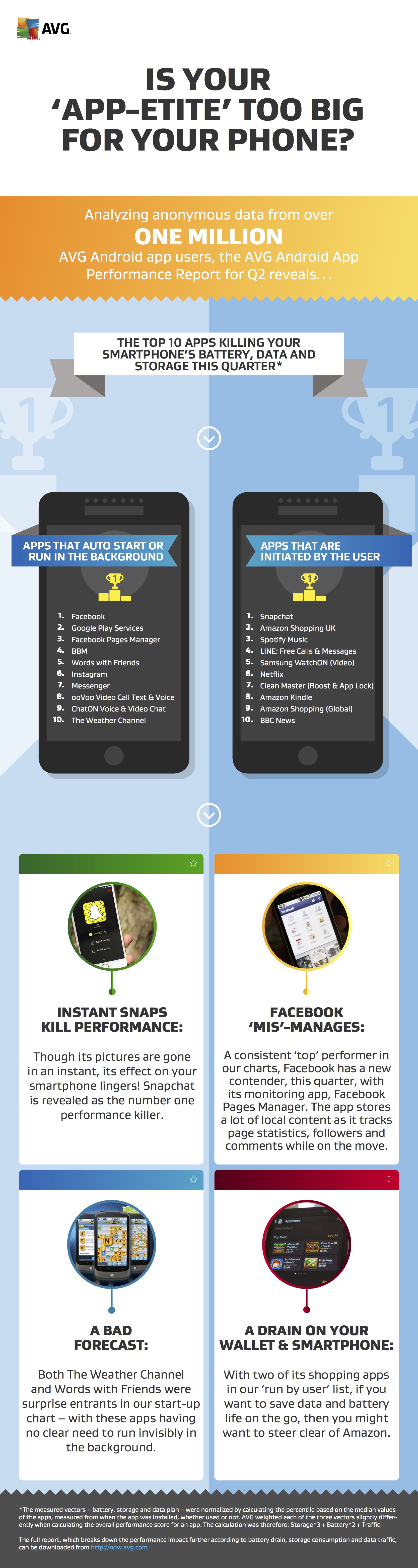
Keen to prevent this? In our global AVG Android App Report (Q2 2015), we’ve again, identified the top 10 apps that drain your battery, clog your storage and use up most of your mobile data. 
AVG App Reprort Infographic Q2 2015

What are the top app sinners? 

  • Snapchat! Oh Snap! Forget Facebook, Spotify, or any of the preinstalled apps: In Q2 2015, Snapchat dethroned them all as the app which had the highest, overall performance drain. Did you know that while it runs, it makes use of the camera, Wi-Fi/mobile data and GPS functionality, simultaneously? This explains the high battery life and traffic consumption.
  • Samsung Updates! The top, hidden battery-drainer this quarter was a service innocuously named “com.sec.android.fwupgrade,” which is responsible for delivering periodic Samsung updates to your device via Wi-Fi. As with the similarly update-heavy Samsung Security Policy Update (KNOX) and Google Play apps, the service has a massive impact on the battery life of your device.
  • Your Browser’s a True Hoarder! Joining more obvious entrants on the top ten list this quarter, such as Spotify and Amazon Kindle, Google Chrome emerged as the second highest, storage-consuming app, thanks to its collection of your browsing data over time. Our advice here: Clean up your browser from the settings menu or use a thorough cleaner product.
  • Facebook ’mis’-manages: A consistent ‘top’ performer in our charts, Facebook entered a new contender this quarter, with its monitoring app, Facebook Pages Manager. The app stores a lot of local content as it tracks page statistics, followers and comments while on the move
  • A bad forecast: Both The Weather Channel and Words with Friends were surprise entrants in our start-up chart – with the apps seemingly having no clear need to run invisibly in the background
  • A drain on your wallet and smartphone: With two of its shopping apps in our top ten ‘run by user’ list, if you want to save data and battery life on the go, you might want to steer clear of Amazon.

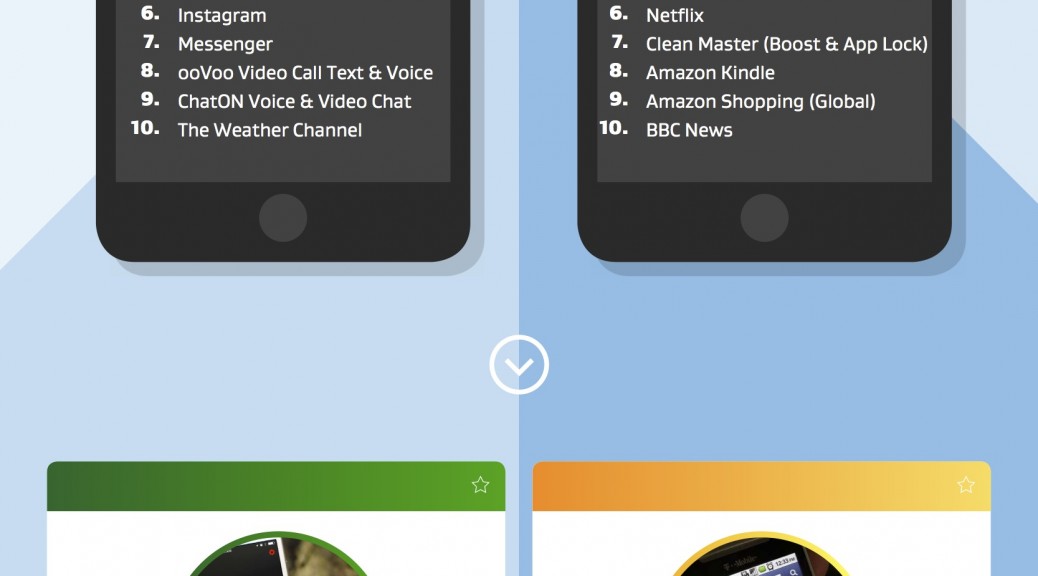
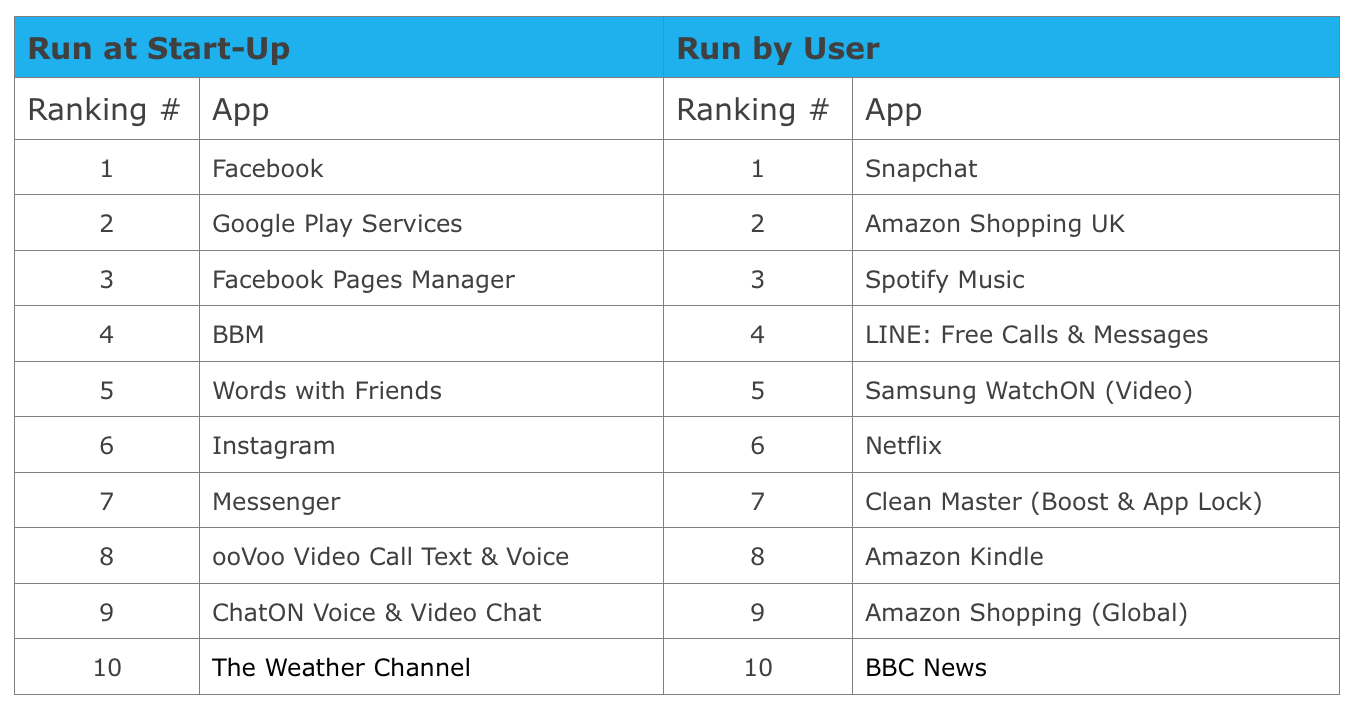
These were just some of the highlights that stood out to us. Our top 10 resource-draining apps should give you even more insight into what apps make your phone or tablet slow to a crawl. We’ve divided our top list into apps that you run by yourself, and those that run quietly in the background, which you may not even know about:

App report q2


Read the entire App Report here.

So what can you do about it?

Now that you know about the top apps, what’s left for you to do? Stay tuned for our next blog on the top tips to optimize your smartphone and tablet.

Is your ‘app-etite’ too big for your phone?

AMSTERDAM – October 20, 2015 – Although its pictures and videos are gone in an instant, its effect on your smartphone lingers, as Snapchat the image-sharing app has been crowned as the number one smartphone performance killer in the latest AVG Android App Performance Report. Compiled by AVG® Technologies N.V. (NYSE: AVG), the online security company™ for more than 200 million monthly active users, the report saw Snapchat dethrone previous top-spot holders, Facebook and Spotify, thanks to its simultaneous use of your device’s camera, Wi-Fi, mobile data and GPS functionality.

Also climbing to the top of the report is the social and blogging platform Tumblr, which has emerged as the highest, traffic-consuming app for the period. Despite the relatively low-level content viewed on the platform – primarily news, short video clips, blogs and some pictures – Tumblr used more data than Netflix and Spotify combined.

Additional findings from the report include:

  • There is a costly quest for updates: Topping the list of hidden, battery-draining services this quarter is the innocuously named “com.sec.android.fwupgrade,” which is responsible for delivering periodic Samsung updates to Android devices via Wi-Fi. As with the similarly update-heavy Samsung Security Policy Update (KNOX) and Google Play apps, the service has a massive impact on the battery life of your device
  • Your browser ‘hoards’ data: Google Chrome emerged as the second-highest storage-consuming app this quarter thanks to its collection of user browsing data over time, joining more obvious apps, such as Spotify and Amazon Kindle
  • Facebook ‘mis’-manages: A consistent ‘top’ performer in our charts, Facebook has a new contender, this quarter, with its monitoring app, Facebook Pages Manager. The app stores a lot of local content as it tracks page statistics, followers and comments while on the move

Though many users make a conscious choice to download and run high-impact apps on their smartphones, AVG’s research has found a host of apps which silently drain smartphone resources in the background without the users’ knowledge or action. These apps are differentiated in the report as those that run at start-up, versus those that are run by the user. The following apps consumed the most, overall battery drain, storage usage and mobile data combined.

AVG App report

  • A bad forecast: Both The Weather Channel and Words with Friends were surprise entrants in our start-up chart – with the apps seemingly having no clear need to run invisibly in the background
  • A drain on your wallet and smartphone: With two of its shopping apps in our top 10 ‘run by user’ list, if you want to save data and battery life on the go, you might want to steer clear of Amazon

“The goal of these reports is not to alarm smartphone users, but rather to enable them to make informed choices about the apps they run on a daily basis,” said Tony Anscombe, Senior Security Evangelist, at AVG Technologies. “Apps are meant to enhance, not to detract from your smartphone experience, but with so many options, we are in danger of overloading our devices. If you are one of the people who feels like they are fighting a constant battle with their device’s battery, or never have enough storage to save your favorite clips and images, then we want to help you take back control.”

Analyzing aggregated, anonymous data from over one million AVG Android app users, the quarterly AVG Android App Performance Report aims to reveal the top performance-affecting apps worldwide – analyzing their overall impact and performance against three key categories – battery drain, storage consumption, and data traffic use.

The full report can be downloaded from http://now.avg.com/android-app-performance-report-q2-2015


About AVG Technologies (NYSE: AVG)

AVG is the online security company providing leading software and services to secure devices, data and people. AVG’s award-winning technology is delivered to over 200 million monthly active users worldwide. AVG’s Consumer portfolio includes internet security, performance optimization, and personal privacy and identity protection for mobile devices and desktops. The AVG Business portfolio – delivered by managed service providers, VARs and resellers – offers IT administration, control and reporting, integrated security, and mobile device management that simplify and protect businesses.

All trademarks are the property of their respective owners.

www.avg.com


Contacts:

North America:
Deanna Contreras
Tel: +1 415 371 2001
Email: [email protected]

Rest of World:
Zena Martin
Tel: +44 7496 638 342
Email: [email protected]

Press information: http://now.avg.com


AVG Android App Performance Report Q2 2015

Press Release

Is your ‘app-etite’ too big for your phone?

Full report

AVG Technologies Android App Performance Report Q2 2015 (PDF)

Performance Optimisation Guide

AVG Technologies Android Performance Optimisation Guide – October 2015 (PDF)

Blog Post

Curb Your ‘App’-etite: These Top 10 Apps Stifle Your Phone’s Performance

Images

App Performance Report related images (zip)

Infographic

‘Is your ‘app-etite’ too big for your phone?’ Infographic (PDF)

AVG App report Infographic

AVG Debates the Impact of Trust on Innovation at the MEF European Consumer Trust Summit

AMSTERDAM– October 19, 2015 – AVG Technologies N.V. (NYSE: AVG), the online security company™ for more than 200 million active users, today announced that Tony Anscombe, the company’s Senior Security Evangelist, will be participating in a panel debate at the MEF European Consumer Trust Summit on October 20, 2015.

Taking place in London’s Canary Wharf, and open to both MEF members and non-members, the Summit will bring together brands, mobile operators, regulators, developers and innovators to examine the business-critical issue of how to foster consumer trust in today’s mobile age.

This comes as the latest MEF Global Consumer Trust Report ranked trust as the single, largest obstacle to growth in the mobile content and commerce industry – with two-fifths of survey respondents naming a lack of trust as the number one dissuasive factor when downloading items.

Anscombe will be joining representatives from Mozilla, Vodafone, Smart e-Money and CitizenMe to discuss, “Trust as a Driver for Innovation.”

What: Tony Anscombe, AVG Technologies, at the MEF Consumer Trust Summit

When: Afternoon Session (between 14.00-17.00), Tuesday, 20 October 2015

Where: Level 39, Canary Wharf, London

The Consumer Trust Summit forms part of a week of activities from MEF, kicking off with the annual Meffys award gala dinner on 19 October 2015. Now in their twelfth year, the Meffys aim to recognize the most successful and innovative players across the mobile ecosystem. This year, AVG has been shortlisted in the Consumer Trust category for its one-page privacy policy.

For further information about the Consumer Trust Summit, or other MEF events, please visit the organization’s website: http://www.mobileecosystemforum.com/


About AVG Technologies (NYSE: AVG)

AVG is the online security company providing leading software and services to secure devices, data and people. AVG’s award-winning technology is delivered to over 200 million monthly active users worldwide. AVG’s Consumer portfolio includes internet security, performance optimization, and personal privacy and identity protection for mobile devices and desktops. The AVG Business portfolio – delivered by managed service providers, VARs and resellers – offers IT administration, control and reporting, integrated security, and mobile device management that simplify and protect businesses.

All trademarks are the property of their respective owners.

www.avg.com

Contacts:

North America:
Deanna Contreras
Tel: +1 415 371 2001
Email: [email protected]

Rest of World:
Zena Martin
Tel: +44 7496 638 342
Email: [email protected]

Press information: http://now.avg.com

Dridex malware crippled by the FBI

On Tuesday, October 13, The United States Department of Justice announced that they had taken down and seized multiple command-and-control (C&C) servers that were part of a network used by the Dridex trojan to upload stolen information and distribute malware.

U.S. Attorney Hickton said, “Through a technical disruption and criminal indictment we have struck a blow to one of the most pernicious malware threats in the world.”

Dridex, also known as ‘Bugat’ and ‘Cridex’, is a malicious trojan used by criminals to steal bank login credentials from an infected PC, in order to gain access to a victim’s bank account—it’s been quite successful too, with losses in the UK estimated at £20 million and in the US at $10 million.

Dridex is commonly distributed in the form of a phishing email, and often contains an infected Word doc attachment. When a victim opens the Word document they unknowingly infect their PC, thereby allowing attackers to eavesdrop on their computer’s activity and automate the theft of data.

Head of Operations at the National Crime Agency’s National Cyber Crime Unit (NCCU), Mike Hulett, said: “This is a particularly virulent form of malware and we have been working with our international law enforcement partners, as well as key partners from industry, to mitigate the damage it causes. Our investigation is ongoing and we expect further arrests to be made.”

While the FBI and other international agencies continue their investigations, UK’s National Crime Agency (NCA) is still warning UK internet users to be aware of and protect themselves against Dridex.

Even though the distribution network has been crippled, the actual malware still exists and can be used by other criminals.

Mike Hulett goes on to provide sound advice for everyone, “We urge all internet users to take action and update your operating system. Ensure you have up to date security software and think twice before clicking on links or attachments in unsolicited emails”.

If you don’t already have a suitable antivirus solution in place, we recommend you install one today. Download our award-winning AVG Protection for your PC to help prevent malware and viruses.


If you or anybody you know has been affected by cybercrime fraud you can report it to:

US
Federal Bureau of Investigation, Internet Crime Complaints Center
http://www.ic3.gov/default.aspx

UK
ActionFruad – National Fraud & Cyber Crime Reporting Centre
http://www.actionfraud.police.uk

AUS
ACORN – Australian Cybercrime Online Reporting Network
https://report.acorn.gov.au

The channel opportunity to reduce security complexity

According to PwC’s latest Information Security Breaches Survey a staggering 74 per cent of small businesses have suffered a security breach in the last year—jumping significantly from the 60 per cent recorded in 2014.

Aside from the monetary losses suffered, the damage to reputation can be incalculable. The topic of data security is higher on the media’s agenda than ever before and the resulting bad press from any security breach today can severely impact a business’s reputation and credibility.

It’s clear that SMBs need to take immediate action, but what’s holding them back? The answer is not just money but time. Discussing small business vulnerability in a recent article in the UK newspaper The Times, journalist Mark Frary called out one of the underlying problems as follows:

“One of the barriers to implementing cyber security is the amount of management attention it takes. SMEs are naturally focused on profit and loss and cyber security can seem less relevant than other challenges.” 

Time management issues shouldn’t be the reason for neglecting security. That’s where AVG Business channel partners come in. This is an opportunity for our partners to add new value for clients, removing the complexity of multiple, different security solutions.

Solutions such as AVG CloudCare can help partners easily implement security strategies for their clients.  AVG CloudCare offers a single cloud platform that enables the real-time management of a full suite of cloud-based security services including antivirus and online backup (OLB), among other key features.

Brookland Computer Services (BCS), an AVG Business channel partner serving clients in finance, legal, manufacturing and accounting, has found AVG CloudCare’s security products fit well in the ICT provider’s business model. BCS Managing Director Eamonn Fogarty explains, “With the old method of purchasing antivirus, you just hope It worked because no one could check it. Businesses were potentially left unprotected. Using AVG CloudCare, we can monitor and control every device and every environment, with reduced workload for us and our clients’ internal IT people.”

Another AVG Business channel partner, Northern IT Consultancy (NITC), is using CloudCare’s security portal to manage clients’ security services from a single screen dashboard. NITC Managing Director Ritesh Mehta commented that it has improved control and flexibility, and provides a straightforward product they can resell at a competitive price, “Threats are detected and the remote management means we don’t have to go onsite to fix the problem or interrupt the client. They’re very happy with that and our client retention speaks volumes.”

If you haven’t heard about AVG CloudCare or the portfolio of security and managed IT services from AVG Business, visit our AVG Business website today.

Protect sensitive documents and data with AVG’s Data Safe

If you need to protect sensitive files or documents on your PC, you’re going to want an extra layer of security. AVG’s Data Safe feature can help.

Data Safe encrypts and stores your valuable documents, pictures or any other files onto a password-protected virtual disk on your PC. You can move files into your Data Safe and open them just like any other disk.

The contents of your AVG Data Safe are protected using AES 256-bit encryption. Once the Data Safe is locked it needs a password to be opened, without the password it’s not possible to access the contents—so your documents will remain protected.

AVG Data Safe is available in:

How to create a Data Safe


  • Open AVG.
  • In the AVG interface, click the Computer tab
  • On the Data Safe tab, click Create Safe.
  • Create a name for the Safe
  • Fill in the Password twice—for verification. Make it strong and memorable.
  • Fill in the Password hint. Remember: If you forget your password you will not be able to access your files!
  • Click Next.
  • Select a Location and the Size of the vault, review the other options.
  • When you’re happy with your choices, click Create Safe.

Once the Safe has been created, click the Open Now button. If the safe isn’t already unlocked, fill in your password to unlock the safe for the first time. The safe will now be accessible via the selected drive letter in Windows Explorer.

How to lock your Data Safe

  • Open AVG.
  • In the AVG interface, click the Computer tab, and then click Manage your Safes.
  • Click the Unlocked slider next to the safe you want to lock. The status will change from unlocked to locked, and the Data Safe virtual drive will be disabled.

If you want to try AVG’s Data Safe feature for yourself, download a 30-day trial of AVG Internet Security. If you have multiple PCs and devices, you can protect and mange them all with AVG Protection PRO.

For more great tips on getting the most out of your PC, Mac and mobile devices, follow us on Twitter and Facebook.