Category Archives: AVG

AVG

Connect, Click and Clean with AVG Cleaner for iOS

From the day you first turn it on, your iPhone or iPad slowly accumulates hidden clutter that take up storage space and negatively affect performance, especially on 16 or 32GB models.

If you have an iPhone or an iPad and are struggling to find space for all your pictures, music or movies, or just want to make space to install the latest operating system, AVG Cleaner for iOS can help.

Since there’s no way for an iOS app to clean up that clutter, you have to do it from your PC.


How to clean up your iOS device:

  • Install AVG Performance 2015 from this page. Once complete, click on Performance to launch the 2015 release of AVG PC TuneUp.
  • From here, click on Clean up iPhone, iPad and iPod touch.
  • Hit Scan Now and have a look at the results. To clean up your phone, hit the Clean Now
Video

How To Clean Up Your iOS Device


Note: in case anything goes wrong, you can always go to Rescue Center and restore the files.

Don’t worry: All we clean are cache files, temporary files, age-old system logs and thumbnail files you will no longer need.


How much space can you get back?

Just how much space can you clear up using our AVG Cleaner for iOS? Well results for each device will differ but in our internal labs we found 340 MB of files on an iPhone 6 that was only four weeks old.

340 MB of junk files cleaneda 4 week old iPhone 6 7.5 GB of junk files cleaned on a 1 year old iPad Air 712 MB of junk files cleaneda 9 months old iPod touch


Don’t forget: you can’t clean up these files from your phone, you have to use AVG Cleaner for iOS as part of AVG Performance 2015.

So what are you waiting for? Unlock the hidden potential of your iOS device with AVG Cleaner for iOS now! Download AVG Performance today.

Legacy Contacts and managing a Digital Legacy

Emails, photos, random postings… We all have a digital footprint and depending on your privacy settings, it’s available to many people including strangers.  Not to mention our passwords to accounts, and other digital assets, including financial ones. Who can access them when we pass on? What happens to the data?

In the world of Internet services, digital legacies and the policies around them have been murky at best.

Because of our position as a leading provider of security for data, devices and people this is an issue we at AVG have long been concerned about. And that’s why we’ve been focused on educating our users on this sensitive topic and advocating for people to provide a digital codicil to their wills, specifying a digital executor to act on their behalf.  (You can see our most recent article here. We also published an ebook dealing with digital death.


Today, different sites have different policies, and requirements vary on the actions that can be taken, and the forms of identification and proof that are required in case of a user’s death.  Twitter has a policy to deactivate accounts after six months of prolonged inactivity, but also will work with authorized individuals to delete a deceased user’s account and or certain imagery. Until last week, Facebook’s policy was to allow users to specify if they wanted to “memorialize” or permanently delete their accounts. Last Thursday, Facebook moved to a step further to allow account holders to appoint what it calls a “Legacy Contact” to manage their memorialized accounts.

Facebook legacy contact


You can read the full announcement here that Facebook released Feb. 12.

But briefly: Facebook now allows the appointee to write a post for your profile, and update your profile picture and cover photo. It also allows the appointee to respond to new friend requests, for example a friend who hadn’t been on Facebook at the time of the user’s death. The Facebook executor, however, can’t go back and delete material, log into the account or remove any of your friends.

In its statement, Facebook said: “By talking to people who have experienced loss, we realized there is more we can do to support those who are grieving and those who want a say in what happens to their account after death.”

The Facebook move is good news, in many ways, not the least of which is that it helps bring this important issue of Digital Legacy to the forefront in one of the largest social venues, where many of us are living our digital lives. It also recognizes that users need more control of their accounts, including deciding how they want them managed when they pass.

Digital legacy is something that everyone online needs to consider. No one wants to consider their own death, but as the physical world morphs into the digital, it’s a very important part of our legacies. One we shouldn’t ignore.

AVG Reports Fourth Quarter and Fiscal Year 2014 Financial Results

AMSTERDAM, February 18, 2015 – AVG Technologies N.V. (NYSE: AVG), the online security company for 197 million active users and 101 million mobile users, today reported results for the fourth quarter and fiscal year ended December 31, 2014.


Key highlights

  • Total revenue for the quarter at $100.2 million
  • Subscription revenue showed double digit growth both for the quarter and full year
  • Total revenue for the year at $374.1 million
  • Total user count increased to 197 million
  • Achieved 100 million mobile user milestone, growing 50% year over year
  • Successful launch and continued acceleration of AVG Zen roll out
  • Completed acquisitions of Locations Labs, Norman Safeground and Winco to support core elements of our strategy including mobile, channel and geographic expansion
  • Non-GAAP diluted EPS was $1.91 and GAAP net income per diluted ordinary share was $ 1.02 for the full year


Our fourth quarter confirmed another good year for AVG. Our pivot of the business and focus on predictable, sustainable subscription revenue already had strong traction which we accelerated with our fourth quarter execution. The acquisitions we completed are a key complement to our development activities.” commented Gary Kovacs, CEO of AVG. “In 2014 we repositioned AVG as the online security company and made great progress in delivering an easy to use, integrated set of security offerings to protect devices, data and people. We believe that our strong user base and growing mobile success, underpinned by our AVG Zen product and increasing SMB presence, means we are well-positioned to deliver in 2015 and beyond.”


Fourth quarter 2014

Subscription revenue increased 15% over the same period one year ago to $77.4 million.  The increase in subscription revenue was the result of growth in both the consumer and SMB segments of the business.  Platform-derived revenue was $22.7 million, impacted by the Google policy changes and our continued exit from the third party search distribution business.  Total revenue for the fourth quarter of 2014 was $100.2 million, which we estimate would have been $102.5 million on a constant currency basis.  This compares to $101.9 million in the fourth quarter of 2013.

We completed a number of acquisitions in the fourth quarter, out of which Location Labs was the largest yet undertaken by AVG and accelerates our mobile monetization.  During the fourth quarter AVG entered into a $280 million credit facility consisting of a $230 million term loan and a $50 million revolver facility. The term loan was fully drawn down and the revolver facility was left undrawn as of December 31st, 2014.

We delivered non-GAAP adjusted net income for the fourth quarter of 2014 of $16.2 million, or $0.31 per diluted ordinary share.  This compares with non-GAAP adjusted net income of $28.2 million, or $0.52 per diluted ordinary share for the same period of the prior year[1] with the difference being attributable to expenses during the fourth quarter associated with newly incurred debt and acquisitions.

GAAP net income for the fourth quarter of 2014 was $4.6 million, or $0.08 per diluted ordinary share.  This compares with GAAP net income of $12.8 million, or $0.23 per diluted ordinary share in the prior year’s fourth quarter.

GAAP net cash provided by operating activities was $35.2 million for the quarter, compared with $32.9 million for the same period in the prior year. Non-GAAP free cash flow was $27.7 million for the quarter, compared with $28.7 million for the same period in the prior year.


Fiscal Year 2014

Subscription revenue increased 12% to $281.6 million from $250.8 million year over year. Our consumer subscription business grew 11% to $223.1 million and our small business segment by 18.7% to $58.5 million. For the fiscal year 2014, total revenue was $374.1 million.

Non-GAAP adjusted net income for 2014 was $100.4 million, or $1.91 per diluted ordinary share. This compares to non-GAAP adjusted net income of $118.2 million, or $2.16 per diluted ordinary share, for the prior year. The year over year difference was largely driven by expenses in 2014 associated with newly incurred debt and acquisitions.

GAAP net income for fiscal year 2014 was $54.4 million, or $1.02 per diluted ordinary share, based on 52.6 million weighted-average diluted ordinary shares outstanding, compared with net income of $63.7 million, or $1.16 per diluted ordinary share, based on 54.7 million weighted-average diluted ordinary shares outstanding, for fiscal year 2013.

AVG generated $108.8 million in cash from operating activities in fiscal year 2014, compared to $145.2 million for the prior year. Non-GAAP free cash flow was $93.2 million for fiscal year 2014, compared with $128.5 million for fiscal year 2013.

During 2014, we repurchased 1.9 million shares at a total cost of $35.3 million under our share repurchase program, which was approved in 2013.


Financial Outlook

Based on information available as of February 18, 2015, AVG is confirming the following outlook for fiscal year 2015:

  • Revenue is expected to be in the range of $410 million to $430 million.
  • Non-GAAP adjusted net income is expected to be in the range of $94.2 million to $99.2 million; non-GAAP diluted EPS is expected to be in the range of $1.80 to $1.90.
  • GAAP net income is expected to be in the range of $48.9 million to $53.9 million; GAAP net income per diluted ordinary share is expected to be in the range of $0.93 to $1.03.

AVG’s expectation of non-GAAP adjusted net income and non-GAAP diluted EPS for the fiscal year 2015 excludes share-based compensation expense, acquisition amortization and certain other adjustments, and assumes a normalized tax rate of 12.5%.  For the purpose of calculating GAAP net income per diluted ordinary share and non-GAAP diluted EPS, the Company assumes approximately 52.6 million weighted-average diluted ordinary shares outstanding for the full year.


Conference Call Information

AVG will hold its quarterly conference call today at 23:00 CET/5:00 p.m. ET/2:00 p.m. PT to discuss its fourth quarter 2014 and full fiscal year 2014 financial results, business highlights and outlook.  The conference call may be accessed via webcast at http://investors.avg.com or using the following phone numbers and conference ID: +1 646 254 3363 (USA); +1 416 216 4141 (Canada); +44 (0)20 3427 1909 (UK); Conference ID: 5098060.

A live version and replay version of the webcast can be accessed via http://investors.avg.com.


Use of Non-GAAP Financial Information

This press release contains supplemental non-GAAP financial measures that are not calculated in accordance with U.S. GAAP.  These non-GAAP measures provide additional information on the performance or liquidity of our business and so we believe are useful for investors.

Adjusted net income, free cash flow and their related ratios are non-GAAP measures and should not be considered alternatives to the applicable U.S. GAAP measures.  In particular, adjusted net income, free cash flow and their related ratios should not be considered as measurements of our financial performance or liquidity under U.S. GAAP, as alternatives to income, operating income or any other performance measures derived in accordance with U.S. GAAP or as alternatives to cash flow from operating activities as a measure of our liquidity.

Adjusted net income and free cash flow are measures of financial performance and liquidity, respectively, and have limitations as analytical tools, and should not be considered in isolation from, or as substitutes for, analysis of our results of operations, including our operating income and cash flows, as reported under U.S. GAAP.  We provide these non-GAAP financial measures because we believe that such measures provide important supplemental information to management and investors about the Company’s core operating results and liquidity, primarily because the non-GAAP financial measures exclude certain expenses and other amounts that management does not consider to be indicative of the Company’s core operating results or business outlook or liquidity.  Management uses these non-GAAP financial measures, in addition to the corresponding U.S. GAAP financial measures, in evaluating the Company’s operating performance, in planning and forecasting future periods, in making decisions regarding business operations and allocation of resources, and in comparing the Company’s performance against its historical performance.  Some of the limitations of adjusted net income and free cash flow and their related ratios as measures are:

  • they do not reflect our cash expenditure or future requirements for capital expenditure or contractual commitments, nor do they reflect the actual cash contributions received from customers;
  • they do not reflect changes in, or cash requirements for, our working capital needs;
  • although amortization and share-based compensation are non-cash charges, the assets being amortized will often have to be replaced in the future and such measures do not reflect any cash requirements for such replacements; and
  • other companies in our industry may calculate these measures differently than we do, limiting their usefulness as comparative measures.

Because of these limitations, investors should rely on AVG’s consolidated financial statements prepared in accordance with U.S. GAAP and treat the Company’s non-GAAP financial measures as supplemental information only.

For a reconciliation of these non-GAAP financial measures to the most directly comparable financial measures prepared in accordance with U.S. GAAP, please see “Reconciliation of GAAP measures to non-GAAP measures”.  All non-GAAP financial measures should be read in conjunction with the comparable information presented in accordance with U.S. GAAP.


Forward-Looking Statements

This press release contains forward-looking statements within the meaning of the Private Securities Litigation Reform Act of 1995, including those relating to an expected range of revenue, net income, net income per diluted ordinary share, non-GAAP adjusted net income and non-GAAP EPS for the fiscal year ending December 31, 2015 and/or future periods, as well as those relating to the future prospects of AVG.  Words such as “expects,” “expectation,” “intends,” “assumes,” “believes” and “estimates,” variations of such words and similar expressions are also intended to identify forward-looking statements. These forward-looking statements involve risks and uncertainties that could cause actual results to differ materially from those contemplated herein. Factors that could cause or contribute to such differences include but are not limited to: changes in international and national tax regulations and related proposals; changes in the Company’s growth strategies; changes in the Company’s future prospects, business development, results of operations and financial condition; the anticipated costs and benefits of the Location Labs and other acquisitions; the Company’s ability to comply with its credit agreements; changes to the online and computer threat environment and the endpoint security industry; competition from local and international companies, new entrants in the market and changes to the competitive landscape; the adoption of new, or changes to existing, laws and regulations; flaws in the assumptions underlying the calculation of the Company’s key metrics, including  the number of the Company’s active users, revenue per average active user, subscription revenue per subscriber and platform revenue per thousand searches; the potential effects of changes in the applicable search guidelines of our search partners, including the Company’s and its competitors’ responses to these changes; the termination of or changes to the Company’s relationships with its partners, including Google, Yahoo! and other third parties; changes in the Company’s and its partners’ responses to privacy concerns; the ability for the Company to successfully diversify its portfolio of search partners; the Company’s plans to launch new products and online services and monetize its full user base; the performance of the Company’s products, including AVG Zen; the Company’s ability to attract and retain active and subscription users; the Company’s ability to retain key personnel and attract new talent; the Company’s ability to adequately protect its intellectual property; flaws in the Company’s internal controls or IT systems; the Company’s geographic expansion plans; the outcome of ongoing or any future litigation or arbitration, including litigation or arbitration relating to intellectual property rights; the Company’s legal and regulatory compliance efforts; and worldwide economic conditions and their impact on demand for the Company’s products and services.  Given these risks and uncertainties, you should not place undue reliance on these forward-looking statements.

Further information on these factors and other risks that may affect the Company’s business is included in filings AVG makes with the U.S. Securities and Exchange Commission (SEC) from time to time, including its Annual Report on Form 20-F, particularly under the heading “Risk Factors”.

The financial information contained in this press release should be read in conjunction with the consolidated financial statements and notes thereto to be included in the Company’s reports on Form 6-K and Form 20-F.  The Company’s results of operations for the fourth quarter and the full year ended December 31, 2014 are not necessarily indicative of the Company’s operating results for any future periods.

These documents are available online from the SEC or in the Investor Relations section of the Company’s website at http://investors.avg.com.  Information on the AVG website is not part of this release.  All forward-looking statements in this press release are based on information currently available to the Company, and AVG assumes no obligation to update these forward-looking statements in light of new information or future events.


About AVG

AVG is the online security company providing leading software and services to secure devices, data and people. Over 197 million active users, as of December 31, 2014, use AVG´s products and services. AVG’s Consumer portfolio includes internet security, performance optimization, and personal privacy and identity protection for mobile devices and desktops. The AVG Business portfolio – delivered by managed service providers, VARs and resellers – offers IT administration, control and reporting, integrated security, and mobile device management that simplify and protect businesses.

All trademarks are the property of their respective owners.


Investor relations contacts:


Europe: Camelia Isaic        

Tel. +420 702 205 848

Email: [email protected]


US: Scott McMullin

Tel: +1 415 741 9860

Email: [email protected]


IR team email: [email protected]

IR website: http://investors.avg.com


[1] Non-GAAP adjusted net income for the fourth quarter of 2014 excludes $2.7 million in share based compensation expense, $6.7 million in acquisition amortization, $1.2 million in acquisition-related costs, $1.5 million in restructuring, legal and other charges, $0.6 million in unwinding of discounts and changes in fair value, adjusted for $1.4 million in net reversal of capitalized development charges, together with a $0.3 million adjustment to normalize to a tax rate of 12.5%, as described in the Reconciliation of GAAP measures to non-GAAP measures.

Malware Is Still Spying On You Even When Your Mobile Is Off

Most of us have seen Hollywood movies where hackers trace and spy on mobile devices even though they are switched off. Like most things in spy movies, we disregard it as fiction.

However, a recent malware discovered by the AVG mobile security team may change this preconception.

This malware hijacks the shutting down process of your mobile, so when the user turns the power off button to shut down their mobile, it doesn’t really shut down.

After pressing the power button, you will see the real shutdown animation, and the phone appears off. Although the screen is black, it is still on.

While the phone is in this state, the malware can make outgoing calls, take pictures and perform many other tasks without notifying the user.

How does this happen?

First, we have to analyze in detail, the shutting down process.

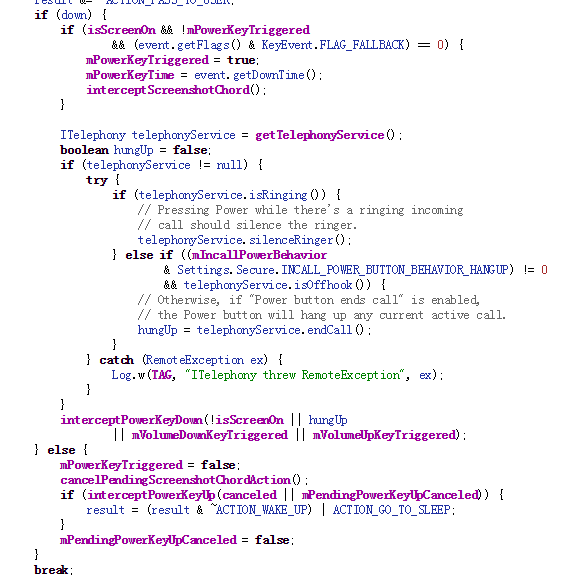
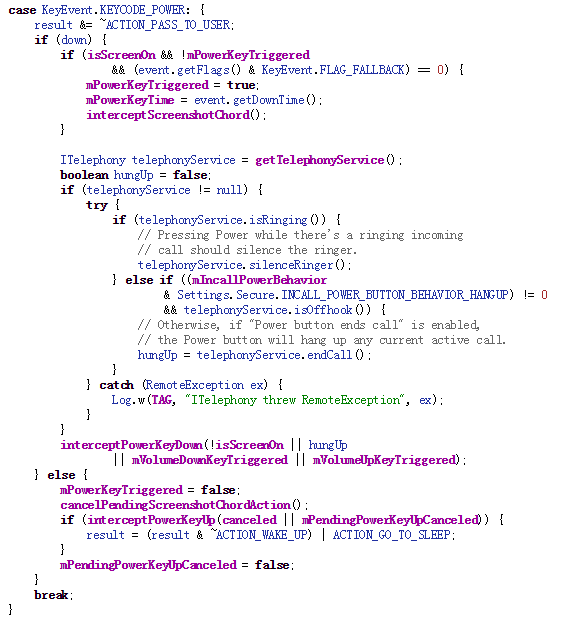
On Android devices, when the power off button is pressed it will invoke the interceptKeyBeforeQueueing function of the class interceptKeyBeforeQueueing. interceptKeyBeforeQueueing will check if the power off button is pressed and go to certain process.

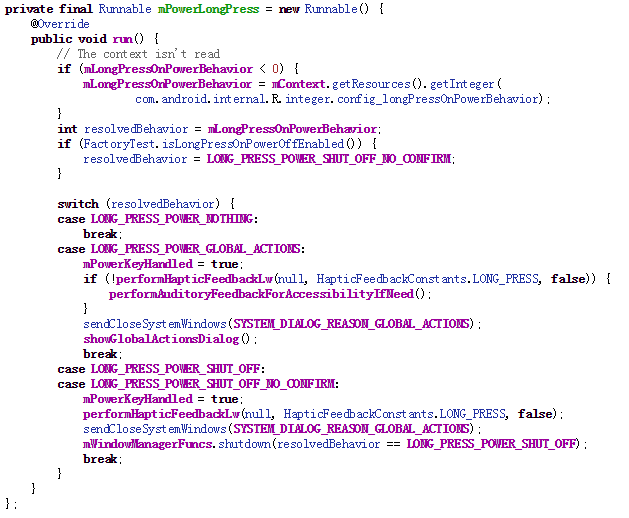
When the power button is released, intereceptPowerKeyUp is invoked and it will trigger a runnable to continue.

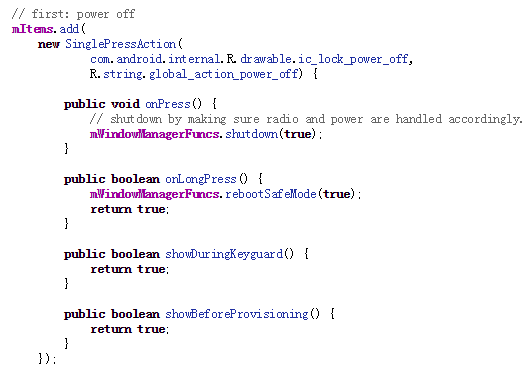
So according to above code snippet, we could see that in LONG_PRESS_POWER_GLOBAL_ACTIONS switch, some actions will be done after power off button is released. showGlobalActionsDialog is what we care about, which will open a dialog for your to select actions, such as power off, mute or airplane mode.

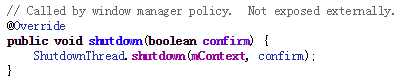
So if you select power off option, mWindowManagerFuncs.shutdown will be called.

But mWindowManagerFuncs is an interface object. It will actually call the thread ShutDownThread’s shutdown function. ShutDownThread.shutdown is the real entry point of the shutting down process. It will shut down radio service first and invoke the power manager service to turn the power off.

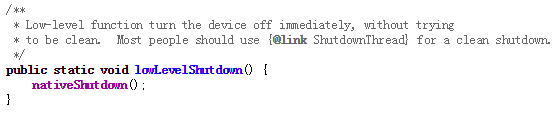
So finally in power manager service, a native function is called to turn the power off.

Now we have understood the whole process of shutting down your mobile. So if we want to hijack the power off process, we definitely need to interfere before mWindowManagerFuncs.shutdown  as that shuts down the radio service.

Now let’s turn back to the malware which executes a similar attack.

First, it applies for the root permission.

Second, after root permission is acquired, the malware will inject the system_server process and hook the mWindowManagerFuncs object.

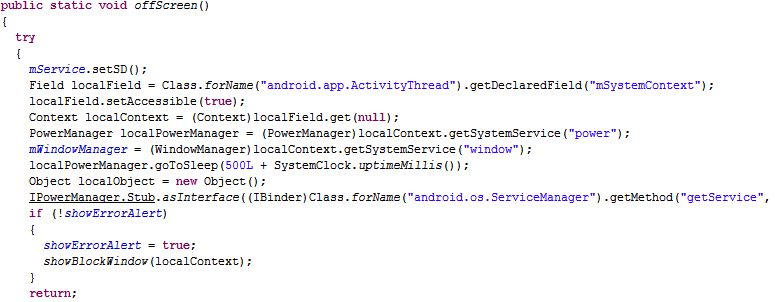
Third, after the hook, when you press the power button, a fake dialog will pop up. And if you select power off option, it will display a fake shut down animation, leaving the power on but the screen off.

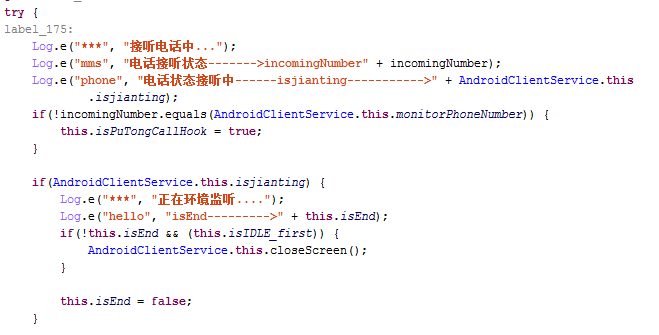
Last, in order to make your mobile look like really off, some system broadcast services also need to be hooked.

Let’s see some examples:

Recording a call


Transmitting private messages

Luckily, this malware has been detected by AVG. And next time if you want to make sure your mobile is really off, take the battery out.

AVG Mobile Malware Research team

How to activate Two Factor Authentication on Apple services

This February Apple announced that they would be making Two Factor Authentication available on iMessage and FaceTime in a bid to help users secure their online identities.

What is Two Factor Authentication?

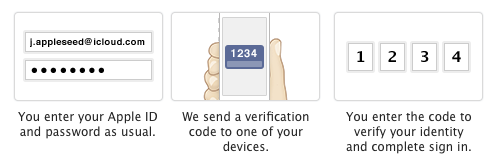
Two Factor Authentication is method of securing your online accounts or services through the addition of another layer of security when you login. This is usually a code which is sent to your mobile device, either in form of a text message or via an app.

Video

What is Two Factor Authentication


Activating Apple’s Two Factor Authentication

Implementing Two Factor Authentication on Apple services is very straightforward.


  1. Go to My Apple ID.
  2. Select Manage your Apple ID and sign in.
  3. Select Password and Security.
  4. Under Two-Step Verification, select Get Started and follow the onscreen instructions.


Apple Two Factor


For help and advice on implementing Two Factor Authentitcation on Apple services, I’d recommend visiting the official Apple FAQ page.

New Concerns for Connected Car Hacks  

Last week, we reported on news of remote hacking of BMW cars that opened car doors and windows.  That episode was followed by a CBS News 60 Minutes report on DARPA and concerns about Internet of Things last Sunday, which included a renegade, runaway car that had been hacked remotely causing it to crash.

In the CBS demonstration, the victims were only some orange traffic cones. But the implications were real: two tons of moving steel out of the driver’s control.

Granted this may be the worst-case scenario but there are also implications for hijacking your data that give us cause for concern.

In that vein, a new report was issued last week (Feb. 9) in the U.S. on broader security and privacy vulnerabilities in smart vehicles. The report by Senator Ed Markey (D-Mass.) called “Tracking & Hacking: Security & Privacy Gaps Put American Drivers at Risk,” identified risks and proposes new safety standards for smart vehicles.

Senator Markey is a member of the Commerce, Science and Transportation Committee. His study is based on how 16 major automobile manufacturers responded to questions about how vehicles may be vulnerable to hackers, and how driver information is collected and protected.

Here are just a few excerpts of its data points:

  • All new cars on the market today include wireless technologies that could pose vulnerabilities to hacking or privacy intrusions.
  • Few manufacturers are able to report past hacking episodes or could describe any current effective capabilities to diagnose or respond to hacks.
  • A majority of automakers collect and use data on performance and driving history in their efforts to improve customer experience, and often share it with third parties.

The full report is available here.


In a statement about the report, Markey summarized: “Drivers have come to rely on these new technologies, but unfortunately the automakers haven’t done their part to protect us from cyber-attacks or privacy invasions. Even as we are more connected than ever in our cars and trucks, our technology systems and data security remain largely unprotected. We need to work with the industry and cyber-security experts to establish clear rules of the road to ensure the safety and privacy of 21st-century American drivers.”

The Markey report illustrates the data and cybersecurity implications for privacy and security in connected cars that we in the industry have been talking about for more than the past year. I’ve written about smart car security and privacy issues and have spoken about the subject at many venues, including last year’s Connected Car Conference.

Our cars are becoming another of our digitally connected devices. But as our cars evolve, essentially into computers on wheels, they are vulnerable to the very same threats and attacks as home computers, laptops and smartphones.

I applaud Markey’s report. As frightening as it may be, it is a call to action for all of us in the auto, tech and security industries.

The Ultimate ‘Dying Light’ Performance Guide

I have to admit it, I got tired of zombies. After the Walking Dead craze, in the past two years, an endless amount of zombie movies, TV shows and games came out of nowhere.

For me, that genre got tiring quickly which is why I also ignored the latest hype around games like H1Z1, DayZ, Days to Die or the Resident Evil Remake. However, one game caught my eye: Dying Light. From the moment I saw the visuals and the gameplay mechanics in the trailer, I was hooked.

The parkour elements, the stealth action, the combat, the entire look and feel – it just captured me. But when I heard that many users are complaining about performance, I just had to write another performance guide!

More than Minimum Requirements

My first piece of advice is that you should largely disregard the minimum requirements as that will likely give you only a lackluster experience:

Minimum System Requirements

  • Processor: Intel Core i5-2500 @3.3 GHz / AMD FX-8320 @3.5 GHz
  • Memory: 4 GB RAM DDR3
  • Graphics: NVIDIA GeForce GTX 560 / AMD Radeon HD 6870 (1GB VRAM)

While testing that on my laptop (3.7 GHz, GeForce 650M) I found that I was getting less than 30fps at medium settings, while my gaming PC (Core i7, 3.8 GHz, GeForce 970 GTX) handled things a lot better – at the highest details.

However even on my gaming rig I was able to detect a slight stuttering here and there, which is why I put together a list of tweaks for Dying Light and was able to finally smooth out all the performance problems.

Realistically you need a GeForce 6 series, 8 GB RAM and at least 2.x GHz CPU to run Dying Light properly.

Dying Light

#1 – Start with the basics

Before you start tweaking performance settings for Dying Light, I recommend that you follow the 9 essential steps to boost your PC or laptop speed that I published a while ago. This covers the basic steps to get your machine in top shape, and including how to:

  • Upgrade your graphics drivers and even use beta drivers
  • Overclock your graphics card (safely!)
  • Use our AVG PC TuneUp to turn off all performance-sapping background activity
  • Defrag your hard disk

As Dying Light takes its toll on your hardware, you’ve got to be sure that it’s tweaked to its absolute limit before you jump into the game-specific settings.


#2 – Get Patch 1.3

As usual, getting the latest patch is always a bonus. Patch 1.3 is supposed to improve performance quite a bit, especially for GeForce GTX 970 users. However, the team is currently working on a patch to solve more deeper routed speed problems including:

  • Performance issues of systems based on the AMD processor
  • Freezes when using Nvidia DoF
  • Unsatisfactory performance on multi-GPU systems

Update 1.3 should be applied automatically once you launch the game over Steam or standalone. But please check back for an upcoming patch which will hopefully fix all the issues above.

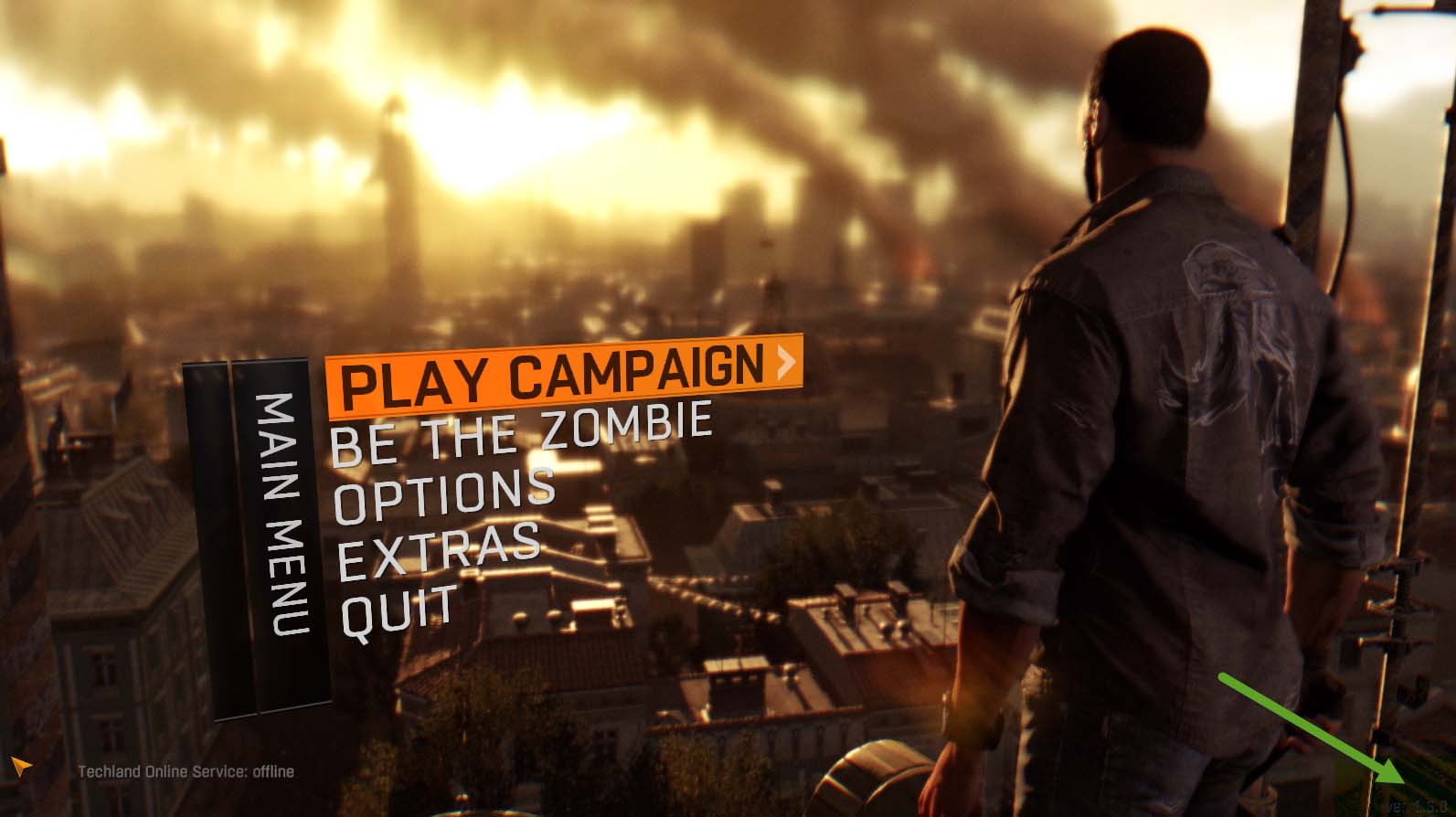
Dying Light Main Menu


#3 – Reduce the View Distance

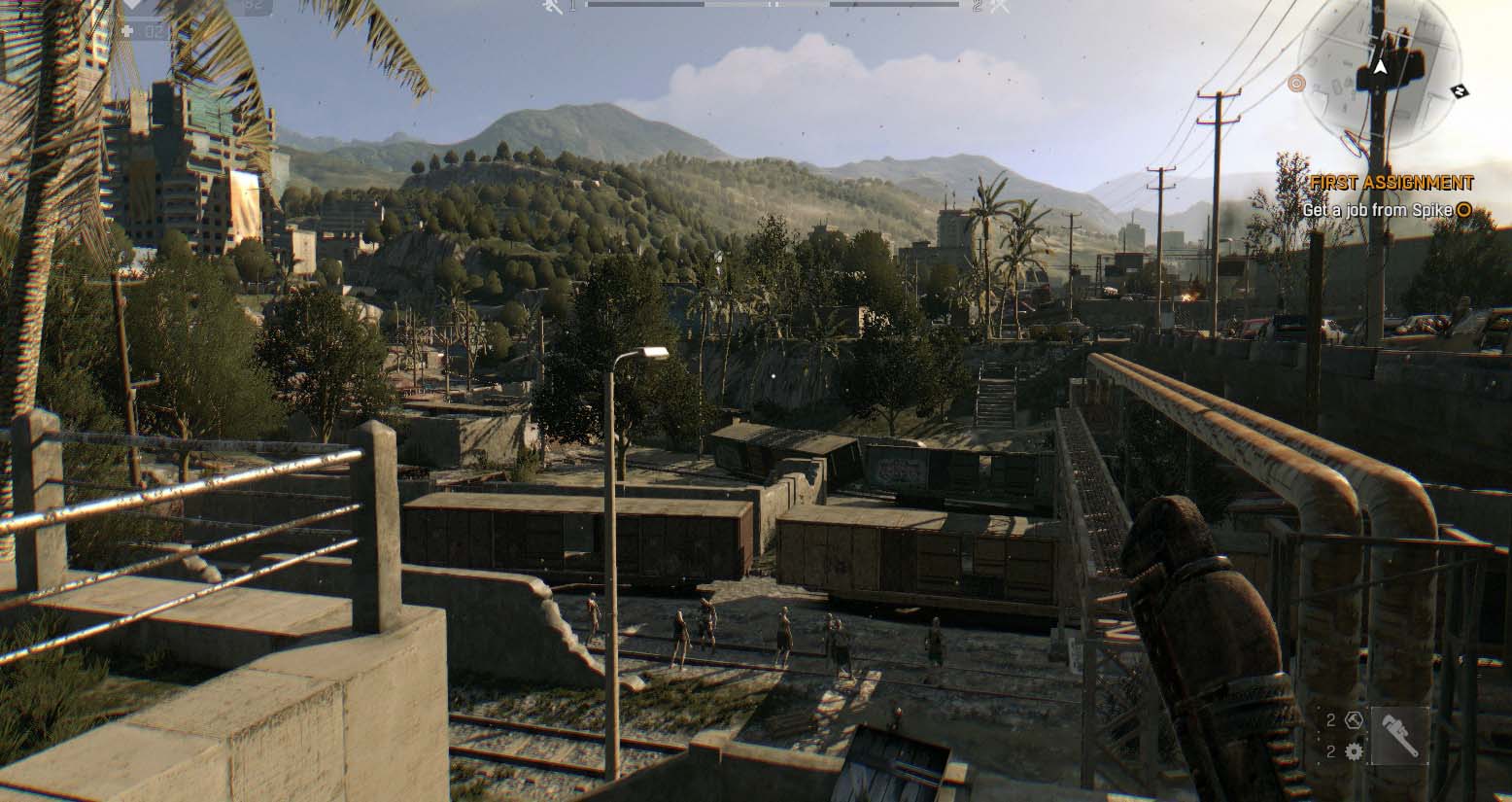
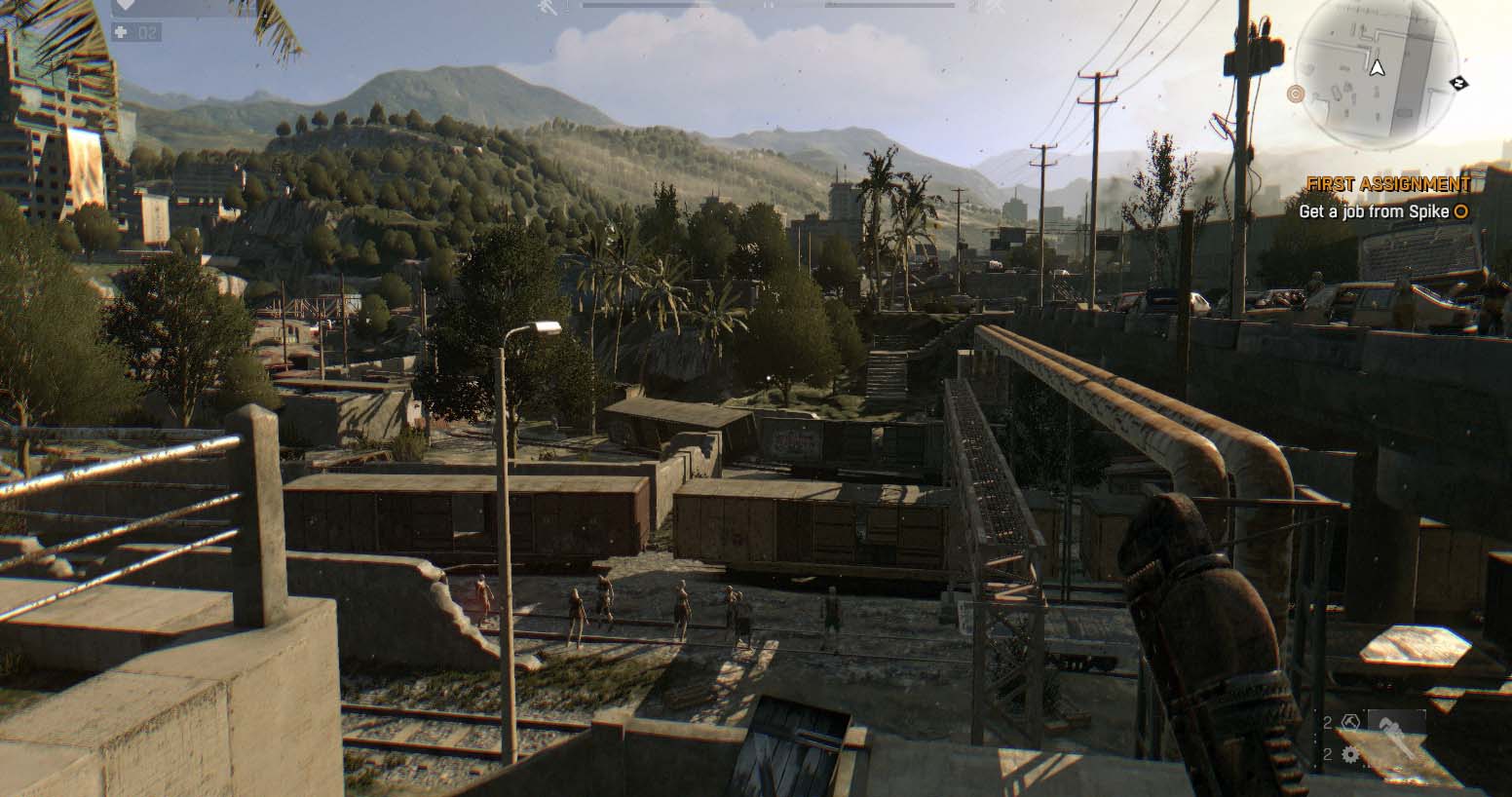
To almost double the performance of Dying Light, I’d recommend reducing the View Distance slider found in the graphics options (Options, Video) to medium or even low.

Sounds like the game is going to look bad? No, actually there was hardly any difference while the framerate on my gaming PC jumped from 35fps to almost 60 when playing with the lowest setting.

100% Viewing distance

Dying Light View Distance 100


5% Viewing Distance:

Dying Light View Distance 5

You can see that some minor details are missing in the background, particularly when looking at the trees and grass in the background, but it really doesn’t make a huge difference, given that you can double the framerate.

This has much more effect than turning off some of the beautiful visual effects like HBAO+/SSAO (which gives you a plus of 2-5fps at most if you turn if off).

Dying Light also supports “DoF” (Depth of Field) which blurs out parts of the image. You can easily see the effect in the main menu screen under tip 2 (blurry background).

The same goes for Foliage quality, which actually made a difference of just 3-4 fps on both of my machines – only turn this off (or set it to low) if you’re really struggling to hit an acceptable framerate. Because if you do, it’ll literally just remove some of the grass and bushes:

Foliage quality set to “High”

Dying Light Foliage

Foliage quality set to “Low” (never mind that zombie, he jumped over that fence and killed me five seconds later while I was taking screenshots for you – that’s dedication!).

Dying Light Foliage Low


If you’re noticing that your framerate goes down over longer periods of gaming time (e.g. 1-2+ hours), then you may want to lower the Texture Quality setting. Why? While it makes no visible difference up close, it defines how many objects are put into the VRAM of your graphics card.

If you lower it, less objects will be stored in your graphics card memory which could cause objects to stop popping in more frequently – but the overall game to run more smoothly.


#4 – Restore the Maximum Viewing Distance

With Dying Light patch 1.2.1, game makers TechLand decreased the maximum view distance by 35% overall: Eagle-eyed gamers with top-of-the-line gaming PCs (we’re talking GeForce 970 or 980s here), can manually override that setting.

However, you must first perfectly set up the graphics of your game as you will basically change a configuration file and make write-protect that file so that Dying Light won’t automatically revert to the lower view distance.

Here’s how:

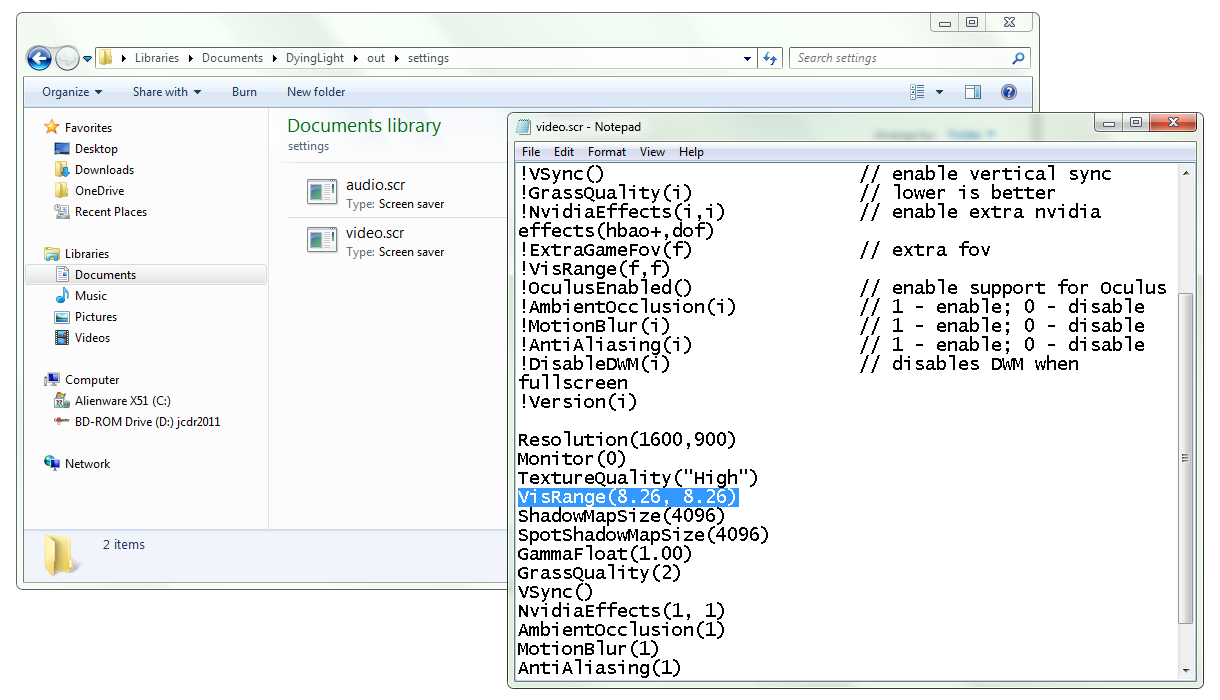
Make sure that Dying Light is optimally configured and then exit the game. Open up “C:UsersUSERNAMEDocumentsDyingLightoutsettingsvideo.scr” using Notepad or a tool like Notepad++ and look for the word “VisRange”.

Change the value to VisRange(8.26, 8.26) which will restore the 100% visibility. Save the file!

Dying Light Viewing

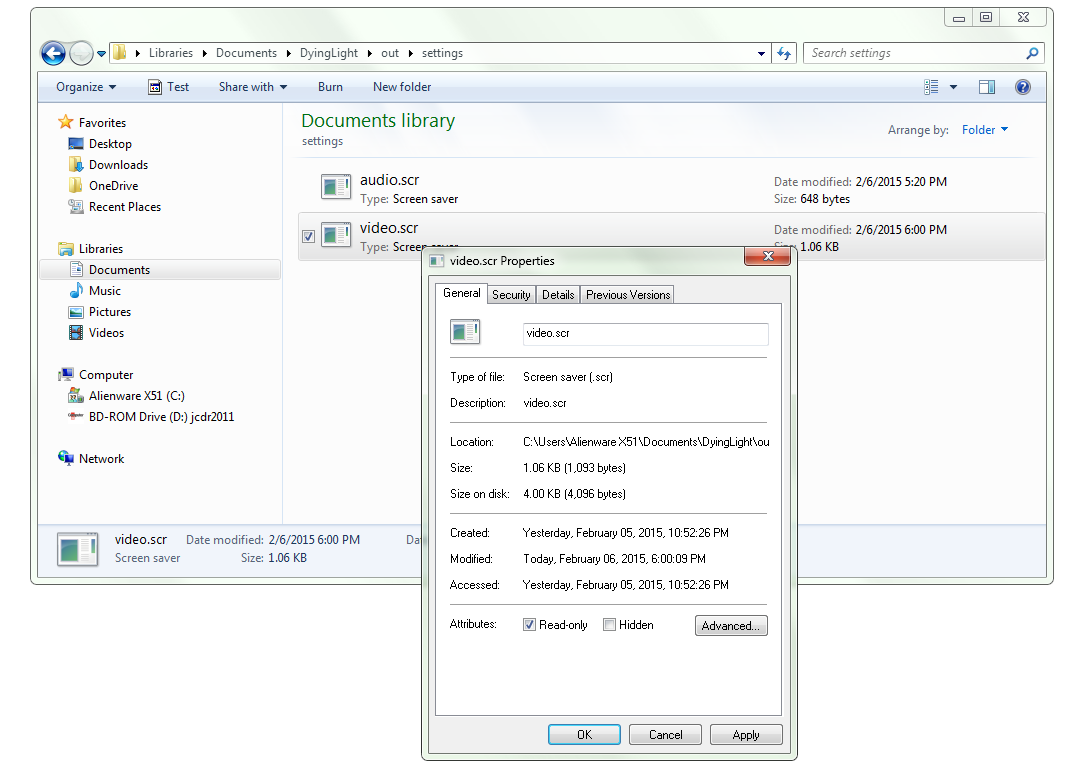
Next, right-click on the file and select Properties. Check the Ready Only box and hit OK.

Dying Light Video Properties


If you want to tweak your settings from here, you need to undo the write-protect and later apply the VisRange tweak again before write-protecting the file again. A bit of a hassle, but beauty comes at a price, right?


#5 – Get the Game Ready Driver

At end of January, nVidia released a new driver specifically optimized for Dying Light which all users GeForce cards should install asap. Version 347.25 offers much smoother gameplay and adds support for the GeForce GTX 960 and a new Anti-Aliasing technique called MFAA (Multi-Frame Sampled Anti-Aliasing). ATI/AMD users should also look out for the latest drivers to ensure best possible performance.


#6 – Fix The Multicore Problems Yourself (experimental)

Until patch 1.4 comes out and offers a fix for the fact that Dying Light only uses one CPU core in some cases, you can try out this little tweak which helps on some systems.

Open the game and then use CTRL+ALT+DEL to open Task-Manager. Right-click on DyingLightGame.exe, go to Set Affinity, uncheck all CPUs and then re-check CPU 0.  Hit OK. Open the affinity window again and re-check all processors. The game should now use all of the cores and balance the load equally instead of taxying only one core.


#7 – Get the Dying Light Manager

On the web you’ll find a dozen or so tweaks which will help you disable the filmgrain effect, change sunlighting or disable some of the blur and coloration around objects or people in the game.

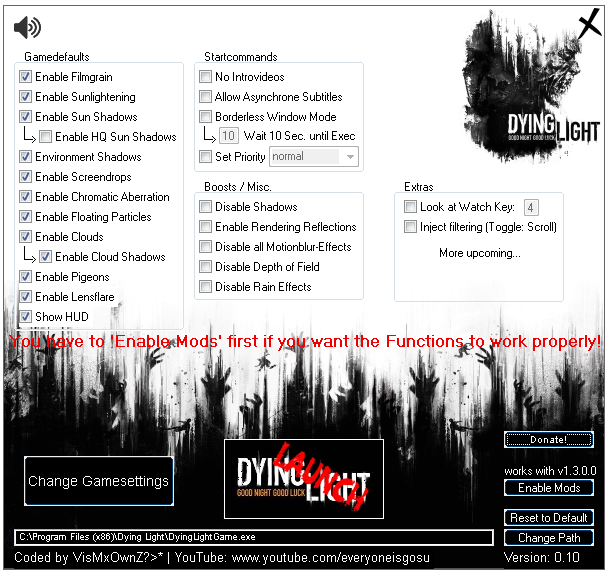
However, these require a lot of tinkering with the game files which is just annoying. Good thing there are modders out there like vismxownz who created the Dying Light Manager and Performance Booster (name is really the game here!).

Note, the MediaFire download may not work the first time – try the Try Again and Repair my download option in case that happens and it should work fine. It gives you a plethora of options to tweak some settings which will definitely help you boost performance of the game and which are not available in game:

Dying Light Manager

Extract the file and browse to the DyingLightGame.exe file on your PC, for example under C:Program Files (x86)Dying Light.

Some of the highlights include:

  • Filmgrain: While I personally think that the filmgrain effect adds a lot to the scenery and atmosphere of the game, I know a lot of people don’t like it. It also has a bit of a performance impact.
  • Sunlightering and Sunshadows: Whenever you look at the sun, you will see shadows and the coloration of the entire scene changes. This could be quite annoying in the middle of a hectic zombie fight, so some users may want to turn it off (and also gain a bit of performance!).
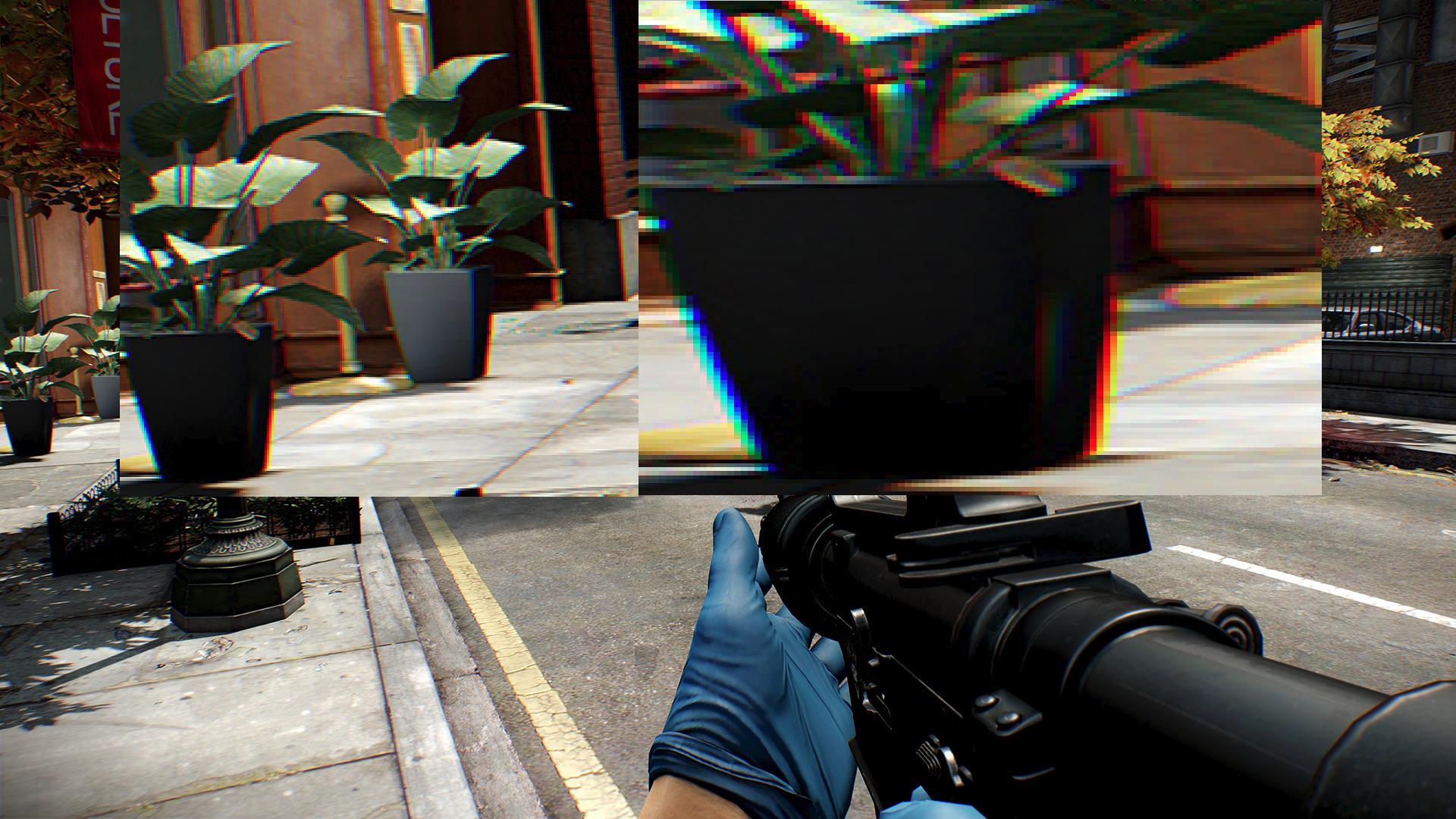
  • Chromatic Aberration: It essentially fakes a bad camera by adding a slight color bleeding effect to the edge of objects. Reddit user sadzora captured this quite accurately:

Dying Light Chromatic Abberation

It’s also quite a strain to performance. If you can live without it (and many users can), it should be turned off.


#8 – Enjoy!

I can’t wait to play this game, now optimized and running smoothly, this weekend. It will be pure joy! Were you able to run the game at its fullest? Do you have any other tweaks we missed? Let us know!

AVG AntiVirus PRO is first security app to enter Google Play Revenue Chart

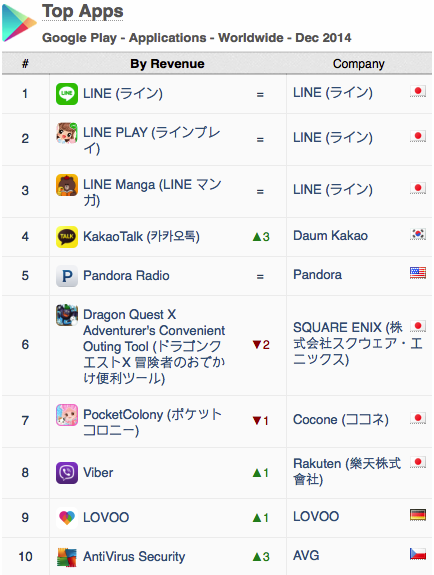
AVG’s position in the Top 10 chart is according to the App Annie Index for December 2014, produced by mobile app analytics company App Annie. The report, which analyzes trends and downloads for apps across all the major app stores, looks at both the popularity of apps and the revenue they drive.

In the report, App Annie details the incredible growth that they have tracked in security apps. And one year after climbing into the top ten apps for downloads, AVG AntiVirus PRO Android Security – referred to AntiVirus Security on Google Play – has become the first security app to enter the Top 10 Revenue Chart (excluding games) on the Google Play Store.

Top Revenue Apps on Google Play


Proven demand

Increased demand comes after a busy 2014 for cybersecurity events and suggests consumers are more security conscious as a result.

There is demand for security apps – the continued popularity of AVG AntiVirus Security FREE, which was the first security app to exceed 100m downloads on Google Play, shows this.  People, however, are not only protecting their devices with free security apps but are willing to invest in the solutions that they trust.

This is echoed in the recent MEF Global Consumer Trust Report where 64% of those studied use software or apps to guard passwords and protect against malware and only one in ten (11%) take no steps to protect their device.


Highly Rated

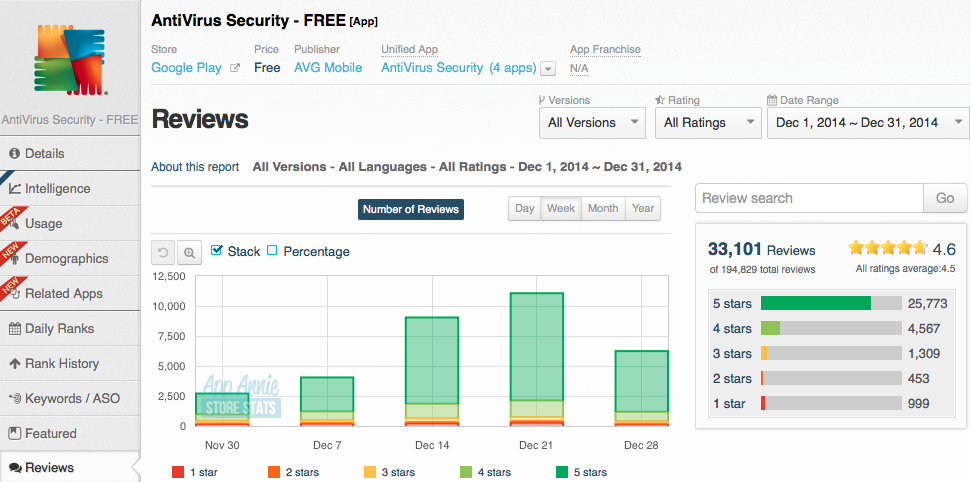
AppAnnie’s report also highlighted that AVG AntiVirus Security FREE is receiving overwhelmingly positive reviews from the public.

During December, AVG’s AntiVirus Security FREE received an average rating of 4.6 from over 33,000 reviews, with 77% of all users awarding us a maximum score of five stars.

AVG AntiVirus FREE Reviews


The future is bright

At AVG, we’re already looking ahead to a world where mobile devices are not just secured, but integrated across the Internet of Things. Through AVG Zen, we deliver a single dashboard from which a customer can manage the security, privacy and performance of all their devices and those of their family, all in one place.


Why iOS devices could be one tap away from disaster

Users who don’t pay attention to warning messages on their iPhones or iPads run the risk of becoming infected with malware that can steal their personal information such as text messages, contact lists, pictures and even their location.

If you’ve followed our advice in the past for keeping your iOS device secure, you’ll know that you should be doing the following:

  • Install updates – keep up to date, and that includes your apps too.
  • Keep a backup – use iCloud or Dropbox for photos and backup your device.
  • Never “jailbreak” – this is the method for breaking the factory security.
  • Activate anti-theft – such as “Find my iPhone/iPad” to locate a lost or stolen device.

BUT despite this, did you know you could still be just one tap away from disaster?

As reported in Macworld, security researchers uncovered spyware dubbed “XAgent” that is delivered via a phishing attack and can spread to other iOS users via contacts in your address book.

For more tips on staying safe from phishing, check out my blog “How To Protect Yourself from Phishing Attacks”

The good news is that you can do something about this, as all the users affected by this particular threat (and previous ones using the same technique) almost certainly “infected themselves” by ignoring vital warning message prompts.

Apple advise iOS users here to be mindful to only download and install apps from the Apple App Store and to be cautious of so-called “enterprise apps” that are only intended for employees of large businesses.

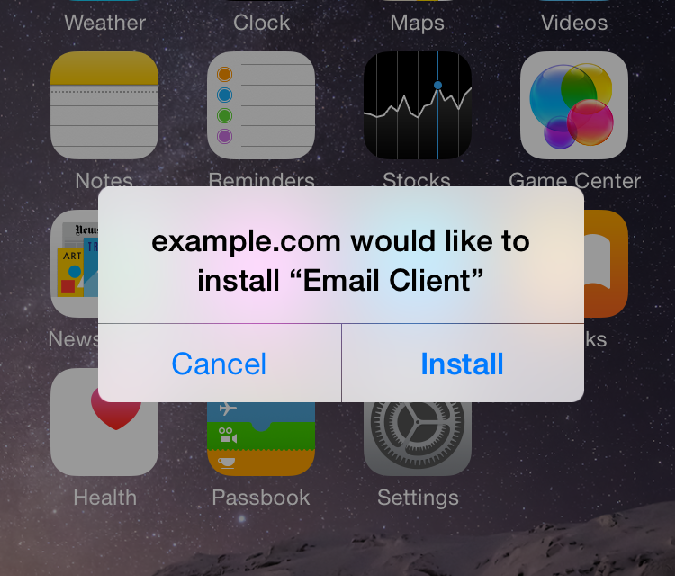
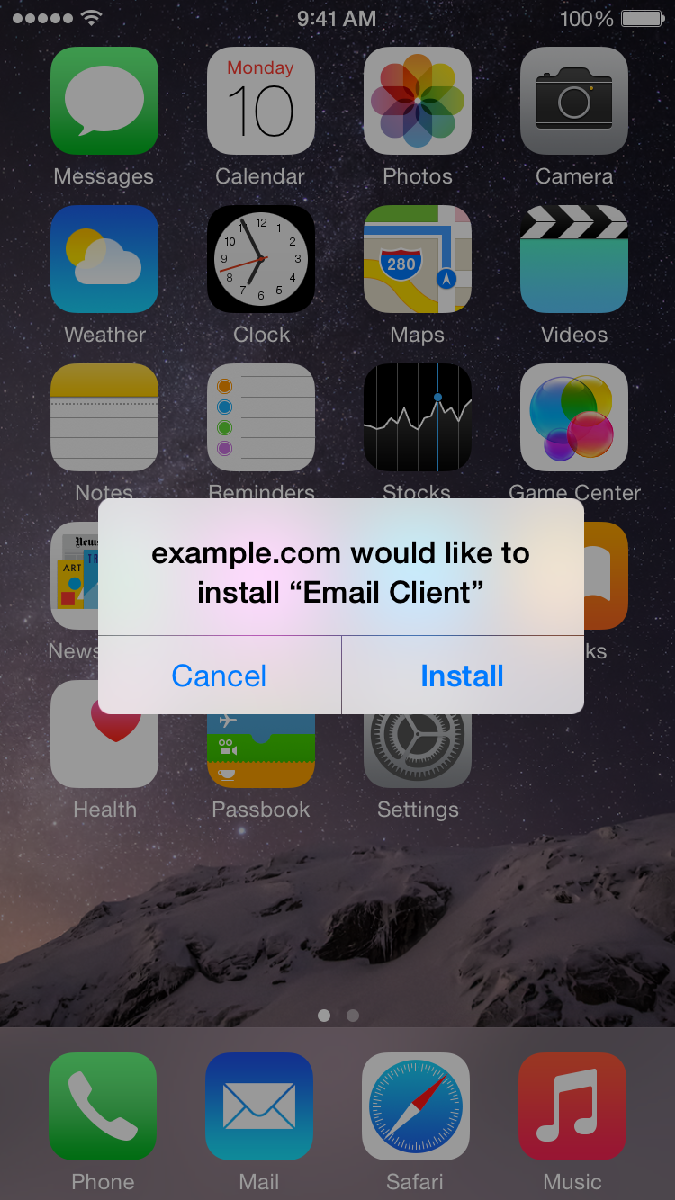
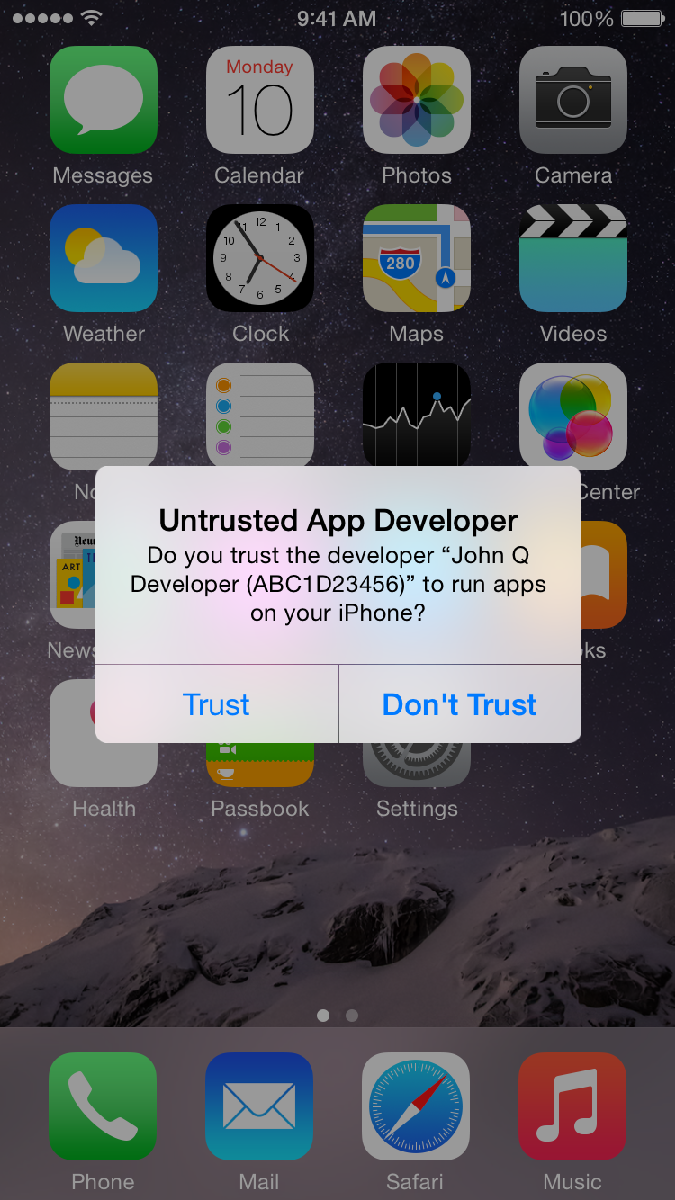
Therefore, if you don’t work for a company that is specifically requesting you to install an app and you see these following prompts – make sure you answer them correctly to protect yourself from inadvertently installing malware.

iOS Install Warning

To protect yourself in this example you click CANCEL


iOS Trust Warning


To protect yourself in this example you click DON’T TRUST

You might have also seen a similar Trust or Don’t Trust option available when connecting your iPhone or iPad to a friends computer – and again the safer option is always Don’t Trust.

Until next time, stay safe out there.

Title image courtesy of iMore

Who’s dating who online & how do you get in safely?

Like many services, dating has made the move from your desktop to your pocket thanks to mobile apps that help you find love just around the corner.

In fact, because of that move to pockets and purses worldwide, there’s been a massive popularity explosion in online dating.

The country with the most online daters by far is the USA, merely because of the sheer number of people using mobile phones and downloading dating apps, according to our own research. As the birthplace of the mobile app industry, this doesn’t really come as surprise.

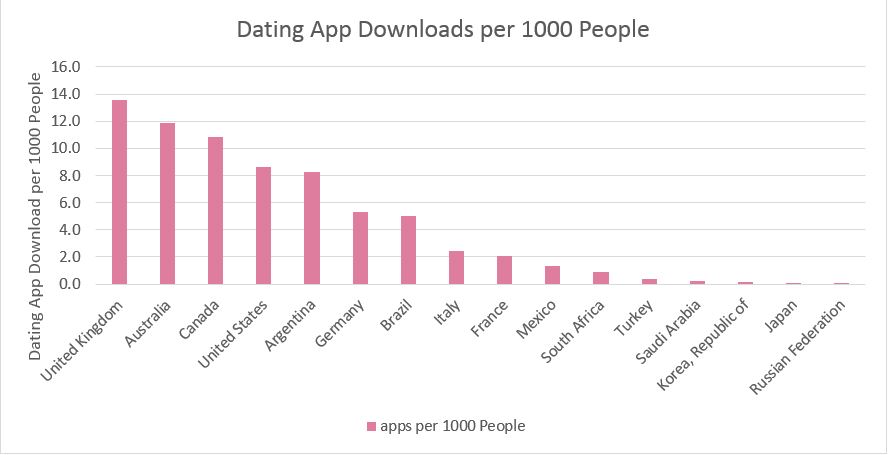
However, Americans are not the most likely to be dating online when viewed as a percentage.

When you break down how many people per 1000 are downloading dating apps, Americans are blown away by the United Kingdom, Australians and Canadians, and are only marginally ahead of the Argentinians. But even the Saudis are getting in on the online dating tango.

Dating App Downloads Per 1000 People


Choosing a site

If you’ve ever been tempted to try your hand at online dating, choosing the right service is one of the most important decisions you can make.

Whatever your age, interests or demographic there will be a site out there catering to your needs. I would advise sticking to well-known sites so that you can get support if you need it.

Interestingly, AVG’s research showed that app popularity differed greatly between countries. For example, Tinder is neck and neck with Plenty of Fish in the USA, but is dominant in Argentina.

If you do your research, you can pick the right service that will give you the best chance of success in your country.

Dating App Popularity By Country


Staying safe while online dating:

If you’re ready to jump into online dating, I would advise taking a few precautions to ensure you have a fun and safe time. Here are five simple tips to help you stay safe:

  • Use throwaway accounts: Some apps require an email or a Facebook account to log in. It may be best to create a new email or Facebook account, so that if things go sour, you can always limit your exposure and just close them down.
  • Use secure messaging in app: Don’t rush to move to off-app communications (emails, phone, etc). Take your time and communicate through the app, it’s there to help you stay private and get support when you need it.
  • Be wary of fake accounts: Fake dating profiles are known as Catfish scams. Don’t give out any personal details unless you are sure you’re talking to a real person. And remember that until you actually meet in person, you can never truly be sure—so try to get on a video call.
  • Be careful what you share: Most people know that the photos you share on social media sites become their property, but you may still be surprised to become the “hot date of the week” promoted on the app. Make sure you’re for anything you share to be seen publicly.
  • If you want to meet, tell someone where you’re going: It goes without saying that you shouldn’t rush out to meet someone you don’t know in the middle of the night. Make sure someone knows you’re out there and check in with them from time to time to let them know everything is ok.