Category Archives: AVG

AVG

AVG Technologies to Announce Financial Results

AMSTERDAM, January 29, 2015 – AVG Technologies N.V. (NYSE: AVG) today announced it will report its fourth quarter and fiscal year 2014 financial results for the period ended December 31, 2014 following the close of market on February 18, 2015.

On that day, management will hold a webcast and conference call at 5:00 p.m. ET/2:00 p.m. PT/ 11 PM CET to review and discuss the Company’s results.

  • What: AVG Technologies N.V. Fourth Quarter and Fiscal Year 2014 Financial Results Conference Call
  • When: Wednesday, February 18, 2015
  • Time:  5:00 p.m. ET/2:00 p.m. PT/ 11 PM CET


Live Call:  Participant Access: Dial in 5-10 minutes prior to the start time using the phone numbers and Conference ID below:

+1 646 254 3363 (USA)

+1 416 216 4141 (Canada)

+44 (0)20 3427 1909 (UK)

Conference ID: 5098060


Live/ replay webcast:  AVG Investors Page


About AVG Technologies (AVG)

AVG is the online security company providing leading software and services to secure devices, data and people.  AVG has over 188 million active users, as of September 30, 2014, using AVG’s products and services including Internet security, performance optimization, and personal privacy and identity protection.  By choosing AVG’s products, users become part of a trusted global community that engages directly with AVG to provide feedback and offer mutual support to other customers.

All trademarks are the property of their respective owners.

SXSW 2015: The Challenges Facing Women in Tech

Recent events have shown that the technology industry is starting to address the gender gap, but what can women do to get ahead in one of the most competitive business environments?

This year at SXSW 2015, Judith Bitterli will be giving expert advice to women looking to forge a career in technology.

Whether a building career roadmap, mentoring advice or hard lessons learned, Judith will share her experiences and answer questions.

Video

The Challenges Facing Women in Tech?


If you are planning to attend SXSW this year, we’d love for you to come by and share your views.

See Judith Bitterli at SXSW 2015

Why you should celebrate Data Protection Day 2015

So what is Data Protection Day? It’s a holiday proclaimed by the Council of Europe on January 28, 2007. The goal is to raise awareness and promote privacy and data protection best practices.

It is globally celebrated and in the U.S. often referred to as Data Privacy and Protection Day, but it’s still a holiday! So tell your boss, and take a day to yourself. In the words of Madonna, rather the spirit, perhaps we should “Celebrate.”

If we took a data day, took some time to celebrate,
Just one data out of life
It would be, it would be so nice

Everybody spread the word… We’re gonna have a celebration
All across the world, In every nation

It’s time for the good data practices… Forget about the bad, oh yeah…
We need a holiday…


On this anniversary of Data Protection Day, the promise is matched only by the tension. In the past year, we’ve seen unprecedented data hacks, continued instances of government surveillance, and an ongoing tide of commercial data collection and use practices that don’t always bode well for consumers.

Data Protection Day 2015


This is amplified by real concerns for people’s safety, life, and liberty. Criminal enterprises continue to engage in identity theft and financial fraud.  Terrorist attacks, like those recently in France, further fuel our fears and heighten the impulse to use more invasive state surveillance techniques.

Add to this the sea-change in the landscape created by mobile devices, which will look like nothing compared to the changes ushered in by the Internet of Things. We have more data, more collection points, more providers, more sensitive information, and growing commercial and state appetites to use the data that define our lives.

So why celebrate? Well, a set of forces seems to be converging that indicates a corresponding change in attitude to better protect consumers and change the pH of the ecosystem so it’s more habitable for businesses and users alike.

The FTC released a thoughtful report on IoT that gives us a framework to get ahead of the changes. President Obama recently proposed new cyber-security and data breach legislation that is promising, provided the voices of civil society advocates like CDT and the EFF remain engaged.

The EU continues to work on updating the data protection act to address both the technological and societal changes that have occurred since it was first drafted. More importantly though, the heat in this space has been turned up. There is more debate.  More industry leaders are devoting increasingly more mind share.  Notions of choice, transparency, control, and reasonable defaults – the very threads that weave the fabric of trust that we depend upon – are no longer dirty words.

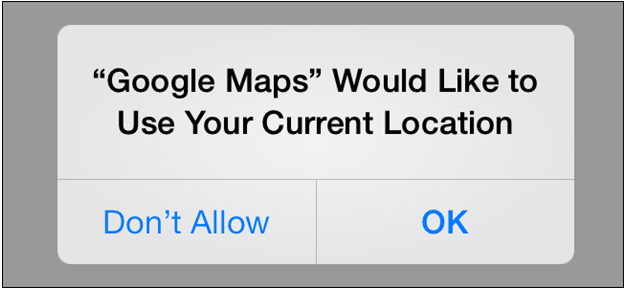
While these may seem like concepts beyond your desktop, there is a lot each of us can do to take back some of our privacy. Today, I actively managed my privacy settings in iOS. I disabled location services for all those apps where it didn’t make sense.  Why for example do the camera or ADP (payroll) apps need to use my location in the background when I’m not using them? Something doesn’t seem right.

Google Maps Sharing


Some apps, I was pleasantly surprised to find, like Google Maps and ESPN’s SportsCenter, do give me the option to turn location services on only “while using.” This makes sense to me and is an example of privacy forward design that gives users better and more refined choices.  The fact that the interface exists at all is an example of transparency that didn’t exist in earlier versions of iOS, and a good sign that things are changing.

All this is to say – the tide is shifting. In this transition, there is more opportunity than we can imagine. We don’t believe that users have to trade privacy and security to benefit from the wealth of data-enabled services available now and soon to come.

Today there is growing interest in shaping a future that is more people-centric than device-centric, and that properly reflects the human rights that we expect. I am optimistic that there is more future than there is past. That’s something to celebrate.

Will 2015 be the biggest yet for Cybersecurity?

President Obama’s recently announced comprehensive new cybersecurity proposal for the U.S., highlighted in his State of the Union address (you can see a full transcript of this address here), puts the issue of cybersecurity where it should be: front and center.

The high-profile cyber-attacks and hacks of the past year have drawn a mainstream spotlight to cybersecurity. As the President emphasized in his address: “No foreign nation, no hacker, should be able to shut down our networks, steal our trade secrets, or invade the privacy of American families, especially our kids.”

What are my thoughts? I think this is a real, actionable step in the right direction to increase the war on cyber-attacks and protect consumers and businesses.

The new Presidential cybersecurity proposal, officially announced  on December 19 at  the National Cybersecurity and Communications Integration Center, aims to move to quicker and more active security breach and threat reporting.

Image courtesy of The Guardian

According to the White House announcement, the proposal would create a more proactive environment for companies and organizations in the private sector to share security breaches with the government. The proposal, for example, would criminalize the sale of stolen financial data, and mandate that companies notify consumers about data breaches, as well as protect companies from liability.

As stated by the White House, “Specifically, the proposal encourages the private sector to share appropriate cyber threat information with the Department of Homeland Security’s National Cybersecurity and Communications Integration Center (NCCIC), which will then share it in as close to real-time as practicable with relevant federal agencies and with private sector-developed and operated Information.”

Information sharing provides a way to get a real-time response to these breaches. But it’s the old left-hand, right-hand problem.  Information sharing would speed up an organized response to a data breach or cyber-threat and allow a concerted response. But there remain legitimate concerns in many camps about the information shared.

This proposal seems to be well crafted in that it recognizes a general apprehension of handing over information to the government, a genuine concern (even an obsession) for many. The plan seeks to mollify privacy concerns by requiring participating companies to comply with a set of restrictions, such as removing “unnecessary personal information” and to protect personal information that has been shared.

A national standard in the United States for reporting breaches has been a long time coming. If you’re a company that has been hacked, your obligations are different in different states. If your information has been hacked, a company’s obligation to report it to you currently depends on the regulations of the state you reside in, which simply doesn’t make sense. If you’ve been hacked by someone from Russia, for example, does it matter whether you live in Connecticut or Texas? The problem is a global one, but a national plan is a great move.

The new cybersecurity proposal has critics and supporters lining up in debate.  And the prospect is real that this cybersecurity plan like previous proposals could become stalled in Congress.

“cybersecurity needs to be proactive in preventing and detecting cyber crime”.

We all need to focus on the idea that cybersecurity is not just reactive, but needs to be proactive – in preventing and detecting cyber crime. The President’s proposal is a step along that path.

I’m looking forward to a next step and results of the newly announced Summit on Cybersecurity and Consumer Protection at Stanford on February 13, 2015 which will convene a wide variety of groups for industry, private and public – to help shape public and private sector efforts to protect consumers and companies from growing network threats.

The good news is that momentum for cybersecurity is building. If we can get business, government, and the security industry in this country working from the same digital page, the benefits could be tremendous.

It’s a critical and very exciting time to be in digital security.

The dangers of relying on our smart devices

As consumers, we continually hear about the ‘Internet of things’ and the positive changes that will come from our always connected world.

I recently read an article in the San Jose Mercury news that talks about the devices we are all expected to acquire that will make many of our life decisions for us, whether an automated butler, health gadget, thermostat or a driverless car.

It made me contemplate the amount of connectivity we already have in our lives and how it is set to increase. How much is enough? Can we have too many smart devices?

Let’s consider a potential scenario from the not too distant future:

Awoken at the optimal moment in your sleep pattern by your wearable tracker,  you are recommended a light breakfast that includes juice with added vitamin D due to your lower than normal levels.

While having breakfast, the news is reported to you by a service that selects what it thinks you will want to know.

The weather app recommends dressing cooler today as sunshine is forecast. Your driverless sends an alert that, based on traffic conditions, the optimal time to get on the freeway would be in 10 minutes time. It then alerts the household heating system to shut down as you are going to be leaving.

The first two hours of your day are led by suggestions made by gadgets and where the information you are offered has been pre-selected.

Facebook like


Some mornings this guidance might seem the perfect way to start the day. To me though, it seems like we are at risk of surrendering control to the devices of the future.

Our connected gadgets and services are being controlled or fed information that, of course, is open to manipulation by people and companies out to exploit our willingness to be led rather than to explore.

“We need to temper our reliance on technology and connected services, even though they can help make life easier”.

We need to keep our reliance on technology in check and connected services, even though they can help make life easier.

Imagine a life without open choice, where all options available have been preselected for you. It is starting to sound like the Truman Show.

Take an everyday task such as selecting a movie for the family to watch. On a busy workday, a recommendation made by a streaming company might be useful, but if I did not sit and browse for myself every now and again, I would miss things that I might also like.

Exploring the options for myself allows me to find things that would not have been on my list of recommendations and might just surprise me.

I love my gadgets and I don’t want to come across as negative. However, there’s a lot to be said for exploring.

I would encourage everyone to find some time in their busy schedule to go gadget free and try something new. You never know what you might discover.

What can you do to mark Safer Internet Day?

Safer Internet Day is fast approaching on February 10. and now is a great time to think about what we can all do to help make the Internet a safer place for everyone, especially children or those just coming online.

I am pleased to announce that AVG is a registered supporter of Safer Internet Day and that this year we will be working with the Anti Bullying Alliance in the UK to create valuable resources for young people and parents.

Safer Internet Day


The Internet is an incredible tool and every one of us uses it in our own way. It is important to think about small steps that you can take to make the Internet a safer place for yourself, your friends and family.

These days, being safe online doesn’t just mean on your computer. Mobile browsing and gaming is more popular than ever and with micropayments available at the click of a button, staying safe on your mobile is a must.

Here are some great tips on how to stay safe on your Android device.

Video

Mobile Safety Tips


Get Involved

Whether you run a business or just use Facebook, Safer Internet Day is about working together to create a more secure, harmonious web for us all to enjoy.

The Safer Internet Day website has several resources that can help you get started if you are thinking of getting involved.

Here are a few ways I plan to mark Safer Internet Day 2015:

  • Social sharing spring clean: A quick double check to make sure I’m only sharing with people that I want to.
  • Two Factor Authentication: Enabling this on my email and banking will help make sure my online accounts are as safe as they can be.
  • Set a passcode on my tablet: Protecting your online world starts with the devices and setting a passcode will help keep my devices and data safe.


At very least, I would recommend taking the Safer Internet quiz, which has loads of great tips on staying safe online.

How to secure your online email accounts

If you use an online email account such as Gmail or Hotmail, there are some simple steps that you can take to ensure that you account is secure and your data is kept private.

AVG’s Michael McKinnon has some security tips to help keep you safe:


Video

How to Secure your Online Email


Here are Michael’s Tips:

1. Make sure you are using a long, strong and unique password that isn’t used anywhere else.

2. Enable two-step verification.

3. Look at your account history and sent items folder to see if anyone, other than you, has accessed your account recently

4. Backup and delete any old email that you no longer need, especially email that might contain sensitive data like old passwords or financial information.


For more online security tips, visit the AVG Academy on YouTube


Until next time, stay safe out there.

The future of smart glasses still looks bright

At the 2015 Consumer Electronics Show earlier in January, wearable digital technology was the darling of the show.

While most of the buzz was around smart watches, Google Glass remained a status symbol worn by some geeks attending the show.  The yet-young “smart glasses” scene even boasted new entrants by major players like Sony and Epson.

So, it was surprising to some, when Google announced last week that as of Monday January 19th 2015, it was halting sales of its glasses and going back to the drawing board. Perhaps not so surprising to anyone outside the bubble of CES.

The consumer product media had ridiculed the glasses and its adopters for everything from how the device looks, to potential privacy infringements.

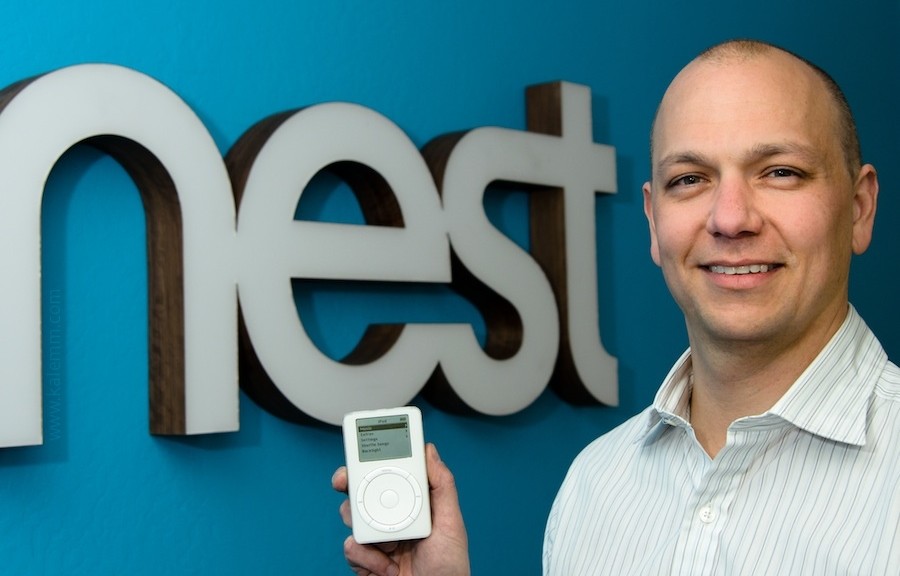
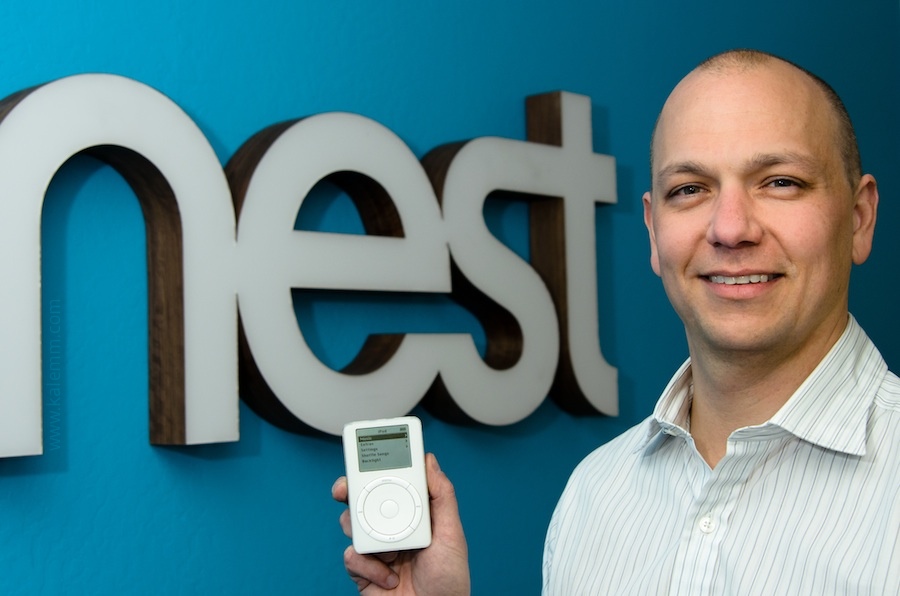
Google announced that Tony Fadell, the father of the iPod while at Apple and the CEO of smart-home device maker Nest Labs, which Google acquired last year, would undertake the Glass re-boot.

Tony Faddell

Image courtesy of mojandroid


Under Fadell’s expert hand, the product’s redesign should help Google Glass, though concerns about the smart glasses concept remain. I recently wrote about wearable devices and adoption, and privacy issues, particularly in the workplace. The focus of that piece was a potential ban on smart glasses and what companies need to do to prepare for the Wear Your Own Device (WYOD) trend. For now, it looks like the negatives outweighed the benefits, on the consumer side at least.

However, I believe that the smart glasses concept has great potential in other areas – one of which, is healthcare.  Boston’s Beth Israel Deaconess Medical Center is a prime example of how smart glasses can assist medical staff. It has developed a system that allows an ER doctor to look up information on patients by using Google Glass to scan a Quick response (QR) code on the wall of each room. It’s a great project and you can read a doctor’s blog about it here.

More recently, smart glasses for healthcare applications got another boost in the form of Augmedix, a startup with the aim of providing medical professionals with a Glass-powered records management solution.

Augmedix

Image courtesy of Augmedix


Enabled by Google Glass, Augmedix expedites the time physicians spend daily entering or retrieving data from electronic health records, allowing them to focus on patient care. According to the company, first launched in 2012, the service has a nationwide patient acceptance rating of more than 99 percent. The company’s CEO reports to Forbes that the Glass reboot is not cause for concern, as Google will continue to supply Glass to enterprise customers.

According to Forbes, Augmedix was one of ten companies Google lists as certified Glass at Work partners, focused on Glass-based enterprise services. More than half of them list healthcare as a major focus.

Of course, privacy issues will be consummately important for smart glasses in healthcare scenarios – as patient privacy is rigorously protected by the Health Insurance Portability and Accountability Act (HIPAA) and vigilance is of critical importance to all of us.

It’s not just about healthcare though, I think the smart glasses category has a lot to offer many fields that need quick and hands-free information, including things like rescue operations and engineering on a drilling platform.

So, where are digital glasses going? Suffice it to say, for now, it looks like away from the consumer market and into business ones.

Image courtesy of knowyourmobile

How To Boost Your Home Wi-Fi Signal (Part 1)

Do you regularly lose connectivity to your Wi-Fi network at home? Are network speeds so low that it takes forever to even copy a simple picture or music file across your PCs – let alone stream video? In this two-part series, we are covering the most important lessons and tips for boosting wireless (WLAN) throughput across your home network. Ready? Let’s dive in!

Figure out the best possible router position

Have you wondered why your wireless signal is strong in some rooms and incredibly weak in others? It’s not only a matter of distance between your wireless router and your PCs or laptops. It’s also a matter of what objects (walls, doors, furniture, electrical equipment/outlets) interfere with a good signal.

In many scenarios, you will be able to boost wifi strength significantly by just repositioning either your router or the connected PCs slightly.
Now, the “Trial and error” method works eventually, but is a waste of time. To get the best possible location you need to create a visualization of network coverage across your home. Heatmapper, a free software for Windows, will do just that:
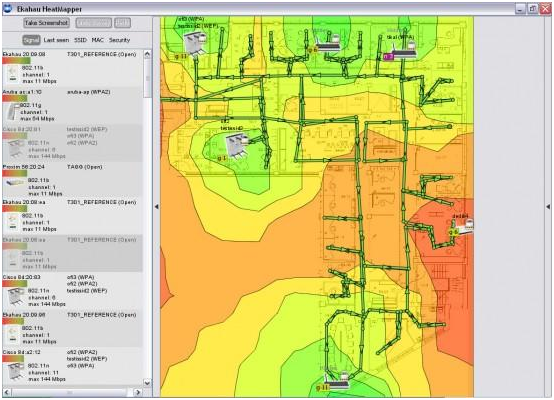
Click here to download Heatmapper (100 MByte). Note: A registration is required to download this free tool.

After installation, the program asks you if you’ve got a map of your map of your floor – no worries, if you don’t, you can create this heatmap based on a grid. Simply walk around your apartment or house with a laptop in your hand running Heatmapper. As you walk (slowly!), use the left-click button frequently as you walk. Walk through all the areas of your home left-clicking as much as you can.

When you’re done, right click and HeatMapper will create a map of your home, showing you where the Wi-Fi signal is stronger or weaker. Here’s how my map at home looks like:
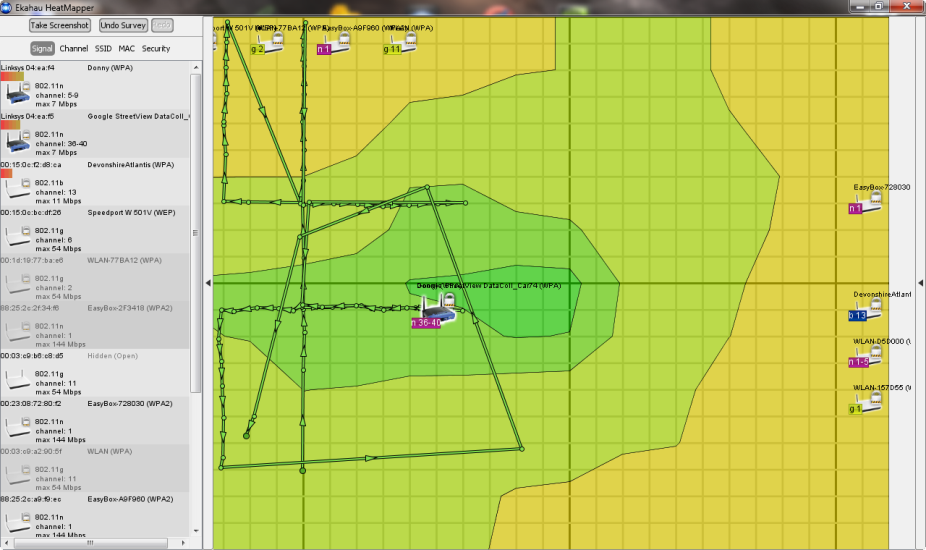
The green area in the middle is also the center of my apartment – a good location for the router! However, in the bedroom (upper part of the screen) I only get „ok“ wireless strength because the router is blocked by three walls.

By looking at the heatmap, I quickly knew where to position the router in order to get a better Wi-Fi signal!
General advice: Make sure not to position the router directly on the floor or next to thick walls. Ideally, the best position is in the center (probably the corridor) of your apartment with no or minimal objects blocking the signal!

Use the latest drivers and firmware

It’s rare to find firmware for a router or driver for a network adapter that works perfectly right out of the gate. Most „V1“ drivers and firmwares of network equipment I have used were bad and came with all sorts of problems: slow connections, drop outs, missing features and other quirks. The first thing I always do when I get a new network device is: look for updates!
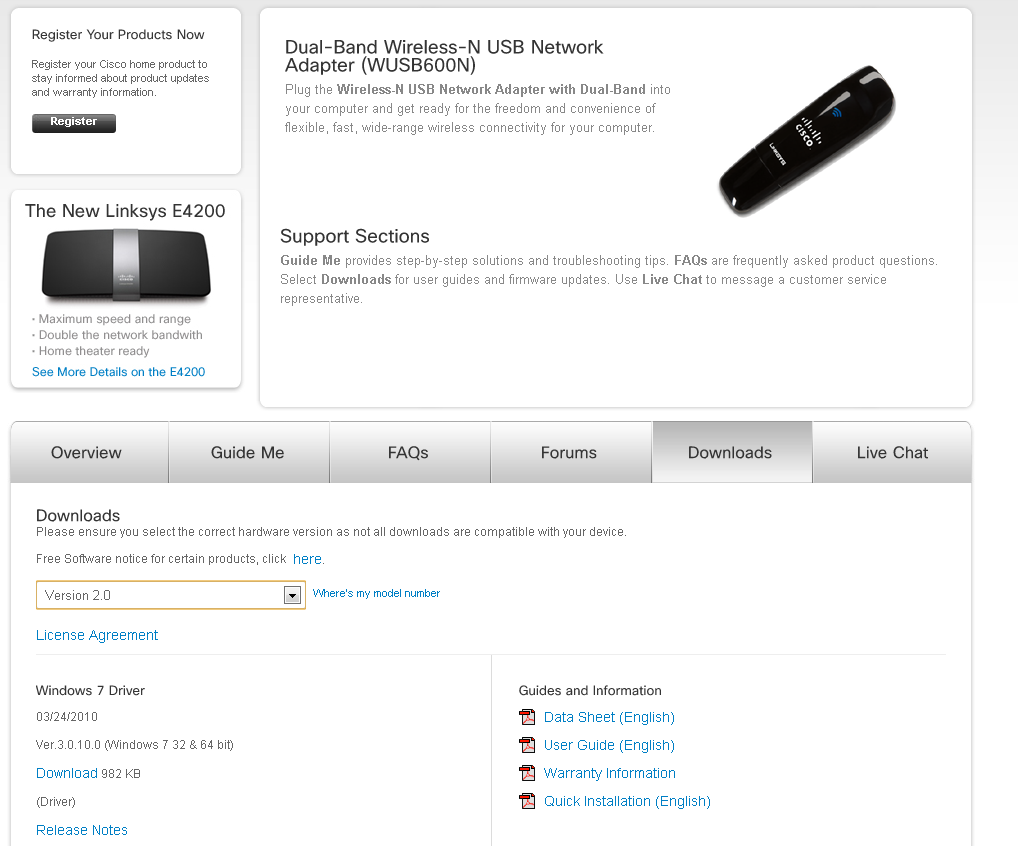
For example, when I bought my Linksys WUSB600N adapter it didn’t work (at all!) under the 64-bit-version of Windows 7. I actually bought the device and couldn’t use it for a couple of weeks until the manufacturer delivered an updated driver that worked under the x64 architecture.

Upgrading the firmware of your router has become somewhat easy over the past couple of years: Simply open up the firmware configuration page in your browser (see below) and find the „Firmware Upgrade“ page.
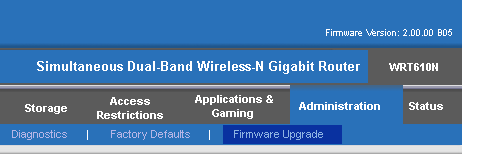
Here you will find direct links to drivers for some popular router manufacturers:

These links will you to the most recent Wi-Fi drivers available. Your wireless adaptor is not on the list? You haven’t found anything using popular search engines? Hit the comment section and provide us with the detailed specs of the Wi-Fi adaptor as shown in your device-manager.


Upgrade your Wi-Fi hardware

If you’re using the 802.11g (or even b/a) wireless standard, more bandwidth-related tasks such as video streaming, launching remote applications or file copy operations will be painfully slow. All three network standards provide a relatively low maximum bandwidth:

Theoretical speed

802.11 (1997) 2 MBps
802.11a (1999) 54 MBps (short range, high cost – mostly in business use)
802.11b (1999) 11 MBps (slower, but higher range than a)
802.11g (2002) 54 MBps (long signal range)
802.11n (2006) 300 MBps (through multiple channels and frequencies)
802.11ac (2012) 1 GBps (through multiple channels and frequencies)

As you can see, 802.11ac is the way to go these day– over the next couple of months, it’ll replaced the older 802.11a/b/g networks, and offers much improved speed, coverage and reliability. In general, 802.11n is at least twice as fast than its predessor “n” while promising theoretical speeds of up to 1000 Mbp/s.

If you’re suffering from a low network bandwidth, be sure to pick a router and Wi-Fi adapters that supports at least the 802.11n specification. If you bought a PC or laptop within the last couple of years, it’ll (very likely) have a 802.11ac wireless adapter. To go check, simply fire up Device-Manager…
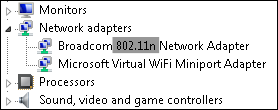
…or take a look at your hardware specification sheet, for example:
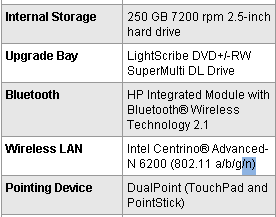
If your adapter does not support 802.11n or ac but your router does, it’ll obviously use the lower N, G, B or even A modes. So make sure that all parts of your wireless chain are “n” compatible!

When shopping for a new network adapter or a router that supports 802.11ac, you should take the following three tips into consideration.

Pick a dedicated USB adapter:

Even if your laptop or desktop has a built-in 802.11ac adapter that is connected to a full-fledged 802.11n router, you might want to look into getting a dedicated (external) USB wireless adapter. Sounds ridiculous, but in my experience many external Wi-Fi adapters perform much better than built-in devices.

When I first got my Linksys WRT610N router, I got quite mixed results and only an average of 100-170 Mbps when the theoretical limit of this beast is around 300 Mbps. So I drank the cool-aid and ordered the adapter that, according to the manufacturer Linksys, “works best with” my router – the WUSB600N USB wireless adapter! And what a difference that made: Signal strength did not change, but the speed went up significantly. Here’s a screenshot of my laptop that’s using both the built-in Wi-fi chip as well as the external USB adapter to connect to the router:
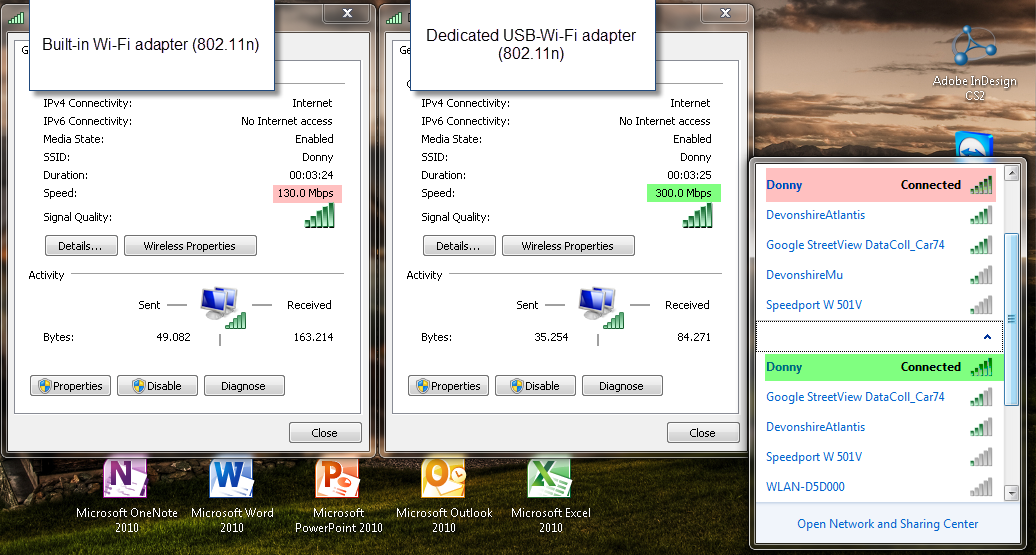

The maximum speed meter went up from 130 Mbps to 300 Mbps. Of course, that is the peak value, but only with this little addition was I able to stream full-definition 1080p video across my apartment with no stuttering or delay whatsoever.

Stay in the family: Besides using external dedicated Wi-Fi devices, I’d also recommend to pick a router and the adapter from the same company. Now, that doesn’t mean that a Linksys router wouldn’t work with a Broadcom or D-Link network adapter, but it’s also my experience that you get the best-possible performance if you „stay in the family“. Now I know that this is what the manufacturer wants but in this case I’d go with it.

Use an external antenna for your router. You can significantly boost your Wi-Fi connection by replacing the antenna or add another external antenna. This guide as well as this one help you figure things out.


Change the Wi-Fi channel

All modern routers are capable of communicating to your PC or laptop on several different channels. However, if your neighbours Wi-Fi equipment is communicating on the same channel, your network speeds and reliability might suffer. Windows offers a built-in solution that lets you see on what channels all your surrounding Wi-Fi networks conmunicate. This is how it works:

Step 1 – Launch the command line. To do that, click on the Start orb, go to „All ProgramsAccessories“ and click on „Command Prompt“.

Step 2 – Type in the following command: netsh wlan show all.
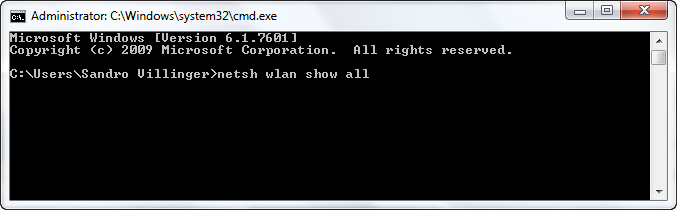

Step 3 – You’ll see a large list of all wireless networks in your area.
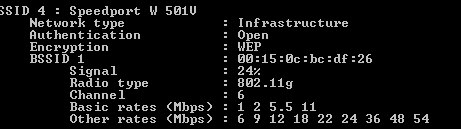
Scroll through the list and watch out for the entry that says „Channel“. Out of those 7 networks, 4 are using channel 6 to send data, two use channel 5 and one is using channel 13.

This is why I should probably choose either a lower channel or a channel between 6 and 13.
Try changing the channel on the routers configuration page.

To open the page, you’ll usually enter it’s IP adress into your browser (check the manual to see which address you need to type in), for example http://192.168.1.1, and enter the user name and password you specified at setup – or the default credentials if you never specified it (which is potentially dangerous)!

Find your wireless channel settings. On my router, that’s under the “Wireless” tab right in the “Basic Wireless Settings” category:
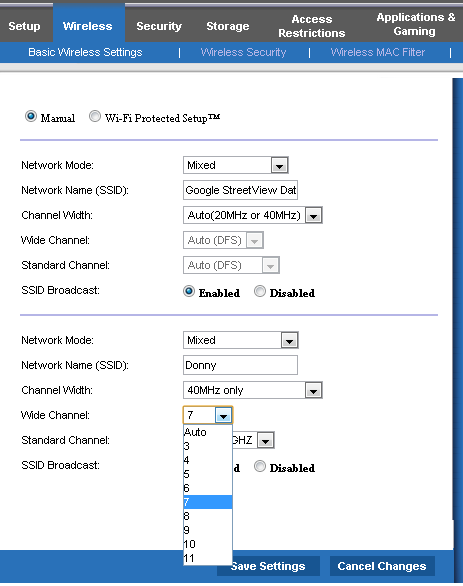
Pick the channel that is not (or barely) used in your area. In my example, I choose channel 10. Reconnect all your devices and see if you’ve got better speed or if you’re reliability issues are fixed!
That was part 1 – look out for part 2 that’ll show you even more in-depth tricks to improve your wireless network speed!

Terror on the streets leads to terror in cyberspace

Earlier this January, the Charlie Hebdo attacks in Paris shocked millions across the globe. News channels brought us almost 24 hour coverage of events and are still analyzing the effects, some weeks later.

However, there’s more to the aftermath than first meets the eye. France has received a massive spike in detected cyber-attacks, reporting over 19,000 attacks since events unfolded in the capital.

This cyber-terrorism represents an often ‘hidden’ side to politically motivated conflict and are neither new nor unique.

For many years, we have witnessed a close correlation between tensions in the middle-east and the number of cyber-attacks detected in conflict zones.

Political conflicts between Turkey, Syria, Lebanon, Israel, Egypt and Palestine regularly trigger waves of cyber-attacks such as website defacements and Denial of Service attacks (DDoS).


Here are just a few examples of this cyber-terrorism:

Just as street-level conflict can be a way to express opinion and get your voice heard; for others, cyber-attacks are the most powerful protest tool available.

“these attacks are usually unsophisticated and are not motivated by theft of data or money”.

In my experience, these attacks are usually unsophisticated and are not motivated by theft of data or money. Instead, they are brought about simply by an individual or group’s need to voice their opinions.

So as Europe experiences a wave of terror attacks, what can it learn from the middle-east and its longstanding tensions?

For one, there is a very real correlation between civil conflicts and attacks in cyberspace, although thankfully not visa-versa.

Second, consumers and businesses should make sure they protect themselves in cyberspace once terror or political conflicts hit the streets.

Visit our AVG Academy on YouTube for helpful tips on protecting yourself online.