Category Archives: AVG

AVG

Get your small business noticed this Saturday

Black Friday and Cyber Monday still get the bulk of holiday shopping attention, but let’s not forget Small Business Saturday – which celebrates and encourages shopping at small businesses that are so vital to our economy.

Since Small Business Saturday’s founding by American Express in 2010, the event to promote small businesses has spread globally and has seen its awareness grow. According to a joint Amex and National Federation of Independent Business (NFIB) survey conducted in December, 2013, awareness by U.S. consumers of the Small Business Saturday jumped to 71%. The survey also found 46% of consumers planned to shop Small Business Saturday and reported spending $5.7 billion with Indy merchants, up from $5.5 billion the previous year.

Video

Small Business Saturday

It’s delightful to go the AMEX site and see the literally thousands of participating small businesses. Businesses can participate in this event by becoming a part of the American Express Shop Small movement.

For their part, customers can register to get up to $30 back when they Shop Small by spending $10 or more at participating businesses.

One of the main ways a small business owners can enhance their business prospects is to invite customers to participate and shop at their business. We all know promotion can be a daunting task for owners who don’t know where to start. Small Business Saturday provides a great, easy entrée – creating free marketing materials, including digital banners, signage, events and more, making them available. More than 346,000 free online tools and materials were accessed by small business owners last year according to the NFIB/Amex survey.

Amex also has lined up major partners like Facebook, Verizon and AARP to help promote awareness, participation and shopping.

Here are few social/tech tips for small businesses for Small Business Saturday this holiday season and beyond:

  • Use and look for the hashtags! Last year organizers reported more than 300,000 Tweets went out in support of #SmallBizSat , #ShopSmall, #DineSmall. That’s a lot of opportunity for you to be seen.
  • Leverage the official social sites like the Facebook Small Business Saturday But also take advantage of the trend and ask your best customers to add a Facebook page for your business or to Yelp you.
  • Be visual. Beautifully displayed merchandise, features of satisfied real customers modeling your wares (with the owner’s permission, of course!) posted on Instagram and Pinterest can be great for enticing new customers. As they say, a photo is worth, what, a billion words now?
  • Embrace the power of video. Share your business’ unique story and why your products and specials are special this holiday…
  • Finally, with all the worrisome security breaches in the news, give yourself a gift as a small business owner, and do an IT Security Health Check to make sure you are prepared for the holidays – and everyday – to keep your business information and your customers safe.


I know I will #ShopSmall local businesses this Saturday and throughout the holiday – and be looking on #DiningSmall. It’s so great to see a friendly face that knows exactly what you want!

Black Friday Sale: 33% off PRO apps for Android

The Black Friday and Cyber Monday weekend can be a great time to take advantage of big discounts on electrical items including smartphones.

If you’re planning on treating yourself or a loved one to a new smartphone this holiday weekend, or even if you just want to look after your existing device, AVG has some great discounts to help you keep your Android smartphone running securely and smoothly.


33% off AVG AntiVirus PRO

AVG AntiVirus PRO for Android is a complete security solution for your smartphone that combines powerful protection tools with useful features that can even help recover your device should it get lost or stolen.

With AVG AntiVirus PRO Android Security you can:

  • Scan apps, files, emails and messages for malware
  • Locate, lock and wipe your lost or stolen phone
  • Kill tasks that can slow down your phone
  • App Lock – password protect app access
  • A Camera Trap – that emails you a photo of anyone who enters an incorrect pass code three timese

Video

AVG AntiVirus PRO

Download AVG AntiVirus PRO now


33% off AVG Cleaner PRO

AVG Cleaner is a FREE app that helps you get more from your Android device. By cleaning out junk files and cache files, AVG Cleaner gives you more space for the files that matter. This holiday weekend get 33% off AVG Cleaner PRO features.

AVG Cleaner FREE allows you to:

  • Remove junk and cache files
  • Automate cleaning for no-hassle performance

AVG Cleaner PRO has these extra features:

  • No advertising
  • Set up custom battery profiles to make your phone run just how you want it to

Video

AVG Cleaner PRO

Ten Online Shopping Tips For Cyber Monday

Cyber Monday, the start of the digital holiday shopalooza, has occupied its role for nearly 10 years – starting in 2005. Though it still trails brick-and-mortar shopping on Black Friday in popularity, Cyber Monday shoppers spend more! According to an AOL study in 2013, Cyber Monday shoppers spent an average of $468 versus $309 spent on Black Friday.

Another data point of interest: Cyber Monday is an increasingly popular shopping experience for Boomers.  Nielsen research found the percent of customers aged 50-64 who visited online retail sites increased 20.5% and for age 65+ it was up 40% from 2011 to 2012.

In 2014 millions of consumers, and not just online shoppers, were affected by a series of major data breaches, along with malware, phishing, and identity theft. It’s enough to dampen the holiday shopping spirit. But there are ways to stay safe, shop online, and get the great deals offered on Cyber Monday.

Here are 10 tips to keep you safe when shopping online:

  • Be aware. There are unbelievable deals on Cyber Monday and the weeks before Christmas. But if it sounds too good to be true then it probably is. Beware of suspicious online ads and even emails or social media messages that seem to come from friends promising free products or unheard of discounts.
  • Be secure. Make sure you’re logged into a secure Wi-Fi.  Shopping online in a public place could compromise your financial accounts and personal privacy. Anyone can download software that picks your credit card numbers off the airwaves.  Wait until your home or on a secure network to do your shopping!
  • Look for the https:// – The “s” stands for secure. Also look for a lock or similar icon to indicate you are on a safe site.

  • Avoid malicious websites by shopping at well-known and trusted sites where you’ve shopped before. Keep in mind it’s possible for even legitimate sites to have been hijacked and to serve up malicious code to your computer. So make sure your online security software includes link-scanning technology. Such as our own AVG AntiVirus FREE
  • Do your research. If a site is unknown to you, check it out with the Better Business Bureau to see if it is accredited by the group. The National Retail Federation’s CyberMonday.com also has a list of legitimate retailers offering Cyber Monday discounts.
  • Always make sure that you have a unique username and password for each online account. And of course, make your password complicated! Use a mix of symbols and upper and lower case letters. Watch this video for more details:

Video

Never Use The Same Password Twice


  • Keep your software up to date! As with any guide to online security, make sure that you’re operating system, browser and antivirus software are up to date.
  • If you’re curious about an order, contact the retailer directly via their site or phone number. Many phishing scams come in the form of emails from Amazon, UPS, FedEx, or other large retailers. Don’t click on the link in the email, even if it looks legitimate.
  • Use one dedicated email and credit card account. Preferably a card with a low limit. This makes it easy to detach and get your money back should your account or the retailer be compromised. Don’t use ATM or debit cards as you could temporarily lose access to cash in the event of theft.
  • Take action immediately if you suspect identity theft! Contact your credit card company, your bank, all three credit-reporting agencies and the police.


Cyber Monday is a great way to get a jump on the holidays and avoid the crazy crowds of Black Friday. Just stay safe and enjoy!

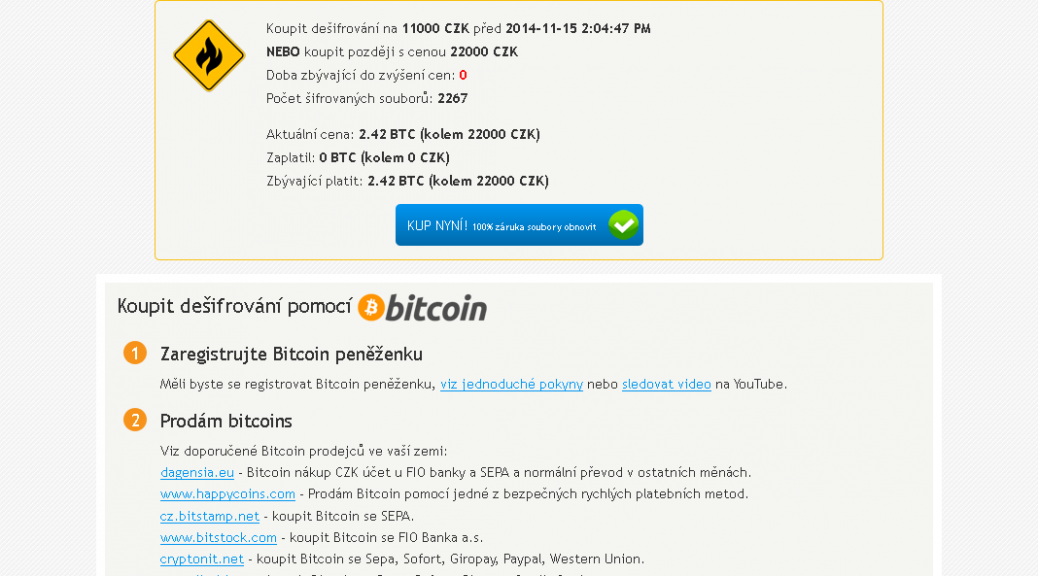
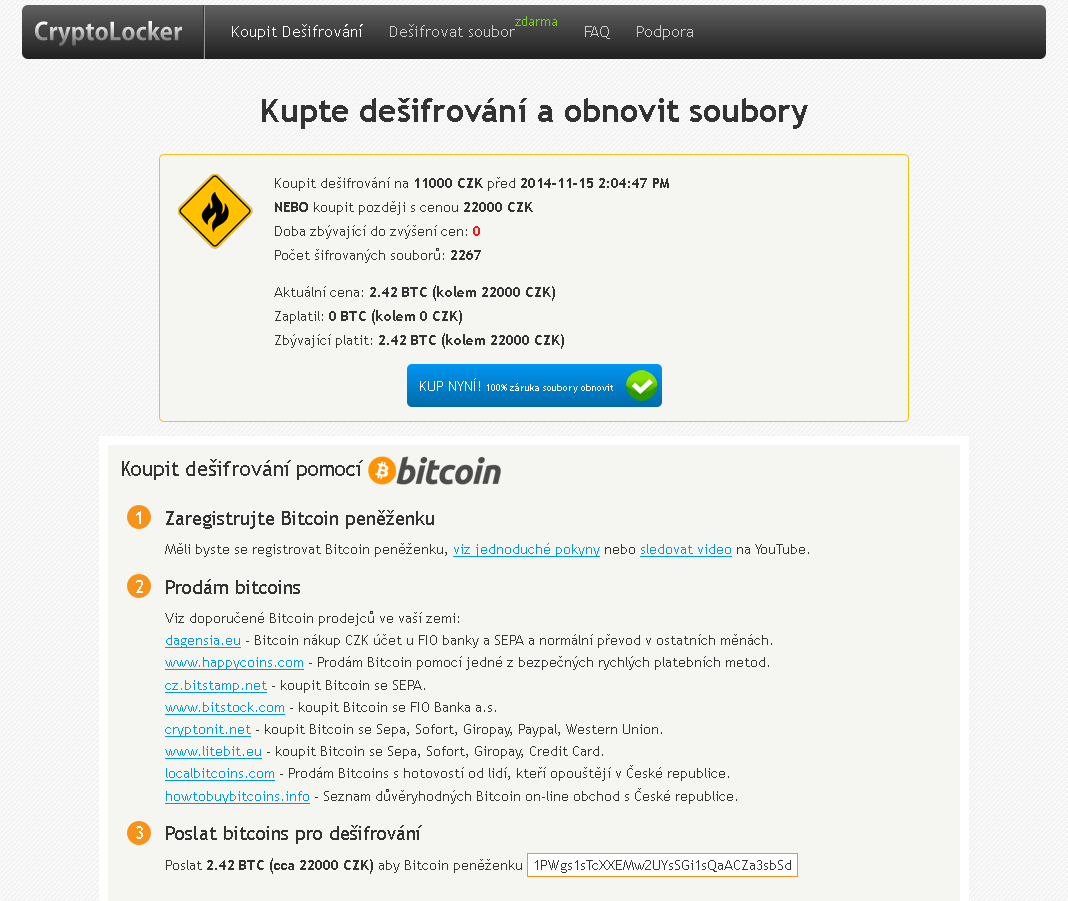
New CryptoLocker variant emerges in Czech Republic

What is ransomware?

As we witnessed with CryptoLocker earlier this year, ransomware is a type of malware which encrypts certain files on your system and then extorts a ransom to unlock them.

Which files are affected?

Most ransomware does not target important system files but instead looks for user files to encrypt. These can be everything from JPG images to office documents and emails, anything personal that could be a value to the user.

What is new about this variant?

Previous ransomware variants had weak or flawed encryption, which meant that files often could be recovered. This new variant contains a much stronger algorithm and encrypted files are almost impossible to recover without the encryption key, which is only held by the attacker. Interestingly the ransom can be paid in cryptocurrency as well as Czech Koruna.

Is there any way to recover my files without paying the ransom?

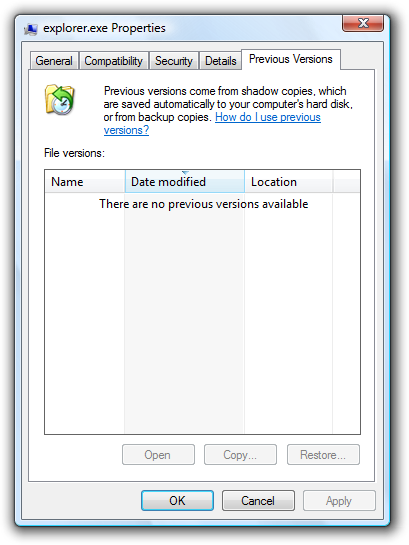
Historically, it has been possible to restore files using Shadow Copy, a tool that allows users to backup parts of their system even while they are in use. Sadly most new ransomware variants are resistant to recovery with Shadow Copy. Always seek advice before taking any drastic action to recover data encrypted by ransomware.

How can you stay protected?

  • Always backup -remember that malware has ability to encrypt files on all disks connected to your computer (including external USB disks, etc.) so be careful of leaving your backup connected to your machine or plugging in a backup to an infected device.
  • Think before you click – If you are unsure whether a link or file is untrustworthy, it is always safer to ignore it and delete it. Never download a file or follow a link from an untrustworthy source.
  • Get protection – As new variants emerge, they are continuously added to the database of definitions maintained by security companies like AVG. Up-to-date virus definitions are your front line protection against malware.
  • Get some Identity Protection tools – Security software like AVG has specially designed tools to protect your personal data from fraudsters and malware.


Story from Tomas Prochazka

Preparing for the Social Internet of Things

Factor in the booming Internet of Things and researchers estimate there will be 50 billion connected devices in the market by 2020! These are big numbers with big implications for the tech industry and our customers.

When you break it down, it means every day millions of new users will get their first smartphone or tablet, or change to a new device, or add other connected digital device such as wearables, activity monitors, health apps, and even their cars…and be coming online with all the data that goes with them. These aren’t just faceless people, but our nephews, nieces, children and grandchildren.

Now, think about when you first came online. For many of us, we had the benefit of growing up with the Internet and were able to make mistakes and learn from them as we went along. The next two billion users won’t have that luxury. They are coming online in the age of the Social Internet of Things and will experience a much larger interconnected world. They will surely find great delight, but every mistake made could be broadcast to billions of people, along with increasing pitfalls and exponentially greater consequences.

Just think about the rise in teen and celebrity sexting scandals and over-disclosure, cyber-bulling, and the mounting security breaches at major banks and retailers putting millions of credit card users at risk.

The bottom line is that businesses have to earn the right to engage with the next two billion web users and that is achieved by earning their trust.

Global research we did with MEF Global Forum earlier this year also reinforces this point. We found that:

  • 40% of mobile media users cited trust as a barrier to purchasing goods and services online via their mobile
  • 65% said they were unhappy sharing personal information with apps.

At AVG with three million Facebook followers and 25,000-50,000 conversations happening daily – we also hear this echoed from our customers. Now magnify the concern consumers will have in a world where every smart connected device is sending our data to the Internet!

I explored the topic of “Building Trust for the Social Internet of Things,” at the MEF Global Forum event In San Francisco last week during a session and panel called, “Know thy Customer, Mastering the Consumer Experience.”  Our mission was to explore shifting consumer experiences and what it means to those of us in the industry and businesses.  I wanted to bring the perspective of what users want and need, and what it means from a mobile security, privacy and trust point of view.

We in the industry need to start planning now for the next two billion users. People need to know that they don’t have to give up their privacy every time they go online.   How do we make that experience all that it promises to be and develop their trust in our brands? How do we equip them for the Social Internet of Things?

Brands must adapt to address the concerns of a new and more connected audience and be willing to help build a future where it is as easy to be safe online as it is to connect a device to the net. People need to change as well. They need to prepare themselves for new technologies and an interconnected age of Digital Citizenship.

At AVG we envision a world of “smart users.” That’s why we recently started a Smart User Initiative as part of the Clinton Global Initiative.  Our goal is to increase the ratio of smart users to smartphones by teaching the next two billion Digital Citizens skills in how to engage in the digital world safely and securely in a way that protects them and others. And we’re putting out a call for partners– other brands, businesses, organizations, carriers, manufactures, and content producers – to join us on this mission.

You can read more about AVG’s Smart User Initiative in a blog by our CLO Harvey Anderson. His Op-Ed on this topic also appeared on Re/code recently.

Let’s strive to make the experience for the next two billion people coming online in the age of Social Internet of Things, more personal, trusted and the best it can possibly be…

Technology is still a distraction for drivers

A newly released study by AT&T reinforces the unfortunate and dangerous trend of driving and texting that shows no sign of stopping. The survey, released last Wednesday, found two-thirds of respondents said they have read text messages while stopped at a red light or stop sign, but more importantly a quarter have sent texts while driving. One in four of those who texted while driving also believe they “can easily do several things at once, even while driving”…

Now for the rest of the story…The AT&T study points to a fascinating and disturbing feature of human behavior:  98% of survey respondents said that sending a text or email wasn’t safe, but 49% of commuters self-reported doing it anyway.

This result comes in spite of all the public-service campaigns and laws against texting and driving. And it certainly reinforces the ability of humans to say one thing and do another – though that isn’t exactly news.

What is news is a newer tech-related peril on the road: Voice-activated software. Originally viewed as an answer to achieving hands-free driving, voice-activated software is now a growing cause of driver distraction and threat to driver safety, according to a recent study by AAA .

Voice-activated software has been touted as a benefit, because drivers can keep their hands on the wheel and their eyes on the road while changing radio stations or composing texts messages… Unfortunately, AAA found that drivers could still be distracted while driving. The reason? Interacting with the software still affects the cognitive part of your brain.  Many of the simple tasks previously noted increase a driver’s cognitive workload. And, depending on the situation, that can be dangerous.

Vehicle voice-activated “infotainment” systems that are more complicated or just take longer to navigate created the highest levels of driver distraction and safety risks, according to the October AAA study.

Many of us who use hands-free phone technologies have already come to understand that having a conversation, especially an important or emotional one, while driving can be only a little less distracting than juggling a phone. It’s for the same reason: Cognitive distraction.  Many studies back this up, including a groundbreaking one from the National Safety Council.

The bottom line: any activity that is not directly related to driving, whether it is using electronics or simply eating, represents a potential distraction and safety risk, according to previous research by AAA, the National Safety Council, the National Transportation Safety Board and other safety groups.

As with the ongoing campaign against text messaging or voice interactive driver safety, what’s needed is a multi-pronged approach just as Mothers Against Drunk Drivers (MADD) has done so successfully. Prevention strategies that may show the most promise are legislative and corporate policies, mixed with high-visibility enforcement and strict consequences.  Yet technology solutions also can go even further by preventing calls and messages from being sent or received by drivers in moving vehicles.

Location Labs

At AVG, we’re proud to have a new solution in our portfolio of products that addresses the texting issue—Location Labs’ Drive Safe app, available as Sprint Drive First and Safely Go. (AVG acquired Location Labs in September.) Drive Safe detects motion and automatically locks a phone moving more than 10 MPH. All ringtones, buzzes and push notifications are silenced, and only designated “VIP” contacts, like parents, can get through, while everyone else gets an automatic “I’m driving, I’ll reply later” reply.

It’s clear as connected cars become the norm, demands for driver security are only going to increase – both in terms of driving safety and data security. It also presents opportunities for technology to help solve these new challenges.

Add driverless cars into the mix, and there is an exciting and brave new world ahead for technology and cars and, hopefully, greater driver safety.

What’s New in AVG PC TuneUp?

In our last blog post, we’ve shown you our new killer feature for cleaner for AVG PC TuneUp, which is part of our all-new AVG Performance 2015 package. But that’s not all. AVG PC TuneUp also got an all-new Disk Cleaner which removes even more clutter from your Windows PC, laptop, and ultrabook:

Improved AVG Disk Cleaner

Our new “AVG Disk Cleaner” includes significant new and improved cleaning definitions to help remove the wasteful files of 39 additional programs.

This year we’re cleaning out unneeded files from:

  • Origin & Steam
    Wasteful log files & telemetry data hidden within the two gaming platforms.
  • Windows®
    We’re now cleaning even more temporary files, caches, log files, and leftover 8.1 Apps cookies from all built-in Windows 8 apps.
  • Skypeâ„¢
    Cache files, temp files and backup installation files from Skype.
  • All Cyberlink® products
    Leftover log files, temp files, trace files and also backup installer files from more than 25 Cyberlink products, such as Cyberlink® PowerDVD.
  • Apple® software
    Unfinished and broken downloads, such as videos or music, from iTunes (on Windows) and many locations in which Apple products, such as QuickTime or the iCloud client store backup installation files and updates, which are no longer necessary once they were installed.
  • nVidia, ATI and Intel
    Leftover data that gets created by installing and running Intel, AMD and nVidia software drivers, such as cache files for nVidia Shadowplay.
  • Windows UAC
    In order to protect Windows and users data from harm, the User Account Control (UAC) redirects files from programs which require administration rights, such as older Windows XP programs. AVG Disk Cleaner remove wasteful files that were created by these older applications.
  • Windows Upgrade Files
    All leftover files from when a user has upgraded to a newer version, such as Windows 7 to Windows 8.1 right within the new category:

  • Screenshots
    This new Disk Cleaner category shows screenshots that an application or the user has takenwithin applications such as BS Player or VLC
  • Flash and Java
    In addition to cleaning Flash and Java cookies, AVG Disk Cleaner now cleans temp files leftover temporary data, too.


In addition to that, we now clean up leftover data and improved existing cleaning algorithms from the following applications: Multiple Ashampoo programs, Avira, Amsn, Ad-aware, Auslogic programs, Audials tunebite, AIMP, Avast software, BS player, CleanMyPC, Comodo programs (CertSentry, PaintShop, VideoStudio), Cyberlink programs (PowerCinema, YouCam, Downloader), CleanMyPC Registry Cleaner, Drivermax, Google Talk, IMVU, Java, Jukebox, Jdownloader, Microsoft Office, Nero Programs, Norton antivirus, Picasa, Roxio, Starmoney, Skype, Spybot search and destroy, Ultraedit, WPFFont, Yahoo! Messenger, ACDSee, Adobe Photoshop, Adobe Lightroom, Corel AfterShot Pro, Corel PaintShop Pro, GIMP, Google Nik Collection, Paint.NET, PhotoPad, Photomatix, Snagit, Zoner Photo Studio


Step by Step: Here’s How You Clean Up

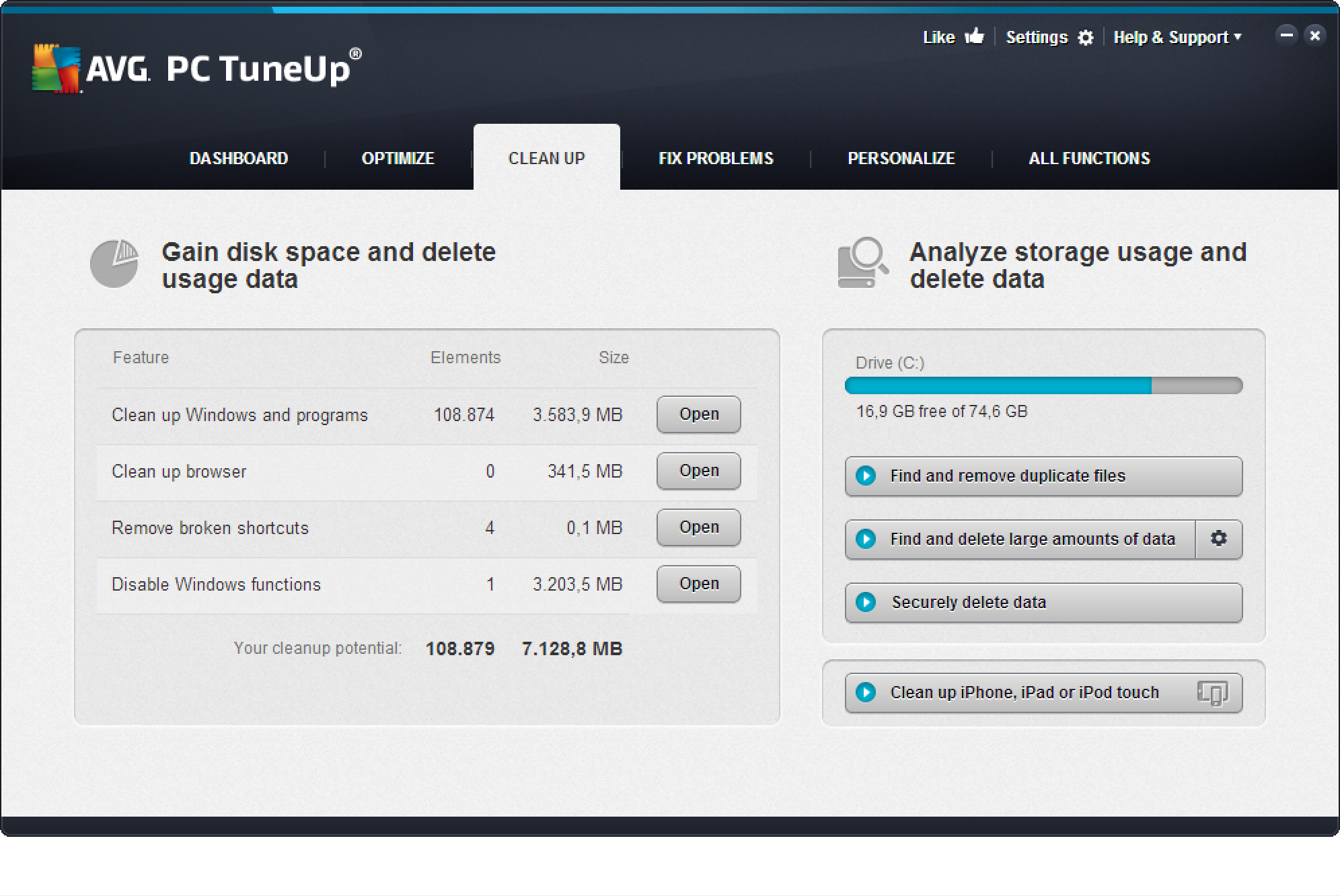
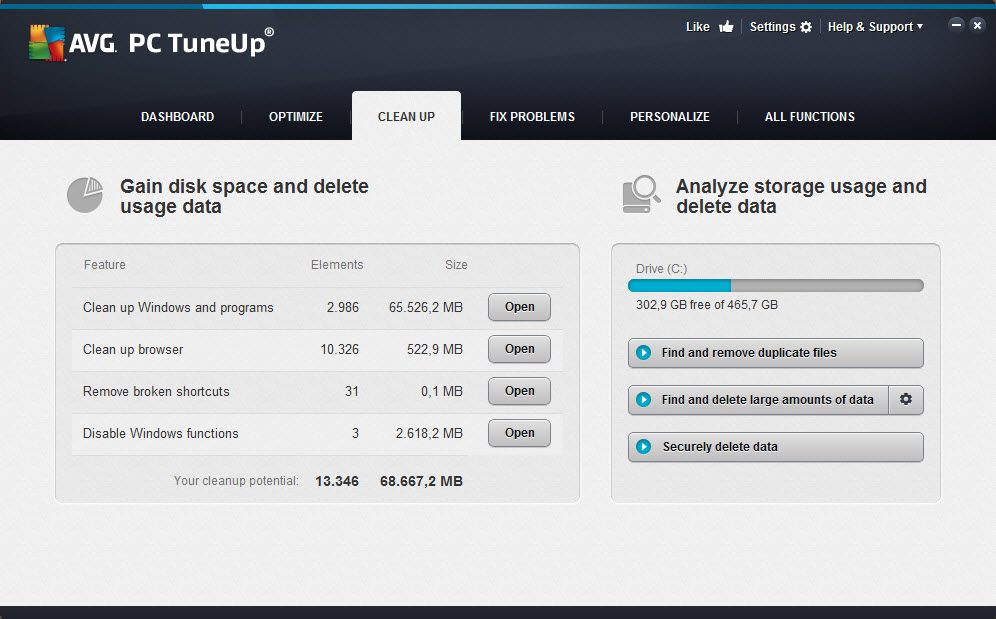
  1. Download and install AVG PC TuneUp trial version here. Finished? Then move on to the “Cleaning” category. AVG PC TuneUp now scans your entire hard disk for invisible data crud:

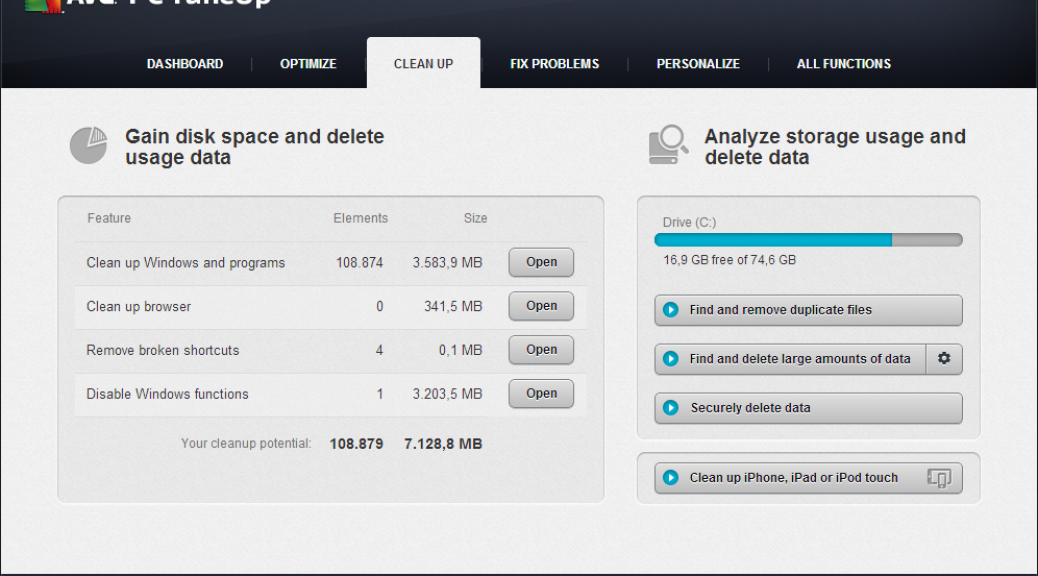
Example: On this 6 year old desktop PC, we found 68 GByte of worthless data!


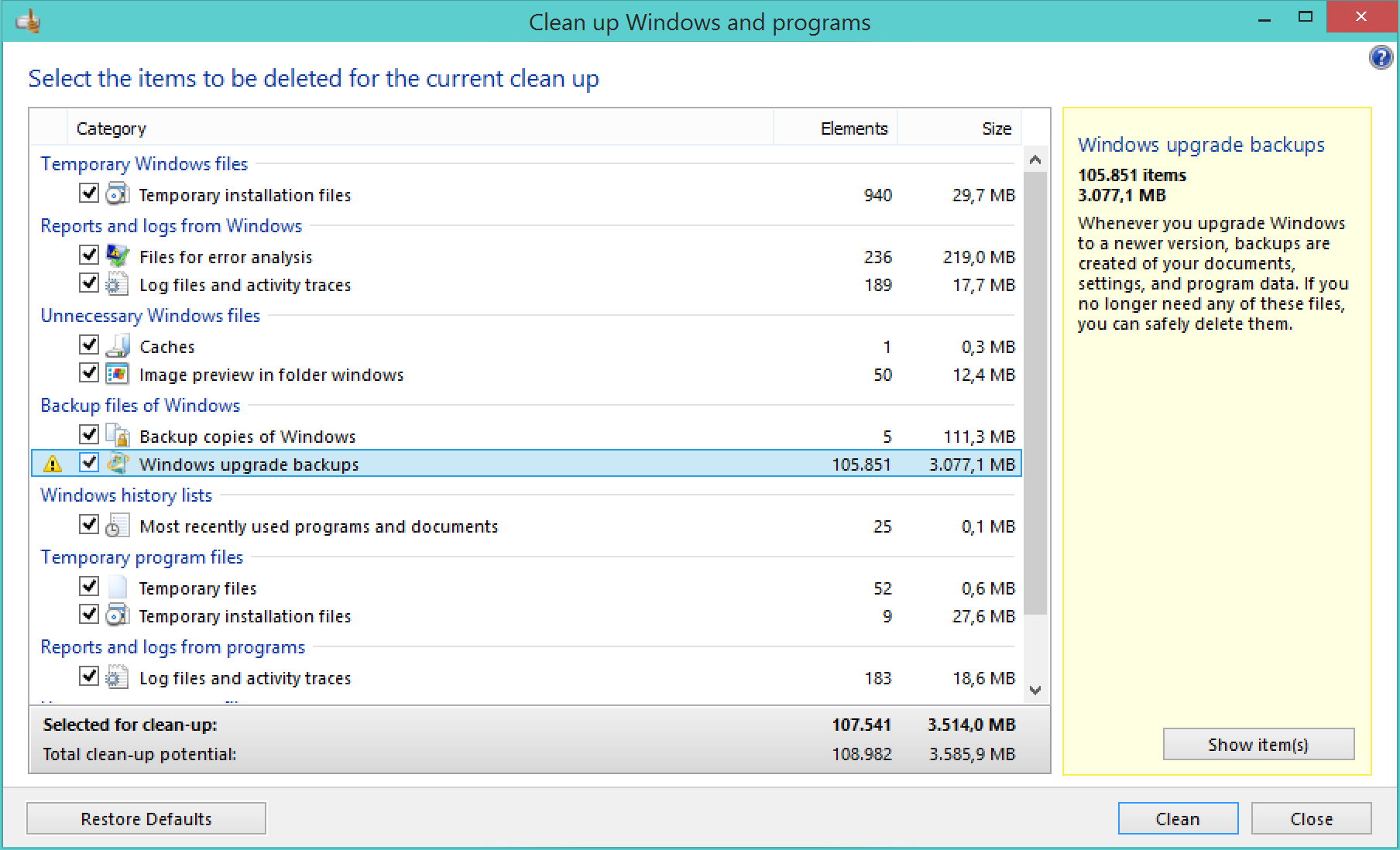
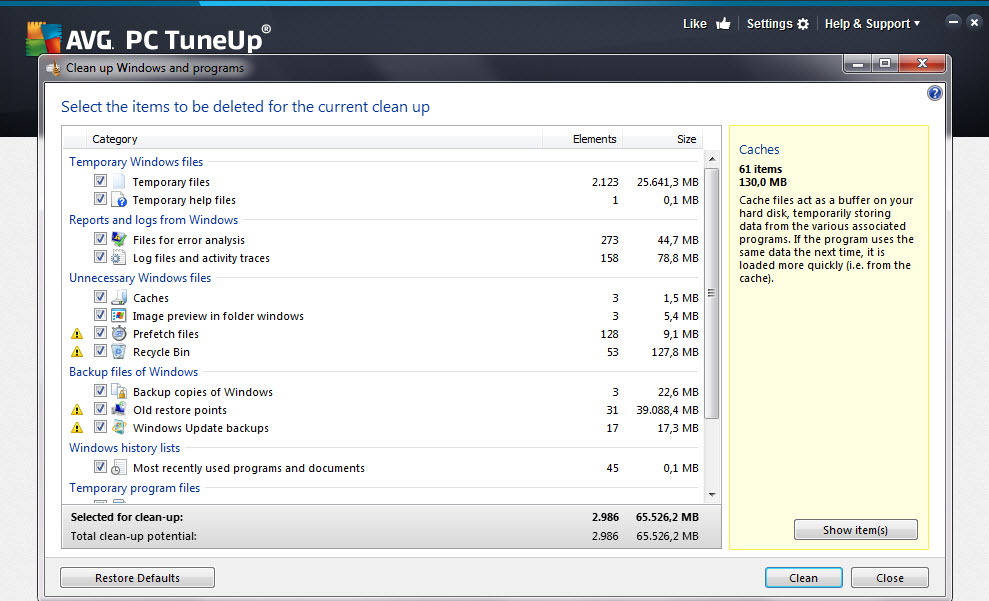
  1. To open AVG Disk Cleaner, click on “Clean up Windows and programs”. You should find a list of things you may not need:

Note that AVG PC TuneUp doesn’t delete any files that are actively used by any of your programs – so  your precious files should not go missing. However, it may be worth going through the list and looking at the help pane on the right to confirm that you really don’t need any of these files.
Ok that’s it for now: Have you tried it out? Let us know how much you were able to clean up on your PC with the new AVG PC TuneUp.

Reporting from AVAR 2014

Kicking off proceedings was Dr. Andrew Clark from CERT Australia (the Australian Government’s Computer Emergency Response Team) who highlighted the many challenges in cyber crime that the Asia Pacific region faces, and how collaboration with neighbouring countries is helping those efforts.

Industry veteran Graham Cluley reminisced on his more than 20 year career with tales of some of the first viruses and malware, many of which now seem so harmless compared to today’s standards.  He also included an amusing rendition of what he calls the “Anti Virus Industry Song”.

“Why can’t we have a virus called ‘Lumpy Trousers’?”, quipped Graham Cluley at one point in the conference, but there was no shortage of interestingly named threats during the conference – such as Dragonfly, Citadel, and even Chuck Norris.

The topic of the Internet of Things inevitably emerged, including discussion of vulnerabilities affecting hundreds of thousands of Internet router and gateway devices used by homes and businesses globally.  Hardware manufacturers were reminded once again not to build devices with backdoors, and to implement better security by design.

As the two day event concluded, a number of industry veterans took to the stage with their musical instruments to rock into the night, entertaining delegates and proving just how collaborative and supportive the Anti-Virus industry is as we all do our best to protect the world from the scourge of malware and online threats.

Image courtesy @alenkacz


Until next time, stay safe out there.

AVG Extends Global Partnership with ALCATEL ONETOUCH

AMSTERDAM and SAN FRANCISCO – November 18, 2014 – AVG Technologies N.V. (NYSE: AVG), the online security company™ for 188 million active users, today announced that it has extended its partnership with ALCATEL ONETOUCH, a leading smartphone brand  to provide AVG’s flagship AVG AntiVirus PRO for Android™ app on its latest Android mobile devices. This agreement will help ALCATEL ONETOUCH’s mobile customers stay safe online from the moment they turn on their new devices for a safer and simpler online experience out-of-the-box.

This marks the latest milestone in the partnership which has been in place since 2011. The AVG pre-loaded devices will be available across ALCATEL ONETOUCH’s global customer base, including a number of fast-growing, emerging markets such as India, Russia, Brazil and Mexico. Customers get a free 90-day trial of AVG AntiVirus PRO for Android, after which they can either purchase an annual subscription to retain its enhanced security features or choose the default AVG AntiVirus FREE for Android option to ensure their smartphone or tablet remains protected.

“Going online via a smartphone is fast becoming a standard activity for mobile users, and understandably our customers want peace of mind to know that they are browsing safely,” said William Dowie, Global Portfolio Director at ALCATEL ONETOUCH. “We continue to be committed to providing them with the best protection possible on our devices and our ongoing partnership with AVG demonstrates our investment in this.”

“We know that the emerging markets account for a large proportion of those going online for the first time – and that mobile often provides the means for doing this.  ALCATEL ONETOUCH is one of the world’s leading smartphone brands with a large presence in these markets, and we believe our combined offering is a cost-effective and smart option for new users there,” said David Ferguson, General Manager Consumer & Mobile, AVG Technologies.

AVG AntiVirus FREE for Android was the first mobile security application to exceed 100 million downloads on the Google Playâ„¢ Store. With the launch earlier this year of AVG Zenâ„¢, an application for Windows PCs and Android smartphones and tablets, AVG has expanded its mobile portfolio to help consumers retain control over their privacy, protection, and performance when using a connected device to get online.

The roll out of AVG AntiVirus PRO for Android is effective immediately.

About AVG AntiVirus PRO for Android

Protect & Keep Safe:

  • App Scanner: Helps stop, remove and prevent the spreading of viruses, worms, and trojans
  • File Scanner: scans your phone for viruses and removes them with a simple click, ensuring your contacts, bookmarks, text messages, music and videos are kept safe.
  • Safe web surfing: actively checks web pages in real-time before you land on that page. If it detects something suspicious, it prevents you from visiting the site.
  • App Lock: protects your privacy by enabling you to lock your apps, thereby securing them from being accessed by other people using your phone.

Find & Protect Your Phone:

  • Phone Locator: helps you locate your phone if lost or stolen. Locate it quickly via Google Maps or enable the SHOUT function which maximizes the volume of your ring tone even if your phone is on “Silent”
  • Phone Locker: keeps outside parties from accessing your personal information by allowing you to lock your phone remotely via SMS or from controls managed from the Anti-Theft service.
  • Camera Trap: if AVG Anti-Theft records 3 failed attempts by an intruder to unlock your phone, it takes a photo of them with the phone’s front-facing camera. The photo is then emailed to you with an alert to the attempted break-in.
  • Remote Wipe: helps preserve your privacy by enabling you to wipe all contacts, photos, and calendars, your text messages, browsing history and SD Card.
  • SIM Lock: locks your phone when the SIM card is replaced.

Enhance Performance:

  • Improve Performance: optimize battery, storage and mobile data usage.
  • Task Killer: shut down apps that may affect device performance.
  • Improved Battery Consumption: get notified when the battery is below the level you set. Use the new Power Save button to turn off device functions that consume your battery or use Auto Power Save to turn off several features that consume battery automatically when the battery power reaches the level you set.
  • Data Usage: keep track of your 3G/4G mobile data usage by getting notifications as you approach your monthly data limit.
  • Storage Usage: uninstall apps that you think use too much storage to free up space on your device.
  • App Backup: helps you back up all your apps to your SD Card so you never get caught without your favorite games, utilities or feeds.


###


About AVG Technologies (NYSE: AVG)

AVG is the online security company providing leading software and services to secure devices, data and people. AVG has over 188 million active users, as of September 30, 2014, using AVG’s products and services including Internet security, performance optimization, and personal privacy and identity protection. By choosing AVG’s products, users become part of a trusted global community that engages directly with AVG to provide feedback and offer mutual support to other customers.

All trademarks are the property of their respective owners.

www.avg.com


Contacts:

US

Katie Han

Waggener Edstrom for AVG

[email protected]

+ 1 (212) 551 4807

UK

Samantha Woodman

Waggener Edstrom for AVG

[email protected]

+ 44 (0)20 7632 3840