One of the terms I’m most often asked to explain is what a “zero day” vulnerability or exploit is; let’s look at what that phrase entails.
The post Security terms explained: What does Zero Day mean? appeared first on We Live Security.
Antivirus Vendors
One of the terms I’m most often asked to explain is what a “zero day” vulnerability or exploit is; let’s look at what that phrase entails.
The post Security terms explained: What does Zero Day mean? appeared first on We Live Security.
Users who don’t pay attention to warning messages on their iPhones or iPads run the risk of becoming infected with malware that can steal their personal information such as text messages, contact lists, pictures and even their location.
If you’ve followed our advice in the past for keeping your iOS device secure, you’ll know that you should be doing the following:
BUT despite this, did you know you could still be just one tap away from disaster?
As reported in Macworld, security researchers uncovered spyware dubbed “XAgent” that is delivered via a phishing attack and can spread to other iOS users via contacts in your address book.
For more tips on staying safe from phishing, check out my blog “How To Protect Yourself from Phishing Attacks”
The good news is that you can do something about this, as all the users affected by this particular threat (and previous ones using the same technique) almost certainly “infected themselves” by ignoring vital warning message prompts.
Apple advise iOS users here to be mindful to only download and install apps from the Apple App Store and to be cautious of so-called “enterprise apps” that are only intended for employees of large businesses.
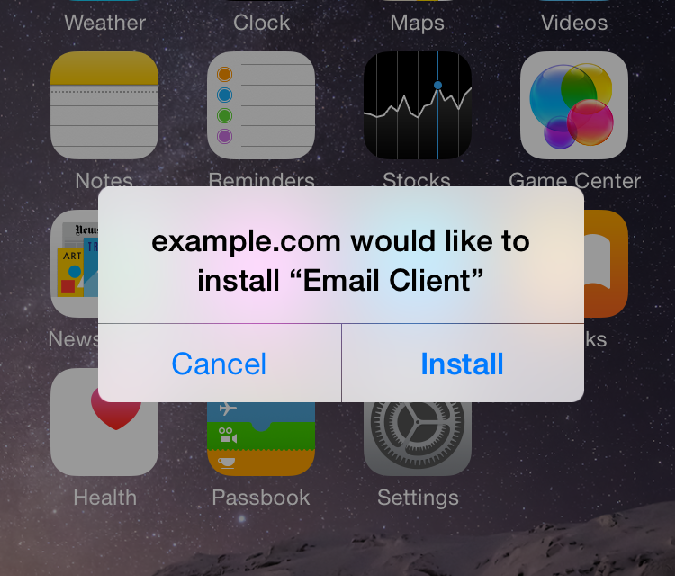
Therefore, if you don’t work for a company that is specifically requesting you to install an app and you see these following prompts – make sure you answer them correctly to protect yourself from inadvertently installing malware.
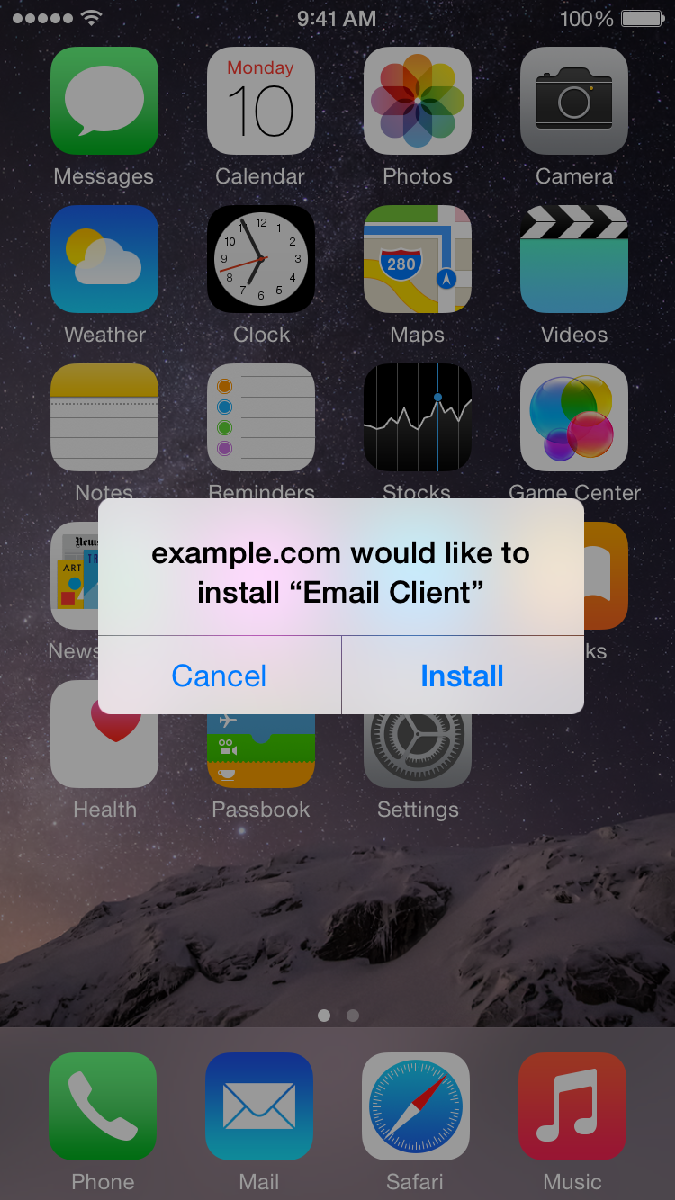
To protect yourself in this example you click CANCEL
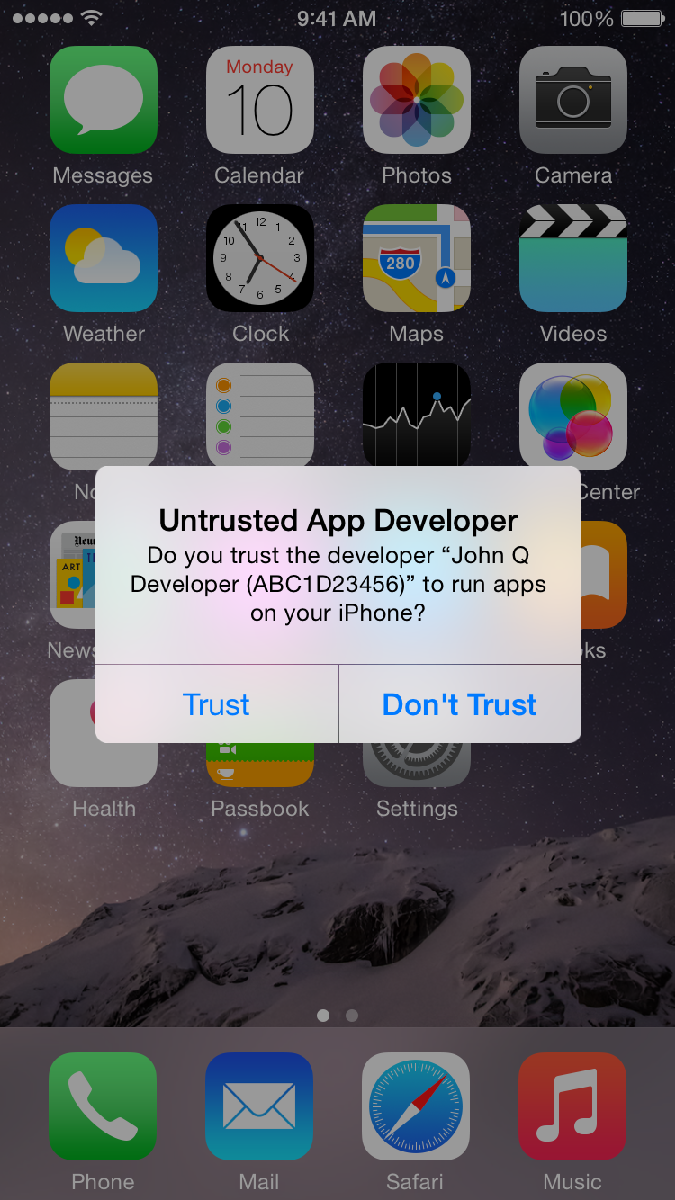
To protect yourself in this example you click DON’T TRUST
You might have also seen a similar Trust or Don’t Trust option available when connecting your iPhone or iPad to a friends computer – and again the safer option is always Don’t Trust.
Until next time, stay safe out there.

Cyber resolutions you’ve already broken
Resolution. I will not reuse passwords
Having different passwords for every website you use increases your safety. A password is only as dependable as the least secure site that has it. You might be attached to ‘loverboy82’, but time to think of something more original.
Resolution. I will not use passwords a human could guess
It’s the age of social media, and we share a lot more than we think. If your password is a loved one’s name (even with threes instead of ‘e’s), the only thing stopping a hacker is a quick search on your Facebook page – or that of your partner, grandchildren, bowling partner…
Resolution. I will not use passwords a computer could guess
Computers understand word structure and are capable of guessing around one thousand variations a second, so using four random words without spaces, e.g. ‘houseboatchickencannon’, is far more effective, and memorable, than using a one-word password. Thinkofsomethingnowquick.
Resolution. I will not use passwords a monkey could guess
We’re calling time on ‘password’, ‘12345’ and ‘let me in’. The only difference between these passwords and none at all is that these come with the satisfaction of making a hacker waste two minutes of his time.
Resolution. I will not put off updating my anti-virus protection
Think of antivirus as your weapon against online fraud, viruses and worse. “Yeah!” shouts your digital anti-virus warrior. “I’m ready to protect your online safety, as soon as you give me a sword! Um… hello? Anyone?”
Resolution. I will install anti-virus protection on every device that needs it
Sure you already protected the main computer, but is that the only device in the house that you use to go online? Mobile devices and laptops have just as much access to your private information, and they need just as much protection.
Resolution. I will install a parental control on my anti-virus software
Sometimes it seems like kids know more than adults about getting around online, but they certainly don’t know more about staying safe. Parental control gives you the power to keep them that way, monitoring and controlling what they’re exposed to online.
Make your resolutions stay safe.
If you want to share this infographic, here you have the code:
The post Cyber Resolutions You’Ve Already Broken appeared first on MediaCenter Panda Security.
Is America’s new Cyber Threat Intelligence Integration Center a step forward? Or a duplication of the National Cybersecurity and Communications Integration Center at DHS?
The post Cyber Threat Intelligence Integration Center: will CTICC be a game changer? appeared first on We Live Security.
Like many services, dating has made the move from your desktop to your pocket thanks to mobile apps that help you find love just around the corner.
In fact, because of that move to pockets and purses worldwide, there’s been a massive popularity explosion in online dating.
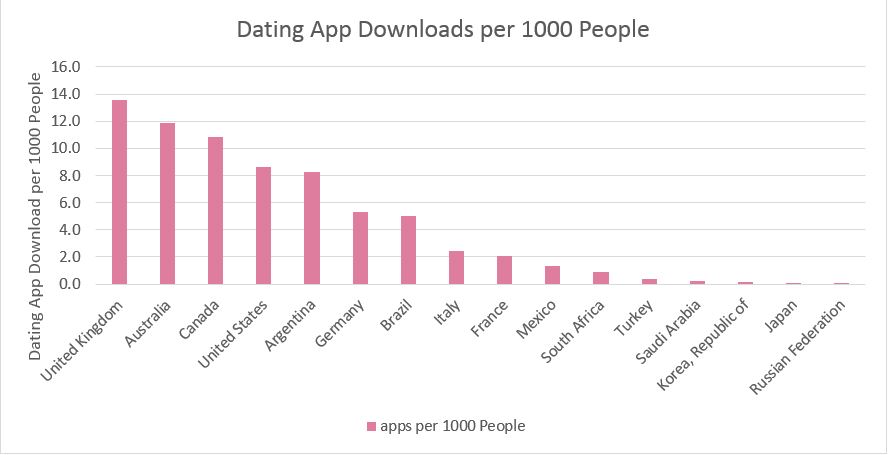
The country with the most online daters by far is the USA, merely because of the sheer number of people using mobile phones and downloading dating apps, according to our own research. As the birthplace of the mobile app industry, this doesn’t really come as surprise.
However, Americans are not the most likely to be dating online when viewed as a percentage.
When you break down how many people per 1000 are downloading dating apps, Americans are blown away by the United Kingdom, Australians and Canadians, and are only marginally ahead of the Argentinians. But even the Saudis are getting in on the online dating tango.
If you’ve ever been tempted to try your hand at online dating, choosing the right service is one of the most important decisions you can make.
Whatever your age, interests or demographic there will be a site out there catering to your needs. I would advise sticking to well-known sites so that you can get support if you need it.
Interestingly, AVG’s research showed that app popularity differed greatly between countries. For example, Tinder is neck and neck with Plenty of Fish in the USA, but is dominant in Argentina.
If you do your research, you can pick the right service that will give you the best chance of success in your country.

If you’re ready to jump into online dating, I would advise taking a few precautions to ensure you have a fun and safe time. Here are five simple tips to help you stay safe:
The Microsoft Outlook app has been banned from use in the EU Parliament, according to emails from the parliament’s IT department, seen by PC World.
The post Outlook app blocked by EU parliament over ‘serious security issues’ appeared first on We Live Security.
Each country has its own initiatives for protecting kids online. In the UK, for example, we have “Active Choice” which makes adult content opt-in rather than opt out. But I believe, that around the world, parents should be the first line of defense and guidance for our kids.
When we talk about children spending time online, it’s important to remember that our children do not have what we term ‘digital lives’. Technology is normal to them and part of growing up in today’s world.
I often hear parents raise concerns about how much time their children spend online and on devices. Generally I observe that they are equally guilty of this digital overindulgence. As ever, children mimic their parents’ behavior.
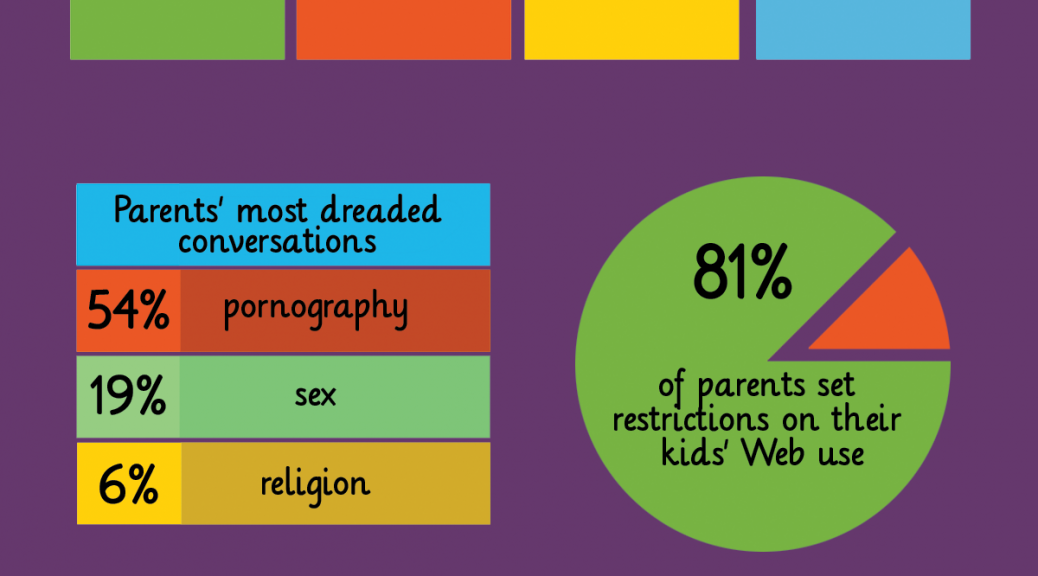
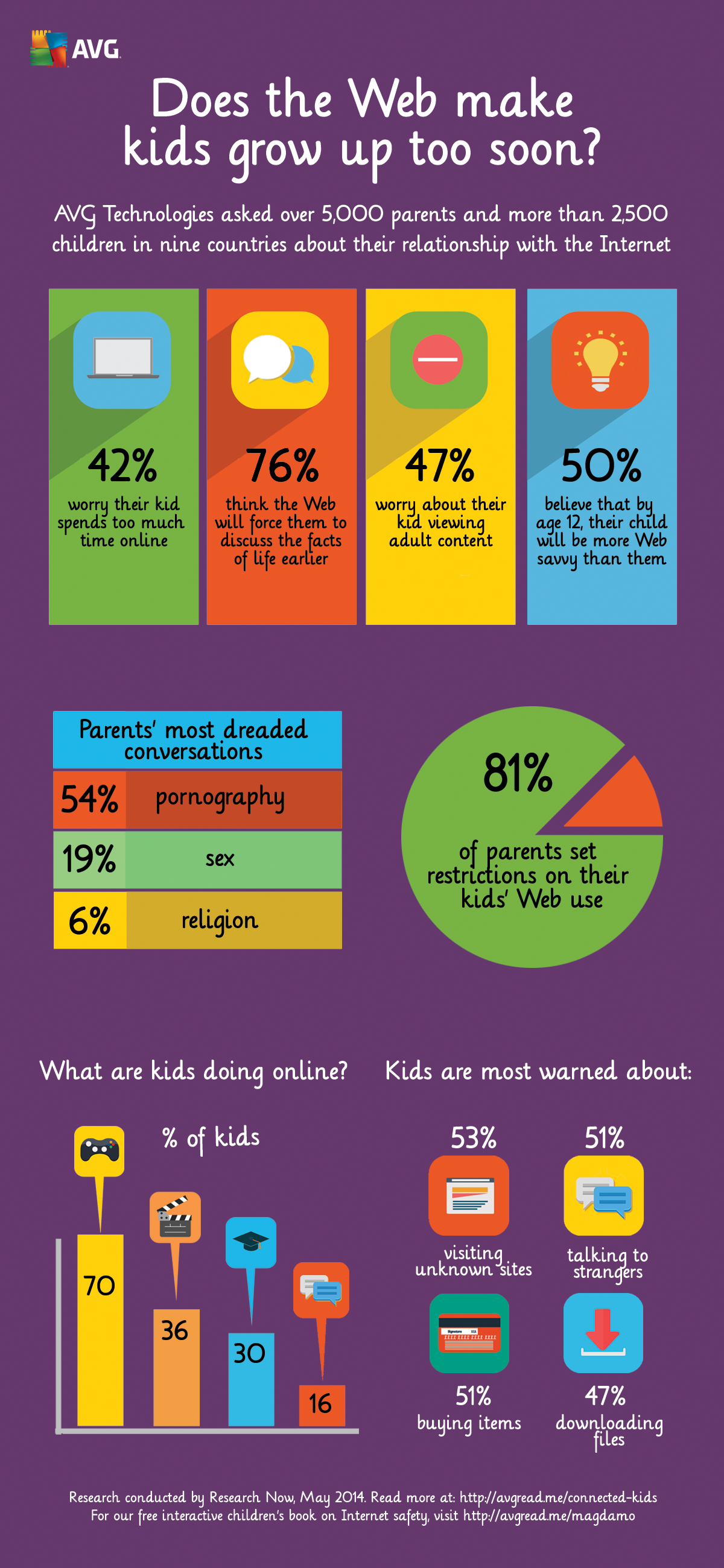
AVG Digital Diaries research last year examined how the Internet is having an impact on how quickly kids grow up. Our findings showed that children are increasingly interacting with digital devices,and 42% of the parents polled by AVG said that they are concerned that their child spends too much time on devices, and a similar number (43%) said they were worried their child didn’t spend enough time outside.
So who is responsible for the time our kids spend online? I believe that parents are, yet 42% of them say they are concerned about it.
As Safer Internet Day has just passed, I challenge the 42% in our survey last year to take charge of the technology in their homes and to correct the balance.
You might not be popular today but introducing other life skills is a good thing to do. Remember, technology is not a babysitter!
We’ve put together more statistics from the AVG Digital Diaries research in this infographic below.
The White House is creating a new agency to help counter cyberthreats, analyzing intelligence from around the government so it is better equipped to deal with attacks.
The post White House creates new agency to centralize cyberthreat intelligence appeared first on We Live Security.
Two phone scams of a type that might be new to you: fake surveys asking dangerous questions, and a Londoning scam that seems to target seniors.
The post Census Scams and ‘Grandparent Scams’ appeared first on We Live Security.