Category Archives: Antivirus Vendors

Antivirus Vendors

Apps on Google Play Pose As Games and Infect Millions of Users with Adware

A couple of days ago, a user posted a comment on our forum regarding apps harboring adware that can be found on Google Play. This didn’t seem like anything spectacular at the beginning, but once I took a closer look it turned out that this malware was a bit bigger than I initially thought. First of all, the apps are on Google Play, meaning that they have a huge target audience – in English speaking and other language regions as well. Second, the apps were already downloaded by millions of users and third, I was surprised that the adware lead to some legitimate companies.
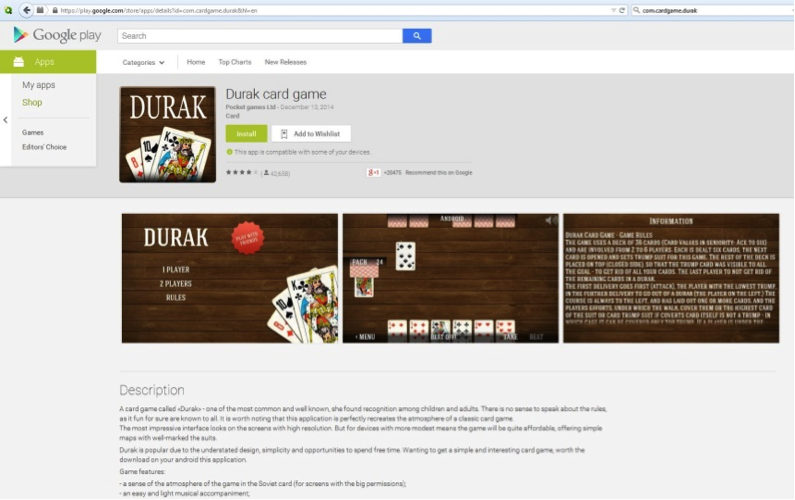
Durak App Google Play The Durak card game app was the most widespread of the malicious apps with 5 – 10 million installations according to Google Play.

Durak interface
When you install Durak, it seems to be a completely normal and well working gaming app. This was the same for the other apps, which included an IQ test and a history app. This impression remains until you reboot your device and wait for a couple of days. After a week, you might start to feel there is something wrong with your device. Some of the apps wait up to 30 days until they show their true colors. After 30 days, I guess not many people would know which app is causing abnormal behavior on their phone, right? :)

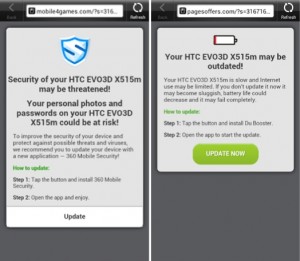
Threats detected malcious appsEach time you unlock your device an ad is presented to you, warning you about a problem, e.g. that your device is infected, out of date or full of porn. This, of course, is a complete lie. You are then asked to take action, however, if you approve you get re-directed to harmful threats on fake pages, like dubious app stores and apps that attempt to send premium SMS behind your back or to apps that simply collect too much of your data for comfort while offering you no additional value.

An even bigger surprise was that users were sometimes directed to security apps on Google Play. These security apps are, of course, harmless, but would security providers really want to promote their apps via adware? Even if you install the security apps, the undesirable ads popping up on your phone don‘t stop. This kind of threat can be considered good social engineering. Most people won‘t be able to find the source of the problem and will face fake ads each time they unlock their device. I believe that most people will trust that there is a problem that can be solved with one of the apps advertised “solutions” and will follow the recommended steps, which may lead to an investment into unwanted apps from untrusted sources.

Avast Mobile Premium detects these apps, protecting its users from the annoying adware. Additionally, the apps’ descriptions should make users skeptical about the legitimacy of the apps.  Both in English and in other languages such as German, were written poorly: “A card game called ‘Durak‘ – one of the most common and well known game“.

The apps‘ secure hash algorithm (SHA256) is the following: BDFBF9DE49E71331FFDFD04839B2B0810802F8C8BB9BE93B5A7E370958762836 9502DFC2D14C962CF1A1A9CDF01BD56416E60DAFC088BC54C177096D033410ED FCF88C8268A7AC97BF10C323EB2828E2025FEEA13CDC6554770E7591CDED462D

Passwords aren’t enough for small business security

From Target to Sony Pictures, security breaches at businesses of all sizes were in the headlines throughout 2014. We are only in February but the data breach stories show no sign of abating.

Whether it’s a specific hacking attack on a British shoe retailer or hacktivism at companies with millions of online members, the loss or compromise of passwords is frequently a common factor.

Ever since they emerged in the late ‘90s, passwords have been our primary security measure. Fast forward to today and we often find that employees are still routinely using the same style of basic password  – except now these passwords are required to protect smartphones and tablets  carrying sensitive company-related data, as well as social media and cloud-based applications used regularly in the workplace.

It’s clear that conventional password use is no longer fit for 21st century purpose and businesses must adopt additional measures to ensure their passwords are up to the task.

Extra levels of authentication are needed to verify the identity of employees using their passwords, and businesses should start to enforce these as standard within their organization especially if they have in place bring your own device (BYOD) policies.

AVG has created this short eBook to help you develop a BYOD policy that fits your business:

 
In my view, many of the user identity breaches reported in the news could have been prevented with better password practices and stronger, multi-factor authentication methods.
 

Five top tips for more effective password management in 2015:


  1. Make sure security measures include formal staff training on password best practice. Passwords need to be strong, long and as secure as possible – complicate them by using “passphrases” rather than individual words – e.g. rather than “spotthedog” use “5p0tth360g”
  2. There is no harm in turning on “two-step authentication”. Most services are offering this now and is a simple code based system that send you a numeric password by SMS/Text to secure you login credentials
  3. Create a single profile for all corporate log-ins, with segmented privileges for individual employees within the same profile. This way, when someone leaves the company, they can be removed automatically.
  4. Some mobile phones now provide both identity and access management capabilities. Encourage employees to adopt these and incorporate them as part of your BYOD policy.
  5. To aid productivity, make it easier for employees to work anywhere, anytime with mobile technology by moving to a single sign-on environment where every employee has one-click to access to a secure area in the cloud containing all of their work accounts and applications.


This constant flow of data breach stories in the media has done much to raise awareness of the issues around passwords. Education is positive, of course, but action must be taken to foil the hackers.

If your business is supported by a mobile workforce equipped with either work or personal devices which provide ready access to company-sensitive systems and information, ask yourself that important question: what password practices do I need to implement to keep those devices and that data secure?

Don’t take it for granted that your people have the knowledge to handle this themselves. Instead make sure you equip them to help protect your company.

Should Kids Be Using Facebook?

Kids can put a lot of pressure on parents to let them use Facebook. However there are several important things that parents should know before making a decision either way.

Did you know?

  • Facebook has a minimum required age to create an account, and for good reason – children can be exposed to inappropriate content.
    For example: Kids may have older Facebook friends or family (perhaps friends of their friends) that post content to their timeline that isn’t appropriate for them to see.
  • Kids themselves may be unknowingly posting inappropriate content or giving away too much of their families private information.
  • When a Facebook account is created for an underage child using a fake date of birth, this gives Facebook a false impression of the child’s real age. This can result in young children being incorrectly targeted by Facebook advertisers and exposed to inappropriate products and services.
  • Kids could also lose all of their Facebook data at any time. Facebook has a whistleblower policy that allows anyone to nominate an account that they think is being used by someone under the required age. If that happens, the account will be shut down and become inaccessible.


So do you still think kids should be using Facebook?

Toy drones continue to cause problems

The latest incident involving a drone has more serious implications than buzzing a neighbor’s yard. In January, a drone crashed into a tree on the South Lawn of the White House.  Apparently, the drone was small enough to avoid detection by the White House security radar.

The man who was operating the drone is an employee of the National Geospatial-Intelligence Agency. After seeing the story on the news the following day, he contacted officials to confess. He later admitted that he had been drinking.

The point is that drone adventures are getting increasingly (and literally) out of control.

The White House incident comes just days after the Department of Homeland Security held a conference in Arlington, Va., on the dangers that such drones pose to the nation’s critical infrastructure and government facilities.

The New York Times reported that the conference exhibited a DJI Phantom drone — the same type of drone that reportedly crashed at the White House.

Image courtesy of gizmag


However, the drone on display at Homeland Security’s conference had three pounds of fake explosives attached to demonstrate how easy it would be to weaponize. Frightening.

The President said in an interview with CNN that he has instructed federal agencies to examine and address the broader problem and the need for regulations on drone technology.

As the President wisely noted, regarding drones, “We don’t yet have the legal structures and the architecture both globally and within individual countries to manage them the way that we need to.”

Part of the idea for legislation or enforcement, the President said, “is seeing if we can start providing some sort of framework that ensures that we get the good and minimize the bad.”

Legislation and regulation needs to happen soon. Even though it is illegal to fly drones in Washington DC, that appears to be a small deterrent.

Let’s see how this unfolds. There are privacy and security hazards with drones that everyone needs to be aware of, and this incident might spur some real action.


Come meet Avast at Mobile World Congress

Mobile World Congress 2014

Avast will participate in the 2015 Mobile World Congress

The Avast Mobile Security Team will be introducing its latest suite of apps and solutions at this year’s Mobile World Congress in Barcelona, March 2 – 5.

The team, including Jude McColgan, President of Mobile, and Daniel Chang, Head of Worldwide Mobile Sales and Marketing, will be participating in this must-attend conference for mobile industry leaders, visionaries, and innovators.

The Avast team are leaders in securing the mobile ecosystem as it expands into the retail, banking, and health services industries. Along with interesting discussions about the latest security threats and vulnerabilities for Android and iOS devices and how users can protect themselves from those threats, our team will show users how they can free their phone from unnecessary files to gain valuable storage space on their mobile devices.

New threats and trends

Mr. McColgan and Mr. Chang will introduce a solution that addresses Wi-Fi security issues. Most people know that connecting to Wi-Fi networks on-the-go at cafes, airports, or hotels can make them vulnerable to hackers. Without the protection of a virtual private network (VPN), hackers can gain access to people’s emails, browsing history, and personal data. Now, routers are increasingly becoming targets for hackers, harboring new risks for iOS and Android smartphones and tablets. Avast will be revealing new research data, then introducing a solution for this threat at Mobile World Congress.

Storage on your smartphone and tablet can be a challenge especially when social media, video, music streaming, and news reader apps pile up data that eats up valuable storage space. Avast will showcase a new solution that addresses this problem.

If you are attending Mobile World Congress, please stop by and visit the Avast team at stand 5K29 in Hall 5.

For the rest of us not lucky enough to travel to Barcelona during the Mobile World Congress, visit the Avast blog and Facebook page where we will keep you updated on all the announcements and happenings. Take a look at some of the fun from last year’s event.

// <![CDATA[
(function(d, s, id) { var js, fjs = d.getElementsByTagName(s)[0]; if (d.getElementById(id)) return; js = d.createElement(s); js.id = id; js.src = “//connect.facebook.net/en_US/all.js#xfbml=1”; fjs.parentNode.insertBefore(js, fjs); }(document, ‘script’, ‘facebook-jssdk’));
// ]]>

14 easy tips to protect your smartphones and tablets – Part I

A few precautions can make a huge difference in the safety of your phone and the important things you saved on it.

Protect your smartphone

Follow our tips to secure your phone and the data on it.

We talk a lot about protection and privacy here in our blog. It’s a bit obvious as our “life” is in our devices nowadays: Photos of our last trip or our loved ones, videos of our children playing and growing up, contacts both professional and personal. All our precious and irreplaceable data is stored in these little machines. Take a minute of your time and follow us in this easy tour to protect them and save a lot of time and headaches.

1. Set your lockscreen

You wouldn’t leave your home door unlocked, would you? Same goes for your phone with all your private data. Set a password or PIN to prevent direct and easy access to your phone. Gestures and face recognition are less secure, but are better than nothing.

2. Hide your passwords from nosy people

You will argue that people around you can look over your shoulder and see what PIN or password you’re typing or gesture you make. Generally, we’re not worried about trustworthy people around us, but what about strangers in a public place like a bus or train? Open your phone settings and hide your passwords by unchecking the option: Settings > Security > Make passwords visible.

3. Protect your apps with a PIN

Not all apps are equal when it comes to security and privacy. Probably the weather app or calculator won’t keep your personal info. However, your messages and banking apps will thank you if you help them to keep their data private. You can imagine what might happen if your kids to open a specific app while they’re playing in your devices. Use Avast Mobile Security to set a PIN to block access to your apps. As an extra security measure, it will be good that your lockscreen and Avast PINs are different ones.

4. Disable installation of apps from unknown sources

If you do not use other app stores besides Google Play, then uncheck the option “Unknown sources” in your phone’s Security Settings page.  Even the Google Play Store sometimes allows malware to get by. It’s well known that most Android malware are fake apps disguised as legitimate apps, so double check the publisher. Be cautious of downloading from fake sites disguised as official ones – check the URL. Avoid completely pirated and cracked sources.

5. Set Avast Mobile Security to scan any app before installing

If you really need to use legal third party stores, like Amazon or F-Droid, please be careful: Keep Avast Mobile Security always on. You know that Avast scans any installed and running app. But do you know that you can set it to scan any app that is about to be installed? After you’ve installed Avast, when you’re about to install a new app, the phone will ask you if you want Avast or the default installer to handle the installation by default. Use Avast, it will scan and then release the app to the default installation process.

6. Disable USB Debugging

This tip is for advanced users. If you have enabled Developer options into your device (and you will know exactly if you did as you’re an advanced user!), please, turn USB debugging off. You will protect your device from outside abuse (via adb connections) if you do so. You don’t need it to be on all the time.

7. Install and set Avast Anti-Theft

This is an old tip, but it’s so important that it should be on all smartphone safety tips lists. Just note that installing is not enough. You need to properly configure Avast Anti-Theft (don’t worry, there is an easy wizard for it) step-by-step. It’s good to check if your location services are properly set also, otherwise, it will be difficult to track it. In other words, go to Settings > Location Access and set High accuracy mode.

We’ll talk about the other 7 tips in next days, so come back to the Avast blog.

Apple ID user? Careful! There is a new phishing attack!

Careful! We have detected a new phishing attack!

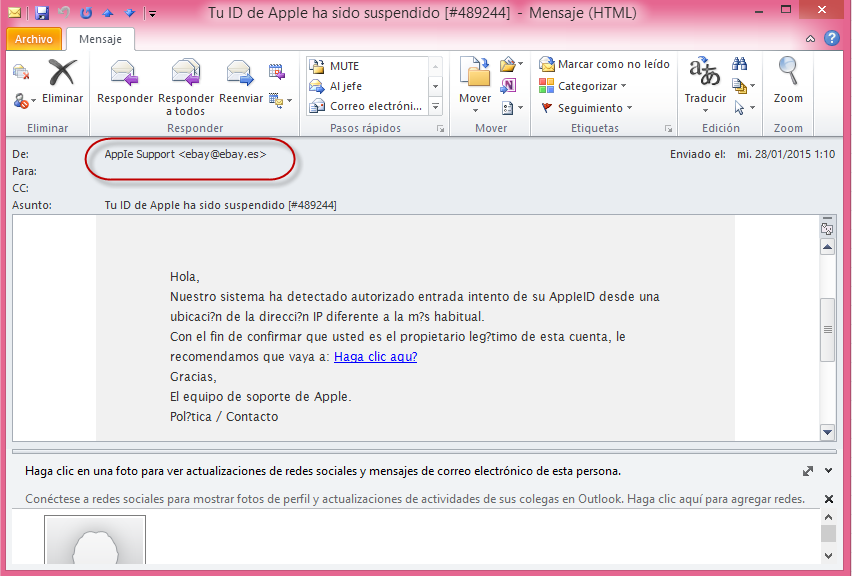
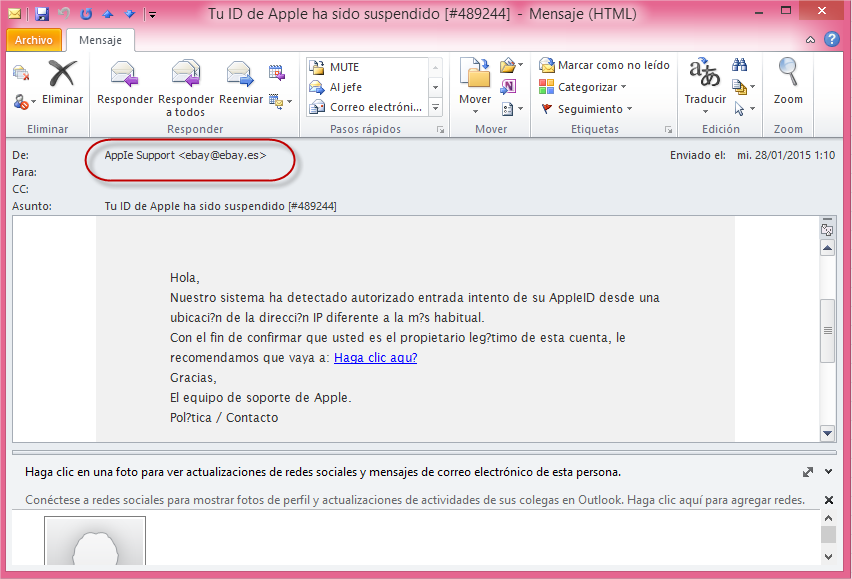
If you receive an email with the Spanish text: “Hola, nuestro sistema ha detectado autorizado entrada intento de su Apple ID…” (“Hello, our system has detected authorized access attempt of your Apple ID…,”) careful, it is phishing!

Below is an example of the email and the first thing that should catch your attention is the sender’s email address: AppIe Support <[email protected]>

phishing apple

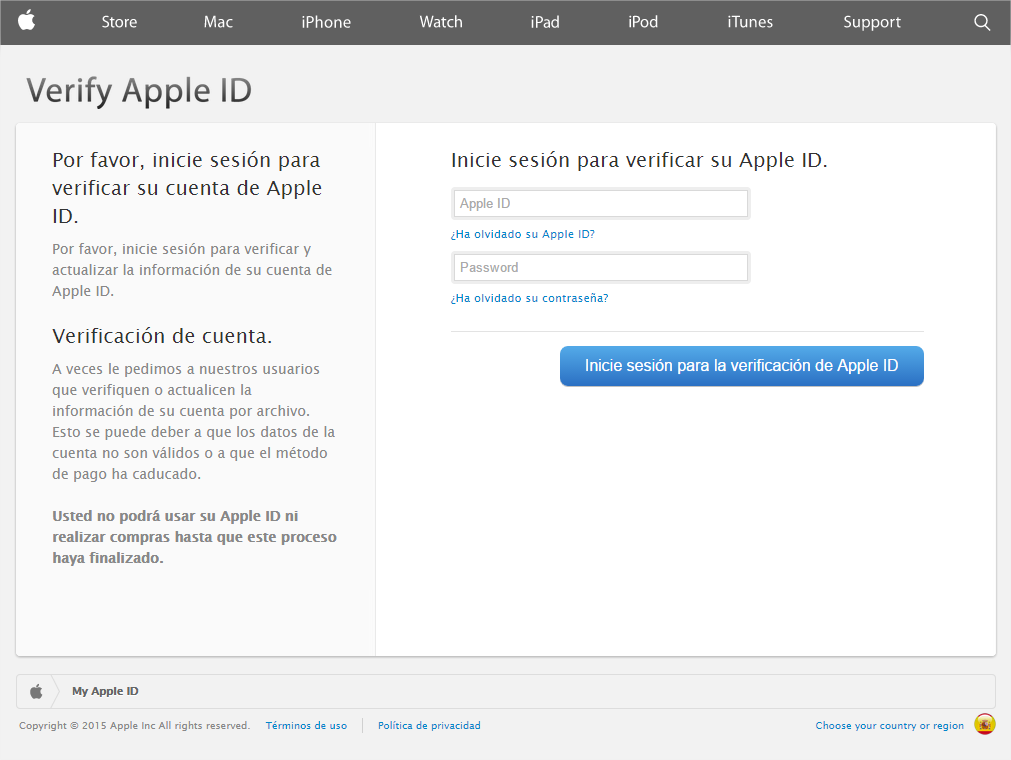
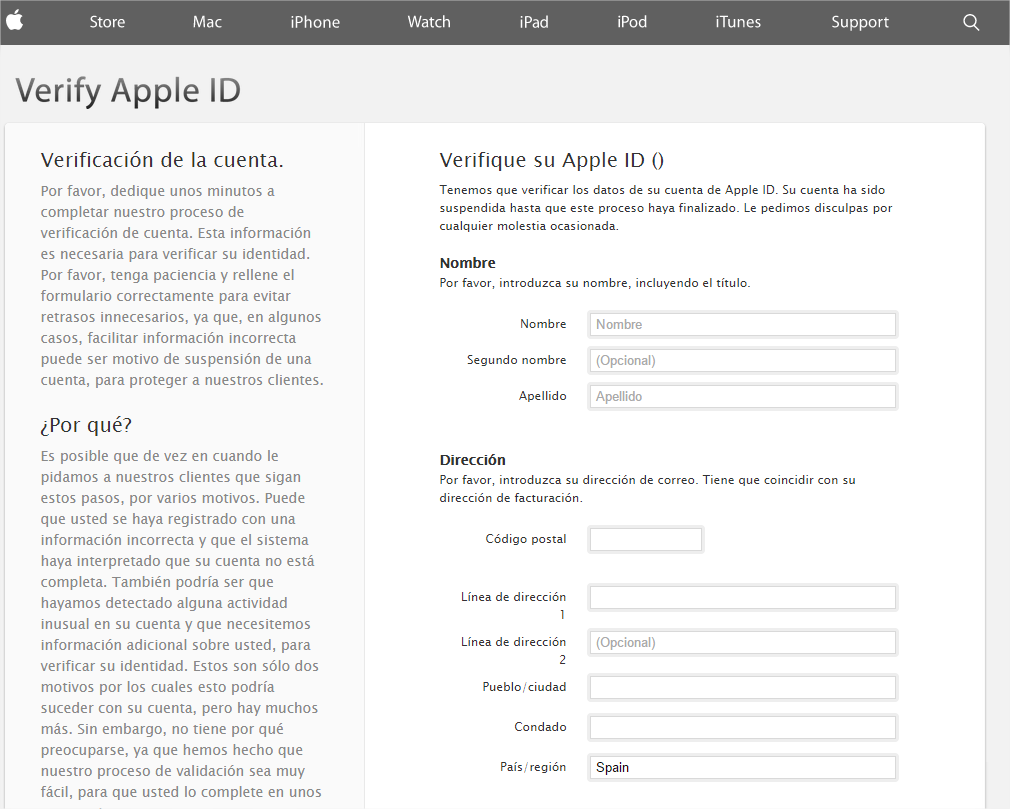
Using the excuse that someone has tried to access your Apple ID account, the cyber-criminals ask you to change your details. When you click on the link, a page opens that is an almost perfect imitation of Apple’s website:

phishing apple email


After signing in with your Apple ID login details, the next step is to update your personal details.

phishing apple ID

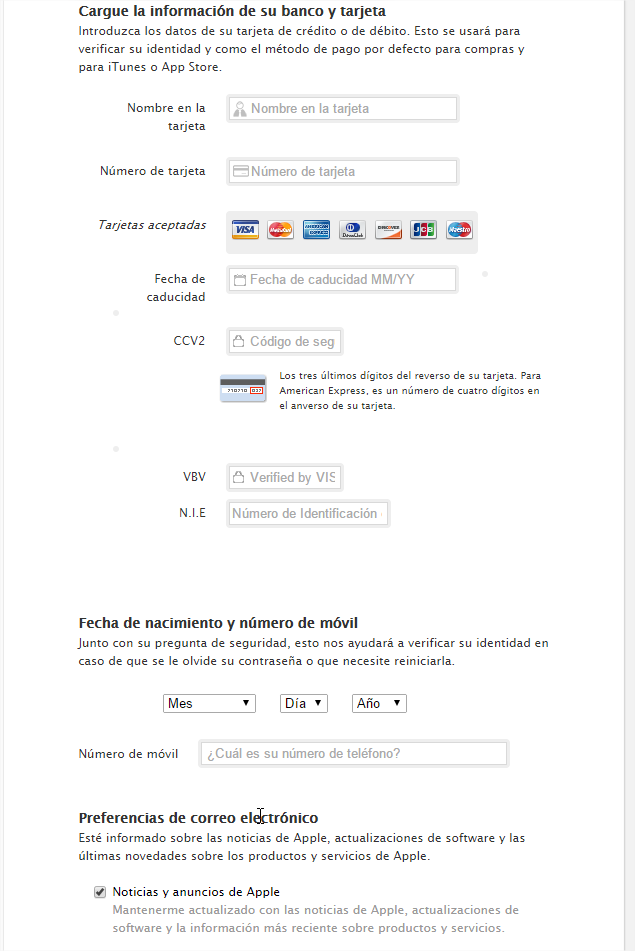
In addition to your name, address or telephone number, it requests your bank and credit card details in order to verify your identity and as the default method of payment for purchases and for iTunes or the App Store.

phishing apple personal details

So, if you fall into the trap and enter all of this data, you will be giving the criminals access to this sensitive information.

As we always say, no company will ever ask you to send your personal details to them via email. If they do, be suspicious! In addition, in this case prevention is better than cure and it is important to have an extra layer of protection by installing one of the antivirus software from our 2015 line.

The post Apple ID user? Careful! There is a new phishing attack! appeared first on MediaCenter Panda Security.

Panda Security improves its positon in the Visionaries Quadrant of Gartner Magic Quadrant

Panda Security, Cloud Security, announces that it has been included as a Visionary in the ‘Gartner Magic Quadrant for Endpoint Protection Platforms’, published on December 22, 2014. The company, which has been included in this quadrant for the seventh consecutive year, has improved its positioning.

The Gartner report evaluated all of the vendors in the endpoint protection platforms market based on their products, completeness of vision and ability to execute.

“We believe industry has assessed positively the new technologies incorporated by Panda Security in the fight against malware. We feel this emphasizes that Panda Security is the first vendor in the endpoint protection platforms market to offer a service that classifies all executables running on endpoints, which represents a significant innovation compared to the current products”, said Josu Franco, VP Corporate Development at Panda Security.

We feel this new evaluation strengthens the path taken years ago by Panda Security towards a strategy that is fully committed to offering cloud-based services and a new protection model.

A complimentary copy of the Gartner, Magic Quadrant for Endpoint Protection Platforms, Peter Firstbrook, John Girard, Neil MacDonald, December 22, 2014 is available here.

The post Panda Security improves its positon in the Visionaries Quadrant of Gartner Magic Quadrant appeared first on MediaCenter Panda Security.