Category Archives: Antivirus Vendors

Antivirus Vendors

What kids want to know about Internet Safety

Who are you and why are you here?

Maddie: My name is Maddie Moate and I am a YouTube Presenter, I make lots of videos mostly about science and technology. I know quite a lot about social media, and how to stay safe using technology. That’s why I’ve been invited here today.

Luke: I’m Luke Franks and I’m a presenter, I present shows on live kids TV but also do the online X-Factor. I spend a lot of time online, on social media in particular so I’ve come along today to talk to people about how they can do that in a safe way.


Have you ever been cyberbullied? Do you think there are ways to stop cyberbullying?

L: I don’t think I’ve ever been cyberbullied, but I’ve had people send me some nasty messages. They don’t make you feel good when you read them. I think the best thing you can do is talk to an adult, either your parents or someone at school who you trust. It’s not okay and it shouldn’t happen!

M: Totally. Just because it is happening online doesn’t mean that it’s okay. It’s just as bad as bullying in real life. I’ve had a couple of instances where people say not very nice things to me on YouTube. It can be very difficult but it’s important to remember that you don’t have to handle it by yourself. Look for some support.

The Interview

What are the pros and cons of social media?

L: Good question. One of the best things about social media is that it’s a very easy way to share things with your friends and build a place online where you can all hang out.

M: Yeah, it’s a great way of sharing photos and memories with friends and family who might live far away. But these days it’s very common to be part of bigger communities that share wider interests or passions for activities, brands or music.

L: Exactly. One of the great things about YouTube is that it can also be a great learning tool. Let’s say you wanted to learn the guitar. You can go onto YouTube and find hundreds of free lessons that will teach you exactly what you want to learn.

And the cons?

L: There are definitely some cons. You don’t always necessarily know who is online or who you are talking to. So you have to be aware and be careful about what you are putting online.

M: There are also lots of people who see what you do online but aren’t speaking up. It’s easy to think that you are just talking to certain people but actually your messages can be seen by many more than you think.


How do you keep safe on the Internet?

M: Check your privacy settings. You want to make sure that what you are posting can only be seen by the people you want to read it. Remember that anything you put online can be discovered, so try and make sure that you are showing a good representation of yourself.

L:  Yeah, settings can be quite complicated sometimes but it’s worth checking them from time to time to make sure you’re not sharing with too many people.


Can someone be addicted to technology?

M: Yes! Definitely.

L: I think you can. I spend so much time on my phone and I love tweeting and finding out about stuff online. But there’s a real world too and it’s important to learn skills for the real world and not just online. You can’t stay on your phone forever!

M: It can be very easy for people to get addicted to creating an online personality or life that doesn’t actually exist. It can seem more exciting online where you might be more cool or popular but actually the most important thing is to look after the real you in the real world.

“More human” carder malware emerges for sale in dark web

A tool for cybercriminals that promises to use stolen credit card details in a more ‘human way’ to bypass fraud detection has been found on sale for as little as $180, according to The Register. “Voxis Platform” is described as “advanced cash out software”, which will help cybercriminals earn “astronomical amounts” by mimicking human behavior on different

The post “More human” carder malware emerges for sale in dark web appeared first on We Live Security.

Official specifications are not enough


is it malicious or clean ?

Before one can tell if a file is malicious or clean,

is it an Android? a Windows file ?

it’s important to determine the file type,

is it valid or corrupted ?

and then if the file is valid or corrupted:

If the file is indeed corrupted (aborted download…), there is no point in checking further. However, pretending to be corrupted while being valid is a way to evade detection: if the file can still run properly, it might infect a user and exploit a system, even if it may look invalid according to the official specifications.

So your reaction might be:

“Just do your work properly, and implement the official specifications”.

Sadly, it’s not that easy:

specsiceberg

because the official specifications are typically far from enough. They only cover the general case of what should be required in theory, not all the corner cases of everything that would actually execute in reality. Official specifications are not enough.

Example

For example, the official Adobe PDF specifications say that a PDF shall start with a signature from 8 possible values (%PDF-1.0 until %PDF-1.7). This sounds easy to check and implement, right ?

Sadly, in practice it’s quite different: Adobe Reader itself just accepts %PDF-1. , or %PDF- followed by a NULL character, and at any position within 1024 bytes.

So, the official PDF reader itself doesn’t strictly follow the official PDF specifications, made by the same company, and what it actually does is not even documented anywhere. If you want to create a robust tool, then you can be sure that official specifications are not enough !

So, if the official tool does something out of bound and undocumented, nothing prevents readers to do follow different undocumented behaviors. So the same files could lead to different interpretations, and none of them is perfectly documented!


A PDF file is made of objects. PDF objects should end with the endobj keyword.

Some objects, like the content of a page, are stream objects.A stream should be closed via the endstream keyword, and then this object should end with the usual endobj keyword.

First, ‘endstream’, then ‘endobj’.

Several readers force the end of a stream of an object if the word ‘endobj’ is present before the ‘endstream’, which means you can’t print the string “this is an endobj” as is, because it will be interpreted as the end of the object, and at the same time, the end of its stream.

The consequence? After an ‘endobj’ word in a stream, some readers will stop parsing as a stream, while others will go on until ‘endstream’ is encountered.

However, parsing the root defining element of the PDF – the trailer – doesn’t explicitely require to parse an object-like structure.

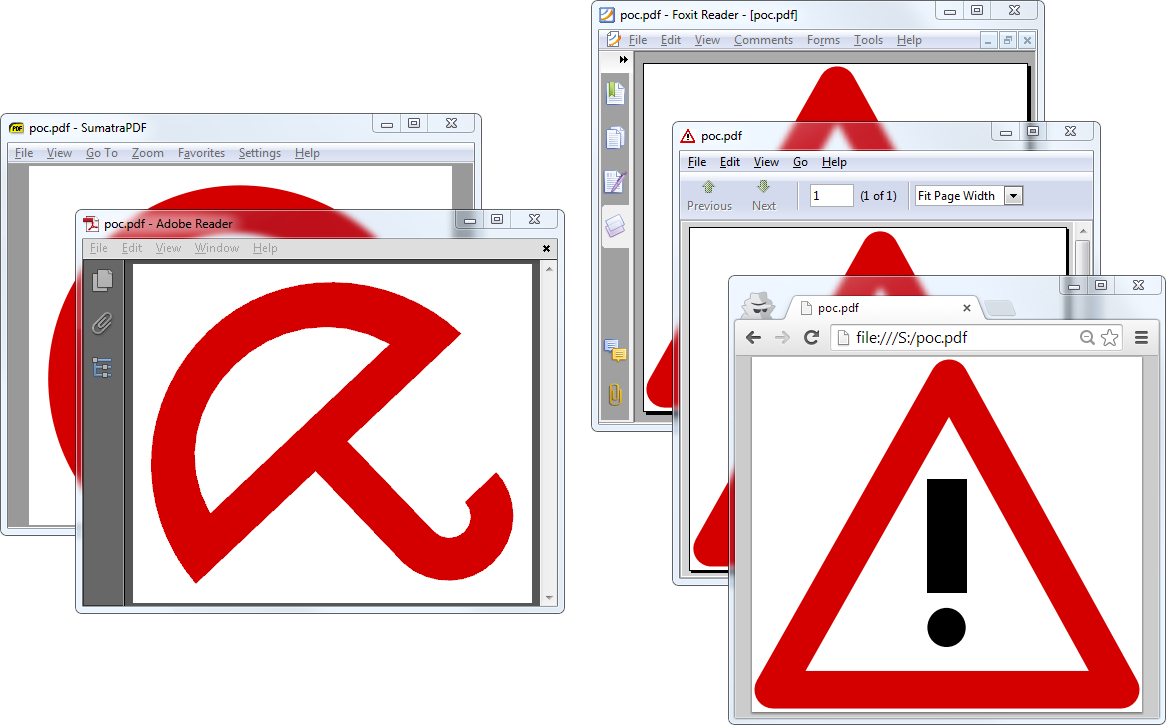
What if the trailer is defined in such an ambiguous object in a PDF (hand-made PoC, for clarity)

Some readers will parse this trailer, some won’t. So some readers will see totally different documents, with the same file:

different documents seen from the same file

The post Official specifications are not enough appeared first on Avira Blog.

Have you got a WordPress blog? Watch out, plugins are their Achilles’ heel

Attacks on Dropbox, leaks of Snapchat images, nude photos of celebrities published on the Internet… You’ve probably read about some of these high-profile IT attacks that have taken place over the last few weeks.

All websites that have carried these or similar stories have a ‘B-side’. Everything you see is built on a content management system, otherwise known as CMS. Today, the most popular of these is WordPress. No doubt you’ve heard of it, or perhaps you have even used it as a tool to venture into the blogosphere. There are now some 75 million pages running on WordPress. And of course, they are also vulnerable to cyber-attacks.

button-badge-wordpress

Being the most popular CMS also makes it the most vulnerable. Not because WordPress has more security holes than others, simply because it is the one that has been most targeted and researched by cyber-criminals.

In recent months, tens of thousands of pages built on WordPress have been hacked. Needless to say this CMS is not perfect and has vulnerabilities, but that still doesn’t explain these mass attacks. “WordPress has been around for a long time, and during that time they’ve had the chance to patch a lot of vulnerabilities and change the way that they develop software in a secure manner,” says researcher Ryan Dewhurst. “They’ve got a great team that knows what they’re doing, and even though vulnerabilities are still found in WordPress, it is less common for them to be found in their core code.”

Dewhurst has published a database of WordPress flaws over recent years, though don’t expect a long list of security holes.

So, what explains the hacking of 50,000 websites last summer? The answer lies not in the WordPress CMS, but in the seemingly inoffensive ‘plugins‘.

chalk-wordpress

Plugins are small additional tools that add new functions to those offered by WordPress by default.

They have however become a real Trojan horse. The problem is similar to the one that has affected Snapchat or Dropbox in the last few weeks. As it is a third-party service, WordPress has no control over the security holes that could be present in the plugins.

There are more than 30,000 of them and monitoring all of them would be a Herculean task for the company. And this is where the cyber-criminals have entered the scene.

What’s the solution?

It would seem then that preventing future attacks is not in the hands of the CMS, though a bit of care on the part of the user could help avoid future problems

In theory at least, one of the solutions is to avoid WordPress altogether. If this CMS is being attacked due to its popularity (according to a report by Imperva, the number of attacks on WordPress websites is 24% greater than those on pages using other CMS), it may be sufficient to stop using it. However, don’t be fooled by the numbers: WordPress suffers more attacks, but other tools like Joomla or Drupal are just as vulnerable.

For now, the best thing is to tread carefully when using WordPress plugins (and other CMS): Running a search to check whether the plugin you want to use is secure or if it is prone to attacks could save you problems in the future.

The post Have you got a WordPress blog? Watch out, plugins are their Achilles’ heel appeared first on MediaCenter Panda Security.

Internet of Things and Managed Workplace v9

Press Releases

IoT Video

Video


IoT Survey Results

Managed Workplace 9 Screenshots


Top Cyber Security Awareness Month themes, topics, and resources

National Cyber Security Awareness Month happens every October and NCSAM 2014 has seen more events and resources than ever. This recorded webinar discusses the top topics of NCSAM 2014, from the shortage of skilled cybersecurity workers to the Internet of Things (IoT).

The post Top Cyber Security Awareness Month themes, topics, and resources appeared first on We Live Security.