Category Archives: Antivirus Vendors

Antivirus Vendors

Avast, me hearties! Today is Talk Like a Pirate Day!

This day be a jolly day to be a scurvy pirate!

 

AVAST celebrates International Talk Like a Pirate Day

Celebrate all things pirate by installing a pirate-themed voice for your avast! Antivirus products. Download and install it from our Facebook avast! Voices tab and all yer antivirus alerts will henceforth be in a pirate voice. Go to avast! Voices on our Facebook page and choose Themed>1-pirate.mp3>Download Voice.

International Talk Like a Pirate Day started after syndicated columnist and author,  Dave Barry, mentioned a group of zany guys who liked to talk using pirate lingo. Years earlier, these guys decided to start their own Talk Like a Pirate Day and make it a national holiday on September 19th.  Trouble was, no one knew about it. But in 2002, when Dave Barry wrote about the fledgling holiday, it was a breakout success.

Since the name of our company, AVAST, also means stop or desist, as in “Avast, ye landlubbers!”, it made sense for us to be a part of the celebration.  Jezebel, the Webwench from the Talk Like a Pirate’s Day crew declares,

avast! Antivirus software  is the official AV protection of at least one-quarter of the Talk Like A Pirate Day crew. I installed the pirate voice and I LOVE IT SO MUCH, mate!

So join th’ ruckas this day, ‘n install th’ scurvy pirate voice on ye avast! Antivirus. Like our avast! Facebook page, click the avast! Voices tab and Talk Like a Pirate!

Thank you for using avast! Antivirus and recommending us to your friends and family. For all the latest news, fun and contest information, please follow us on Facebook, Twitter and Google+. Business owners – check out our business products.


How to switch to AVG antivirus

Sometimes changing your security software can seem like a daunting and complicated task, especially if you’re not familiar with removing programs from your computer. There are many things to remember and check. It doesn’t always need to be complicated though, if you want to protect your Windows PC with AVG’s award winning security software, there are just a few steps you need to take to make sure it goes to plan.

Follow these five tips to help you avoid any complications when switching to AVG’s security software and have a hassle free experience:

Check your system specifications:

With any installation, you should check that your PC meets the minimum requirements for the software. This will ensure that it is compatible with your machine and that you have enough space and power to run it properly.

Action: You can find AVG’s requirements here: What are AVG system requirements and supported operating systems.


Ensure your system is up to date:

Security software can make alterations to your operating system, so it’s important to check that you are running the most current version of Windows. This will help prevent issues when AVG has to make changes to any system files.

Action:  Visit the Microsoft Windows Update page to make sure that you are running the most up to date version of Windows.


Remove other security software:

Before installing AVG security software, it’s important to check that you have removed any existing protection. It’s quite common for multiple installations of security software to conflict as they can both alter you system at the same time and also degrade performance.

Action: If you are having difficulty removing any existing security software, check out this How to remove conflicting anti-virus products article.


Check you are logged in as Administrator:

In order for AVG to install properly, it needs to be done by the system administrator. This will ensure that the AVG installer has access to all the files necessary for it to complete successfully.

Action: Read this How to check if I’m using an administrative account article to sure you are logged into Windows as an Administrator.


Install the latest version of AVG:

Whether you are reinstalling AVG or installing it for the first time, it is important to check that you are installing the latest version of our security software.

Action: For instructions on how to install the latest version of AVG, visit the How to download and install AVG article.

Tip: If you happen to experience any issues during installation, please refer to the article What to do when AVG installation is failing for help. 

Fixing bugs is hard – Rosetta Flash is back


software is a long chain

 Software is like a very long chain, made of millions of links.

a link of the chainIt’s more or less impossible to check all links individually in detail. a weak linkSome links are weaker than others and make the whole chain vulnerable.
But they’re needles in a huge haystack.

a vulnerability in the chainWhen a vulnerability is found, it’s critical to fix it. CORRECTLY.

patching a vulnerabilitySo, a patch is created…

Of course, you need to apply the patch to keep your software secure! But most people don’t, choosing instead the “Remind me later” option — unaware that they are leaving themselves open to security holes exploitable by malware writers.

Releasing a patch highlights weaknesses

Once the patch is available, the weak link is now highlighted: it now stands out from the millions of other links in the chain.

Whether the vulnerability is documented or not, whether the patch is documented or not, it’s possible to reverse-engineer the patch and see the changes (there are several advanced tools for that). By checking out the changes, one can determine what is actually fixed rather than what should be theoretically prevented to fail.

a new vulnerabilityBy looking closely where the patch was applied, it’s possible that a related and smaller vulnerability which is still not fixed might be easy to find, thanks to the information provided by the patch.

That is, when comparing the changes introduced by the patch, it’s possible to quickly find what was fixed, and by doing this discover a new vulnerability that is still not fixed. And since patches are usually released once a month, it gives a person an easier 0-day, that could stay unpatched for a complete month!

Fixing bugs is hard

We can see the difficulties of releasing a patch: it has to be done fast, reliably, but it also has to cover more than the initial descriptions or test cases.


In a previous blog entry, we looked at how crafting an Adobe Flash file made of alphanumeric characters enabled an attack on many websites. The initial Proof Of Concept only used 0-9A-Za-z characters.

It's actually possible to make a Flash file only made of printable characters.

It’s actually possible to make a Flash file only made of printable characters.

This is what the patched fixed: checking if the flash file is made entirely of these characters.

However, the risk is more significant than the initial PoC: with the same technique it’s easy to craft a file just by letting it finish with another character ‘(‘. Just changing this last character bypasses the filter implemented by the official patch! This new vulnerability remained unpatched for a whole month (8th July -> 12th August) !

Another CVE was assigned to this new vulnerability, which is now patched, but this shows that releasing a patch is a double-edged sword: you give the defenders a new protection layer, but you also highlight a — previously — weak area for the attackers. Fixing bugs is hard.

Here is small chronology

  1. 8th July: the original Rosetta Flash PoC (made only of alphanumeric characters) is public, along with the patch and announcment (CVE-2014-4671).
  2. The patch is not enough! Just by letting the PoC end with “(” the filter is bypassed. This is way too weak.
  3. 12th August: the 2nd patch is released (CVE-2014-5333).

The post Fixing bugs is hard – Rosetta Flash is back appeared first on Avira Blog.

How to make a backup with avast! Mobile Backup & Restore

howto2_enQuestion of the week: I have lots of photos on my phone from summer vacation. How do I back them up so I don’t lose them?
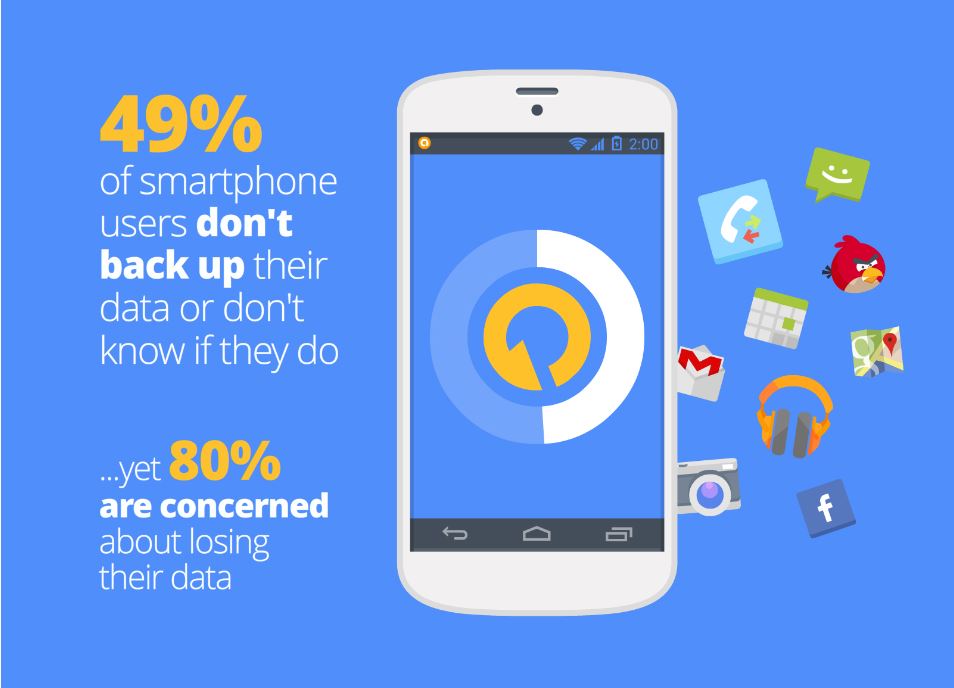
These days we keep everything from photographs, videos and music to messages and contacts on our mobile devices. This makes losing our phones a big headache. Unfortunately, most people don’t think of this until after their phone goes missing or fails. We asked our users if they back-up their data, and a whopping 49% said they don’t back up or don’t know if they do.

backup data

avast! Mobile Backup makes backing up your important data easy for you. In a few easy steps, you can backup all your files from the pictures of your last trip to the contacts and applications you keep in your devices.
Want to know how? Just follow the following steps:

  • Install avast! Mobile Backup & Restore from Google Play.
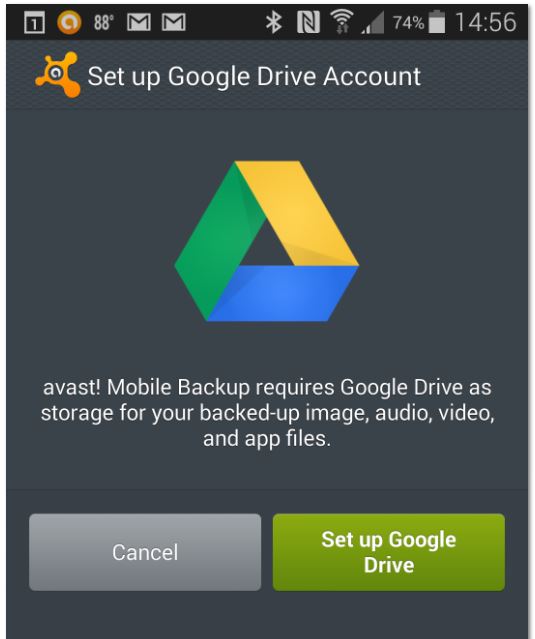
  • Once you have installed avast! Mobile Backup, you’ll need to configure your Google Drive. It’s as simple as clicking on the button “Set up Google Drive Account” and follow the simple steps on the screen to access your Google account. backup
  • Once you’ve set up your Google Drive, you can select items for backup. The free version lets you back up contacts, calls and SMS. The Premium version also allows you to back up all the audio and video files and also all your applications. When you finish the selection, click the “Continue” button.
  • On the next page, “Important Options”, you can select whether you want the backups to be made only through a WiFi connection in order to save mobile data, and configure the maximum size of the files which you want to perform that backup. Once you’ve configured everything, click Finish.
  • You are now ready to perform the backup. Tap the dark square at the top and avast! Mobile Backup will start backing up your files.

If you want to restore your backup when you change your phone, simply reinstall avast! Mobile Backup, click “Browse backup” and then “Restore all.”

Thank you for using avast! Antivirus and recommending us to your friends and family. For all the latest news, fun and contest information, please follow us on Facebook, Twitter and Google+. Business owners – check out our business products.

iOS 8. Apple increases user privacy

ios 8 privacy


No doubt if you have an Apple device, you’ll know that the new iOS 8 operating system is now available. What you might not know is that installing it will prevent Apple from accessing users’ devices without their consent.

This has been announced by the company, which says that “unlike their competitors” they will not access users’ systems without their permission. They claim that it is therefore not technically possible for them to comply with government orders to retrieve data from devices running iOS 8.

So how is privacy enhanced with iOS 8? To prevent itself from accessing these devices, Apple has modified its encryption system which is applied automatically when users select their password.

This way, Apple’s new operating system has taken a step forward in increasing privacy, as all the information stored on users’ iPads or iPhones (photos, emails, files, etc.) will be protected not only from Apple, but also from governments.

This is clearly how Apple has responded to accusations of collaboration with the National Security Agency (NSA) by handing over its customers personal data. Similarly, the company has also assured that it only provided the data of “less than 0.00385%” of Apple device users. ”

We remind you that it’s important to scan your iPhone or iPad for malware that could affect the functionality of your device. For your peace of mind, try our antivirus for Mac.

More | Cyber-espionage. Can you avoid it?

The post iOS 8. Apple increases user privacy appeared first on MediaCenter Panda Security.

The dangerous side of USB convenience

How many USB devices do you own? At this moment, you probably have one or more of them connected to your computer. USB devices are everywhere, and they come in the form of flash drives, webcams, keyboards, and so on. One of the attractive things about a USB connection is that you just plug in a device and it works. That convenience, while nice to have, presents a real danger.

For years, many computer users have just plugged in USB devices without putting much thought into any vulnerabilities they might present, but hackers have found ways to prey on the carefree nature of USB usage. You may remember the Stuxnet worm that targeted nuclear facilities in Iran. USB flash drives were used to initiate the infections, and this brought a lot of attention to how USB devices could play a key role in IT attacks.

Fast-forward a few years to today and USBs are a hot security topic once again because of details revealed by security researchers about an exploit called BadUSB. Essentially, the BadUSB hack makes it possible to reprogram the firmware on USB devices, which means that they can then be used maliciously. Since the majority of USB devices will just accept any firmware update that they’re offered, it’s really difficult to know if the firmware on your device is secure or not.

That said, any malware introduced via USB can be detected, depending on the payload. It is why we can consider #BadUSB as being a means to install malware on a machine rather than being a specific virus or malware itself.

Because of the insidious way in which this hack works, protecting yourself from it is really difficult at this point. One of the most logical things that you can do is to make sure that the USB devices that you use have remained only in your possession. USB flash drives in particular tend to get passed between people on a regular basis, but based on this new information, that’s not always such a good idea.

The post The dangerous side of USB convenience appeared first on Avira Blog.

Airplane WiFi – Secure surfing or danger for onboard electronics?

The “fasten your seatbelts” signs turn off and you can finally recline, fold down the tray table, and switch on your notebook or tablet. Many airlines now even offer WiFi access in the cabin, so you can surf the Internet, post to Facebook, and write emails without restriction. Hard to believe, given that it wasn’t long ago that you couldn’t even leave your cell phone switched on during the flight. So, is it safe and secure to use WiFi and portable devices? There are two major aspects to this question:

  • First, whether airplane systems are secure, even though WiFi radio waves are used to communicate and passengers have access to the digital infrastructure aboard the airplane.
  • And second, whether passengers’ devices are also safe and secure, as they share the airplane WiFi network with all other users in the cabin.

Hacking airplane systems

A clear answer can be given to the first question, at least at the moment: Yes, the airplane is still safe and secure. The radio waves are irrelevant to the onboard electronics in terms of power and frequency, as the cockpit and internal technology have to be able to cope with completely different types of possible interference. In addition, there is no potential risk of airplane systems being hacked into. Every airplane manufacturer separates the in-flight entertainment and WiFi systems from the critical airplane systems. Furthermore, they use data and signal formats to communicate, which are incompatible with Ethernet; they also don’t use the TCP/IP protocol. Frequently, additional security functions are integrated into the systems, such as specific transmitter restrictions and extremely strict time intervals, within which data must be exchanged between communication partners. And even if there was a widespread failure of the electronics system, irrespective of what measures are taken to deal with it, all flight-critical systems have a mechanical backup – cable controls and hydraulic systems instead of servos and electronic actuators.

This doesn’t mean, however, that airplanes are immune to potential security loopholes. Researchers are repeatedly discovering weaknesses in various systems, such as those involved in satellite communications, which could theoretically be exploited. By exploiting this bug, false positioning data can be transmitted to the airplane while in flight causing a change of course; however, other experts have given the all-clear. Even if a person were able to exploit this security loophole, the pilots themselves could just simply make a course correction. Other means of communication are available in each passenger airplane which allow verification of positioning data and flight plans. On top of this, the flight-control center would also spot each course change and alarm the pilots.

The statistical probability of mounting such attacks successfully is far below the other typical causes of failure, technical or human error, which are also rare. Airplane manufacturers also want to save costs and are trying wherever possible to integrate standard IT components that transfer and process data using standard IT formats.

Airline operators have set out countless operational cases where digital data would improve services, shorten ground times, and resultingly save costs. Whether over the short term or long term, manufacturers will eventually meet these requests and integrate an ever greater amount of standard IT equipment into airplanes. Hopefully the security measures will be tightened to meet the aviation industry’s more stringent requirements.

Security measures above the clouds

So how about the information on your notebook or tablet? WiFi access aboard an airplane is just like a standard public hotspot – no difference from the one in the airport or at Starbucks. Those who use the WiFi network share the wireless network with all other users. Whether airplane manufacturers integrate specific security measures in their switches and routers is information that currently only they know. For this reason exactly, the same security measures that are also suitable at Starbucks or in the airport should apply: Either you encrypt all data traffic using a virtual private network (VPN), which companies usually install on professional users’ devices anyway, or you encrypt each app’s data. In the case of email, this can be done using encryption programs like Pretty Good Privacy (PGP), EnigMail or GnuPG. For browser-based communications, it can be achieved using Secure Sockets Layer (SSL) technology, usually identifiable by the little padlock icon in the address bar. Plug-ins for many browsers can also take care of this automatically if required, such as HTTPS Everywhere for Firefox and Chrome. Naturally, the internal firewall should be enabled on each device and the latest version of a security software solution such as Avira Antivirus Pro, Avira Internet Security Suite or Avira Free Antivirus should also be installed and active.


The post Airplane WiFi – Secure surfing or danger for onboard electronics? appeared first on Avira Blog.

How to change Safari’s default search engine in iOS 8 for greater privacy

With iOS 8, you can – for the first time – switch your Safari browser’s search engine to alternatives such as DuckDuckGo. Find out why you might want to and, in fairness, why you might NOT want to…

The post How to change Safari’s default search engine in iOS 8 for greater privacy appeared first on We Live Security.