Wi-Fi networking is absolutely essential to the modern home. From smartphones to games consoles to intelligent thermostats like Nest, virtually every appliance now requires a wireless internet connection.
As a result, there is all kinds of valuable information being transmitted across your Wi-Fi network – credit card numbers, passwords and sensitive photos and files. Which makes your network a natural target for cybercriminals.
Introducing drive-by hacking
Because you can’t see wireless network signals, you cannot easily tell how far they reach. It is not unusual for your network to extend into the street outside your house – which provides an opportunity for hackers to get connected.
Using basic cracking tools, it is possible to bypass Wi-Fi network security in as little as 10 minutes. It may be that these hackers simply want to use your internet connection to get online – not as serious as stealing your sensitive personal information, but still stealing nonetheless.
So how do you know if your Wi-Fi network has been hacked?
The first sign that your Wi-Fi network has been compromised will probably be a general decrease in internet speeds. The more people connected to your network, the more problems you will have loading webpages or streaming videos
If you notice anything strange happening on your network, you must investigate. The first thing to check will be the Wi-Fi router itself.
The connected devices list
Log into your router using the username and password supplied when it was installed (they are often printed on a sticker on the rear of the unit). The specifics for each router are different, but you are looking for the Wi-Fi status page which lists all the devices that have connected, or are connected, to your network.
These details may be under a section called Attached Devices, Device List or Home Network for instance.
The list should look something like the image below (we’ve blocked out some of the most sensitive details):
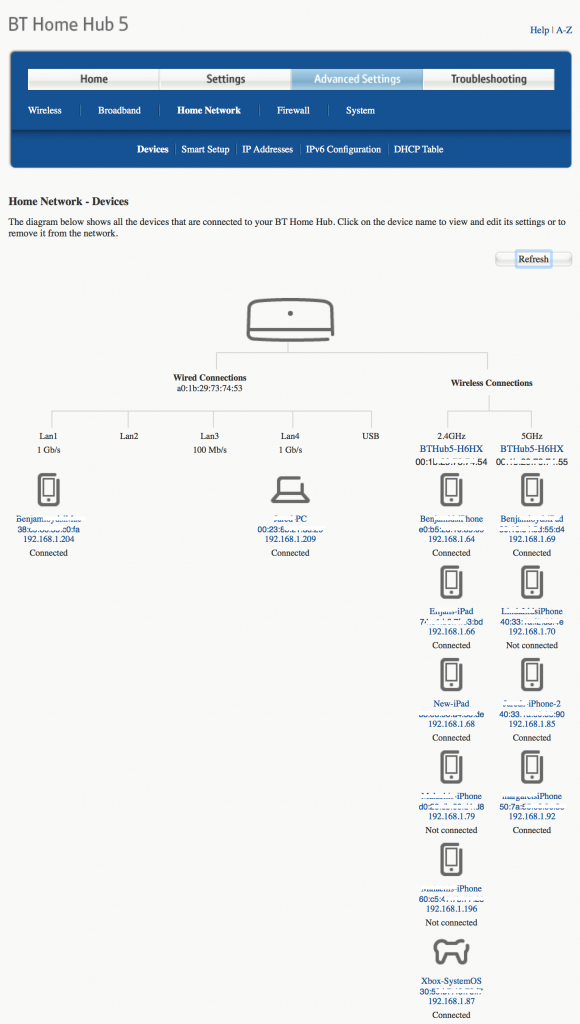
Have a look through the listing, looking for any devices that are unfamiliar. Any devices you don’t recognise indicate a hacker may have compromised your network security.
It is possible that some of the devices have “unfriendly” names that aren’t immediately recognisable, but which are completely legitimate. Make sure you check all of your Wi-Fi-attached devices before panicking!
Keeping Wi-Fi hackers out
There are a number of advanced techniques for improving your Wi-Fi network security, like locking down network access to pre-approved devices based on the unique MAC identifier. Far simpler, and almost as effective, is to simply choose a more robust security protocol.
The latest, most secure option is WPA2 as shown below:
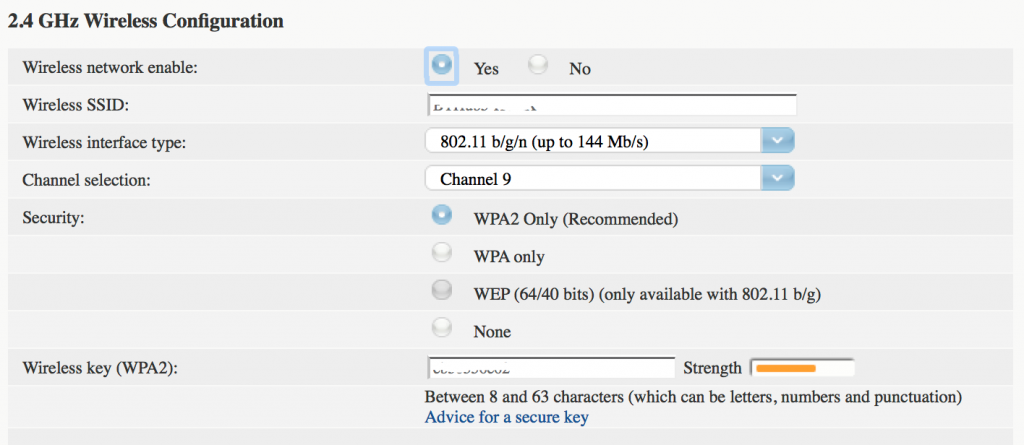
Just remember that if you do change the security protocol setting, you may have to reconnect all of your Wi-Fi devices – but that’s a small price to pay to prevent people cracking their way onto the network.
You should also add a second layer of security to deal with the eventuality that a hacker still manages to break in. A comprehensive security application installed on your PCs and Android phones will help prevent your personal data being stolen. This has the added benefit of blocking viruses and to protect younger members of your family from questionable web content.
Wi-Fi security is constantly evolving
you need to stay aware of what is happening on your network to keep the bad guys out. These tips will help you tell if something is wrong and help to formulate an effective response.
In the meantime, download a free trial of Panda Security to protect your PCs while you check your router.
The post How to tell if your Wi-Fi network has been hacked appeared first on Panda Security Mediacenter.