Category Archives: Panda Security

Panda Security

Almost half of companies save employee passwords in Word documents

passwordsThere is a growing awareness of cybersecurity within companies, but are these companies taking action to improve their security? As seen in a recent study, 750 IT security decision-makers worldwide were surveyed to see whether they are “learning and applying lessons from high-profile cyber-attacks”, and if it influences their security priorities and decisions.

The study examined the contradictory situation that is currently present in a number of global businesses. On a positive note, 79% of those surveyed said that they learned their lesson after seeing cyberattacks jeopardize the IT security in other companies, and 55% confirmed that they have changed the way they manage corporate accounts in order to adapt to the current cybersecurity climate and avoid unnecessary risks.

Nevertheless, the survey also exposes a very different reality. Far different from those who are complying with security procedures, 40% of the survey’s participants stated that they just use a Word document or worksheet to manage their company’s credentials and 28% stated that they use a shared server or a USB stick, for the same purpose. What is obvious is that IT security is absent in almost half of the 750 businesses in the survey.

Of course the previously mentioned storage methods are all susceptible of suffering a cyberattack, especially if they fall into the hands of someone with the right know-how, but they can also be leaked by the company’s own employees. A Word document makes private information accessible for any employee in the company.

To ensure that employees only use their own password, companies should use a password manager that will also protect their company’s devices. This will also help keep documents and devices, like a Word document or USB memory stick that stores passwords, safe from a cyberattack or infection.

In terms of cybersecurity, there is still a long way to go in the business environment. IT security should be a priority. Although, 95% of these organizations have a plan in place in case of IT emergencies, only 45% of them periodically check that they are functioning properly.

Despite their carelessness, 68 % of those surveyed claim that their greatest concern and challenge is the data theft of their customers (but this percentage does not correspond with the cybersecurity mechanisms implemented by IT security heads).

The post Almost half of companies save employee passwords in Word documents appeared first on Panda Security Mediacenter.


This is why you should “tether” your work phone

3g-4g

The tablets or smartphones at your office connect to either 3G or 4G (which is better than WiFi). When tablets and other connected devices (like smartphones or smartwatches) become essential to an employee’s work, then it is essential these employees are properly trained on using them safely. Surely, workers think that connecting an office device to their data is much safer than using a WiFi Network.

Whether you connect with 3G or 4G, Regardless of how you connect to the net, your tablets and phones will all connect to the internet in the same way, whether you use 3G or 4G: the internet provider has the power in giving us access to the internet. What’s interesting about this? Well, in the case of WiFi connection, the provider always sends encrypted data.

Although there is no confirmation that the internet you connect to on your mobile devices is 100% secure, what we do know is that the possibility of a cyberattack through a 3G or 4G connection is much lower than through a WiFi network. However, Spanish cybersecurity experts recently demonstrated how it is possible to attack a 3G or 4G connected device, but its still in the proof of concept phase.

Fortunately, in order for cybercriminals to perform these 3G attacks, the resources are excessive. This makes it the safer option. Especially if the device in question is protected by a solution consistent with the company and its private information.

In fact, this is your better option, even for a laptop. It is safer to use your Smartphone or Tablet as a sharing point than connect to an unsecure public network—this is called “tethering”. With tethering, you can connect your computer to your mobile device’s data. Here’s another great option that’s a little easier and does the same thing: a 3G USB Flash Drive.

In the end, protecting your business’s private information is the most important, and most of it is managed using these same tablets or smartphones. It is recommended that businesses choose an internet connection with a powerful data plan: any WiFi network (even some private ones) are less secure than the 3G or 4G one we enjoy on our smartphones. Encrypted business information is worth the price of a great data plan with GBs and GBs of internet.

The post This is why you should “tether” your work phone appeared first on Panda Security Mediacenter.

Android malware surges again

panda-security-android-malware

For most people, their smartphone has become the most important gateway to the internet. We use our phones to check facts on the move, plan journeys, update shopping lists and check our bank balance.

Simple-to-use apps have put information and services at our fingertips. In fact, the world now uses smartphones and tablets online more than any traditional computers and laptops.

So it’s no surprise that hackers and cybercriminals have turned their attentions to attacking your smartphone.

The Android factor

The relatively low cost of Android-powered smartphones, has helped the mobile operating system establish a significant majority of the mobile market. Android handsets outnumber iPhones by nearly 9 to 1 for instance.

This, coupled with the relative ease of crafting malware for the Android platform, has seen a massive increase in mobile attacks. In July this year, an estimated 10 million Android phones were infected with malware that spied on their owners for instance.

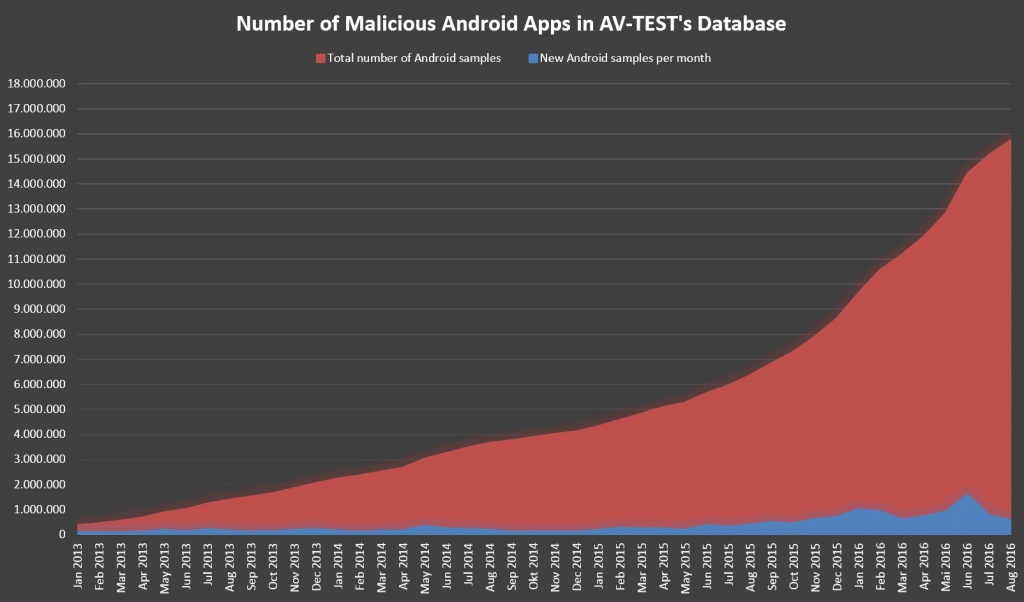
The problem has become steadily worse over time. In January 2013, AV-TEST database of malicious Android apps contained less than 500,000 examples. By August 2016, the total topped 16 million as the number of new malware variants released continues to grow.

pandasecurity-av-test

The open nature of Android that allows anyone to create software and access key system resources – seen by many as one of the operating system’s strengths – makes it even easier for hackers to create malware and infect phones. This problem is compounded by the infrequency of software updates to patch these vulnerabilities, leaving Android users at risks for months.

Protecting your Android handset against malware

Just like your PC, you have the responsibility for keeping malware from being installed on your phone. There are however a few easy steps to counter the most obvious risks.

1. Always use an official app store

The Google Play app store is the largest, and most trustworthy source of apps for your phone. All of the apps available there have been checked to ensure they do not contain malware, so you should be safe installing them.

Other app stores or websites are not so stringent, so there is a much higher risk of infection when using them.

2. Treat email with caution

Email has been a particularly effective way of installing malware on PCs, so cybercriminals use many of the same techniques on your phone. Always treat email attachments with caution, and never open anything that looks suspicious.

And if you are prompted to download software unexpectedly, there’s a reasonable chance that someone is trying to trick you into installing malware.

3. Consider installing an ad blocker

Malware can sometimes be downloaded and installed without warning via infected banner ads. Installing an ad blocker app can help prevent compromised banner ads from being displayed – which also stops malware from being downloaded.

4. Install an antivirus app

Your home PC is protected by antivirus software – and your Android smartphone needs the same level of protection. Leaving your phone open to malware installation is a serious risk – and cybercriminals will take advantage eventually.

Panda Mobile Security (also available in the trusted Google Play store) offers maximum protection against malware along with a number of useful tools should your phone be stolen. You are protected against Android viruses and information theft at all times.

Get protected now

These practical steps will help to improve your device security – and stop the most common malware attacks. And because they are simple and straightforward, you can get started right now.

To learn more about protecting your Android smartphone, please check out this guide.

The post Android malware surges again appeared first on Panda Security Mediacenter.

New WhatsApp updates: how to keep your privacy.

pandasecurity-whatsapp-updates-privacy

As the World’s most popular messaging application, WhatsApp is constantly adding new features designed to delight their 1 billion registered users. And the latest update contains a number of goodies that will delight fans of picture messaging.

This all looks very familiar…
For anyone who uses the Snapchat app, the new WhatsApp features will seem very familiar. In fact, you might say that they are identical.

WhatsApp users can now take a photo, and quickly add a sketch or some text, before sending it as a message – just like Snapchat. Or they can add emojis – that look exactly the same as those in Snapchat. There’s even several navigation gestures (zooming in an out, or switching between cameras) that are exactly the same as those used in the Snapchat app.

The reason WhatsApp have borrowed so much from Snapchat is simple – to keep people engaged with their platform. The more that people use the platform, the better able WhatsApp (and their parent company Facebook) is to profile them for advertising purposes.

And obviously people want entertaining picture messaging services – so these new features are sure to be incredibly popular

Is there a potential security risk with the new WhatsApp app?

Because of its popularity, WhatsApp has been targeted by cybercriminals many times over the years. Several times researchers and hackers have uncovered flaws in the software that allow accounts to be compromised.

Every one of these breaches has the potential to expose personal information – or to give criminals useful information for identity theft.

WhatsApp has made significant efforts to improve security, although privacy still remains doubtful because of the new data sharing agreement with Facebook. However end-to-end encryption of messages – including the new photo options – should prevent people from “listening in”.

Better safe than sorry

No matter how trusted the developer may be, you should always treat each new app (or update) with some caution. Installing an antivirus and security tool will help you see what is going on behind the scenes, how the app is using your personal data.

The WhatsApp service is known to take a copy of your entire address book and upload it to their servers for instance. WhatsApp are relatively transparent about this (they can better identify your friends who are also using their service) – but other developers are not. You should always use a tool like Panda Mobile Security to monitor exactly what’s happening on your phone.

Otherwise you might be installing software that accesses much more personal data than you expect.

You can prevent data stored on your handset from being accessed by thieves too. Panda Mobile Security allows you to lock each app with a PIN, so if you don’t enter the right code, the app cannot be opened. If someone steals your phone, they cannot view your messages and pictures.

No less secure, but a useful reminder

Because the latest update is still very new, no one has yet exposed any new WhatsApp security vulnerabilities. And even if there aren’t any problems, the release is a useful reminder of the importance of scanning new apps from malware, loopholes and suspicious data access permissions.

Download your free copy of Panda Mobile Security now – then go get creative with the new WhatsApp picture features. Have fun!

The post New WhatsApp updates: how to keep your privacy. appeared first on Panda Security Mediacenter.
Advanced Reporting Tool, an Intelligent Control Platform

art-main

A platform that can detect a company’s internal threats? Many organizations and companies could have avoided major scandals if they acted in time: there’s the case of Snowden and the stolen NSA files, Bradley Manning and the US diplomatic cables, and Hervé Falciani and top-secret information from the HSBC private bank. These are all clear examples that, with cybersecurity, you can’t just cross your fingers and think “this won’t happen to me”. Any business could be threatened by an insider.

That’s why Panda Security has introduced the latest version of its Advanced Reporting Tool. This efficient and easy-to-use tool satisfies business needs; it is capable of maximizing Big Data performance to control the corporate resources.

Threats in the Workplace

PandaLabs detects 200,000 samples of new malware daily. It is imperative for businesses to control all security issues, especially those that stem from the misuse and abuse of corporate resources, leading to attacks, threats, vulnerabilities, or data leaks.

art-2


While Adaptive Defense collects all information on processes running on the endpoint, the Advanced Reporting Tool automatically stores and correlates this information. The platform automatically generates security intelligence that allow users to identify strange behaviors or problems.


The Advanced Reporting Tool enables the IT administrator to:

  • Focus on relevant information, increasing efficiency in the IT department by finding security risks or misappropriation in the corporate infrastructure.
  • Pinpoint problems by extracting behavior patterns from resources and users, identifying its impact on the business.
  • Alert in real-time about all events that could be a potential data breach.
  • Generate configurable reports showing the status of key security indicators and how they are evolving.

What does the latest version offer?

art-1In addition to the existing Big Data Cloud Service and its real-time alerts, the latest version includes predefined and adaptable analysis with three different action areas:

  • Information about IT security incidents: generates security intelligence then processes and associates those events as intrusion attempts.
  • Controls network applications and resources: detects user patterns of IT resources.
  • Controls access to business data: shows any access to confidential information and its online traffic.


Feedback from SIEM system

For organizations already using a SIEM, the Advanced Reporting Tool compliments it providing a SIEMFeeder which feeds your SIEM relevant data and associates it with the information you already have.  The SIEMFeeder gathers information from all endpoints that are protected by Adaptive Defense.

The feedback provided by the SIEMFeeder enables you to detect insiders before they become the biggest threat to your business.  The SIEMFeeder creates behavioral logics and locates all anomalies existing in your technological system.

The post Advanced Reporting Tool, an Intelligent Control Platform appeared first on Panda Security Mediacenter.

Got something to hide? Don’t pixelate it.

pixelate Many businesses share documents that are pixelated in order to protect private information, whether they be bank account numbers, photographs or other private information. Although pixelation used to be a simple and sufficient way to hide confidential information, now computers are smart enough to read these distorted images—even when your eye cannot. Pixelated documents are no longer safe!

Researchers from the University of Texas and Cornell Tech have developed software based on artificial intelligence that is capable of reading standard content-masking techniques (like blurring or pixelation) in order to read what was originally covered up.

One of the authors, Vitaly Shmatikov, warned that, aside from the complex technical developments, “the techniques we’re using in this paper are very standard in image recognition, which is a disturbing thought.”

But these researchers aren’t the only ones developing this type of software. More powerful object and facial recognition techniques already exist for those who want to use them. This means cybercriminals may already have the tools to unveil private information you thought was hidden.

pixelate

To carry out their research, the team fed neural networks images with faces, words and objects. The more times the neural networks “see” these images, the easier they can recognize them. After successfully memorizing the photos, the neural networks were able to successful defeat three privacy protection technologies including YouTube blurring technology, pixelation and Privacy Preserving Photo Sharing (P3).

In conclusion, pixelating or blurring information is no longer the best way to share confidential documents. After this research, the software was able to recognize 80% of the distorted images.

According to Lawrence Saul, a machine learning researcher at the University of California, San Diego, “For the purposes of defeating privacy, you don’t really need to show that 99.9 percent of the time you can reconstruct. If 40 or 50 percent of the time you can guess the face or figure out what the text is then that’s enough to render that privacy method as something that should be obsolete.”

To keep you corporate information safe, the best you can do is avoid sharing it (if you can) and above all, protect it with the appropriate protection for your company.

The post Got something to hide? Don’t pixelate it. appeared first on Panda Security Mediacenter.

Smart cities with Invisible Dangers

Smart-Cities

Smart cities are a real thing—could you live in one? Do you live in one?

Actually, a smart city is an “urban development vision” used to manage a city’s assets by integrating multiple information and communication technology (ICT) and Internet of Things (IoT) solutions within the city. A smart city’s ultimate goal is to improve the quality of life for its residents.

With just an internet connection and one of the endless number of devices available, residents can do a multitude of things like pay parking meters and purchase movie tickets.  Did your device run out of battery while you were on-the-go? Go ahead and hook up to one of your city’s many public charging stations.

Yes, a properly planned smart city can make life more convenient, but this is also a double ended sword. However convenient, in regards to internet security, it is very dangerous. At the end of any given day, there’s a high possibility that any one of these connected devices could be hacked, while criminals getaway with your top private information.

Danger wherever you look

City Bikes

The next time you take one of those public bikes for a spin, keep in mind that these electric bike stations are run by a computer… a computer that can be hacked like any other connected device. You’ll see that at each bike station there’s a small computer screen for riders to register, recharge passes, report incidents, and map the other stations in close proximity. But like any other computer, cybercriminals can use a lot of different techniques to take advantage of any vulnerability that these systems might have.

On these payment screens, in the maps section, there are various (public) sections on the platform, such as “Report an Error” “Privacy Policy” and “Terms of Use”. When these are tapped, an internet explorer window pops up. From there, the cybercriminals have access to a virtual keyboard—this will ultimately give them the power to execute those unwanted applications. This is the start of their hack—now they can access and collect info belonging to all those wanting to rent a city bike, getting their full names, verified email addresses and phone numbers. Some hackers will be able to steal customer payment data, too.

Taxis

New York City’s famous yellow taxi has jumped on the “smart experience” bandwagon. Aside from the tourist maps, Broadway ads and business cards that fill the back seat of the yellow cabs, passengers can use the tablet attached to the Plexiglas divider separating you from the driver. Go ahead and read the news during your commute, and when you arrive at your location, and make your payment from the same device.  Just remember, if a cybercriminal gets in the back of this cab he could successfully install malware and gain access to a lot of customer information. Likewise, remember to watch out for the public chargers in the taxi. Just imagine all the people whose privacy could be in danger.

We leave you with a last note, if a city wishes to become a smart city, installing these intelligent devices requires that all businesses commit to the necessary security measures to safeguard government and public privacy. Keep your citizens safe by following adequate security assurances.


The post Smart cities with Invisible Dangers appeared first on Panda Security Mediacenter.

Is it safe to connect to a public Wi-Fi hotspot?

Is it safe to connect to a public Wi-Fi hotspot?

Enjoy going for a drink at your local coffee store whilst getting some work done or browsing the web? With more and more cafes, bars and libraries these days resembling public workspaces and free Wi-Fi feeling like an essential part of daily life, it is very easy to go to a local café and feel at home.

But are public Wi-fi hotspots really safe places to browse the Internet or do we have to be on high alert anytime we’re online in a public place?

Let’s have a look at some of the dangers one faces when connecting to a public network:

Page Spoofing

 It’s easy to take for granted that a venue’s network actually belongs to that specific venue.

How many times have you sat down at a cafe and connected to the venue’s network at the click of a button? It’s this simplicity that hackers take advantage of when creating a malicious access point.

It’s very easy for an attacker to create a fake page that looks very much like the real thing. For example, when you sign up to the network you may be redirected to a Facebook sign in page. This could potentially be a fake, and entering your details would send them straight to the cyber attacker.

Luckily there are small indicators that can help us, on most occasions, to know if a page is definitely a fake.

Facebook for example, encrypts all data sent to its pages by connecting its users via SSL.

If any page that typically connects through SSL doesn’t show a padlock next to the page address it’s best not to give personal details!

Sniffing Apps

In an open network it is very easy for an attacker to capture the data traffic sent from your device. In fact, there are free easy to use apps, called “sniffing apps”, dedicated to this very purpose.

Although the common WPA2 routers do encrypt connections, these apps are capable of sniffing out the PSK (password). If an attacker does this they can then decrypt all traffic connected from a device to the network.

These risks have actually led police in Derbyshire in the UK to release a statement this month on the growing dangers of cyber crime:

“The UK now has more than 300,000 public Wi-Fi hotspots, which means more people than ever before are potential targets for cyber criminals, simply because they don’t know how secure the networks they’re using are.”

Third-Party Data Gathering

Sadly, even when you’re connected to a venue’s actual network you have no guarantee of privacy. In fact, venues often use their public Wi-fi hotspots to gather information about consumers.

Though third-party data gathering isn’t likely to end up with your passwords or your identity being stolen, your personal details are often being taken without your consent.

Whilst most venues directly ask a customer for an email address or number in order to access their Wi-fi, some go the extra mile of injecting cookies into your device’s network in order to track your browser history, typically resulting in an onslaught of targeted ads.

A great way to protect yourself against these attacks as well as against sniffing apps is to use a VPN (Virtual Private Network) service. This will ensure that all data traffic from your device is encrypted, whether the page you’re visiting is secure or not.

Another step that can be taken is to use a personal mobile broadband dongle, which, though slower, can be used in public spaces and is less likely to be compromised.

The best bet always, however, is simply to avoid sharing personal information, especially bank details, when on a public network. Stick to that principal rule and you should be ok.

Happy browsing!

The post Is it safe to connect to a public Wi-Fi hotspot? appeared first on Panda Security Mediacenter.
Struggling with your Panda security subscription renewal?

How to renew your Panda antivirus subscription?

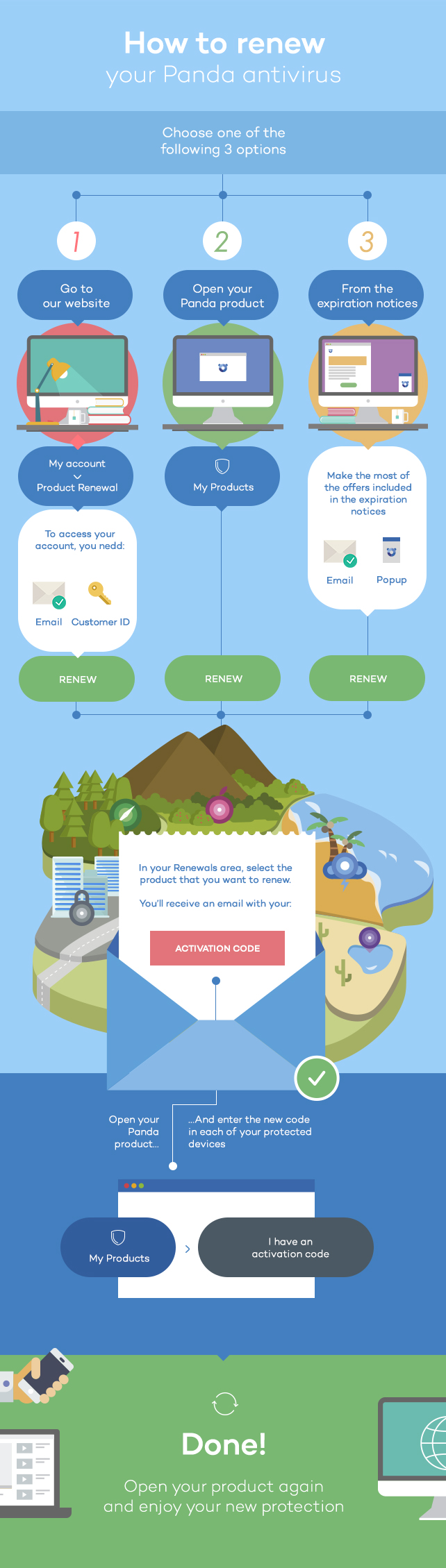
Renew your Panda Antivirus it’s easier than you think. Here’s how to do it.

pandasecurity-renew-antivirus-infographic

You can renew your subscription in three ways:

1.Go to Panda Security’s website.

On the homepage, go to “My Account” ➡ “Product Renewal”. To access your Renewals area you’ll have to enter your email address and customer ID. You can find your customer ID in the welcome email that you received after purchasing your product.

If you can’t find your customer ID, don’t worry. There are other ways to renew your subscription:

2.Open your antivirus, go to “My Products” and click the Renew option.

Alternatively,

3.Renew your subscription from the renewal notices

Renew your subscription from the renewal notices you will receive at your mailbox or from the pop-up messages displayed by your antivirus.

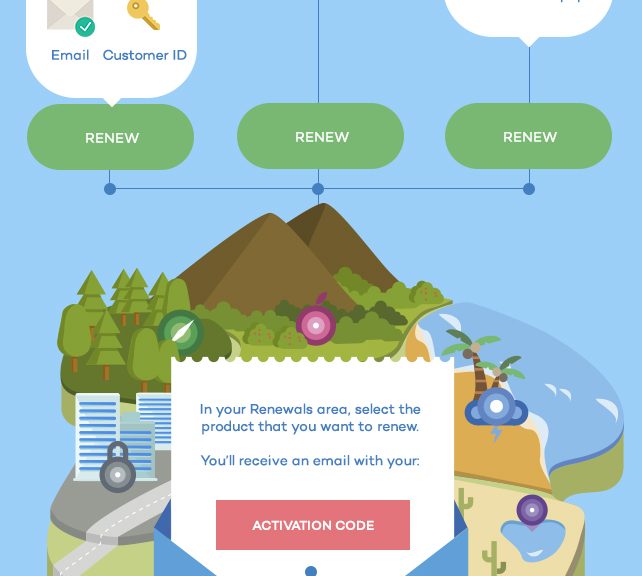
Once in your personal area, select the protection whose subscription you want to renew. You will receive an email with a new activation code. Then, enter the new activation code in “My Products” ➡ “I have an activation code”. The next time you open your antivirus your protection will have been extended.

Follow these simple steps to remain protected!

The post Struggling with your Panda security subscription renewal? appeared first on Panda Security Mediacenter.

Apple Macs – more secure, but not invulnerable

pandasecurity-apple-macs-not-invulnerable

Over the years, Apple computers have developed a reputation for exceptional security. In fact, many people believe that Macs are completely invulnerable to malware, like viruses and ransomware.

But in an age where cybercriminals are using increasingly sophisticated attacks to break into computers, Apple owners need to know the truth.

No computer is 100% secure

The first thing to realise is that Apple computers are not completely hack proof. No computer is completely hack proof. It is completely untrue to say that Apple Macs cannot be hacked, or be infected with malware.

In fact, one of the first viruses ever created was targeted at the Apple II computer back in 1982. The virus was relatively harmless – it simply displayed a rather childish poem on screen. But the reality was that the computer’s built-in security had been breached.

More malware followed over the years, each becoming more serious as time went on.

OS X significantly improves security

With the release of OS X in 2001, Apple significantly improved the security of their operating system. The core of the operating system made it much harder for malware to install itself – and it was around this time that Apple began to attract a reputation for being 100% secure – one they did little to dispel.

Interestingly, there has been roughly one significant item of Mac malware released every year since 2004. But the fact that there are less viruses targeting OS X than Windows, helped drive the legend of invulnerability. In most cases the only way to “catch” one of these viruses was to install illegal software from a “warez” website.

Ransomware – a true game-changer

Like its Windows-based relatives, most Mac malware was designed to steal personal information. However these viruses were relatively easy to identify and remove – often before any real damage was caused.

The emergence of ransomware has completely changed the game however. These malware infections encrypt the files stored on your Apple computer so that you can no longer read or use them. The only way to decrypt them is by paying a ransom to the cybercriminal behind the infection.

Eventually the ransomware infection will make all of your files unreadable.

There’s still worse to come

Cybercriminals are also creating new attacks that use a number of different techniques to trick you installing their malware. An infected email may be followed by an official-sounding phone call for instance, encouraging you to download and install an application to assist with internet banking, or to troubleshoot a technical issue.

Hackers are also becoming more patient, sometimes spending days and weeks building trust with their victims, using a technique known as “social engineering”. Which makes these attacks all the more subtle and effective.

Mac anti-virus software is no longer optional

When Mac malware was relatively rare, the chances of your computer becoming infected were slim. Mac malware is becoming more common and sophisticated – so all of your computers need to be protected with a comprehensive security package.

Panda Antivirus help to block malware and ransomware before it can be installed on your computer. It will also help to protect against social engineering attacks – you won’t be able to install dodgy software, even by accident.

To learn more about how to protect your Mac, download a free trial of Panda Mac Antivirus now.

The post Apple Macs – more secure, but not invulnerable appeared first on Panda Security Mediacenter.